---
title: Whitelist Alerts
description: "Tags: Documentation The Whitelist Alert feature allows you to whitelist the unwanted and recurring non-suspicious Endpoint alerts triggered in"
---
[Skip to content](https://mydev.netwitness.com/knowledge-base/whitelistalerts#main-content)

- [Home](https://mydev.netwitness.com/home)
- Integrations
Show submenu for Integrations
- [Netwitness Platform Integrations](https://mydev.netwitness.com/netwitnessplatformintegrations)
- [Third Party Integrations](https://mydev.netwitness.com/thirdpartyintegrations)
- [Knowledge Center](https://mydev.netwitness.com/knowledge-base)
- Community
Show submenu for Community
- [Blogs](https://mydev.netwitness.com/netwitness-security-llc-blog)
- Discussions
- Customers
Show submenu for Customers
- [Manage Products and Licenses](https://mydev.netwitness.com/nwportal)
- Downloads
- Partners
Show submenu for Partners
- [Partner Program](https://mydev.netwitness.com/partner)
- [Partner Resources](https://mydev.netwitness.com/partnerresources)
- [Submit a New Deal Registration](https://mydev.netwitness.com/dealregistration)
- [Become a Partner](https://mydev.netwitness.com/becomeapartner)
- [Update Your Partner Locator Profile](https://www.netwitness.com/partner-locator/?utm_source=pardotnewsletter&utm_medium=email&utm_campaign=partner_march)
- [NetWitness LinkedIn Partner Hub](https://linkedin.com/showcase/netwitnesspartners/)
- Education
Show submenu for Education
- [Instructor Led Training Schedule](https://mydev.netwitness.com/instructorledtrainingschedule)
- [NetWitness Training Catalog](https://mydev.netwitness.com/netwitnesstrainingcatalog)
- [Security Awareness Training](https://mydev.netwitness.com/securityawarenesstraining)
- [New Product Readiness](https://mydev.netwitness.com/newproductreadiness)
- [On-Demand Virtual Labs](https://mydev.netwitness.com/ondemandvirtuallabs)
- [Additional Training Information](https://mydev.netwitness.com/additionaltraininginformation)
- [Frequently Asked Questions](https://mydev.netwitness.com/educationfaq)
- [Contact NetWitness Education Team](https://mydev.netwitness.com/contact-netwitness-education-team)
- Support
Show submenu for Support
- [Contact Support](https://mydev.netwitness.com/contact-support)
- [Create a New Case](https://mydev.netwitness.com/create-support-case)
- [View My Cases](https://mydev.netwitness.com/viewmycase)
- [Product Version Life Cycle](https://mydev.netwitness.com/product-version-life-cycle)
- [Warranty & Replacement Parts](https://mydev.netwitness.com/warranty-and-replacement-parts)
- [Community Support Forum](https://mydev.netwitness.com/community-support-forum)
- [Technical Support Guide](https://mydev.netwitness.com/technical-support-guide)
Open main navigation
Close main navigation
- [Home](https://mydev.netwitness.com/home)
- Integrations
Show submenu for Integrations
- [Netwitness Platform Integrations](https://mydev.netwitness.com/netwitnessplatformintegrations)
- [Third Party Integrations](https://mydev.netwitness.com/thirdpartyintegrations)
- [Knowledge Center](https://mydev.netwitness.com/knowledge-base)
- Community
Show submenu for Community
- [Blogs](https://mydev.netwitness.com/netwitness-security-llc-blog)
- Discussions
- Customers
Show submenu for Customers
- [Manage Products and Licenses](https://mydev.netwitness.com/nwportal)
- Downloads
- Partners
Show submenu for Partners
- [Partner Program](https://mydev.netwitness.com/partner)
- [Partner Resources](https://mydev.netwitness.com/partnerresources)
- [Submit a New Deal Registration](https://mydev.netwitness.com/dealregistration)
- [Become a Partner](https://mydev.netwitness.com/becomeapartner)
- [Update Your Partner Locator Profile](https://www.netwitness.com/partner-locator/?utm_source=pardotnewsletter&utm_medium=email&utm_campaign=partner_march)
- [NetWitness LinkedIn Partner Hub](https://linkedin.com/showcase/netwitnesspartners/)
- Education
Show submenu for Education
- [Instructor Led Training Schedule](https://mydev.netwitness.com/instructorledtrainingschedule)
- [NetWitness Training Catalog](https://mydev.netwitness.com/netwitnesstrainingcatalog)
- [Security Awareness Training](https://mydev.netwitness.com/securityawarenesstraining)
- [New Product Readiness](https://mydev.netwitness.com/newproductreadiness)
- [On-Demand Virtual Labs](https://mydev.netwitness.com/ondemandvirtuallabs)
- [Additional Training Information](https://mydev.netwitness.com/additionaltraininginformation)
- [Frequently Asked Questions](https://mydev.netwitness.com/educationfaq)
- [Contact NetWitness Education Team](https://mydev.netwitness.com/contact-netwitness-education-team)
- Support
Show submenu for Support
- [Contact Support](https://mydev.netwitness.com/contact-support)
- [Create a New Case](https://mydev.netwitness.com/create-support-case)
- [View My Cases](https://mydev.netwitness.com/viewmycase)
- [Product Version Life Cycle](https://mydev.netwitness.com/product-version-life-cycle)
- [Warranty & Replacement Parts](https://mydev.netwitness.com/warranty-and-replacement-parts)
- [Community Support Forum](https://mydev.netwitness.com/community-support-forum)
- [Technical Support Guide](https://mydev.netwitness.com/technical-support-guide)
How can we help you?
- There are no suggestions because the search field is empty.
1. [NetWitness Knowledge Base](https://mydev.netwitness.com/knowledge-base?hsLang=en)
2. [Documentation](https://mydev.netwitness.com/knowledge-base/documentation?hsLang=en)
April 7, 2026
# Whitelist Alerts
**Tags:** Documentation
The **Whitelist Alert** feature allows you to whitelist the unwanted and recurring non-suspicious Endpoint alerts triggered in the **Respond** \> **Alerts** view.
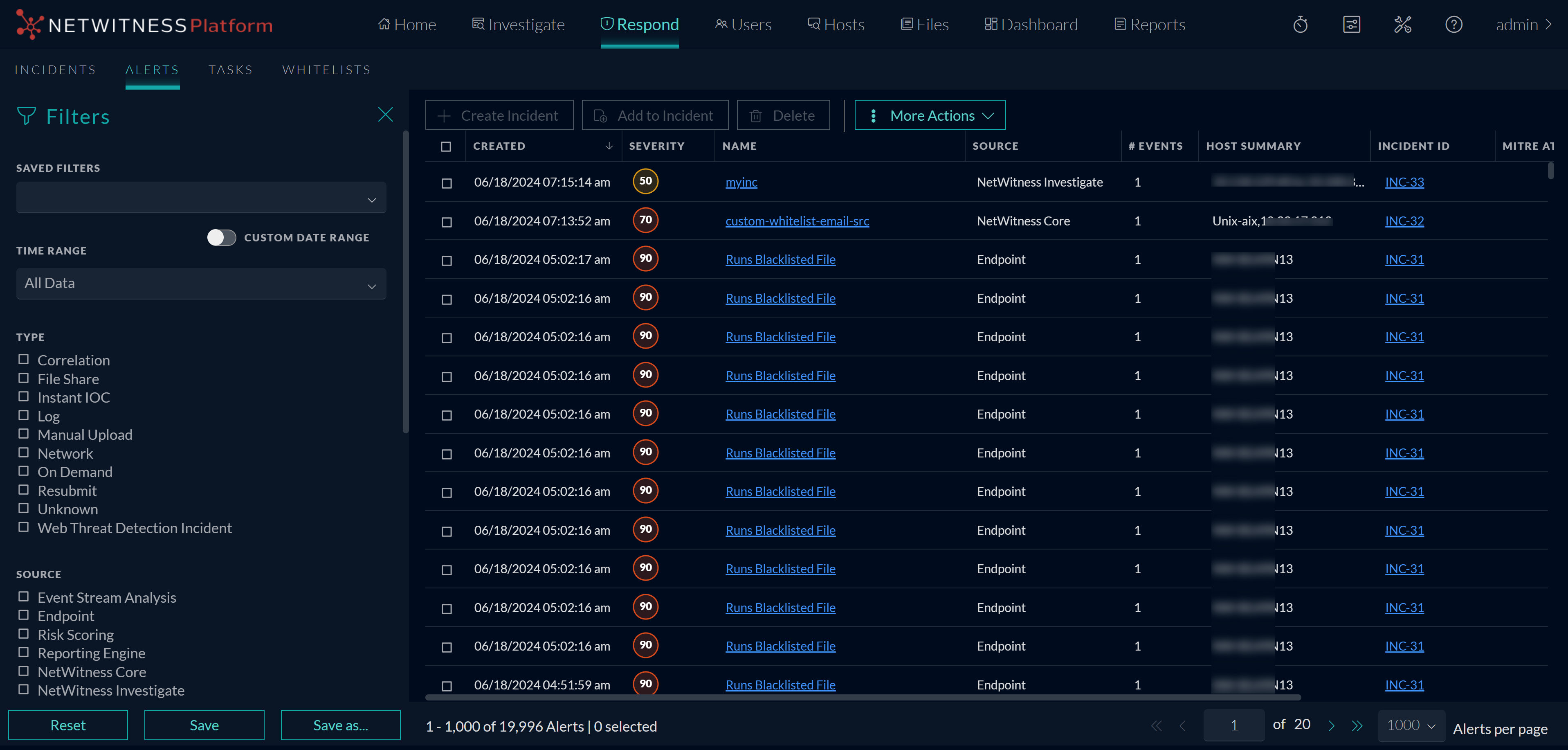
With this feature, you can select entities such as File, User, and Host and define the Whitelist condition to avoid triggering unwanted alerts for the required entities. Administrators can permanently delete the existing alerts matched with the Whitelist condition by enabling the Config in the **Services** \> **Respond Server** \> **Explore** view.
**Note:** By default, the Config is disabled in the **Services** \> **Respond Server** \> **Explore** view (the alert-cleanup-enabled parameter is set to **false**). To enable the config, you must set the alert-cleanup-enabled parameter to **true** in **Services** \> **Respond Server** \> **Explore** view. Refer to the following figures.


**Note:**
\- When you enable the config, the existing alerts matched with the Whitelist condition still continue to exist over a period of time before they are permanently deleted. Once deleted, the alerts cannot be reversed to the selected entities.
\- You can select only one alert at a time for whitelisting.
**Note:** NetWitness 12.5 extended the Whitelist feature to Event Stream Analysis and NetWitness Core. Now, you can whitelist unwanted and recurring non-suspicious alerts for these services.
To whitelist an Endpoint alert
1. Go to **Respond** \> **Alerts**.
The **Alerts** view is displayed.
2. Select an alert and click **More Actions** \> **Whitelist Alert**.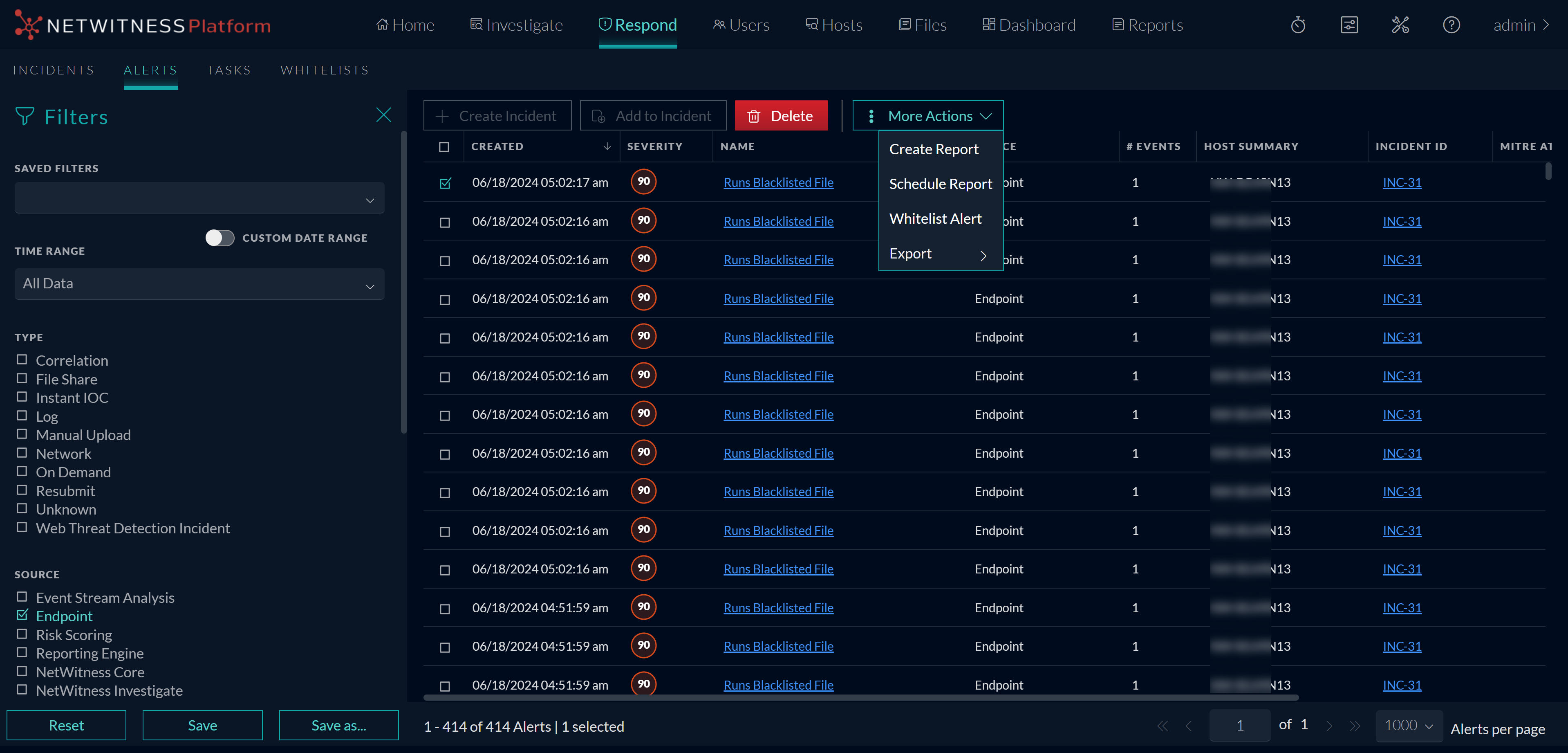
3. Enter the name of the Whitelist and select the required entities.
**Note:** The entities displayed depend on the entities present on the selected Endpoint Alert. You must select at least one of the entities to apply to the Whitelist.
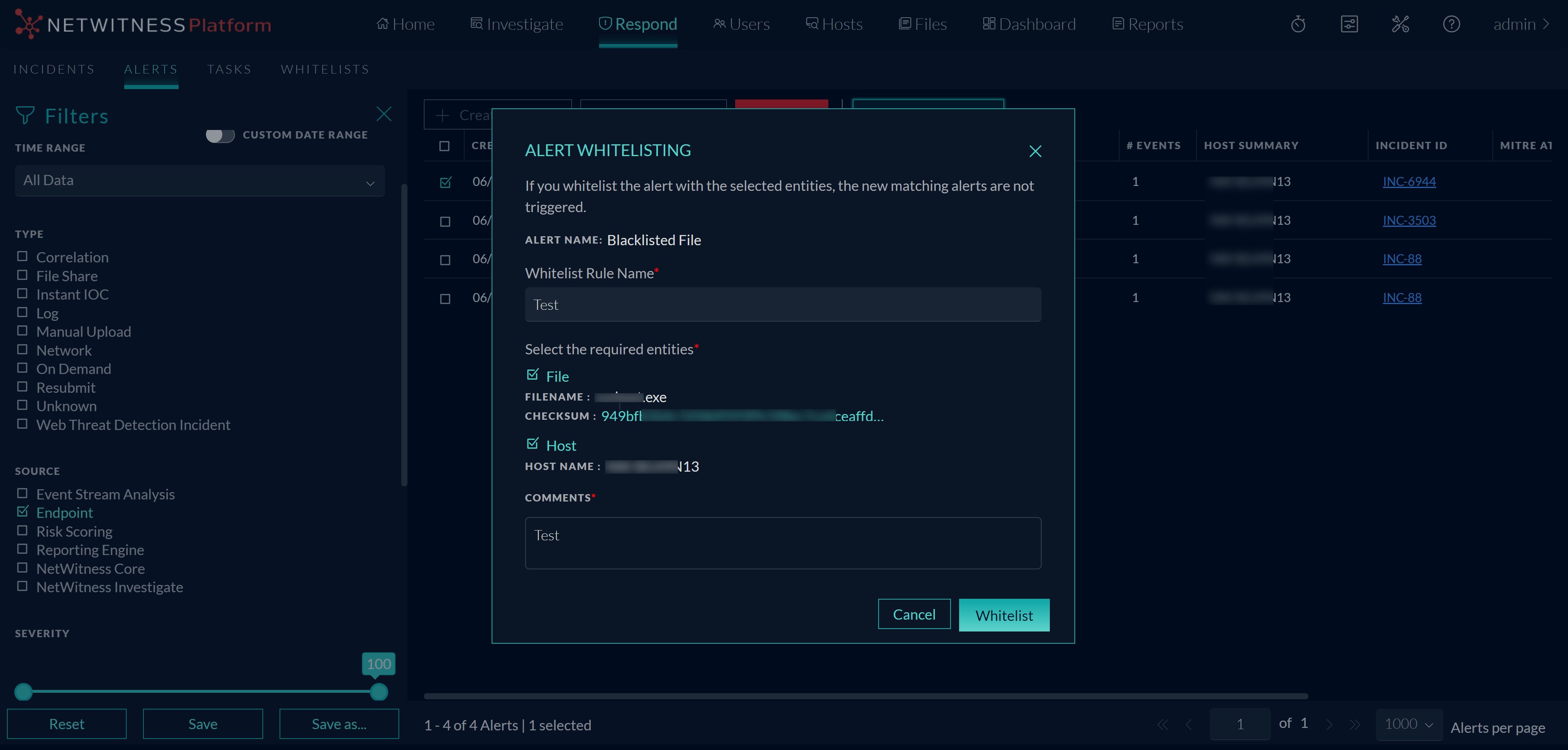
4. Specify the reason for whitelisting in the **Comments** section.
5. Click **Whitelist**.
The **Confirm Whitelist** confirmation dialog is displayed.
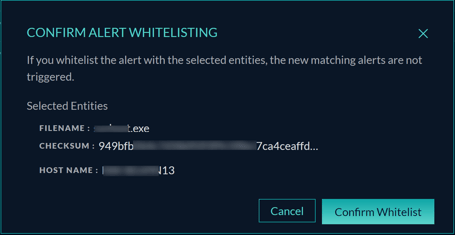
6. Click **Confirm Whitelist**.
Meta Keys Supported
The following table shows the meta keys supported for Endpoint alert whitelisting:
- **Elements:** Source
- **Meta Keys:**
user.src
- **Elements:** Target
- **Meta Keys:** user.dst
- **Elements:** Filename
- **Meta Keys:** filename, filename.src, filename.dst
- **Elements:** Hostname
- **Meta Keys:** alias.host, host.dst, host.src, device.host
To Whitelist an Event Stream Analysis Alert (From NetWitness 12.5)
1. Go to **Respond** \> **Alerts**.
2. Select the **Event Stream Analysis** Alert and click **More Actions \> Whitelist Alert**.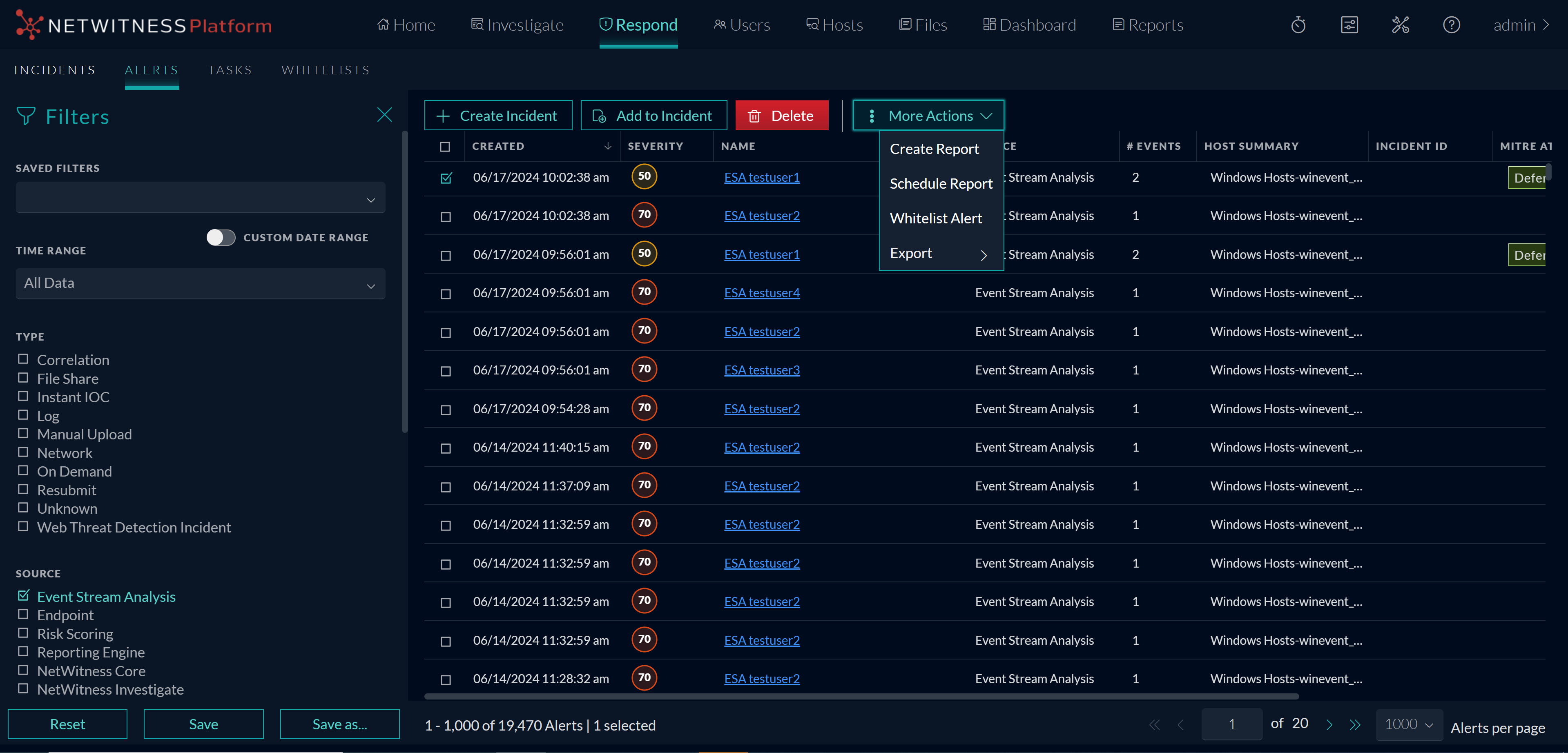
3. Enter the name of the Whitelist and select the required entities.
**Note:** The entities displayed depend on the entities present on the selected Endpoint Alert. You must select at least one of the entities to apply to the Whitelist.
**Note:** In Event Stream Analysis Alert, you have the option to select either “Match All Events” or “Match Any Events”. Selecting “Match All Events” will Whitelist the Alerts only if the selected entities are present across all the events of that alert. Selecting “Match Any Events” will Whitelist the Alerts if the selected entities are present in any of the events of that alert.
that alert.
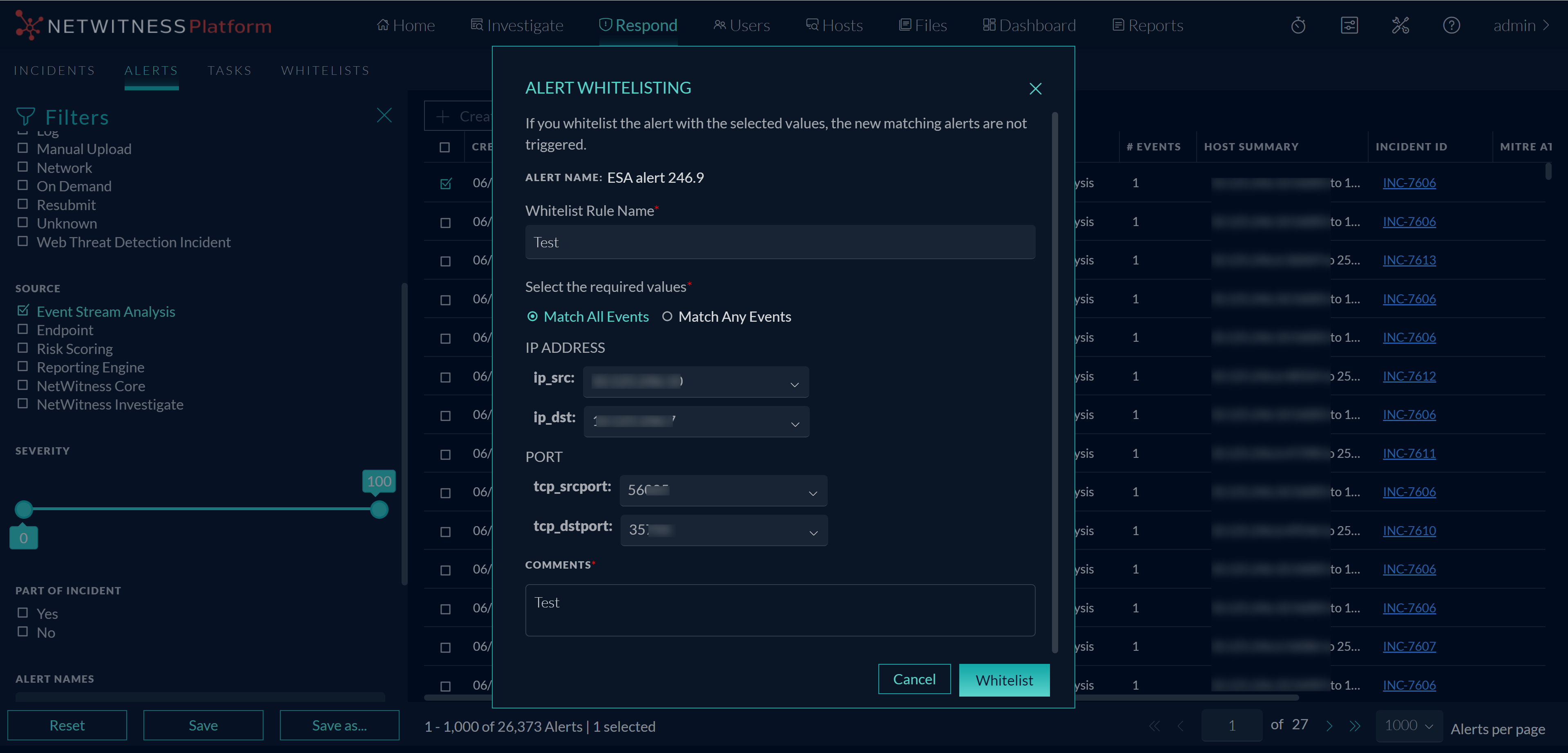
4. Specify the reason for whitelisting in the **Comments** section.
5. Click **Whitelist**.
The **Confirm Alert Whitelisting** confirmation dialog is displayed.
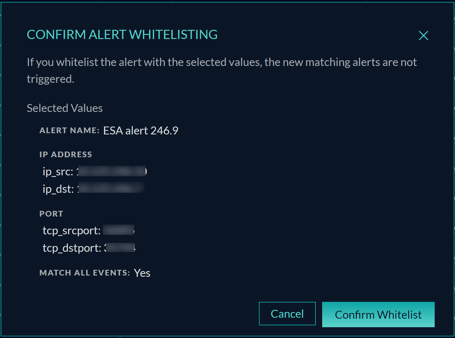
6. Click **Confirm Whitelist**.
Meta Keys Supported
The following table shows the meta keys supported for Endpoint alert whitelisting:
- **Elements:** IP
- **Meta Keys:**
alias.ip, ip.src, ip.dst, forward.ip, device.ip
- **Elements:** Port
- **Meta Keys:** tcp\_srcport, udp\_srcport, tcp\_dstport, udp\_dstport
- **Elements:** Filename
- **Meta Keys:** filename, filename.src, filename.dst
- **Elements:** Action
- **Meta Keys:** action
- **Elements:** Hostname
- **Meta Keys:** alias.host, host.dst, host.src, device.host
To Whitelist a NetWitness Core Alert (From NetWitness 12.5)
1. Go to **Respond** \> **Alerts**.
2. Select the NetWitness Core Alert and click **More Actions \> Whitelist Alert**.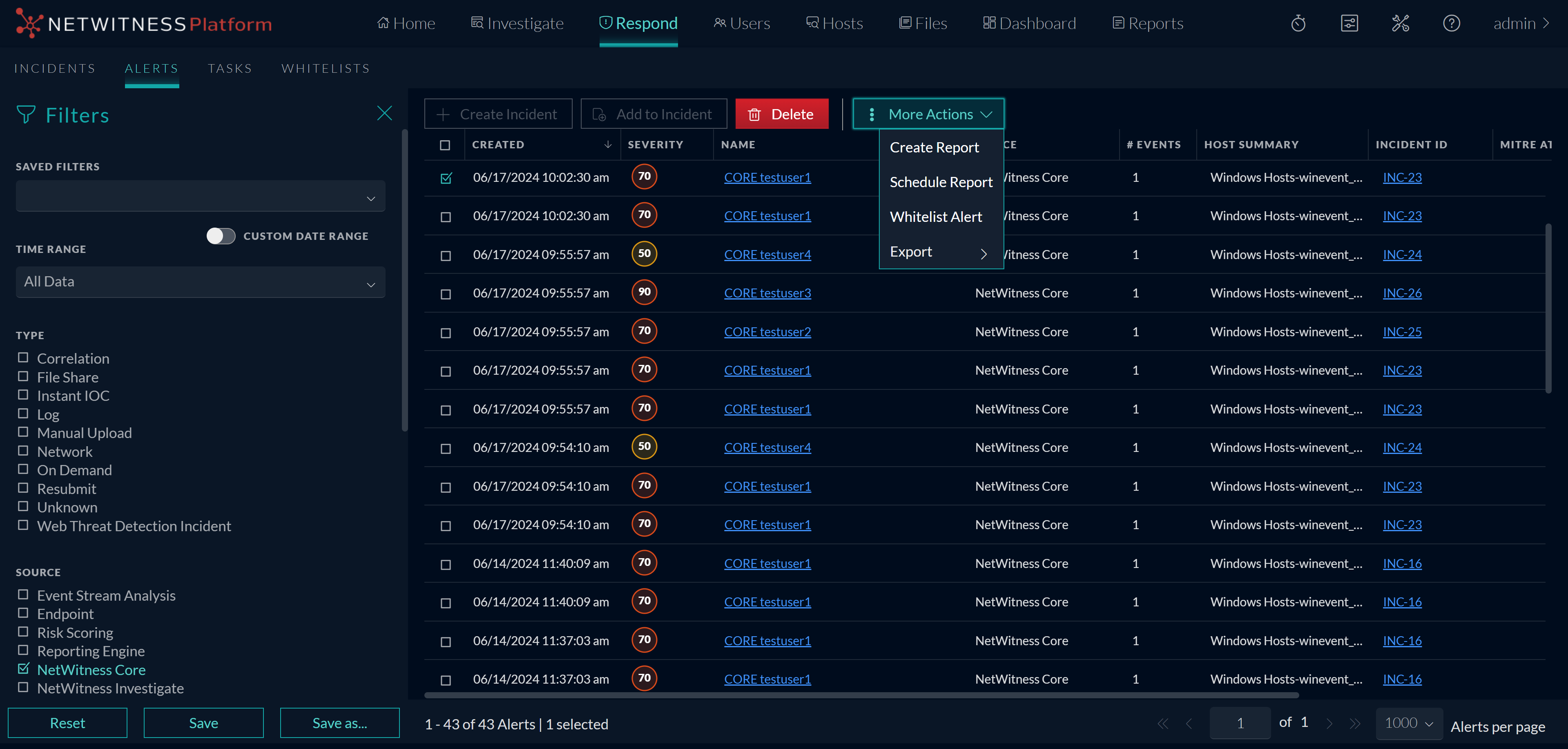
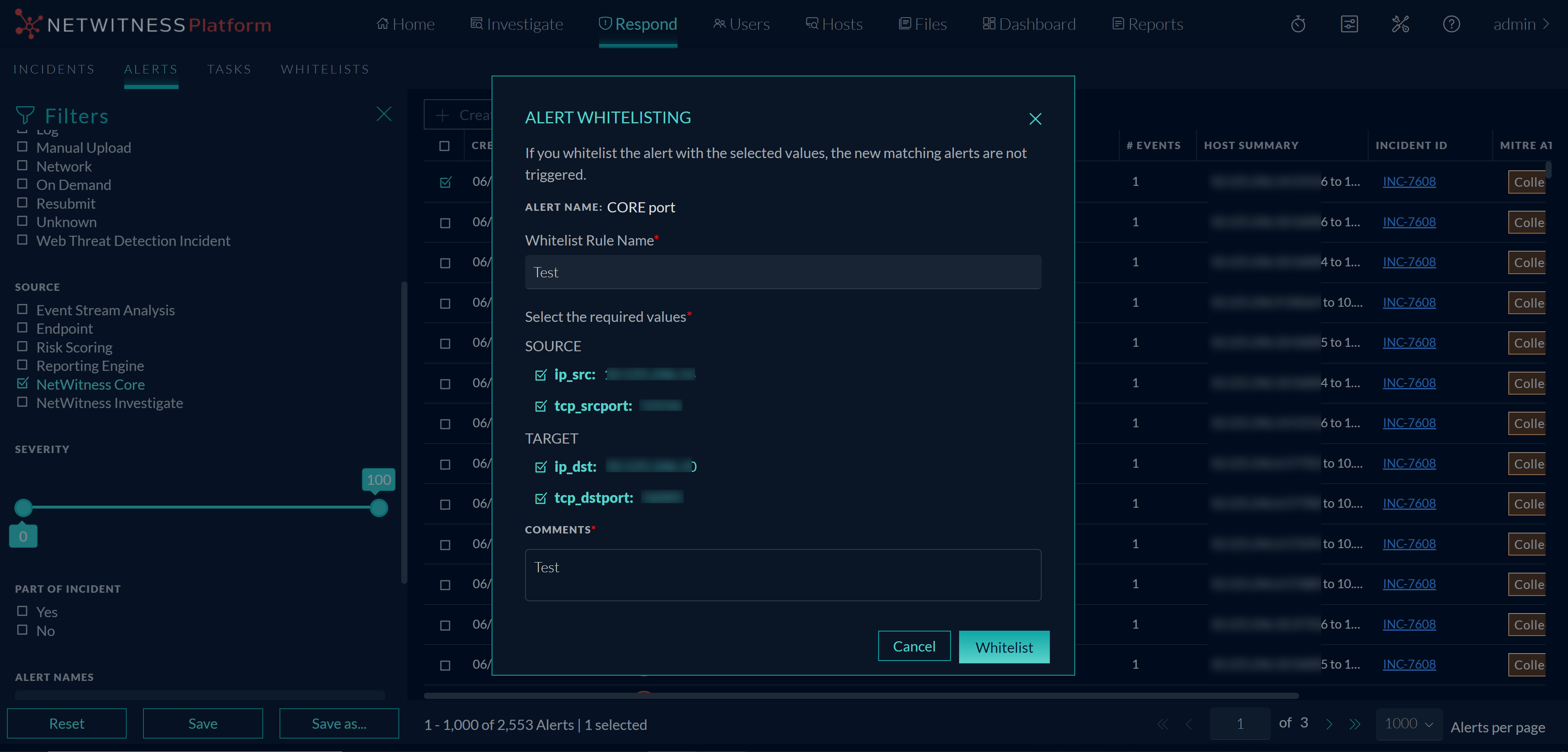
3. Enter the name of the Whitelist and select the required entities.
The entities displayed depend on the entities present on the selected NetWitness Core Alert. You must select atleast one of the entities to apply the Whitelist
4. Specify the reason for whitelisting in the **Comments** section.
5. Click **Whitelist**.
The **Confirm Alert Whitelisting** confirmation dialog is displayed.

6. Click **Confirm Whitelist**.
## Use Case: Unwanted Endpoint Alerts Triggering in the Respond service
John, an analyst, logs in to the NetWitness Platform XDR and clicks **Respond** \> **Alerts**. While investigating the alerts in the Respond **Alerts** view, John notices that a few alerts displayed in the UI are not suspicious. Analyst selects a non-suspicious alert and clicks the **Whitelist Alert** tab under **More Actions** in the toolbar. Once the **Alert Whitelisting** confirmation window is displayed, John performs the following:
- Enters the name of the Whitelist.
- Selects the entities **File, Host** and **User** to stop triggering the new matching alerts for the particular file **xxxx.exe** and the host **Windows**.
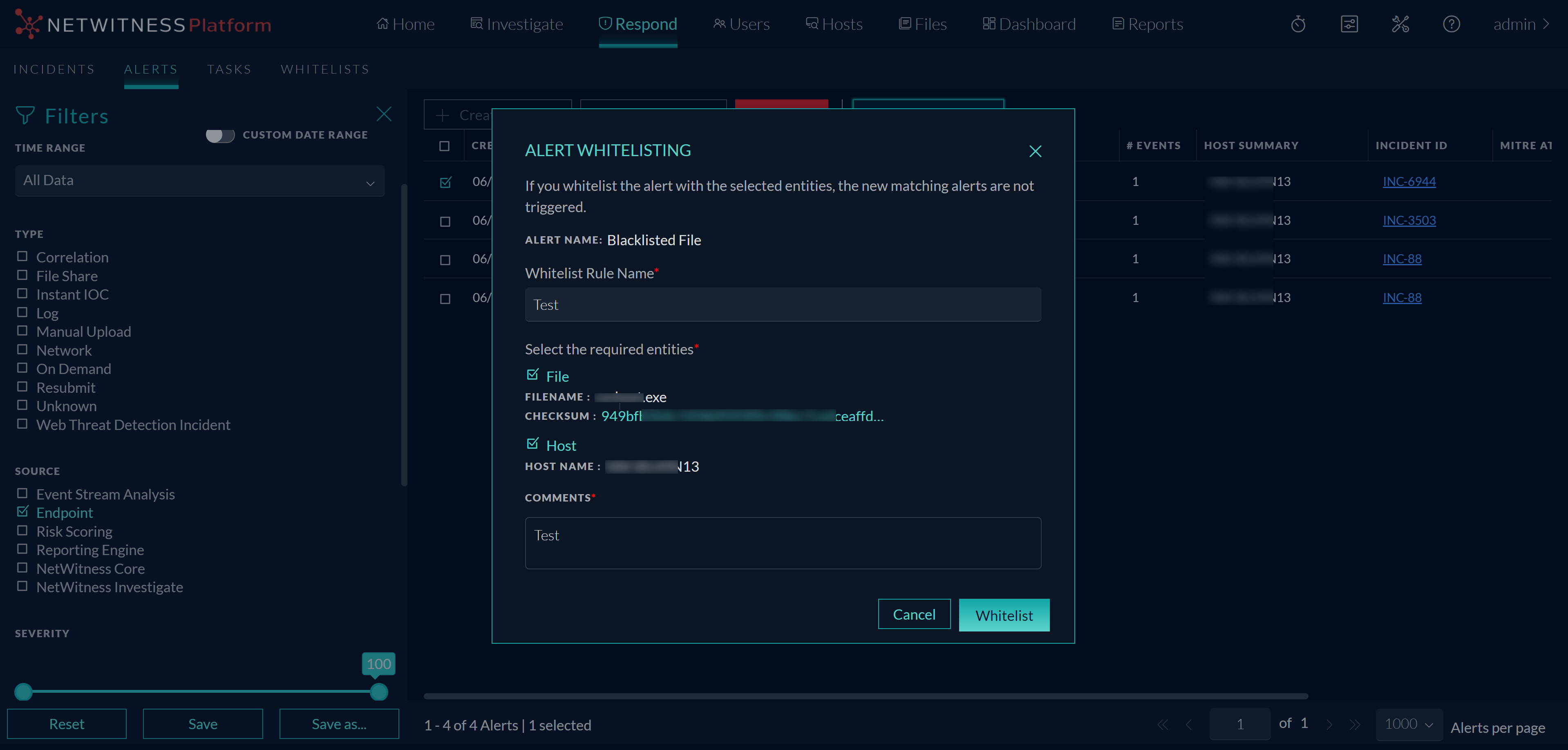
- Specifies the reason for whitelisting the alert in the **Comments** section and clicks **Whitelist**.
- Once the **Confirm Whitelist** confirmation window is displayed, John clicks **Confirm Whitelist**.
After whitelisting the selected alert, John selects another non-suspicious alert in the Respond Alerts view for whitelisting. This time, John enables the config in the **Services** \> **Respond Server** \> **Explore** view to permanently delete the existing alerts matched with the Whitelist condition. Later, John selects the entities **User**, **Host**, and **File** in the **Alert Whitelisting** confirmation window to stop triggering the new matching alerts for the selected entities.
**Note:** Upon enabling the config and then whitelisting the alert for the selected entities **User**, **Host**, and **File**, John finds that the risk score of the entities **File** and **Host** is affected. This is due to the permanent deletion of the existing alerts matched with the Whitelist condition after enabling the config.
**Note:** You can make similar Alert Whitelisting to Event Stream Analysis and NetWitness Core alerts.
## Whitelists List View
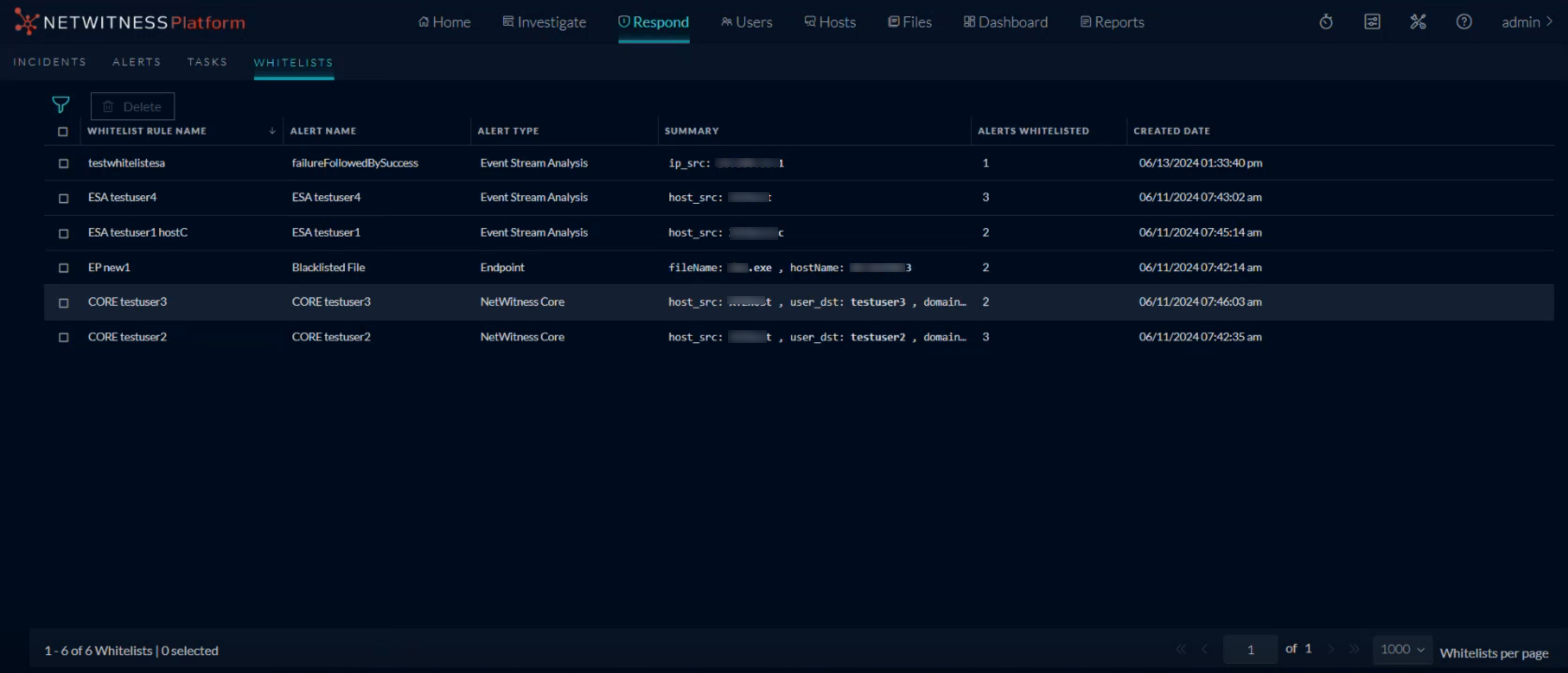
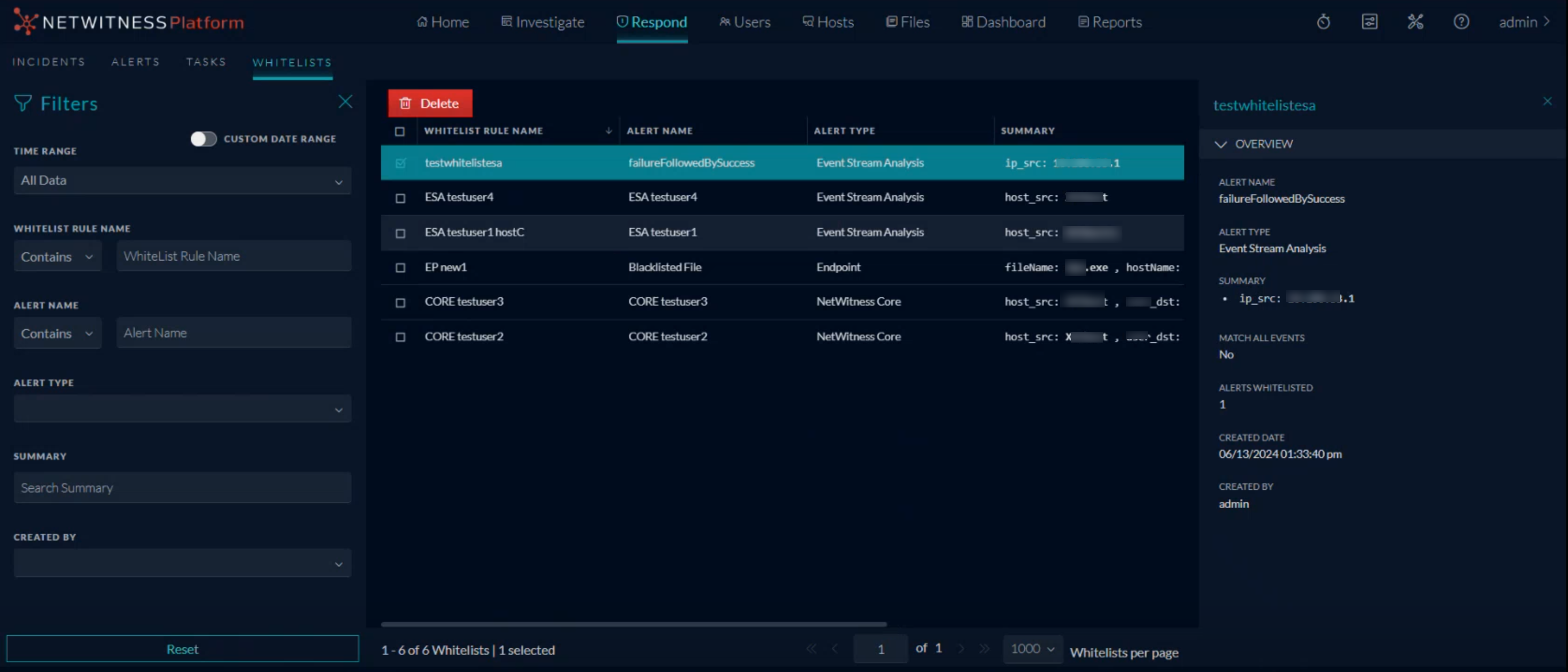
The Whitelists List view displays the list of all the Endpoint, ESA, NetWitness Core, and Insight Whitelists with the Whitelist Rule Name, Alert Name, Alert Type, Summary, Alerts Whitelisted, and the Created Date associated with the respective Whitelisted Alerts. The view consists of a Filters panel, Whitelists List, and the Whitelist Overview.
### Whitelists List
The Whitelists List displays all the Whitelists in the NetWitness Platform. You can filter this list to view only the Whitelists of interest.
The following table describes the columns in the Whitelists List.
- **Columns:** Whitelist Name
- **Description:** Displays the name of the Whitelist you provided during the whitelisting of the selected alert.
- **Columns:**
Alert Name
- **Description:**
Displays the rule name associated with the whitelisted alert.
- **Columns:** Alert Type
- **Description:** Displays the alert type: ESA, Endpoint, and NetWitness Core.
- **Columns:**
Summary
- **Description:**
Displays the details of the entities selected during the whitelisting of the selected alert. For Example: **File name: cmd.exe, Host name: win34**.
- **Columns:** Alerts Whitelisted
- **Description:** Displays the number of number of alerts suppressed after the creation of Whitelist.
- **Columns:**
Created Date
- **Description:**
Displays the Whitelist creation date and time.
### Filters Panel
You can filter the Whitelists based on the following parameters.
- Time Range
- Whitelist Rule Name
- Alert Name
- Alert Type
- Summary
- Created By
Click **Reset** to remove the filters applied.
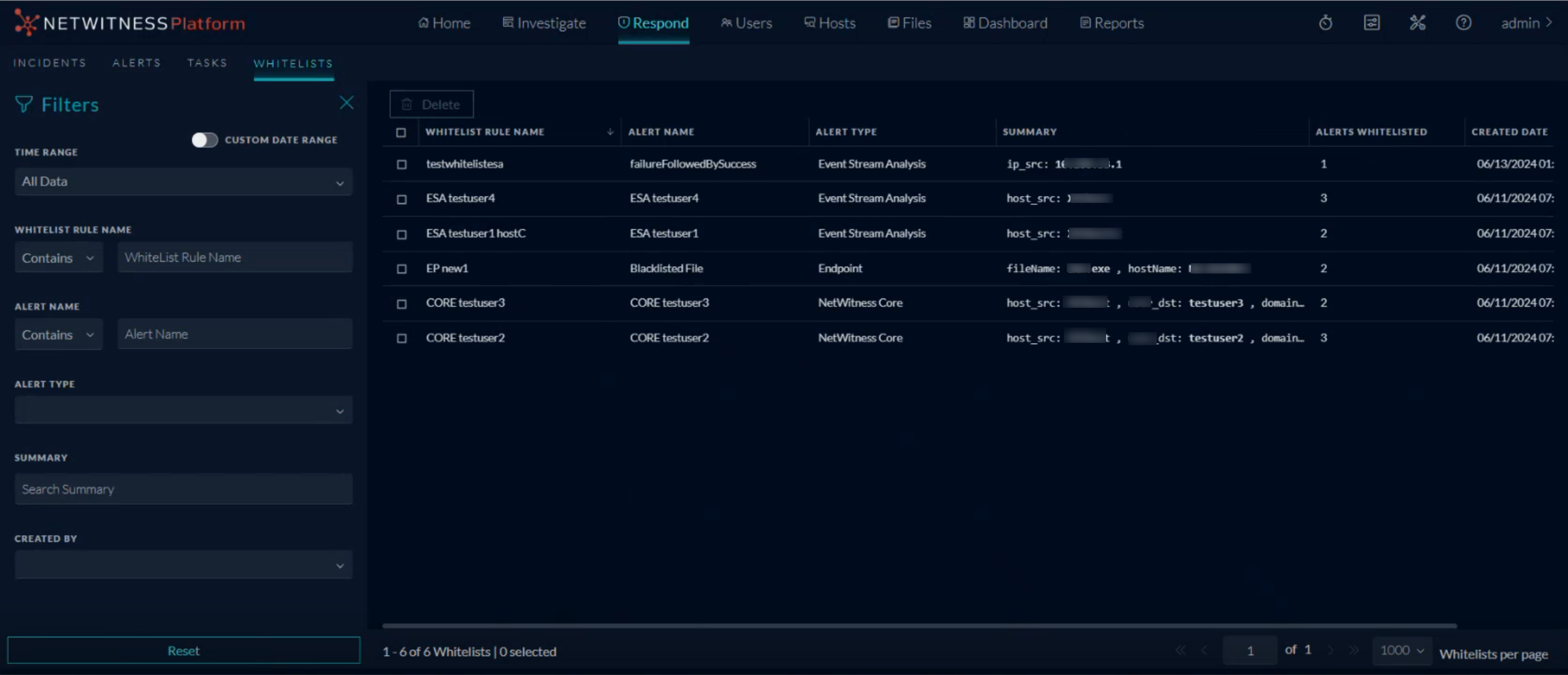
The following table lists all the fields displayed in the Whitelists List view Filters panel.
- **Fields:** Time Range
- **Description:**
Allows you to select the required time duration and view the Whitelists created in the time duration selected.
**Note:** Turn On the **Custom Date Range** Toggle to select a custom date range of your choice.
- **Fields:** Whitelist Rule Name
- **Description:** Allows you to enter the name of required Whitelist.
- **Fields:** Alert Name
- **Description:** Allows you to enter the name of the rule associated with the Whitelists created.
- **Fields:** Alert Type
- **Description:** Allows you to select the alert type: ESA, Endpoint, NetWitness Core, and Insights.
- **Fields:** Summary
- **Description:**
Allows you to enter the complete value or a part of the value associated with the required Whitelist. For example: **cmd.exe** or **win34** or **analyst1**.
- **Fields:** Created By
- **Description:**
Allows you to filter the Whitelists on the basis of the user who created them.
### Whitelist Overview
You can click on any whitelisted alert to view the overview on the right panel. All the selected entities will be displayed in the overview panel.
## Delete the Whitelists
You can delete the Whitelists to start receiving the new matched alerts for the selected entities in the **Respond** \> **Alerts** view. Once you delete the selected Whitelist, the new matching alerts are triggered only for the selected entities.
To delete the Whitelists
1. Go to **Respond** \> **Whitelists**.
The **Whitelists** view is displayed.
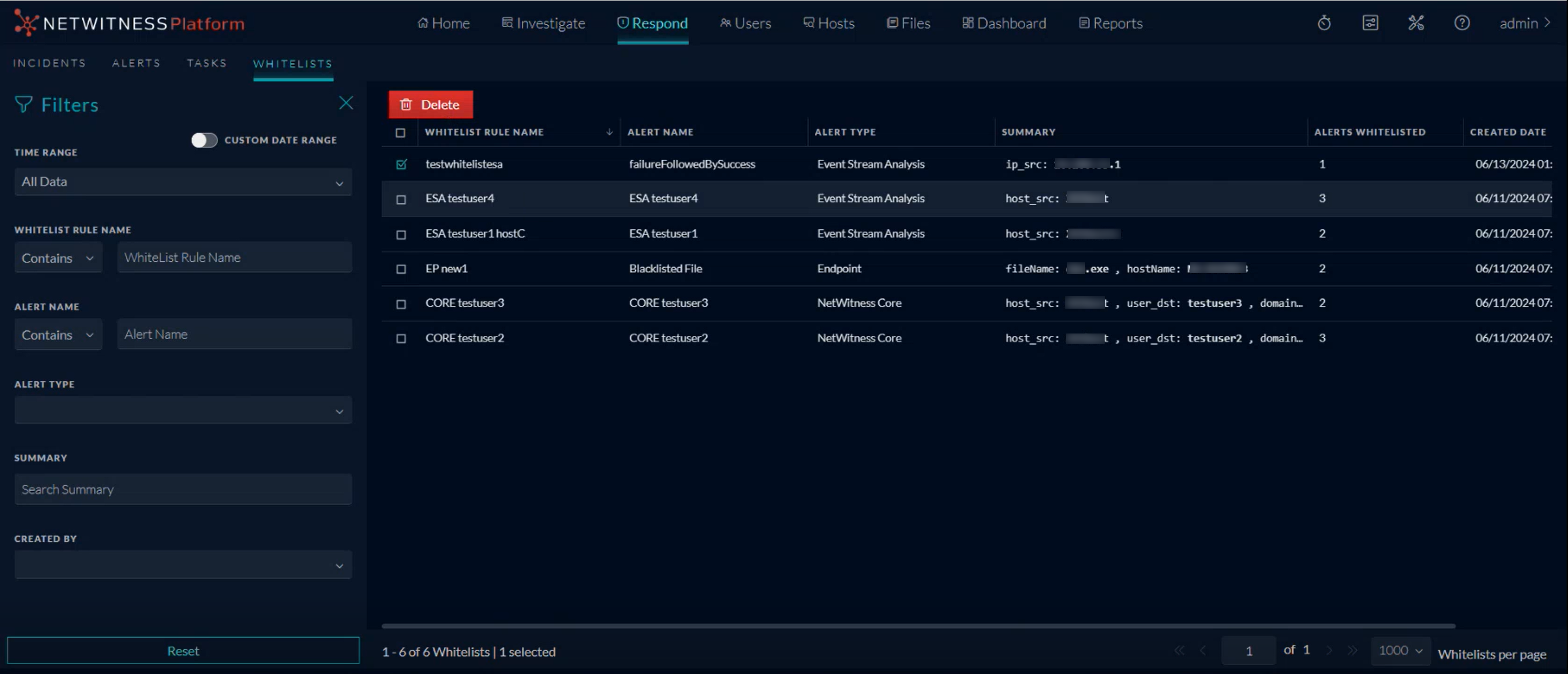
1. Select the Whitelist and click **Delete**.
The confirmation window is displayed.
2. Click **Delete Whitelist**.
The Whitelist is deleted.
**Note:**
\- When you delete the Whitelists, only the new matching alerts are triggered. The whitelisted old alerts cannot be recovered for the selected entities.
\- Analysts must have one of the following permissions to view the **Whitelists** tab in the **Respond** view:
- **respond-server.alert.delete**
- **respond-server.alert.read**
- **respond-server.alert.manage**
- **respond-server.alertrule.manage**
- **respond-server.alertrule.read**
\- Analysts must have the **respond-server.alert.read** permission to view the whitelists in **Respond** \> **Whitelists** view and **respond-server.alert.manage** permission to delete the Whitelists.
## Toolbar Actions
The table below lists the toolbar actions available in the Whitelists List view.
- **Option:** 
- **Description:** Select this option and access the **Filters** panel to filter the required Whitelists.
- **Option:** 
- **Description:** Select this option to delete the selected Whitelist.
[](https://mydev.netwitness.com/?hsLang=en)
Copyright © 2026, NetWitness LLC. All rights reserved.
[NetWitness Platform](https://www.netwitness.com/)
[Acceptable Use Policy](https://www.netwitness.com/wp-content/uploads/Acceptable-Use-Policy-092022.pdf) [Privacy Statement](https://www.netwitness.com/wp-content/uploads/NetWitness-Privacy-Statement-07292024.pdf)

[](https://www.linkedin.com/company/netwitness-platform/) [](https://www.youtube.com/@netwitness)
© 2026 NetWitness LLC. All rights reserved.