---
title: View Memory Metrics for Rules
description: "View Memory Metrics for RulesView Memory Metrics for Rules\nThis topic tells ESA rule writers how to view memory metrics for an ESA Correlation servic"
---
[Skip to content](https://mydev.netwitness.com/knowledge-base/viewmemorymetricsforrules#main-content)

- [Home](https://mydev.netwitness.com/home)
- Integrations
Show submenu for Integrations
- [Netwitness Platform Integrations](https://mydev.netwitness.com/netwitnessplatformintegrations)
- [Third Party Integrations](https://mydev.netwitness.com/thirdpartyintegrations)
- [Knowledge Center](https://mydev.netwitness.com/knowledge-base)
- Community
Show submenu for Community
- [Blogs](https://mydev.netwitness.com/netwitness-security-llc-blog)
- Discussions
- Customers
Show submenu for Customers
- [Manage Products and Licenses](https://mydev.netwitness.com/nwportal)
- Downloads
- Partners
Show submenu for Partners
- [Partner Program](https://mydev.netwitness.com/partner)
- [Partner Resources](https://mydev.netwitness.com/partnerresources)
- [Submit a New Deal Registration](https://mydev.netwitness.com/dealregistration)
- [Become a Partner](https://mydev.netwitness.com/becomeapartner)
- [Update Your Partner Locator Profile](https://www.netwitness.com/partner-locator/?utm_source=pardotnewsletter&utm_medium=email&utm_campaign=partner_march)
- [NetWitness LinkedIn Partner Hub](https://linkedin.com/showcase/netwitnesspartners/)
- Education
Show submenu for Education
- [Instructor Led Training Schedule](https://mydev.netwitness.com/instructorledtrainingschedule)
- [NetWitness Training Catalog](https://mydev.netwitness.com/netwitnesstrainingcatalog)
- [Security Awareness Training](https://mydev.netwitness.com/securityawarenesstraining)
- [New Product Readiness](https://mydev.netwitness.com/newproductreadiness)
- [On-Demand Virtual Labs](https://mydev.netwitness.com/ondemandvirtuallabs)
- [Additional Training Information](https://mydev.netwitness.com/additionaltraininginformation)
- [Frequently Asked Questions](https://mydev.netwitness.com/educationfaq)
- [Contact NetWitness Education Team](https://mydev.netwitness.com/contact-netwitness-education-team)
- Support
Show submenu for Support
- [Contact Support](https://mydev.netwitness.com/contact-support)
- [Create a New Case](https://mydev.netwitness.com/create-support-case)
- [View My Cases](https://mydev.netwitness.com/viewmycase)
- [Product Version Life Cycle](https://mydev.netwitness.com/product-version-life-cycle)
- [Warranty & Replacement Parts](https://mydev.netwitness.com/warranty-and-replacement-parts)
- [Community Support Forum](https://mydev.netwitness.com/community-support-forum)
- [Technical Support Guide](https://mydev.netwitness.com/technical-support-guide)
Open main navigation
Close main navigation
- [Home](https://mydev.netwitness.com/home)
- Integrations
Show submenu for Integrations
- [Netwitness Platform Integrations](https://mydev.netwitness.com/netwitnessplatformintegrations)
- [Third Party Integrations](https://mydev.netwitness.com/thirdpartyintegrations)
- [Knowledge Center](https://mydev.netwitness.com/knowledge-base)
- Community
Show submenu for Community
- [Blogs](https://mydev.netwitness.com/netwitness-security-llc-blog)
- Discussions
- Customers
Show submenu for Customers
- [Manage Products and Licenses](https://mydev.netwitness.com/nwportal)
- Downloads
- Partners
Show submenu for Partners
- [Partner Program](https://mydev.netwitness.com/partner)
- [Partner Resources](https://mydev.netwitness.com/partnerresources)
- [Submit a New Deal Registration](https://mydev.netwitness.com/dealregistration)
- [Become a Partner](https://mydev.netwitness.com/becomeapartner)
- [Update Your Partner Locator Profile](https://www.netwitness.com/partner-locator/?utm_source=pardotnewsletter&utm_medium=email&utm_campaign=partner_march)
- [NetWitness LinkedIn Partner Hub](https://linkedin.com/showcase/netwitnesspartners/)
- Education
Show submenu for Education
- [Instructor Led Training Schedule](https://mydev.netwitness.com/instructorledtrainingschedule)
- [NetWitness Training Catalog](https://mydev.netwitness.com/netwitnesstrainingcatalog)
- [Security Awareness Training](https://mydev.netwitness.com/securityawarenesstraining)
- [New Product Readiness](https://mydev.netwitness.com/newproductreadiness)
- [On-Demand Virtual Labs](https://mydev.netwitness.com/ondemandvirtuallabs)
- [Additional Training Information](https://mydev.netwitness.com/additionaltraininginformation)
- [Frequently Asked Questions](https://mydev.netwitness.com/educationfaq)
- [Contact NetWitness Education Team](https://mydev.netwitness.com/contact-netwitness-education-team)
- Support
Show submenu for Support
- [Contact Support](https://mydev.netwitness.com/contact-support)
- [Create a New Case](https://mydev.netwitness.com/create-support-case)
- [View My Cases](https://mydev.netwitness.com/viewmycase)
- [Product Version Life Cycle](https://mydev.netwitness.com/product-version-life-cycle)
- [Warranty & Replacement Parts](https://mydev.netwitness.com/warranty-and-replacement-parts)
- [Community Support Forum](https://mydev.netwitness.com/community-support-forum)
- [Technical Support Guide](https://mydev.netwitness.com/technical-support-guide)
How can we help you?
- There are no suggestions because the search field is empty.
1. [NetWitness Knowledge Base](https://mydev.netwitness.com/knowledge-base?hsLang=en)
2. [Documentation](https://mydev.netwitness.com/knowledge-base/documentation?hsLang=en)
April 27, 2026
# View Memory Metrics for Rules
## View Memory Metrics for RulesView Memory Metrics for Rules
This topic tells ESA rule writers how to view memory metrics for an ESA Correlation service and its associated ESA rules. You can see estimated memory usage for each rule running on a server, and you can use this information to modify your rule statements and conditions if they use too much memory.
Rules can sometimes consume more memory than you expect, causing ESA to slow down or stop. To see approximately how much memory a rule is using, you can view estimated memory usage for each rule in the Health & Wellness System Stats browser (you need permissions to access this module). You can use this information to modify your rules to be more efficient.
At a high level, you need to complete the following steps to use memory metrics to troubleshoot memory usage for rules:
1. Ensure you have the correct permissions to view the Health & Wellness module. For information on roles and permissions, see [ESA Permissions](https://50269063.hs-sites.com/knowledge-base/ESAPermissions?hsLang=en).
2. View the memory statistics in Health & Wellness.
3. (Recommended) Configure Health & Wellness ESA policies to send an email if memory thresholds are exceeded. See "Manage Policies" in the *System Maintenance Guide* for instructions on sending email notifications.
4. Use the memory metrics data to modify rules to be more efficient, if necessary.
**Note:** You can also view memory metrics for ESA rules in the ** (Configure) \> ESA Rules \> Services** tab. See [View Stats for an ESA Service](https://50269063.hs-sites.com/knowledge-base/ViewStatsforanESAService?hsLang=en).
## PrerequisitesPrerequisites
The following are requirements for using memory metrics:
- You must have the appropriate permissions to view Health & Wellness statistics.
- (Recommended) Configure the ESA Health & Wellness policy to send an email when memory thresholds are exceeded.
**Note:** Memory Metrics is always on for the ESA Correlation service; you do not have to enable it.
## View Health Statistics and Trends for ESA Correlation in New Health & WellnessView Health Statistics and Trends for ESA Correlation in New Health & Wellness
In NetWitness version 11.5 and later, New Health & Wellness provides improved and intuitive dashboards, monitors, and visualizations. The ESA Correlation Overview dashboard provides health statistics and trends on ESA rule deployments.
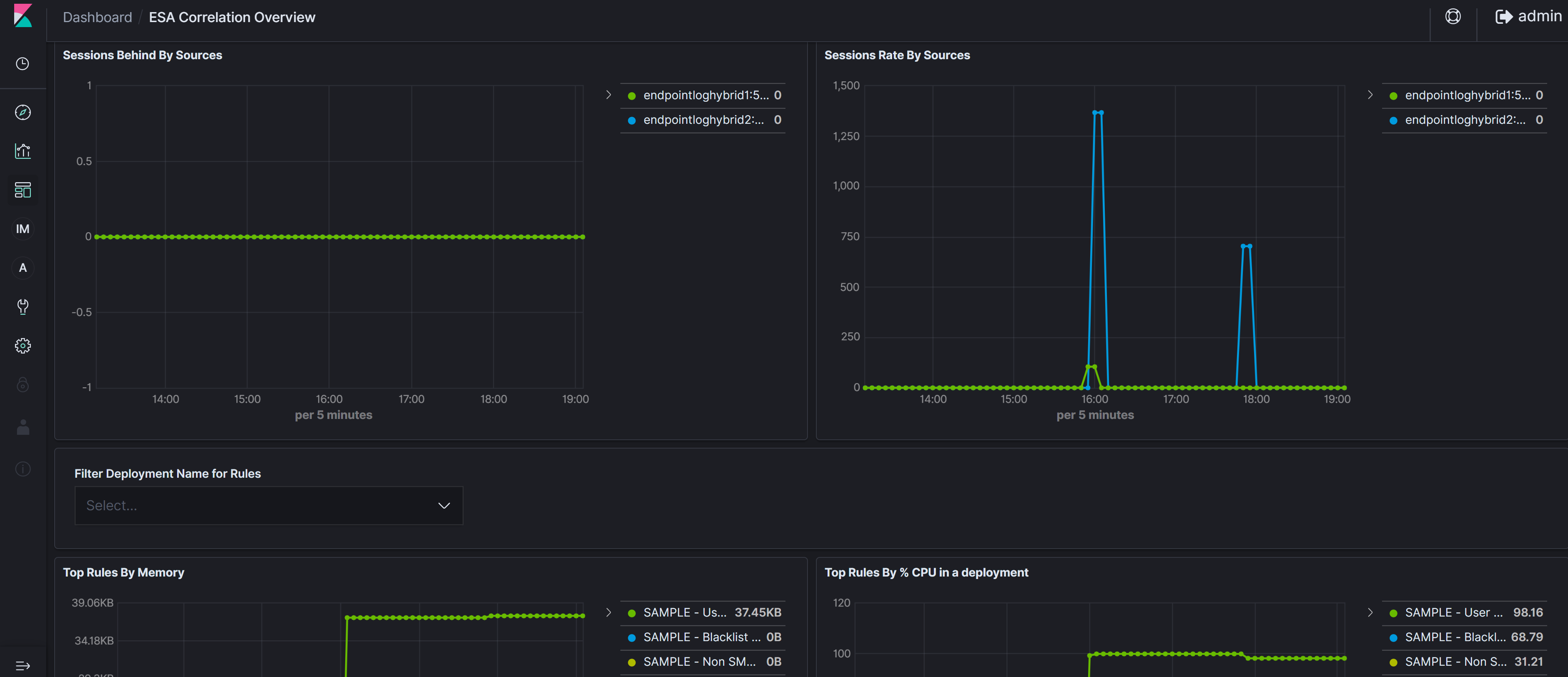
For more information, see "Monitor New Health and Wellness" and "Appendix A: New Health and Wellness Dashboards / ESA Correlation Overview Dashboard" in the *System Maintenance Guide*.
## View Memory Metrics for an ESA Correlation Service in Health & WellnessView Memory Metrics for an ESA Correlation Service in Health & Wellness
1. Go to ** (Admin) \> Health & Wellness \> Monitoring** tab.
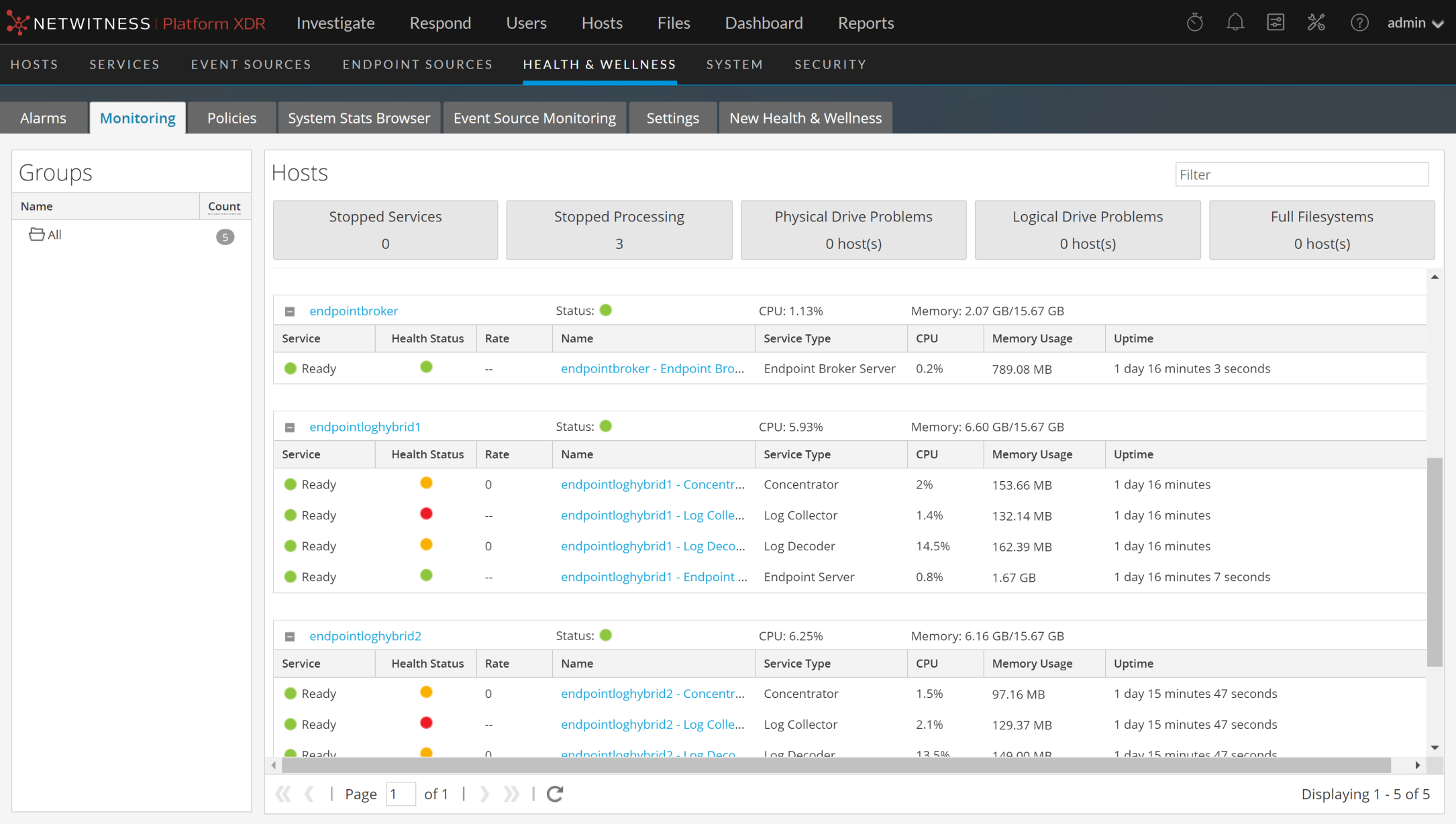
2. Locate your host and click the link in the **Name** field for your ESA Correlation service, for example, ESA- ESA Correlation.

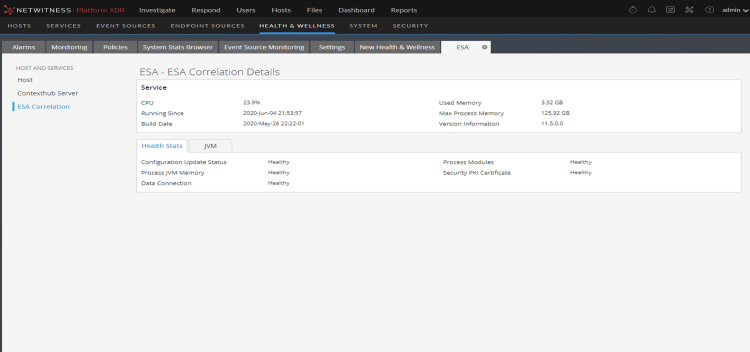
3. On the tab for your ESA host, click the **Health Stats** tab.
You can view the health status of the ESA Correlation service.
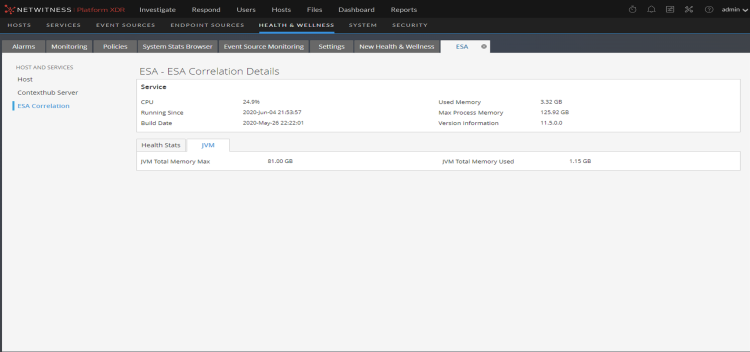
4. Click the **JVM** tab.
You can view the JVM total memory used by the selected ESA Correlation service.
**Note:** You can also view memory metrics for the ESA Correlation service in the ** (Configure) \> ESA Rules \> Services** tab. See [View Stats for an ESA Service](https://50269063.hs-sites.com/knowledge-base/ViewStatsforanESAService?hsLang=en).
## View Memory Metrics for an ESA Correlation Service and its ESA RulesView Memory Metrics for an ESA Correlation Service and its ESA Rules
1. Go to ** (Admin) \> Health & Wellness \> System Stats Browser**.
2. To view memory metrics for an ESA Correlation service, in the **Host** field, select your ESA host. Select **Correlation Server** for **Component**, enter **ProcessInfo** for **Category**, and then click **Apply**.
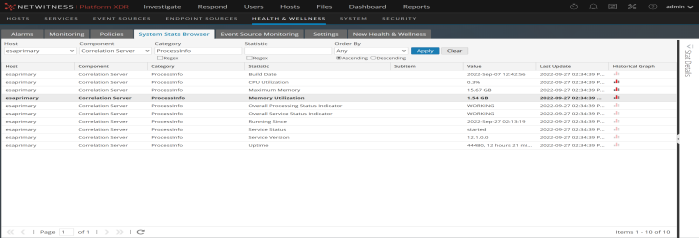
The **Memory Utilization** statistic shows the total memory in use by the ESA Correlation service.
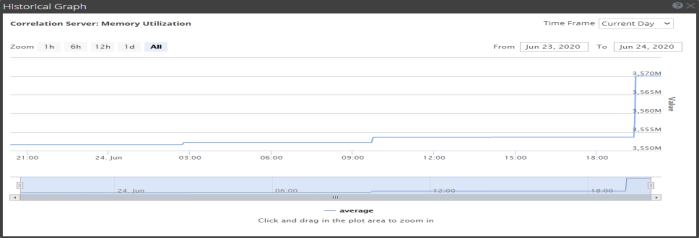
3. To view the historical memory usage for the ESA Correlation service, click the **Historical Graph** icon.
4. To view the memory metrics for individual rules, in the **Category** field, enter **Correlation Engine Metrics** and click **Apply**.
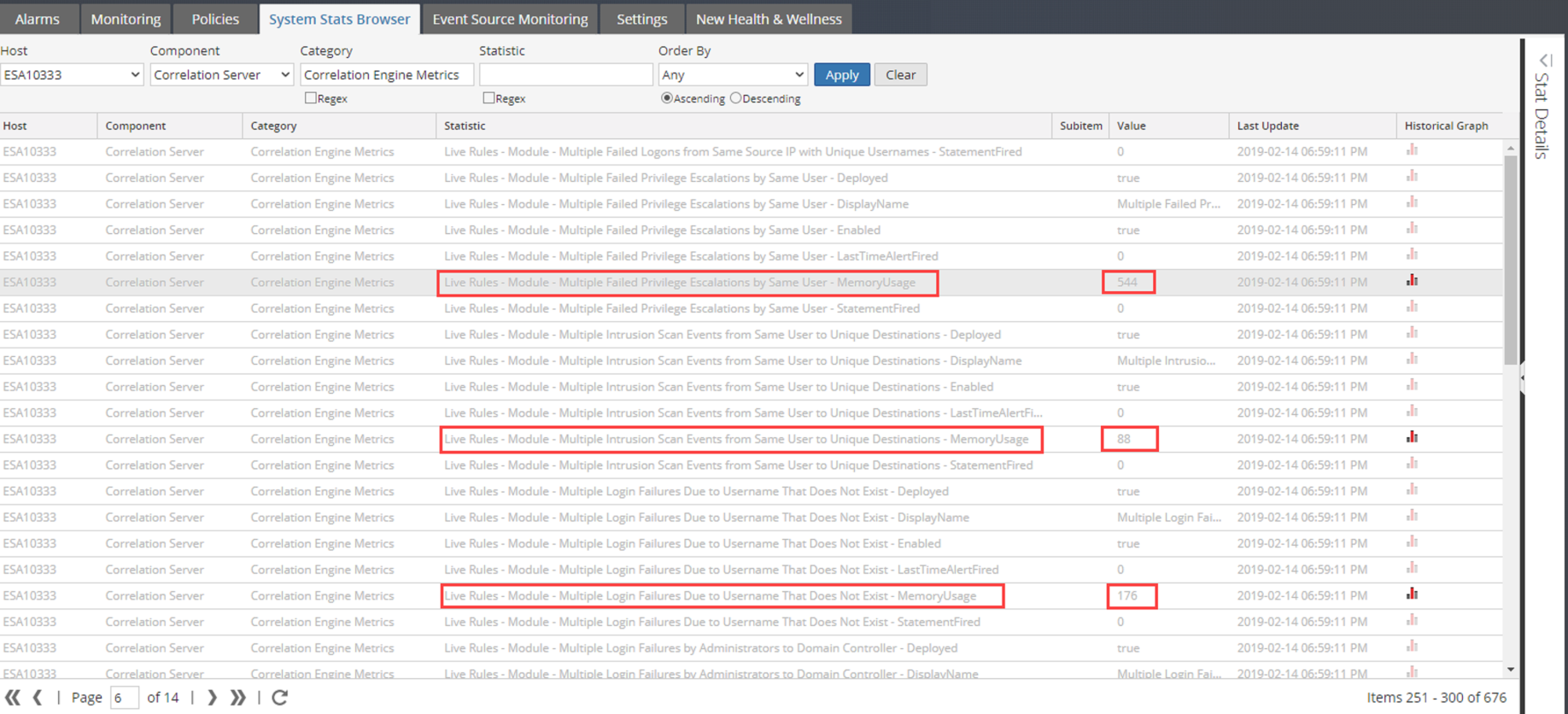
The name of the rule is in the **Statistic** column appended with **MemoryUsage** and the memory usage in bytes is in the **Value** column.
**Note:** The **Last Update** field reflects when Health & Wellness polls ESA. However, the Memory Metrics is not synchronized with the Health & Wellness polling. For example, if the memory threshold is exceeded on 2/10/19 at 12 p.m., but Health & Wellness polls at 2/10/19 at 12:10 p.m., the **Last Update** field will display a timestamp of 2/10/19 12:10 p.m.
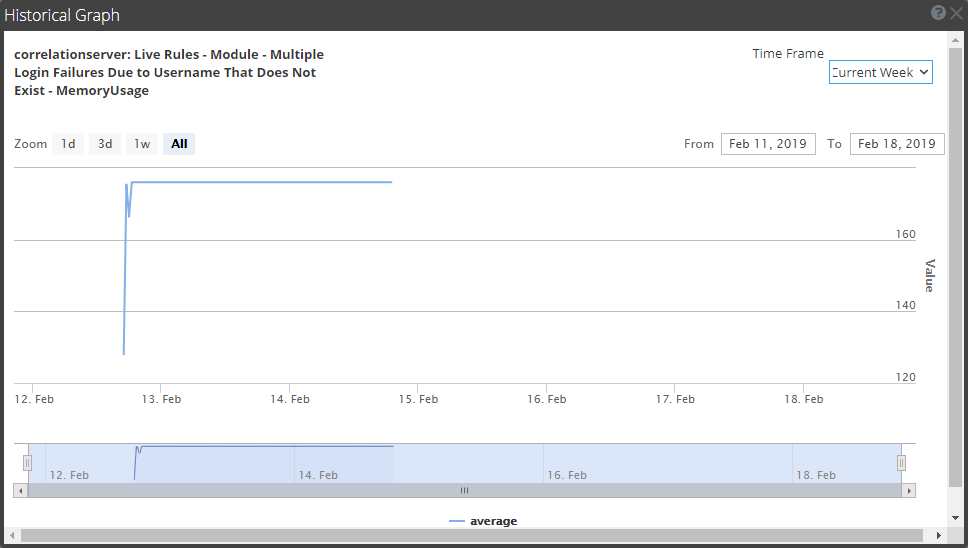
5. Click  to view a historical view of memory usage for the rule in the **Historical Graph** column.
**Note:** You can also view memory metrics for ESA rules in the ** (Configure) \> ESA Rules \> Services** tab. See [View Stats for an ESA Service](https://50269063.hs-sites.com/knowledge-base/ViewStatsforanESAService?hsLang=en).
[](https://mydev.netwitness.com/?hsLang=en)
Copyright © 2026, NetWitness LLC. All rights reserved.
[NetWitness Platform](https://www.netwitness.com/)
[Acceptable Use Policy](https://www.netwitness.com/wp-content/uploads/Acceptable-Use-Policy-092022.pdf) [Privacy Statement](https://www.netwitness.com/wp-content/uploads/NetWitness-Privacy-Statement-07292024.pdf)

[](https://www.linkedin.com/company/netwitness-platform/) [](https://www.youtube.com/@netwitness)
© 2026 NetWitness LLC. All rights reserved.