---
title: User Preferences
description: "User Preferences\nTo adjust NetWitness to best fit your environment and work practices, you can set your own global application preferences. You can:"
---
[Skip to content](https://mydev.netwitness.com/knowledge-base/userpreferences#main-content)

- [Home](https://mydev.netwitness.com/home)
- Integrations
Show submenu for Integrations
- [Netwitness Platform Integrations](https://mydev.netwitness.com/netwitnessplatformintegrations)
- [Third Party Integrations](https://mydev.netwitness.com/thirdpartyintegrations)
- [Knowledge Center](https://mydev.netwitness.com/knowledge-base)
- Community
Show submenu for Community
- [Blogs](https://mydev.netwitness.com/netwitness-security-llc-blog)
- Discussions
- Customers
Show submenu for Customers
- [Manage Products and Licenses](https://mydev.netwitness.com/nwportal)
- Downloads
- Partners
Show submenu for Partners
- [Partner Program](https://mydev.netwitness.com/partner)
- [Partner Resources](https://mydev.netwitness.com/partnerresources)
- [Submit a New Deal Registration](https://mydev.netwitness.com/dealregistration)
- [Become a Partner](https://mydev.netwitness.com/becomeapartner)
- [Update Your Partner Locator Profile](https://www.netwitness.com/partner-locator/?utm_source=pardotnewsletter&utm_medium=email&utm_campaign=partner_march)
- [NetWitness LinkedIn Partner Hub](https://linkedin.com/showcase/netwitnesspartners/)
- Education
Show submenu for Education
- [Instructor Led Training Schedule](https://mydev.netwitness.com/instructorledtrainingschedule)
- [NetWitness Training Catalog](https://mydev.netwitness.com/netwitnesstrainingcatalog)
- [Security Awareness Training](https://mydev.netwitness.com/securityawarenesstraining)
- [New Product Readiness](https://mydev.netwitness.com/newproductreadiness)
- [On-Demand Virtual Labs](https://mydev.netwitness.com/ondemandvirtuallabs)
- [Additional Training Information](https://mydev.netwitness.com/additionaltraininginformation)
- [Frequently Asked Questions](https://mydev.netwitness.com/educationfaq)
- [Contact NetWitness Education Team](https://mydev.netwitness.com/contact-netwitness-education-team)
- Support
Show submenu for Support
- [Contact Support](https://mydev.netwitness.com/contact-support)
- [Create a New Case](https://mydev.netwitness.com/create-support-case)
- [View My Cases](https://mydev.netwitness.com/viewmycase)
- [Product Version Life Cycle](https://mydev.netwitness.com/product-version-life-cycle)
- [Warranty & Replacement Parts](https://mydev.netwitness.com/warranty-and-replacement-parts)
- [Community Support Forum](https://mydev.netwitness.com/community-support-forum)
- [Technical Support Guide](https://mydev.netwitness.com/technical-support-guide)
Open main navigation
Close main navigation
- [Home](https://mydev.netwitness.com/home)
- Integrations
Show submenu for Integrations
- [Netwitness Platform Integrations](https://mydev.netwitness.com/netwitnessplatformintegrations)
- [Third Party Integrations](https://mydev.netwitness.com/thirdpartyintegrations)
- [Knowledge Center](https://mydev.netwitness.com/knowledge-base)
- Community
Show submenu for Community
- [Blogs](https://mydev.netwitness.com/netwitness-security-llc-blog)
- Discussions
- Customers
Show submenu for Customers
- [Manage Products and Licenses](https://mydev.netwitness.com/nwportal)
- Downloads
- Partners
Show submenu for Partners
- [Partner Program](https://mydev.netwitness.com/partner)
- [Partner Resources](https://mydev.netwitness.com/partnerresources)
- [Submit a New Deal Registration](https://mydev.netwitness.com/dealregistration)
- [Become a Partner](https://mydev.netwitness.com/becomeapartner)
- [Update Your Partner Locator Profile](https://www.netwitness.com/partner-locator/?utm_source=pardotnewsletter&utm_medium=email&utm_campaign=partner_march)
- [NetWitness LinkedIn Partner Hub](https://linkedin.com/showcase/netwitnesspartners/)
- Education
Show submenu for Education
- [Instructor Led Training Schedule](https://mydev.netwitness.com/instructorledtrainingschedule)
- [NetWitness Training Catalog](https://mydev.netwitness.com/netwitnesstrainingcatalog)
- [Security Awareness Training](https://mydev.netwitness.com/securityawarenesstraining)
- [New Product Readiness](https://mydev.netwitness.com/newproductreadiness)
- [On-Demand Virtual Labs](https://mydev.netwitness.com/ondemandvirtuallabs)
- [Additional Training Information](https://mydev.netwitness.com/additionaltraininginformation)
- [Frequently Asked Questions](https://mydev.netwitness.com/educationfaq)
- [Contact NetWitness Education Team](https://mydev.netwitness.com/contact-netwitness-education-team)
- Support
Show submenu for Support
- [Contact Support](https://mydev.netwitness.com/contact-support)
- [Create a New Case](https://mydev.netwitness.com/create-support-case)
- [View My Cases](https://mydev.netwitness.com/viewmycase)
- [Product Version Life Cycle](https://mydev.netwitness.com/product-version-life-cycle)
- [Warranty & Replacement Parts](https://mydev.netwitness.com/warranty-and-replacement-parts)
- [Community Support Forum](https://mydev.netwitness.com/community-support-forum)
- [Technical Support Guide](https://mydev.netwitness.com/technical-support-guide)
How can we help you?
- There are no suggestions because the search field is empty.
1. [NetWitness Knowledge Base](https://mydev.netwitness.com/knowledge-base?hsLang=en)
2. [Documentation](https://mydev.netwitness.com/knowledge-base/documentation?hsLang=en)
April 28, 2026
# User Preferences
## User Preferences
To adjust NetWitness to best fit your environment and work practices, you can set your own global application preferences. You can:
- Change the application language
- Set the application time zone
- Set the date and time formats
- Select your default NetWitness starting location
- Select your default Investigate view
- Choose a dark or light theme for the application
- Change your password
- Enable notifications
- Enable context menus
- Change Investigate preferences - Described in the *NetWitness Investigate User Guide*.
Your global preference options vary depending on whether you access them, such as Springboard, Investigate, Respond, Users, Hosts, Files, Dashboard, Reports, Configure, and Admin. There are two global user preferences dialogs accessible from the main menu bar:
- **User Preferences** dialog - Accessible from these views: Springboard, Investigate \> Events, Respond, Users, Hosts, Files, and  (Configure) \> (Capture Policies, Incident Rules, Incident Notifications, and Log Parser Rules).
- **Preferences** dialog - Accessible from these views: Investigate, Dashboard, Reports,  (Configure) \> (Live Content, Subscriptions, ESA Rules, and Custom Feeds), and  (Admin) .
What do you want to do?
Related Topics
- [NetWitness Platform Basic Navigation](https://50269063.hs-sites.com/knowledge-base/NetWitnessPlatformBasicNavigation?hsLang=en)
User Preferences
To access your user preferences, click your username, for example, .
The User Preferences dialog shows your current preferences and the NetWitness version.
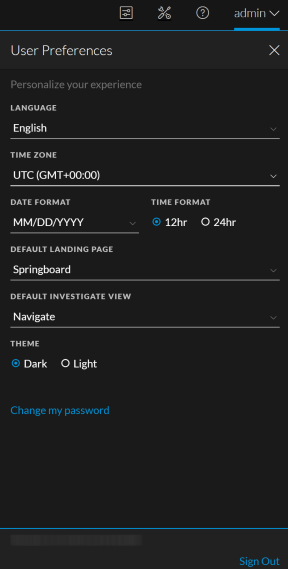
The following table describes the global application preference options that you can access from the User Preferences dialog.
Any selections that you make become effective immediately.
Preferences
To access additional global user preferences, do one of the following:
- For most views, such as Investigate, Dashboard, Reports,  (Configure) , or  (Admin) , select your username and then select **Profile**.
- In the Home, Springboard, Investigate view \[Events (formerly Event Analysis)\], Respond, Users, Hosts, Files, and some  (Configure) views, select your username, for example , and in the User Preferences dialog click **Change my password**.
The Preferences dialog shows your current preferences.
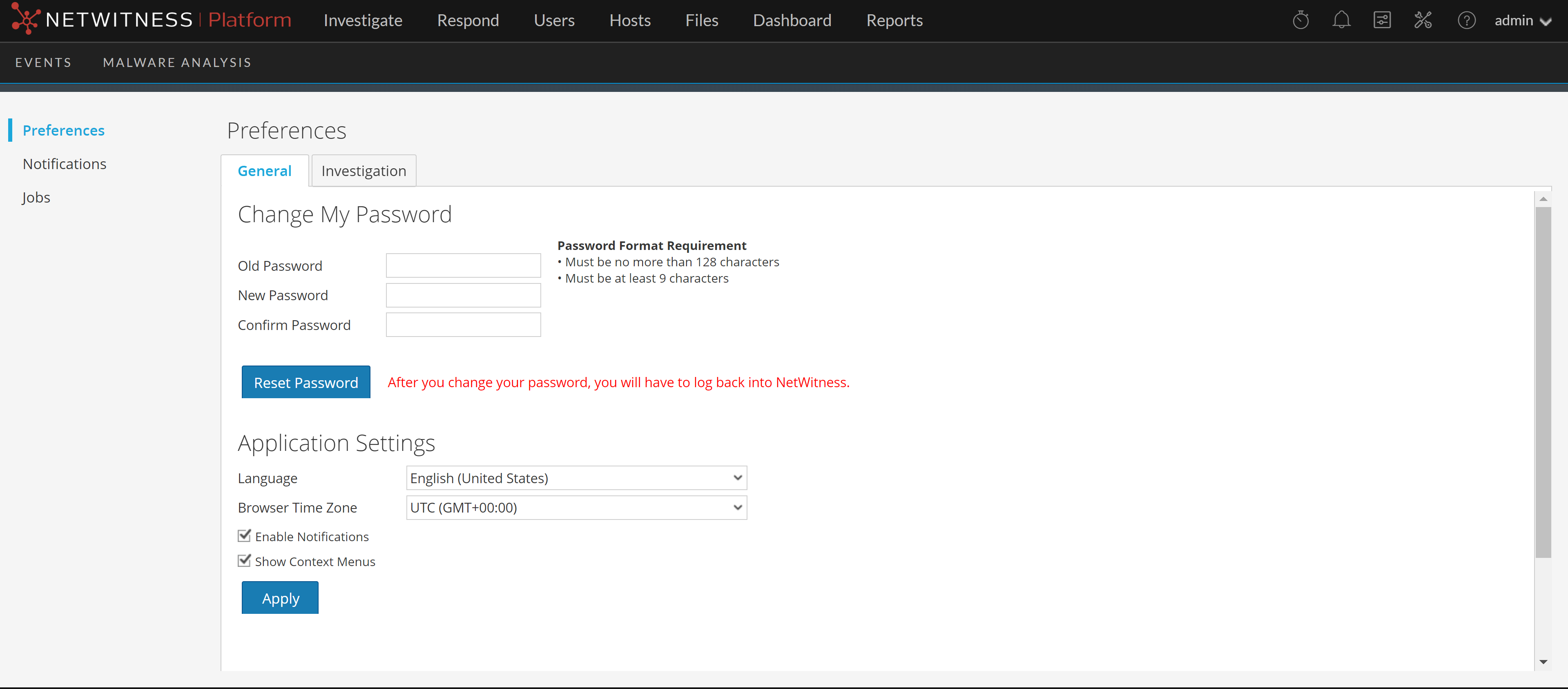
The following tables describe the global application preference options that you can access from the Preferences dialog.
Change My Password Section
This section enables you to change your password. Your administrator defines the appropriate password strength requirements for your NetWitness password, such as minimum password length and minimum number of uppercase, lowercase, decimal, non-Latin alphabetic, and special characters. These requirements are then displayed when changing your password.
The following tables describes the options in the Change My Password section.
If you changed your password, you will be logged out of NetWitness for the changes to take effect. The new password becomes effective the next time you log in to NetWitness.
Application Settings Section
The following tables describes the options in the Application Settings section.
[](https://mydev.netwitness.com/?hsLang=en)
Copyright © 2026, NetWitness LLC. All rights reserved.
[NetWitness Platform](https://www.netwitness.com/)
[Acceptable Use Policy](https://www.netwitness.com/wp-content/uploads/Acceptable-Use-Policy-092022.pdf) [Privacy Statement](https://www.netwitness.com/wp-content/uploads/NetWitness-Privacy-Statement-07292024.pdf)

[](https://www.linkedin.com/company/netwitness-platform/) [](https://www.youtube.com/@netwitness)
© 2026 NetWitness LLC. All rights reserved.