---
title: Upload, Edit, or Remove a Feed
description: "Edit, Upload, or Remove a Feed\nYou can upload a feed, edit an existing feed, or remove a feed.\nTo edit an existing feed:\n\nGo to (Configure) > Cus"
---
[Skip to content](https://mydev.netwitness.com/knowledge-base/upload-edit-orremoveafeed#main-content)

- [Home](https://mydev.netwitness.com/home)
- Integrations
Show submenu for Integrations
- [Netwitness Platform Integrations](https://mydev.netwitness.com/netwitnessplatformintegrations)
- [Third Party Integrations](https://mydev.netwitness.com/thirdpartyintegrations)
- [Knowledge Center](https://mydev.netwitness.com/knowledge-base)
- Community
Show submenu for Community
- [Blogs](https://mydev.netwitness.com/netwitness-security-llc-blog)
- Discussions
- Customers
Show submenu for Customers
- [Manage Products and Licenses](https://mydev.netwitness.com/nwportal)
- Downloads
- Partners
Show submenu for Partners
- [Partner Program](https://mydev.netwitness.com/partner)
- [Partner Resources](https://mydev.netwitness.com/partnerresources)
- [Submit a New Deal Registration](https://mydev.netwitness.com/dealregistration)
- [Become a Partner](https://mydev.netwitness.com/becomeapartner)
- [Update Your Partner Locator Profile](https://www.netwitness.com/partner-locator/?utm_source=pardotnewsletter&utm_medium=email&utm_campaign=partner_march)
- [NetWitness LinkedIn Partner Hub](https://linkedin.com/showcase/netwitnesspartners/)
- Education
Show submenu for Education
- [Instructor Led Training Schedule](https://mydev.netwitness.com/instructorledtrainingschedule)
- [NetWitness Training Catalog](https://mydev.netwitness.com/netwitnesstrainingcatalog)
- [Security Awareness Training](https://mydev.netwitness.com/securityawarenesstraining)
- [New Product Readiness](https://mydev.netwitness.com/newproductreadiness)
- [On-Demand Virtual Labs](https://mydev.netwitness.com/ondemandvirtuallabs)
- [Additional Training Information](https://mydev.netwitness.com/additionaltraininginformation)
- [Frequently Asked Questions](https://mydev.netwitness.com/educationfaq)
- [Contact NetWitness Education Team](https://mydev.netwitness.com/contact-netwitness-education-team)
- Support
Show submenu for Support
- [Contact Support](https://mydev.netwitness.com/contact-support)
- [Create a New Case](https://mydev.netwitness.com/create-support-case)
- [View My Cases](https://mydev.netwitness.com/viewmycase)
- [Product Version Life Cycle](https://mydev.netwitness.com/product-version-life-cycle)
- [Warranty & Replacement Parts](https://mydev.netwitness.com/warranty-and-replacement-parts)
- [Community Support Forum](https://mydev.netwitness.com/community-support-forum)
- [Technical Support Guide](https://mydev.netwitness.com/technical-support-guide)
Open main navigation
Close main navigation
- [Home](https://mydev.netwitness.com/home)
- Integrations
Show submenu for Integrations
- [Netwitness Platform Integrations](https://mydev.netwitness.com/netwitnessplatformintegrations)
- [Third Party Integrations](https://mydev.netwitness.com/thirdpartyintegrations)
- [Knowledge Center](https://mydev.netwitness.com/knowledge-base)
- Community
Show submenu for Community
- [Blogs](https://mydev.netwitness.com/netwitness-security-llc-blog)
- Discussions
- Customers
Show submenu for Customers
- [Manage Products and Licenses](https://mydev.netwitness.com/nwportal)
- Downloads
- Partners
Show submenu for Partners
- [Partner Program](https://mydev.netwitness.com/partner)
- [Partner Resources](https://mydev.netwitness.com/partnerresources)
- [Submit a New Deal Registration](https://mydev.netwitness.com/dealregistration)
- [Become a Partner](https://mydev.netwitness.com/becomeapartner)
- [Update Your Partner Locator Profile](https://www.netwitness.com/partner-locator/?utm_source=pardotnewsletter&utm_medium=email&utm_campaign=partner_march)
- [NetWitness LinkedIn Partner Hub](https://linkedin.com/showcase/netwitnesspartners/)
- Education
Show submenu for Education
- [Instructor Led Training Schedule](https://mydev.netwitness.com/instructorledtrainingschedule)
- [NetWitness Training Catalog](https://mydev.netwitness.com/netwitnesstrainingcatalog)
- [Security Awareness Training](https://mydev.netwitness.com/securityawarenesstraining)
- [New Product Readiness](https://mydev.netwitness.com/newproductreadiness)
- [On-Demand Virtual Labs](https://mydev.netwitness.com/ondemandvirtuallabs)
- [Additional Training Information](https://mydev.netwitness.com/additionaltraininginformation)
- [Frequently Asked Questions](https://mydev.netwitness.com/educationfaq)
- [Contact NetWitness Education Team](https://mydev.netwitness.com/contact-netwitness-education-team)
- Support
Show submenu for Support
- [Contact Support](https://mydev.netwitness.com/contact-support)
- [Create a New Case](https://mydev.netwitness.com/create-support-case)
- [View My Cases](https://mydev.netwitness.com/viewmycase)
- [Product Version Life Cycle](https://mydev.netwitness.com/product-version-life-cycle)
- [Warranty & Replacement Parts](https://mydev.netwitness.com/warranty-and-replacement-parts)
- [Community Support Forum](https://mydev.netwitness.com/community-support-forum)
- [Technical Support Guide](https://mydev.netwitness.com/technical-support-guide)
How can we help you?
- There are no suggestions because the search field is empty.
1. [NetWitness Knowledge Base](https://mydev.netwitness.com/knowledge-base?hsLang=en)
2. [Documentation](https://mydev.netwitness.com/knowledge-base/documentation?hsLang=en)
April 28, 2026
# Upload, Edit, or Remove a Feed
## Edit, Upload, or Remove a Feed
You can upload a feed, edit an existing feed, or remove a feed.
To edit an existing feed:
1. Go to  (Configure) \> **Custom Feeds**.
The Feeds view is displayed.
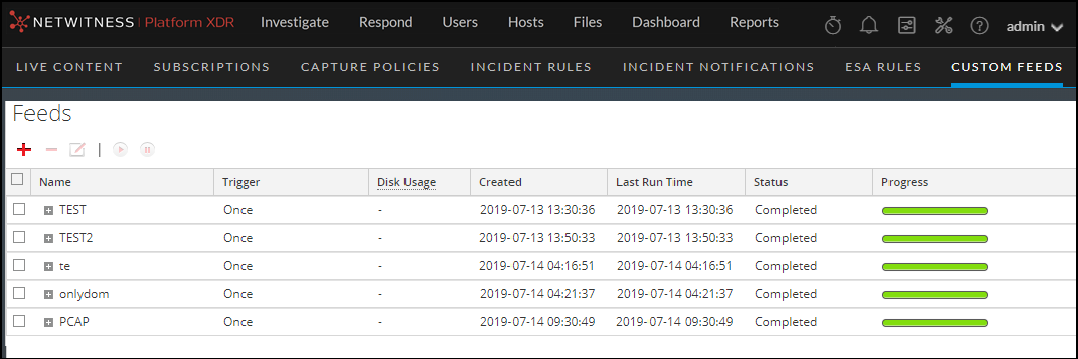
2. In the toolbar, select a feed and click .
The Configure Custom Feed or Configure Identity Feed panel opens in the Custom Feed wizard.
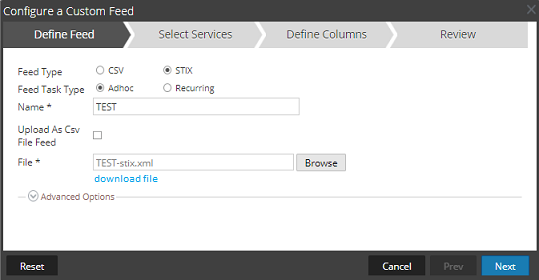
3. If you want to edit the feed file:
1. Click **download file**.
For an Identity feed, the .zip file is downloaded. For a custom feed, the .csv or .xml file is downloaded to your local file system. For a STIX feed, the .xml file is downloaded to your local file system.
2. Edit and save the file.
3. In the **Define Feed** tab, browse for and open the edited file.
4. Edit any other parameters in the **Define Feed** tab, **Select Services** tab, and **Define Columns** tab that apply to the type of feed.
5. Anytime before you click **Finish**, you can:
- Click **Cancel** to close the wizard without saving your changes.
- Click **Reset** to clear the data in the wizard.
- Click **Next** to display the next form (if not viewing the last form).
- Click **Prev** to display the previous form (if not viewing the first form).
6. In the **Review** tab, review the feed information, and if correct, click **Finish**.
The feed is recreated with the updated file and new feed specifications. The feed is added to the Feeds list and progress bar tracks completion. Upon successful creation of the feed definition file, the Create Feed wizard closes, and the feed and corresponding token file is listed in the Feeds list. You can expand or collapse the entry to see how many services are included, and which services are successful.
To upload a feed to a Decoder or Log Decoder:
1. Go to  (Admin) \> **Services**.
2. Select a Decoder or Log Decoder service and click  **\> View \> Config**.
The Services Config view is displayed with the General tab open.
3. Select the **Feeds** tab.
4. In the Feeds tab toolbar, click .
The Upload Feeds dialog is displayed.
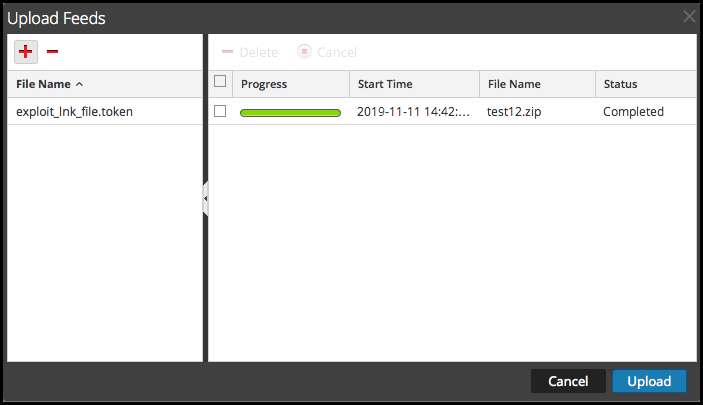
5. In the **File** grid, click  and select a feed file. Supported files are \*.feed, \*.token, and \*.filter.
6. Select the feed file from the **File** list and click **Upload**.
The Upload Job list is updated to show the progress and status of the uploaded feed.
To remove a feed:
1. Go to  (Configure) \> **Custom Feeds**.
The Custom Feeds view is displayed.

2. In the toolbar, select a feed and click .
The Delete Custom Feeds dialog is displayed.
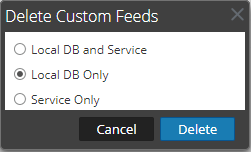
You can select one of the following options to delete the feed:
- If you choose to delete the feed from **Local DB and Service**, the feed is deleted from both the service and the local NetWitness box. The deleted feed will no longer be seen on the NetWitness user interface.
- If you choose to delete the feed from **Local DB Only**, the feed is deleted from the local NetWitness box. The deleted feed will not be seen on the NetWitness user interface; however, the last deployed version of the feeds will be present on the service. The undeployed feeds will be deleted forever.
- If you choose to delete the feed from **Service Only**, the feed is deleted from the service. The deleted feed will appear on the NetWitness user interface and can be deployed again.
3. Select where you want to delete the feed and click **Delete**.
A warning dialog is displayed.
4. Click **yes** to confirm that you want to delete the feed from the select areas.
- If you chose to delete the feed from the **Local DB Only**, the feed is deleted.
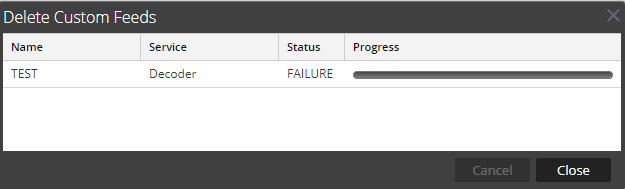
- If you chose to delete the feed from the **Local DB and Service** or **Service Only**, the Delete Custom Feeds view is displayed showing the progress of the deletion on the service.
[](https://mydev.netwitness.com/?hsLang=en)
Copyright © 2026, NetWitness LLC. All rights reserved.
[NetWitness Platform](https://www.netwitness.com/)
[Acceptable Use Policy](https://www.netwitness.com/wp-content/uploads/Acceptable-Use-Policy-092022.pdf) [Privacy Statement](https://www.netwitness.com/wp-content/uploads/NetWitness-Privacy-Statement-07292024.pdf)

[](https://www.linkedin.com/company/netwitness-platform/) [](https://www.youtube.com/@netwitness)
© 2026 NetWitness LLC. All rights reserved.