---
title: Upgrade Preparation Tasks for 12.3
description: "Tags: Documentation, Installation & Upgrade, Version 12.3Complete the following tasks to prepare for the upgrade to NetWitness 12.3.0.0"
---
[Skip to content](https://mydev.netwitness.com/knowledge-base/upgradepreparationtasksfor12-3#main-content)

- [Home](https://mydev.netwitness.com/home)
- Integrations
Show submenu for Integrations
- [Netwitness Platform Integrations](https://mydev.netwitness.com/netwitnessplatformintegrations)
- [Third Party Integrations](https://mydev.netwitness.com/thirdpartyintegrations)
- [Knowledge Center](https://mydev.netwitness.com/knowledge-base)
- Community
Show submenu for Community
- [Blogs](https://mydev.netwitness.com/netwitness-security-llc-blog)
- Discussions
- Customers
Show submenu for Customers
- [Manage Products and Licenses](https://mydev.netwitness.com/nwportal)
- Downloads
- Partners
Show submenu for Partners
- [Partner Program](https://mydev.netwitness.com/partner)
- [Partner Resources](https://mydev.netwitness.com/partnerresources)
- [Submit a New Deal Registration](https://mydev.netwitness.com/dealregistration)
- [Become a Partner](https://mydev.netwitness.com/becomeapartner)
- [Update Your Partner Locator Profile](https://www.netwitness.com/partner-locator/?utm_source=pardotnewsletter&utm_medium=email&utm_campaign=partner_march)
- [NetWitness LinkedIn Partner Hub](https://linkedin.com/showcase/netwitnesspartners/)
- Education
Show submenu for Education
- [Instructor Led Training Schedule](https://mydev.netwitness.com/instructorledtrainingschedule)
- [NetWitness Training Catalog](https://mydev.netwitness.com/netwitnesstrainingcatalog)
- [Security Awareness Training](https://mydev.netwitness.com/securityawarenesstraining)
- [New Product Readiness](https://mydev.netwitness.com/newproductreadiness)
- [On-Demand Virtual Labs](https://mydev.netwitness.com/ondemandvirtuallabs)
- [Additional Training Information](https://mydev.netwitness.com/additionaltraininginformation)
- [Frequently Asked Questions](https://mydev.netwitness.com/educationfaq)
- [Contact NetWitness Education Team](https://mydev.netwitness.com/contact-netwitness-education-team)
- Support
Show submenu for Support
- [Contact Support](https://mydev.netwitness.com/contact-support)
- [Create a New Case](https://mydev.netwitness.com/create-support-case)
- [View My Cases](https://mydev.netwitness.com/viewmycase)
- [Product Version Life Cycle](https://mydev.netwitness.com/product-version-life-cycle)
- [Warranty & Replacement Parts](https://mydev.netwitness.com/warranty-and-replacement-parts)
- [Community Support Forum](https://mydev.netwitness.com/community-support-forum)
- [Technical Support Guide](https://mydev.netwitness.com/technical-support-guide)
Open main navigation
Close main navigation
- [Home](https://mydev.netwitness.com/home)
- Integrations
Show submenu for Integrations
- [Netwitness Platform Integrations](https://mydev.netwitness.com/netwitnessplatformintegrations)
- [Third Party Integrations](https://mydev.netwitness.com/thirdpartyintegrations)
- [Knowledge Center](https://mydev.netwitness.com/knowledge-base)
- Community
Show submenu for Community
- [Blogs](https://mydev.netwitness.com/netwitness-security-llc-blog)
- Discussions
- Customers
Show submenu for Customers
- [Manage Products and Licenses](https://mydev.netwitness.com/nwportal)
- Downloads
- Partners
Show submenu for Partners
- [Partner Program](https://mydev.netwitness.com/partner)
- [Partner Resources](https://mydev.netwitness.com/partnerresources)
- [Submit a New Deal Registration](https://mydev.netwitness.com/dealregistration)
- [Become a Partner](https://mydev.netwitness.com/becomeapartner)
- [Update Your Partner Locator Profile](https://www.netwitness.com/partner-locator/?utm_source=pardotnewsletter&utm_medium=email&utm_campaign=partner_march)
- [NetWitness LinkedIn Partner Hub](https://linkedin.com/showcase/netwitnesspartners/)
- Education
Show submenu for Education
- [Instructor Led Training Schedule](https://mydev.netwitness.com/instructorledtrainingschedule)
- [NetWitness Training Catalog](https://mydev.netwitness.com/netwitnesstrainingcatalog)
- [Security Awareness Training](https://mydev.netwitness.com/securityawarenesstraining)
- [New Product Readiness](https://mydev.netwitness.com/newproductreadiness)
- [On-Demand Virtual Labs](https://mydev.netwitness.com/ondemandvirtuallabs)
- [Additional Training Information](https://mydev.netwitness.com/additionaltraininginformation)
- [Frequently Asked Questions](https://mydev.netwitness.com/educationfaq)
- [Contact NetWitness Education Team](https://mydev.netwitness.com/contact-netwitness-education-team)
- Support
Show submenu for Support
- [Contact Support](https://mydev.netwitness.com/contact-support)
- [Create a New Case](https://mydev.netwitness.com/create-support-case)
- [View My Cases](https://mydev.netwitness.com/viewmycase)
- [Product Version Life Cycle](https://mydev.netwitness.com/product-version-life-cycle)
- [Warranty & Replacement Parts](https://mydev.netwitness.com/warranty-and-replacement-parts)
- [Community Support Forum](https://mydev.netwitness.com/community-support-forum)
- [Technical Support Guide](https://mydev.netwitness.com/technical-support-guide)
How can we help you?
- There are no suggestions because the search field is empty.
1. [NetWitness Knowledge Base](https://mydev.netwitness.com/knowledge-base?hsLang=en)
2. [Documentation](https://mydev.netwitness.com/knowledge-base/documentation?hsLang=en)
April 28, 2026
# Upgrade Preparation Tasks for 12.3
**Tags:** Documentation, Installation & Upgrade, Version 12.3
Complete the following tasks to prepare for the upgrade to NetWitness 12.3.0.0
**Warning:** The Dell S4 and S4s appliances reached the End of Life (EOL) in June 2021. We recommend that you discontinue installation or upgrade activities on these and upgrade to new hardware. For more information on End of Life hardware support, see [https://50269063.hs-sites.com/knowledge-base/product-version-life-cycle-for-netwitness-platform-MCACAQCUG63VGCBMYTNCFBSBPLIY](https://50269063.hs-sites.com/knowledge-base/product-version-life-cycle-for-netwitness-platform-MCACAQCUG63VGCBMYTNCFBSBPLIY?hsLang=en).
## Task 1 (Optional). Remove Legacy Package Repositories
Perform this task to free up space by removing unused repositories from previous releases.
1. Determine the version of the oldest NetWitness Platform host in your environment by doing one of the following:
- Review the host list in the Admin user interface.
- Run the following command on the NW Server:
upgrade-cli-client --list
2. You can safely remove all legacy package repository folders located at /var/netwitness/common/repo/ on the NW Server for all versions prior to the baseline major release version of the oldest active host in the environment.
- If the oldest host version is 11.7.x.x, you can safely remove 11.0.x.x, 11.1.x.x, 11.2.x.x, 11.3.x.x, 11.4.x.x, 11.5.x.x, and 11.6.x.x repository folders. **However, do not remove repository versions greater than or equal to 11.7.0.0.**
## Task 2. Backup and Remove the Rotated RabbitMQ Logs
Before upgrading from 11.7.x to 12.3.0.0, you must remove the old RabbitMQ logs and free up the space in /var/log mount disk. Follow the below procedure to free up the space in /var/log mount disk.
1. Backup the rotated RabbitMQ logs into var/netwitness directory. Do the following.
mkdir /var/netwitness/rabbitmq\_logsbkp
scp -r /var/log/rabbitmq/ /var/netwitness/rabbitmq\_logsbkp
2. Remove the rotated RabbitMQ logs from /var/log/rabbitmq pre-upgrade. Do the following.
cd /var/log/rabbitmq
rm -f rabbit\\@ .log.\*
rm -f rabbit\\@ \_upgrade.log.\*
rm -f \*.gz
rm -f rabbit@ .log-\*
**Note:**
\- This procedure must be performed only once before upgrading to 12.3.0.0 Post-upgrade, the RabbitMQ service automatically handles the log rotation.
\- The command rm -f rabbit\\@ .log.\* is used to clean up the old uncompressed logs such as log.1, log.2, and log.3.
\- The command rm -f rabbit\\@ \_upgrade.log.\* is used to clean up the old uncompressed upgrade logs.
\- The command rm -f \*.gz is used to clean up the old compressed logs.
\- The command rm -f rabbit@ .log-\* is used to clean up the old uncompressed logs rotated with logrotate.
## Task 3. Preparing ESA Deployments for Migration to 12.3.0.0
Before upgrading to 12.3.0.0, NetWitness recommends that all the ESA deployments maintain an error-free state and remove any unused ESA deployments, as ESA deployments will be migrated to policies and groups after upgrading to 12.3.0.0. Each deployment will be converted into a policy and group and will be available to manage only after the upgrade of the Correlation servers to the 12.3.x.x version.
### Manage ESA Deployments and Data Sources
In 12.1 and later versions, you can only manage the ESA deployments and Data Sources through **Centralized Content Management**. Go to (**CONFIGURE**) \> **Policies** \> **Content** \> **Event Stream Analysis** page to manage the ESA deployments and Data Sources. You can only manage the ESA Rules in the **ESA Rules** page. Refer the following screenshots.
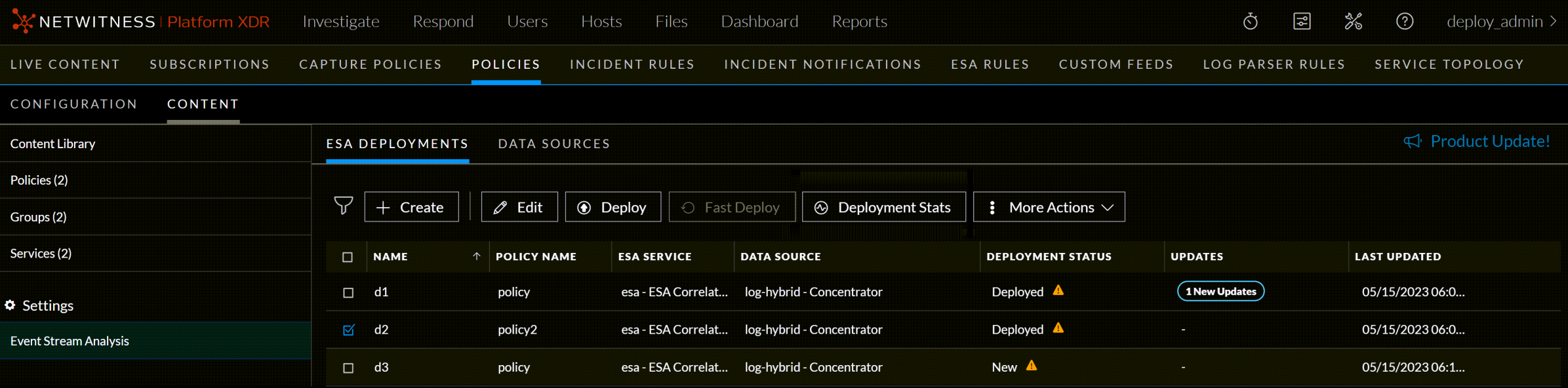
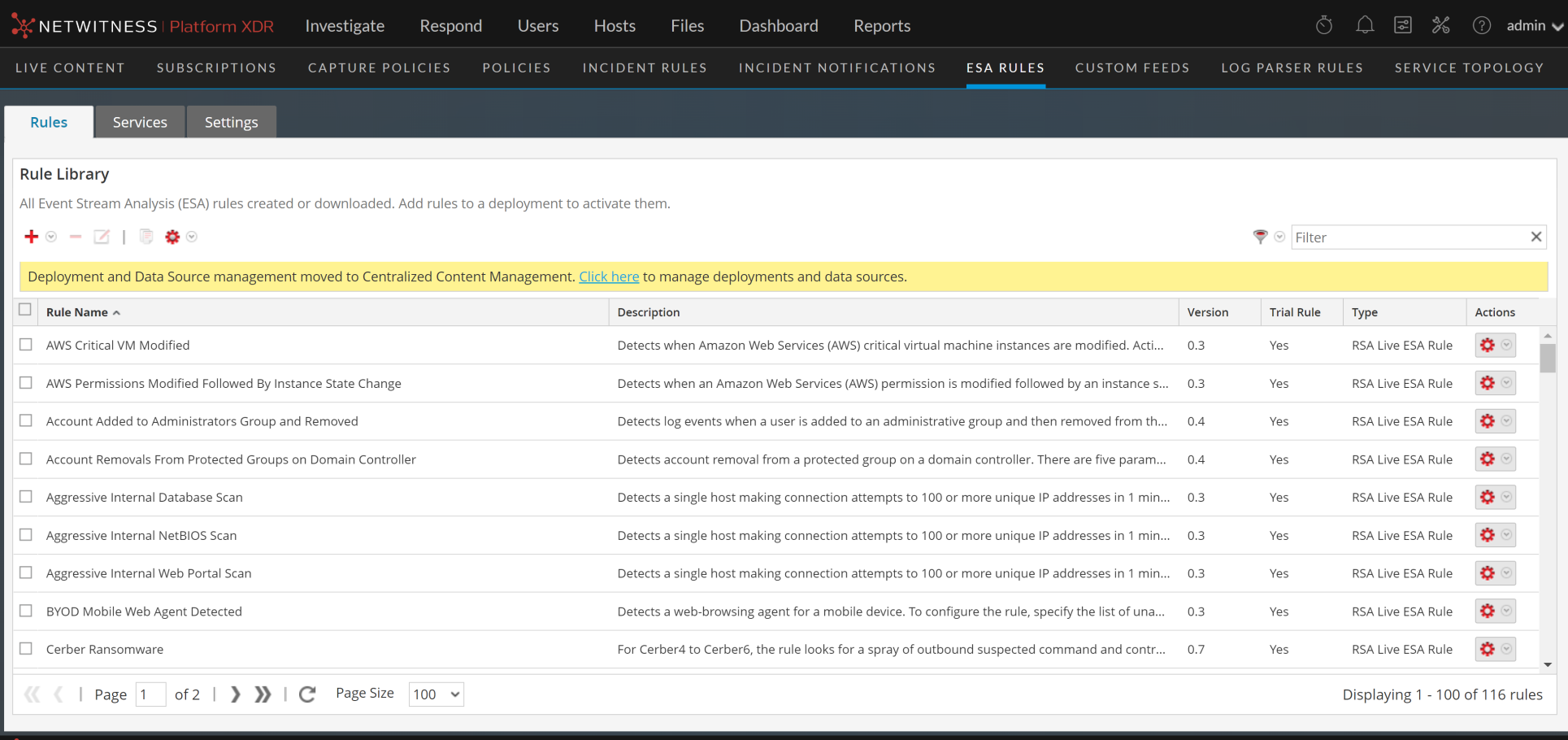
Make sure that you plan the upgrade process so that Correlation servers are upgraded immediately after the Admin Server is done. The deployments will not be accessible until the corresponding Correlation servers are upgraded. However, the correlation servers will still continue to process the Alerts and Events. You must upgrade the ESA hosts immediately after upgrading the Admin Server.
For more information on **Centralized Content Management** and managing the deployments, see [https://50269063.hs-sites.com/knowledge-base/694426](https://50269063.hs-sites.com/knowledge-base/694426?hsLang=en).
**IMPORTANT:** If there is any need to import ESA Rules and Enrichments. NetWitness recommends importing those missing rules and enrichments before the upgrade.
The pre-upgrade and post-upgrade states of deployments are represented in the following table.
Healthy deployment contains no errors, and the required resources such as ESA Server, Data source, and ESA rule are added.
**Note:** NetWitness recommends that all the deployments maintain an error-free state and also remove any unnecessary or unused ESA deployments.
## Task 4. Backup Elasticsearch Data (Users, Entities, Alerts, and Indicators)
Before upgrading the UEBA host from 12.0.0.0 and older versions to 12.3.0.0, you must perform the backup of your Elasticsearch data such as Users, Entities, Alerts, and Indicators (using the Elasticsearch migration tool) to retain them post upgrade.
### Prerequisites
Make sure the following prerequisites are met before you perform data backup:
- The current Elasticsearch version must be 5.5.0.
- Presidio rpms version must be less than or equal to 12.0.0.0.
- ueba\_es\_migration\_tool.zip file must be downloaded.
**Note: ueba\_es\_migration\_tool** allows you to migrate presidio Elasticsearch data from Elasticsearch version 5.5.0 to 7.17.6 while upgrading the UEBA host to 12.3.0.0 from 12.0.0.0 and older versions. This tool contains elk-migration-script.sh script file and presidio-elk-migration-1.0.0.jar file and it can be downloaded from [https://50269063.hs-sites.com/knowledge-base/696519](https://50269063.hs-sites.com/knowledge-base/696519?hsLang=en).
To backup the Elasticsearch data:
1. Select the available directory and unzip the ueba\_es\_migration\_tool.zip file.
2. Go to cd ueba\_es\_migration\_tool. Run the following command.
sh elk-migration-script.sh
The Elasticsearch migration tool guide is displayed.
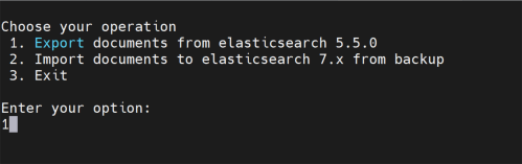
3. Select **Export documents from elasticsearch 5.5.0** and enter **yes** when prompted to stop the airflow scheduler.
**Note:** When you enter **yes**, the airflow scheduler stops consuming the fresh incoming data such as Users, Entities, and Alerts. This avoids data loss during the export process.
4. In the next step, select **Fresh Export** to export the existing data.
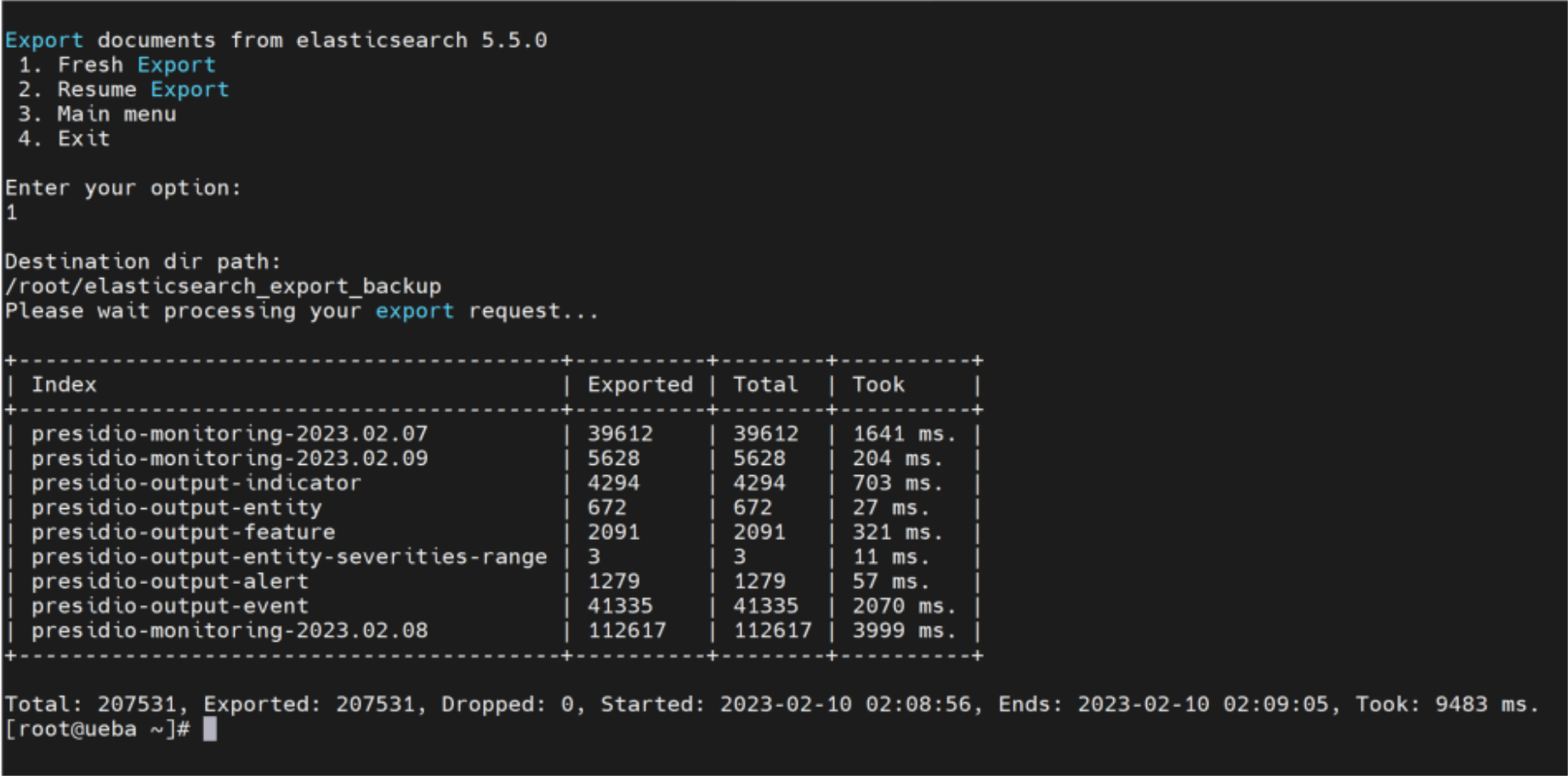
**Note:**
\- If the Export operation fails due to some technical issue, select **Resume Export** once the issue is resolved, to resume the Export operation.
\- Go to /log/log/es-migration-export.log if you want to view the log for the succeeded or failed processes.
## Task 5 (Optional). Disable STIG-based FIPS Kernel Controls
If you enabled STIG-based FIPS Kernel controls, you must disable them before initiating the NetWitness Platform upgrade process to avoid boot errors. To disable STIG-based FIPS Kernel controls, run the following commands:
manage-stig-controls --disable-control-groups 3 --host-all
grub2-mkconfig -o /boot/grub2/grub.cfg
After you upgrade NetWitness Platform, ensure that you enable STIG-based FIPS Kernel controls.
**Note:** STIG-based FIPS Kernel controls which require modifications to kernel boot options are not enabled by NetWitness out-of-the-box.
## Task 6 (Optional). Verify Connection for Live Server
Go to admin/system/live services and do a test connection to verify if you are able to connect to the live server as this is essential for the source-server from 12.x and above. This is an optional step and applicable only for customers who have configured live.
[](https://mydev.netwitness.com/?hsLang=en)
Copyright © 2026, NetWitness LLC. All rights reserved.
[NetWitness Platform](https://www.netwitness.com/)
[Acceptable Use Policy](https://www.netwitness.com/wp-content/uploads/Acceptable-Use-Policy-092022.pdf) [Privacy Statement](https://www.netwitness.com/wp-content/uploads/NetWitness-Privacy-Statement-07292024.pdf)

[](https://www.linkedin.com/company/netwitness-platform/) [](https://www.youtube.com/@netwitness)
© 2026 NetWitness LLC. All rights reserved.