---
title: Upgrade Overview for 12.5
description: "Tags: Documentation\n\n\n\n\n\n\n\n\nUpgrade NetWitness Platform\n\n\n\n\n\n\n\n\n\n\nThis document provides information about the benefits and process of upgrading NetWi"
---
[Skip to content](https://mydev.netwitness.com/knowledge-base/upgradeoverviewfor12-5#main-content)

- [Home](https://mydev.netwitness.com/home)
- Integrations
Show submenu for Integrations
- [Netwitness Platform Integrations](https://mydev.netwitness.com/netwitnessplatformintegrations)
- [Third Party Integrations](https://mydev.netwitness.com/thirdpartyintegrations)
- [Knowledge Center](https://mydev.netwitness.com/knowledge-base)
- Community
Show submenu for Community
- [Blogs](https://mydev.netwitness.com/netwitness-security-llc-blog)
- Discussions
- Customers
Show submenu for Customers
- [Manage Products and Licenses](https://mydev.netwitness.com/nwportal)
- Downloads
- Partners
Show submenu for Partners
- [Partner Program](https://mydev.netwitness.com/partner)
- [Partner Resources](https://mydev.netwitness.com/partnerresources)
- [Submit a New Deal Registration](https://mydev.netwitness.com/dealregistration)
- [Become a Partner](https://mydev.netwitness.com/becomeapartner)
- [Update Your Partner Locator Profile](https://www.netwitness.com/partner-locator/?utm_source=pardotnewsletter&utm_medium=email&utm_campaign=partner_march)
- [NetWitness LinkedIn Partner Hub](https://linkedin.com/showcase/netwitnesspartners/)
- Education
Show submenu for Education
- [Instructor Led Training Schedule](https://mydev.netwitness.com/instructorledtrainingschedule)
- [NetWitness Training Catalog](https://mydev.netwitness.com/netwitnesstrainingcatalog)
- [Security Awareness Training](https://mydev.netwitness.com/securityawarenesstraining)
- [New Product Readiness](https://mydev.netwitness.com/newproductreadiness)
- [On-Demand Virtual Labs](https://mydev.netwitness.com/ondemandvirtuallabs)
- [Additional Training Information](https://mydev.netwitness.com/additionaltraininginformation)
- [Frequently Asked Questions](https://mydev.netwitness.com/educationfaq)
- [Contact NetWitness Education Team](https://mydev.netwitness.com/contact-netwitness-education-team)
- Support
Show submenu for Support
- [Contact Support](https://mydev.netwitness.com/contact-support)
- [Create a New Case](https://mydev.netwitness.com/create-support-case)
- [View My Cases](https://mydev.netwitness.com/viewmycase)
- [Product Version Life Cycle](https://mydev.netwitness.com/product-version-life-cycle)
- [Warranty & Replacement Parts](https://mydev.netwitness.com/warranty-and-replacement-parts)
- [Community Support Forum](https://mydev.netwitness.com/community-support-forum)
- [Technical Support Guide](https://mydev.netwitness.com/technical-support-guide)
Open main navigation
Close main navigation
- [Home](https://mydev.netwitness.com/home)
- Integrations
Show submenu for Integrations
- [Netwitness Platform Integrations](https://mydev.netwitness.com/netwitnessplatformintegrations)
- [Third Party Integrations](https://mydev.netwitness.com/thirdpartyintegrations)
- [Knowledge Center](https://mydev.netwitness.com/knowledge-base)
- Community
Show submenu for Community
- [Blogs](https://mydev.netwitness.com/netwitness-security-llc-blog)
- Discussions
- Customers
Show submenu for Customers
- [Manage Products and Licenses](https://mydev.netwitness.com/nwportal)
- Downloads
- Partners
Show submenu for Partners
- [Partner Program](https://mydev.netwitness.com/partner)
- [Partner Resources](https://mydev.netwitness.com/partnerresources)
- [Submit a New Deal Registration](https://mydev.netwitness.com/dealregistration)
- [Become a Partner](https://mydev.netwitness.com/becomeapartner)
- [Update Your Partner Locator Profile](https://www.netwitness.com/partner-locator/?utm_source=pardotnewsletter&utm_medium=email&utm_campaign=partner_march)
- [NetWitness LinkedIn Partner Hub](https://linkedin.com/showcase/netwitnesspartners/)
- Education
Show submenu for Education
- [Instructor Led Training Schedule](https://mydev.netwitness.com/instructorledtrainingschedule)
- [NetWitness Training Catalog](https://mydev.netwitness.com/netwitnesstrainingcatalog)
- [Security Awareness Training](https://mydev.netwitness.com/securityawarenesstraining)
- [New Product Readiness](https://mydev.netwitness.com/newproductreadiness)
- [On-Demand Virtual Labs](https://mydev.netwitness.com/ondemandvirtuallabs)
- [Additional Training Information](https://mydev.netwitness.com/additionaltraininginformation)
- [Frequently Asked Questions](https://mydev.netwitness.com/educationfaq)
- [Contact NetWitness Education Team](https://mydev.netwitness.com/contact-netwitness-education-team)
- Support
Show submenu for Support
- [Contact Support](https://mydev.netwitness.com/contact-support)
- [Create a New Case](https://mydev.netwitness.com/create-support-case)
- [View My Cases](https://mydev.netwitness.com/viewmycase)
- [Product Version Life Cycle](https://mydev.netwitness.com/product-version-life-cycle)
- [Warranty & Replacement Parts](https://mydev.netwitness.com/warranty-and-replacement-parts)
- [Community Support Forum](https://mydev.netwitness.com/community-support-forum)
- [Technical Support Guide](https://mydev.netwitness.com/technical-support-guide)
How can we help you?
- There are no suggestions because the search field is empty.
1. [NetWitness Knowledge Base](https://mydev.netwitness.com/knowledge-base?hsLang=en)
2. [Documentation](https://mydev.netwitness.com/knowledge-base/documentation?hsLang=en)
April 26, 2026
# Upgrade Overview for 12.5
**Tags:** Documentation
Upgrade NetWitness Platform
This document provides information about the benefits and process of upgrading NetWitness Platform to 12.5. Ensure you go through the pre-requisites and pre-upgrade tasks before you upgrade NetWitness Platform. You can upgrade NetWitness Platform using four different options depending upon your Internet connectivity. After upgrading, you should also perform certain post upgrade tasks and post upgrade validation checks listed in this guide to complete the upgrade process successfully. The instructions in this document apply to both physical and virtual hosts (including AWS, Azure Public Cloud, and Google Cloud Platform) unless stated to the contrary.
**Important:** NetWitness advises users to check their software versions, noting that versions up to 12.2 have reached End of Life (EOL) as of March 31, 2024. For more information, see [https://50269063.hs-sites.com/knowledge-base/product-version-life-cycle-for-netwitness-platform-MCACAQCUG63VGCBMYTNCFBSBPLIY](https://50269063.hs-sites.com/knowledge-base/product-version-life-cycle-for-netwitness-platform-MCACAQCUG63VGCBMYTNCFBSBPLIY?hsLang=en). To take advantage of the latest features and security updates, NetWitness recommends upgrading to version 12.5.
**Important:** NetWitness strongly recommends you to take a backup of the schemas.json file before upgrading the UEBA server to 12.5 version. You can find this file at the following location, */var/netwitness/presidio/asl/adapter-config/schema-query/schemas.json*
**Important:** UEBA is now enabled with App rules by default starting from version 12.5. This means that Decoders deployed with fresh installations of 12.5 will automatically have the necessary UEBA related App rules. If you were already using App rules with an older version and then upgraded to 12.5, those rules will continue to work without any changes. However, NetWitness strongly recommends you to deploy the new UEBA Bundles from NetWitness Live to your Decoders for using App rules. This will ensure that you have all the latest App rules required for UEBA to function properly. For more information on deploying the UEBA Bundles on Decoders, see the [Find and Deploy Live Resources](https://50269063.hs-sites.com/knowledge-base/FindandDeployLiveResources?hsLang=en) topic in the *NetWitness Live Services Guide for 12.5*.
**Bundle names for deploying UEBA related App rules**:
\- NetWitness UEBA Authentication Operations
\- NetWitness UEBA Registry Operations
\- NetWitness UEBA Active Directory Operations
\- NetWitness UEBA Process Operations
\- NetWitness UEBA File Operations
\- NetWitness UEBA Windows Kerberos Service Request
\- NetWitness UEBA Network TLS Outbound Connections
**Important:** NetWitness 12.4 and later versions (AlmaLinux) do not support numeric usernames. This means that customers who use Pam Securid with only numbers as usernames cannot be added to the groups after upgrading to 12.5 version. For more information on this limitation, see [https://www.webconn.tech/kb/are-all-numeric-usernames-allowed-in-almalinux-8.](https://www.webconn.tech/kb/are-all-numeric-usernames-allowed-in-almalinux-8)
**Important:** The custom search patterns you created using the **search.ini** file in version 12.3.1 or earlier will not be migrated to the new **search.xml** file format used in version 12.5 and later. As a result, those custom search patterns will not be available after you upgrade to version 12.5 or later.
To recreate those custom search patterns in the new version, you need to manually configure them again. You can do this in two ways:
\- Go to **Investigate** \> **Events** view and create and deploy the search pattern rules to a policy containing Packet Decoder.
\- Go to **Content Library** \> **More** \> **Search Pattern Rule** tab and create the rules.
For detailed instructions on creating search pattern rules, refer to the **Create a Search Pattern in the** Text **Tab** section in the **Analyze Events in the Events View** topic of the [Investigate User Guide](https://50269063.hs-sites.com/knowledge-base/AnalyzeEventsintheEventsView?hsLang=en) or the **Manage Search Pattern Rules** topic in the [Centralized Content Management Guide for NetWitness.](https://50269063.hs-sites.com/knowledge-base/Policy-basedCentralizedContentManagement?hsLang=en)
**Note:** NetWitness Platform now supports installing multiple servers of UEBA in your environment. For more information, see **Configure Multiple UEBA Servers** topic in the *NetWitness UEBA Configuration Guide*.
**Note:** From NetWitness 12.5 and later, the Home page will be the default landing page for users installing the NetWitness Platform for the first time. For existing users, Springboard will still be the default landing page. However, the Springboard feature will be deprecated in future releases, and the Home page will become the default landing page. For more information, see **Managing the Springboard** topic in the *NetWitness Getting Started Guide for 12.5*.
There are many exciting new features that you can enable after you have upgraded to 12.5. For a detailed description of the new features in this release, see the [*Release Notes for NetWitness Platform 12.5*](https://50269063.hs-sites.com/knowledge-base/715806?hsLang=en). Go to the [NetWitness All Versions Documents](https://community.netwitness.com/t5/netwitness-platform-online/netwitness-platform-all-documents/ta-p/676246) page and find NetWitness Platform guides to troubleshoot issues. For more information on the new features released in the previous releases, see [https://community.netwitness.com/t5/netwitness-platform-online/what-s-new-in-previous-releases-11-x-to-12-x/ta-p/695650](https://community.netwitness.com/t5/netwitness-platform-online/what-s-new-in-previous-releases-11-x-to-12-x/ta-p/695650).
## **Upgrade Paths Supported for 12.5**
The following upgrade paths are supported for NetWitness 12.5:
- NetWitness 12.4.2.0 to 12.5
- NetWitness 12.4.1.0 to 12.5
- NetWitness 12.4.0.0 to 12.5
- NetWitness 12.3.1.0 to 12.5
- NetWitness 12.3.0.0 to 12.5
- NetWitness 12.2.0.1 to 12.5
- NetWitness 12.2.0.0 to 12.5
## **NetWitness Upgrade Guidelines for Azure**
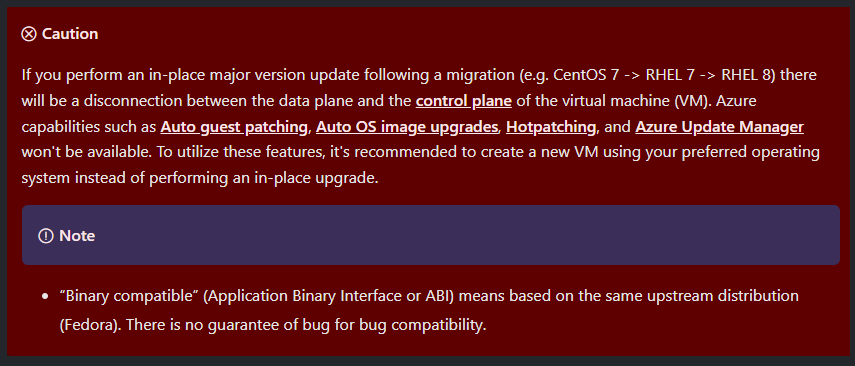
In-place upgrades on Azure VMs are supported when followed by the Standard Configuration outlined in the Azure Installation Guide. The user is responsible for ensuring that no VM policies at the Azure Subscription level interfere with the VM's operating system, such as configurations related to the Azure Control Plane.
If you follow the Azure Installation Guide correctly, you should experience a smooth upgrade process without encountering any warnings. However, deviating from these guidelines or adding extra configurations, such as those involving the Azure Control Plane, can lead to errors, as shown below:
## Running in Mixed Mode Environment
NetWitness Platform supports mixed mode during upgrade. Mixed mode occurs when some services are upgraded to the latest version and some services are still on the older versions.
For more information, see **Running in Mixed Mode** in the *[NetWitness Hosts and Services Getting Started Guide](https://50269063.hs-sites.com/knowledge-base/HostsandServicesGettingStartedGuidefor12-5?hsLang=en)*.
**Note:**
\- If it takes a longer duration for upgrading all the hosts in your environment, contact NetWitness support to avoid encountering any issues.
\- If you are running Endpoint Log Hybrid in mixed mode, make sure Endpoint Broker is on the same version as one of the Endpoint Servers.
\- Mixed mode is not supported for ESA hosts in NetWitness Platform.
## **Upgrade Considerations for ESA Hosts**
**IMPORTANT:** The NetWitness server, ESA primary host, and ESA secondary host must all be on the same NetWitness Platform version.
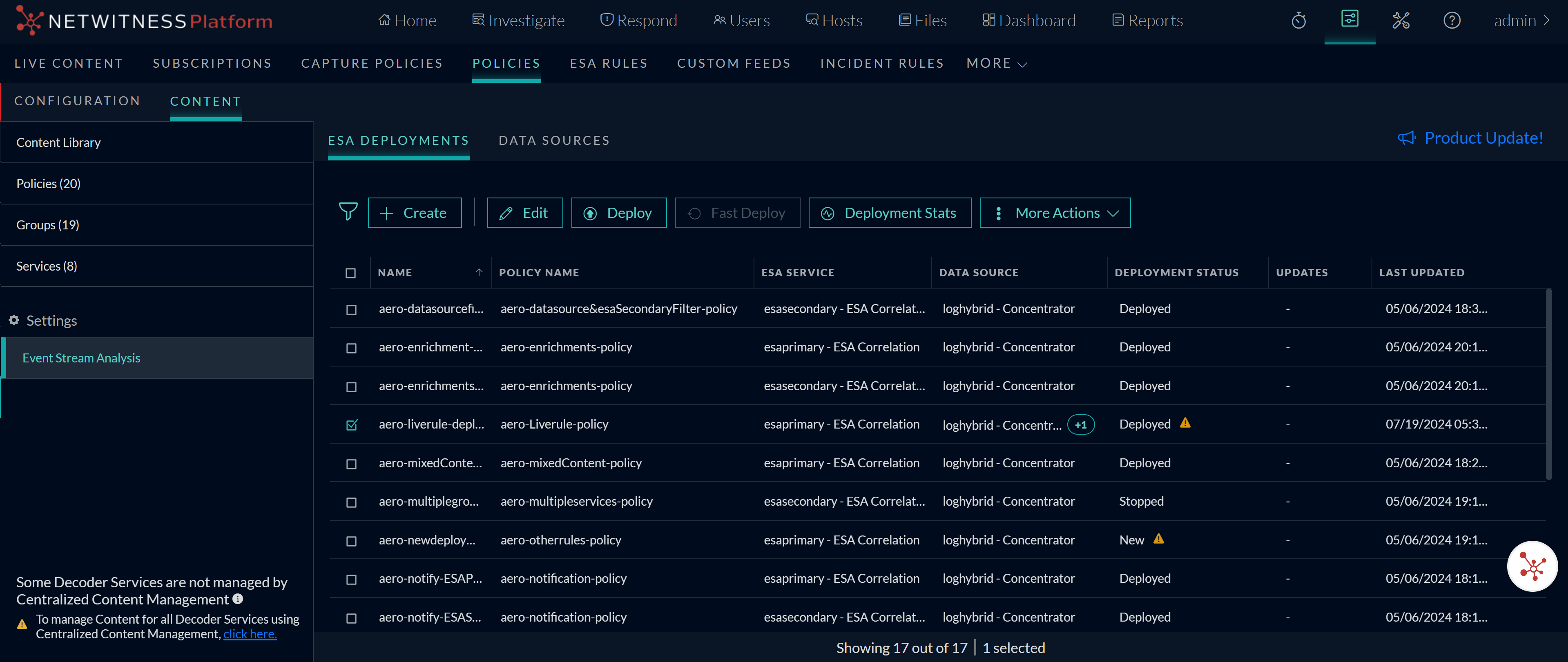
- You can only manage the ESA deployments and Data Sources through **Centralized Content Management**. Go to  (**CONFIGURE**) \> **Policies** \> **Content** \> **Event Stream Analysis** page to manage the ESA deployments and Data Sources. Refer the following figure.
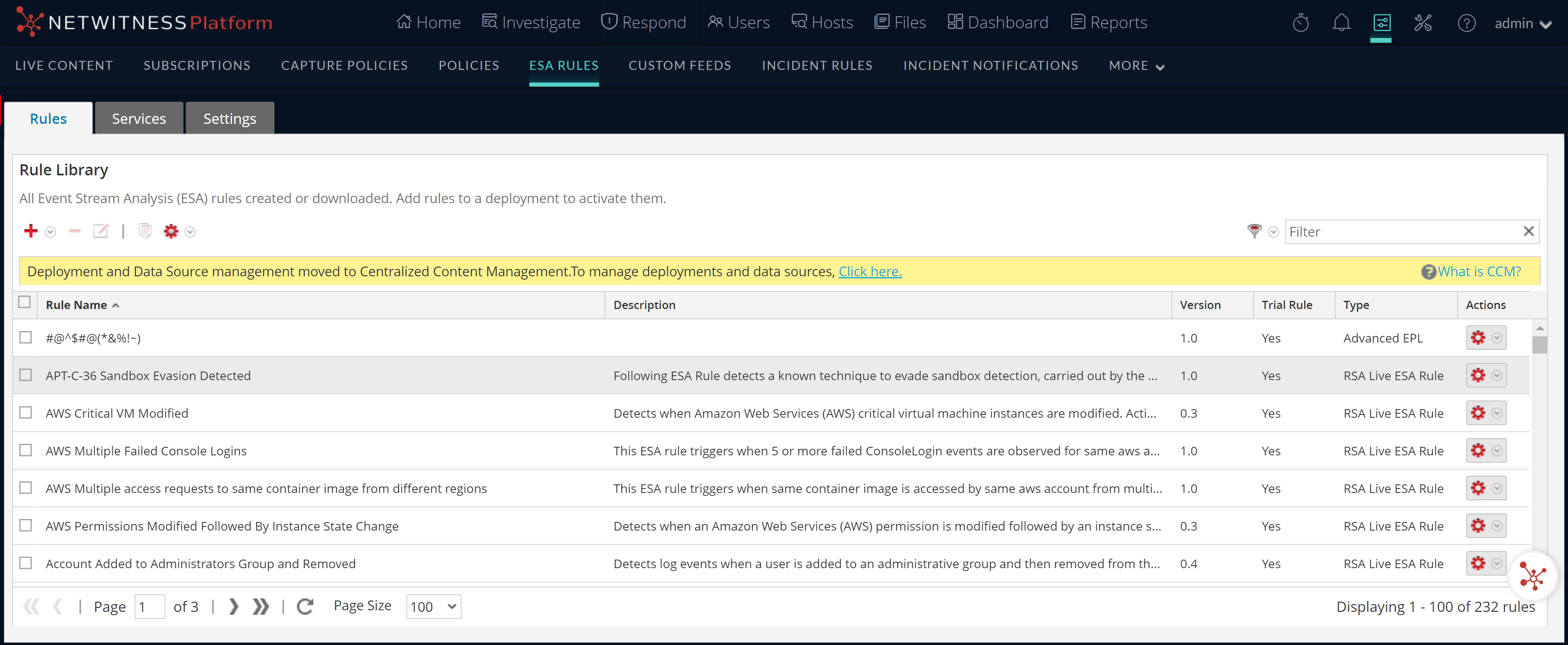
- You can only manage the ESA Rules in the **ESA Rules** page. Refer the following figure.
- After upgrading to the 12.5 version, all the ESA deployments will be migrated to  (**CONFIGURE**) \> **Policies** page. Each deployment will be converted into a policy and group and will be available to manage only after the upgrade of the Correlation servers to the 12.5 version. Make sure that you plan the upgrade process so that Correlation servers are upgraded immediately after the Admin Server is done. The deployments will not be accessible until the corresponding Correlation servers are upgraded. However, the correlation servers will still continue to process the Alerts and Events.
- You must upgrade the ESA hosts immediately after upgrading the Admin Server.
For more information on **Centralized Content Management** and managing the deployments, see [Centralized Content Management Guide for NetWitness](https://50269063.hs-sites.com/knowledge-base/CentralizedContentManagementGuidefor12-5?hsLang=en).
## **Upgrade or Install Windows Legacy Collection**
Refer to **[Windows Legacy Collection Guide for NetWitness](https://50269063.hs-sites.com/knowledge-base/WindowsLegacyCollection?hsLang=en)** for NetWitness Legacy Windows Collection Upgrade & Installation Instructions.
**Note:** After you upgrade or install Windows Legacy Collection, reboot the system to ensure that Log Collection functions correctly.
## **Terminologies**
[](https://mydev.netwitness.com/?hsLang=en)
Copyright © 2026, NetWitness LLC. All rights reserved.
[NetWitness Platform](https://www.netwitness.com/)
[Acceptable Use Policy](https://www.netwitness.com/wp-content/uploads/Acceptable-Use-Policy-092022.pdf) [Privacy Statement](https://www.netwitness.com/wp-content/uploads/NetWitness-Privacy-Statement-07292024.pdf)

[](https://www.linkedin.com/company/netwitness-platform/) [](https://www.youtube.com/@netwitness)
© 2026 NetWitness LLC. All rights reserved.