---
title: System Logging - Settings View
description: System Logging - Settings ViewSystem Logging - Settings View The NetWitness Settings view in the System Logging panel configures the size of the log
---
[Skip to content](https://mydev.netwitness.com/knowledge-base/systemlogging-settingsview#main-content)

- [Home](https://mydev.netwitness.com/home)
- Integrations
Show submenu for Integrations
- [Netwitness Platform Integrations](https://mydev.netwitness.com/netwitnessplatformintegrations)
- [Third Party Integrations](https://mydev.netwitness.com/thirdpartyintegrations)
- [Knowledge Center](https://mydev.netwitness.com/knowledge-base)
- Community
Show submenu for Community
- [Blogs](https://mydev.netwitness.com/netwitness-security-llc-blog)
- Discussions
- Customers
Show submenu for Customers
- [Manage Products and Licenses](https://mydev.netwitness.com/nwportal)
- Downloads
- Partners
Show submenu for Partners
- [Partner Program](https://mydev.netwitness.com/partner)
- [Partner Resources](https://mydev.netwitness.com/partnerresources)
- [Submit a New Deal Registration](https://mydev.netwitness.com/dealregistration)
- [Become a Partner](https://mydev.netwitness.com/becomeapartner)
- [Update Your Partner Locator Profile](https://www.netwitness.com/partner-locator/?utm_source=pardotnewsletter&utm_medium=email&utm_campaign=partner_march)
- [NetWitness LinkedIn Partner Hub](https://linkedin.com/showcase/netwitnesspartners/)
- Education
Show submenu for Education
- [Instructor Led Training Schedule](https://mydev.netwitness.com/instructorledtrainingschedule)
- [NetWitness Training Catalog](https://mydev.netwitness.com/netwitnesstrainingcatalog)
- [Security Awareness Training](https://mydev.netwitness.com/securityawarenesstraining)
- [New Product Readiness](https://mydev.netwitness.com/newproductreadiness)
- [On-Demand Virtual Labs](https://mydev.netwitness.com/ondemandvirtuallabs)
- [Additional Training Information](https://mydev.netwitness.com/additionaltraininginformation)
- [Frequently Asked Questions](https://mydev.netwitness.com/educationfaq)
- [Contact NetWitness Education Team](https://mydev.netwitness.com/contact-netwitness-education-team)
- Support
Show submenu for Support
- [Contact Support](https://mydev.netwitness.com/contact-support)
- [Create a New Case](https://mydev.netwitness.com/create-support-case)
- [View My Cases](https://mydev.netwitness.com/viewmycase)
- [Product Version Life Cycle](https://mydev.netwitness.com/product-version-life-cycle)
- [Warranty & Replacement Parts](https://mydev.netwitness.com/warranty-and-replacement-parts)
- [Community Support Forum](https://mydev.netwitness.com/community-support-forum)
- [Technical Support Guide](https://mydev.netwitness.com/technical-support-guide)
Open main navigation
Close main navigation
- [Home](https://mydev.netwitness.com/home)
- Integrations
Show submenu for Integrations
- [Netwitness Platform Integrations](https://mydev.netwitness.com/netwitnessplatformintegrations)
- [Third Party Integrations](https://mydev.netwitness.com/thirdpartyintegrations)
- [Knowledge Center](https://mydev.netwitness.com/knowledge-base)
- Community
Show submenu for Community
- [Blogs](https://mydev.netwitness.com/netwitness-security-llc-blog)
- Discussions
- Customers
Show submenu for Customers
- [Manage Products and Licenses](https://mydev.netwitness.com/nwportal)
- Downloads
- Partners
Show submenu for Partners
- [Partner Program](https://mydev.netwitness.com/partner)
- [Partner Resources](https://mydev.netwitness.com/partnerresources)
- [Submit a New Deal Registration](https://mydev.netwitness.com/dealregistration)
- [Become a Partner](https://mydev.netwitness.com/becomeapartner)
- [Update Your Partner Locator Profile](https://www.netwitness.com/partner-locator/?utm_source=pardotnewsletter&utm_medium=email&utm_campaign=partner_march)
- [NetWitness LinkedIn Partner Hub](https://linkedin.com/showcase/netwitnesspartners/)
- Education
Show submenu for Education
- [Instructor Led Training Schedule](https://mydev.netwitness.com/instructorledtrainingschedule)
- [NetWitness Training Catalog](https://mydev.netwitness.com/netwitnesstrainingcatalog)
- [Security Awareness Training](https://mydev.netwitness.com/securityawarenesstraining)
- [New Product Readiness](https://mydev.netwitness.com/newproductreadiness)
- [On-Demand Virtual Labs](https://mydev.netwitness.com/ondemandvirtuallabs)
- [Additional Training Information](https://mydev.netwitness.com/additionaltraininginformation)
- [Frequently Asked Questions](https://mydev.netwitness.com/educationfaq)
- [Contact NetWitness Education Team](https://mydev.netwitness.com/contact-netwitness-education-team)
- Support
Show submenu for Support
- [Contact Support](https://mydev.netwitness.com/contact-support)
- [Create a New Case](https://mydev.netwitness.com/create-support-case)
- [View My Cases](https://mydev.netwitness.com/viewmycase)
- [Product Version Life Cycle](https://mydev.netwitness.com/product-version-life-cycle)
- [Warranty & Replacement Parts](https://mydev.netwitness.com/warranty-and-replacement-parts)
- [Community Support Forum](https://mydev.netwitness.com/community-support-forum)
- [Technical Support Guide](https://mydev.netwitness.com/technical-support-guide)
How can we help you?
- There are no suggestions because the search field is empty.
1. [NetWitness Knowledge Base](https://mydev.netwitness.com/knowledge-base?hsLang=en)
2. [Documentation](https://mydev.netwitness.com/knowledge-base/documentation?hsLang=en)
April 7, 2026
# System Logging - Settings View
## System Logging - Settings ViewSystem Logging - Settings View
The NetWitness Settings view in the System Logging panel configures the size of the log files, the number of backup log files maintained, as well as the default logging levels for the packages within NetWitness. The "Configure Log File Settings" topic in the *System Configuration Guide* provides detailed procedures.
To access the Settings tab:
1. Go to ** (Admin) \> System.**
2. In the options panel, select **System Logging**.
The System Logging panel opens to the Realtime tab by default.
3. Click the **Settings** tab.
## What do you want to do?What do you want to do?
- **Role:** Administrator
- **I want to ...:** Configure the size of the Log files
- **Show me how:** See the "Configure Log File Settings" topic in the *System Configuration Guide*
## Related TopicsRelated Topics
[System Logging - Historical Tab](https://community.netwitness.com/t5/netwitness-platform-online/system-logging-historical-view/ta-p/669844)
[System Logging - Realtime Tab](https://community.netwitness.com/t5/netwitness-platform-online/system-logging-realtime-view/ta-p/669843)
## Quick LookQuick Look
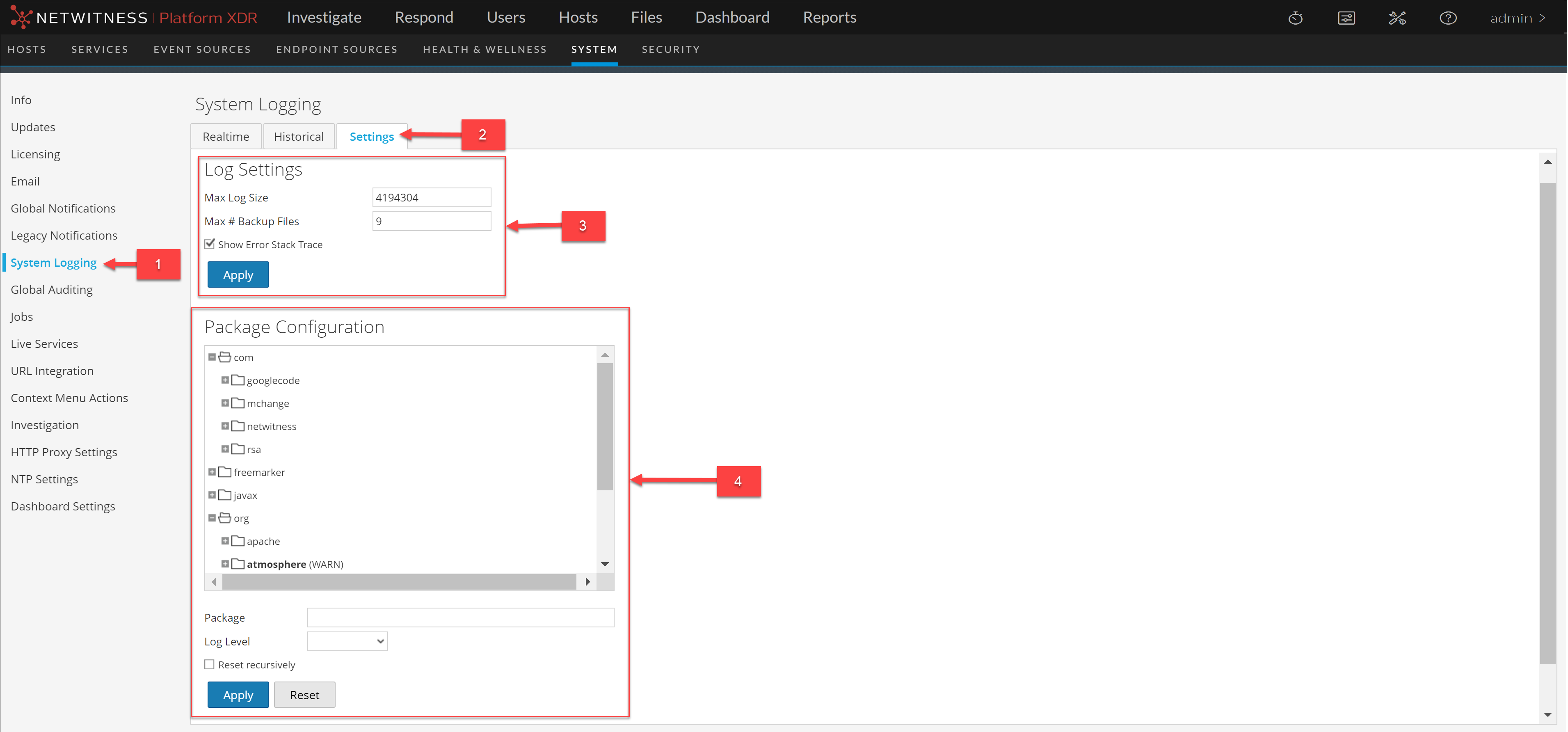
- **Column 1:** 1
- **Column 2:** Displays System Logging Panel
- **Column 1:** 2
- **Column 2:** Displays Settings Tab
- **Column 1:** 3
- **Column 2:** Configure Log Settings
- **Column 1:** 4
- **Column 2:** Configure Packages
## FeaturesFeatures
The Settings tab has two sections: Log Settings and Package Configuration.
### Log SettingsLog Settings
The Log Settings section configures the size of the NetWitness log files and the number of backup logs that NetWitness maintains.
- **Feature:** Max Log Size
- **Description:** Configures the maximum size in bytes of each log file. The minimum value for this setting is **4096**.
- **Feature:** Max # Backup Files
- **Description:** Specifies how many backup log files are maintained. The minimum value for this setting is **0**. When the maximum number of log files is attained, and a new backup file is made, the oldest backup is discarded.
- **Feature:**
 Show Error Stack Trace
- **Description:** Displays ERROR, STACK, and TRACE log messages.
- **Feature:** Apply
- **Description:** Puts the settings into effect immediately for all future logs.
### Package ConfigurationPackage Configuration
The Package Configuration section shows the NetWitness packages in a tree structure.
- **Feature:** Package tree
- **Description:**
Contains all the packages used within NetWitness. You can drill down into the tree to view the log levels of each package.
The **root** logging level represents the default log level for all packages that are not explicitly set. The root level is set to **INFO**
- **Feature:** Package field
- **Description:** The name of the selected package when you select a package in the **Package** tree.
- **Feature:** Log Level
- **Description:** If the selected package has a log level explicitly set, the value is displayed in the **Log Level** field.
- **Feature:**
 Reset recursively
- **Description:** Resets the log recursively.
- **Feature:** Apply
- **Description:** Puts settings into effect immediately for all future logs.
- **Feature:** Reset
- **Description:** Resets the selected package to the log level of **root**.
- **Column 1:**
- **Column 2:**
- **Column 1:** [Previous Page](https://community.netwitness.com/t5/netwitness-platform-online/system-updates-panel-settings-view/ta-p/669841)
- **Column 2:** [Next Page](https://community.netwitness.com/t5/netwitness-platform-online/system-logging-realtime-view/ta-p/669843)
[](https://mydev.netwitness.com/?hsLang=en)
Copyright © 2026, NetWitness LLC. All rights reserved.
[NetWitness Platform](https://www.netwitness.com/)
[Acceptable Use Policy](https://www.netwitness.com/wp-content/uploads/Acceptable-Use-Policy-092022.pdf) [Privacy Statement](https://www.netwitness.com/wp-content/uploads/NetWitness-Privacy-Statement-07292024.pdf)

[](https://www.linkedin.com/company/netwitness-platform/) [](https://www.youtube.com/@netwitness)
© 2026 NetWitness LLC. All rights reserved.