---
title: Synchronize Local Licensing Server Offline
description: "Register the Server (Offline Capability Request)\nNetWitness manages licensing through a Local License Server (LLS). Each client appliance is shipped"
---
[Skip to content](https://mydev.netwitness.com/knowledge-base/synchronizelocallicensingserveroffline#main-content)

- [Home](https://mydev.netwitness.com/home)
- Integrations
Show submenu for Integrations
- [Netwitness Platform Integrations](https://mydev.netwitness.com/netwitnessplatformintegrations)
- [Third Party Integrations](https://mydev.netwitness.com/thirdpartyintegrations)
- [Knowledge Center](https://mydev.netwitness.com/knowledge-base)
- Community
Show submenu for Community
- [Blogs](https://mydev.netwitness.com/netwitness-security-llc-blog)
- Discussions
- Customers
Show submenu for Customers
- [Manage Products and Licenses](https://mydev.netwitness.com/nwportal)
- Downloads
- Partners
Show submenu for Partners
- [Partner Program](https://mydev.netwitness.com/partner)
- [Partner Resources](https://mydev.netwitness.com/partnerresources)
- [Submit a New Deal Registration](https://mydev.netwitness.com/dealregistration)
- [Become a Partner](https://mydev.netwitness.com/becomeapartner)
- [Update Your Partner Locator Profile](https://www.netwitness.com/partner-locator/?utm_source=pardotnewsletter&utm_medium=email&utm_campaign=partner_march)
- [NetWitness LinkedIn Partner Hub](https://linkedin.com/showcase/netwitnesspartners/)
- Education
Show submenu for Education
- [Instructor Led Training Schedule](https://mydev.netwitness.com/instructorledtrainingschedule)
- [NetWitness Training Catalog](https://mydev.netwitness.com/netwitnesstrainingcatalog)
- [Security Awareness Training](https://mydev.netwitness.com/securityawarenesstraining)
- [New Product Readiness](https://mydev.netwitness.com/newproductreadiness)
- [On-Demand Virtual Labs](https://mydev.netwitness.com/ondemandvirtuallabs)
- [Additional Training Information](https://mydev.netwitness.com/additionaltraininginformation)
- [Frequently Asked Questions](https://mydev.netwitness.com/educationfaq)
- [Contact NetWitness Education Team](https://mydev.netwitness.com/contact-netwitness-education-team)
- Support
Show submenu for Support
- [Contact Support](https://mydev.netwitness.com/contact-support)
- [Create a New Case](https://mydev.netwitness.com/create-support-case)
- [View My Cases](https://mydev.netwitness.com/viewmycase)
- [Product Version Life Cycle](https://mydev.netwitness.com/product-version-life-cycle)
- [Warranty & Replacement Parts](https://mydev.netwitness.com/warranty-and-replacement-parts)
- [Community Support Forum](https://mydev.netwitness.com/community-support-forum)
- [Technical Support Guide](https://mydev.netwitness.com/technical-support-guide)
Open main navigation
Close main navigation
- [Home](https://mydev.netwitness.com/home)
- Integrations
Show submenu for Integrations
- [Netwitness Platform Integrations](https://mydev.netwitness.com/netwitnessplatformintegrations)
- [Third Party Integrations](https://mydev.netwitness.com/thirdpartyintegrations)
- [Knowledge Center](https://mydev.netwitness.com/knowledge-base)
- Community
Show submenu for Community
- [Blogs](https://mydev.netwitness.com/netwitness-security-llc-blog)
- Discussions
- Customers
Show submenu for Customers
- [Manage Products and Licenses](https://mydev.netwitness.com/nwportal)
- Downloads
- Partners
Show submenu for Partners
- [Partner Program](https://mydev.netwitness.com/partner)
- [Partner Resources](https://mydev.netwitness.com/partnerresources)
- [Submit a New Deal Registration](https://mydev.netwitness.com/dealregistration)
- [Become a Partner](https://mydev.netwitness.com/becomeapartner)
- [Update Your Partner Locator Profile](https://www.netwitness.com/partner-locator/?utm_source=pardotnewsletter&utm_medium=email&utm_campaign=partner_march)
- [NetWitness LinkedIn Partner Hub](https://linkedin.com/showcase/netwitnesspartners/)
- Education
Show submenu for Education
- [Instructor Led Training Schedule](https://mydev.netwitness.com/instructorledtrainingschedule)
- [NetWitness Training Catalog](https://mydev.netwitness.com/netwitnesstrainingcatalog)
- [Security Awareness Training](https://mydev.netwitness.com/securityawarenesstraining)
- [New Product Readiness](https://mydev.netwitness.com/newproductreadiness)
- [On-Demand Virtual Labs](https://mydev.netwitness.com/ondemandvirtuallabs)
- [Additional Training Information](https://mydev.netwitness.com/additionaltraininginformation)
- [Frequently Asked Questions](https://mydev.netwitness.com/educationfaq)
- [Contact NetWitness Education Team](https://mydev.netwitness.com/contact-netwitness-education-team)
- Support
Show submenu for Support
- [Contact Support](https://mydev.netwitness.com/contact-support)
- [Create a New Case](https://mydev.netwitness.com/create-support-case)
- [View My Cases](https://mydev.netwitness.com/viewmycase)
- [Product Version Life Cycle](https://mydev.netwitness.com/product-version-life-cycle)
- [Warranty & Replacement Parts](https://mydev.netwitness.com/warranty-and-replacement-parts)
- [Community Support Forum](https://mydev.netwitness.com/community-support-forum)
- [Technical Support Guide](https://mydev.netwitness.com/technical-support-guide)
How can we help you?
- There are no suggestions because the search field is empty.
1. [NetWitness Knowledge Base](https://mydev.netwitness.com/knowledge-base?hsLang=en)
2. [Documentation](https://mydev.netwitness.com/knowledge-base/documentation?hsLang=en)
April 28, 2026
# Synchronize Local Licensing Server Offline
## Register the Server (Offline Capability Request)
NetWitness manages licensing through a Local License Server (LLS). Each client appliance is shipped with an installed LLS. This topic provides instructions for offline synchronization of the Local License Server (LLS) with the online repository. For more information on the functional description of the LLS, see [Entitlement Capability Implementation](https://50269063.hs-sites.com/knowledge-base/EntitlementCapabilityImplementation?hsLang=en).
If you are unable to register the NetWitness Server online, you can download an offline capability request in NetWitness and upload that binary request to the myRSA Portal. If the NetWitness Server is not connected to the Internet, you can perform offline synchronization of entitlements through the View Server page in myRSA.
## Prerequisites
Before implementing the NetWitness Platform entitlements capability offline, ensure the following
- The NetWitness Server is registered to myRSA ([https://my.rsa.com/](https://my.rsa.com/)) and entitlements are mapped. Internet access is not required for offline synchronization.
- An Offline Capability Request has been downloaded from the NetWitness UI to be uploaded to myRSA.
- An Offline Response has been uploaded to NetWitness that was received from myRSA within 24 hours.
Here is a workflow that describes how to use the offline capability to acquire the licenses from myRSA and view them.

## Download an Offline Request for Submission to myRSA
To register the server using an offline capability request:
- 1. Go to ** (Admin) \> System**.
2. Click **Licensing**.
The License Details page is displayed.
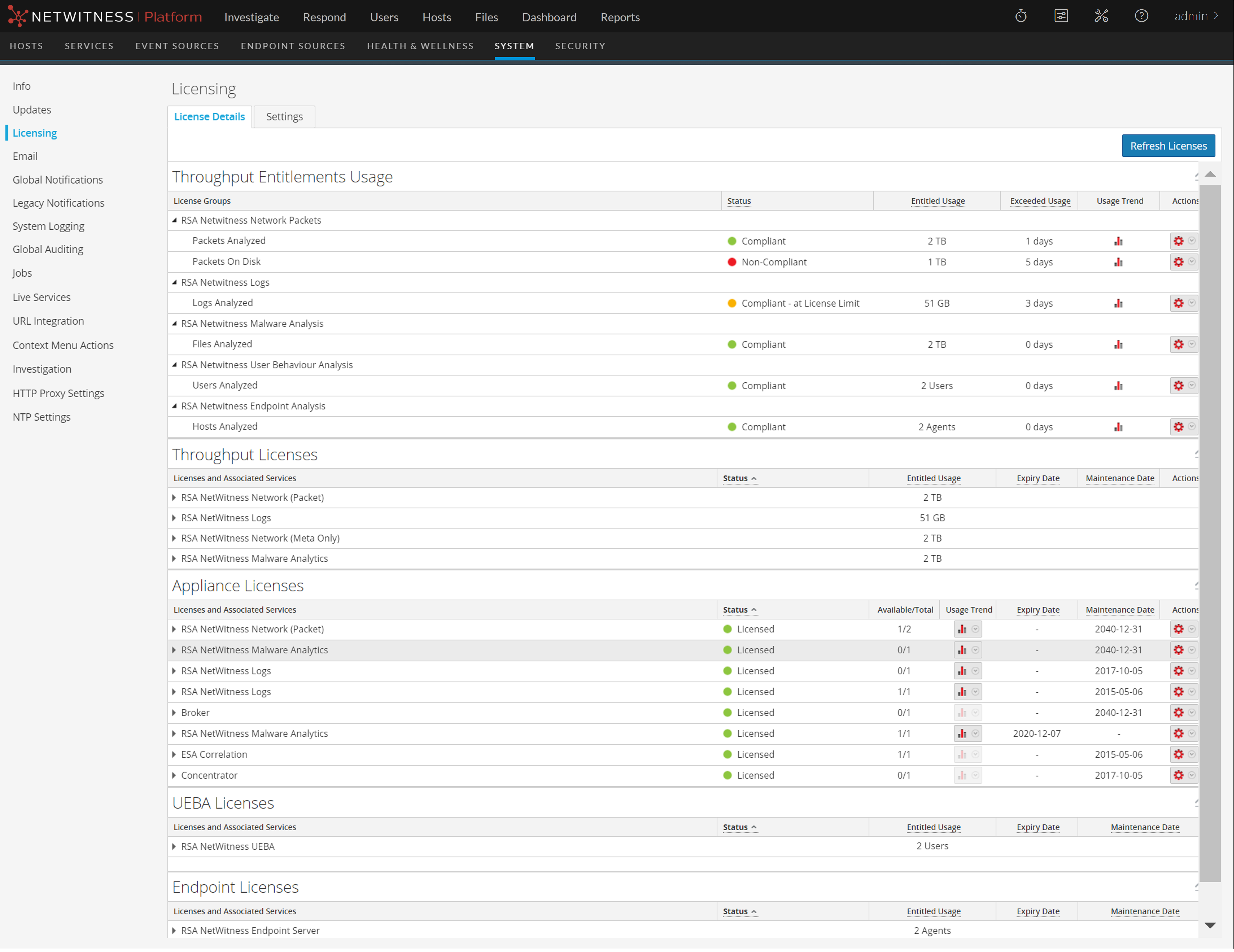
3. Select the **Settings** tab.
The Settings page is displayed.
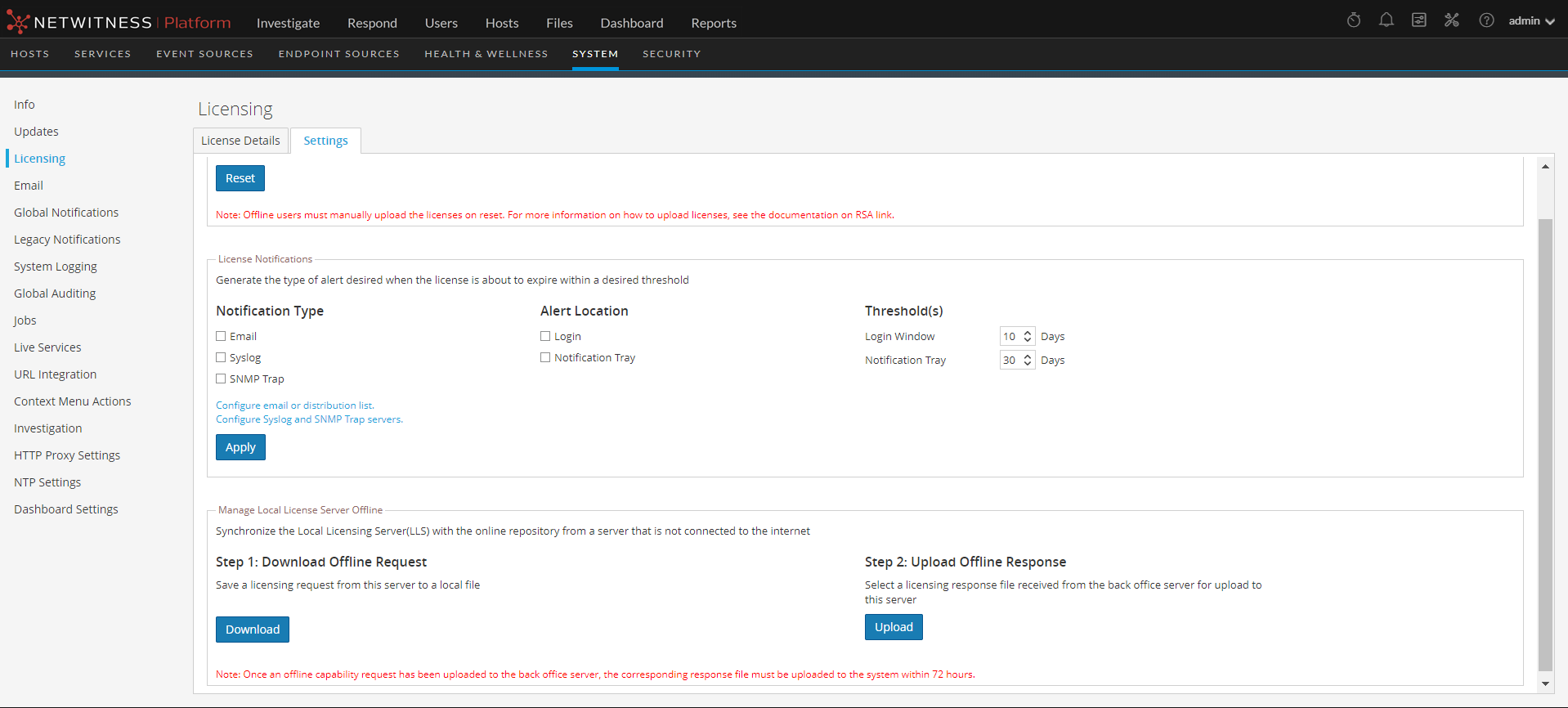
4. In the **Step 1. Download Offline Request** panel, click **Download**.
A file called **OfflineCapabilityRequest.bin** is downloaded to the local system.
5. Login to the myRSA Portal at [https://my.rsa.com/](https://my.rsa.com/) with your user credentials.
6. Click on a service which needs to be licensed.
Under **Device Management**, click **Upload Capability Request**.
The **Upload Capability Request** dialog is displayed.
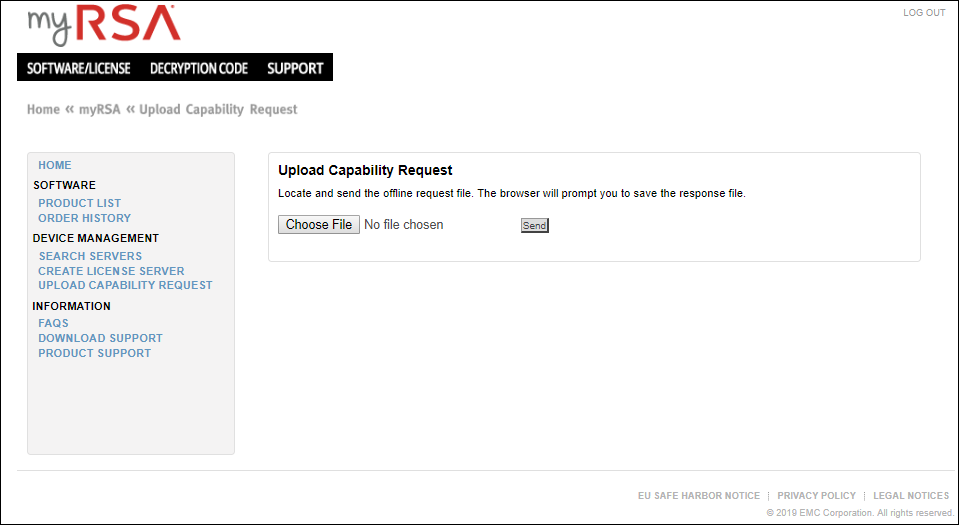
7. Click **Choose File** and browse the local file system to find the file downloaded from the NetWitness Server. Select **OfflineCapabilityRequest.bin**.
The filename is displayed next to the **Choose File** button.
8. Click **Send**.
The license data in a .bin file format is downloaded. The .bin file contains the data you entered as well as information about any entitlements that have been added to the NetWitness Server. If the server has just been added, there are no entries under **Add-Ons**. The server is registered and you can now map entitlements as described in the following sections.
9. After you download the .bin file from myRSA, login to NetWitness UI to upload the .bin file on the Settings page. For more information, see [Upload an Offline Capability Response to NetWitness Platform](https://mydev.netwitness.com/knowledge-base/synchronizelocallicensingserveroffline#Upload).
## Upload an Offline Capability Response to NetWitness PlatformUpload an Offline Capability Response to NetWitness Platform
If the NetWitness Server is not connected to the Internet, you can perform offline synchronization of entitlements through the View Server page in myRSA. To upload an offline capability response (**response.bin**) file saved to the local file system from myRSA:
1. Follow the steps 1 to 3 mentioned in the Download a Capability Request for Submission to myRSA procedure.
2. Login to the NetWitness user interface.
3. Go to ** (Admin) \> System** \> **Licensing** \> **Settings** tab.
4. In the **Upload Offline Response** section, click **Upload Response**.
A dialog to upload the file is displayed.
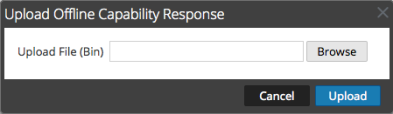
5. Browse and select the **response.bin** file so that it is displayed in the Upload File (bin) field.
6. Click **Upload**.
The entitlements are uploaded to NetWitness and the licenses added to the grid in the **Licensing Details** tab. They are available for licensing appliances.
After you have uploaded the entitlements, you can verify the synchronization by performing any one of the following:
- To view results in NetWitness, go to ** (Admin) \> System**\>**Licensing** \> **Licensing Details** tab. The individual product entitlements that have been pulled down to NetWitness are displayed in the **Available/Total** column.
- Within the myRSA interface, you can see the status for entitlements changed to **In Sync**.
### Refresh Licenses
When a new license is added, to map the view with the new license, click **Refresh Licenses.**
Refreshing your licenses performs the following behind-the-scenes tasks:
- Restarts the LLS server to ensure the latest licenses are pulled down from the central Flexera server.
- Associates any unlicensed service with a valid license (if available).
- Replaces expired or Out-of-the-Box license with valid licenses (if available).
[](https://mydev.netwitness.com/?hsLang=en)
Copyright © 2026, NetWitness LLC. All rights reserved.
[NetWitness Platform](https://www.netwitness.com/)
[Acceptable Use Policy](https://www.netwitness.com/wp-content/uploads/Acceptable-Use-Policy-092022.pdf) [Privacy Statement](https://www.netwitness.com/wp-content/uploads/NetWitness-Privacy-Statement-07292024.pdf)

[](https://www.linkedin.com/company/netwitness-platform/) [](https://www.youtube.com/@netwitness)
© 2026 NetWitness LLC. All rights reserved.