---
title: Step 3. Configure Aggregate Services
description: "Step 3. Configure Aggregate ServicesStep 3. Configure Aggregate Services\nThis topic introduces basic tasks related to data aggregation on Brokers and"
---
[Skip to content](https://mydev.netwitness.com/knowledge-base/step3-configureaggregateservices#main-content)

- [Home](https://mydev.netwitness.com/home)
- Integrations
Show submenu for Integrations
- [Netwitness Platform Integrations](https://mydev.netwitness.com/netwitnessplatformintegrations)
- [Third Party Integrations](https://mydev.netwitness.com/thirdpartyintegrations)
- [Knowledge Center](https://mydev.netwitness.com/knowledge-base)
- Community
Show submenu for Community
- [Blogs](https://mydev.netwitness.com/netwitness-security-llc-blog)
- Discussions
- Customers
Show submenu for Customers
- [Manage Products and Licenses](https://mydev.netwitness.com/nwportal)
- Downloads
- Partners
Show submenu for Partners
- [Partner Program](https://mydev.netwitness.com/partner)
- [Partner Resources](https://mydev.netwitness.com/partnerresources)
- [Submit a New Deal Registration](https://mydev.netwitness.com/dealregistration)
- [Become a Partner](https://mydev.netwitness.com/becomeapartner)
- [Update Your Partner Locator Profile](https://www.netwitness.com/partner-locator/?utm_source=pardotnewsletter&utm_medium=email&utm_campaign=partner_march)
- [NetWitness LinkedIn Partner Hub](https://linkedin.com/showcase/netwitnesspartners/)
- Education
Show submenu for Education
- [Instructor Led Training Schedule](https://mydev.netwitness.com/instructorledtrainingschedule)
- [NetWitness Training Catalog](https://mydev.netwitness.com/netwitnesstrainingcatalog)
- [Security Awareness Training](https://mydev.netwitness.com/securityawarenesstraining)
- [New Product Readiness](https://mydev.netwitness.com/newproductreadiness)
- [On-Demand Virtual Labs](https://mydev.netwitness.com/ondemandvirtuallabs)
- [Additional Training Information](https://mydev.netwitness.com/additionaltraininginformation)
- [Frequently Asked Questions](https://mydev.netwitness.com/educationfaq)
- [Contact NetWitness Education Team](https://mydev.netwitness.com/contact-netwitness-education-team)
- Support
Show submenu for Support
- [Contact Support](https://mydev.netwitness.com/contact-support)
- [Create a New Case](https://mydev.netwitness.com/create-support-case)
- [View My Cases](https://mydev.netwitness.com/viewmycase)
- [Product Version Life Cycle](https://mydev.netwitness.com/product-version-life-cycle)
- [Warranty & Replacement Parts](https://mydev.netwitness.com/warranty-and-replacement-parts)
- [Community Support Forum](https://mydev.netwitness.com/community-support-forum)
- [Technical Support Guide](https://mydev.netwitness.com/technical-support-guide)
Open main navigation
Close main navigation
- [Home](https://mydev.netwitness.com/home)
- Integrations
Show submenu for Integrations
- [Netwitness Platform Integrations](https://mydev.netwitness.com/netwitnessplatformintegrations)
- [Third Party Integrations](https://mydev.netwitness.com/thirdpartyintegrations)
- [Knowledge Center](https://mydev.netwitness.com/knowledge-base)
- Community
Show submenu for Community
- [Blogs](https://mydev.netwitness.com/netwitness-security-llc-blog)
- Discussions
- Customers
Show submenu for Customers
- [Manage Products and Licenses](https://mydev.netwitness.com/nwportal)
- Downloads
- Partners
Show submenu for Partners
- [Partner Program](https://mydev.netwitness.com/partner)
- [Partner Resources](https://mydev.netwitness.com/partnerresources)
- [Submit a New Deal Registration](https://mydev.netwitness.com/dealregistration)
- [Become a Partner](https://mydev.netwitness.com/becomeapartner)
- [Update Your Partner Locator Profile](https://www.netwitness.com/partner-locator/?utm_source=pardotnewsletter&utm_medium=email&utm_campaign=partner_march)
- [NetWitness LinkedIn Partner Hub](https://linkedin.com/showcase/netwitnesspartners/)
- Education
Show submenu for Education
- [Instructor Led Training Schedule](https://mydev.netwitness.com/instructorledtrainingschedule)
- [NetWitness Training Catalog](https://mydev.netwitness.com/netwitnesstrainingcatalog)
- [Security Awareness Training](https://mydev.netwitness.com/securityawarenesstraining)
- [New Product Readiness](https://mydev.netwitness.com/newproductreadiness)
- [On-Demand Virtual Labs](https://mydev.netwitness.com/ondemandvirtuallabs)
- [Additional Training Information](https://mydev.netwitness.com/additionaltraininginformation)
- [Frequently Asked Questions](https://mydev.netwitness.com/educationfaq)
- [Contact NetWitness Education Team](https://mydev.netwitness.com/contact-netwitness-education-team)
- Support
Show submenu for Support
- [Contact Support](https://mydev.netwitness.com/contact-support)
- [Create a New Case](https://mydev.netwitness.com/create-support-case)
- [View My Cases](https://mydev.netwitness.com/viewmycase)
- [Product Version Life Cycle](https://mydev.netwitness.com/product-version-life-cycle)
- [Warranty & Replacement Parts](https://mydev.netwitness.com/warranty-and-replacement-parts)
- [Community Support Forum](https://mydev.netwitness.com/community-support-forum)
- [Technical Support Guide](https://mydev.netwitness.com/technical-support-guide)
How can we help you?
- There are no suggestions because the search field is empty.
1. [NetWitness Knowledge Base](https://mydev.netwitness.com/knowledge-base?hsLang=en)
2. [Documentation](https://mydev.netwitness.com/knowledge-base/documentation?hsLang=en)
April 28, 2026
# Step 3. Configure Aggregate Services
## Step 3. Configure Aggregate ServicesStep 3. Configure Aggregate Services
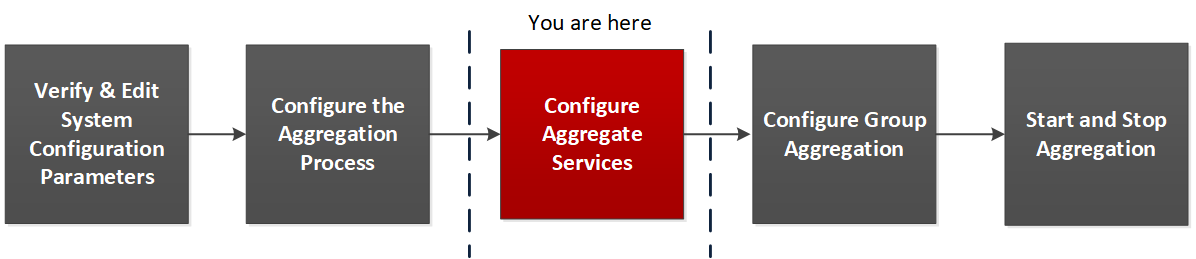
This topic introduces basic tasks related to data aggregation on Brokers and Concentrators. For information on the optional setup of group aggregation, see **[Step 4. (Optional) Configuring Group Aggregation](https://community.netwitness.com/t5/netwitness-platform-online/step-4-optional-configure-group-aggregation/ta-p/669215).**
Configuring the aggregate services (whose data is consumed and aggregated) includes:
- Adding, editing, and deleting Concentrators and Decoders as aggregate services
- Toggling an aggregate service online and offline
To configure aggregate services to a Broker or Concentrator:
1. Go to ** (Admin) \> Services**.
2. In the **Services** view, select a Broker or Concentrator, and select  **\>** **View \> Config**.
The Services Config view for the selected service is displayed.
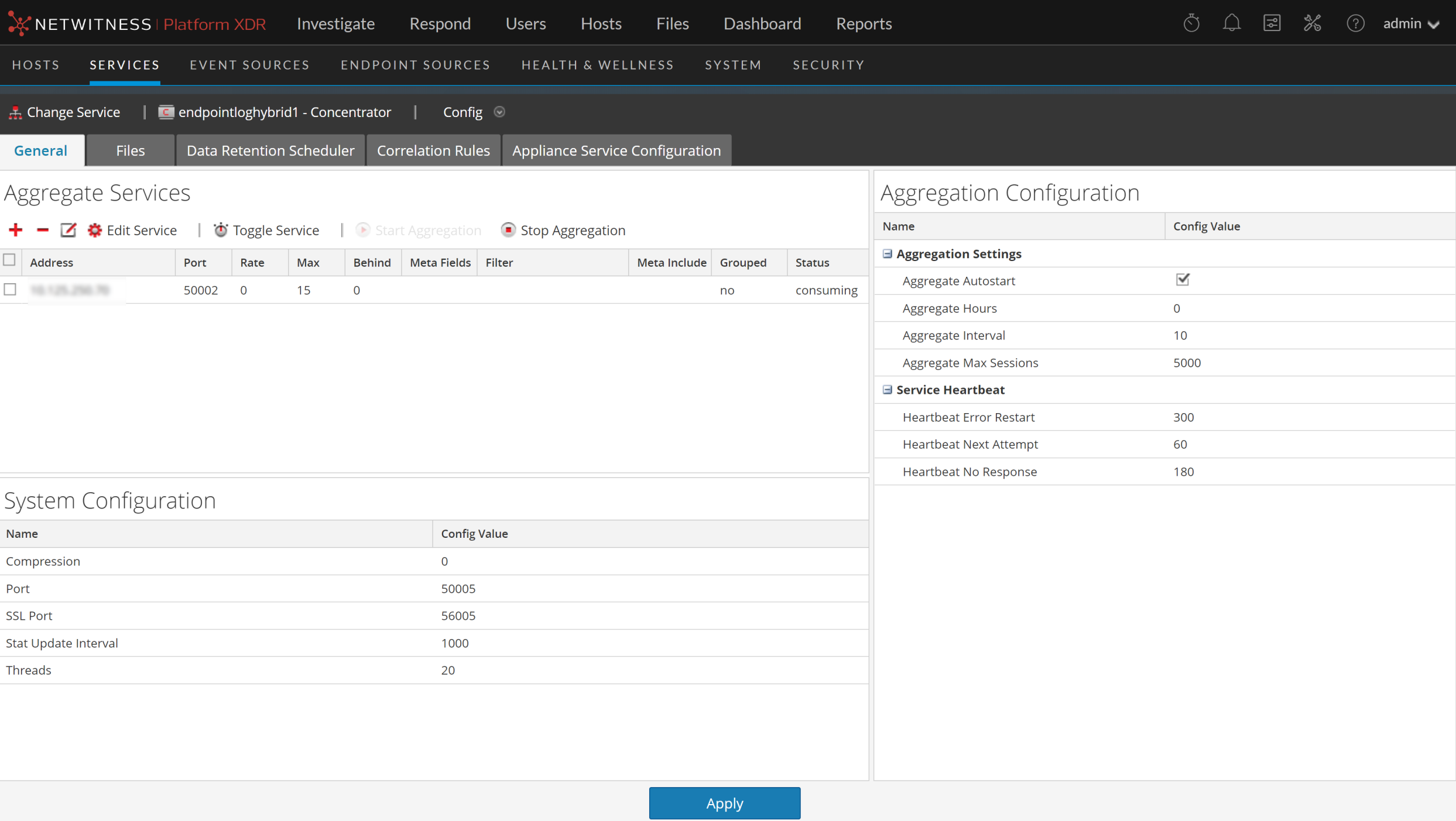
3. Click  in the **Aggregate Services** toolbar.
The Available Services dialog is displayed.
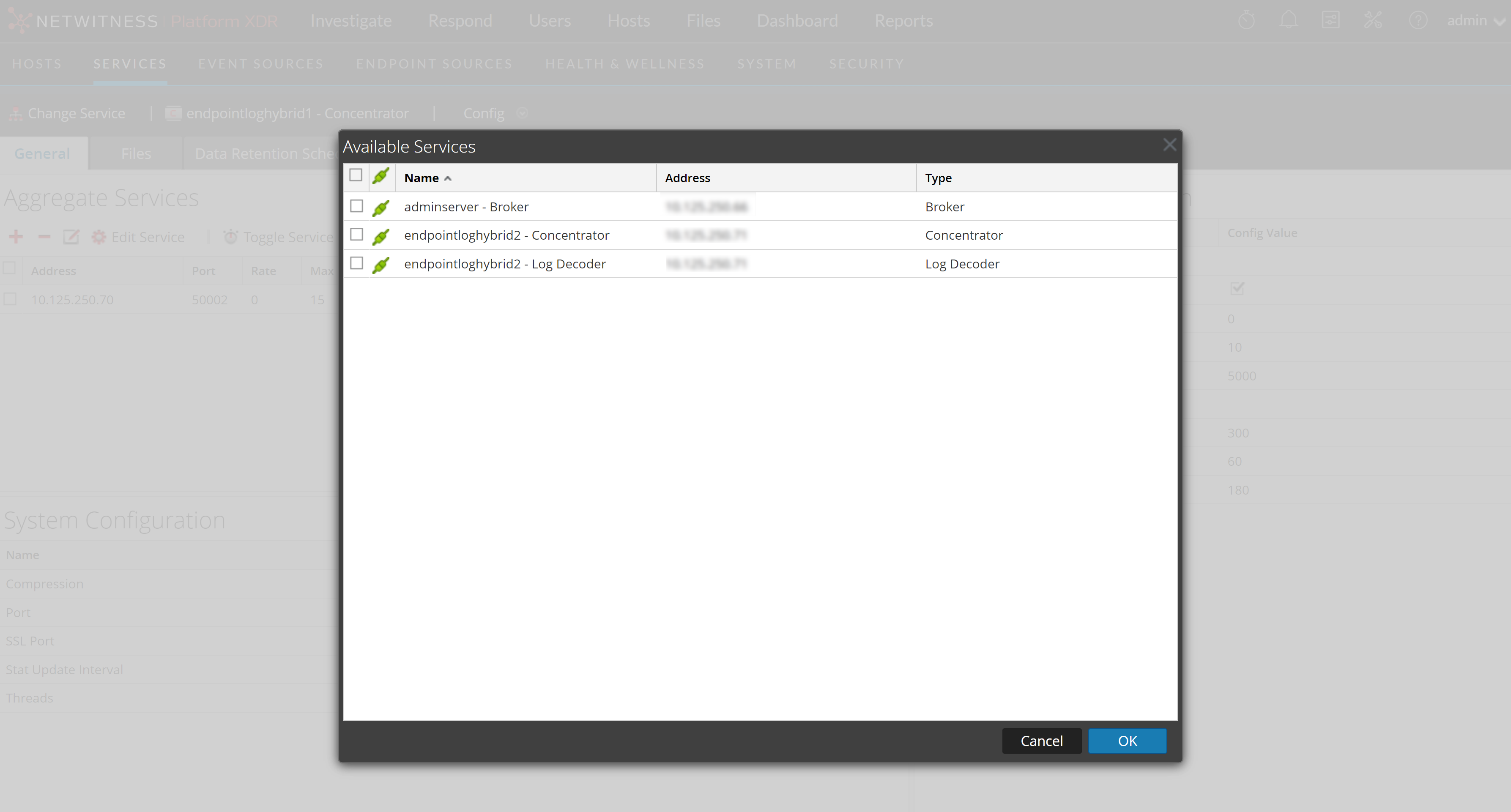
4. Select one or more services to be added and click **OK**.
5. Use one of the following ways to add a service for aggregation:
- Use Password-Based Authentication. Enter the Administrator username and password. Click **OK**.
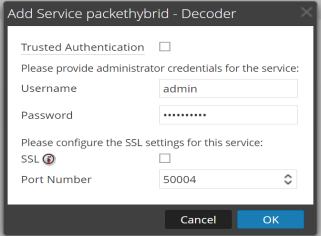
- Select **Trusted Authentication**. Click **OK**.
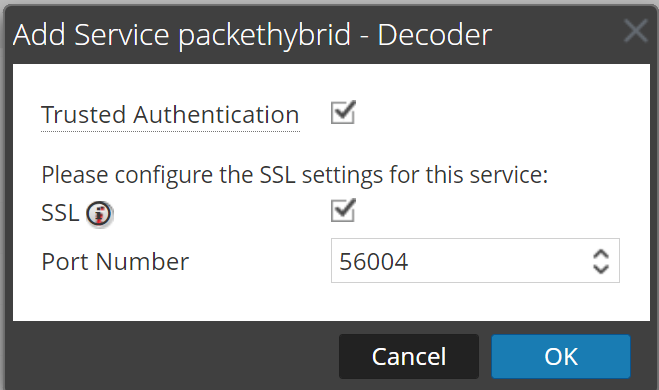
The added services are listed in the Aggregate Services list.
6. To save the changes, click **Apply**.
To remove aggregate services from a Broker or Concentrator:
**Note:** This option applies only to offline services. If the aggregate service is online, you must first toggle the service offline.
1. In the **Aggregate Services** list, select one or more services.
2. Clickin the toolbar.
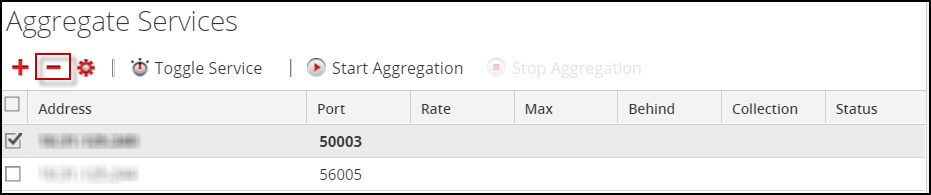
The service is removed from Aggregate Services list.
3. To save the change, click **Apply**.
To edit aggregate services on a Concentrator:
**Note:** This option applies only to offline services. If the aggregate service is online, you must first toggle the service offline. You can edit only one service at a time.
You can limit the data being consumed from an aggregate service using meta fields and filters.
1. Click **Change Service** to change the service to Concentrator.
2. In the **Aggregate Services** list, select one or more services.
3. Click  in the toolbar. Enter the authentication information in the pop up dialog box.
- If the service was added on a different instance of NetWitness, you must add it to this instance of NetWitness in order to edit. A warning dialog allows you to add the service. If you click **Yes**, the Add Service dialog is displayed.
- If the service is online, a dialog notifies that the service must be offline and requests confirmation that you want to continue. If you click **Yes**, NetWitness takes the service offline and the Edit Aggregate Service dialog is displayed.
- If the service is offline, the Edit Aggregate Service dialog is displayed with the editable properties for an aggregate service on a Concentrator.
4. Click a type of metadata in the **Meta Include** tab to select the type of metadata for the Concentrator to consume from this service. Click **Save**.
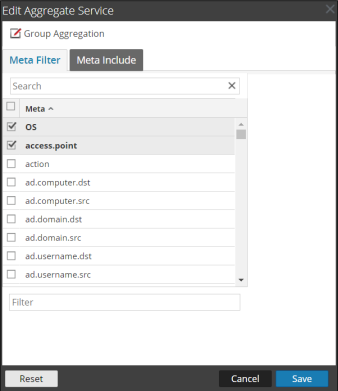
5. To specify a rule to filter data that the Concentrator consumes from this service, compose a rule in the **Meta Filter** tab. Click **Save**.
6. Click **Close**.
The Edit Aggregate Service dialog closes and the changes are shown in the Aggregate Services list. In this example, two meta were selected on the Meta Include tab. When you click the information icon in the Meta Include field, it shows the selections.
7. To save the changes, click **Apply**.
Toggle a Service
When data aggregation starts, Brokers and Concentrators consume data from aggregate services that are online. When first added to a Broker or Concentrator, aggregate services are offline.
To toggle a service between online and offline:
1. Select a service in the **Aggregate Services** list.
2. Click .
The status is changed.
[](https://mydev.netwitness.com/?hsLang=en)
Copyright © 2026, NetWitness LLC. All rights reserved.
[NetWitness Platform](https://www.netwitness.com/)
[Acceptable Use Policy](https://www.netwitness.com/wp-content/uploads/Acceptable-Use-Policy-092022.pdf) [Privacy Statement](https://www.netwitness.com/wp-content/uploads/NetWitness-Privacy-Statement-07292024.pdf)

[](https://www.linkedin.com/company/netwitness-platform/) [](https://www.youtube.com/@netwitness)
© 2026 NetWitness LLC. All rights reserved.