---
title: Step 1a. Create Virtual Machine - VMware
description: "Step 1a. Create Virtual Machine - VMwareStep 1a. Create Virtual Machine - VMware\nComplete the following steps to deploy the OVA file on the vCenter S"
---
[Skip to content](https://mydev.netwitness.com/knowledge-base/step1a-createvirtualmachine-vmware#main-content)

- [Home](https://mydev.netwitness.com/home)
- Integrations
Show submenu for Integrations
- [Netwitness Platform Integrations](https://mydev.netwitness.com/netwitnessplatformintegrations)
- [Third Party Integrations](https://mydev.netwitness.com/thirdpartyintegrations)
- [Knowledge Center](https://mydev.netwitness.com/knowledge-base)
- Community
Show submenu for Community
- [Blogs](https://mydev.netwitness.com/netwitness-security-llc-blog)
- Discussions
- Customers
Show submenu for Customers
- [Manage Products and Licenses](https://mydev.netwitness.com/nwportal)
- Downloads
- Partners
Show submenu for Partners
- [Partner Program](https://mydev.netwitness.com/partner)
- [Partner Resources](https://mydev.netwitness.com/partnerresources)
- [Submit a New Deal Registration](https://mydev.netwitness.com/dealregistration)
- [Become a Partner](https://mydev.netwitness.com/becomeapartner)
- [Update Your Partner Locator Profile](https://www.netwitness.com/partner-locator/?utm_source=pardotnewsletter&utm_medium=email&utm_campaign=partner_march)
- [NetWitness LinkedIn Partner Hub](https://linkedin.com/showcase/netwitnesspartners/)
- Education
Show submenu for Education
- [Instructor Led Training Schedule](https://mydev.netwitness.com/instructorledtrainingschedule)
- [NetWitness Training Catalog](https://mydev.netwitness.com/netwitnesstrainingcatalog)
- [Security Awareness Training](https://mydev.netwitness.com/securityawarenesstraining)
- [New Product Readiness](https://mydev.netwitness.com/newproductreadiness)
- [On-Demand Virtual Labs](https://mydev.netwitness.com/ondemandvirtuallabs)
- [Additional Training Information](https://mydev.netwitness.com/additionaltraininginformation)
- [Frequently Asked Questions](https://mydev.netwitness.com/educationfaq)
- [Contact NetWitness Education Team](https://mydev.netwitness.com/contact-netwitness-education-team)
- Support
Show submenu for Support
- [Contact Support](https://mydev.netwitness.com/contact-support)
- [Create a New Case](https://mydev.netwitness.com/create-support-case)
- [View My Cases](https://mydev.netwitness.com/viewmycase)
- [Product Version Life Cycle](https://mydev.netwitness.com/product-version-life-cycle)
- [Warranty & Replacement Parts](https://mydev.netwitness.com/warranty-and-replacement-parts)
- [Community Support Forum](https://mydev.netwitness.com/community-support-forum)
- [Technical Support Guide](https://mydev.netwitness.com/technical-support-guide)
Open main navigation
Close main navigation
- [Home](https://mydev.netwitness.com/home)
- Integrations
Show submenu for Integrations
- [Netwitness Platform Integrations](https://mydev.netwitness.com/netwitnessplatformintegrations)
- [Third Party Integrations](https://mydev.netwitness.com/thirdpartyintegrations)
- [Knowledge Center](https://mydev.netwitness.com/knowledge-base)
- Community
Show submenu for Community
- [Blogs](https://mydev.netwitness.com/netwitness-security-llc-blog)
- Discussions
- Customers
Show submenu for Customers
- [Manage Products and Licenses](https://mydev.netwitness.com/nwportal)
- Downloads
- Partners
Show submenu for Partners
- [Partner Program](https://mydev.netwitness.com/partner)
- [Partner Resources](https://mydev.netwitness.com/partnerresources)
- [Submit a New Deal Registration](https://mydev.netwitness.com/dealregistration)
- [Become a Partner](https://mydev.netwitness.com/becomeapartner)
- [Update Your Partner Locator Profile](https://www.netwitness.com/partner-locator/?utm_source=pardotnewsletter&utm_medium=email&utm_campaign=partner_march)
- [NetWitness LinkedIn Partner Hub](https://linkedin.com/showcase/netwitnesspartners/)
- Education
Show submenu for Education
- [Instructor Led Training Schedule](https://mydev.netwitness.com/instructorledtrainingschedule)
- [NetWitness Training Catalog](https://mydev.netwitness.com/netwitnesstrainingcatalog)
- [Security Awareness Training](https://mydev.netwitness.com/securityawarenesstraining)
- [New Product Readiness](https://mydev.netwitness.com/newproductreadiness)
- [On-Demand Virtual Labs](https://mydev.netwitness.com/ondemandvirtuallabs)
- [Additional Training Information](https://mydev.netwitness.com/additionaltraininginformation)
- [Frequently Asked Questions](https://mydev.netwitness.com/educationfaq)
- [Contact NetWitness Education Team](https://mydev.netwitness.com/contact-netwitness-education-team)
- Support
Show submenu for Support
- [Contact Support](https://mydev.netwitness.com/contact-support)
- [Create a New Case](https://mydev.netwitness.com/create-support-case)
- [View My Cases](https://mydev.netwitness.com/viewmycase)
- [Product Version Life Cycle](https://mydev.netwitness.com/product-version-life-cycle)
- [Warranty & Replacement Parts](https://mydev.netwitness.com/warranty-and-replacement-parts)
- [Community Support Forum](https://mydev.netwitness.com/community-support-forum)
- [Technical Support Guide](https://mydev.netwitness.com/technical-support-guide)
How can we help you?
- There are no suggestions because the search field is empty.
1. [NetWitness Knowledge Base](https://mydev.netwitness.com/knowledge-base?hsLang=en)
2. [Documentation](https://mydev.netwitness.com/knowledge-base/documentation?hsLang=en)
April 26, 2026
# Step 1a. Create Virtual Machine - VMware
## Step 1a. Create Virtual Machine - VMwareStep 1a. Create Virtual Machine - VMware
Complete the following steps to deploy the OVA file on the vCenter Server or ESX Server using the vSphere client.
## PrerequisitesPrerequisites
Make sure that you have:
- Network IP addresses, netmask, and gateway IP addresses for the virtual host.
- Network names for all virtual hosts, if you are creating a cluster.
- DNS or host information.
- Password for virtual host access. The default username is `root` and the default password is `netwitness`.
- The NetWitness virtual host package file for example, rsanw-11.7.0.0.xxxx.el7-x86\_64.ova. (You download this package from Download Central ([https://community.netwitness.com/t5/netwitness-platform-downloads/tkb-p/netwitness-downloads](https://community.netwitness.com/t5/netwitness-platform-downloads/tkb-p/netwitness-downloads)).)
## ProcedureProcedure
**Note:** The following instructions illustrate an example of deploying an OVA host in the ESXi environment. The screens you see may be different from this example.
To deploy the OVA host:
1. Log on to the ESXi environment.
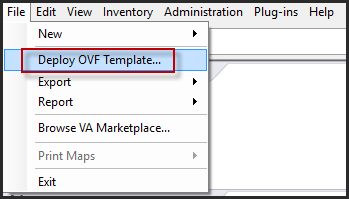
2. In the **File** drop-down, select **Deploy OVF Template**.
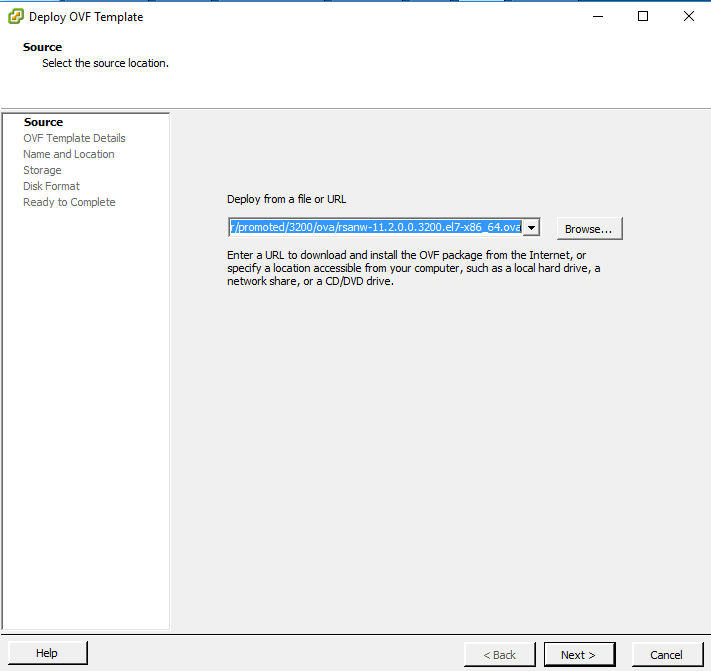
3. The Deploy OVF Template dialog is displayed. In the **Deploy OVF Template** dialog, select the OVF for the host that you want to deploy in the virtual environment (for example, **V11.7** GOLD\\\\rsanw-11.7.0.0.xxxx.el7-x86\_64.ova), and click **Next**.
4. The Name and Location dialog is displayed. The designated name does not reflect the server hostname. The name displayed is useful for inventory reference from within ESXi.
5. Make a note of the name, and click **Next**.
Storage Options are displayed.
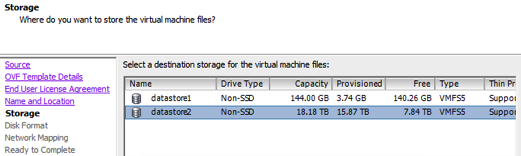
6. For Storage options, designate the datastore location for the virtual host and click **Next**.
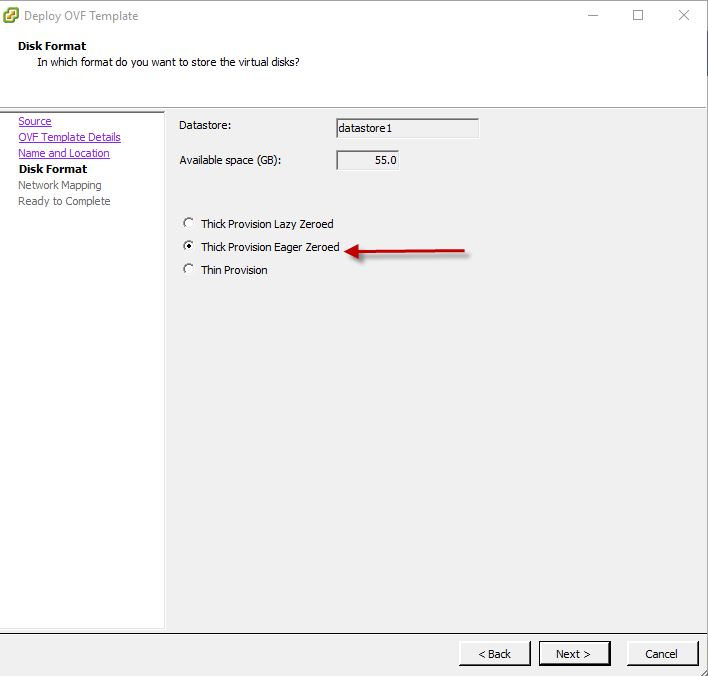
**Note:** This location is for the host operating system (OS) exclusively. It does not have to be the same datastore needed to set up and configure additional volumes for the NetWitness databases on certain hosts (covered in the following sections).
7. Click **Next**.
The Network Mapping options are displayed.
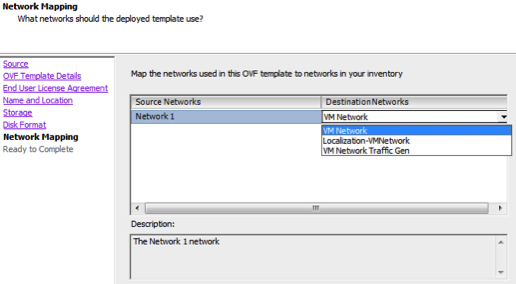
8. Select the **Network label** based on your requirement (For example, VM Network), and click **Next**.
**Note:** If you want to configure Network Mapping now, you can select options, but NetWitness recommends that you keep the default values and configure network mapping after you configure the OVA. You configure the OVA in [Step 4: Configure Host-Specific Parameters](https://50269063.hs-sites.com/knowledge-base/Step4-ConfigureHost-SpecificParameters?hsLang=en).
A status window showing deployment status is displayed.
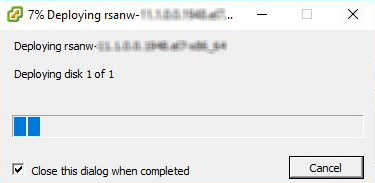
After the process is complete, the new OVA is presented in the designated resource pool visible on ESXi from within vSphere. At this point, the core virtual host is installed, but is still not configured.
[](https://mydev.netwitness.com/?hsLang=en)
Copyright © 2026, NetWitness LLC. All rights reserved.
[NetWitness Platform](https://www.netwitness.com/)
[Acceptable Use Policy](https://www.netwitness.com/wp-content/uploads/Acceptable-Use-Policy-092022.pdf) [Privacy Statement](https://www.netwitness.com/wp-content/uploads/NetWitness-Privacy-Statement-07292024.pdf)

[](https://www.linkedin.com/company/netwitness-platform/) [](https://www.youtube.com/@netwitness)
© 2026 NetWitness LLC. All rights reserved.