---
title: Specify UNC Paths
description: "Specify UNC (Universal Naming Convention) PathsSpecify UNC (Universal Naming Convention) Paths\nDuring configuration of a Log File Policy, you can spe"
---
[Skip to content](https://mydev.netwitness.com/knowledge-base/specifyuncpaths#main-content)

- [Home](https://mydev.netwitness.com/home)
- Integrations
Show submenu for Integrations
- [Netwitness Platform Integrations](https://mydev.netwitness.com/netwitnessplatformintegrations)
- [Third Party Integrations](https://mydev.netwitness.com/thirdpartyintegrations)
- [Knowledge Center](https://mydev.netwitness.com/knowledge-base)
- Community
Show submenu for Community
- [Blogs](https://mydev.netwitness.com/netwitness-security-llc-blog)
- Discussions
- Customers
Show submenu for Customers
- [Manage Products and Licenses](https://mydev.netwitness.com/nwportal)
- Downloads
- Partners
Show submenu for Partners
- [Partner Program](https://mydev.netwitness.com/partner)
- [Partner Resources](https://mydev.netwitness.com/partnerresources)
- [Submit a New Deal Registration](https://mydev.netwitness.com/dealregistration)
- [Become a Partner](https://mydev.netwitness.com/becomeapartner)
- [Update Your Partner Locator Profile](https://www.netwitness.com/partner-locator/?utm_source=pardotnewsletter&utm_medium=email&utm_campaign=partner_march)
- [NetWitness LinkedIn Partner Hub](https://linkedin.com/showcase/netwitnesspartners/)
- Education
Show submenu for Education
- [Instructor Led Training Schedule](https://mydev.netwitness.com/instructorledtrainingschedule)
- [NetWitness Training Catalog](https://mydev.netwitness.com/netwitnesstrainingcatalog)
- [Security Awareness Training](https://mydev.netwitness.com/securityawarenesstraining)
- [New Product Readiness](https://mydev.netwitness.com/newproductreadiness)
- [On-Demand Virtual Labs](https://mydev.netwitness.com/ondemandvirtuallabs)
- [Additional Training Information](https://mydev.netwitness.com/additionaltraininginformation)
- [Frequently Asked Questions](https://mydev.netwitness.com/educationfaq)
- [Contact NetWitness Education Team](https://mydev.netwitness.com/contact-netwitness-education-team)
- Support
Show submenu for Support
- [Contact Support](https://mydev.netwitness.com/contact-support)
- [Create a New Case](https://mydev.netwitness.com/create-support-case)
- [View My Cases](https://mydev.netwitness.com/viewmycase)
- [Product Version Life Cycle](https://mydev.netwitness.com/product-version-life-cycle)
- [Warranty & Replacement Parts](https://mydev.netwitness.com/warranty-and-replacement-parts)
- [Community Support Forum](https://mydev.netwitness.com/community-support-forum)
- [Technical Support Guide](https://mydev.netwitness.com/technical-support-guide)
Open main navigation
Close main navigation
- [Home](https://mydev.netwitness.com/home)
- Integrations
Show submenu for Integrations
- [Netwitness Platform Integrations](https://mydev.netwitness.com/netwitnessplatformintegrations)
- [Third Party Integrations](https://mydev.netwitness.com/thirdpartyintegrations)
- [Knowledge Center](https://mydev.netwitness.com/knowledge-base)
- Community
Show submenu for Community
- [Blogs](https://mydev.netwitness.com/netwitness-security-llc-blog)
- Discussions
- Customers
Show submenu for Customers
- [Manage Products and Licenses](https://mydev.netwitness.com/nwportal)
- Downloads
- Partners
Show submenu for Partners
- [Partner Program](https://mydev.netwitness.com/partner)
- [Partner Resources](https://mydev.netwitness.com/partnerresources)
- [Submit a New Deal Registration](https://mydev.netwitness.com/dealregistration)
- [Become a Partner](https://mydev.netwitness.com/becomeapartner)
- [Update Your Partner Locator Profile](https://www.netwitness.com/partner-locator/?utm_source=pardotnewsletter&utm_medium=email&utm_campaign=partner_march)
- [NetWitness LinkedIn Partner Hub](https://linkedin.com/showcase/netwitnesspartners/)
- Education
Show submenu for Education
- [Instructor Led Training Schedule](https://mydev.netwitness.com/instructorledtrainingschedule)
- [NetWitness Training Catalog](https://mydev.netwitness.com/netwitnesstrainingcatalog)
- [Security Awareness Training](https://mydev.netwitness.com/securityawarenesstraining)
- [New Product Readiness](https://mydev.netwitness.com/newproductreadiness)
- [On-Demand Virtual Labs](https://mydev.netwitness.com/ondemandvirtuallabs)
- [Additional Training Information](https://mydev.netwitness.com/additionaltraininginformation)
- [Frequently Asked Questions](https://mydev.netwitness.com/educationfaq)
- [Contact NetWitness Education Team](https://mydev.netwitness.com/contact-netwitness-education-team)
- Support
Show submenu for Support
- [Contact Support](https://mydev.netwitness.com/contact-support)
- [Create a New Case](https://mydev.netwitness.com/create-support-case)
- [View My Cases](https://mydev.netwitness.com/viewmycase)
- [Product Version Life Cycle](https://mydev.netwitness.com/product-version-life-cycle)
- [Warranty & Replacement Parts](https://mydev.netwitness.com/warranty-and-replacement-parts)
- [Community Support Forum](https://mydev.netwitness.com/community-support-forum)
- [Technical Support Guide](https://mydev.netwitness.com/technical-support-guide)
How can we help you?
- There are no suggestions because the search field is empty.
1. [NetWitness Knowledge Base](https://mydev.netwitness.com/knowledge-base?hsLang=en)
2. [Documentation](https://mydev.netwitness.com/knowledge-base/documentation?hsLang=en)
April 28, 2026
# Specify UNC Paths
## Specify UNC (Universal Naming Convention) PathsSpecify UNC (Universal Naming Convention) Paths
During configuration of a Log File Policy, you can specify the log file path. You can set one or more paths to be used by the agent to locate the log files. The path can be a standard Windows pathname (such as C:\\Program Files\\Apache\\error\_logs\\logfile.log) or a UNC (Universal Naming Convention) pathname (\\\\host-name\\share-name\\file-path). This topic describes how to specify a UNC path.
## Secure the UNC Path LocationSecure the UNC Path Location
When you use a UNC path to collect log data on a remote system, make sure that you secure the UNC path location. One solution that works with minimal risk in a Windows domain environment is to do the following:
1. Create a share on the directory on the computer where the log data exists in isolation.
2. Name the share to something like **LOGDATA$** for example. (Shares can be hidden from curious browsers by adding a "$" to the end of the share name).
3. Remove all the default share permissions except local admin so it can be changed.
4. Add a share permission for the agent computer system. This allows any user on the agent system to access the shared location. On the agent system collecting the remote log data, nothing else should be required to properly collect the log data from the UNC path.
**Note:** You may not be able to view the UNC directory contents from file explorer. Seek advice from your IT or security group for additional guidence to setting up and securing a UNC directory share.
The following procedures describe how to:
- [Share a folder between machines in a domain](https://mydev.netwitness.com/knowledge-base/specifyuncpaths#Share), and
- [Share a folder between machines in a Workgroup](https://mydev.netwitness.com/knowledge-base/specifyuncpaths#Share2)
## Share a folder between machines in a domainShare a folder between machines in a domain
This procedure describes how to share a folder between Windows machines that are both in the same domain.
1. Log on to a Domain member machine that contains the logs folder you want to collect using an agent.
2. Right click on the folder you want to share with the agent to collect logs from, and click **Properties**: **SHARE$** in this example.
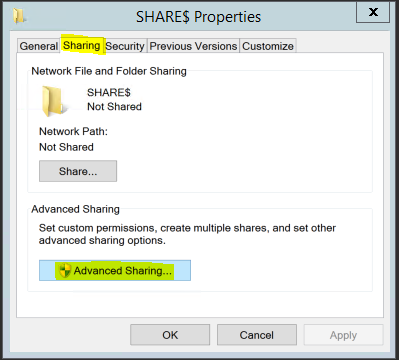
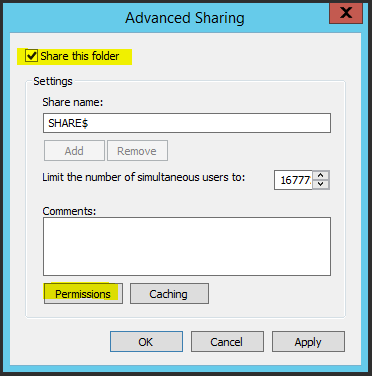
3. Click Advanced Sharing, select Share this folder, and then click Permissions.
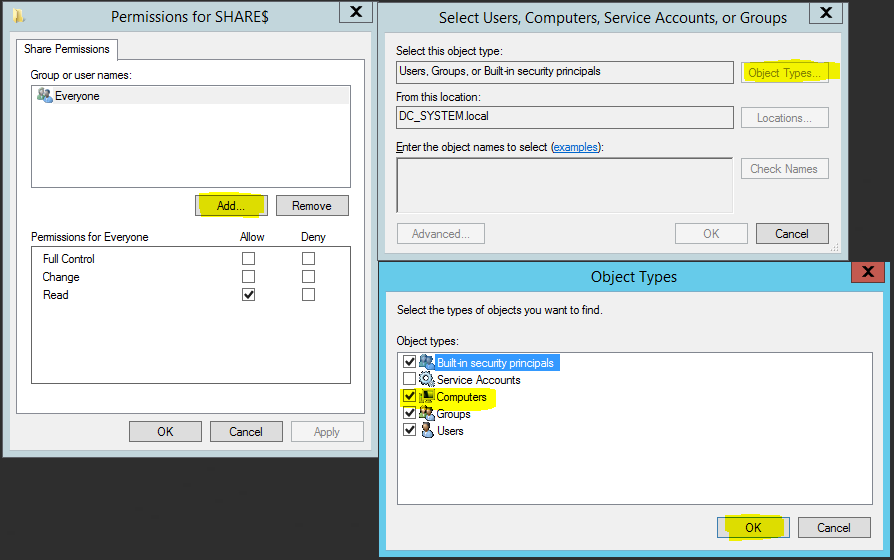
4. Click **Add**, and then on the next window click **Object Types**, check **Computers**, hit **OK**.
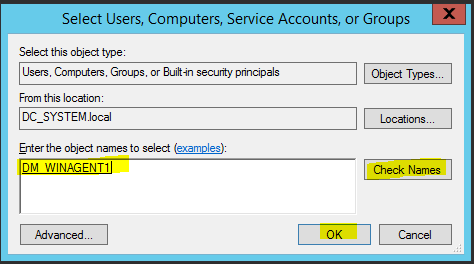
5. Search for the Agent computer name as shown below and click **OK**.
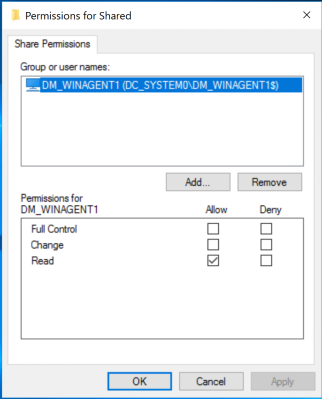
6. In the Permissions screen, provide **Read** permission to the agent, click **Apply**, and then click **OK**.
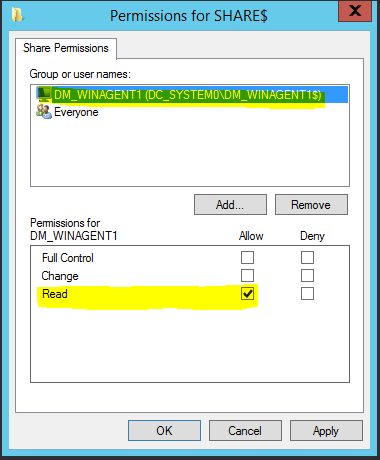
7. Remove **Everyone** from the Share Permissions list.
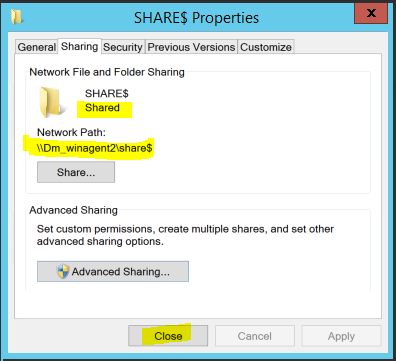
8. Verify that now the **SHARE$** folder status is correct, and note the network path so that you can enter it later, when you configure the policy that will use this shared folder.
## Share a folder between machines in a WorkgroupShare a folder between machines in a Workgroup
This procedure describes how to share a folder between Windows machines that are both in the same Workgroup.
1. Log on to a workgroup machine that contains the logs folder you want to collect using an agent.
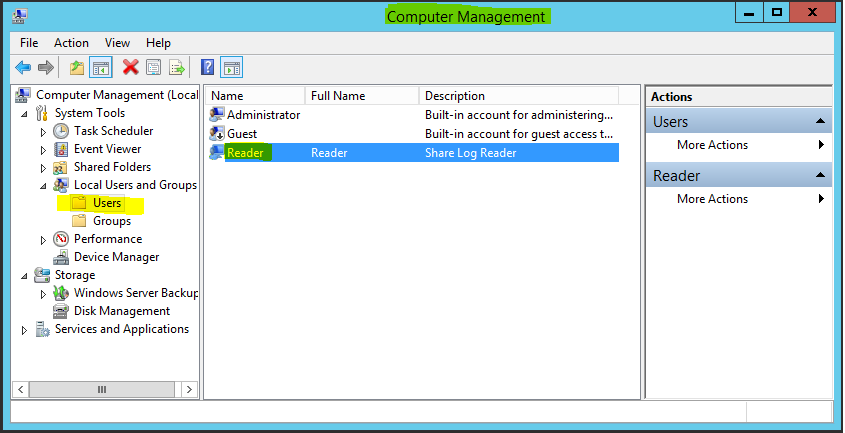
2. Create a non-admin user for log collection: **Reader** in this example.
3. Right click on the folder you want to share with the agent to collect logs from, and click **Properties**: **SHARE$** in this example.
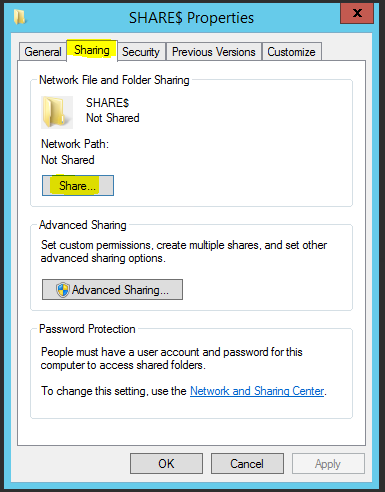
4. Click the **Sharing** tab, then click **Share**.
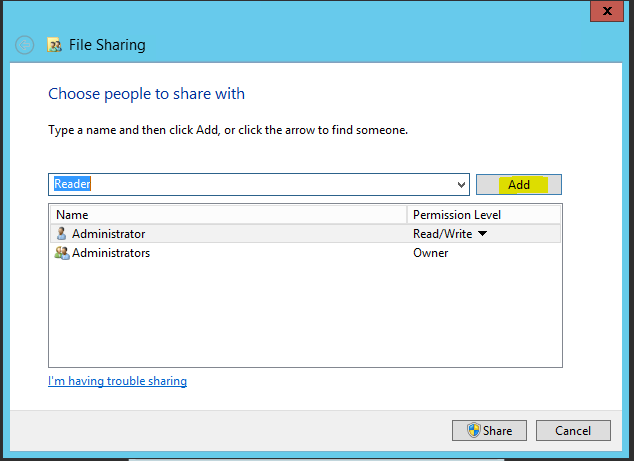
5. Choose the newly-created user and click **Add**.
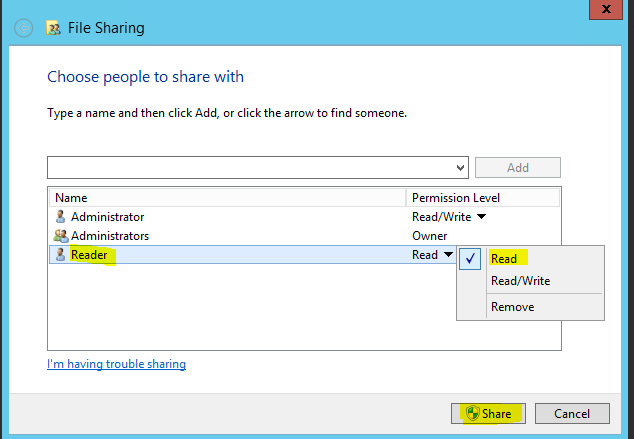
6. Select the **Read** permission and click **Share**.
7. Log onto the Agent to add credentials, so that the system can read logs from the shared folder.
1. Download the psexec tool from the Microsoft web site.
2. Run the following command:
psexec -i -s cmd.exe
A new command window opens, running as **system**.
3. In the command window, run the following command to cache credentials for the newly-created user to access logs on shared folder from a workgroup machine:
net use \\\\**hostname of machine with logs**\\Share$
For example:
net use \\\\WGWINAGENT2\\Share$
4. Provide the username and password for the non-admin user created earlier (in step 2).
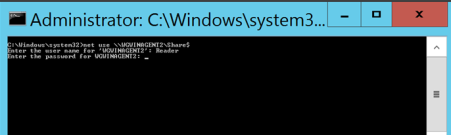
This command adds credentials to read logs from the shared folder on the workgroup machine.
[](https://mydev.netwitness.com/?hsLang=en)
Copyright © 2026, NetWitness LLC. All rights reserved.
[NetWitness Platform](https://www.netwitness.com/)
[Acceptable Use Policy](https://www.netwitness.com/wp-content/uploads/Acceptable-Use-Policy-092022.pdf) [Privacy Statement](https://www.netwitness.com/wp-content/uploads/NetWitness-Privacy-Statement-07292024.pdf)

[](https://www.linkedin.com/company/netwitness-platform/) [](https://www.youtube.com/@netwitness)
© 2026 NetWitness LLC. All rights reserved.