---
title: Set Up Notifications
description: "Setting Up Notifications\nThis topic describes how to configure notifications for event source groups. Notifications are sent when thresholds are not"
---
[Skip to content](https://mydev.netwitness.com/knowledge-base/setupnotifications#main-content)

- [Home](https://mydev.netwitness.com/home)
- Integrations
Show submenu for Integrations
- [Netwitness Platform Integrations](https://mydev.netwitness.com/netwitnessplatformintegrations)
- [Third Party Integrations](https://mydev.netwitness.com/thirdpartyintegrations)
- [Knowledge Center](https://mydev.netwitness.com/knowledge-base)
- Community
Show submenu for Community
- [Blogs](https://mydev.netwitness.com/netwitness-security-llc-blog)
- Discussions
- Customers
Show submenu for Customers
- [Manage Products and Licenses](https://mydev.netwitness.com/nwportal)
- Downloads
- Partners
Show submenu for Partners
- [Partner Program](https://mydev.netwitness.com/partner)
- [Partner Resources](https://mydev.netwitness.com/partnerresources)
- [Submit a New Deal Registration](https://mydev.netwitness.com/dealregistration)
- [Become a Partner](https://mydev.netwitness.com/becomeapartner)
- [Update Your Partner Locator Profile](https://www.netwitness.com/partner-locator/?utm_source=pardotnewsletter&utm_medium=email&utm_campaign=partner_march)
- [NetWitness LinkedIn Partner Hub](https://linkedin.com/showcase/netwitnesspartners/)
- Education
Show submenu for Education
- [Instructor Led Training Schedule](https://mydev.netwitness.com/instructorledtrainingschedule)
- [NetWitness Training Catalog](https://mydev.netwitness.com/netwitnesstrainingcatalog)
- [Security Awareness Training](https://mydev.netwitness.com/securityawarenesstraining)
- [New Product Readiness](https://mydev.netwitness.com/newproductreadiness)
- [On-Demand Virtual Labs](https://mydev.netwitness.com/ondemandvirtuallabs)
- [Additional Training Information](https://mydev.netwitness.com/additionaltraininginformation)
- [Frequently Asked Questions](https://mydev.netwitness.com/educationfaq)
- [Contact NetWitness Education Team](https://mydev.netwitness.com/contact-netwitness-education-team)
- Support
Show submenu for Support
- [Contact Support](https://mydev.netwitness.com/contact-support)
- [Create a New Case](https://mydev.netwitness.com/create-support-case)
- [View My Cases](https://mydev.netwitness.com/viewmycase)
- [Product Version Life Cycle](https://mydev.netwitness.com/product-version-life-cycle)
- [Warranty & Replacement Parts](https://mydev.netwitness.com/warranty-and-replacement-parts)
- [Community Support Forum](https://mydev.netwitness.com/community-support-forum)
- [Technical Support Guide](https://mydev.netwitness.com/technical-support-guide)
Open main navigation
Close main navigation
- [Home](https://mydev.netwitness.com/home)
- Integrations
Show submenu for Integrations
- [Netwitness Platform Integrations](https://mydev.netwitness.com/netwitnessplatformintegrations)
- [Third Party Integrations](https://mydev.netwitness.com/thirdpartyintegrations)
- [Knowledge Center](https://mydev.netwitness.com/knowledge-base)
- Community
Show submenu for Community
- [Blogs](https://mydev.netwitness.com/netwitness-security-llc-blog)
- Discussions
- Customers
Show submenu for Customers
- [Manage Products and Licenses](https://mydev.netwitness.com/nwportal)
- Downloads
- Partners
Show submenu for Partners
- [Partner Program](https://mydev.netwitness.com/partner)
- [Partner Resources](https://mydev.netwitness.com/partnerresources)
- [Submit a New Deal Registration](https://mydev.netwitness.com/dealregistration)
- [Become a Partner](https://mydev.netwitness.com/becomeapartner)
- [Update Your Partner Locator Profile](https://www.netwitness.com/partner-locator/?utm_source=pardotnewsletter&utm_medium=email&utm_campaign=partner_march)
- [NetWitness LinkedIn Partner Hub](https://linkedin.com/showcase/netwitnesspartners/)
- Education
Show submenu for Education
- [Instructor Led Training Schedule](https://mydev.netwitness.com/instructorledtrainingschedule)
- [NetWitness Training Catalog](https://mydev.netwitness.com/netwitnesstrainingcatalog)
- [Security Awareness Training](https://mydev.netwitness.com/securityawarenesstraining)
- [New Product Readiness](https://mydev.netwitness.com/newproductreadiness)
- [On-Demand Virtual Labs](https://mydev.netwitness.com/ondemandvirtuallabs)
- [Additional Training Information](https://mydev.netwitness.com/additionaltraininginformation)
- [Frequently Asked Questions](https://mydev.netwitness.com/educationfaq)
- [Contact NetWitness Education Team](https://mydev.netwitness.com/contact-netwitness-education-team)
- Support
Show submenu for Support
- [Contact Support](https://mydev.netwitness.com/contact-support)
- [Create a New Case](https://mydev.netwitness.com/create-support-case)
- [View My Cases](https://mydev.netwitness.com/viewmycase)
- [Product Version Life Cycle](https://mydev.netwitness.com/product-version-life-cycle)
- [Warranty & Replacement Parts](https://mydev.netwitness.com/warranty-and-replacement-parts)
- [Community Support Forum](https://mydev.netwitness.com/community-support-forum)
- [Technical Support Guide](https://mydev.netwitness.com/technical-support-guide)
How can we help you?
- There are no suggestions because the search field is empty.
1. [NetWitness Knowledge Base](https://mydev.netwitness.com/knowledge-base?hsLang=en)
2. [Documentation](https://mydev.netwitness.com/knowledge-base/documentation?hsLang=en)
April 28, 2026
# Set Up Notifications
## Setting Up Notifications
This topic describes how to configure notifications for event source groups. Notifications are sent when thresholds are not met.
Notifications go hand-in-hand with Thresholds. Before you configure notifications, you should set up Thresholds for an event source group.
**Note:** After configuring the thresholds for an event source group, if you do not set any notifications, then even if an alarm is triggered, users are not notified. However, all alarms are visible on the [Alarms Tab](https://50269063.hs-sites.com/knowledge-base/AlarmsTab?hsLang=en).
## PrerequisitesPrerequisites
Before you set up notifications for an event source group, you should review the available notification items:
- **Notification Servers:** These are the servers that you want to receive notifications from the system. For more details, see the **Notification Servers Overview** topic in the [*System Configuration Guide*](https://50269063.hs-sites.com/knowledge-base/SystemConfigurationGuidefor12-5?hsLang=en).
- **Notification Templates:** These are the available templates for each type of notification. For Event Source Management, default templates are supplied for Email (SMTP), SNMP, and Syslog. You can use these templates as supplied, or customize them if necessary. For more details, see the **Templates Overview** topic in the [*System Configuration* Guide](https://50269063.hs-sites.com/knowledge-base/SystemConfigurationGuidefor12-5?hsLang=en).
- **Notification Output:** The outputs contain the parameters for the notification type. For example, an email notification type contains the email addresses and subject for the notification. For more details, see the **Notification Outputs Overview** topic in the [*System Configuration* Guide](https://50269063.hs-sites.com/knowledge-base/SystemConfigurationGuidefor12-5?hsLang=en).
## Add Notifications for an event source group
To add notifications for an event source group:
1. Go to ** (Admin) \> Event Sources**.
2. Select the **Monitoring Policies** tab.
3. In the **Event Groups** panel, select a group.
**Note:** You should have already set a threshold for the group. If not, see [Set and View the Thresholds for an Alert Policy](https://community.netwitness.com/ESMCreAlrt.htm#setThreshold) to set a threshold, and then return to this procedure. Alternatively, if you have automatic alerting turned on, then you do not need to set thresholds for a policy. Automatic alarms generate notifications without the need to set thresholds.
4. In the Notifications panel, click , and from the drop-down menu, select the type of notification you want to add:
- Email
- SNMP
- Syslog
**Note:** Default ESM (Event Source Monitoring) templates are provided for each type of notification.
5. Enter values for the Notification, Notification Server, and Template fields.
1. For Notification, select from the list, or add a suitable notification type in **Notifications**, and then select it here.
2. For the Server, select one from the list, or add a suitable server in **Notifications**, and then select it here.
3. For Template, select an available template, or create a suitable template in **Notifications**, and then select it here.
**Note:** If you need to add or edit one of these items, click **Notification Settings**. A new browser window opens on the **Administration \> System \> Global Notifications** page. Use this page to view or update the available Notification items.
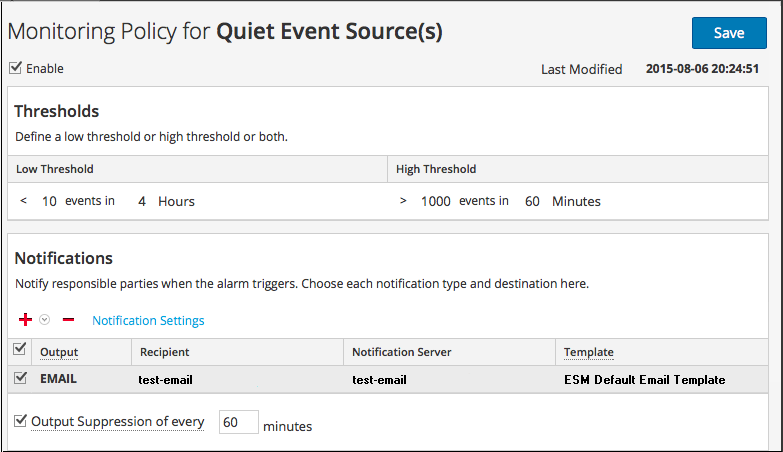
6. Optionally, you can limit the rate of notifications for a policy.
1. Select **Output Suppression** to enable setting a limit.
2. Enter a value, in minutes, for the suppression rate. For example, if you enter **30**, notifications for this policy are limited to one notification every 30 minutes.
3. Click **Save**.
Here is an example of a monitoring policy that contains a threshold and notification for an event source group.
[](https://mydev.netwitness.com/?hsLang=en)
Copyright © 2026, NetWitness LLC. All rights reserved.
[NetWitness Platform](https://www.netwitness.com/)
[Acceptable Use Policy](https://www.netwitness.com/wp-content/uploads/Acceptable-Use-Policy-092022.pdf) [Privacy Statement](https://www.netwitness.com/wp-content/uploads/NetWitness-Privacy-Statement-07292024.pdf)

[](https://www.linkedin.com/company/netwitness-platform/) [](https://www.youtube.com/@netwitness)
© 2026 NetWitness LLC. All rights reserved.