---
title: "Security Configuration: Firewall Rules"
description: "Tags: Version 11.4It is important that you use a firewall to restrict network traffic between RSA NetWitness Platform and external systems. RSA NetWit"
---
[Skip to content](https://mydev.netwitness.com/knowledge-base/securityconfiguration-firewallrules#main-content)

- [Home](https://mydev.netwitness.com/home)
- Integrations
Show submenu for Integrations
- [Netwitness Platform Integrations](https://mydev.netwitness.com/netwitnessplatformintegrations)
- [Third Party Integrations](https://mydev.netwitness.com/thirdpartyintegrations)
- [Knowledge Center](https://mydev.netwitness.com/knowledge-base)
- Community
Show submenu for Community
- [Blogs](https://mydev.netwitness.com/netwitness-security-llc-blog)
- Discussions
- Customers
Show submenu for Customers
- [Manage Products and Licenses](https://mydev.netwitness.com/nwportal)
- Downloads
- Partners
Show submenu for Partners
- [Partner Program](https://mydev.netwitness.com/partner)
- [Partner Resources](https://mydev.netwitness.com/partnerresources)
- [Submit a New Deal Registration](https://mydev.netwitness.com/dealregistration)
- [Become a Partner](https://mydev.netwitness.com/becomeapartner)
- [Update Your Partner Locator Profile](https://www.netwitness.com/partner-locator/?utm_source=pardotnewsletter&utm_medium=email&utm_campaign=partner_march)
- [NetWitness LinkedIn Partner Hub](https://linkedin.com/showcase/netwitnesspartners/)
- Education
Show submenu for Education
- [Instructor Led Training Schedule](https://mydev.netwitness.com/instructorledtrainingschedule)
- [NetWitness Training Catalog](https://mydev.netwitness.com/netwitnesstrainingcatalog)
- [Security Awareness Training](https://mydev.netwitness.com/securityawarenesstraining)
- [New Product Readiness](https://mydev.netwitness.com/newproductreadiness)
- [On-Demand Virtual Labs](https://mydev.netwitness.com/ondemandvirtuallabs)
- [Additional Training Information](https://mydev.netwitness.com/additionaltraininginformation)
- [Frequently Asked Questions](https://mydev.netwitness.com/educationfaq)
- [Contact NetWitness Education Team](https://mydev.netwitness.com/contact-netwitness-education-team)
- Support
Show submenu for Support
- [Contact Support](https://mydev.netwitness.com/contact-support)
- [Create a New Case](https://mydev.netwitness.com/create-support-case)
- [View My Cases](https://mydev.netwitness.com/viewmycase)
- [Product Version Life Cycle](https://mydev.netwitness.com/product-version-life-cycle)
- [Warranty & Replacement Parts](https://mydev.netwitness.com/warranty-and-replacement-parts)
- [Community Support Forum](https://mydev.netwitness.com/community-support-forum)
- [Technical Support Guide](https://mydev.netwitness.com/technical-support-guide)
Open main navigation
Close main navigation
- [Home](https://mydev.netwitness.com/home)
- Integrations
Show submenu for Integrations
- [Netwitness Platform Integrations](https://mydev.netwitness.com/netwitnessplatformintegrations)
- [Third Party Integrations](https://mydev.netwitness.com/thirdpartyintegrations)
- [Knowledge Center](https://mydev.netwitness.com/knowledge-base)
- Community
Show submenu for Community
- [Blogs](https://mydev.netwitness.com/netwitness-security-llc-blog)
- Discussions
- Customers
Show submenu for Customers
- [Manage Products and Licenses](https://mydev.netwitness.com/nwportal)
- Downloads
- Partners
Show submenu for Partners
- [Partner Program](https://mydev.netwitness.com/partner)
- [Partner Resources](https://mydev.netwitness.com/partnerresources)
- [Submit a New Deal Registration](https://mydev.netwitness.com/dealregistration)
- [Become a Partner](https://mydev.netwitness.com/becomeapartner)
- [Update Your Partner Locator Profile](https://www.netwitness.com/partner-locator/?utm_source=pardotnewsletter&utm_medium=email&utm_campaign=partner_march)
- [NetWitness LinkedIn Partner Hub](https://linkedin.com/showcase/netwitnesspartners/)
- Education
Show submenu for Education
- [Instructor Led Training Schedule](https://mydev.netwitness.com/instructorledtrainingschedule)
- [NetWitness Training Catalog](https://mydev.netwitness.com/netwitnesstrainingcatalog)
- [Security Awareness Training](https://mydev.netwitness.com/securityawarenesstraining)
- [New Product Readiness](https://mydev.netwitness.com/newproductreadiness)
- [On-Demand Virtual Labs](https://mydev.netwitness.com/ondemandvirtuallabs)
- [Additional Training Information](https://mydev.netwitness.com/additionaltraininginformation)
- [Frequently Asked Questions](https://mydev.netwitness.com/educationfaq)
- [Contact NetWitness Education Team](https://mydev.netwitness.com/contact-netwitness-education-team)
- Support
Show submenu for Support
- [Contact Support](https://mydev.netwitness.com/contact-support)
- [Create a New Case](https://mydev.netwitness.com/create-support-case)
- [View My Cases](https://mydev.netwitness.com/viewmycase)
- [Product Version Life Cycle](https://mydev.netwitness.com/product-version-life-cycle)
- [Warranty & Replacement Parts](https://mydev.netwitness.com/warranty-and-replacement-parts)
- [Community Support Forum](https://mydev.netwitness.com/community-support-forum)
- [Technical Support Guide](https://mydev.netwitness.com/technical-support-guide)
How can we help you?
- There are no suggestions because the search field is empty.
1. [NetWitness Knowledge Base](https://mydev.netwitness.com/knowledge-base?hsLang=en)
2. [Documentation](https://mydev.netwitness.com/knowledge-base/documentation?hsLang=en)
April 6, 2026
# Security Configuration: Firewall Rules
**Tags:** Version 11.4
It is important that you use a firewall to restrict network traffic between RSA NetWitness Platform and external systems. RSA NetWitness Platform recommends that you configure firewall rules to help ensure secure communication for the following connections:
- Demilitarized zone (DMZ) to corporate network
- Corporate network to site sub network
- Site to site
- Live CMS to DMZ
- External email server to DMZ
**Note:** RSA recommends that you restrict access from client hosts to only known IP addresses. For example, if you set up the NetWitness Platform Client UI on IP address 192.168.0.1, configure your firewall to allow only the IP address 192.168.0.1 to connect to the NetWitness Platform host.
**Note:** The firewall rules should be configured on an external firewall and not on any of the NetWitness Platform host.
RSA recommends that you configure firewall rules as described in the sections below. These recommendations are based on the following assumptions:
- You have a stateful firewall, indicating that only the establishment of TCP ports is considered.
- You specify the direction of communication for the UDP ports because the connections are sessionless.
- You deploy NetWitness Platform as shown in the Security Controls Map.
- The firewall processes the rules top to bottom, finishing with a generic drop of all the packets.
### DMZ to Corporate Network
RSA recommends that you:
- Configure whitelist communication from the VPN server in the DMZ to the client machines on which you run RSA NetWitness Platform applications such as NetWitness Platform Web UI.
- Create firewall rules for all the machines from which you intended to remotely access the corporate network through Remote Desktop Protocol (RDP).
### Corporate Network to Site
RSA recommends that the firewall at each RSA NetWitness Platform site allow access only from designated client machines through a whitelisted IP address and port.
RSA recommends that you secure the following ports to ensure secure communication between the client machine that is set as the RSA NetWitness Platform Web UI and the NetWitness Platform site:
- TCP 443
For more information, see [Communication Security Settings](https://community.rsa.com/docs/DOC-105896). To help ensure secure communication between the client machines that access the NetWitness Platform UI and a site, you must set up the firewall rules as shown below:
ALLOW $nwclient\_IP to $nwsite\_IP on port 443/tcp
DROP all from \* to \*
where **nwclient\_IP** is the IP address assigned to the client machine that is set as the NetWitness Platform web UI and **nwsite\_IP** is the IP address assigned to the Broker host within which the RSA NetWitness Platform web server is running.
### Site to Site
RSA NetWitness Platform may run in multiple sub‐networks within your corporate network, called sites. You can configure RSA NetWitness Platform to allow the hosts located in one site to communicate with the hosts in another site.
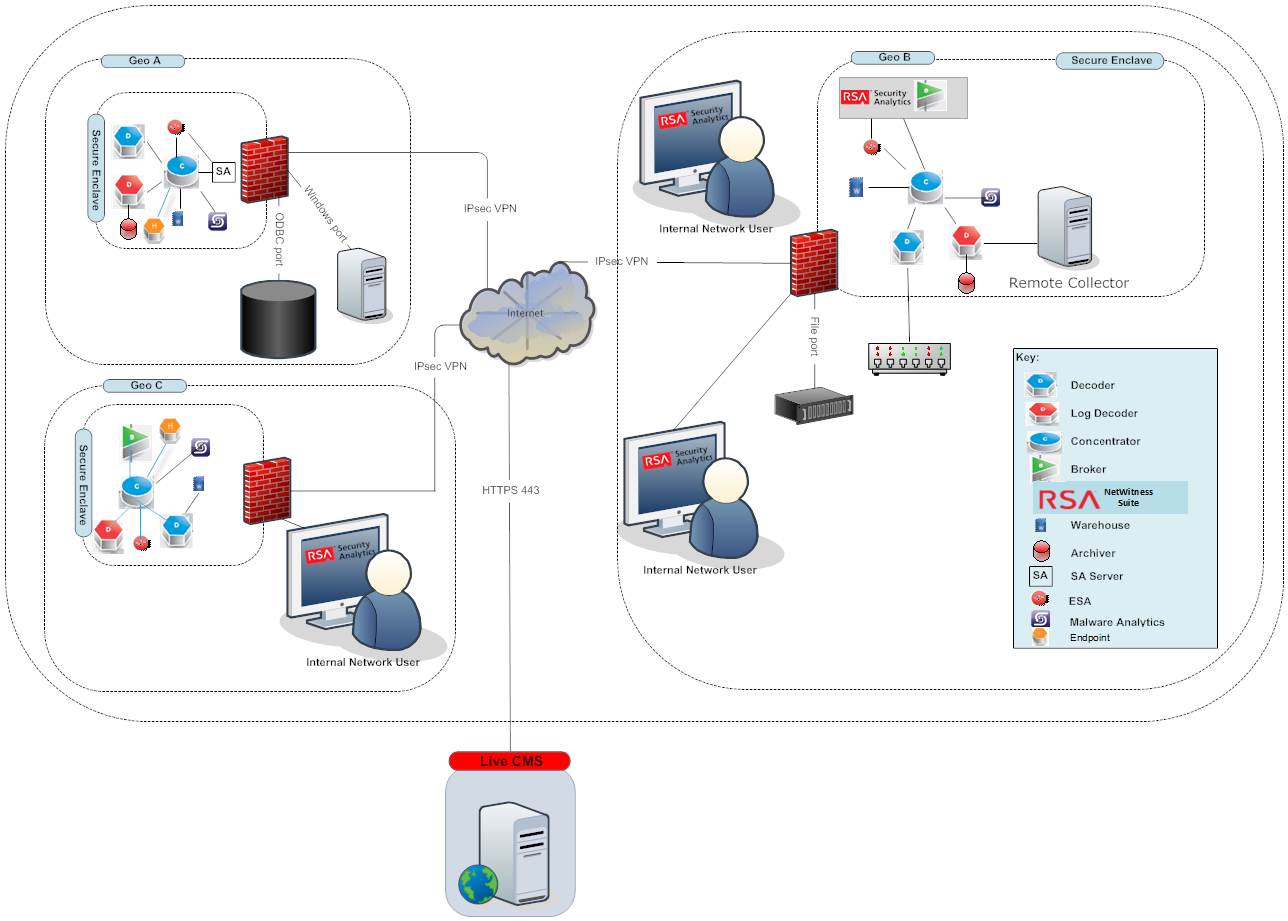For this scenario, RSA recommends that you do the following:
- Ensure that the firewall at each RSA NetWitness Platform site allows communication between two sites only through a whitelisted IP address and port. For a graphical depiction of the site‐to‐site security control map showing the site firewalls, see the above figure.
- NetWitness Platform system update uses port 80. That means NetWitness Platform site to another site (where brokers, decoders exist), port 80 should be open.
### Live CMS to DMZ
To ensure secure communication between the RSA NetWitness Platform site and Live CMS, set up the firewall rules as shown below:
ALLOW $nw\_site\_IP to $Live\_IP on port 443/tcp
DROP all from \* to \*
where **nw\_site\_IP** and **Live\_IP** are the IP addresses assigned to the NetWitness Platform site and the Live CMS respectively.
**Note:** If you are using proxy server with self-signed certificate, you must add exception in proxy server rule to allow traffic between Live CMS server (cms.netwitness.com, port 443) and NetWitness Platform.
### RSA Download Central to DMZ
To ensure secure communication between the RSA NetWitness Platform site and RSA Download Central, set up the firewall rules as shown below:
ALLOW $nw\_site\_IP to $rsa\_DLC\_IP on port 80/tcp
DROP all from \* to \*
where **nw\_site\_IP** and **rsa\_DLC\_IP** are the IP addresses assigned to the NetWitness Platform site and RSA Download Central respectively.
### External Email Server to DMZ
To ensure secure communication between the RSA NetWitness Platform site and the External Email Server, set up the firewall rules as shown below:
ALLOW $nw\_site\_IP to $Email\_IP on port 443/tcp
DROP all from \* to \*
where **nw\_site\_IP** and **Email\_IP** are the IP addresses assigned to the NetWitness Platform site and the external email server respectively.
### Syslog Server to Site
If you have enabled the syslog port, to ensure secure communication between the RSA NetWitness Platform site and the Syslog Server, set up the firewall rules as shown below:
ALLOW $nw\_site\_IP to $Syslog\_IP on port 514/udp
DROP all from \* to \*
where **nw\_site\_IP** and **Syslog\_IP** are the IP addresses assigned to the NetWitness Platform site and the syslog server respectively.
### SNMP Server to Site
If you have enabled the SNMP port, to ensure secure communication between the RSA NetWitness Platform site and the SNMP Server, set up the firewall rules as shown below:
ALLOW $nw\_site\_IP to $SNMP\_IP on port 1610/SNMP
DROP all from \* to \*
where **nw\_site\_IP** and **SNMP\_IP** are the IP addresses assigned to the NetWitness Platform site and the SNMP server respectively.
Previous Topic: [Security Controls Map](https://community.rsa.com/docs/DOC-105899)
Next Topic: [Secure Deployment Settings](https://community.rsa.com/docs/DOC-105914)
You are here
[Table of Contents](https://community.rsa.com/docs/DOC-105932) \> [Secure Deployment and Usage Settings](https://community.rsa.com/docs/DOC-105912) \> Firewall Rules
[](https://mydev.netwitness.com/?hsLang=en)
Copyright © 2026, NetWitness LLC. All rights reserved.
[NetWitness Platform](https://www.netwitness.com/)
[Acceptable Use Policy](https://www.netwitness.com/wp-content/uploads/Acceptable-Use-Policy-092022.pdf) [Privacy Statement](https://www.netwitness.com/wp-content/uploads/NetWitness-Privacy-Statement-07292024.pdf)

[](https://www.linkedin.com/company/netwitness-platform/) [](https://www.youtube.com/@netwitness)
© 2026 NetWitness LLC. All rights reserved.