---
title: Search for Text Patterns in the Navigate and Legacy Events Views
description: "Search for Text Patterns in the Navigate and Legacy Events ViewsSearch for Text Patterns in the Navigate and Legacy Events Views\nYou can search for t"
---
[Skip to content](https://mydev.netwitness.com/knowledge-base/searchfortextpatternsinthenavigateandlegacyeventsviews#main-content)

- [Home](https://mydev.netwitness.com/home)
- Integrations
Show submenu for Integrations
- [Netwitness Platform Integrations](https://mydev.netwitness.com/netwitnessplatformintegrations)
- [Third Party Integrations](https://mydev.netwitness.com/thirdpartyintegrations)
- [Knowledge Center](https://mydev.netwitness.com/knowledge-base)
- Community
Show submenu for Community
- [Blogs](https://mydev.netwitness.com/netwitness-security-llc-blog)
- Discussions
- Customers
Show submenu for Customers
- [Manage Products and Licenses](https://mydev.netwitness.com/nwportal)
- Downloads
- Partners
Show submenu for Partners
- [Partner Program](https://mydev.netwitness.com/partner)
- [Partner Resources](https://mydev.netwitness.com/partnerresources)
- [Submit a New Deal Registration](https://mydev.netwitness.com/dealregistration)
- [Become a Partner](https://mydev.netwitness.com/becomeapartner)
- [Update Your Partner Locator Profile](https://www.netwitness.com/partner-locator/?utm_source=pardotnewsletter&utm_medium=email&utm_campaign=partner_march)
- [NetWitness LinkedIn Partner Hub](https://linkedin.com/showcase/netwitnesspartners/)
- Education
Show submenu for Education
- [Instructor Led Training Schedule](https://mydev.netwitness.com/instructorledtrainingschedule)
- [NetWitness Training Catalog](https://mydev.netwitness.com/netwitnesstrainingcatalog)
- [Security Awareness Training](https://mydev.netwitness.com/securityawarenesstraining)
- [New Product Readiness](https://mydev.netwitness.com/newproductreadiness)
- [On-Demand Virtual Labs](https://mydev.netwitness.com/ondemandvirtuallabs)
- [Additional Training Information](https://mydev.netwitness.com/additionaltraininginformation)
- [Frequently Asked Questions](https://mydev.netwitness.com/educationfaq)
- [Contact NetWitness Education Team](https://mydev.netwitness.com/contact-netwitness-education-team)
- Support
Show submenu for Support
- [Contact Support](https://mydev.netwitness.com/contact-support)
- [Create a New Case](https://mydev.netwitness.com/create-support-case)
- [View My Cases](https://mydev.netwitness.com/viewmycase)
- [Product Version Life Cycle](https://mydev.netwitness.com/product-version-life-cycle)
- [Warranty & Replacement Parts](https://mydev.netwitness.com/warranty-and-replacement-parts)
- [Community Support Forum](https://mydev.netwitness.com/community-support-forum)
- [Technical Support Guide](https://mydev.netwitness.com/technical-support-guide)
Open main navigation
Close main navigation
- [Home](https://mydev.netwitness.com/home)
- Integrations
Show submenu for Integrations
- [Netwitness Platform Integrations](https://mydev.netwitness.com/netwitnessplatformintegrations)
- [Third Party Integrations](https://mydev.netwitness.com/thirdpartyintegrations)
- [Knowledge Center](https://mydev.netwitness.com/knowledge-base)
- Community
Show submenu for Community
- [Blogs](https://mydev.netwitness.com/netwitness-security-llc-blog)
- Discussions
- Customers
Show submenu for Customers
- [Manage Products and Licenses](https://mydev.netwitness.com/nwportal)
- Downloads
- Partners
Show submenu for Partners
- [Partner Program](https://mydev.netwitness.com/partner)
- [Partner Resources](https://mydev.netwitness.com/partnerresources)
- [Submit a New Deal Registration](https://mydev.netwitness.com/dealregistration)
- [Become a Partner](https://mydev.netwitness.com/becomeapartner)
- [Update Your Partner Locator Profile](https://www.netwitness.com/partner-locator/?utm_source=pardotnewsletter&utm_medium=email&utm_campaign=partner_march)
- [NetWitness LinkedIn Partner Hub](https://linkedin.com/showcase/netwitnesspartners/)
- Education
Show submenu for Education
- [Instructor Led Training Schedule](https://mydev.netwitness.com/instructorledtrainingschedule)
- [NetWitness Training Catalog](https://mydev.netwitness.com/netwitnesstrainingcatalog)
- [Security Awareness Training](https://mydev.netwitness.com/securityawarenesstraining)
- [New Product Readiness](https://mydev.netwitness.com/newproductreadiness)
- [On-Demand Virtual Labs](https://mydev.netwitness.com/ondemandvirtuallabs)
- [Additional Training Information](https://mydev.netwitness.com/additionaltraininginformation)
- [Frequently Asked Questions](https://mydev.netwitness.com/educationfaq)
- [Contact NetWitness Education Team](https://mydev.netwitness.com/contact-netwitness-education-team)
- Support
Show submenu for Support
- [Contact Support](https://mydev.netwitness.com/contact-support)
- [Create a New Case](https://mydev.netwitness.com/create-support-case)
- [View My Cases](https://mydev.netwitness.com/viewmycase)
- [Product Version Life Cycle](https://mydev.netwitness.com/product-version-life-cycle)
- [Warranty & Replacement Parts](https://mydev.netwitness.com/warranty-and-replacement-parts)
- [Community Support Forum](https://mydev.netwitness.com/community-support-forum)
- [Technical Support Guide](https://mydev.netwitness.com/technical-support-guide)
How can we help you?
- There are no suggestions because the search field is empty.
1. [NetWitness Knowledge Base](https://mydev.netwitness.com/knowledge-base?hsLang=en)
2. [Documentation](https://mydev.netwitness.com/knowledge-base/documentation?hsLang=en)
April 27, 2026
# Search for Text Patterns in the Navigate and Legacy Events Views
## Search for Text Patterns in the Navigate and Legacy Events ViewsSearch for Text Patterns in the Navigate and Legacy Events Views
You can search for text patterns within the current set of events in the Navigate view, the Events view, and the Legacy Events view. This section provides information about searching in the Navigate view and the Legacy Events view.
You can perform a keyword text search or do regex (Regular Expression) matching. In the Navigate view, you can click a meta value, such as HTTP, to drill into the data and then enter a search string in the Search field to search for events within that subset of data. The search opens a tab in the Legacy Events view, brings your drill and time range forward, and shows your search results. You can also drill into the data using queries before starting a search. To execute the search, enter a search string in the Search box, and press **Enter** or click **Search**.
**Note:** By default search results are only for exact matches found in indexed data. Only meta values shown as blue links in the Events Detail view are indexed. The regex option must be selected if the value contains a space. To broaden the search change the options in the Search Events drop-down menu.
## Keyword Text SearchKeyword Text Search
The text search provides these capabilities:
- Each white space delimited word is ANDed, so that every word must be found, but the order or location position in relation to the other words is irrelevant. For example, if you search on `Mark Albert`, both Mark and Albert must be found in the session, but they need not be together or in any specific order.
- The word OR is special. If you search `Mark OR Albert`, either Mark or Albert must be found in the session to match; both are not required.
- You can mix or match implicit ANDs and ORs together in the search string. The explicit OR has higher precedence than the implicit (whitespace) AND. The following examples make the same logical statement, which requires that both the terms cheese and dumplings be present in a match and one of toast or bread:
`cheese toast OR bread dumplings`
`cheese AND (toast OR bread) AND dumplings`
- You can exclude words from search results using the `-` operator. For example, searching for `cheese -toast` would return any result that has the word cheese, unless the word toast is also present.
- The keyword search can match metadata stored in the following patterns:
- **IPv4 and IPv6 addresses**. Any term that can be recognized as an IP address is converted to the native metadata format so that it can be found in indexed metadata.
- **IPv4 CIDR ranges**. You can use CIDR notation to locate IPv4 addresses within a range.
- **Timestamps**. Timestamps are matched against the native time metadata, and any additional time meta fields stored with the Time type.
- **Numbers**. The search function will attempt to automatically identify decimal search terms and match them against numeric meta data fields.
### Options Controlling Search BehaviorOptions Controlling Search Behavior
To access the Search box and search options in the Navigate or Legacy Events view:
1. You can see the Search Events field in the toolbar.

**Note:** If you cannot see the Search Events field in the toolbar, click  on the right side of the toolbar.
2. Click in the **Search Events** field to view the Search Options drop-down menu. In Version 11.2 and later, the menu options are slightly different. The first figure illustrates the menu for 11.1 and below; the second figure illustrates the menu for Version 11.2 and above.
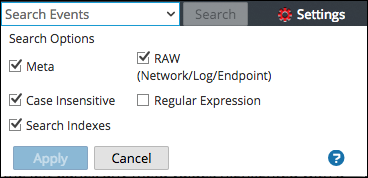
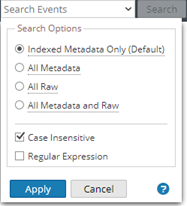
The options selected in this box change how the search is executed. The default search mode is to search indexed metadata and raw data only.
**Note:** Because the Index or Indexed Metadata Only (default) checkbox is selected by default, the search returns results based on data that is indexed. If you want to search for a complete set of metadata or raw data, select those checkboxes and clear the Index or Indexed Metadata Only (default) checkbox. This type of search takes longer, but it contains a more complete set of data.
The following table describes the Investigation search options.
### Regular Expression Search SyntaxRegular Expression Search Syntax
A regular expression search uses Perl regular expression syntax, which is documented in detail in [http://perldoc.perl.org/perlre.html](http://perldoc.perl.org/perlre.html).
### Raw Text Keyword Search Raw Text Keyword Search
The Log Decoder has the capability to create a raw text index for unparsed log events. This functionality creates metadata items that form a full-text index on downstream services such as Concentrators and Archivers. When you enable the Search Indexes option in your search preferences, your search automatically uses the text index. Note that the text index produces meta items that have a coarse granularity. For example, the default text indexer configuration truncates text terms. By comparing the index matches against raw data, the search engine will find accurate results for your search. However, you can improve search times by disabling the raw search checkbox. If you do so, results will be returned faster, but you may see false positive hits in your search results.
## Search ProceduresSearch Procedures
### Search in the Navigate ViewSearch in the Navigate View
To search within the currently displayed data in the Navigate view:
1. Type a search string in the Search field and press **Enter** or click **Search**.
2. To clear the search box and return to the previous Navigate view with results unfiltered by the search, click the **X** in the search box.
### Search in the Legacy Events ViewSearch in the Legacy Events View
To search within the currently displayed data in the Legacy Events view:
1. Type a search string in the Search box, and press **Enter** or click **Search**.
The search results are displayed. Events that match the search criteria are displayed in the events list. In the Details view and List view, matches are highlighted in the Details column. In addition, when searching RAW, matches are highlighted in the Log view Logs column.
2. If you want to narrow the search, change the query and time.
3. If you want to stop the search and return to the Legacy Events view, click **Cancel**.
Any results that are displayed remain.
4. To clear the search box and return to the normal Events view, click **X** in the search box.
[](https://mydev.netwitness.com/?hsLang=en)
Copyright © 2026, NetWitness LLC. All rights reserved.
[NetWitness Platform](https://www.netwitness.com/)
[Acceptable Use Policy](https://www.netwitness.com/wp-content/uploads/Acceptable-Use-Policy-092022.pdf) [Privacy Statement](https://www.netwitness.com/wp-content/uploads/NetWitness-Privacy-Statement-07292024.pdf)

[](https://www.linkedin.com/company/netwitness-platform/) [](https://www.youtube.com/@netwitness)
© 2026 NetWitness LLC. All rights reserved.