---
title: Schedule Report Dialog from Respond View
description: "Tags: Documentation The Schedule Report dialog enables you to create a schedule for the report. Reports can be scheduled hourly, daily, weekly,"
---
[Skip to content](https://mydev.netwitness.com/knowledge-base/schedulereportdialogfromrespondview#main-content)

- [Home](https://mydev.netwitness.com/home)
- Integrations
Show submenu for Integrations
- [Netwitness Platform Integrations](https://mydev.netwitness.com/netwitnessplatformintegrations)
- [Third Party Integrations](https://mydev.netwitness.com/thirdpartyintegrations)
- [Knowledge Center](https://mydev.netwitness.com/knowledge-base)
- Community
Show submenu for Community
- [Blogs](https://mydev.netwitness.com/netwitness-security-llc-blog)
- Discussions
- Customers
Show submenu for Customers
- [Manage Products and Licenses](https://mydev.netwitness.com/nwportal)
- Downloads
- Partners
Show submenu for Partners
- [Partner Program](https://mydev.netwitness.com/partner)
- [Partner Resources](https://mydev.netwitness.com/partnerresources)
- [Submit a New Deal Registration](https://mydev.netwitness.com/dealregistration)
- [Become a Partner](https://mydev.netwitness.com/becomeapartner)
- [Update Your Partner Locator Profile](https://www.netwitness.com/partner-locator/?utm_source=pardotnewsletter&utm_medium=email&utm_campaign=partner_march)
- [NetWitness LinkedIn Partner Hub](https://linkedin.com/showcase/netwitnesspartners/)
- Education
Show submenu for Education
- [Instructor Led Training Schedule](https://mydev.netwitness.com/instructorledtrainingschedule)
- [NetWitness Training Catalog](https://mydev.netwitness.com/netwitnesstrainingcatalog)
- [Security Awareness Training](https://mydev.netwitness.com/securityawarenesstraining)
- [New Product Readiness](https://mydev.netwitness.com/newproductreadiness)
- [On-Demand Virtual Labs](https://mydev.netwitness.com/ondemandvirtuallabs)
- [Additional Training Information](https://mydev.netwitness.com/additionaltraininginformation)
- [Frequently Asked Questions](https://mydev.netwitness.com/educationfaq)
- [Contact NetWitness Education Team](https://mydev.netwitness.com/contact-netwitness-education-team)
- Support
Show submenu for Support
- [Contact Support](https://mydev.netwitness.com/contact-support)
- [Create a New Case](https://mydev.netwitness.com/create-support-case)
- [View My Cases](https://mydev.netwitness.com/viewmycase)
- [Product Version Life Cycle](https://mydev.netwitness.com/product-version-life-cycle)
- [Warranty & Replacement Parts](https://mydev.netwitness.com/warranty-and-replacement-parts)
- [Community Support Forum](https://mydev.netwitness.com/community-support-forum)
- [Technical Support Guide](https://mydev.netwitness.com/technical-support-guide)
Open main navigation
Close main navigation
- [Home](https://mydev.netwitness.com/home)
- Integrations
Show submenu for Integrations
- [Netwitness Platform Integrations](https://mydev.netwitness.com/netwitnessplatformintegrations)
- [Third Party Integrations](https://mydev.netwitness.com/thirdpartyintegrations)
- [Knowledge Center](https://mydev.netwitness.com/knowledge-base)
- Community
Show submenu for Community
- [Blogs](https://mydev.netwitness.com/netwitness-security-llc-blog)
- Discussions
- Customers
Show submenu for Customers
- [Manage Products and Licenses](https://mydev.netwitness.com/nwportal)
- Downloads
- Partners
Show submenu for Partners
- [Partner Program](https://mydev.netwitness.com/partner)
- [Partner Resources](https://mydev.netwitness.com/partnerresources)
- [Submit a New Deal Registration](https://mydev.netwitness.com/dealregistration)
- [Become a Partner](https://mydev.netwitness.com/becomeapartner)
- [Update Your Partner Locator Profile](https://www.netwitness.com/partner-locator/?utm_source=pardotnewsletter&utm_medium=email&utm_campaign=partner_march)
- [NetWitness LinkedIn Partner Hub](https://linkedin.com/showcase/netwitnesspartners/)
- Education
Show submenu for Education
- [Instructor Led Training Schedule](https://mydev.netwitness.com/instructorledtrainingschedule)
- [NetWitness Training Catalog](https://mydev.netwitness.com/netwitnesstrainingcatalog)
- [Security Awareness Training](https://mydev.netwitness.com/securityawarenesstraining)
- [New Product Readiness](https://mydev.netwitness.com/newproductreadiness)
- [On-Demand Virtual Labs](https://mydev.netwitness.com/ondemandvirtuallabs)
- [Additional Training Information](https://mydev.netwitness.com/additionaltraininginformation)
- [Frequently Asked Questions](https://mydev.netwitness.com/educationfaq)
- [Contact NetWitness Education Team](https://mydev.netwitness.com/contact-netwitness-education-team)
- Support
Show submenu for Support
- [Contact Support](https://mydev.netwitness.com/contact-support)
- [Create a New Case](https://mydev.netwitness.com/create-support-case)
- [View My Cases](https://mydev.netwitness.com/viewmycase)
- [Product Version Life Cycle](https://mydev.netwitness.com/product-version-life-cycle)
- [Warranty & Replacement Parts](https://mydev.netwitness.com/warranty-and-replacement-parts)
- [Community Support Forum](https://mydev.netwitness.com/community-support-forum)
- [Technical Support Guide](https://mydev.netwitness.com/technical-support-guide)
How can we help you?
- There are no suggestions because the search field is empty.
1. [NetWitness Knowledge Base](https://mydev.netwitness.com/knowledge-base?hsLang=en)
2. [Documentation](https://mydev.netwitness.com/knowledge-base/documentation?hsLang=en)
April 7, 2026
# Schedule Report Dialog from Respond View
**Tags:** Documentation
The **Schedule Report** dialog enables you to create a schedule for the report. Reports can be scheduled hourly, daily, weekly, or monthly. In order to schedule a report at a specific time or on a daily, weekly, or monthly basis, you must configure the scheduling options on the Schedule report dialog.
To access this dialog, Go to the **Respond** \> **Incidents** view, add a query on the query search bar \>  \> **Schedule Report** from the toolbar.
## What do you want to do?
- **User Role:**
Administrator / Analysts
- **I want to ...:**
Schedule Report
- **Show me how:**
[Generate Reports from Respond View](https://community.netwitness.com/../../5-UserGuide/RespondUG/ReportsRespondView.htm)
## Quick Look - Schedule Report Dialog
This is an example of the Schedule Report Dialog.
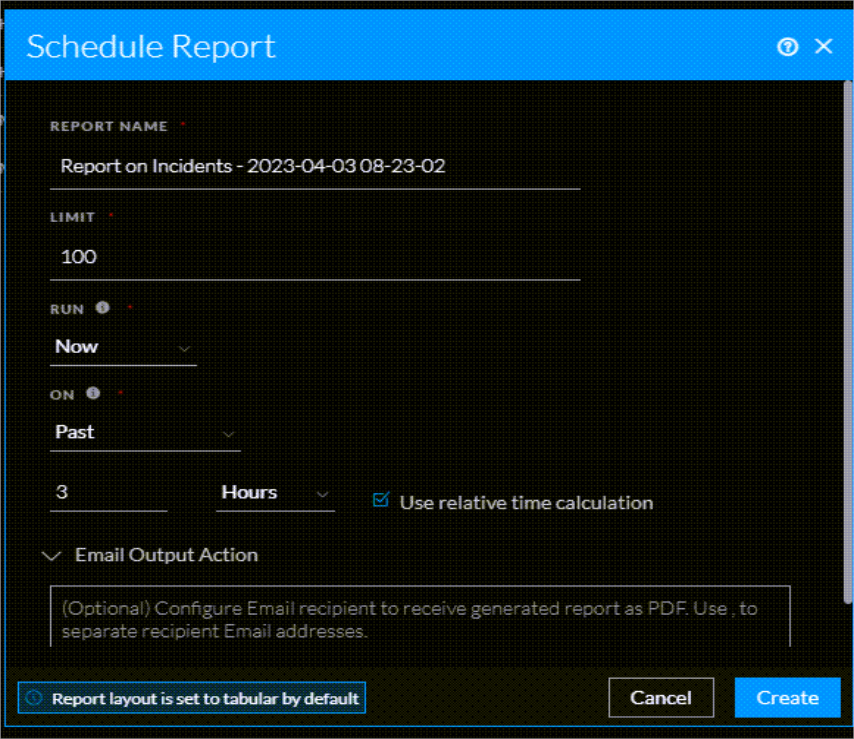
The following table describes the fields in the **Schedule Report Dialog** view.
- **Feature:** Report Name
- **Description:** Specifies a name to identify the panel. For example, **Report on Incident - 2023-04-25 10-18-26**. You can provide a name that clearly identifies the nature of events that will be added to this report.
- **Feature:** Run
- **Description:** Time interval to use for running the scheduled job:
- **Later**: Runs on specific date and time.
- **Hourly**: Runs on a designated repeating interval. For example, if you schedule the report for 50 minutes, for every 50th minute, the report will be prepared.
**Note:** A maximum of only 59 minutes can be selected.
- **Daily**: Runs daily at a designated time. For example, if you schedule the report at 04:25, the report will be prepared at 04:25 AM every day.
- **Monthly**: Runs on a monthly basis at a designated time and day of the month. For example, select 25 for the 25th day of the month. The report will be prepared on the 25th month of every month.
**Note:** During the monthly report generation process, a message will appear if the day is greater than 28. This will notify the user that the report will be scheduled for the month containing that day.
- **Feature:** ON
- **Description:**
Set the frequency, duration, and time for running the report:
- **Past**: You can schedule the report based on **Hours**, **Days**, **Weeks**, **Months**, and **Years**.
- **Range(specific)**: You can schedule the report for a specific date and time range.
**Note:** This field appears only if you select Later in the Run field.
- **Range(generic)**: You can schedule the report for a generic date and time.
**Note:** This field appears only if you select Later, Daily, Weekly, and Monthly in the Run field.
- **Feature:** Use relative time calculation
- **Description:**
The Use relative time calculation option is enabled by default, and it uses the relative time duration to schedule a report.
For example, if you schedule a report to run over the past 1 hour –1h for the relative time, the time is exactly 1 hour from when the report is run. If the current time is 3 P.M., the events that occurred in the past 60 minutes or between 2 P.M. and 3 P.M. today.
- **Feature:** Email Output Action
- **Description:** Specify email addresses to send the report to, separated by commas.
- **Feature:** Create
- **Description:** Creates the report and closes the dialog. A message confirms that the report was scheduled successfully.
- **Feature:**
Cancel
- **Description:**
Closes the dialog without applying changes.
[](https://mydev.netwitness.com/?hsLang=en)
Copyright © 2026, NetWitness LLC. All rights reserved.
[NetWitness Platform](https://www.netwitness.com/)
[Acceptable Use Policy](https://www.netwitness.com/wp-content/uploads/Acceptable-Use-Policy-092022.pdf) [Privacy Statement](https://www.netwitness.com/wp-content/uploads/NetWitness-Privacy-Statement-07292024.pdf)

[](https://www.linkedin.com/company/netwitness-platform/) [](https://www.youtube.com/@netwitness)
© 2026 NetWitness LLC. All rights reserved.