---
title: RSA NetWitness Dell TSR generation fails to create a “tsr.zip” file
description: "Issue\nFollowing the command-line instructions to generate a Dell appliance TSR Report fails to create a “tsr.zip” file.The command-line script output"
---
[Skip to content](https://mydev.netwitness.com/knowledge-base/rsa-netwitness-dell-tsr-generation-fails-to-create-a-tsr-zip-file#main-content)

- [Home](https://mydev.netwitness.com/home)
- Integrations
Show submenu for Integrations
- [Netwitness Platform Integrations](https://mydev.netwitness.com/netwitnessplatformintegrations)
- [Third Party Integrations](https://mydev.netwitness.com/thirdpartyintegrations)
- [Knowledge Center](https://mydev.netwitness.com/knowledge-base)
- Community
Show submenu for Community
- [Blogs](https://mydev.netwitness.com/netwitness-security-llc-blog)
- Discussions
- Customers
Show submenu for Customers
- [Manage Products and Licenses](https://mydev.netwitness.com/nwportal)
- Downloads
- Partners
Show submenu for Partners
- [Partner Program](https://mydev.netwitness.com/partner)
- [Partner Resources](https://mydev.netwitness.com/partnerresources)
- [Submit a New Deal Registration](https://mydev.netwitness.com/dealregistration)
- [Become a Partner](https://mydev.netwitness.com/becomeapartner)
- [Update Your Partner Locator Profile](https://www.netwitness.com/partner-locator/?utm_source=pardotnewsletter&utm_medium=email&utm_campaign=partner_march)
- [NetWitness LinkedIn Partner Hub](https://linkedin.com/showcase/netwitnesspartners/)
- Education
Show submenu for Education
- [Instructor Led Training Schedule](https://mydev.netwitness.com/instructorledtrainingschedule)
- [NetWitness Training Catalog](https://mydev.netwitness.com/netwitnesstrainingcatalog)
- [Security Awareness Training](https://mydev.netwitness.com/securityawarenesstraining)
- [New Product Readiness](https://mydev.netwitness.com/newproductreadiness)
- [On-Demand Virtual Labs](https://mydev.netwitness.com/ondemandvirtuallabs)
- [Additional Training Information](https://mydev.netwitness.com/additionaltraininginformation)
- [Frequently Asked Questions](https://mydev.netwitness.com/educationfaq)
- [Contact NetWitness Education Team](https://mydev.netwitness.com/contact-netwitness-education-team)
- Support
Show submenu for Support
- [Contact Support](https://mydev.netwitness.com/contact-support)
- [Create a New Case](https://mydev.netwitness.com/create-support-case)
- [View My Cases](https://mydev.netwitness.com/viewmycase)
- [Product Version Life Cycle](https://mydev.netwitness.com/product-version-life-cycle)
- [Warranty & Replacement Parts](https://mydev.netwitness.com/warranty-and-replacement-parts)
- [Community Support Forum](https://mydev.netwitness.com/community-support-forum)
- [Technical Support Guide](https://mydev.netwitness.com/technical-support-guide)
Open main navigation
Close main navigation
- [Home](https://mydev.netwitness.com/home)
- Integrations
Show submenu for Integrations
- [Netwitness Platform Integrations](https://mydev.netwitness.com/netwitnessplatformintegrations)
- [Third Party Integrations](https://mydev.netwitness.com/thirdpartyintegrations)
- [Knowledge Center](https://mydev.netwitness.com/knowledge-base)
- Community
Show submenu for Community
- [Blogs](https://mydev.netwitness.com/netwitness-security-llc-blog)
- Discussions
- Customers
Show submenu for Customers
- [Manage Products and Licenses](https://mydev.netwitness.com/nwportal)
- Downloads
- Partners
Show submenu for Partners
- [Partner Program](https://mydev.netwitness.com/partner)
- [Partner Resources](https://mydev.netwitness.com/partnerresources)
- [Submit a New Deal Registration](https://mydev.netwitness.com/dealregistration)
- [Become a Partner](https://mydev.netwitness.com/becomeapartner)
- [Update Your Partner Locator Profile](https://www.netwitness.com/partner-locator/?utm_source=pardotnewsletter&utm_medium=email&utm_campaign=partner_march)
- [NetWitness LinkedIn Partner Hub](https://linkedin.com/showcase/netwitnesspartners/)
- Education
Show submenu for Education
- [Instructor Led Training Schedule](https://mydev.netwitness.com/instructorledtrainingschedule)
- [NetWitness Training Catalog](https://mydev.netwitness.com/netwitnesstrainingcatalog)
- [Security Awareness Training](https://mydev.netwitness.com/securityawarenesstraining)
- [New Product Readiness](https://mydev.netwitness.com/newproductreadiness)
- [On-Demand Virtual Labs](https://mydev.netwitness.com/ondemandvirtuallabs)
- [Additional Training Information](https://mydev.netwitness.com/additionaltraininginformation)
- [Frequently Asked Questions](https://mydev.netwitness.com/educationfaq)
- [Contact NetWitness Education Team](https://mydev.netwitness.com/contact-netwitness-education-team)
- Support
Show submenu for Support
- [Contact Support](https://mydev.netwitness.com/contact-support)
- [Create a New Case](https://mydev.netwitness.com/create-support-case)
- [View My Cases](https://mydev.netwitness.com/viewmycase)
- [Product Version Life Cycle](https://mydev.netwitness.com/product-version-life-cycle)
- [Warranty & Replacement Parts](https://mydev.netwitness.com/warranty-and-replacement-parts)
- [Community Support Forum](https://mydev.netwitness.com/community-support-forum)
- [Technical Support Guide](https://mydev.netwitness.com/technical-support-guide)
How can we help you?
- There are no suggestions because the search field is empty.
1. [NetWitness Knowledge Base](https://mydev.netwitness.com/knowledge-base?hsLang=en)
2. [Break Fix](https://mydev.netwitness.com/knowledge-base/break-fix?hsLang=en)
April 30, 2026
# RSA NetWitness Dell TSR generation fails to create a “tsr.zip” file
#### Issue
Following the command-line instructions to generate a Dell appliance TSR Report fails to create a “tsr.zip” file.
The command-line script output contains the following error message,
mv: cannot stat ‘tsr.zip’: No such file or directory
Reference: [How to Determine Add On Components for RSA NetWitness Platform Servers Using TSR Reports](https://mydev.netwitness.com/articles/en_US/How_To/How-to-Determine-Add-On-Components-for-RSA-NetWitness-Platform-Servers-Using-TSR-Reports?popup=false&caseId=5004u00002M5nLQ&sfdcIFrameOrigin=https%3A%2F%2Frsasecurity.my.salesforce.com&nonce=b59a38c66811c8bd0b12e72e5af3625d955a04eda90bad7a6095ee673006e2af&navBack=H4sIAAAAAAAAAIuuVipWslLyzssvz0lNSU_1yM9NVdJRygaKFSSmp4ZkluSA-KVAvn58aaZ-NkyhPpCDqqs2FgCHRwp0TQAAAA&isWsVw=true&hsLang=en)
Example of full TSR script output with the error message below.
cd /opt/rsa/hw\_report
./install.sh
#########################################################################################
This tool only supports S5 and S6 appliances with RSA NetWitness version 11.3 or higher.
#########################################################################################
Enter y to install or q to quit then press ENTER. y
This will install hardware tools for RSA NetWitness 11.x appliances
Installing dependent packages package pciutils-3.5.1-3.el7.x86\_64 is already installed
package libxslt-1.1.28-5.el7.x86\_64 is already installed
warning: /opt/rsa/hw\_report/tools/srvadmin-argtable2-9.4.0-3787.15943.el7.x86\_64.rpm: Header V4 RSA/SHA512 Signature, key ID 34d8786f: NOKEY
Preparing... ################################# \[100%\]
Updating / installing...
1:srvadmin-omilcore-9.4.0-3787.1594################################# \[ 7%\]
\*\*\*\*\*\*\*\*\*\*\*\*\*\*\*\*\*\*\*\*\*\*\*\*\*\*\*\*\*\*\*\*\*\*\*\*\*\*\*\*\*\*\*\*\*\*\*\*\*\*\*\*\*\*\*\*\*\*
After the install process completes, you may need
to log out and then log in again to reset the PATH
variable to access the Server Administrator CLI utilities
\*\*\*\*\*\*\*\*\*\*\*\*\*\*\*\*\*\*\*\*\*\*\*\*\*\*\*\*\*\*\*\*\*\*\*\*\*\*\*\*\*\*\*\*\*\*\*\*\*\*\*\*\*\*\*\*\*\*
2:srvadmin-deng-9.4.0-3787.15943.el################################# \[ 14%\]
3:srvadmin-omacs-9.4.0-3787.15943.e################################# \[ 21%\]
4:srvadmin-hapi-9.4.0-3787.15943.el################################# \[ 29%\]
5:srvadmin-isvc-9.4.0-3787.15943.el################################# \[ 36%\]
6:srvadmin-ominst-9.4.0-3787.15943.################################# \[ 43%\]
7:srvadmin-omcommon-9.4.0-3787.1594################################# \[ 50%\]
8:srvadmin-xmlsup-9.4.0-3787.15943.################################# \[ 57%\]
9:srvadmin-argtable2-9.4.0-3787.159################################# \[ 64%\]
10:srvadmin-idracadm7-9.4.0-3787.159################################# \[ 71%\]
11:srvadmin-omacore-9.4.0-3787.15943################################# \[ 79%\]
12:srvadmin-realssd-9.4.0-3787.15943################################# \[ 86%\]
13:srvadmin-nvme-9.4.0-3787.15943.el################################# \[ 93%\]
14:srvadmin-cm-9.4.0-20.02.00 ################################# \[100%\]
Starting OMSA service
Installation has completed.
Enter 5 to collect reports for an S5 appliance.
Enter 6 to collect reports for an S6 appliance.
Make your selection from the menu above and press ENTER. 5
Collecting PCI Slot Report...
Slots Information
Index : 0
Slot ID : PCIe Slot 1
Adapter : \[Not Occupied\]
Data Bus Width : 16x or x16
Index : 1
Slot ID : PCIe Slot 2
Adapter : \[Not Occupied\]
Data Bus Width : 8x or x8
Index : 2
Slot ID : PCIe Slot 3
Adapter : PERC H830 Adapter
Data Bus Width : 8x or x8
Collecting BIOS and firmware version report
Version Report
\---------------------
Main System Chassis
\---------------------
Name : BIOS
Version : 2.8.0
Name : iDRAC8
Version : 2.61.60.60 (Build 8)
Name : Lifecycle Controller
Version : 2.61.60.60
\----------
Software
\----------
Name : CentOS Linux
Version : release 7.8.2003 (Core) Kernel 3.10.0-1127.13.1.el7.x86\_64 (x86\_64)
Name : Server Administrator
Version : 9.4.0
Collecting TSR...
Job ID = JID\_015494682006
RAC1154: The requested operation is initiated.
Run the RACADM jobqueue sub-command, using the job id to check the status of
the requested operation.
Waiting for 6 minutes to let the TSR generation process complete.
Tech Support Report export to local share in progress, Please wait till the operation completes.
mv: cannot stat ‘tsr.zip’: No such file or directory
Zipping up reports...please wait.
Done. Please check the reports folder
ls -lR reports/
reports/:
total 20
-rw-r--r--. 1 root root 10240 Oct 1 05:57 allreports.tar
-rw-r--r--. 1 root root 400 Oct 1 05:50 bios\_fw\_versions.txt
-rw-r--r--. 1 root root 345 Oct 1 05:50 pci\_slots.txt
#### Cause
If the appliance takes longer than 6 minutes to finish, then the script will timeout before the “tsr.zip” can be created.
If any part of the TSR\_Collect job fails, then the “tsr.zip” file cannot be created, and this is not detected by the command-line script.
#### Workaround
Generating the TSR Report via the iDRAC UI is often more successful, or will show where the job has failed.
1. Review the status of the command-line command to generate the TSR Report in the iDRAC UI.
Example screenshots are for the NetWitness Series 5 appliance.
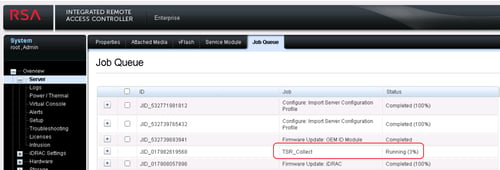
After login to the iDRAC UI, check the TSR\_Collect Job Queue status in, Overview \> Server, Job Queue tab
If the TSR\_Collect job is still running, then wait for it to complete.
2. If the TSR\_Collect job has failed, review the message for a reason.
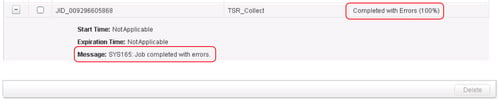
In the above example, SYS165 indicates a Tech Support Report (TSR) data collection option did not complete successfully.
Reference: [Event and Error Message Reference Guide For 13th Generation Dell PowerEdge Servers Version 1.50](https://topics-cdn.dell.com/pdf/dell-openmanage-software-8.4_reference-guide_en-us.pdf)
Ensure you have the latest RSA NetWitness approved iDRAC and BIOS firmware version that is installed for your Dell appliance.
Reference: [RSA NetWitness Availability of BIOS & iDRAC Firmware Updates](https://community.rsa.com/docs/DOC-79266)
After updating the Dell appliance iDRAC and BIOS firmware try run a new TSR\_Collect job via the iDRAC UI (preferred), or from the command-line.
3. Once the TSR\_Collect job has completed successfully save the Collection.
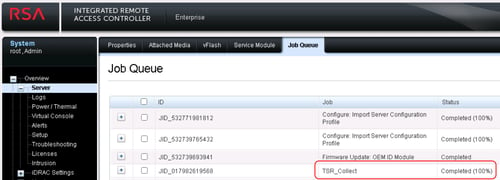
In the iDRAC UI, Overview \> Server \> Troubleshooting, SupportAssist tab, the “Save Collection” button should no longer be grey, click it, after ensuring the “Save Locally” option is selected.
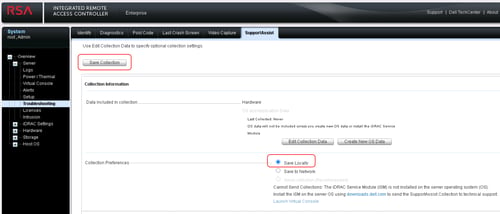
Wait for the “Save Collection” to complete.
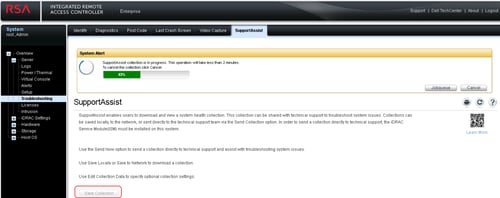
The local PC file should be created as, %TEMP%\\ TSR*{date\_time}*\_*{serial\_number}*.zip
Where
*{date\_time}* is the date time the file exported.
*{serial\_number}* is the serial number of the Dell appliance.
#### Product Details
**RSA Product Set:** RSA NetWitness Platform
**RSA Product/Service Type:** Dell Appliance Series 5, Series 6
**RSA Version/Condition:** 11.3.x, 11.4.x, 11.5.x
**Platform:** CentOS
**O/S Version:** 7
#### Summary
Following the command-line instructions to generate a Dell appliance TSR (Tech Support Report) fails to create a “tsr.zip” file.
#### Approval Reviewer Queue
RSA NetWitness Suite Approval Queue
[](https://mydev.netwitness.com/?hsLang=en)
Copyright © 2026, NetWitness LLC. All rights reserved.
[NetWitness Platform](https://www.netwitness.com/)
[Acceptable Use Policy](https://www.netwitness.com/wp-content/uploads/Acceptable-Use-Policy-092022.pdf) [Privacy Statement](https://www.netwitness.com/wp-content/uploads/NetWitness-Privacy-Statement-07292024.pdf)

[](https://www.linkedin.com/company/netwitness-platform/) [](https://www.youtube.com/@netwitness)
© 2026 NetWitness LLC. All rights reserved.