---
title: Response Actions and Quick Actions Use Case Examples
description: "Tags: Documentation The following use cases provide examples of an administrator and an analyst using NetWitness Platform to manage Response ac"
---
[Skip to content](https://mydev.netwitness.com/knowledge-base/responseactionsandquickactionsusecaseexamples#main-content)

- [Home](https://mydev.netwitness.com/home)
- Integrations
Show submenu for Integrations
- [Netwitness Platform Integrations](https://mydev.netwitness.com/netwitnessplatformintegrations)
- [Third Party Integrations](https://mydev.netwitness.com/thirdpartyintegrations)
- [Knowledge Center](https://mydev.netwitness.com/knowledge-base)
- Community
Show submenu for Community
- [Blogs](https://mydev.netwitness.com/netwitness-security-llc-blog)
- Discussions
- Customers
Show submenu for Customers
- [Manage Products and Licenses](https://mydev.netwitness.com/nwportal)
- Downloads
- Partners
Show submenu for Partners
- [Partner Program](https://mydev.netwitness.com/partner)
- [Partner Resources](https://mydev.netwitness.com/partnerresources)
- [Submit a New Deal Registration](https://mydev.netwitness.com/dealregistration)
- [Become a Partner](https://mydev.netwitness.com/becomeapartner)
- [Update Your Partner Locator Profile](https://www.netwitness.com/partner-locator/?utm_source=pardotnewsletter&utm_medium=email&utm_campaign=partner_march)
- [NetWitness LinkedIn Partner Hub](https://linkedin.com/showcase/netwitnesspartners/)
- Education
Show submenu for Education
- [Instructor Led Training Schedule](https://mydev.netwitness.com/instructorledtrainingschedule)
- [NetWitness Training Catalog](https://mydev.netwitness.com/netwitnesstrainingcatalog)
- [Security Awareness Training](https://mydev.netwitness.com/securityawarenesstraining)
- [New Product Readiness](https://mydev.netwitness.com/newproductreadiness)
- [On-Demand Virtual Labs](https://mydev.netwitness.com/ondemandvirtuallabs)
- [Additional Training Information](https://mydev.netwitness.com/additionaltraininginformation)
- [Frequently Asked Questions](https://mydev.netwitness.com/educationfaq)
- [Contact NetWitness Education Team](https://mydev.netwitness.com/contact-netwitness-education-team)
- Support
Show submenu for Support
- [Contact Support](https://mydev.netwitness.com/contact-support)
- [Create a New Case](https://mydev.netwitness.com/create-support-case)
- [View My Cases](https://mydev.netwitness.com/viewmycase)
- [Product Version Life Cycle](https://mydev.netwitness.com/product-version-life-cycle)
- [Warranty & Replacement Parts](https://mydev.netwitness.com/warranty-and-replacement-parts)
- [Community Support Forum](https://mydev.netwitness.com/community-support-forum)
- [Technical Support Guide](https://mydev.netwitness.com/technical-support-guide)
Open main navigation
Close main navigation
- [Home](https://mydev.netwitness.com/home)
- Integrations
Show submenu for Integrations
- [Netwitness Platform Integrations](https://mydev.netwitness.com/netwitnessplatformintegrations)
- [Third Party Integrations](https://mydev.netwitness.com/thirdpartyintegrations)
- [Knowledge Center](https://mydev.netwitness.com/knowledge-base)
- Community
Show submenu for Community
- [Blogs](https://mydev.netwitness.com/netwitness-security-llc-blog)
- Discussions
- Customers
Show submenu for Customers
- [Manage Products and Licenses](https://mydev.netwitness.com/nwportal)
- Downloads
- Partners
Show submenu for Partners
- [Partner Program](https://mydev.netwitness.com/partner)
- [Partner Resources](https://mydev.netwitness.com/partnerresources)
- [Submit a New Deal Registration](https://mydev.netwitness.com/dealregistration)
- [Become a Partner](https://mydev.netwitness.com/becomeapartner)
- [Update Your Partner Locator Profile](https://www.netwitness.com/partner-locator/?utm_source=pardotnewsletter&utm_medium=email&utm_campaign=partner_march)
- [NetWitness LinkedIn Partner Hub](https://linkedin.com/showcase/netwitnesspartners/)
- Education
Show submenu for Education
- [Instructor Led Training Schedule](https://mydev.netwitness.com/instructorledtrainingschedule)
- [NetWitness Training Catalog](https://mydev.netwitness.com/netwitnesstrainingcatalog)
- [Security Awareness Training](https://mydev.netwitness.com/securityawarenesstraining)
- [New Product Readiness](https://mydev.netwitness.com/newproductreadiness)
- [On-Demand Virtual Labs](https://mydev.netwitness.com/ondemandvirtuallabs)
- [Additional Training Information](https://mydev.netwitness.com/additionaltraininginformation)
- [Frequently Asked Questions](https://mydev.netwitness.com/educationfaq)
- [Contact NetWitness Education Team](https://mydev.netwitness.com/contact-netwitness-education-team)
- Support
Show submenu for Support
- [Contact Support](https://mydev.netwitness.com/contact-support)
- [Create a New Case](https://mydev.netwitness.com/create-support-case)
- [View My Cases](https://mydev.netwitness.com/viewmycase)
- [Product Version Life Cycle](https://mydev.netwitness.com/product-version-life-cycle)
- [Warranty & Replacement Parts](https://mydev.netwitness.com/warranty-and-replacement-parts)
- [Community Support Forum](https://mydev.netwitness.com/community-support-forum)
- [Technical Support Guide](https://mydev.netwitness.com/technical-support-guide)
How can we help you?
- There are no suggestions because the search field is empty.
1. [NetWitness Knowledge Base](https://mydev.netwitness.com/knowledge-base?hsLang=en)
2. [Documentation](https://mydev.netwitness.com/knowledge-base/documentation?hsLang=en)
April 8, 2026
# Response Actions and Quick Actions Use Case Examples
**Tags:** Documentation
The following use cases provide examples of an administrator and an analyst using NetWitness Platform to manage Response actions and send the additional parameters along with the meta to ThreatConnect connector for further processing.
### Use Case #1: Managing Response Action and taking Quick Action for the supported meta in Respond view
After integrating the third-party tool ThreatConnect with NetWitness Platform, administrator John navigates to the **Response Actions** view ((**CONFIGURE**) \> **More** \> **Response Actions**) and performs the following actions.
- Creates new Response Action: Administrator John clicks the  option in the Response Actions toolbar and enters the following details in the **Create Response Action** view.
\- Response Action Name
\- Description of the Response Action
\- Metas supported for Response Action
\- URL path associated with the connector
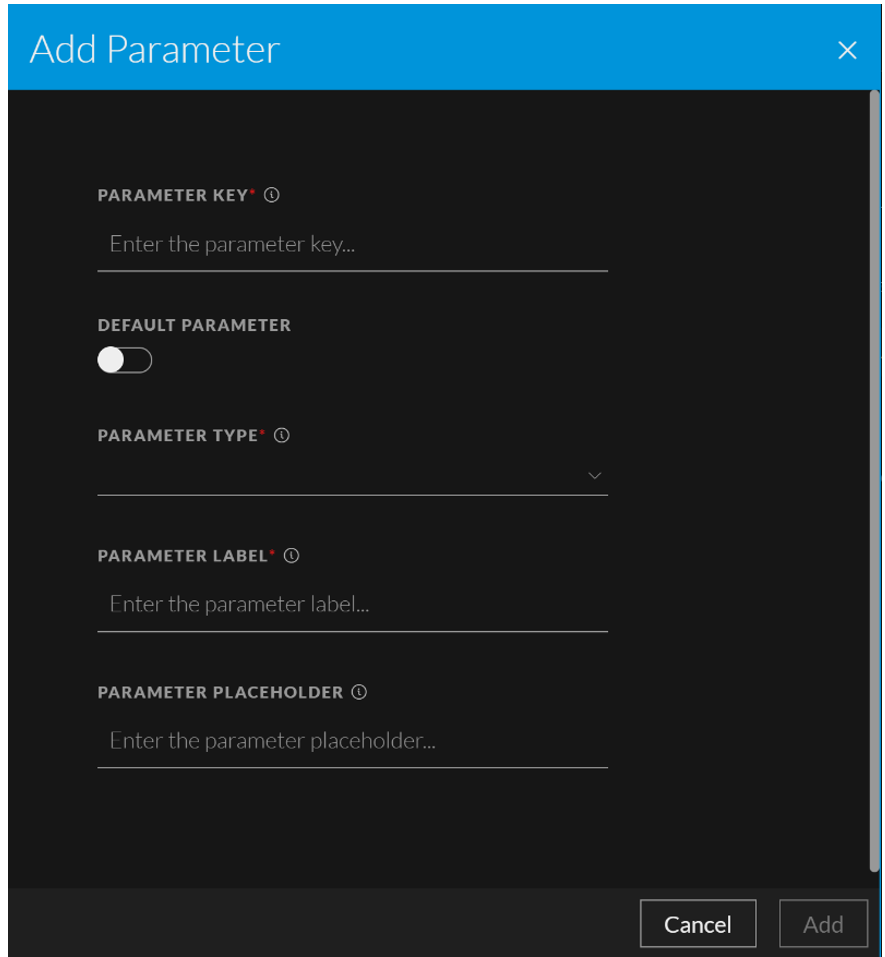
Finally, the administrator clicks  besides the **Parameters** field and creates the default parameter in the **Add Parameter** window. This is used as the key in the key-value pair associated with the value of the meta selected that is sent to ThreatConnect.
\- Parameter Key: Administrator John enters **ip-meta** in this field.
\- Default Parameter: Enabled
After entering these details, John clicks **Add**. Now, the admin clicks besides the  **Parameters** field and creates an additional parameter he would like to send to ThreatConnect.
\- Parameter Key: Administrator John enters **additional-ip** in this field.
\- Parameter Type: Administrator John selects **IP** in this field.
\- Parameter Label: Administrator John enters **Additional IP Address to Block** in this field.
\- Parameter Placeholder: Administrator John enters **Additional IPs** as the placeholder text in this field.
After entering these details, John clicks **Add**.
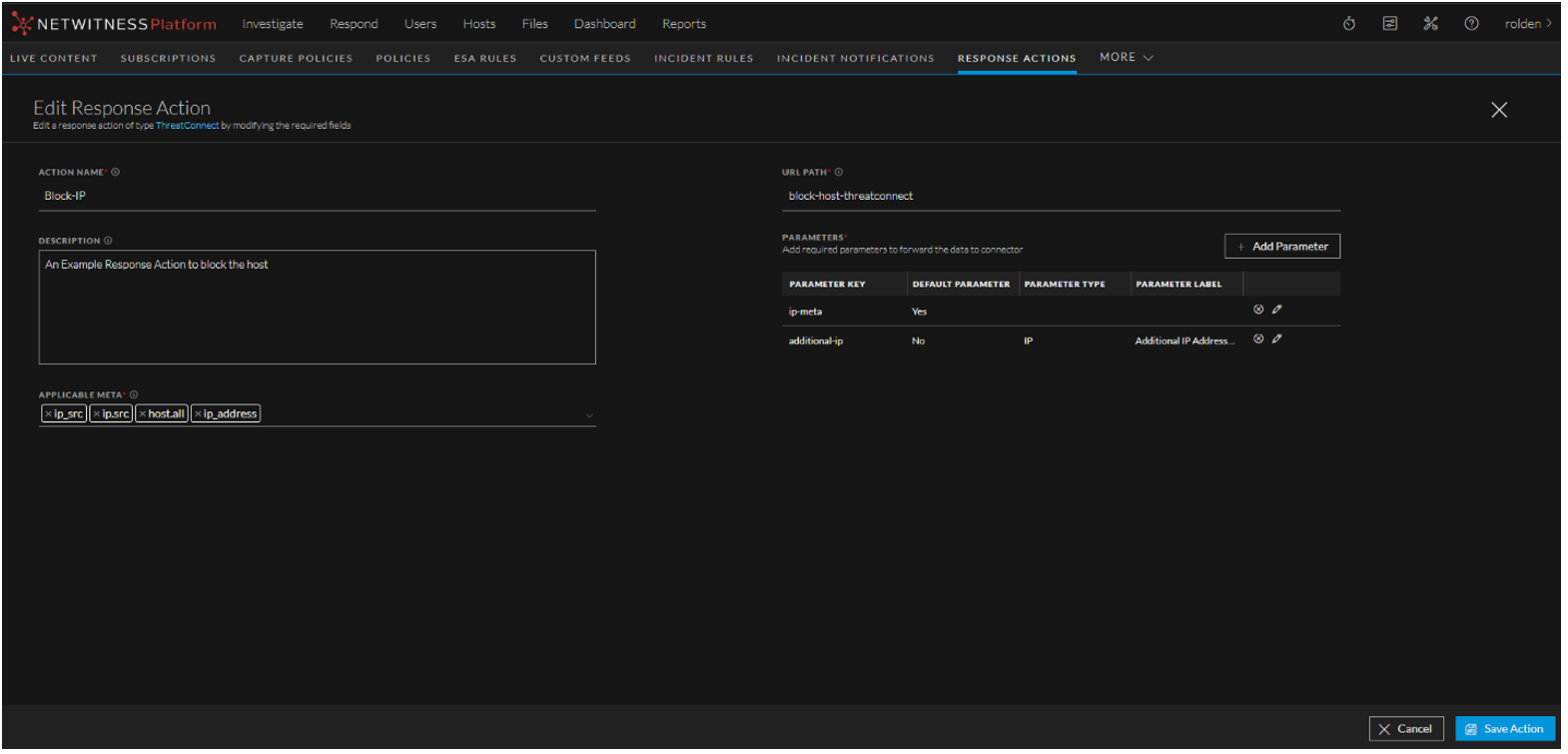
As the last step, John clicks **Save Action**.
- Edits the Response Action: John selects the newly created Response Action and clicks the  option in the Response Actions toolbar. As soon as the **Edit Response Action** view is displayed, the admin adds a new meta ip.src to the existing list of the Applicable metas in **Applicable Meta** field and clicks **Save Action**.
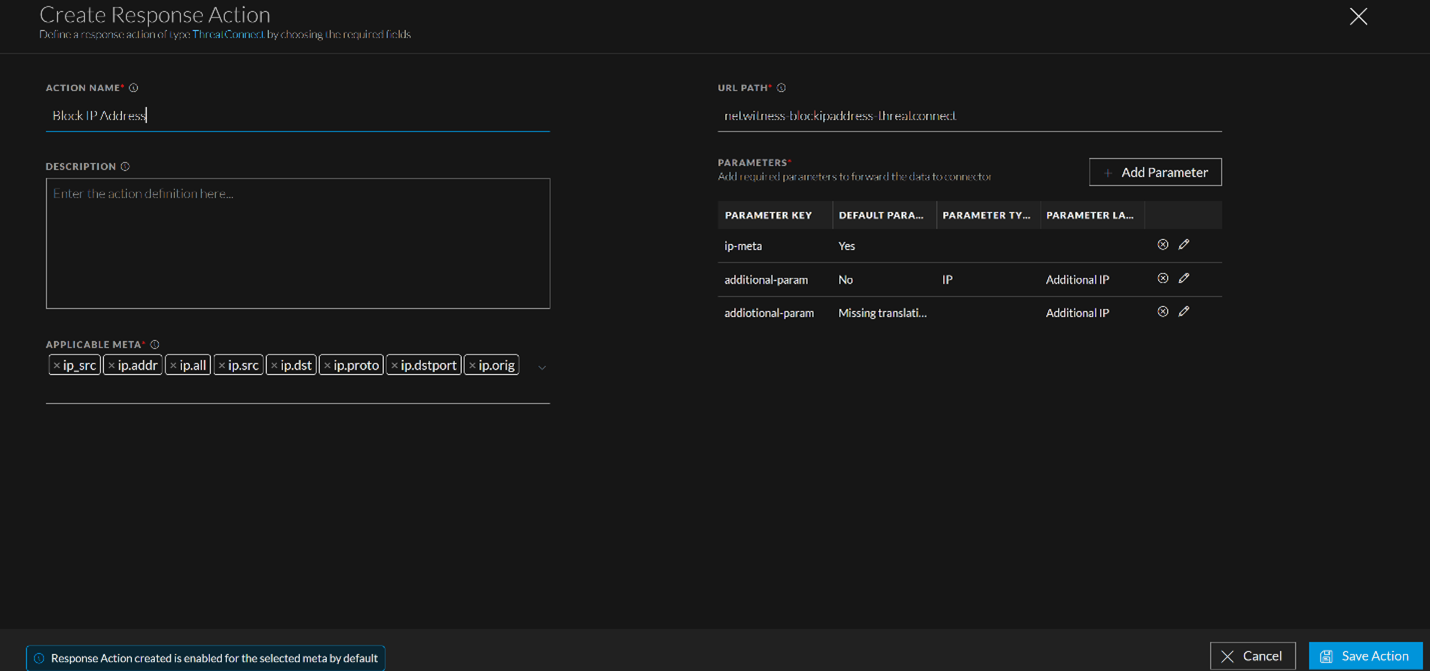
- Clones the Response Action: After editing the Response Action, the admin selects an existing Response Action and clicks the  toolbar option in the Response Actions toolbar. Once the **Create Response Action** view is displayed, admin John modifies the Action Name **Block IP** to **Block IP Address** and clicks **Save Action**.
- Disables the Response Action: Administrator John decides to disable the Response Action in the **Response Actions** view. Therefore, to disable the Response Action, John selects the Response Action and clicks the  option in the Response Actions toolbar.
- Enables the Response Action: Administrator John decides to re-enable the Response Action in the **Response Actions** view. Therefore, to re-enable the Response Action, John selects the Response Action and clicks the  option in the Response Actions toolbar.
- Deletes the Response Action: John creates a new Response Action and decides to delete the previous Response Action he created. To delete the Response Action, John selects that Response Action and clicks the  option in the Response Actions toolbar.
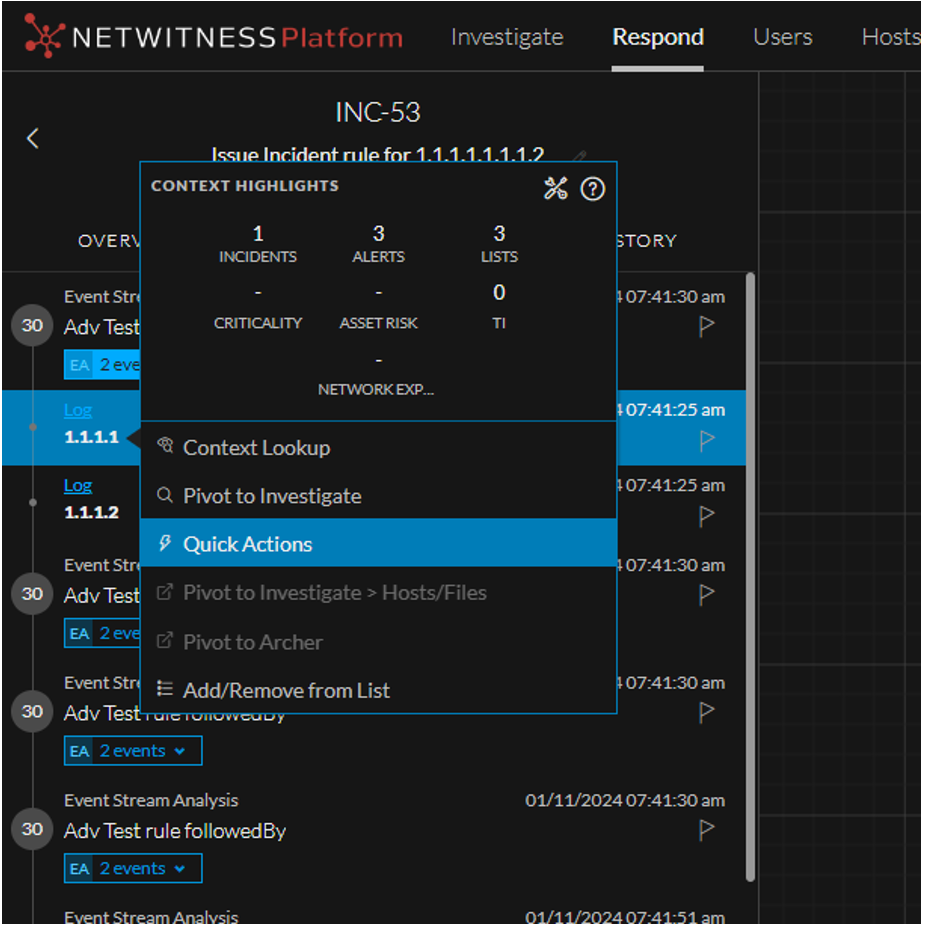
After performing the above actions, administrator John navigates to the **Respond** \> **Alerts** view. The administrator clicks the Alert name in the **Name** column in the Alerts List view and then right clicks the Source IP value (supported meta) **1.1.1.1** once the **Event Details** view is displayed. When the **ContextHighlights** section is displayed, John selects the **Quick Actions** option.
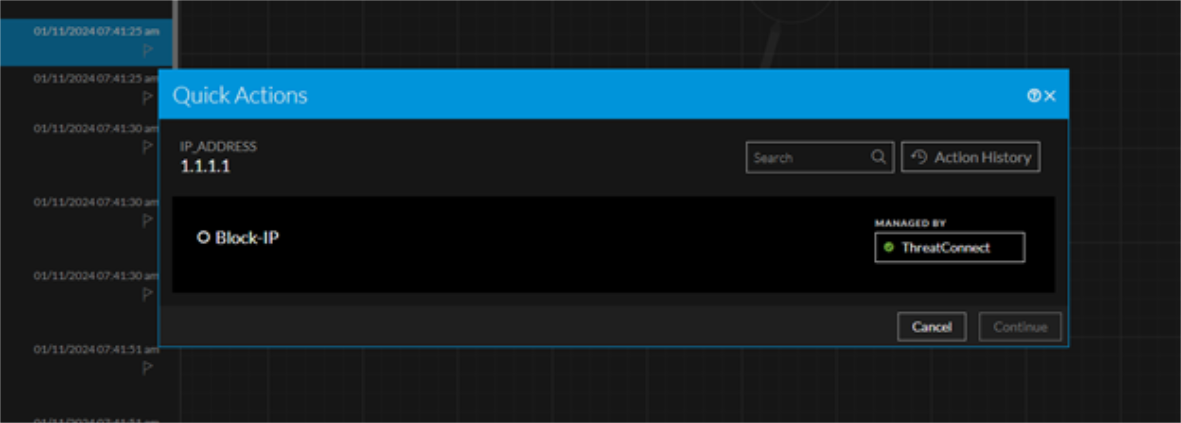
As soon as the **Quick Actions** window is displayed, John selects the Response Action he created for the meta and clicks **Continue**.
In the next step, he observes that the parameter label he entered while adding parameters is now appearing as a field in the **Quick Actions** window.
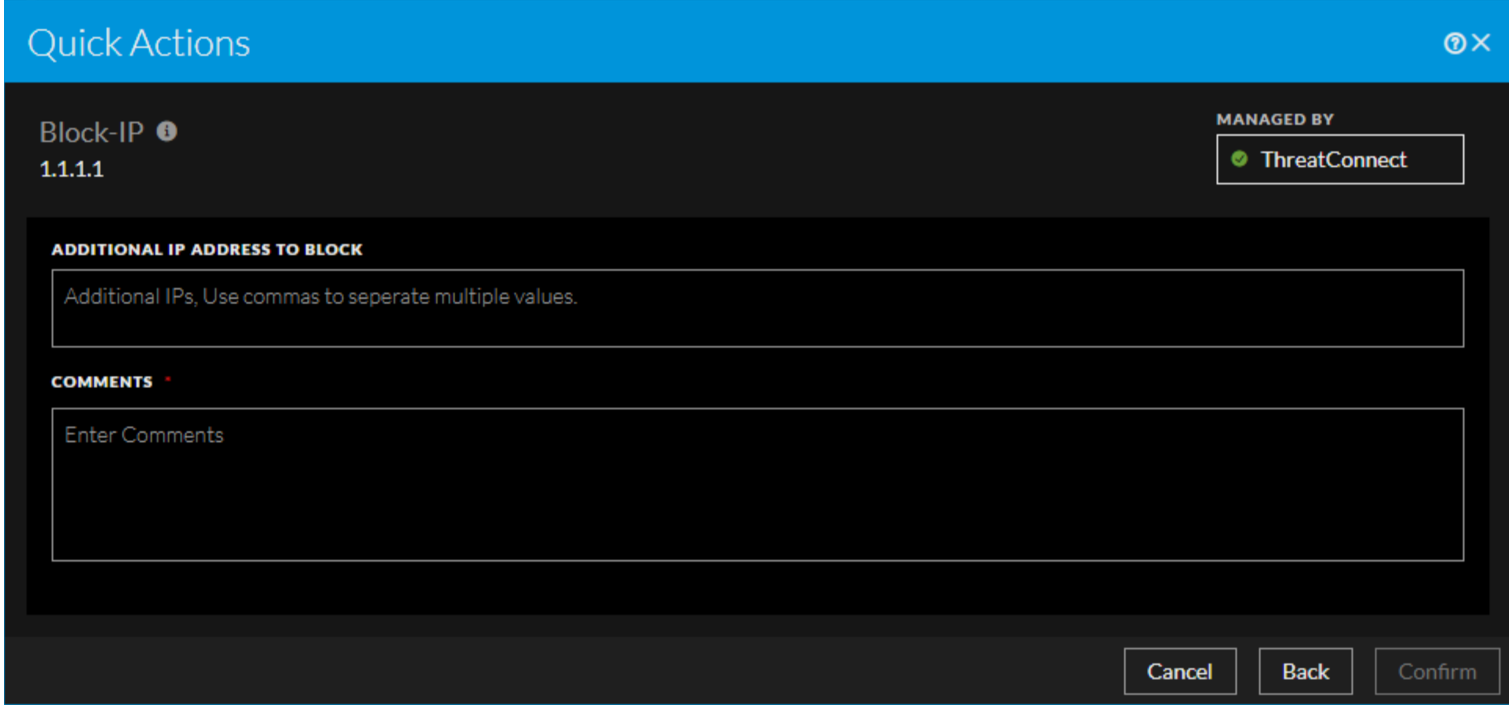
Then, John enters **1.1.1.0/24** in the **Additional IP Address to Block** field (parameter label added), enters the comment as **These areunrecognized hosts** and finally clicks **Confirm**.
After executing the Response Action, the following JSON is posted to ThreatConnect.
{
"ip-meta": "1.1.1.1",
"additional-ip" : \["1.1.1.0/24"\]
"nw-user" : "tony",
"nw-comment" : "These are unrecognized hosts",
"nw-actionId" : "8635834894350nbdf99025356",
"nw-actionName": "Block-IP"
}
Here,
**"ip-meta": "1.1.1.1"** is the supported meta for which the Response Action is executed.
**"additional-ip" : \["1.1.1.0/24"\]** is the parameter label value posted to ThreatConnect.
**"nw-user" : "tony"** is the user who executed the Response Action.
**"nw-comment"** : **"These are unrecognized hosts"** is the comment provided while executing the Response Action.
**"nw-actionId"** : **"8635834894350nbdf99025356"** is the ID associated with this specific Response Action executed.
**"nw-actionName"**: **"Block-IP"** is the name of the Response Action executed.
### Use Case #2: Taking Quick Action for the supported meta in Investigate view
Kevin, an analyst, navigates to the **Investigate \> Events** view and queries the events. Kevin finds the meta key **ip.src** with value **10.12.12.12** in the **Summary** column in the **Events** view and decides to take a Quick Action on the meta. As the first step, Kevin creates the Response Action for the meta using the **Response Actions** view. After creating the Response Action, Kevin navigates back to the **Investigate \> Events** view and right clicks the meta to select the **Quick Actions** option under the **Context Highlights** section. After clicking the **Quick Actions** option, Kevin selects the newly created Response Action in the **Quick Actions** window and clicks **Continue**. In the next step, Kevin enters the value for the Additional Parameter he configured while creating the Response Action. Finally, Kevin enters the comment and clicks **Confirm**.
[](https://mydev.netwitness.com/?hsLang=en)
Copyright © 2026, NetWitness LLC. All rights reserved.
[NetWitness Platform](https://www.netwitness.com/)
[Acceptable Use Policy](https://www.netwitness.com/wp-content/uploads/Acceptable-Use-Policy-092022.pdf) [Privacy Statement](https://www.netwitness.com/wp-content/uploads/NetWitness-Privacy-Statement-07292024.pdf)

[](https://www.linkedin.com/company/netwitness-platform/) [](https://www.youtube.com/@netwitness)
© 2026 NetWitness LLC. All rights reserved.