---
title: Reset File Collection Bookmarks
description: "Reset File Collection BookmarksReset File Collection Bookmarks\nIn cases where issues have caused logs to be lost, or not correctly sent to the Log De"
---
[Skip to content](https://mydev.netwitness.com/knowledge-base/resetfilecollectionbookmarks#main-content)

- [Home](https://mydev.netwitness.com/home)
- Integrations
Show submenu for Integrations
- [Netwitness Platform Integrations](https://mydev.netwitness.com/netwitnessplatformintegrations)
- [Third Party Integrations](https://mydev.netwitness.com/thirdpartyintegrations)
- [Knowledge Center](https://mydev.netwitness.com/knowledge-base)
- Community
Show submenu for Community
- [Blogs](https://mydev.netwitness.com/netwitness-security-llc-blog)
- Discussions
- Customers
Show submenu for Customers
- [Manage Products and Licenses](https://mydev.netwitness.com/nwportal)
- Downloads
- Partners
Show submenu for Partners
- [Partner Program](https://mydev.netwitness.com/partner)
- [Partner Resources](https://mydev.netwitness.com/partnerresources)
- [Submit a New Deal Registration](https://mydev.netwitness.com/dealregistration)
- [Become a Partner](https://mydev.netwitness.com/becomeapartner)
- [Update Your Partner Locator Profile](https://www.netwitness.com/partner-locator/?utm_source=pardotnewsletter&utm_medium=email&utm_campaign=partner_march)
- [NetWitness LinkedIn Partner Hub](https://linkedin.com/showcase/netwitnesspartners/)
- Education
Show submenu for Education
- [Instructor Led Training Schedule](https://mydev.netwitness.com/instructorledtrainingschedule)
- [NetWitness Training Catalog](https://mydev.netwitness.com/netwitnesstrainingcatalog)
- [Security Awareness Training](https://mydev.netwitness.com/securityawarenesstraining)
- [New Product Readiness](https://mydev.netwitness.com/newproductreadiness)
- [On-Demand Virtual Labs](https://mydev.netwitness.com/ondemandvirtuallabs)
- [Additional Training Information](https://mydev.netwitness.com/additionaltraininginformation)
- [Frequently Asked Questions](https://mydev.netwitness.com/educationfaq)
- [Contact NetWitness Education Team](https://mydev.netwitness.com/contact-netwitness-education-team)
- Support
Show submenu for Support
- [Contact Support](https://mydev.netwitness.com/contact-support)
- [Create a New Case](https://mydev.netwitness.com/create-support-case)
- [View My Cases](https://mydev.netwitness.com/viewmycase)
- [Product Version Life Cycle](https://mydev.netwitness.com/product-version-life-cycle)
- [Warranty & Replacement Parts](https://mydev.netwitness.com/warranty-and-replacement-parts)
- [Community Support Forum](https://mydev.netwitness.com/community-support-forum)
- [Technical Support Guide](https://mydev.netwitness.com/technical-support-guide)
Open main navigation
Close main navigation
- [Home](https://mydev.netwitness.com/home)
- Integrations
Show submenu for Integrations
- [Netwitness Platform Integrations](https://mydev.netwitness.com/netwitnessplatformintegrations)
- [Third Party Integrations](https://mydev.netwitness.com/thirdpartyintegrations)
- [Knowledge Center](https://mydev.netwitness.com/knowledge-base)
- Community
Show submenu for Community
- [Blogs](https://mydev.netwitness.com/netwitness-security-llc-blog)
- Discussions
- Customers
Show submenu for Customers
- [Manage Products and Licenses](https://mydev.netwitness.com/nwportal)
- Downloads
- Partners
Show submenu for Partners
- [Partner Program](https://mydev.netwitness.com/partner)
- [Partner Resources](https://mydev.netwitness.com/partnerresources)
- [Submit a New Deal Registration](https://mydev.netwitness.com/dealregistration)
- [Become a Partner](https://mydev.netwitness.com/becomeapartner)
- [Update Your Partner Locator Profile](https://www.netwitness.com/partner-locator/?utm_source=pardotnewsletter&utm_medium=email&utm_campaign=partner_march)
- [NetWitness LinkedIn Partner Hub](https://linkedin.com/showcase/netwitnesspartners/)
- Education
Show submenu for Education
- [Instructor Led Training Schedule](https://mydev.netwitness.com/instructorledtrainingschedule)
- [NetWitness Training Catalog](https://mydev.netwitness.com/netwitnesstrainingcatalog)
- [Security Awareness Training](https://mydev.netwitness.com/securityawarenesstraining)
- [New Product Readiness](https://mydev.netwitness.com/newproductreadiness)
- [On-Demand Virtual Labs](https://mydev.netwitness.com/ondemandvirtuallabs)
- [Additional Training Information](https://mydev.netwitness.com/additionaltraininginformation)
- [Frequently Asked Questions](https://mydev.netwitness.com/educationfaq)
- [Contact NetWitness Education Team](https://mydev.netwitness.com/contact-netwitness-education-team)
- Support
Show submenu for Support
- [Contact Support](https://mydev.netwitness.com/contact-support)
- [Create a New Case](https://mydev.netwitness.com/create-support-case)
- [View My Cases](https://mydev.netwitness.com/viewmycase)
- [Product Version Life Cycle](https://mydev.netwitness.com/product-version-life-cycle)
- [Warranty & Replacement Parts](https://mydev.netwitness.com/warranty-and-replacement-parts)
- [Community Support Forum](https://mydev.netwitness.com/community-support-forum)
- [Technical Support Guide](https://mydev.netwitness.com/technical-support-guide)
How can we help you?
- There are no suggestions because the search field is empty.
1. [NetWitness Knowledge Base](https://mydev.netwitness.com/knowledge-base?hsLang=en)
2. [Documentation](https://mydev.netwitness.com/knowledge-base/documentation?hsLang=en)
April 28, 2026
# Reset File Collection Bookmarks
## Reset File Collection BookmarksReset File Collection Bookmarks
In cases where issues have caused logs to be lost, or not correctly sent to the Log Decoder, you can resend messages in log files by resetting the bookmarks for those log files.
**Note:** For security reasons, NetWitness does not allow resetting bookmarks from the agents. Rather, you must do so from an Endpoint Server.
The following procedure describes how to reset bookmarks for file collection logs.
**Note:** Currently, you can reset bookmarks for all sources or just one specific source, by providing a list in a JSON file.
## Construct a JSON File to Identify Agents and Event Source Types for ResetConstruct a JSON File to Identify Agents and Event Source Types for Reset
First, you need to construct a JSON file using the following structure:
{
> "agentIds": \[\],
> "sourceType" : ""
}
where:
- agentIds: a list of the IDs for one or more Endpoint Agents: these are the individual agents on which the source log files reside.
- sourceType: this is a list of the file event source type or types for which you want the log file bookmarks to be reset.
For details on finding agent IDs and source types, see [How to Find Agent IDs and Source Types](https://mydev.netwitness.com/knowledge-base/resetfilecollectionbookmarks#How) below.
For example, the following source code snippet could be used to delete bookmarks for **all** sources on 3 agents:
{
> "agentIds": \["43F27B6E-A02D-955A-9607-2DFC5D17B6E7",
> 88AD4B2C-192B-B50E-A125-C05B801301AA"
> "3899038D-8F42-BC93-5BA7-ECBFC309D6A3"\],
> "sourceType": "ALL"
}
Similarly, the following source code snippet could be used to delete bookmarks for **apache** sources on 3 agents:
{
> "agentIds": \["43F27B6E-A02D-955A-9607-2DFC5D17B6E7",
> 88AD4B2C-192B-B50E-A125-C05B801301AA"
> "3899038D-8F42-BC93-5BA7-ECBFC309D6A3"\],
> "sourceType": "apache"
}
## Reset BookmarksReset Bookmarks
Perform the following steps to reset the bookmarks that you specified in a JSON-formatted file:
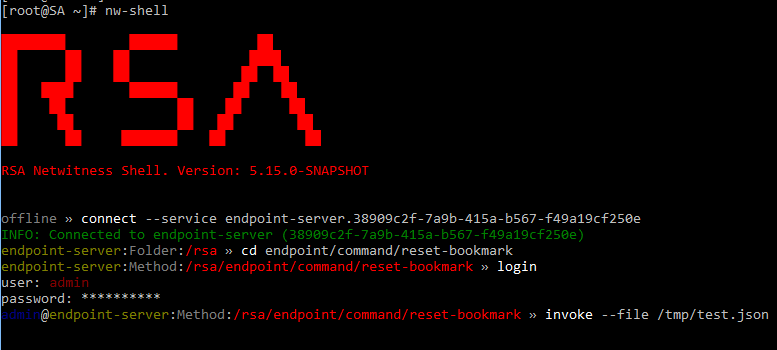
1. SSH to the NetWitness Admin Server.
2. Run nw-shell command. for details about using the NetWitness shell, see the *Shell User Guide*, available in NetWitness Link.
3. After nw-shell starts, connect to an Endpoint Server service, using the following command:
connect --service endpoint-server.*serviceID*
where *serviceID* is identifier for the Endpoint Server that hosts the agents you are changing. See [How to Find Endpoint Service IDs](https://mydev.netwitness.com/knowledge-base/resetfilecollectionbookmarks#How2) for details on how to retrieve the service ID.
4. Change to the directory where the reset command resides:
cd endpoint/command/reset-bookmark
5. Login with an administrator account.
1. Type the login command:
login
2. Enter the user name for your admin account.
3. Enter the password for your admin account.
6. Run the reset command: you need to provide the JSON path and filename that you created earlier.
invoke --file
For example:
invoke --file /tmp/test.json
The bookmarks for each log file identified in your JSON file are reset. The following image shows an example NetWitness Shell session:
## How to Find Agent IDs and Source TypesHow to Find Agent IDs and Source Types
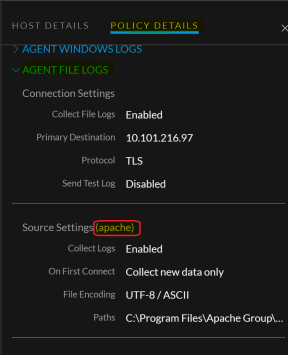
To find the Agent IDs for agents, go to **Hosts \>** *, then click the Host Details panel, and scroll down to the Agent section, where the Agent ID is shown: To find the source types, go to Hosts \>* , then click the **Policy Details** panel, expand Agent File Logs, view the Source Settings for the source type name to use:
## How to Find Endpoint Service IDsHow to Find Endpoint Service IDs
You can retrieve the service ID for an Endpoint Server by using SSH to connect to it.
To retrieve the service ID for an Endpoint Server:
1. SSH to the NetWitness Endpoint Server for which you need to retrieve the ID. The IP address is available under ** (Admin) \> Hosts**. The IP address for each host is listed in the **Host** column of the table.
2. View the file that contains the ID by running the following command:
cat /etc/netwitness/endpoint-server/service-id
It returns the Endpoint Server ID, for example:
38909c2f-7a9b-415a-b567-f49a19cf250e
[](https://mydev.netwitness.com/?hsLang=en)
Copyright © 2026, NetWitness LLC. All rights reserved.
[NetWitness Platform](https://www.netwitness.com/)
[Acceptable Use Policy](https://www.netwitness.com/wp-content/uploads/Acceptable-Use-Policy-092022.pdf) [Privacy Statement](https://www.netwitness.com/wp-content/uploads/NetWitness-Privacy-Statement-07292024.pdf)

[](https://www.linkedin.com/company/netwitness-platform/) [](https://www.youtube.com/@netwitness)
© 2026 NetWitness LLC. All rights reserved.