---
title: Reissue Certificates
description: "Reissue Certificates\nIntroduction\nFor a secure deployment, NetWitness has installed internal NetWitness-issued certificates such as CA Certificate an"
---
[Skip to content](https://mydev.netwitness.com/knowledge-base/reissuecertificates#main-content)

- [Home](https://mydev.netwitness.com/home)
- Integrations
Show submenu for Integrations
- [Netwitness Platform Integrations](https://mydev.netwitness.com/netwitnessplatformintegrations)
- [Third Party Integrations](https://mydev.netwitness.com/thirdpartyintegrations)
- [Knowledge Center](https://mydev.netwitness.com/knowledge-base)
- Community
Show submenu for Community
- [Blogs](https://mydev.netwitness.com/netwitness-security-llc-blog)
- Discussions
- Customers
Show submenu for Customers
- [Manage Products and Licenses](https://mydev.netwitness.com/nwportal)
- Downloads
- Partners
Show submenu for Partners
- [Partner Program](https://mydev.netwitness.com/partner)
- [Partner Resources](https://mydev.netwitness.com/partnerresources)
- [Submit a New Deal Registration](https://mydev.netwitness.com/dealregistration)
- [Become a Partner](https://mydev.netwitness.com/becomeapartner)
- [Update Your Partner Locator Profile](https://www.netwitness.com/partner-locator/?utm_source=pardotnewsletter&utm_medium=email&utm_campaign=partner_march)
- [NetWitness LinkedIn Partner Hub](https://linkedin.com/showcase/netwitnesspartners/)
- Education
Show submenu for Education
- [Instructor Led Training Schedule](https://mydev.netwitness.com/instructorledtrainingschedule)
- [NetWitness Training Catalog](https://mydev.netwitness.com/netwitnesstrainingcatalog)
- [Security Awareness Training](https://mydev.netwitness.com/securityawarenesstraining)
- [New Product Readiness](https://mydev.netwitness.com/newproductreadiness)
- [On-Demand Virtual Labs](https://mydev.netwitness.com/ondemandvirtuallabs)
- [Additional Training Information](https://mydev.netwitness.com/additionaltraininginformation)
- [Frequently Asked Questions](https://mydev.netwitness.com/educationfaq)
- [Contact NetWitness Education Team](https://mydev.netwitness.com/contact-netwitness-education-team)
- Support
Show submenu for Support
- [Contact Support](https://mydev.netwitness.com/contact-support)
- [Create a New Case](https://mydev.netwitness.com/create-support-case)
- [View My Cases](https://mydev.netwitness.com/viewmycase)
- [Product Version Life Cycle](https://mydev.netwitness.com/product-version-life-cycle)
- [Warranty & Replacement Parts](https://mydev.netwitness.com/warranty-and-replacement-parts)
- [Community Support Forum](https://mydev.netwitness.com/community-support-forum)
- [Technical Support Guide](https://mydev.netwitness.com/technical-support-guide)
Open main navigation
Close main navigation
- [Home](https://mydev.netwitness.com/home)
- Integrations
Show submenu for Integrations
- [Netwitness Platform Integrations](https://mydev.netwitness.com/netwitnessplatformintegrations)
- [Third Party Integrations](https://mydev.netwitness.com/thirdpartyintegrations)
- [Knowledge Center](https://mydev.netwitness.com/knowledge-base)
- Community
Show submenu for Community
- [Blogs](https://mydev.netwitness.com/netwitness-security-llc-blog)
- Discussions
- Customers
Show submenu for Customers
- [Manage Products and Licenses](https://mydev.netwitness.com/nwportal)
- Downloads
- Partners
Show submenu for Partners
- [Partner Program](https://mydev.netwitness.com/partner)
- [Partner Resources](https://mydev.netwitness.com/partnerresources)
- [Submit a New Deal Registration](https://mydev.netwitness.com/dealregistration)
- [Become a Partner](https://mydev.netwitness.com/becomeapartner)
- [Update Your Partner Locator Profile](https://www.netwitness.com/partner-locator/?utm_source=pardotnewsletter&utm_medium=email&utm_campaign=partner_march)
- [NetWitness LinkedIn Partner Hub](https://linkedin.com/showcase/netwitnesspartners/)
- Education
Show submenu for Education
- [Instructor Led Training Schedule](https://mydev.netwitness.com/instructorledtrainingschedule)
- [NetWitness Training Catalog](https://mydev.netwitness.com/netwitnesstrainingcatalog)
- [Security Awareness Training](https://mydev.netwitness.com/securityawarenesstraining)
- [New Product Readiness](https://mydev.netwitness.com/newproductreadiness)
- [On-Demand Virtual Labs](https://mydev.netwitness.com/ondemandvirtuallabs)
- [Additional Training Information](https://mydev.netwitness.com/additionaltraininginformation)
- [Frequently Asked Questions](https://mydev.netwitness.com/educationfaq)
- [Contact NetWitness Education Team](https://mydev.netwitness.com/contact-netwitness-education-team)
- Support
Show submenu for Support
- [Contact Support](https://mydev.netwitness.com/contact-support)
- [Create a New Case](https://mydev.netwitness.com/create-support-case)
- [View My Cases](https://mydev.netwitness.com/viewmycase)
- [Product Version Life Cycle](https://mydev.netwitness.com/product-version-life-cycle)
- [Warranty & Replacement Parts](https://mydev.netwitness.com/warranty-and-replacement-parts)
- [Community Support Forum](https://mydev.netwitness.com/community-support-forum)
- [Technical Support Guide](https://mydev.netwitness.com/technical-support-guide)
How can we help you?
- There are no suggestions because the search field is empty.
1. [NetWitness Knowledge Base](https://mydev.netwitness.com/knowledge-base?hsLang=en)
2. [Documentation](https://mydev.netwitness.com/knowledge-base/documentation?hsLang=en)
April 26, 2026
# Reissue Certificates
## Reissue Certificates
## Introduction
For a secure deployment, NetWitness has installed internal NetWitness-issued certificates such as CA Certificate and Service certificates .
The validity for NetWitness certificates are as follows:
- CA root certificate for NetWitness is valid for 10 years.
- CA root certificate for NetWitness is valid for 5 years
- Service certificates are valid for 1000 days
**Note:** The certificate expiration warning is triggered 30 days prior to expiration.
When these certificates are about to expire or have expired, you must renew and reissue the certificates as soon as possible to avoid any issues with your NetWitness deployment.
**Note:** You can view the expiration details, by executing the ca-expire-test-sh script on the NetWitness Server. For more information, see [Reissue root CA security certificates on NetWitness Platform](https://community.netwitness.com/t5/netwitness-knowledge-base/reissue-root-ca-security-certificates-on-rsa-netwitness-platform/ta-p/45)and download the script.
## CA Certificate Reissue
To renew the CA certificates, do the following:
- Before you upgrade to the NetWitness latest version, check the expiry and reissue those certificates. For more information, see the [Reissue root CA security certificates on NetWitness Platform](https://community.netwitness.com/t5/netwitness-knowledge-base/reissue-root-ca-security-certificates-on-rsa-netwitness-platform/ta-p/45).
**Note:** If you have Windows Legacy Collectors (WLC) in your deployment, renew the CA certificate of the WLC after renewing the CA certificate of the NetWitness Admin Server.
## Service Certificate Reissue
To renew the Service certificates, do the following:
- If your hosts are on the NetWitness latest version, you must use the cert-reissue script. For more information, see the [Reissuing Service Certificate](https://mydev.netwitness.com/knowledge-base/reissuecertificates#Reissuin).
- If your hosts are running on an earlier version, you must upgrade the NetWitness Platform to the latest version and run the cert-reissue script.
**Note:** If you have a host that is decommissioned or plan to remove, do not renew the certificate for that host.
## Reissuing Service Certificate Reissuing Service Certificate
You can reissue service certificates in the following two ways.
- All at once
Reboot NW Server host after the cert-reissue --host-all command completes.
- One at a time
Reissue the NW Server host certificates first, restart the host, then reissue each component host.
**IMPORTANT:** If you are reissuing certificates for each host individually (one at a time), you must reissue the certificate for the NW Server host before you can reissue certificates for any other host.
## When to Use the --host-all Argument
Use the cert-reissue --host-all command string if you have a large number of hosts. Make sure that:
- All your hosts are running on the later release.
- All your hosts are online.
- The NW Server host run time services are running.
## cert-reissue Arguments and Options for All Hostscert-reissue Arguments and Options for All Hosts
The following tables lists the argument you can use to reissue certificates for all hosts at one time. See [Troubleshooting Cert-Reissue Command](https://50269063.hs-sites.com/knowledge-base/TroubleshootingCert-ReissueCommand?hsLang=en) for additional options you can use with Customer Support to troubleshoot errors.
**Caution:** Make sure you do not run this argument on a node or host that you plan to remove or decommission.
## When to Use the Individual Host Argument (--host-key )
The cert-reissue --host-key command reissues a certificate for an individual host. You may want to reissue certificates for an individual host if you have a small number of hosts.
Make sure that:
- Each host is running on a later release.
- Each host is online.
- The NW Server host run time services are running
- You reissue certificates for the NW Server host first.
**Note:** You must run the command for the NW Server host first and reboot that host before you run the command for each component host.
## Reissuing Certificates for All Hosts Except Windows Legacy Collection (WLC) host
Use the cert-reissue command to reissue certificates for all hosts except the WLC host with the following procedures.
### Running the Cert-Reissue Command for All Hosts
1. SSH to the NW Server host.
2. Submit the appropriate command string.
cert-reissue --host-all
### Running the Cert-Reissue Command for an Individual Host
1. SSH to the NW Server host.
2. Submit the appropriate command string:
cert-reissue --host-key
## Reissuing Certificates for a WLC Host
You must use the wlc-cli-client utility to reissue certificates for a WLC host (you cannot use the cert-reissue command). You also need to specify a number of WLC identification parameters with this utility.
**Note:** The certificates for a Windows Legacy Server host are stored in the following directories on the host.
C:\\ProgramData\\netwitness\\ng\\logcollector\_cert.pem
C:\\ProgramData\\netwitness\\ng\\logcollector\_dh2048.pem
Th validity period of WLC certificates can range from 2 to 20 years. If you rename or remove the files and restart **NwLogCollector** Service, NetWitness regenerates them.
Every reissue of a certificate on the Windows Legacy server creates a new private key.
To reissue certificates on a WLC host.
1. SSH to the NW Server host.
2. Submit the following command string.
wlc-cli-client --cert-renew --host 10.129.43.13 --port 50101 --use-ssl false --username --password \<'nwadmin service account password'\> --ss-username --ss-password \<'deploy\_admin password'\>
**Note: nwadmin service account** is the WLC rest UI User and **'nwadmin service account password'** is the WLC rest UI password.
## Successful Reissue Summary Report
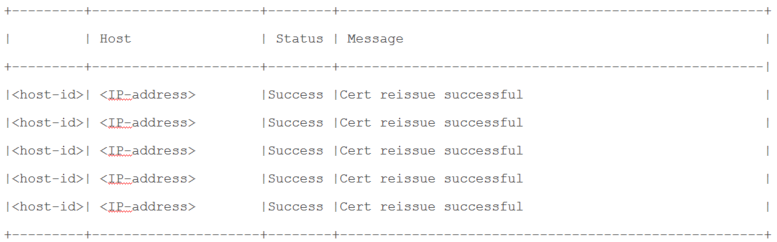
When you run cert-reissue --host-all, the following summary report will be displayed if all hosts are online, all run time services are running, and all hosts should be running on a later release.
## Unsuccessful Reissue Summary Reports
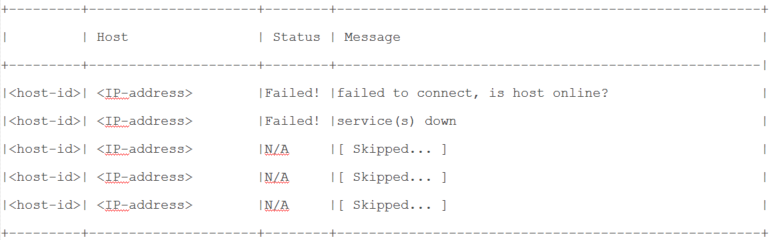
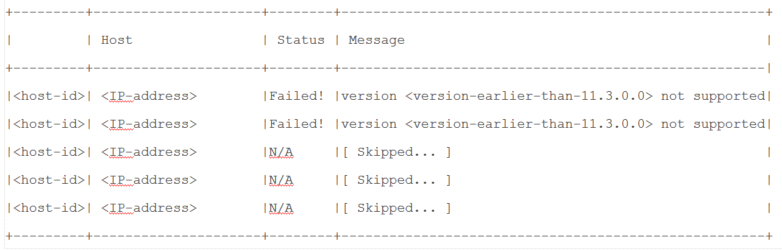
You must contact Customer Support ([https://community.netwitness.com/t5/support-information/how-to-contact-netwitness-support/ta-p/563897](https://community.netwitness.com/t5/support-information/how-to-contact-netwitness-support/ta-p/563897)) to troubleshoot problems. You know there is a problem if any does not return a Success **Status**. Success indicates that certificates were reissued for a host. The following examples illustrate unsuccessful reissues.
### Reissue Failed for Host and Aborted Command
The following three examples illustrate the failure of certificate reissuing for any hosts.
### Reissue Certificate Partially ExecutedReissue Certificate Partially Executed
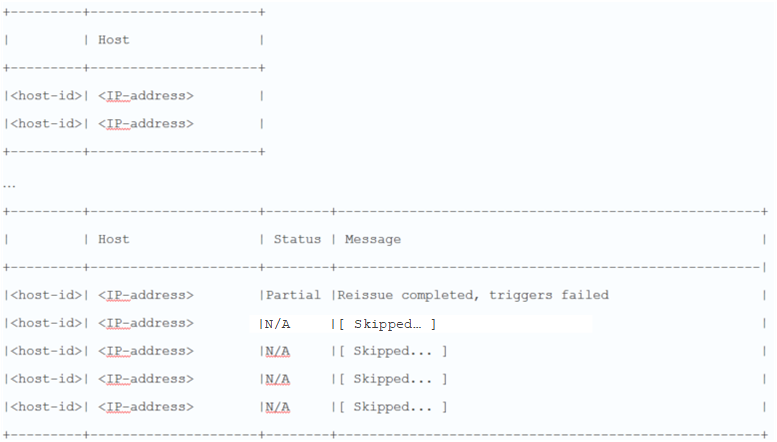
The NW Server Host certificates were reissued but failed to properly distribute the reissued certificates to one or more component hosts.
[](https://mydev.netwitness.com/?hsLang=en)
Copyright © 2026, NetWitness LLC. All rights reserved.
[NetWitness Platform](https://www.netwitness.com/)
[Acceptable Use Policy](https://www.netwitness.com/wp-content/uploads/Acceptable-Use-Policy-092022.pdf) [Privacy Statement](https://www.netwitness.com/wp-content/uploads/NetWitness-Privacy-Statement-07292024.pdf)

[](https://www.linkedin.com/company/netwitness-platform/) [](https://www.youtube.com/@netwitness)
© 2026 NetWitness LLC. All rights reserved.