---
title: Reconstruct an Event in the Legacy Events View
description: "Reconstruct an Event in the Legacy Events View\nWhen viewing a list of events in Legacy Events view, you can safely create a reconstruction of the eve"
---
[Skip to content](https://mydev.netwitness.com/knowledge-base/reconstructaneventinthelegacyeventsview#main-content)

- [Home](https://mydev.netwitness.com/home)
- Integrations
Show submenu for Integrations
- [Netwitness Platform Integrations](https://mydev.netwitness.com/netwitnessplatformintegrations)
- [Third Party Integrations](https://mydev.netwitness.com/thirdpartyintegrations)
- [Knowledge Center](https://mydev.netwitness.com/knowledge-base)
- Community
Show submenu for Community
- [Blogs](https://mydev.netwitness.com/netwitness-security-llc-blog)
- Discussions
- Customers
Show submenu for Customers
- [Manage Products and Licenses](https://mydev.netwitness.com/nwportal)
- Downloads
- Partners
Show submenu for Partners
- [Partner Program](https://mydev.netwitness.com/partner)
- [Partner Resources](https://mydev.netwitness.com/partnerresources)
- [Submit a New Deal Registration](https://mydev.netwitness.com/dealregistration)
- [Become a Partner](https://mydev.netwitness.com/becomeapartner)
- [Update Your Partner Locator Profile](https://www.netwitness.com/partner-locator/?utm_source=pardotnewsletter&utm_medium=email&utm_campaign=partner_march)
- [NetWitness LinkedIn Partner Hub](https://linkedin.com/showcase/netwitnesspartners/)
- Education
Show submenu for Education
- [Instructor Led Training Schedule](https://mydev.netwitness.com/instructorledtrainingschedule)
- [NetWitness Training Catalog](https://mydev.netwitness.com/netwitnesstrainingcatalog)
- [Security Awareness Training](https://mydev.netwitness.com/securityawarenesstraining)
- [New Product Readiness](https://mydev.netwitness.com/newproductreadiness)
- [On-Demand Virtual Labs](https://mydev.netwitness.com/ondemandvirtuallabs)
- [Additional Training Information](https://mydev.netwitness.com/additionaltraininginformation)
- [Frequently Asked Questions](https://mydev.netwitness.com/educationfaq)
- [Contact NetWitness Education Team](https://mydev.netwitness.com/contact-netwitness-education-team)
- Support
Show submenu for Support
- [Contact Support](https://mydev.netwitness.com/contact-support)
- [Create a New Case](https://mydev.netwitness.com/create-support-case)
- [View My Cases](https://mydev.netwitness.com/viewmycase)
- [Product Version Life Cycle](https://mydev.netwitness.com/product-version-life-cycle)
- [Warranty & Replacement Parts](https://mydev.netwitness.com/warranty-and-replacement-parts)
- [Community Support Forum](https://mydev.netwitness.com/community-support-forum)
- [Technical Support Guide](https://mydev.netwitness.com/technical-support-guide)
Open main navigation
Close main navigation
- [Home](https://mydev.netwitness.com/home)
- Integrations
Show submenu for Integrations
- [Netwitness Platform Integrations](https://mydev.netwitness.com/netwitnessplatformintegrations)
- [Third Party Integrations](https://mydev.netwitness.com/thirdpartyintegrations)
- [Knowledge Center](https://mydev.netwitness.com/knowledge-base)
- Community
Show submenu for Community
- [Blogs](https://mydev.netwitness.com/netwitness-security-llc-blog)
- Discussions
- Customers
Show submenu for Customers
- [Manage Products and Licenses](https://mydev.netwitness.com/nwportal)
- Downloads
- Partners
Show submenu for Partners
- [Partner Program](https://mydev.netwitness.com/partner)
- [Partner Resources](https://mydev.netwitness.com/partnerresources)
- [Submit a New Deal Registration](https://mydev.netwitness.com/dealregistration)
- [Become a Partner](https://mydev.netwitness.com/becomeapartner)
- [Update Your Partner Locator Profile](https://www.netwitness.com/partner-locator/?utm_source=pardotnewsletter&utm_medium=email&utm_campaign=partner_march)
- [NetWitness LinkedIn Partner Hub](https://linkedin.com/showcase/netwitnesspartners/)
- Education
Show submenu for Education
- [Instructor Led Training Schedule](https://mydev.netwitness.com/instructorledtrainingschedule)
- [NetWitness Training Catalog](https://mydev.netwitness.com/netwitnesstrainingcatalog)
- [Security Awareness Training](https://mydev.netwitness.com/securityawarenesstraining)
- [New Product Readiness](https://mydev.netwitness.com/newproductreadiness)
- [On-Demand Virtual Labs](https://mydev.netwitness.com/ondemandvirtuallabs)
- [Additional Training Information](https://mydev.netwitness.com/additionaltraininginformation)
- [Frequently Asked Questions](https://mydev.netwitness.com/educationfaq)
- [Contact NetWitness Education Team](https://mydev.netwitness.com/contact-netwitness-education-team)
- Support
Show submenu for Support
- [Contact Support](https://mydev.netwitness.com/contact-support)
- [Create a New Case](https://mydev.netwitness.com/create-support-case)
- [View My Cases](https://mydev.netwitness.com/viewmycase)
- [Product Version Life Cycle](https://mydev.netwitness.com/product-version-life-cycle)
- [Warranty & Replacement Parts](https://mydev.netwitness.com/warranty-and-replacement-parts)
- [Community Support Forum](https://mydev.netwitness.com/community-support-forum)
- [Technical Support Guide](https://mydev.netwitness.com/technical-support-guide)
How can we help you?
- There are no suggestions because the search field is empty.
1. [NetWitness Knowledge Base](https://mydev.netwitness.com/knowledge-base?hsLang=en)
2. [Documentation](https://mydev.netwitness.com/knowledge-base/documentation?hsLang=en)
April 28, 2026
# Reconstruct an Event in the Legacy Events View
## Reconstruct an Event in the Legacy Events View
When viewing a list of events in Legacy Events view, you can safely create a reconstruction of the event in a readable form that matches the original. By default, the initial view of a reconstructed event is the most suitable format (Best Reconstruction); for example, web content is reconstructed as a web page; an IM conversation is displayed with both parts of the conversation. Each user can select a different default reconstruction in the Profile \> Preferences view.
You can also open a reconstruction from the Navigate view if you know the Event ID of the event.
In the reconstruction, you can:
- Select event information to view. Possible values are: request data, response data, both request and response data.
- Select the reconstruction type: details, text, hex, packets, web, mail, or IM.
- Export raw logs.
- Export the event as a PCAP file.
- Extract any files available in the event.
- Extract all the meta data associated with the event.
**Caution:** Be careful when clicking a link to a file in the Reconstruction. If your system has an application associated with the file, or the browser is capable of opening them, and the attachments are malicious, they can negatively affect your system.
- Display the event in a separate window or tab (depending on your browser configuration).
- If you are viewing the reconstruction as a preview in the current view, you can page forward to the next event and back to the previous using the navigation buttons in the bottom left corner.
**Important:** In legacy web reconstruction, HTTP2 sessions only support web reconstructions, not text reconstructions. However, to view text reconstructions for HTTP2 sessions, you can check on the **Events** page.
**Note:** Reconstruction Settings and Reconstruction Cache Settings allow an administrator to manage application performance for Investigation (as described in the *System Configuration Guide*). When analysts reconstruct sessions, two situations can affect performance and results.
\- Some large events contain many thousands of source packets. Reconstructing these sessions can degrade application performance.
\- In some cases, the reconstruction cache can present incorrect content; for this reason, NetWitness cleans cache that is older than a day every 24 hours. Between the daily cache cleanings, certain actions my result in stale cache being used for a reconstruction, and if the need arises, administrators can manually clear cache for one or more services that are connected to the current NetWitness Server.
## Reconstruct an Event Using an Event ID
You can reconstruct an event directly from the Navigate view given a known Event ID. You can use this option without executing a query as you usually do when beginning an investigation. A service and time range must be selected to be able to jump directly to an event using just its eventid.
To view a reconstruction or event analysis directly from the Navigate view:
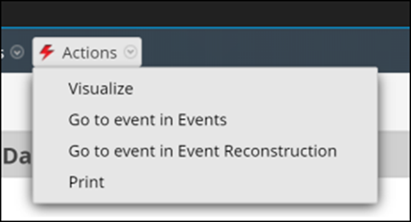
1. Go to Investigate **\>** Navigate and select **Actions** \> **Go to event in Events** or **Go to event in Event Reconstruction**.
The Go to event dialog is displayed. There are two dialogs, one for Events and one for Legacy Event reconstruction. Both ask for the Event ID.
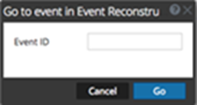
2. In the **Event ID** field, type the ID and click **Go**.
The specified event is reconstructed in the legacy Event Reconstruction view or the Events view.
## Reconstruct an Event from a Drill Point in the Navigate View
1. Click the count (the green number following a value) for a value in the Navigate view to open a drill point in the **Events** view.
2. To show all meta data, click .
3. To open an event reconstruction in the Legacy Events view, select an event to reconstruct and select **Actions \> View Event \> Preview Inline**.
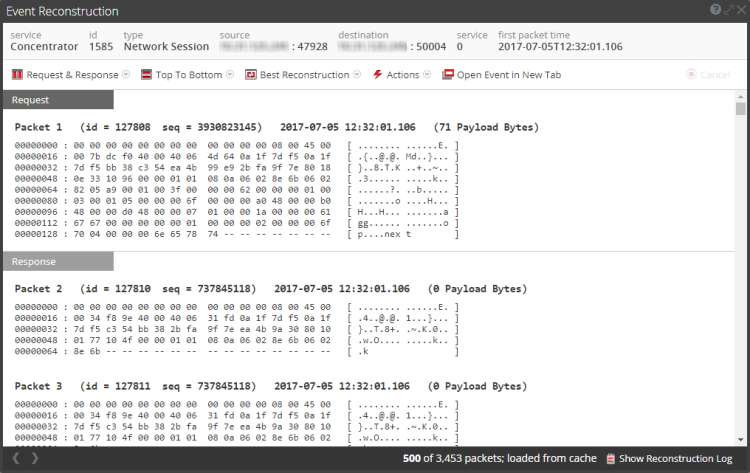
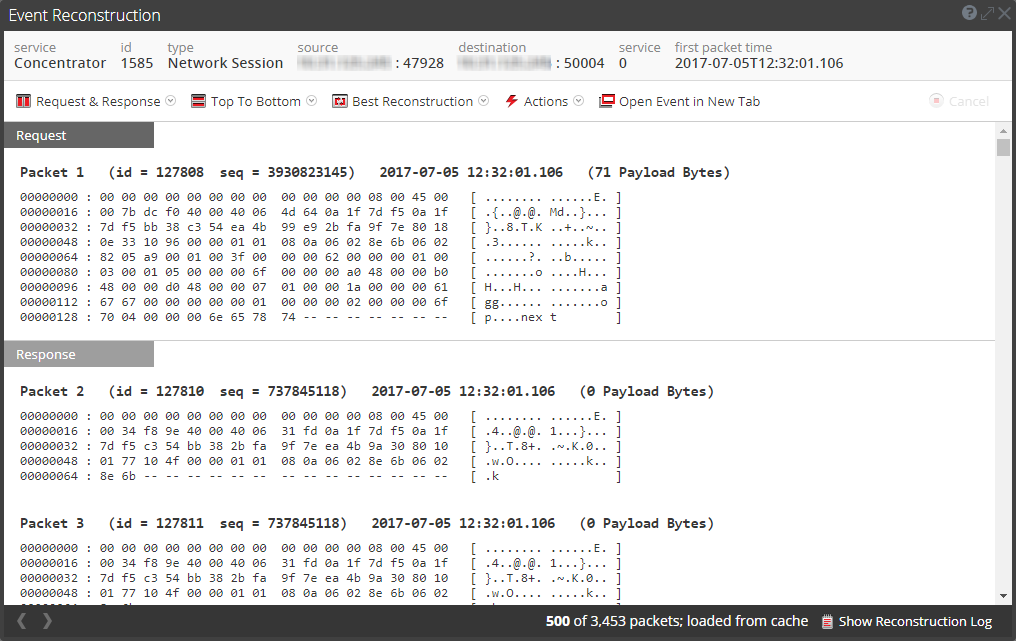
The Event Reconstruction opens in a popup window in the same view. By default, NetWitness displays the best reconstruction for the event determined by the event content or the reconstruction that you have selected in the Default Session View setting for Investigation. You can use the options in the Event Reconstruction toolbar to change the reconstruction method, view side-by-side results, export an event, open an email attachment, extract files, and open the event in a new tab. The toolbar options vary depending on the type of event being reconstructed (network event, log event, or endpoint event). This is an example of the reconstruction for a network event.
4. To preview a reconstruction of the next event, click  in the lower left corner of the reconstruction or to preview a reconstruction of the previous event, click .
5. To open an event reconstruction in a new tab, do one of the following:
1. In the **Legacy Events** view, select an event to reconstruct and select **Actions \> View Event** **\> Open in New Tab**.
2. In the **Event Reconstruction** toolbar of previewed reconstruction, click **Open Event in New Tab** in the toolbar.
The Event Reconstruction opens in a new tab.
## View Side by Side or Top to Bottom
To select the way requests and responses for an event are displayed:
1. In the **Event Reconstruction** toolbar, click **Top to Bottom** or **Side by Side**.
2. In the drop-down menu, select the information you want to see in the event: **Side by Side** or **Top to Bottom.**
The reconstruction is refreshed with the selected information.
## Select Event Information to View
To select what event information to view:
1. In the **Event Reconstruction** toolbar, click **Request & Response**.
2. In the drop-down menu, select the information you want to see in the event: **Request & Response**, **Request**, or **Response**.
The reconstruction is refreshed with the selected information.
## Select Event Reconstruction Type
To select the reconstruction type for an event:
1. In the **Event Reconstruction** toolbar, click **Best Reconstruction**.
2. In the drop-down menu, select the reconstruction type to view: **meta**, **text**, **hex**, **packets**, **web**, **mail**, or **files**.
The reconstruction is refreshed with the selected reconstruction type.
## Open or Download an Email Attachment
When viewing a reconstruction of an email that has attachments, you can open supported file types or download the files to the local system.
**Caution:** Be careful when selecting file attachments. If your system has an application associated with the file attachments, or the browser is capable of opening them, and the attachments are malicious, they can negatively affect your system.
To open or download email attachments:
1. In the **Event Reconstruction** toolbar, select the **View** drop-down and select **View** **Mail**.
The Event Reconstruction is displayed.
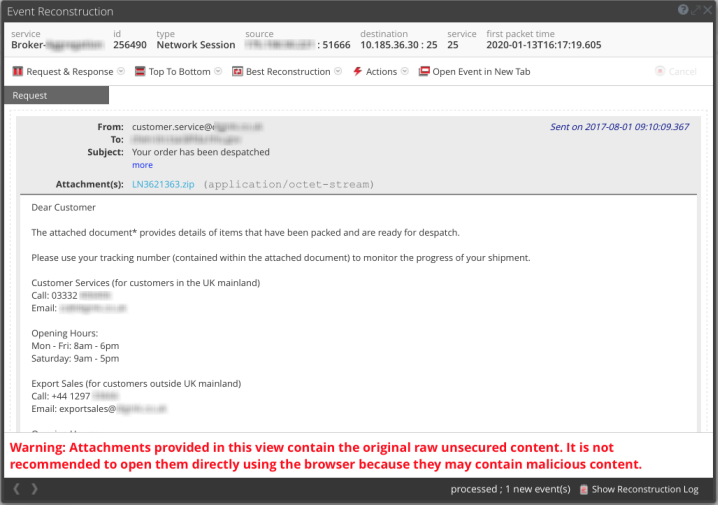
2. In the **Event Reconstruction** section of the email, click the Attachment.
If the file type is supported by the browser, the attachment will open in a new tab.
If the file type is not supported, the Download dialog is displayed so that you can download the attachment.
## Export an Event as a PCAP File
The PCAP export option downloads the sessions for the current time range and drill point to a PCAP file. To export an event as a pcap file:
1. In the **Event Reconstruction** toolbar, click **Actions**.
2. Click **Export PCAP**.
3. A confirmation dialog is displayed.
4. Click **OK**.
The job is scheduled and when complete the PCAP is downloaded to the local file system. In the Profile \> Jobs tab, you can download the PCAP.
## Extract Files from a Reconstructed Event
The Extract Files option extracts and downloads the files associated with the event. To extract files:
1. In the **Event Reconstruction** toolbar, click **Actions**.
2. Click **Extract Files**.
The File Extraction dialog is displayed.
3. Select the types of files to extract, and click **OK**.
4. The job is scheduled and when complete the selected file types are downloaded to the local file system. In the Profile \> Jobs tab, you can download the files.
[](https://mydev.netwitness.com/?hsLang=en)
Copyright © 2026, NetWitness LLC. All rights reserved.
[NetWitness Platform](https://www.netwitness.com/)
[Acceptable Use Policy](https://www.netwitness.com/wp-content/uploads/Acceptable-Use-Policy-092022.pdf) [Privacy Statement](https://www.netwitness.com/wp-content/uploads/NetWitness-Privacy-Statement-07292024.pdf)

[](https://www.linkedin.com/company/netwitness-platform/) [](https://www.youtube.com/@netwitness)
© 2026 NetWitness LLC. All rights reserved.