---
title: (Optional) Use a Custom Server Certificate
description: "(Optional) Use a Custom Server Certificate(Optional) Use a Custom Server Certificate\nNetWitness also allows you to configure custom web server certif"
---
[Skip to content](https://mydev.netwitness.com/knowledge-base/optional-useacustomservercertificate#main-content)

- [Home](https://mydev.netwitness.com/home)
- Integrations
Show submenu for Integrations
- [Netwitness Platform Integrations](https://mydev.netwitness.com/netwitnessplatformintegrations)
- [Third Party Integrations](https://mydev.netwitness.com/thirdpartyintegrations)
- [Knowledge Center](https://mydev.netwitness.com/knowledge-base)
- Community
Show submenu for Community
- [Blogs](https://mydev.netwitness.com/netwitness-security-llc-blog)
- Discussions
- Customers
Show submenu for Customers
- [Manage Products and Licenses](https://mydev.netwitness.com/nwportal)
- Downloads
- Partners
Show submenu for Partners
- [Partner Program](https://mydev.netwitness.com/partner)
- [Partner Resources](https://mydev.netwitness.com/partnerresources)
- [Submit a New Deal Registration](https://mydev.netwitness.com/dealregistration)
- [Become a Partner](https://mydev.netwitness.com/becomeapartner)
- [Update Your Partner Locator Profile](https://www.netwitness.com/partner-locator/?utm_source=pardotnewsletter&utm_medium=email&utm_campaign=partner_march)
- [NetWitness LinkedIn Partner Hub](https://linkedin.com/showcase/netwitnesspartners/)
- Education
Show submenu for Education
- [Instructor Led Training Schedule](https://mydev.netwitness.com/instructorledtrainingschedule)
- [NetWitness Training Catalog](https://mydev.netwitness.com/netwitnesstrainingcatalog)
- [Security Awareness Training](https://mydev.netwitness.com/securityawarenesstraining)
- [New Product Readiness](https://mydev.netwitness.com/newproductreadiness)
- [On-Demand Virtual Labs](https://mydev.netwitness.com/ondemandvirtuallabs)
- [Additional Training Information](https://mydev.netwitness.com/additionaltraininginformation)
- [Frequently Asked Questions](https://mydev.netwitness.com/educationfaq)
- [Contact NetWitness Education Team](https://mydev.netwitness.com/contact-netwitness-education-team)
- Support
Show submenu for Support
- [Contact Support](https://mydev.netwitness.com/contact-support)
- [Create a New Case](https://mydev.netwitness.com/create-support-case)
- [View My Cases](https://mydev.netwitness.com/viewmycase)
- [Product Version Life Cycle](https://mydev.netwitness.com/product-version-life-cycle)
- [Warranty & Replacement Parts](https://mydev.netwitness.com/warranty-and-replacement-parts)
- [Community Support Forum](https://mydev.netwitness.com/community-support-forum)
- [Technical Support Guide](https://mydev.netwitness.com/technical-support-guide)
Open main navigation
Close main navigation
- [Home](https://mydev.netwitness.com/home)
- Integrations
Show submenu for Integrations
- [Netwitness Platform Integrations](https://mydev.netwitness.com/netwitnessplatformintegrations)
- [Third Party Integrations](https://mydev.netwitness.com/thirdpartyintegrations)
- [Knowledge Center](https://mydev.netwitness.com/knowledge-base)
- Community
Show submenu for Community
- [Blogs](https://mydev.netwitness.com/netwitness-security-llc-blog)
- Discussions
- Customers
Show submenu for Customers
- [Manage Products and Licenses](https://mydev.netwitness.com/nwportal)
- Downloads
- Partners
Show submenu for Partners
- [Partner Program](https://mydev.netwitness.com/partner)
- [Partner Resources](https://mydev.netwitness.com/partnerresources)
- [Submit a New Deal Registration](https://mydev.netwitness.com/dealregistration)
- [Become a Partner](https://mydev.netwitness.com/becomeapartner)
- [Update Your Partner Locator Profile](https://www.netwitness.com/partner-locator/?utm_source=pardotnewsletter&utm_medium=email&utm_campaign=partner_march)
- [NetWitness LinkedIn Partner Hub](https://linkedin.com/showcase/netwitnesspartners/)
- Education
Show submenu for Education
- [Instructor Led Training Schedule](https://mydev.netwitness.com/instructorledtrainingschedule)
- [NetWitness Training Catalog](https://mydev.netwitness.com/netwitnesstrainingcatalog)
- [Security Awareness Training](https://mydev.netwitness.com/securityawarenesstraining)
- [New Product Readiness](https://mydev.netwitness.com/newproductreadiness)
- [On-Demand Virtual Labs](https://mydev.netwitness.com/ondemandvirtuallabs)
- [Additional Training Information](https://mydev.netwitness.com/additionaltraininginformation)
- [Frequently Asked Questions](https://mydev.netwitness.com/educationfaq)
- [Contact NetWitness Education Team](https://mydev.netwitness.com/contact-netwitness-education-team)
- Support
Show submenu for Support
- [Contact Support](https://mydev.netwitness.com/contact-support)
- [Create a New Case](https://mydev.netwitness.com/create-support-case)
- [View My Cases](https://mydev.netwitness.com/viewmycase)
- [Product Version Life Cycle](https://mydev.netwitness.com/product-version-life-cycle)
- [Warranty & Replacement Parts](https://mydev.netwitness.com/warranty-and-replacement-parts)
- [Community Support Forum](https://mydev.netwitness.com/community-support-forum)
- [Technical Support Guide](https://mydev.netwitness.com/technical-support-guide)
How can we help you?
- There are no suggestions because the search field is empty.
1. [NetWitness Knowledge Base](https://mydev.netwitness.com/knowledge-base?hsLang=en)
2. [Documentation](https://mydev.netwitness.com/knowledge-base/documentation?hsLang=en)
April 28, 2026
# (Optional) Use a Custom Server Certificate
## (Optional) Use a Custom Server Certificate(Optional) Use a Custom Server Certificate
NetWitness also allows you to configure custom web server certificate to be used as NetWitness Server certificate. By default NetWitness Server uses a web server certificate generated by NetWitness for HTTPS connection. You can configure custom web server certificate even if PKI is not enabled.
## Supported Keystore FormatsSupported Keystore Formats
You must select the format that meets your requirement. The following keystore formats are supported:
- For server certificate with its private key:
- pfx/pkcs/p12 (PKCS8/PKCS12 are the standards)
- jks (JKS standard)
**Note:** The .pfx, .p12 and .jks are containers that can contain one or more private keys and its corresponding chains or certificates.
## (Optional) Create a Certificate Signing Request (CSR) and Certificate Store for a Server Certificate(Optional) Create a Certificate Signing Request (CSR) and Certificate Store for a Server Certificate
**Note:** The steps provided in this procedure allows you to create a CSR and Certificate Store for a Server Certificate.
If a server certificate is already created along with its private key, you can directly upload the certificate to the NetWitness Server. If the server certificate is not created, based on the CSR created, the CSR can be submitted to the Certificate Authority (CA) server to obtain a server certificate. Once the certificate is created, perform the following steps to package the private key and the signed certificate that must uploaded to the NetWitness Server to be used as a server certificate.
To create a CSR for a Server Certificate:
1\. Change the directory to /root:
cd /root
2\. Create a new directory:
mkdir nw\_pki\_server\_cert
3\. Change the directory to the newly created directory:
cd nw\_pki\_server\_cert
4\. Create a Private Key of 2048 Bits:
openssl genrsa -out nw\_server\_pki\_private\_key.key 2048
5\. Create a CSR:
openssl req -new -sha256 -key nw\_server\_pki\_private\_key.key -out server\_cert\_request.csr
For example, if country: US, location: RT, and unit:
CN: ABCD (Hostname or IP Address of the Machine)
For multiple names, use values such as : CN=ABCD, CN=10.XX.XXX.XX
email: example@rsa.com
6\. Check the CSR and Private Key match.
openssl req -noout -modulus -in server\_cert\_request.csr | openssl sha256
openssl rsa -noout -modulus -in nw\_server\_pki\_private\_key.key | openssl sha256
For example:
\[root@ABCD open\_ssl\_test\]# openssl rsa -noout -modulus -in server\_private.key | openssl sha256
(stdin)= 88df3d1ea5b2f411712b96d2ed4a72f5
\[root@ABCD open\_ssl\_test\]# openssl req -noout -modulus -in server\_cert\_request.csr | openssl sha256
(stdin)= 88df3d1ea5b2f411712b96d2ed4a72f5
**Note:** You make a note of both stdin's.
7\. Submit the CSR to the CA and get a signed Server Certificate.
8\. Copy the certificate in PEM format to the new directory:
/root/nw\_pki\_server\_cert/signed\_certificate.pem
9\. Check the certificate for the correct public key.
openssl x509 -noout -modulus -in certificate.pem | openssl sha256
For example :
\[root@ABCD open\_ssl\_test\]# mv test.pem certificate.pem
\[root@ABCD open\_ssl\_test\]# openssl x509 -noout -modulus -in certificate.pem | openssl sha256
(stdin)= 3e2f4bbd1f32ae097902afcc1893089e
\[root@ABCD open\_ssl\_test\]# openssl rsa -noout -modulus -in sa\_server\_pki\_private\_key.key | openssl sha256
(stdin)= 3e2f4bbd1f32ae097902afcc1893089e
\[root@ABCD open\_ssl\_test\]# openssl req -noout -modulus -in server\_cert\_request.csr | openssl sha256
(stdin)= 3e2f4bbd1f32ae097902afcc1893089e
10\. Copy the Private Key and Certificate to a Key Store.
openssl pkcs12 -export -descert -name -in signed\_certificate.pem -inkey nw\_server\_pki\_private\_key.key -out keystore.p12
11\. Enter the keystore password, for example **NetWitness@123**, to the Keystore.
## Import an NW Server Certificate with its Private KeyImport an NW Server Certificate with its Private Key
**Note:** .p12, .jks, and .pfx are the supported server certificate formats. Execute the following OpenSSL command to convert certificates to the supported format:
openssl pkcs12 -export -out cert.p12 -in cert.cer -inkey nw\_server\_pki\_private\_key.key
Only certificates that are configured with an export password can be uploaded to the NetWitness UI.
1. Go to ** (Admin) \> Security.**
The Security view is displayed with the **Users** tab open.
2. Click the **PKI Settings** tab.
3. In the **Server Certificates** section, click .
The Import Server Certificates dialog is displayed.
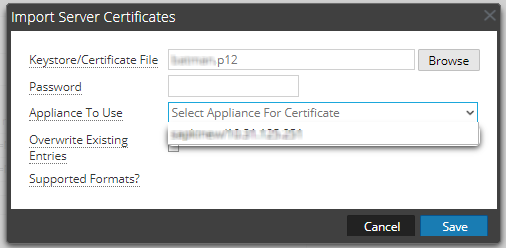
4. In the **Keystore/Certificate File** field, click **Browse** and select the keystore.
5. In the **Password** field, enter the keystore password.
6. In the **Appliance To Use** field, select the appliance for which you want to use this certificate.
7. (Optional) Select the **Overwrite Existing Entries** checkbox to overwrite the entries of the certificate that is already added.
8. Click **Save.**
The NetWitness Server certificate with its private key is successfully added to NetWitness.
**Note:** When the certificate is being applied on the selected appliance, no other operation on PKI can be performed until the process is completed.
Double-click on the added entries to view the details of the certificate.
1. To apply the server certificate on a server, select a certificate and click .
**Note:** Uploading a keystore will add the server certificate and its private key locally. To apply a server certificate on a server, you need to select a server certificate and click the synchronization button .
All server certificates are also synchronized on the appliances when PKI is enabled.
**Note:** To complete the certificate update process, log into the Admin Server (node-0) stop and start the nginx with the command systemctl restart nginx.
[](https://mydev.netwitness.com/?hsLang=en)
Copyright © 2026, NetWitness LLC. All rights reserved.
[NetWitness Platform](https://www.netwitness.com/)
[Acceptable Use Policy](https://www.netwitness.com/wp-content/uploads/Acceptable-Use-Policy-092022.pdf) [Privacy Statement](https://www.netwitness.com/wp-content/uploads/NetWitness-Privacy-Statement-07292024.pdf)

[](https://www.linkedin.com/company/netwitness-platform/) [](https://www.youtube.com/@netwitness)
© 2026 NetWitness LLC. All rights reserved.