---
title: (Optional) Installing and Configuring Relay Server
description: "(Optional) Installing and Configuring Relay Server\nNote: The information in this topic applies to NetWitness Version 11.3.1 and later.\nRelay Server ("
---
[Skip to content](https://mydev.netwitness.com/knowledge-base/optional-installingandconfiguringrelayserver#main-content)

- [Home](https://mydev.netwitness.com/home)
- Integrations
Show submenu for Integrations
- [Netwitness Platform Integrations](https://mydev.netwitness.com/netwitnessplatformintegrations)
- [Third Party Integrations](https://mydev.netwitness.com/thirdpartyintegrations)
- [Knowledge Center](https://mydev.netwitness.com/knowledge-base)
- Community
Show submenu for Community
- [Blogs](https://mydev.netwitness.com/netwitness-security-llc-blog)
- Discussions
- Customers
Show submenu for Customers
- [Manage Products and Licenses](https://mydev.netwitness.com/nwportal)
- Downloads
- Partners
Show submenu for Partners
- [Partner Program](https://mydev.netwitness.com/partner)
- [Partner Resources](https://mydev.netwitness.com/partnerresources)
- [Submit a New Deal Registration](https://mydev.netwitness.com/dealregistration)
- [Become a Partner](https://mydev.netwitness.com/becomeapartner)
- [Update Your Partner Locator Profile](https://www.netwitness.com/partner-locator/?utm_source=pardotnewsletter&utm_medium=email&utm_campaign=partner_march)
- [NetWitness LinkedIn Partner Hub](https://linkedin.com/showcase/netwitnesspartners/)
- Education
Show submenu for Education
- [Instructor Led Training Schedule](https://mydev.netwitness.com/instructorledtrainingschedule)
- [NetWitness Training Catalog](https://mydev.netwitness.com/netwitnesstrainingcatalog)
- [Security Awareness Training](https://mydev.netwitness.com/securityawarenesstraining)
- [New Product Readiness](https://mydev.netwitness.com/newproductreadiness)
- [On-Demand Virtual Labs](https://mydev.netwitness.com/ondemandvirtuallabs)
- [Additional Training Information](https://mydev.netwitness.com/additionaltraininginformation)
- [Frequently Asked Questions](https://mydev.netwitness.com/educationfaq)
- [Contact NetWitness Education Team](https://mydev.netwitness.com/contact-netwitness-education-team)
- Support
Show submenu for Support
- [Contact Support](https://mydev.netwitness.com/contact-support)
- [Create a New Case](https://mydev.netwitness.com/create-support-case)
- [View My Cases](https://mydev.netwitness.com/viewmycase)
- [Product Version Life Cycle](https://mydev.netwitness.com/product-version-life-cycle)
- [Warranty & Replacement Parts](https://mydev.netwitness.com/warranty-and-replacement-parts)
- [Community Support Forum](https://mydev.netwitness.com/community-support-forum)
- [Technical Support Guide](https://mydev.netwitness.com/technical-support-guide)
Open main navigation
Close main navigation
- [Home](https://mydev.netwitness.com/home)
- Integrations
Show submenu for Integrations
- [Netwitness Platform Integrations](https://mydev.netwitness.com/netwitnessplatformintegrations)
- [Third Party Integrations](https://mydev.netwitness.com/thirdpartyintegrations)
- [Knowledge Center](https://mydev.netwitness.com/knowledge-base)
- Community
Show submenu for Community
- [Blogs](https://mydev.netwitness.com/netwitness-security-llc-blog)
- Discussions
- Customers
Show submenu for Customers
- [Manage Products and Licenses](https://mydev.netwitness.com/nwportal)
- Downloads
- Partners
Show submenu for Partners
- [Partner Program](https://mydev.netwitness.com/partner)
- [Partner Resources](https://mydev.netwitness.com/partnerresources)
- [Submit a New Deal Registration](https://mydev.netwitness.com/dealregistration)
- [Become a Partner](https://mydev.netwitness.com/becomeapartner)
- [Update Your Partner Locator Profile](https://www.netwitness.com/partner-locator/?utm_source=pardotnewsletter&utm_medium=email&utm_campaign=partner_march)
- [NetWitness LinkedIn Partner Hub](https://linkedin.com/showcase/netwitnesspartners/)
- Education
Show submenu for Education
- [Instructor Led Training Schedule](https://mydev.netwitness.com/instructorledtrainingschedule)
- [NetWitness Training Catalog](https://mydev.netwitness.com/netwitnesstrainingcatalog)
- [Security Awareness Training](https://mydev.netwitness.com/securityawarenesstraining)
- [New Product Readiness](https://mydev.netwitness.com/newproductreadiness)
- [On-Demand Virtual Labs](https://mydev.netwitness.com/ondemandvirtuallabs)
- [Additional Training Information](https://mydev.netwitness.com/additionaltraininginformation)
- [Frequently Asked Questions](https://mydev.netwitness.com/educationfaq)
- [Contact NetWitness Education Team](https://mydev.netwitness.com/contact-netwitness-education-team)
- Support
Show submenu for Support
- [Contact Support](https://mydev.netwitness.com/contact-support)
- [Create a New Case](https://mydev.netwitness.com/create-support-case)
- [View My Cases](https://mydev.netwitness.com/viewmycase)
- [Product Version Life Cycle](https://mydev.netwitness.com/product-version-life-cycle)
- [Warranty & Replacement Parts](https://mydev.netwitness.com/warranty-and-replacement-parts)
- [Community Support Forum](https://mydev.netwitness.com/community-support-forum)
- [Technical Support Guide](https://mydev.netwitness.com/technical-support-guide)
How can we help you?
- There are no suggestions because the search field is empty.
1. [NetWitness Knowledge Base](https://mydev.netwitness.com/knowledge-base?hsLang=en)
2. [Documentation](https://mydev.netwitness.com/knowledge-base/documentation?hsLang=en)
April 26, 2026
# (Optional) Installing and Configuring Relay Server
## (Optional) Installing and Configuring Relay Server
**Note:** The information in this topic applies to NetWitness Version 11.3.1 and later.
Relay Server (referred to as RAR in NetWitness Endpoints) extends NetWitness Platform’s visibility into endpoints when they are outside the corporate network. The Relay Server deployed in a cloud or DMZ relays the endpoint data between the hosts and the Endpoint Server. The hosts that are outside the corporate network send the endpoint data to the configured Relay Server and the corresponding Endpoint server pulls the data.
**Note:** If you have Windows hosts that are outside the corporate network, the log data is not sent to the Relay Server.
You can configure a Relay Server on the Endpoint Server Config view. Once the Relay Server is configured, the policy for the host is automatically updated and you can view the Relay Server settings on the **Host Details** view \> **Policy Details** panel.
You can configure a single Relay Server with one or more Endpoint servers. In this case, the Relay Server ensures that the endpoint data reaches the Endpoint Server configured in the policy.
The following describes the architecture of the Relay Server.
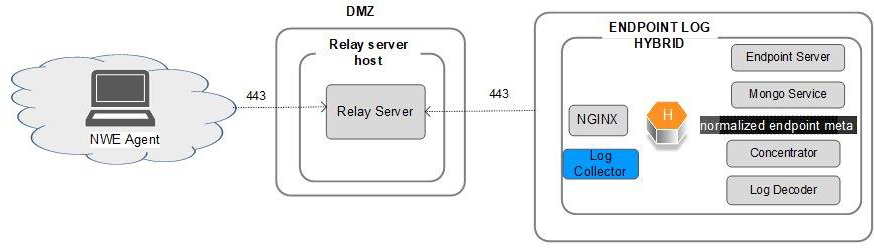
The following flowchart explains how the host switches to the Relay Server.
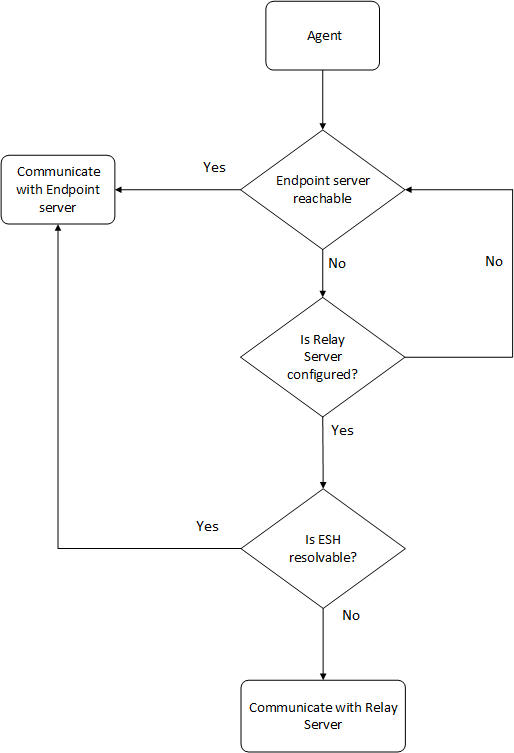
## Installing the Relay Server
The Relay Server installer contains binaries, certificates, configuration files, and the installation script required to install the Relay Server.
**IMPORTANT:**
\- The Relay Server version must match with the corresponding NetWitness Endpoint Server version. If you plan to upgrade a Relay Server to a newer version, first upgrade the Endpoint Server, then download the Relay Server installer, and run the installer script.
\- Operating System updates and general system hardening on the Relay Server must be managed by the customer according to standard best practices. The Relay server package does not contain OS updates and the operating system will not be updated as part of the standard NetWitness update process.
\- Do NOT run the nwsetup-tui script to install the Relay Server. Follow the instructions in this document only as Relay Server is an independent server and not part of NetWitness UI (Admin \> Hosts).
### Installation MediaI
The Relay Server can be installed only on EL 8 or NetWitness Platform 12.4.0.0 base image which is available for download from Downloads page ([https://community.netwitness.com/t5/netwitness-platform-downloads/tkb-p/netwitness-downloads](https://community.netwitness.com/t5/netwitness-platform-downloads/tkb-p/netwitness-downloads)). Also, make sure that the Relay server host is connected to internet to download the required dependencies.
For more information on deploying Relay Server host on a:
- DMZ - see "Step 1a. Deploy the Virtual Host to create VM" in the *Virtual Host Installation Guide*.
- Cloud
- see "Step 1. Deploy NW Server Host" in the *Azure Installation Guide*.
- see "AWS Deployment" in the *AWS Installation Guide*.
### Relay Server Host System Requirements
To install the Relay Server:
1. Log in to NetWitness Platform.
2. Click ** (Admin) \> Services**.
3. Select the **Endpoint Server** service and click  \> **View** \> **Config** \> **Relay Server** tab.
4. In the **Download Installer** section, enter the installer password and click **Download** to download the Relay Server installer file (**RelayInstaller.zip**).
5. Copy the Relay Server installer file (**RelayInstaller.zip**) to the Relay Server host.
6. Unzip the **RelayInstaller.zip** file on the Relay Server host. For example:
/home/RelayInstaller.zip
unzip
7. Set up the execution permission using the following command:
chmod +x install.sh
8. Run the installer script using the following command:
./install.sh
The **All necessary RPMs will be installed without further** prompts is displayed.
9. Enter **Y** to continue the installation.
The password prompt is displayed.
10. Enter the password.
**Note:** Make sure you enter the same password you set while downloading the Relay Server installer.
**Note:** In case if you are re-installing the Relay Server host. **Do you wish to update the list** prompt is displayed.
\- Enter **Y** to update the Endpoint server IPs.
**Enter the Endpoint Server IPs** prompt is displayed.
11. Enter all the Endpoint server IPs you plan to configure with the Relay server with comma separated.
If the Relay Server installation is successful, you can check the status of the services:
- Check if the Relay Server is up and running:
systemctl status rsa-nw-relay-server
- Check if Ngnix is running:
systemctl status ngnix
You can also update Endpoint Server IPs without installing the Relay Server.
To update Endpoint Server IPs without installing the Relay Server:
1. Run the following command:
bash /var/netwitness/relay-configure-allowed-hosts.sh
The list of all the configured Endpoint server IPs is displayed and **Do you wish to update the list** prompt is displayed.
2. Enter **Y** to update the list of Endpoint server IPs.
**Enter the Endpoint Server IPs** prompt is displayed.
3. Enter a comma-separated list of all the Endpoint Server IPs to update.
The list of updated IPs is displayed.
## Configuring the Relay Server
Make sure you have installed the Relay Server.
**Note:** During Relay Server host installation, firewalld is configured to allow incoming connections only on TCP ports 443 and 22.
To configure the Relay Server:
1. Log in to NetWitness Platform.
2. Click ** (Admin) \> Services**.
3. Select the **Endpoint Server** service and click  \> **View** \> **Config** \> **Relay Server** tab.
The Relay Server tab is displayed.
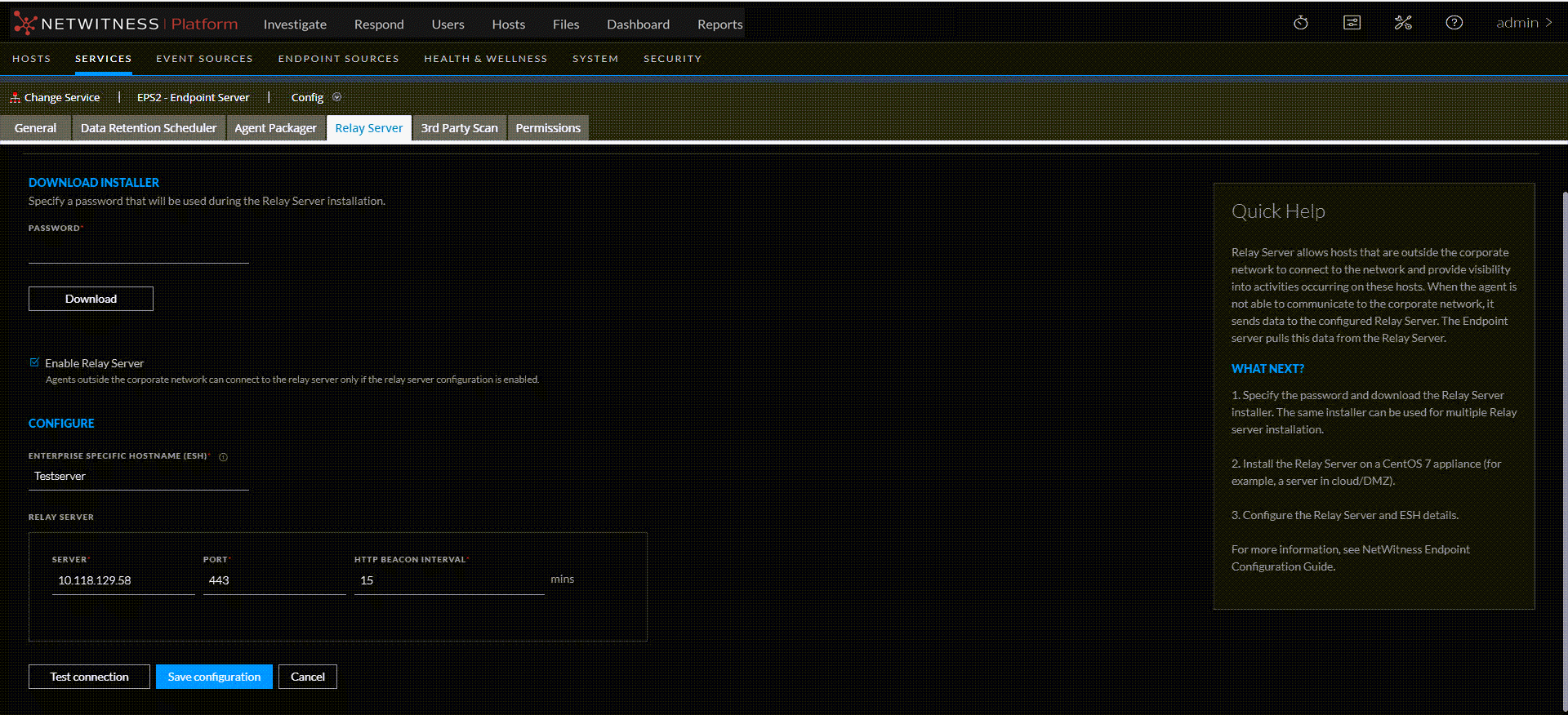
4. Select the **Enable Relay Server** check box to enable the Relay Server configuration.
**Note:** To disable the Relay Server, clear the **Enable Relay Server** check box.
**Caution:** Before you disable the Relay Server configuration, if the hosts will be always roaming make sure to migrate these hosts to an alternate Endpoint server configured with a different Relay server. Else these hosts will not be able to connect back to the corporate network. When you disable the configuration, the Relay Server settings are removed from the EDR policy.
5. In the **Configure** section:
1. Enter the ESH.
**IMPORTANT:** This should a hostname that can only be resolved on the corporate internal DNS and not on public internet DNS (ex: 1.1.1.1 or 8.8.8.8). It is used to determine if the host running the Endpoint agent client is connected to the internal network (physically on premise or via VPN).
1. Specify the Relay **Server**, **Port** and **HTTP Beacon Interval**.
**IMPORTANT:** The Relay Server needs to be a hostname that can be resolved correctly on both internal DNS (with the internal IP) and public DNS (with the public IP)
6. Click **Test Connection** to check if the Relay Server is reachable.
7. Click **Save Configuration** to save the configuration.
**Note:** Before you modify the Relay Server configuration, perform any one of the following:
\- Make sure that the hosts are inside the corporate network so that the policy with the Relay Server configuration is applied.
\- If hosts will always be roaming, then migrate these hosts to an alternate Endpoint server configured with a different Relay Server.
**IMPORTANT:** You must change the root password after you deploy the Relay Server host.
**Note:** If you encounter test connection failure between Endpoint server and relay server, see **Relay Server Issues** section in the [Troubleshooting](https://50269063.hs-sites.com/knowledge-base/669562?hsLang=en) topic.
[](https://mydev.netwitness.com/?hsLang=en)
Copyright © 2026, NetWitness LLC. All rights reserved.
[NetWitness Platform](https://www.netwitness.com/)
[Acceptable Use Policy](https://www.netwitness.com/wp-content/uploads/Acceptable-Use-Policy-092022.pdf) [Privacy Statement](https://www.netwitness.com/wp-content/uploads/NetWitness-Privacy-Statement-07292024.pdf)

[](https://www.linkedin.com/company/netwitness-platform/) [](https://www.youtube.com/@netwitness)
© 2026 NetWitness LLC. All rights reserved.