---
title: Netwitness New Health & Wellness Kibana dashboard is empty.
description: "Issue\nNetwitness New Health & Wellness Kibana dashboard shows empty as below.\n\nCause\nThis issue is due to the stats collection being in a disabled"
---
[Skip to content](https://mydev.netwitness.com/knowledge-base/netwitness-new-health-wellness-kibana-dashboard-is-empty#main-content)

- [Home](https://mydev.netwitness.com/home)
- Integrations
Show submenu for Integrations
- [Netwitness Platform Integrations](https://mydev.netwitness.com/netwitnessplatformintegrations)
- [Third Party Integrations](https://mydev.netwitness.com/thirdpartyintegrations)
- [Knowledge Center](https://mydev.netwitness.com/knowledge-base)
- Community
Show submenu for Community
- [Blogs](https://mydev.netwitness.com/netwitness-security-llc-blog)
- Discussions
- Customers
Show submenu for Customers
- [Manage Products and Licenses](https://mydev.netwitness.com/nwportal)
- Downloads
- Partners
Show submenu for Partners
- [Partner Program](https://mydev.netwitness.com/partner)
- [Partner Resources](https://mydev.netwitness.com/partnerresources)
- [Submit a New Deal Registration](https://mydev.netwitness.com/dealregistration)
- [Become a Partner](https://mydev.netwitness.com/becomeapartner)
- [Update Your Partner Locator Profile](https://www.netwitness.com/partner-locator/?utm_source=pardotnewsletter&utm_medium=email&utm_campaign=partner_march)
- [NetWitness LinkedIn Partner Hub](https://linkedin.com/showcase/netwitnesspartners/)
- Education
Show submenu for Education
- [Instructor Led Training Schedule](https://mydev.netwitness.com/instructorledtrainingschedule)
- [NetWitness Training Catalog](https://mydev.netwitness.com/netwitnesstrainingcatalog)
- [Security Awareness Training](https://mydev.netwitness.com/securityawarenesstraining)
- [New Product Readiness](https://mydev.netwitness.com/newproductreadiness)
- [On-Demand Virtual Labs](https://mydev.netwitness.com/ondemandvirtuallabs)
- [Additional Training Information](https://mydev.netwitness.com/additionaltraininginformation)
- [Frequently Asked Questions](https://mydev.netwitness.com/educationfaq)
- [Contact NetWitness Education Team](https://mydev.netwitness.com/contact-netwitness-education-team)
- Support
Show submenu for Support
- [Contact Support](https://mydev.netwitness.com/contact-support)
- [Create a New Case](https://mydev.netwitness.com/create-support-case)
- [View My Cases](https://mydev.netwitness.com/viewmycase)
- [Product Version Life Cycle](https://mydev.netwitness.com/product-version-life-cycle)
- [Warranty & Replacement Parts](https://mydev.netwitness.com/warranty-and-replacement-parts)
- [Community Support Forum](https://mydev.netwitness.com/community-support-forum)
- [Technical Support Guide](https://mydev.netwitness.com/technical-support-guide)
Open main navigation
Close main navigation
- [Home](https://mydev.netwitness.com/home)
- Integrations
Show submenu for Integrations
- [Netwitness Platform Integrations](https://mydev.netwitness.com/netwitnessplatformintegrations)
- [Third Party Integrations](https://mydev.netwitness.com/thirdpartyintegrations)
- [Knowledge Center](https://mydev.netwitness.com/knowledge-base)
- Community
Show submenu for Community
- [Blogs](https://mydev.netwitness.com/netwitness-security-llc-blog)
- Discussions
- Customers
Show submenu for Customers
- [Manage Products and Licenses](https://mydev.netwitness.com/nwportal)
- Downloads
- Partners
Show submenu for Partners
- [Partner Program](https://mydev.netwitness.com/partner)
- [Partner Resources](https://mydev.netwitness.com/partnerresources)
- [Submit a New Deal Registration](https://mydev.netwitness.com/dealregistration)
- [Become a Partner](https://mydev.netwitness.com/becomeapartner)
- [Update Your Partner Locator Profile](https://www.netwitness.com/partner-locator/?utm_source=pardotnewsletter&utm_medium=email&utm_campaign=partner_march)
- [NetWitness LinkedIn Partner Hub](https://linkedin.com/showcase/netwitnesspartners/)
- Education
Show submenu for Education
- [Instructor Led Training Schedule](https://mydev.netwitness.com/instructorledtrainingschedule)
- [NetWitness Training Catalog](https://mydev.netwitness.com/netwitnesstrainingcatalog)
- [Security Awareness Training](https://mydev.netwitness.com/securityawarenesstraining)
- [New Product Readiness](https://mydev.netwitness.com/newproductreadiness)
- [On-Demand Virtual Labs](https://mydev.netwitness.com/ondemandvirtuallabs)
- [Additional Training Information](https://mydev.netwitness.com/additionaltraininginformation)
- [Frequently Asked Questions](https://mydev.netwitness.com/educationfaq)
- [Contact NetWitness Education Team](https://mydev.netwitness.com/contact-netwitness-education-team)
- Support
Show submenu for Support
- [Contact Support](https://mydev.netwitness.com/contact-support)
- [Create a New Case](https://mydev.netwitness.com/create-support-case)
- [View My Cases](https://mydev.netwitness.com/viewmycase)
- [Product Version Life Cycle](https://mydev.netwitness.com/product-version-life-cycle)
- [Warranty & Replacement Parts](https://mydev.netwitness.com/warranty-and-replacement-parts)
- [Community Support Forum](https://mydev.netwitness.com/community-support-forum)
- [Technical Support Guide](https://mydev.netwitness.com/technical-support-guide)
How can we help you?
- There are no suggestions because the search field is empty.
1. [NetWitness Knowledge Base](https://mydev.netwitness.com/knowledge-base?hsLang=en)
2. [Break Fix](https://mydev.netwitness.com/knowledge-base/break-fix?hsLang=en)
April 30, 2026
# Netwitness New Health & Wellness Kibana dashboard is empty.
#### Issue
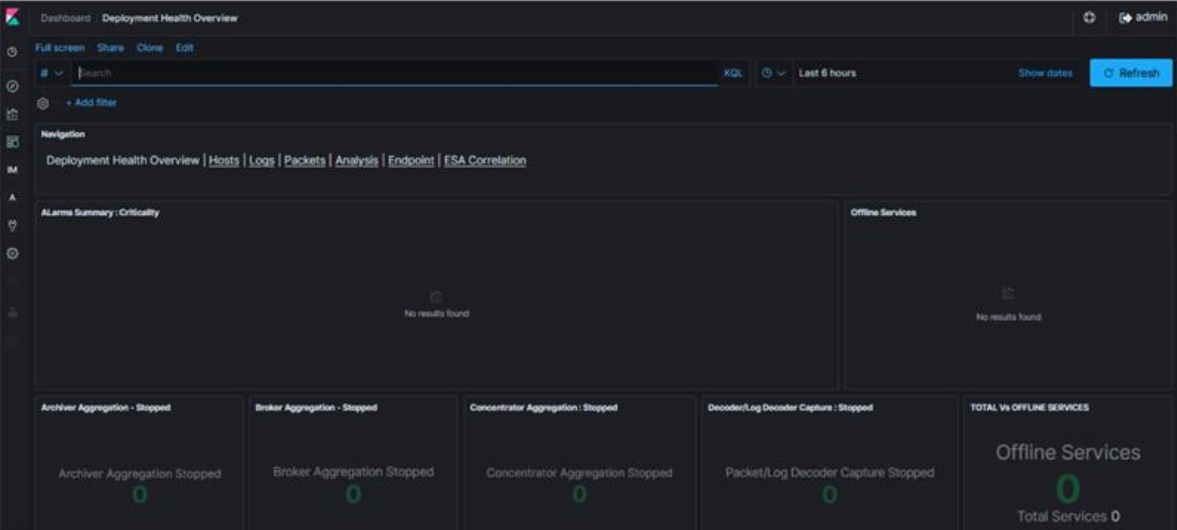
Netwitness New Health & Wellness Kibana dashboard shows empty as below.
#### Cause
This issue is due to the stats collection being in a disabled state and that can be verified as below.
1\. SSH into the Admin Server.
2\. Run nw-shell command to login with deploy\_admin credentials.
\# nw-shell
offline » login
user: deploy\_admin
password: \*\*\*\*\*\*\*\*\*\*
3\. Connect to the Metric server using the below command
deploy\_admin@offline » **connect --service metrics-server**
4\. cd into "/rsa/metrics/elastic/get-config"
\>\> **cd /rsa/metrics/elastic/get-config**
5\. Get the service id for core services from Netwitness UI
Go to (Admin) \> Core service.
Click \> View \> Explore.
Expand the sys/stats node list.
In the UUID field, copy the value.
6. Display the Stats collection settings using the below command.
» **invoke**
**Example:**
» **invoke a2534276-5b7f-4005-b0e4-96d53ba2f373**
{
"service" : "log-decoder",
"serviceId" : "a2534276-5b7f-4005-b0e4-96d53ba2f373",
"enabled" : false,
"username" : "nwservice",
"password" : "b3a539cd43d9d9c22144674599fcb04e",
"port" : 9200,
"secure" : true,
"host" : "43378eb9-7ac0-4751-af6f-c2f46453985b",
"verifyHostname" : false,
"conversionUnit" : "SECONDS",
"interval" : "120 SECONDS",
"exclusion" : \[
"/decoder/config/rules/\*\*",
"/decoder/config/recovery/\*\*",
"/decoder/parsers/feeds/\*\*",
"/sys/config/scheduler/\*\*",
"/sdk/stats/queries/\*\*",
"/decoder/devices/\*\*"
\],
"inclusion" : \[
"/decoder/\*\*",
"/sdk/\*\*",
"/database/\*\*",
"/sys/\*\*"
\]
}
#### Resolution
Please follow the below steps to enable the stats collection settings.
1\. SSH into the Admin Server.
2\. Run nw-shell command to login with deploy\_admin credentials.
\[root@AdminServer ~\]# **nw-shell**
offline » **login**
user: **deploy\_admin**
password: \*\*\*\*\*\*\*\*\*\*
admin@offline » **connect --service metrics-server**
3. Please use enable-all API to enable all the nextgen services to collect metrics.
admin@metrics-server:Folder:/rsa » **cd /rsa/metrics/elastic/enable-all**
admin@metrics-server:Method:/rsa/metrics/elastic/enable-all » **invoke**
Note: The API call might be time-consuming depending on the number of services configured in the environment.
4. Please verify the stats collection has been enabled.
deploy\_admin@metrics-server:Method:/rsa/metrics/elastic/enable-all » **cd ..**
deploy\_admin@metrics-server:Component:/rsa/metrics/elastic » **cd get-config**
deploy\_admin@metrics-server:Method:/rsa/metrics/elastic/get-config » **invoke a2534276-5b7f-4005-b0e4-96d53ba2f373**
{
"service" : "log-decoder",
"serviceId" : "a2534276-5b7f-4005-b0e4-96d53ba2f373",
"enabled" : true,
"username" : "nwservice",
"password" : "b3a539cd43d9d9c22144674599fcb04e",
"port" : 9200,
"secure" : true,
"host" : "43378eb9-7ac0-4751-af6f-c2f46453985b",
"verifyHostname" : false,
"conversionUnit" : "SECONDS",
"interval" : "120 SECONDS",
"exclusion" : \[
"/decoder/config/rules/\*\*",
"/decoder/config/recovery/\*\*",
"/decoder/parsers/feeds/\*\*",
"/sys/config/scheduler/\*\*",
"/sdk/stats/queries/\*\*",
"/decoder/devices/\*\*"
\],
"inclusion" : \[
"/decoder/\*\*",
"/sdk/\*\*",
"/database/\*\*",
"/sys/\*\*"
\]
}
5\. The Kibana dashboard will now display the stats.
#### Product Details
**RSA Product Set:** RSA NetWitness Platform
**RSA Product/Service Type:** New Health and Wellness
**RSA Version/Condition:** 11.x,12.X
**Platform:** CentOS
**O/S Version:** 7
#### Summary
This document outlines the procedure to get the stats on kibana dashboard.
#### Approval Reviewer Queue
Technical approval queue
[](https://mydev.netwitness.com/?hsLang=en)
Copyright © 2026, NetWitness LLC. All rights reserved.
[NetWitness Platform](https://www.netwitness.com/)
[Acceptable Use Policy](https://www.netwitness.com/wp-content/uploads/Acceptable-Use-Policy-092022.pdf) [Privacy Statement](https://www.netwitness.com/wp-content/uploads/NetWitness-Privacy-Statement-07292024.pdf)

[](https://www.linkedin.com/company/netwitness-platform/) [](https://www.youtube.com/@netwitness)
© 2026 NetWitness LLC. All rights reserved.