---
title: Navigate View
description: "Navigate View\nThe Navigate view ( Investigate > Navigate) displays event metadata--the meta keys and meta values-- that were found in captured dat"
---
[Skip to content](https://mydev.netwitness.com/knowledge-base/navigateview#main-content)

- [Home](https://mydev.netwitness.com/home)
- Integrations
Show submenu for Integrations
- [Netwitness Platform Integrations](https://mydev.netwitness.com/netwitnessplatformintegrations)
- [Third Party Integrations](https://mydev.netwitness.com/thirdpartyintegrations)
- [Knowledge Center](https://mydev.netwitness.com/knowledge-base)
- Community
Show submenu for Community
- [Blogs](https://mydev.netwitness.com/netwitness-security-llc-blog)
- Discussions
- Customers
Show submenu for Customers
- [Manage Products and Licenses](https://mydev.netwitness.com/nwportal)
- Downloads
- Partners
Show submenu for Partners
- [Partner Program](https://mydev.netwitness.com/partner)
- [Partner Resources](https://mydev.netwitness.com/partnerresources)
- [Submit a New Deal Registration](https://mydev.netwitness.com/dealregistration)
- [Become a Partner](https://mydev.netwitness.com/becomeapartner)
- [Update Your Partner Locator Profile](https://www.netwitness.com/partner-locator/?utm_source=pardotnewsletter&utm_medium=email&utm_campaign=partner_march)
- [NetWitness LinkedIn Partner Hub](https://linkedin.com/showcase/netwitnesspartners/)
- Education
Show submenu for Education
- [Instructor Led Training Schedule](https://mydev.netwitness.com/instructorledtrainingschedule)
- [NetWitness Training Catalog](https://mydev.netwitness.com/netwitnesstrainingcatalog)
- [Security Awareness Training](https://mydev.netwitness.com/securityawarenesstraining)
- [New Product Readiness](https://mydev.netwitness.com/newproductreadiness)
- [On-Demand Virtual Labs](https://mydev.netwitness.com/ondemandvirtuallabs)
- [Additional Training Information](https://mydev.netwitness.com/additionaltraininginformation)
- [Frequently Asked Questions](https://mydev.netwitness.com/educationfaq)
- [Contact NetWitness Education Team](https://mydev.netwitness.com/contact-netwitness-education-team)
- Support
Show submenu for Support
- [Contact Support](https://mydev.netwitness.com/contact-support)
- [Create a New Case](https://mydev.netwitness.com/create-support-case)
- [View My Cases](https://mydev.netwitness.com/viewmycase)
- [Product Version Life Cycle](https://mydev.netwitness.com/product-version-life-cycle)
- [Warranty & Replacement Parts](https://mydev.netwitness.com/warranty-and-replacement-parts)
- [Community Support Forum](https://mydev.netwitness.com/community-support-forum)
- [Technical Support Guide](https://mydev.netwitness.com/technical-support-guide)
Open main navigation
Close main navigation
- [Home](https://mydev.netwitness.com/home)
- Integrations
Show submenu for Integrations
- [Netwitness Platform Integrations](https://mydev.netwitness.com/netwitnessplatformintegrations)
- [Third Party Integrations](https://mydev.netwitness.com/thirdpartyintegrations)
- [Knowledge Center](https://mydev.netwitness.com/knowledge-base)
- Community
Show submenu for Community
- [Blogs](https://mydev.netwitness.com/netwitness-security-llc-blog)
- Discussions
- Customers
Show submenu for Customers
- [Manage Products and Licenses](https://mydev.netwitness.com/nwportal)
- Downloads
- Partners
Show submenu for Partners
- [Partner Program](https://mydev.netwitness.com/partner)
- [Partner Resources](https://mydev.netwitness.com/partnerresources)
- [Submit a New Deal Registration](https://mydev.netwitness.com/dealregistration)
- [Become a Partner](https://mydev.netwitness.com/becomeapartner)
- [Update Your Partner Locator Profile](https://www.netwitness.com/partner-locator/?utm_source=pardotnewsletter&utm_medium=email&utm_campaign=partner_march)
- [NetWitness LinkedIn Partner Hub](https://linkedin.com/showcase/netwitnesspartners/)
- Education
Show submenu for Education
- [Instructor Led Training Schedule](https://mydev.netwitness.com/instructorledtrainingschedule)
- [NetWitness Training Catalog](https://mydev.netwitness.com/netwitnesstrainingcatalog)
- [Security Awareness Training](https://mydev.netwitness.com/securityawarenesstraining)
- [New Product Readiness](https://mydev.netwitness.com/newproductreadiness)
- [On-Demand Virtual Labs](https://mydev.netwitness.com/ondemandvirtuallabs)
- [Additional Training Information](https://mydev.netwitness.com/additionaltraininginformation)
- [Frequently Asked Questions](https://mydev.netwitness.com/educationfaq)
- [Contact NetWitness Education Team](https://mydev.netwitness.com/contact-netwitness-education-team)
- Support
Show submenu for Support
- [Contact Support](https://mydev.netwitness.com/contact-support)
- [Create a New Case](https://mydev.netwitness.com/create-support-case)
- [View My Cases](https://mydev.netwitness.com/viewmycase)
- [Product Version Life Cycle](https://mydev.netwitness.com/product-version-life-cycle)
- [Warranty & Replacement Parts](https://mydev.netwitness.com/warranty-and-replacement-parts)
- [Community Support Forum](https://mydev.netwitness.com/community-support-forum)
- [Technical Support Guide](https://mydev.netwitness.com/technical-support-guide)
How can we help you?
- There are no suggestions because the search field is empty.
1. [NetWitness Knowledge Base](https://mydev.netwitness.com/knowledge-base?hsLang=en)
2. [Documentation](https://mydev.netwitness.com/knowledge-base/documentation?hsLang=en)
April 26, 2026
# Navigate View
## Navigate View
The Navigate view ( **Investigate** \> Navigate) displays event metadata--the meta keys and meta values-- that were found in captured data for the selected service. The data is filtered and displayed in accordance with the options you set for profile, time range, meta group, and query. You can also drill into the data by clicking meta keys and meta values.
**Note:** By default, the Navigate view is disabled in Version 11.6 as the Filter Events Panel in the Events view provides this functionality. To enable the Navigate view, see [Configure the Navigate View and Legacy Events View](https://50269063.hs-sites.com/knowledge-base/ConfiguretheNavigateViewandLegacyEventsView?hsLang=en).
## Workflow
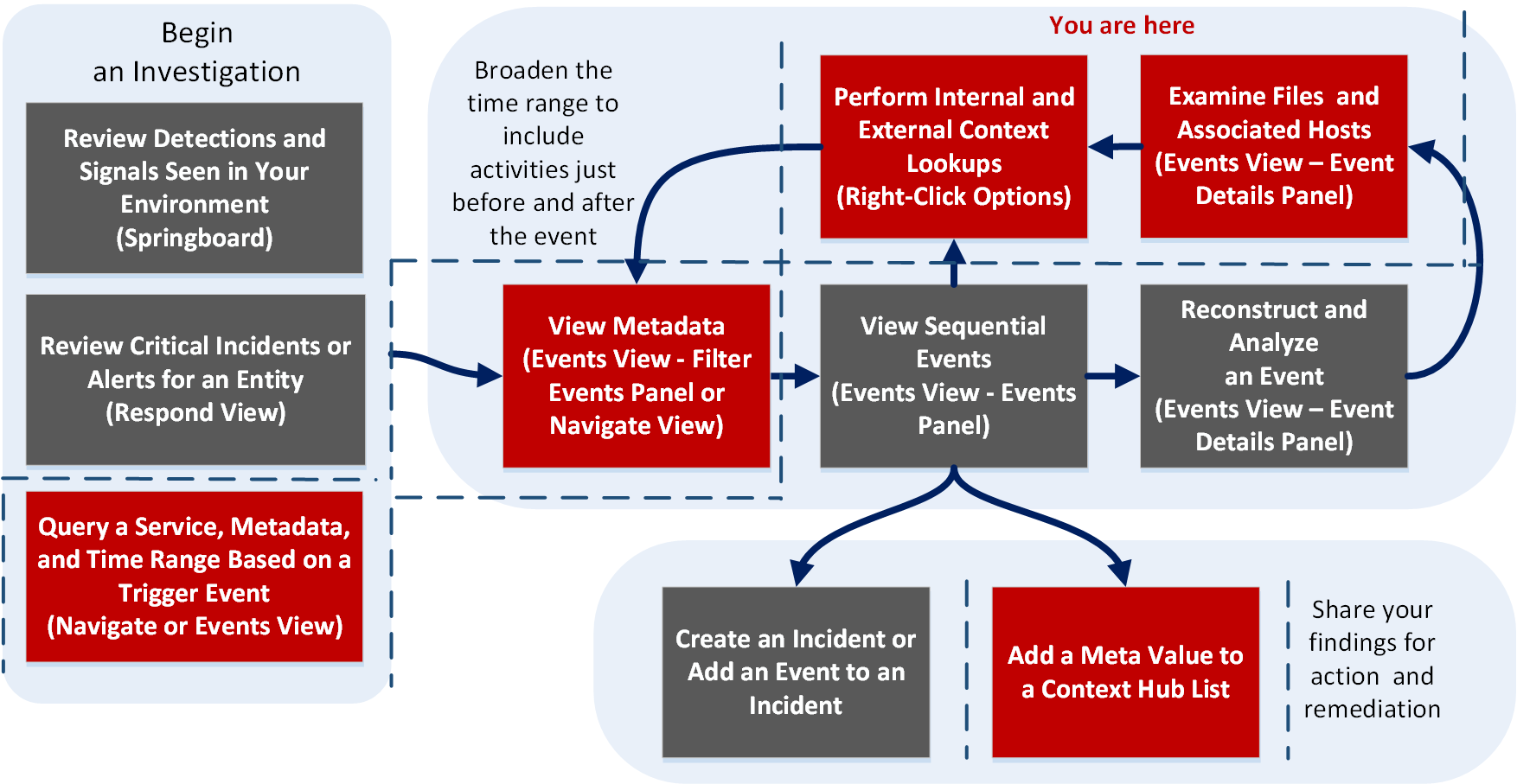
In the Navigate view, you can:
- View metadata for events in the Values panel.
- Visualize events in a timeline or parallel coordinates chart.
- Save events, go to an event using the event ID, visualize an event, and print an event.
- View additional contextual data for meta keys and values.
- Open a drill point or an event in the Legacy Events or the Events view.
## What do you want to do?
\*You can perform this task in the current view.
## Related Topics
- [How NetWitness Investigate Works](https://50269063.hs-sites.com/knowledge-base/HowNetWitnessInvestigateWorks?hsLang=en)
- [Legacy Events View](https://50269063.hs-sites.com/knowledge-base/LegacyEventsView?hsLang=en)
- [Events View](https://50269063.hs-sites.com/knowledge-base/EventsView?hsLang=en)
## Quick Look
This figure illustrates the Version 11.5 Navigate view.
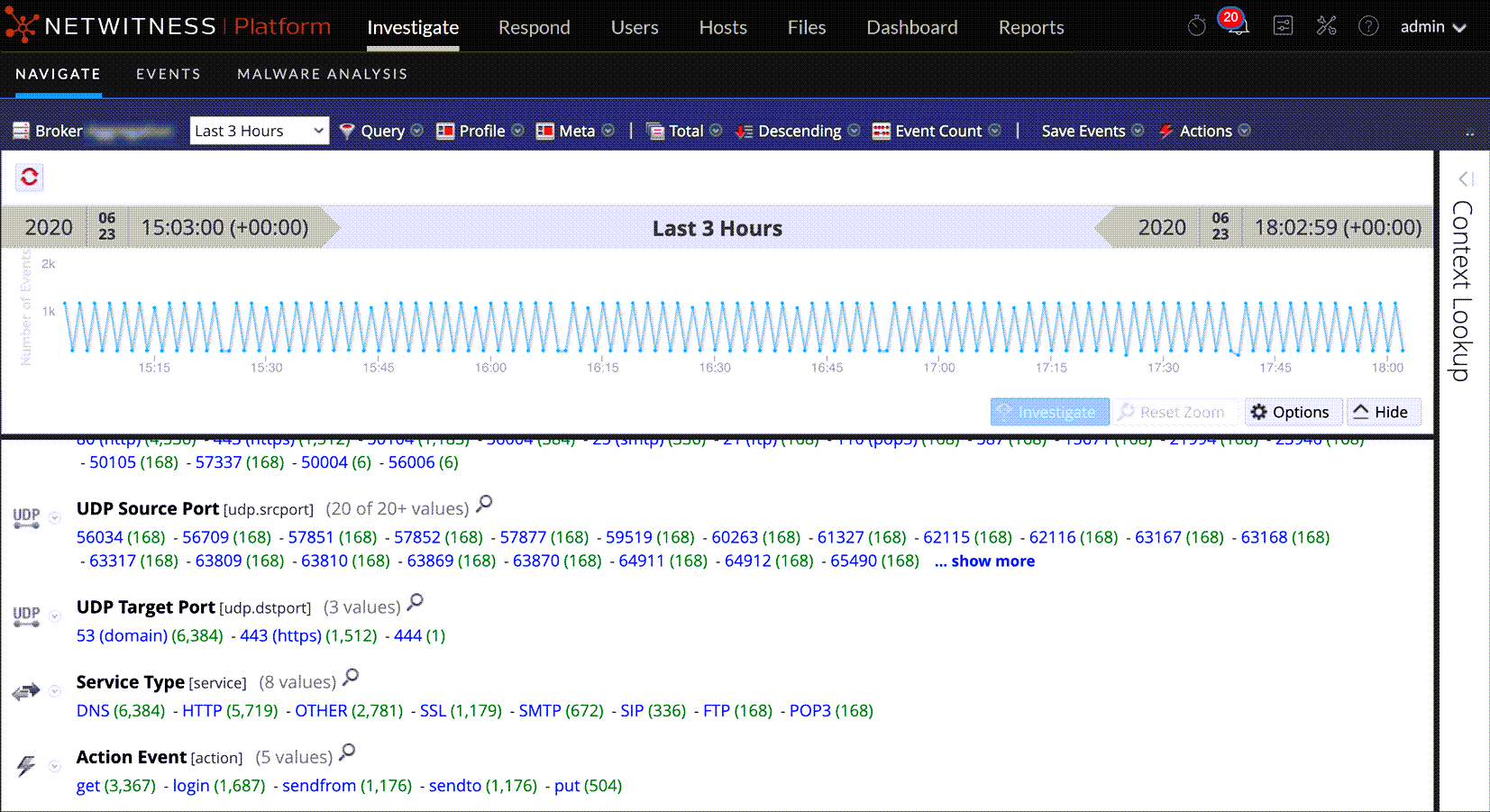
The Navigate view consists of these features:
- Toolbar
- Pause/reload button and breadcrumb
- Time banner
- Optional debug information.
- Collapsible Visualization panel
- Values panel
- Context Lookup panel
- Context menus
## Toolbar
The following figure is an example of the toolbar. The toolbar provides a way to:
- Change the service being investigated.
- Control the range of data displayed: You can select use profiles, set a time range, use meta groups, and create queries to apply to the data.
- Set the quantification method and sorting method for data in the Values panel.
- Perform actions on the results. You can export and print results, open an event for which you have an event ID in the Legacy Events view or Events view, and pass a query to Informer.
- Configure Investigate settings without navigating away from the Investigate views.

Some of the toolbar options are labeled with the default value or the selected value rather than displaying the name of the option. For example, the time range option in the example above is labeled **Last 5 Minutes** to reflect the currently selected value. These are the toolbar options.
## Pause/Reload Button and Breadcrumb
The breadcrumb tracks each query as you drill down through the metadata for the service. The following figure is an example of the breadcrumb.

Each query is listed with a drop-down menu in a pipe separated string. The last point is the current point, also called the tip. The icon in front of the breadcrumb allows you to pause the loading of meta values and to reload meta values. The breadcrumb does not include the service name and appears only if a query is in effect. If too many drill points exist for display, the overflow is shown as double angle brackets, \>\>, at the end of the breadcrumb. Each drop-down menu in the breadcrumb is the same, with slight variation based on the position of the crumb.
The following table describes the controls and menu options in the breadcrumb.
## (Optional) Debug Information
If you have activated the Show Debug Information setting and the service you are navigating is a Broker, NetWitness, displays the debug information beneath the breadcrumb.
The debug information is the where clause from the current query. The only time there is no where clause is when the time range is all data and there are no drill points. If the Broker has at least one aggregate service that is offline, the debug information also lists the offline service.
For example:
(attachment exists)&&(tcp.dstport = '80')&&(risk.info exists)$$time='2014-05-04 18:50:00"-"2014-05-09 18:59:59(attachment exists) && (tcp.dstport = '80') && (risk.info exists) && time="2014-05-04 18:50:00"-"2014-05-09 18:50:59"
In addition, the time taken to load is displayed at the end of each meta key in the Values panel.
## Time Banner
Just below the breadcrumb and debug information (if present), the time banner shows the time range used to create the chart. The following figure is an example of the time banner.

## Visualizations
At the top of the Navigate view is a visualization of the current drill point. You can use this to drill into data from the Visualization panel (see [Filter Results in the Navigate View](https://50269063.hs-sites.com/knowledge-base/FilterResultsintheNavigateView?hsLang=en)). You can show or hide the visualization, and choose one of thevisualization options: Timeline or Coordinates. The Visualization opens initially to the last saved Visualization.
### Timeline Chart
The timeline is the count of the number of events that occur at a specific instance. The timeline provides event counts so that you can see if the number of events increases drastically at a given point in time. The timeline displays activity for the specified service and time range as a line chart or a bar chart based on your choice in the Options menu. The second figure illustrates a line chart and third figure illustrates a bar chart.
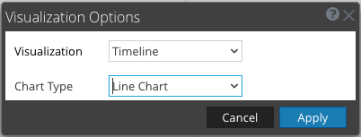
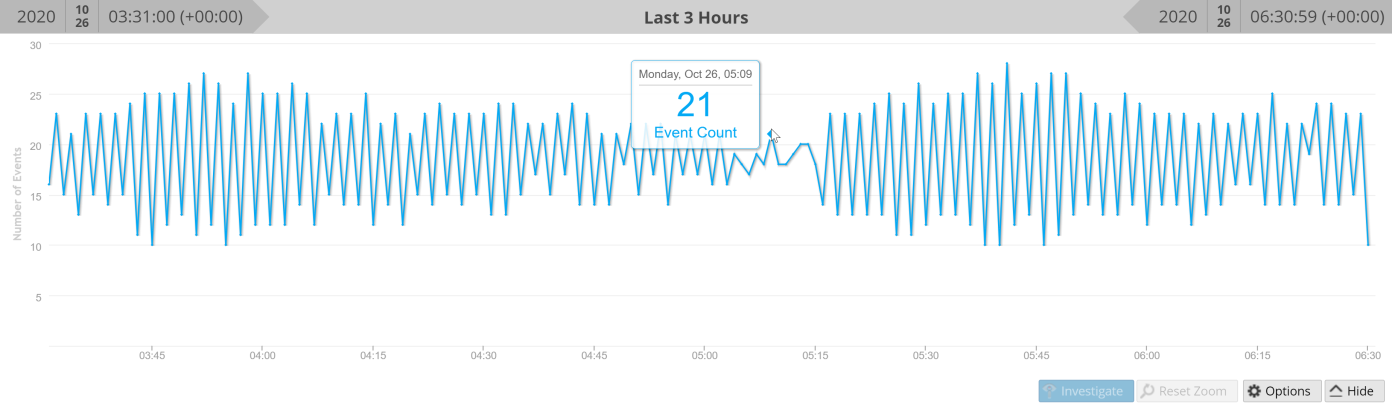
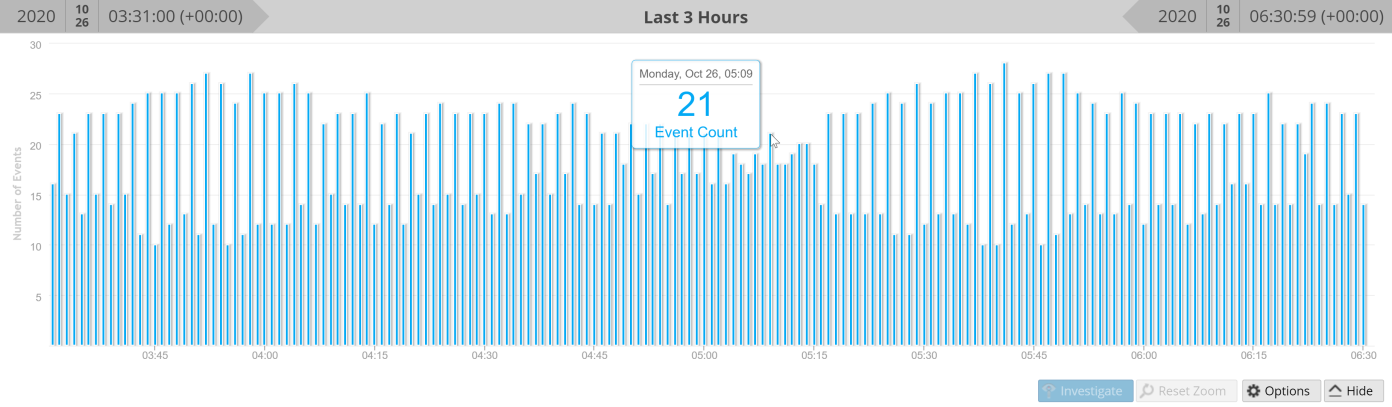
The timeline displays activity for the specified service and time range, as a line chart or a bar chart based on your choice in the Options menu.
[](https://mydev.netwitness.com/?hsLang=en)
Copyright © 2026, NetWitness LLC. All rights reserved.
[NetWitness Platform](https://www.netwitness.com/)
[Acceptable Use Policy](https://www.netwitness.com/wp-content/uploads/Acceptable-Use-Policy-092022.pdf) [Privacy Statement](https://www.netwitness.com/wp-content/uploads/NetWitness-Privacy-Statement-07292024.pdf)

[](https://www.linkedin.com/company/netwitness-platform/) [](https://www.youtube.com/@netwitness)
© 2026 NetWitness LLC. All rights reserved.