---
title: [ARCHIVE] Monitoring Security Analytics with Nagios
description: "Issue\nThis article contains sample nagios plugins that may be used to monitor Security Analytics. Many of these features are available within the Heal"
---
[Skip to content](https://mydev.netwitness.com/knowledge-base/monitoring-security-analytics-with-nagios#main-content)

- [Home](https://mydev.netwitness.com/home)
- Integrations
Show submenu for Integrations
- [Netwitness Platform Integrations](https://mydev.netwitness.com/netwitnessplatformintegrations)
- [Third Party Integrations](https://mydev.netwitness.com/thirdpartyintegrations)
- [Knowledge Center](https://mydev.netwitness.com/knowledge-base)
- Community
Show submenu for Community
- [Blogs](https://mydev.netwitness.com/netwitness-security-llc-blog)
- Discussions
- Customers
Show submenu for Customers
- [Manage Products and Licenses](https://mydev.netwitness.com/nwportal)
- Downloads
- Partners
Show submenu for Partners
- [Partner Program](https://mydev.netwitness.com/partner)
- [Partner Resources](https://mydev.netwitness.com/partnerresources)
- [Submit a New Deal Registration](https://mydev.netwitness.com/dealregistration)
- [Become a Partner](https://mydev.netwitness.com/becomeapartner)
- [Update Your Partner Locator Profile](https://www.netwitness.com/partner-locator/?utm_source=pardotnewsletter&utm_medium=email&utm_campaign=partner_march)
- [NetWitness LinkedIn Partner Hub](https://linkedin.com/showcase/netwitnesspartners/)
- Education
Show submenu for Education
- [Instructor Led Training Schedule](https://mydev.netwitness.com/instructorledtrainingschedule)
- [NetWitness Training Catalog](https://mydev.netwitness.com/netwitnesstrainingcatalog)
- [Security Awareness Training](https://mydev.netwitness.com/securityawarenesstraining)
- [New Product Readiness](https://mydev.netwitness.com/newproductreadiness)
- [On-Demand Virtual Labs](https://mydev.netwitness.com/ondemandvirtuallabs)
- [Additional Training Information](https://mydev.netwitness.com/additionaltraininginformation)
- [Frequently Asked Questions](https://mydev.netwitness.com/educationfaq)
- [Contact NetWitness Education Team](https://mydev.netwitness.com/contact-netwitness-education-team)
- Support
Show submenu for Support
- [Contact Support](https://mydev.netwitness.com/contact-support)
- [Create a New Case](https://mydev.netwitness.com/create-support-case)
- [View My Cases](https://mydev.netwitness.com/viewmycase)
- [Product Version Life Cycle](https://mydev.netwitness.com/product-version-life-cycle)
- [Warranty & Replacement Parts](https://mydev.netwitness.com/warranty-and-replacement-parts)
- [Community Support Forum](https://mydev.netwitness.com/community-support-forum)
- [Technical Support Guide](https://mydev.netwitness.com/technical-support-guide)
Open main navigation
Close main navigation
- [Home](https://mydev.netwitness.com/home)
- Integrations
Show submenu for Integrations
- [Netwitness Platform Integrations](https://mydev.netwitness.com/netwitnessplatformintegrations)
- [Third Party Integrations](https://mydev.netwitness.com/thirdpartyintegrations)
- [Knowledge Center](https://mydev.netwitness.com/knowledge-base)
- Community
Show submenu for Community
- [Blogs](https://mydev.netwitness.com/netwitness-security-llc-blog)
- Discussions
- Customers
Show submenu for Customers
- [Manage Products and Licenses](https://mydev.netwitness.com/nwportal)
- Downloads
- Partners
Show submenu for Partners
- [Partner Program](https://mydev.netwitness.com/partner)
- [Partner Resources](https://mydev.netwitness.com/partnerresources)
- [Submit a New Deal Registration](https://mydev.netwitness.com/dealregistration)
- [Become a Partner](https://mydev.netwitness.com/becomeapartner)
- [Update Your Partner Locator Profile](https://www.netwitness.com/partner-locator/?utm_source=pardotnewsletter&utm_medium=email&utm_campaign=partner_march)
- [NetWitness LinkedIn Partner Hub](https://linkedin.com/showcase/netwitnesspartners/)
- Education
Show submenu for Education
- [Instructor Led Training Schedule](https://mydev.netwitness.com/instructorledtrainingschedule)
- [NetWitness Training Catalog](https://mydev.netwitness.com/netwitnesstrainingcatalog)
- [Security Awareness Training](https://mydev.netwitness.com/securityawarenesstraining)
- [New Product Readiness](https://mydev.netwitness.com/newproductreadiness)
- [On-Demand Virtual Labs](https://mydev.netwitness.com/ondemandvirtuallabs)
- [Additional Training Information](https://mydev.netwitness.com/additionaltraininginformation)
- [Frequently Asked Questions](https://mydev.netwitness.com/educationfaq)
- [Contact NetWitness Education Team](https://mydev.netwitness.com/contact-netwitness-education-team)
- Support
Show submenu for Support
- [Contact Support](https://mydev.netwitness.com/contact-support)
- [Create a New Case](https://mydev.netwitness.com/create-support-case)
- [View My Cases](https://mydev.netwitness.com/viewmycase)
- [Product Version Life Cycle](https://mydev.netwitness.com/product-version-life-cycle)
- [Warranty & Replacement Parts](https://mydev.netwitness.com/warranty-and-replacement-parts)
- [Community Support Forum](https://mydev.netwitness.com/community-support-forum)
- [Technical Support Guide](https://mydev.netwitness.com/technical-support-guide)
How can we help you?
- There are no suggestions because the search field is empty.
1. [NetWitness Knowledge Base](https://mydev.netwitness.com/knowledge-base?hsLang=en)
2. [Break Fix](https://mydev.netwitness.com/knowledge-base/break-fix?hsLang=en)
April 30, 2026
# \[ARCHIVE\] Monitoring Security Analytics with Nagios
#### Issue
This article contains sample nagios plugins that may be used to monitor Security Analytics. Many of these features are available within the Health and Wellness System Stats feature of the product.
When there is a need to display the information in a third party Nagios based monitoring tool, the scripts can be copied to the Security Analytics server. Then the check\_by\_ssh command may used to run the scripts on the server, noting that the main purpose of the scripts is to gather information that can then be graphed.
#### Resolution
## Script to Check Warehouse Streams Behind
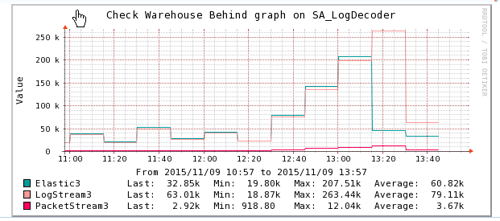
This script will output how far each stream is behind. Install on the machine hosting the warehouse connector service.
#!/bin/bash
#David Waugh RSA
#This script will display the current Warehouse Connector Stream Rate for all streams.
#Get the stream names
Perfdata=""
Output=""
Streams=$(NwConsole -c login localhost:50020 admin netwitness -c cd warehouseconnector/streams -c ls |tail -n +9)
for mystream in $Streams
do
behind=$(NwConsole -c login localhost:50020 admin netwitness -c cd warehouseconnector/streams -c cd $mystream -c cd stats -c ls |grep -i behind | awk -F "= " '{print $2}' | awk '{s+=$1} END {print s}')
Output+=$mystream
Output+=": "
Output+=$behind
Output+=" "
Perfdata+=$mystream
Perfdata+=\\=
Perfdata+=$behind
Perfdata+=" "
done
echo $Output\\|$Perfdata\\;\\;
exit 0
Sample Output:
Elastic3: 27951 LogStream3: 278805 PacketStream3: 12731 |Elastic3=27951 LogStream3=278805 PacketStream3=12731 ;;
## Script to Check Log Decoder EPS
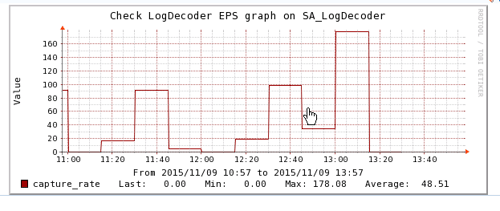
This script will collect the current capture rate through a log decoder. Install on a logdecoder.
#!/bin/bash
#David Waugh (RSA)
#This script will display the current EPS of the logdecoder
eval capture\_rate=$(NwConsole -c login localhost:56002:ssl admin netwitness -c logdecoder/stats ls |grep "/decoder
/stats/capture.packet.rate "| awk -F "= " '{print $2}')
echo "capture rate: $capture\_rate|capture\_rate=$capture\_rate;;"
exit 0
Sample Ouput
capture rate: 110|capture\_rate=110;;
## Script To Check Log Collection Statistics
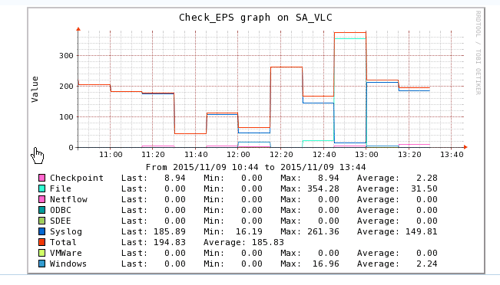
Install on a Log Collector
#!/bin/bash
#Lee Kirkpatrick (RSA)
#This script will display the current EPS for all collection methods and a total
#Declare collection methods
declare -a cMethod=('syslog' 'windows' 'checkpoint' 'vmware' 'sdee' 'file' 'netflow' 'odbc' 'snmptrap');
#Get the current EPS for each of the above
for i in "${cMethod\[@\]}"
do
eval $i=$(NwConsole -c login localhost:56001:ssl admin netwitness -c logcollection/$i/stats/eventsources ls |grep total\_events\_rate | awk -F "= " '{print $2}')
if \[\[ $sdee == "" \]\]
then
sdee=0
elif \[\[ $syslog == "" \]\]
then
syslog=0
elif \[\[ $windows == "" \]\]
then
windows=0
elif \[\[ $checkpoint == "" \]\]
then
checkpoint=0
elif \[\[ $vmware == "" \]\]
then
vmware=0
elif \[\[ $file == "" \]\]
then
file=0
elif \[\[ $netflow == "" \]\]
then
netflow=0
elif \[\[ $odbc == "" \]\]
then
odbc=0
elif \[\[ $snmptrap == "" \]\]
then
snmptrap=0
fi
done
#Calculate total of all methods
total=$\[$sdee+$syslog+$windows+$checkpoint+$vmware+$file+$netflow+$odbc\]
#Pretty Print
#printf '%-15s %-10s\\n' "Syslog: " "$syslog"
#printf '%-15s %-10s\\n' "SDEE: " "$sdee"
#printf '%-15s %-10s\\n' "Windows: " "$windows"
#printf '%-15s %-10s\\n' "Checkpoint: " "$checkpoint"
#printf '%-15s %-10s\\n' "VMWare: " "$vmware"
#printf '%-15s %-10s\\n' "File: " "$file"
#printf '%-15s %-10s\\n' "NetFlow: " "$netflow"
#printf '%-15s %-10s\\n' "ODBC: " "$odbc"
#echo
#printf '%-15s %-10s\\n' "Total: " "$total"
echo "Syslog: $syslog SDEE: $sdee Windows: $windows Checkpoint: $checkpoint VMWare: $vmware File: $file Netflow: $
netflow ODBC: $ODBC Total: $total|Syslog=$syslog SDEE=$sdee Windows=$windows Checkpoint=$checkpoint VMWare=$vmware File=$file Netflow=$netflow ODBC=$odbc Total=$total;;"
exit 0
Sample Ouptut:
Syslog: 3 SDEE: 0 Windows: 0 Checkpoint: 0 VMWare: 0 File: 0 Netflow: 0 ODBC: Total: 3|Syslog=3 SDEE=0 Windows=0 Checkpoint=0 VMWare=0 File=0 Netflow=0 ODBC=0 Total=3;;
#### Product Details
**RSA Product Set:** Security Analytics
**RSA Version/Condition:** 10.5.X
**Platform:** CentOS
**O/S Version:** 6
#### Summary
This article provides Nagios monitoring scripts and plugins that may be used on Security Analytics. Note this information is provided on a courtesy basis only, with no expressed and implied warranties by RSA. RSA does not bundle Nagios with Security Analytics., nor is licensed to distribute Nagios. Nagios is an open source project and part of the public domain. For more information on Nagios, visit the opensource site itself at https://www.nagios.org.
#### Approval Reviewer Queue
Technical approval queue
[](https://mydev.netwitness.com/?hsLang=en)
Copyright © 2026, NetWitness LLC. All rights reserved.
[NetWitness Platform](https://www.netwitness.com/)
[Acceptable Use Policy](https://www.netwitness.com/wp-content/uploads/Acceptable-Use-Policy-092022.pdf) [Privacy Statement](https://www.netwitness.com/wp-content/uploads/NetWitness-Privacy-Statement-07292024.pdf)

[](https://www.linkedin.com/company/netwitness-platform/) [](https://www.youtube.com/@netwitness)
© 2026 NetWitness LLC. All rights reserved.