---
title: Monitor Health and Wellness Using SNMP Alerts
description: "Monitor Health and Wellness Using SNMP Alerts\nYou can monitor a NetWitness component to proactively send alerts, using Simple Network Management Prot"
---
[Skip to content](https://mydev.netwitness.com/knowledge-base/monitorhealthandwellnessusingsnmpalerts#main-content)

- [Home](https://mydev.netwitness.com/home)
- Integrations
Show submenu for Integrations
- [Netwitness Platform Integrations](https://mydev.netwitness.com/netwitnessplatformintegrations)
- [Third Party Integrations](https://mydev.netwitness.com/thirdpartyintegrations)
- [Knowledge Center](https://mydev.netwitness.com/knowledge-base)
- Community
Show submenu for Community
- [Blogs](https://mydev.netwitness.com/netwitness-security-llc-blog)
- Discussions
- Customers
Show submenu for Customers
- [Manage Products and Licenses](https://mydev.netwitness.com/nwportal)
- Downloads
- Partners
Show submenu for Partners
- [Partner Program](https://mydev.netwitness.com/partner)
- [Partner Resources](https://mydev.netwitness.com/partnerresources)
- [Submit a New Deal Registration](https://mydev.netwitness.com/dealregistration)
- [Become a Partner](https://mydev.netwitness.com/becomeapartner)
- [Update Your Partner Locator Profile](https://www.netwitness.com/partner-locator/?utm_source=pardotnewsletter&utm_medium=email&utm_campaign=partner_march)
- [NetWitness LinkedIn Partner Hub](https://linkedin.com/showcase/netwitnesspartners/)
- Education
Show submenu for Education
- [Instructor Led Training Schedule](https://mydev.netwitness.com/instructorledtrainingschedule)
- [NetWitness Training Catalog](https://mydev.netwitness.com/netwitnesstrainingcatalog)
- [Security Awareness Training](https://mydev.netwitness.com/securityawarenesstraining)
- [New Product Readiness](https://mydev.netwitness.com/newproductreadiness)
- [On-Demand Virtual Labs](https://mydev.netwitness.com/ondemandvirtuallabs)
- [Additional Training Information](https://mydev.netwitness.com/additionaltraininginformation)
- [Frequently Asked Questions](https://mydev.netwitness.com/educationfaq)
- [Contact NetWitness Education Team](https://mydev.netwitness.com/contact-netwitness-education-team)
- Support
Show submenu for Support
- [Contact Support](https://mydev.netwitness.com/contact-support)
- [Create a New Case](https://mydev.netwitness.com/create-support-case)
- [View My Cases](https://mydev.netwitness.com/viewmycase)
- [Product Version Life Cycle](https://mydev.netwitness.com/product-version-life-cycle)
- [Warranty & Replacement Parts](https://mydev.netwitness.com/warranty-and-replacement-parts)
- [Community Support Forum](https://mydev.netwitness.com/community-support-forum)
- [Technical Support Guide](https://mydev.netwitness.com/technical-support-guide)
Open main navigation
Close main navigation
- [Home](https://mydev.netwitness.com/home)
- Integrations
Show submenu for Integrations
- [Netwitness Platform Integrations](https://mydev.netwitness.com/netwitnessplatformintegrations)
- [Third Party Integrations](https://mydev.netwitness.com/thirdpartyintegrations)
- [Knowledge Center](https://mydev.netwitness.com/knowledge-base)
- Community
Show submenu for Community
- [Blogs](https://mydev.netwitness.com/netwitness-security-llc-blog)
- Discussions
- Customers
Show submenu for Customers
- [Manage Products and Licenses](https://mydev.netwitness.com/nwportal)
- Downloads
- Partners
Show submenu for Partners
- [Partner Program](https://mydev.netwitness.com/partner)
- [Partner Resources](https://mydev.netwitness.com/partnerresources)
- [Submit a New Deal Registration](https://mydev.netwitness.com/dealregistration)
- [Become a Partner](https://mydev.netwitness.com/becomeapartner)
- [Update Your Partner Locator Profile](https://www.netwitness.com/partner-locator/?utm_source=pardotnewsletter&utm_medium=email&utm_campaign=partner_march)
- [NetWitness LinkedIn Partner Hub](https://linkedin.com/showcase/netwitnesspartners/)
- Education
Show submenu for Education
- [Instructor Led Training Schedule](https://mydev.netwitness.com/instructorledtrainingschedule)
- [NetWitness Training Catalog](https://mydev.netwitness.com/netwitnesstrainingcatalog)
- [Security Awareness Training](https://mydev.netwitness.com/securityawarenesstraining)
- [New Product Readiness](https://mydev.netwitness.com/newproductreadiness)
- [On-Demand Virtual Labs](https://mydev.netwitness.com/ondemandvirtuallabs)
- [Additional Training Information](https://mydev.netwitness.com/additionaltraininginformation)
- [Frequently Asked Questions](https://mydev.netwitness.com/educationfaq)
- [Contact NetWitness Education Team](https://mydev.netwitness.com/contact-netwitness-education-team)
- Support
Show submenu for Support
- [Contact Support](https://mydev.netwitness.com/contact-support)
- [Create a New Case](https://mydev.netwitness.com/create-support-case)
- [View My Cases](https://mydev.netwitness.com/viewmycase)
- [Product Version Life Cycle](https://mydev.netwitness.com/product-version-life-cycle)
- [Warranty & Replacement Parts](https://mydev.netwitness.com/warranty-and-replacement-parts)
- [Community Support Forum](https://mydev.netwitness.com/community-support-forum)
- [Technical Support Guide](https://mydev.netwitness.com/technical-support-guide)
How can we help you?
- There are no suggestions because the search field is empty.
1. [NetWitness Knowledge Base](https://mydev.netwitness.com/knowledge-base?hsLang=en)
2. [Documentation](https://mydev.netwitness.com/knowledge-base/documentation?hsLang=en)
April 27, 2026
# Monitor Health and Wellness Using SNMP Alerts
## Monitor Health and Wellness Using SNMP Alerts
You can monitor a NetWitness component to proactively send alerts, using Simple Network Management Protocol (SNMP) that is based on thresholds or system failures.
You can monitor the following for NetWitness components:
- CPU utilization that reaches a defined threshold
- Memory utilization that reaches a defined threshold
- Disk utilization that reaches a defined threshold
### SNMP Configuration
NetWitness Servers can be configured to send out SNMPv3 threshold traps and monitor traps. Threshold traps are sent in conjunction with node thresholds that are configured by the NetWitness Core applications. Monitor traps are sent by the SNMP daemon for the items indicated in the SNMP configuration file. You must set up the SNMP daemon on another service to receive SNMP traps from NetWitness. You can set up SNMP on NetWitness in the configuration setting for the NetWitness Server. For more information, see "Service Configuration Settings" in the [**NetWitness Host and Services Getting Started Guide**](https://50269063.hs-sites.com/knowledge-base/HostsandServicesGettingStartedGuidefor12-5?hsLang=en) for a specific type of host.
### Thresholds
Thresholds can be set on any service statistics that can accept the setLimit message. You can retrieve current thresholds using the getLimit message. To set a limit, you can pass a low and high threshold value.
When the value of a statistic crosses either the low or high threshold, an SNMP trap is triggered, indicating that the threshold has been crossed. The trap is not triggered if the value is below the low and above the high value, but another trap is triggered if it crosses back into the normal range (above the low and below the high).
You must set the threshold for the service using the Service Explorer view or the REST API.
This example shows a sample threshold for monitoring CPU usage (below 10% or above 90%):
/sys/stats/cpu setLimit low=10 high=90
This example shows how the threshold is set using REST API:
http:// :50102/sys/stats/cpu?msg=setLimit&low=10&high=90
If the CPU usage spikes to 90% or higher, an SNMP trap is generated:
23435333 2018-Dec-16 11:08:35 Threshold warning path=/sys/stats/cpu old=77% new=91
### Configure SNMPv3 for a Host
1. Go to ** (Admin) \> Services**.
The Services view is displayed.
2. Select the service.
3. In the Actions column, select **View \> Explore**.
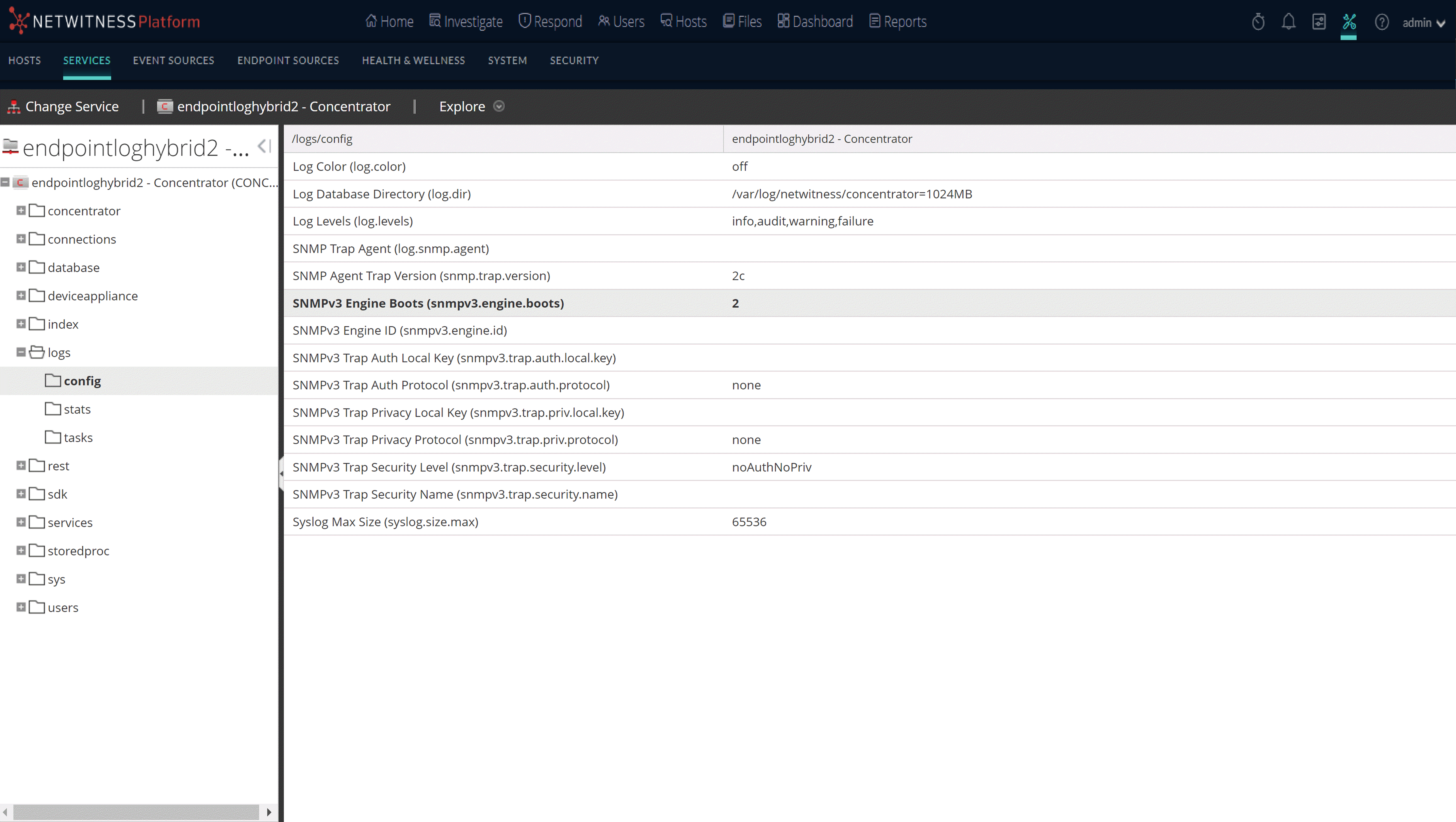
4. In the nodes list, expand the list and select a configuration folder. For example, **logs** \> **config**
5. Set the SNMPv3 configuration.
### Set the Threshold for a Service
1. Go to ** (Admin) \> Services**.
The Services view is displayed.
2. Select the service.
3. In the Actions column, select **View \> Explore**.
4. In the nodes list, expand the list and select a stat folder.
5. Select a stat, for example, CPU, and right-click.
6. From the drop-down menu, select **Properties.**
The Properties panel is displayed. The Properties panel has a drop-down list of available messages for the parameter.
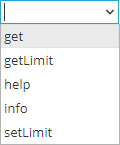
7. Select **setLimit**.
8. Specify the low and high values.
### SNMP Traps for System Status
The threshold mechanism can also be used to monitor string-valued stats generated by Core services. There are two ways to monitor string-valued stats:
1. Generate a trap whenever the status value is NOT an expected value. For example, if you want monitor the stat /broker/stats/status and generate a trap whenever the value is not started, set the high limit on the stat to the expected value. You would use the setLimit message on /broker/stats/status as follows:
setLimit high=started
2. Generate a trap whenever the status value matches an expected value. This is accomplished by using the low limit on the stat. For example, if you wanted generate a trap when the stat /sys/stats/service.status has the value "Initialization Failure", you would use the setLimit message on /sys/stats/service.status as follows:
setLimit low="Initialization Failure"
In both of these scenarios, it is possible to check for multiple values by using a comma-separated list of values to check for.
[](https://mydev.netwitness.com/?hsLang=en)
Copyright © 2026, NetWitness LLC. All rights reserved.
[NetWitness Platform](https://www.netwitness.com/)
[Acceptable Use Policy](https://www.netwitness.com/wp-content/uploads/Acceptable-Use-Policy-092022.pdf) [Privacy Statement](https://www.netwitness.com/wp-content/uploads/NetWitness-Privacy-Statement-07292024.pdf)

[](https://www.linkedin.com/company/netwitness-platform/) [](https://www.youtube.com/@netwitness)
© 2026 NetWitness LLC. All rights reserved.