---
title: Microsoft Office 365 Configuration Guide
description: " \n\n\n\n\nEvent Source Product Information\n\nVendor: Microsoft\n\nEvent Source: Office 365\n\nVersions: API v1.0\n\nRSA Product Information"
---
[Skip to content](https://mydev.netwitness.com/knowledge-base/microsoftoffice365configurationguide#main-content)

- [Home](https://mydev.netwitness.com/home)
- Integrations
Show submenu for Integrations
- [Netwitness Platform Integrations](https://mydev.netwitness.com/netwitnessplatformintegrations)
- [Third Party Integrations](https://mydev.netwitness.com/thirdpartyintegrations)
- [Knowledge Center](https://mydev.netwitness.com/knowledge-base)
- Community
Show submenu for Community
- [Blogs](https://mydev.netwitness.com/netwitness-security-llc-blog)
- Discussions
- Customers
Show submenu for Customers
- [Manage Products and Licenses](https://mydev.netwitness.com/nwportal)
- Downloads
- Partners
Show submenu for Partners
- [Partner Program](https://mydev.netwitness.com/partner)
- [Partner Resources](https://mydev.netwitness.com/partnerresources)
- [Submit a New Deal Registration](https://mydev.netwitness.com/dealregistration)
- [Become a Partner](https://mydev.netwitness.com/becomeapartner)
- [Update Your Partner Locator Profile](https://www.netwitness.com/partner-locator/?utm_source=pardotnewsletter&utm_medium=email&utm_campaign=partner_march)
- [NetWitness LinkedIn Partner Hub](https://linkedin.com/showcase/netwitnesspartners/)
- Education
Show submenu for Education
- [Instructor Led Training Schedule](https://mydev.netwitness.com/instructorledtrainingschedule)
- [NetWitness Training Catalog](https://mydev.netwitness.com/netwitnesstrainingcatalog)
- [Security Awareness Training](https://mydev.netwitness.com/securityawarenesstraining)
- [New Product Readiness](https://mydev.netwitness.com/newproductreadiness)
- [On-Demand Virtual Labs](https://mydev.netwitness.com/ondemandvirtuallabs)
- [Additional Training Information](https://mydev.netwitness.com/additionaltraininginformation)
- [Frequently Asked Questions](https://mydev.netwitness.com/educationfaq)
- [Contact NetWitness Education Team](https://mydev.netwitness.com/contact-netwitness-education-team)
- Support
Show submenu for Support
- [Contact Support](https://mydev.netwitness.com/contact-support)
- [Create a New Case](https://mydev.netwitness.com/create-support-case)
- [View My Cases](https://mydev.netwitness.com/viewmycase)
- [Product Version Life Cycle](https://mydev.netwitness.com/product-version-life-cycle)
- [Warranty & Replacement Parts](https://mydev.netwitness.com/warranty-and-replacement-parts)
- [Community Support Forum](https://mydev.netwitness.com/community-support-forum)
- [Technical Support Guide](https://mydev.netwitness.com/technical-support-guide)
Open main navigation
Close main navigation
- [Home](https://mydev.netwitness.com/home)
- Integrations
Show submenu for Integrations
- [Netwitness Platform Integrations](https://mydev.netwitness.com/netwitnessplatformintegrations)
- [Third Party Integrations](https://mydev.netwitness.com/thirdpartyintegrations)
- [Knowledge Center](https://mydev.netwitness.com/knowledge-base)
- Community
Show submenu for Community
- [Blogs](https://mydev.netwitness.com/netwitness-security-llc-blog)
- Discussions
- Customers
Show submenu for Customers
- [Manage Products and Licenses](https://mydev.netwitness.com/nwportal)
- Downloads
- Partners
Show submenu for Partners
- [Partner Program](https://mydev.netwitness.com/partner)
- [Partner Resources](https://mydev.netwitness.com/partnerresources)
- [Submit a New Deal Registration](https://mydev.netwitness.com/dealregistration)
- [Become a Partner](https://mydev.netwitness.com/becomeapartner)
- [Update Your Partner Locator Profile](https://www.netwitness.com/partner-locator/?utm_source=pardotnewsletter&utm_medium=email&utm_campaign=partner_march)
- [NetWitness LinkedIn Partner Hub](https://linkedin.com/showcase/netwitnesspartners/)
- Education
Show submenu for Education
- [Instructor Led Training Schedule](https://mydev.netwitness.com/instructorledtrainingschedule)
- [NetWitness Training Catalog](https://mydev.netwitness.com/netwitnesstrainingcatalog)
- [Security Awareness Training](https://mydev.netwitness.com/securityawarenesstraining)
- [New Product Readiness](https://mydev.netwitness.com/newproductreadiness)
- [On-Demand Virtual Labs](https://mydev.netwitness.com/ondemandvirtuallabs)
- [Additional Training Information](https://mydev.netwitness.com/additionaltraininginformation)
- [Frequently Asked Questions](https://mydev.netwitness.com/educationfaq)
- [Contact NetWitness Education Team](https://mydev.netwitness.com/contact-netwitness-education-team)
- Support
Show submenu for Support
- [Contact Support](https://mydev.netwitness.com/contact-support)
- [Create a New Case](https://mydev.netwitness.com/create-support-case)
- [View My Cases](https://mydev.netwitness.com/viewmycase)
- [Product Version Life Cycle](https://mydev.netwitness.com/product-version-life-cycle)
- [Warranty & Replacement Parts](https://mydev.netwitness.com/warranty-and-replacement-parts)
- [Community Support Forum](https://mydev.netwitness.com/community-support-forum)
- [Technical Support Guide](https://mydev.netwitness.com/technical-support-guide)
How can we help you?
- There are no suggestions because the search field is empty.
1. [NetWitness Knowledge Base](https://mydev.netwitness.com/knowledge-base?hsLang=en)
2. [Documentation](https://mydev.netwitness.com/knowledge-base/documentation?hsLang=en)
April 21, 2026
# Microsoft Office 365 Configuration Guide
[](https://community.rsa.com/docs/DOC-112149#copyright)
Document Sections:
- Collecting Office 365 Events in NetWitness Platform
- Configure the Office 365 Event Source
- Set Up the Office 365 Event Source in NetWitness Platform
- Office 365 Collection Configuration Parameters
## Collecting Office 365 Events in NetWitness Platform
Office 365 is a Web-based version of Microsoft's Office suite of enterprise-grade productivity applications. Office 365 is delivered to users through the cloud and includes Exchange Online for email, SharePoint Online for collaboration, Lync Online for unified communications, and a suite of Office Web Apps (web-based versions of the traditional Microsoft Office suite of applications).
The Office 365 integration consumes activity logs using the Office 365 Management Activity API. The Office 365 Management Activity API aggregates actions and events into tenant-specific content blobs, which are classified by the type and source of the content they contain. Currently, these content types are supported:
- Audit.AzureActiveDirectory
- Audit.Exchange
- Audit.SharePoint
- Audit.General (includes all other workloads not included in the previous content types)
- DLP.All (DLP events only for all workloads)
**Note:** Advanced Threat Protection and Threat Intelligence events are available under the Audit.General resource group.
For more details, see the following Microsoft Office 365 web pages:
- Getting Started: [https://docs.microsoft.com/en-us/office/office-365-management-api/office-365-management-activity-api-reference](https://docs.microsoft.com/en-us/office/office-365-management-api/office-365-management-activity-api-reference)
- Schema: [https://docs.microsoft.com/en-us/office/office-365-management-api/office-365-management-activity-api-schema](https://docs.microsoft.com/en-us/office/office-365-management-api/office-365-management-activity-api-schema)
The following sections describe how to configure Office 365 as an event source:
- Configure the Office 365 Event Source
- Set Up the Office 365 Event Source in NetWitness Platform
- Office 365 Collection Configuration Parameters
## Configure the Office 365 Event Source
Perform the following tasks to configure your event source:
1. Begin Recording User and Admin Activity
2. (Optional) Enable Audit Logs
3. Use the Azure Management Portal to Register an Application
4. Deploy the Office 365 Files from RSA NetWitness Live
5. Enable Subscription
For more information on Office 365, see the following Microsoft URLs:
- Office 365 Management API getting started: [https://msdn.microsoft.com/en-us/office-365/get-started-with-office-365-management-apis](https://msdn.microsoft.com/en-us/office-365/get-started-with-office-365-management-apis)
- Enable mailbox auditing in Office 365: [https://technet.microsoft.com/en-us/library/dn879651.aspx](https://technet.microsoft.com/en-us/library/dn879651.aspx)
## Begin Recording User and Admin Activity
This section describes how to begin recording user and admin activity.
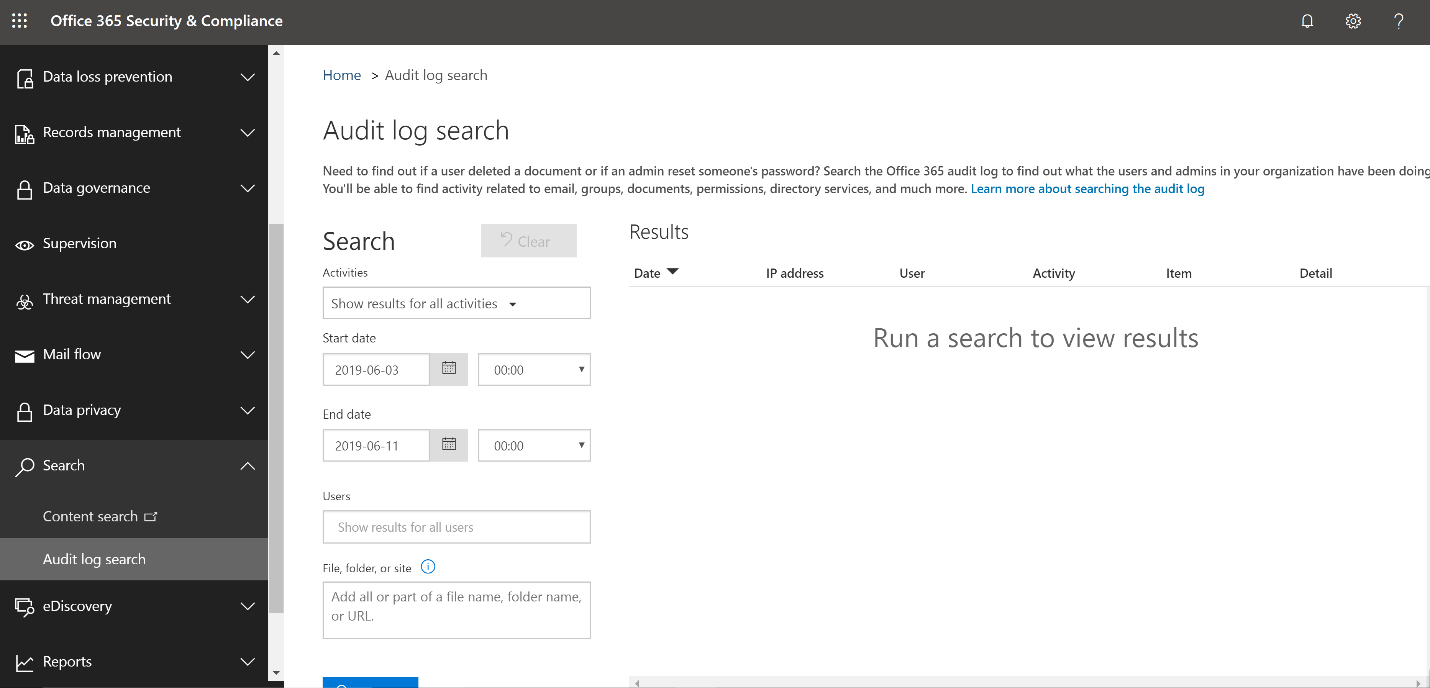
1. Go to admin portal for Office365: [https://portal.office.com/adminportal/home#/homepage](https://portal.office.com/adminportal/home#/homepage).
2. Go to **Admin centers \> Security and Compliance \> Audit Log Search** and enable logging. If logging has already been enabled, you may not see the option to enable logs.
**Note:** It make take up to 24 hours for some logs to appear once logging has been enabled.
## (Optional) Enable Audit Logs
**Note:** This step is only required if you wish to consume Audit.Exchange logs.
In order to track all activities performed on all mailbox in an organization you need enable audit through a Powershell command.
1. Connect to Exchange Online using remote PowerShell
1. Open Windows PowerShell and run the following command:
$UserCredential = Get-Credential
2. Type user name and password for an Office 365 global admin account, and then click **OK**.
3. Run the following command:
$Session = New-PSSession -ConfigurationName Microsoft.Exchange -ConnectionUri https://outlook.office365.com/powershell-liveid/ -Credential $UserCredential -Authentication Basic ‑AllowRedirection
Import-PSSession $Session
4. To verify, run the following command:
Get-Mailbox
2. Enable mailbox audit logging.
- Below command enables mailbox audit logging for Pilar Pinilla’s mailbox:
Set-Mailbox -Identity "Pilar Pinilla" -AuditEnabled $true
- Below command enables mailbox audit logging for all user mailboxes in your organization:
Get-Mailbox -ResultSize Unlimited -Filter {RecipientTypeDetails -eq "UserMailbox"} | Set-Mailbox ‑AuditEnabled $true
3. Specify owner actions to audit.
Below command specifies that the MailboxLogin and HardDelete actions are performed by the mailbox owner:
Set-Mailbox "Pilar Pinilla" -AuditOwner MailboxLogin,HardDelete
Below command specifies MailboxLogin, HardDelete, and SoftDelete actions performed by the mailbox owner will be logged for all mailboxes in the organization
Get-Mailbox -ResultSize Unlimited -Filter {RecipientTypeDetails -eq "UserMailbox"} | Set-Mailbox ‑AuditOwner MailboxLogin,HardDelete,SoftDelete
## Use the Azure Management Portal to Register an Application
This section describes how to use the Azure Management Portal to register your application in Azure AD, and to create a key.
To register your application:
1. Go to **Office365 portal \> Admin centers \> Azure AD Admin center**.
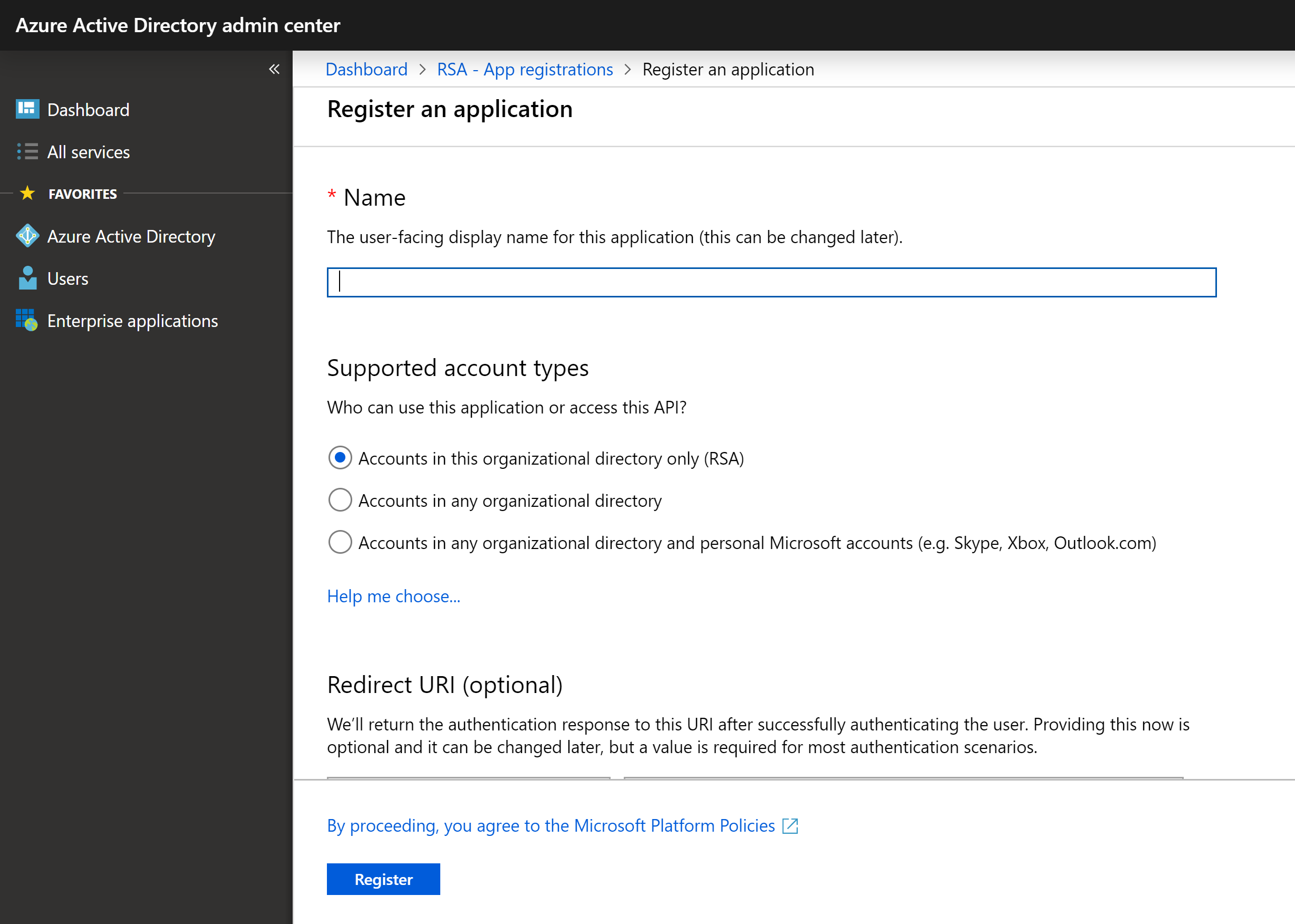
2. In the left-hand navigation pane, select the **Azure Active Directory** service, and then select **App registrations \> New registration**.
3. Provide a name for your application and click **Register** at the bottom of the blade.
4. After clicking **Register**, the Overview page for the application is displayed. Azure AD assigns a unique application (client) ID to your app.
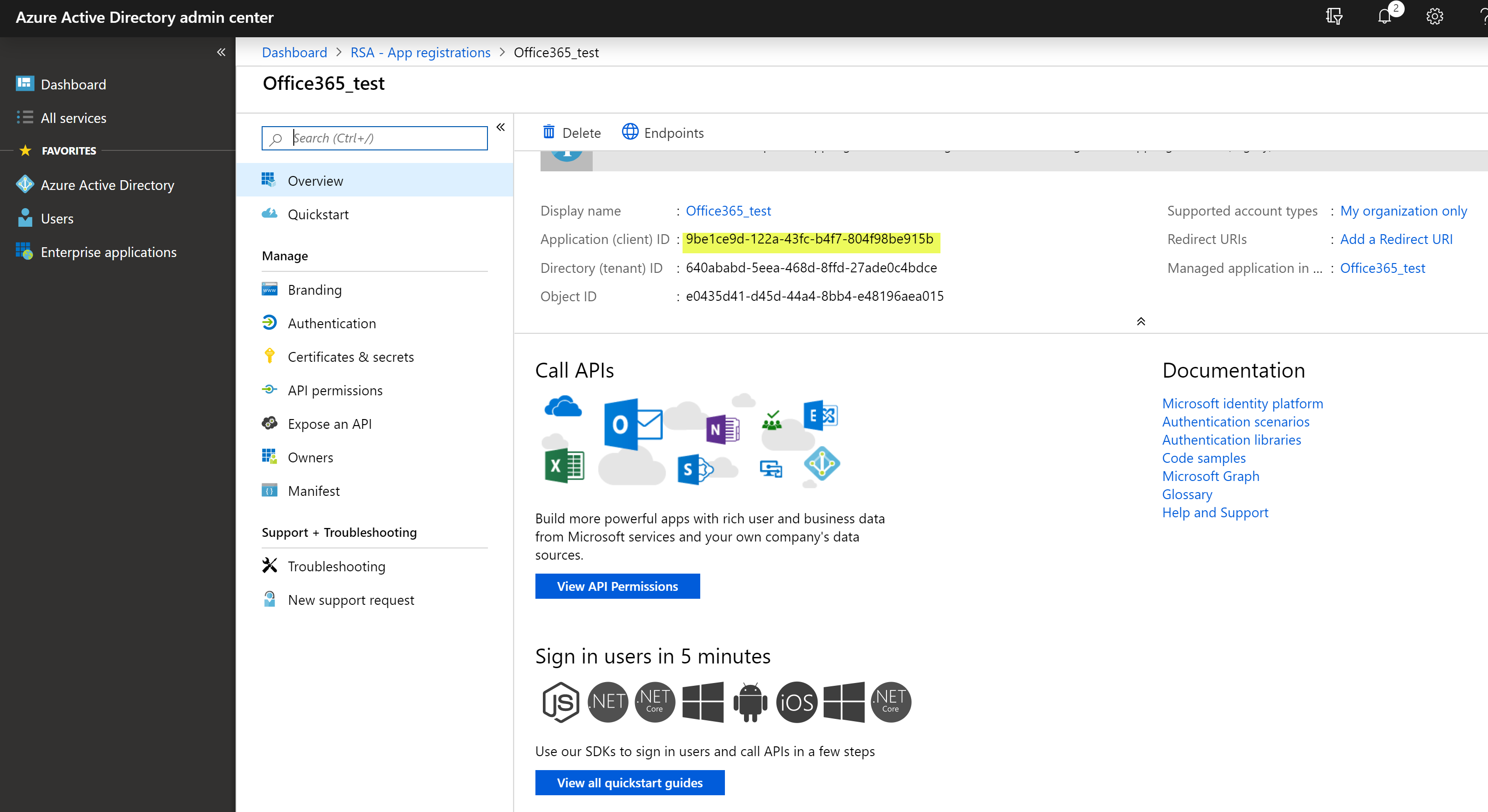
5. In the left menu bar, click **API permissions**, then **Add a permission \> Select an API** and choose **Office 365 Management APIs**.
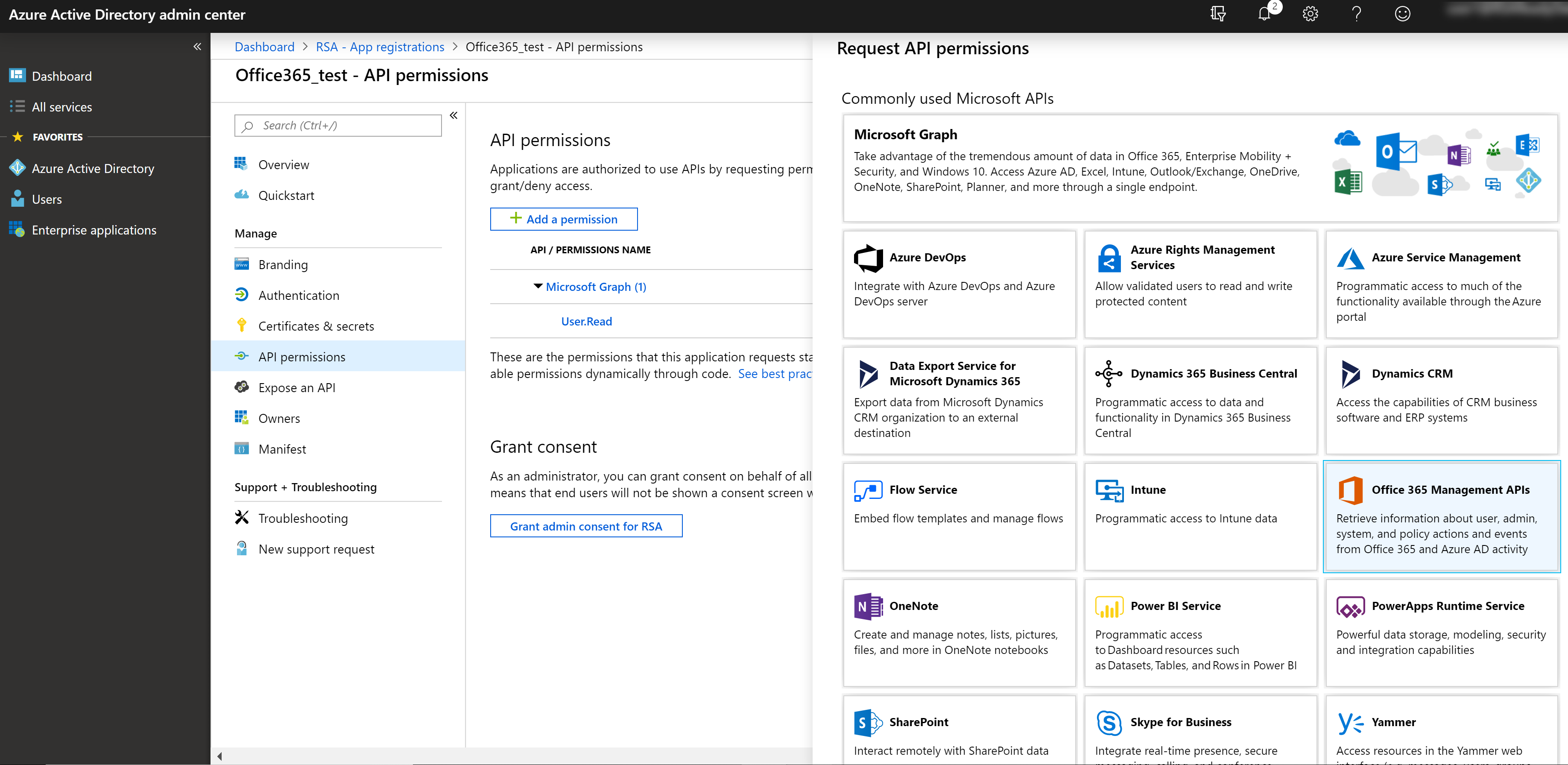
6. Under **What type of permissions does your application require** option, choose **Application permissions** and enable the permissions as shown here:
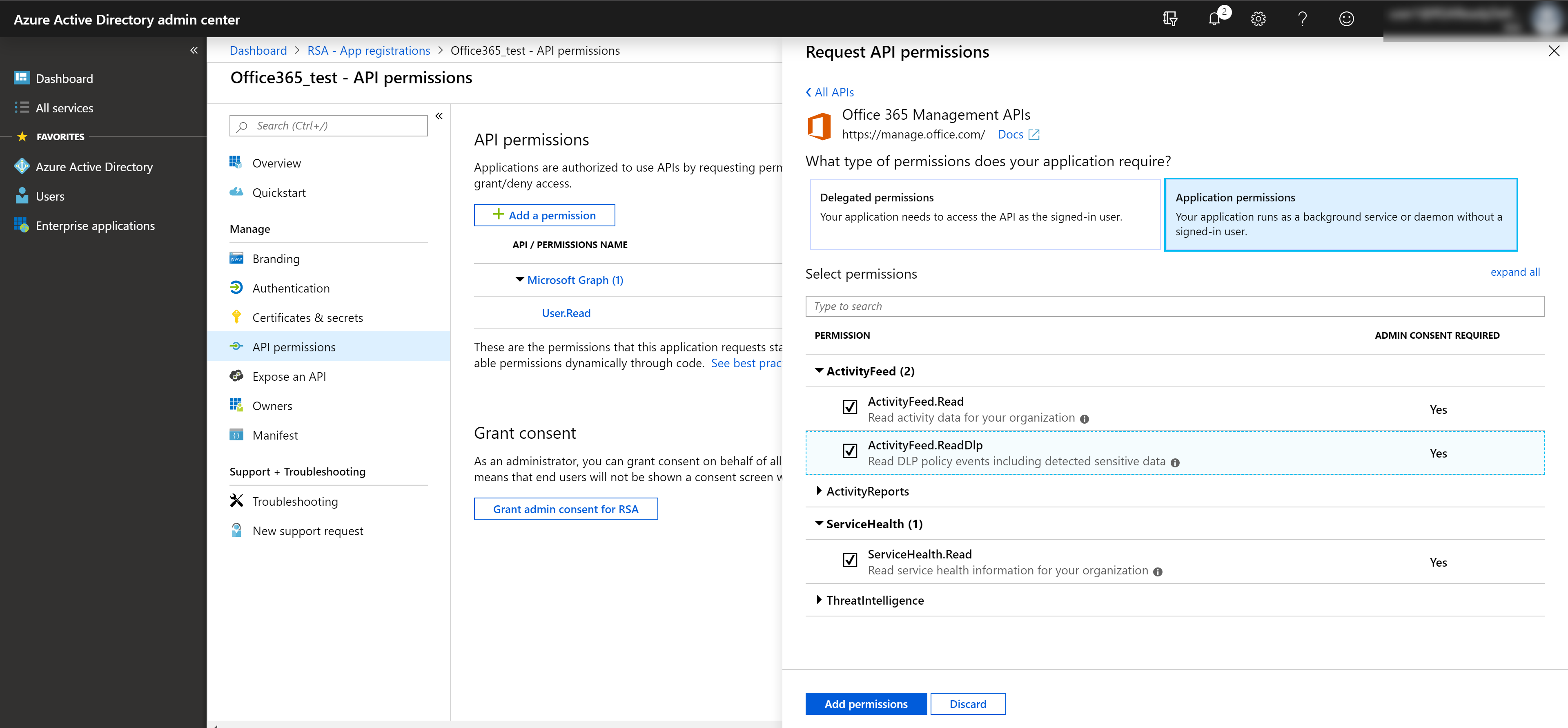
**Note:** Assign the **Read DLP policy events including detected sensitive data** permission only if logs are being read from the **DLP.All** resource group.
7. Click **Add permissions**.
8. Click **Grant admin consent**, then click **Yes** when prompted.
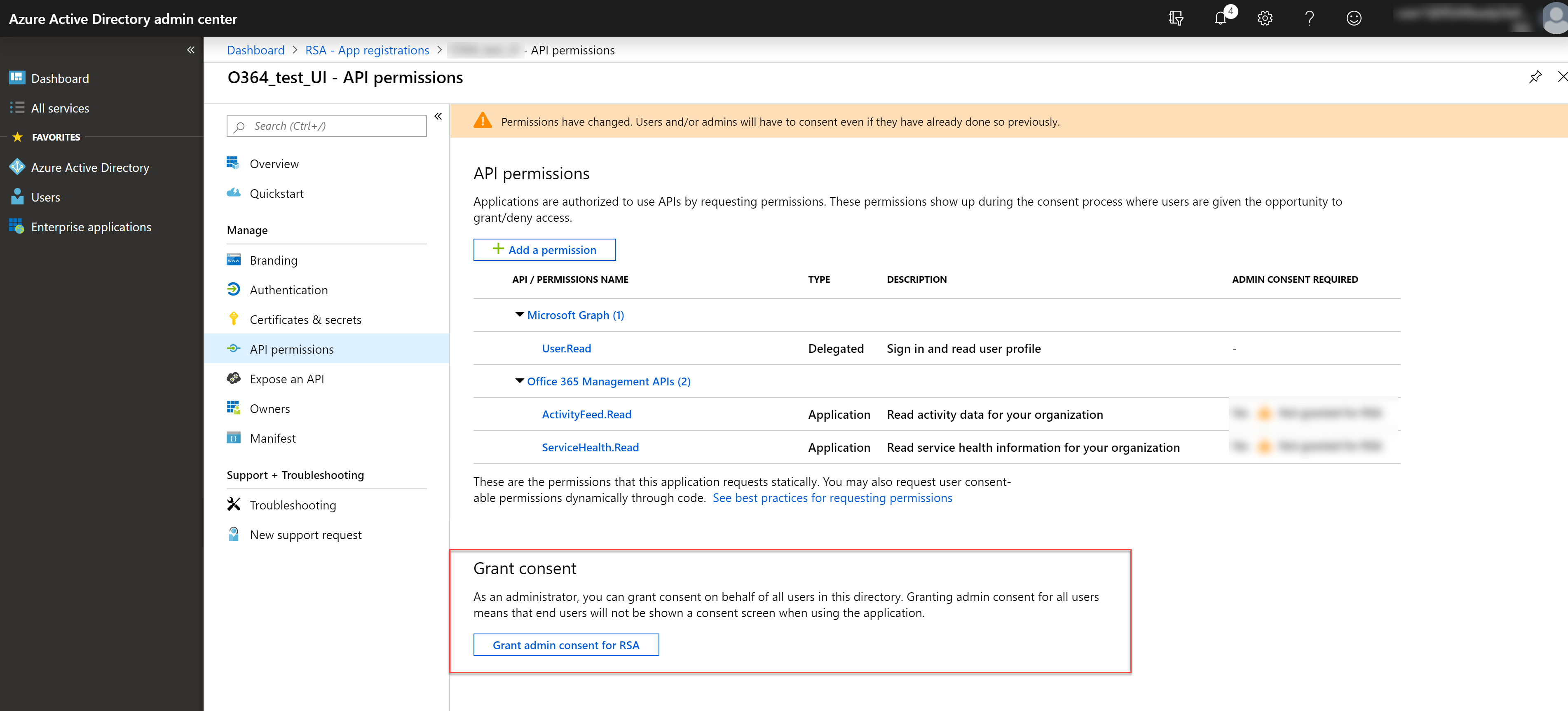
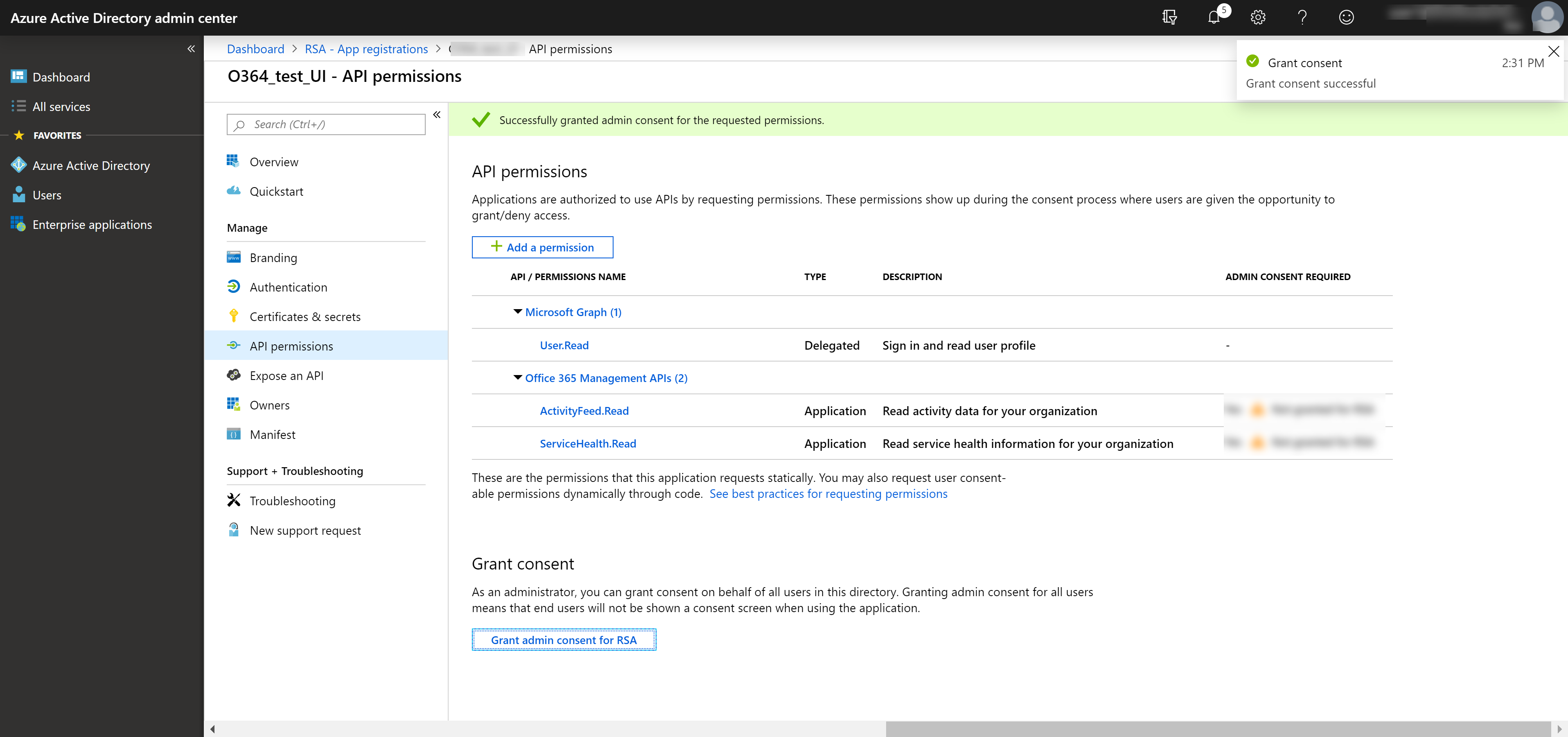
Continue to the next procedure, for creating a key.
To create a key:
1. In the left menu bar, click **Certificates & secrets**, then click **New client secret**.
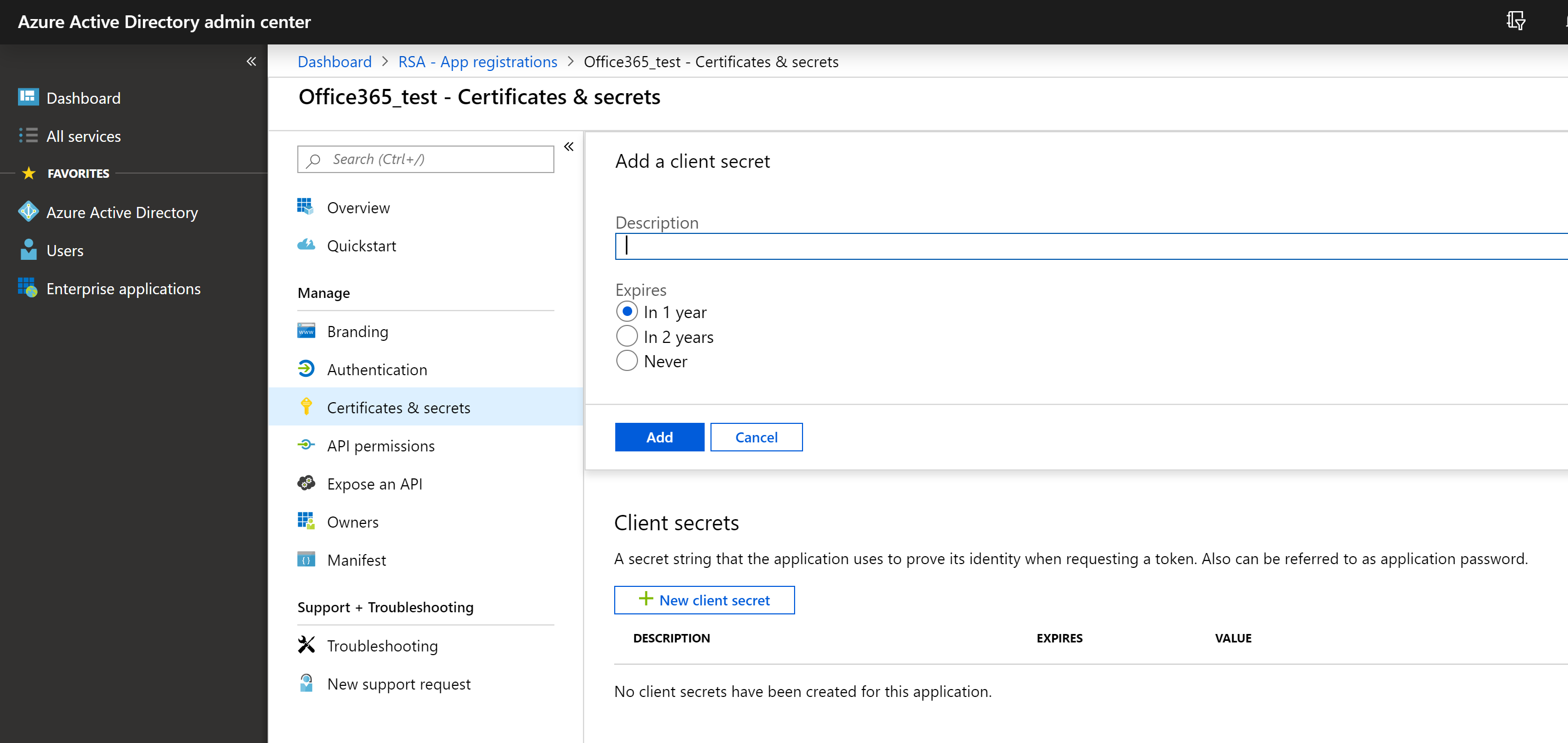
2. Add new client secret information and click **Add**.
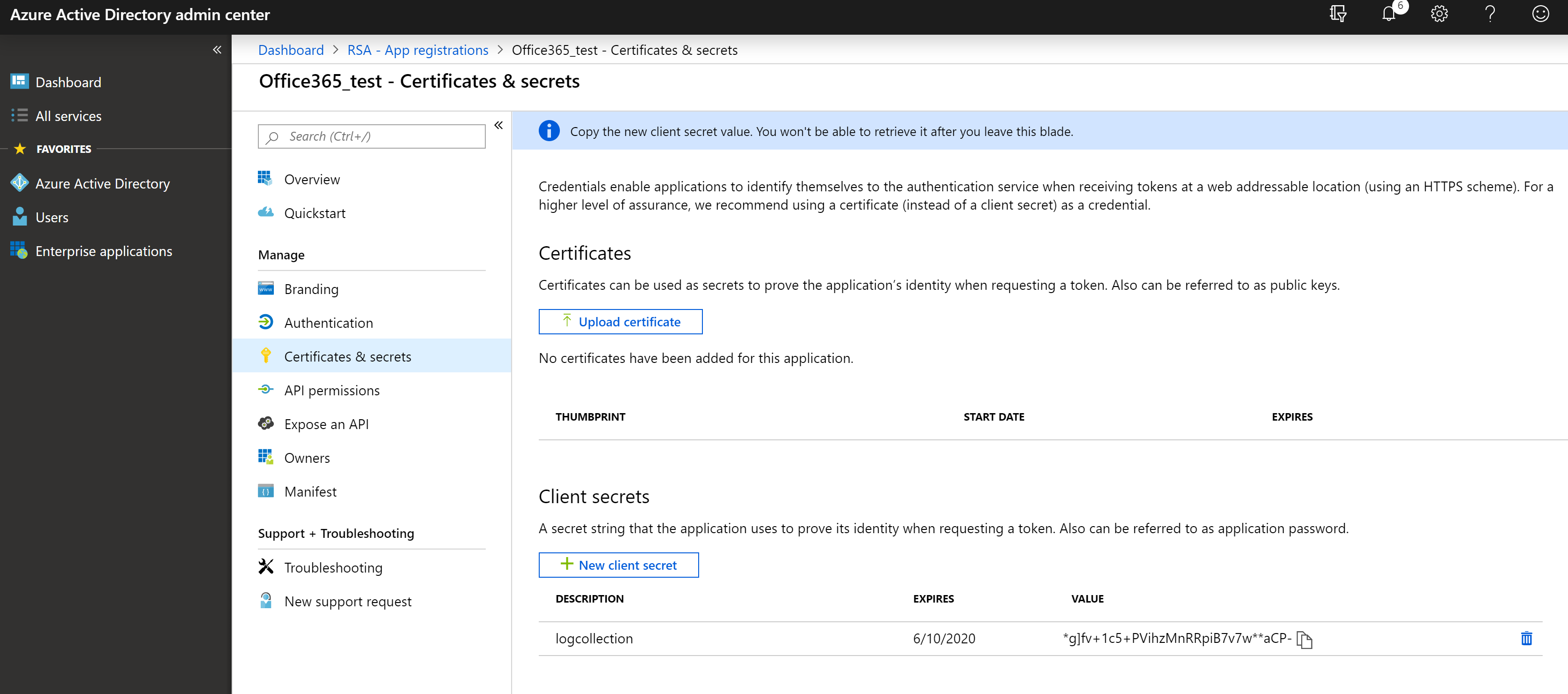
**Important:** Azure only displays the client secret at the time you initially generate it. You cannot navigate back to this page and retrieve the client secret later. Make sure to copy and save this key, as it is needed for further configuration.
## Deploy the Office 365 Files from RSA NetWitness Live
Office 365 requires resources available in RSA NetWitness Live in order to collect logs.
To deploy the Office 365 content from Live:
1. In the RSA NetWitness Platform menu, select **Live**.
2. Browse Live for the cef parser, using **RSA Log Device** as the **Resource Type**.
3. Select the cef parser from the list and click **Deploy** to deploy it to the appropriate the Log Decoders.
4. You also need to deploy the Office 365 package. Browse Live for MS Office 365 content, typing **Office 365** into the **Keywords** text box and click **Search**.
5. Select the item returned from the search and click Deploy to deploy to the appropriate Log Collectors.
**Note:** On a hybrid installation, you need to deploy the package on both the VLC and the LC. If you deploy the package on the LC, you need to restart the log decoder and log collector services: otherwise, logs are not collected.
6. Restart the **nwlogcollector** service.
For more details, see the [Add or Update Supported Event Source Log Parsers](https://50269063.hs-sites.com/knowledge-base/677997?hsLang=en) topic, or the *Live Resource Guide* on RSA Link.
## Enable Subscription
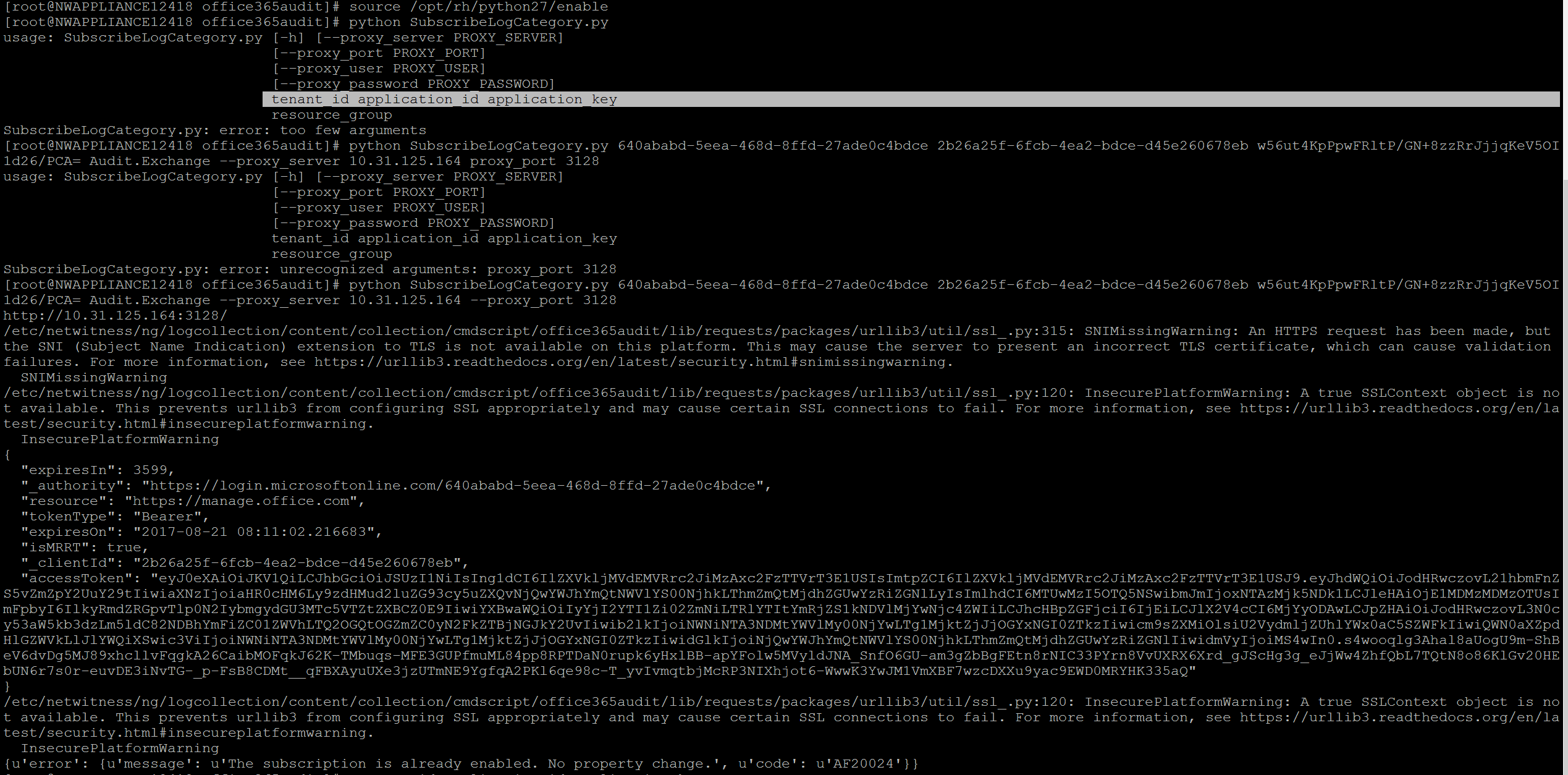
Go to the office office365audit folder on the VLC and execute **SubscribeLogCategory.py** to subscribe to a resource group:
\# cd /etc/netwitness/ng/logcollection/content/collection/cmdscript/office365audit
\# source /opt/rh/python27/enable
**Note:** The previous command (highlighted) is not required for NetWitness 11.0 or later.
\# python SubscribeLogCategory.py tenant\_id application\_id application\_key resource\_group \[--proxy\_server PROXY\_SERVER\] \[--proxy\_port PROXY\_PORT\] \[--proxy\_user PROXY\_USER\] \[--proxy\_password PROXY\_PASSWORD\]
The following screen shows an example of running this script.
## Set Up the Office 365 Event Source in NetWitness Platform
This section contains details on setting up the event source in RSA NetWitness Platform. In addition to the procedure, the Office 365 Collection Configuration Parameters are described, as well as how to Microsoft Office 365.
To configure the Office 365 Event Source:
1. In the RSA NetWitness Platform menu, select **Administration \> Services**.
2. In the Services grid, select a Log Collector service, and from the Actions menu, choose **View** \> **Config**.
3. In the **Event Sources** tab, select **Plugins/Config** from the drop-down menu.
The Event Categories panel displays the File event sources that are configured, if any.
4. In the Event Categories panel toolbar, click +.
The Available Event Source Types dialog is displayed.
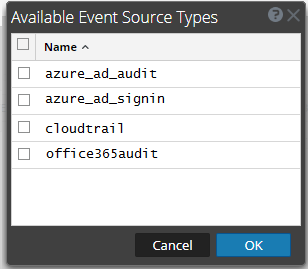
5. Select **office365audit** from the list, and click **OK**.
The newly added event source type is displayed in the Event Categories panel.
6. Select the new type in the Event Categories panel and click + in the Sources panel toolbar.
The Add Source dialog is displayed.
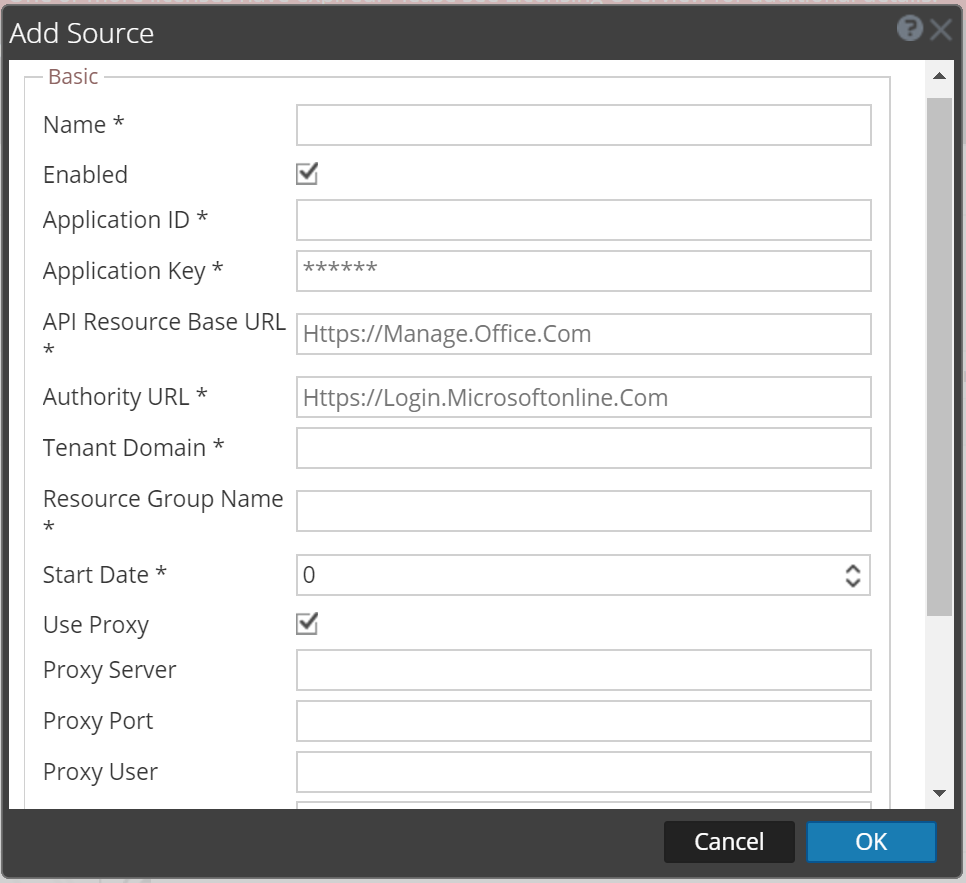
7. Define parameter values, as described in Office 365 Collection Configuration Parameters.
8. Click **Test Connection**.
The result of the test is displayed in the dialog box. If the test is unsuccessful, edit the device or service information and retry.
**Note:** The Log Collector takes approximately 60 seconds to return the test results. If it exceeds the time limit, the test times out and RSA NetWitness Platform displays an error message.
9. If the test is successful, click **OK**.
The new event source is displayed in the Sources panel.
## Office 365 Collection Configuration Parameters
The following table describes the configuration parameter for the Microsoft Office 365 integration with RSA NetWitness Platform. Fields marked with an asterisk (\*) are required.
**Note:** When run from behind an SSL proxy, if certificate verification needs to be disabled, uncheck the **SSL Enable** checkbox in the **Advanced** section.
**Note:** For more details, see the following Microsoft website: [https://msdn.microsoft.com/en-us/office-365/office-365-management-activity-api-reference#retrieving-content](https://msdn.microsoft.com/en-us/office-365/office-365-management-activity-api-reference#retrieving-content).
Copyright 2020 Dell Inc. or its subsidiaries. All Rights Reserved.
Trademarks
For a list of RSA trademarks, go to [www.emc.com/legal/emc-corporation-trademarks.htm#rsa](http://www.emc.com/legal/emc-corporation-trademarks.htm#rsa).
You are here
Microsoft Office 365 Configuration Guide
[](https://mydev.netwitness.com/?hsLang=en)
Copyright © 2026, NetWitness LLC. All rights reserved.
[NetWitness Platform](https://www.netwitness.com/)
[Acceptable Use Policy](https://www.netwitness.com/wp-content/uploads/Acceptable-Use-Policy-092022.pdf) [Privacy Statement](https://www.netwitness.com/wp-content/uploads/NetWitness-Privacy-Statement-07292024.pdf)

[](https://www.linkedin.com/company/netwitness-platform/) [](https://www.youtube.com/@netwitness)
© 2026 NetWitness LLC. All rights reserved.