---
title: Jetty not starting after importing a custom certificate in RSA Security Analytics 10.6.1.0
description: "Issue\nJetty crashes and the UI is not available after the customer imports a custom certificate as per https://community.rsa.com/docs/DOC-56684 (https"
---
[Skip to content](https://mydev.netwitness.com/knowledge-base/jetty-not-starting-after-importing-a-custom-certificate-in-rsa-security-analytics-10-6-1-0#main-content)

- [Home](https://mydev.netwitness.com/home)
- Integrations
Show submenu for Integrations
- [Netwitness Platform Integrations](https://mydev.netwitness.com/netwitnessplatformintegrations)
- [Third Party Integrations](https://mydev.netwitness.com/thirdpartyintegrations)
- [Knowledge Center](https://mydev.netwitness.com/knowledge-base)
- Community
Show submenu for Community
- [Blogs](https://mydev.netwitness.com/netwitness-security-llc-blog)
- Discussions
- Customers
Show submenu for Customers
- [Manage Products and Licenses](https://mydev.netwitness.com/nwportal)
- Downloads
- Partners
Show submenu for Partners
- [Partner Program](https://mydev.netwitness.com/partner)
- [Partner Resources](https://mydev.netwitness.com/partnerresources)
- [Submit a New Deal Registration](https://mydev.netwitness.com/dealregistration)
- [Become a Partner](https://mydev.netwitness.com/becomeapartner)
- [Update Your Partner Locator Profile](https://www.netwitness.com/partner-locator/?utm_source=pardotnewsletter&utm_medium=email&utm_campaign=partner_march)
- [NetWitness LinkedIn Partner Hub](https://linkedin.com/showcase/netwitnesspartners/)
- Education
Show submenu for Education
- [Instructor Led Training Schedule](https://mydev.netwitness.com/instructorledtrainingschedule)
- [NetWitness Training Catalog](https://mydev.netwitness.com/netwitnesstrainingcatalog)
- [Security Awareness Training](https://mydev.netwitness.com/securityawarenesstraining)
- [New Product Readiness](https://mydev.netwitness.com/newproductreadiness)
- [On-Demand Virtual Labs](https://mydev.netwitness.com/ondemandvirtuallabs)
- [Additional Training Information](https://mydev.netwitness.com/additionaltraininginformation)
- [Frequently Asked Questions](https://mydev.netwitness.com/educationfaq)
- [Contact NetWitness Education Team](https://mydev.netwitness.com/contact-netwitness-education-team)
- Support
Show submenu for Support
- [Contact Support](https://mydev.netwitness.com/contact-support)
- [Create a New Case](https://mydev.netwitness.com/create-support-case)
- [View My Cases](https://mydev.netwitness.com/viewmycase)
- [Product Version Life Cycle](https://mydev.netwitness.com/product-version-life-cycle)
- [Warranty & Replacement Parts](https://mydev.netwitness.com/warranty-and-replacement-parts)
- [Community Support Forum](https://mydev.netwitness.com/community-support-forum)
- [Technical Support Guide](https://mydev.netwitness.com/technical-support-guide)
Open main navigation
Close main navigation
- [Home](https://mydev.netwitness.com/home)
- Integrations
Show submenu for Integrations
- [Netwitness Platform Integrations](https://mydev.netwitness.com/netwitnessplatformintegrations)
- [Third Party Integrations](https://mydev.netwitness.com/thirdpartyintegrations)
- [Knowledge Center](https://mydev.netwitness.com/knowledge-base)
- Community
Show submenu for Community
- [Blogs](https://mydev.netwitness.com/netwitness-security-llc-blog)
- Discussions
- Customers
Show submenu for Customers
- [Manage Products and Licenses](https://mydev.netwitness.com/nwportal)
- Downloads
- Partners
Show submenu for Partners
- [Partner Program](https://mydev.netwitness.com/partner)
- [Partner Resources](https://mydev.netwitness.com/partnerresources)
- [Submit a New Deal Registration](https://mydev.netwitness.com/dealregistration)
- [Become a Partner](https://mydev.netwitness.com/becomeapartner)
- [Update Your Partner Locator Profile](https://www.netwitness.com/partner-locator/?utm_source=pardotnewsletter&utm_medium=email&utm_campaign=partner_march)
- [NetWitness LinkedIn Partner Hub](https://linkedin.com/showcase/netwitnesspartners/)
- Education
Show submenu for Education
- [Instructor Led Training Schedule](https://mydev.netwitness.com/instructorledtrainingschedule)
- [NetWitness Training Catalog](https://mydev.netwitness.com/netwitnesstrainingcatalog)
- [Security Awareness Training](https://mydev.netwitness.com/securityawarenesstraining)
- [New Product Readiness](https://mydev.netwitness.com/newproductreadiness)
- [On-Demand Virtual Labs](https://mydev.netwitness.com/ondemandvirtuallabs)
- [Additional Training Information](https://mydev.netwitness.com/additionaltraininginformation)
- [Frequently Asked Questions](https://mydev.netwitness.com/educationfaq)
- [Contact NetWitness Education Team](https://mydev.netwitness.com/contact-netwitness-education-team)
- Support
Show submenu for Support
- [Contact Support](https://mydev.netwitness.com/contact-support)
- [Create a New Case](https://mydev.netwitness.com/create-support-case)
- [View My Cases](https://mydev.netwitness.com/viewmycase)
- [Product Version Life Cycle](https://mydev.netwitness.com/product-version-life-cycle)
- [Warranty & Replacement Parts](https://mydev.netwitness.com/warranty-and-replacement-parts)
- [Community Support Forum](https://mydev.netwitness.com/community-support-forum)
- [Technical Support Guide](https://mydev.netwitness.com/technical-support-guide)
How can we help you?
- There are no suggestions because the search field is empty.
1. [NetWitness Knowledge Base](https://mydev.netwitness.com/knowledge-base?hsLang=en)
2. [Break Fix](https://mydev.netwitness.com/knowledge-base/break-fix?hsLang=en)
April 30, 2026
# Jetty not starting after importing a custom certificate in RSA Security Analytics 10.6.1.0
#### Issue
Jetty crashes and the UI is not available after the customer imports a custom certificate as per https://community.rsa.com/docs/DOC-56684 (https://sadocs.emc.com/0\_en-us/088\_SA106/200\_SecUsrMgt/25\_SetPublicKey/10\_CfgPKI/20\_ImprtCert)
If during the import they didn't check the box "Import CAs", as per the document above, the Trusted CAs section in Administration \> Security \> PKI Settings will not populate.
After next run of puppet agent and the restart of jettysrv it will start to crash but no relevant error is visible in sa.log.
In sa.log you may see errors similar to this one:
2016-11-25 10:20:49,435 \[RBAC Inventory Task 1433513373\] ERROR com.rsa.smc.sa.rbac.aspect.RBACLoggingAspect - Method: com.rsa.smc.sa.rbac.service.RBACServiceImpl.getPermissionsMap() threw exception: Couldn't send message to carlos: Exception SecurityManagerMessage: null
2016-11-25 10:20:49,436 \[RBAC Inventory Task 1433513373\] ERROR com.rsa.smc.sa.rbac.service.PermissionInventory - com.rsa.smc.sa.rbac.exception.RBACException: Couldn't send message to carlos: Exception SecurityManagerMessage: null
2016-11-25 10:20:49,473 \[Endpoint Service Resolver 743826446\] ERROR com.rsa.smc.sa.core.appliance.service.DefaultApplianceService - Failed to load appliance with id null
#### Cause
See SACE-6862
It appears this could happen when the customer does not check the box to import the CAs.
#### Resolution
First try resetting jetty-ssl.xml as per KBA 000030477.
Try also what was suggested in case 00865420 and SACE-6862:
- stop jettysrv
- move /opt/rsa/carlos/keystore to another location
- replace again jetty-ssl.xml in /opt/rsa/jetty9/etc/ and /etc/puppet/modules/saserver/files/ with the default copy of the file
- restart jettysrv
If this does not work, diff the default jetty-ssl.xml that was copied on the appliance with the file in /opt/rsa/jetty9/etc/ and /etc/puppet/modules/saserver/files/.
Assuming you have a copy of the default jetty-ssl.xml in /tmp, the following command should show you that the files differ:
diff /tmp/default-jetty-ssl.xml /opt/rsa/jetty9/etc/jetty-ssl.xml
diff /tmp/default-jetty-ssl.xml /etc/puppet/modules/saserver/files/jetty-ssl.xml
At this point puppet is trying to put back in place the keystore in jetty-ssl.xml, which is what causes the crash of jettysrv.
Try the following procedure, assuming you have a copy of the default jetty-ssl.xml in /tmp:
service puppetmaster stop
service puppet stop
stop jettysrv
cp /tmp/default-jetty-ssl.xml /opt/rsa/jetty9/etc/jetty-ssl.xml
chattr +i /opt/rsa/jetty9/etc/jetty-ssl.xml
cp /tmp/default-jetty-ssl.xml /etc/puppet/modules/saserver/files/jetty-ssl.xml
chattr +i /etc/puppet/modules/saserver/files/jetty-ssl.xml
service puppetmaster start
service puppet start
start jettysrv
This should be enough to have the UI back. Go to Administration \> Security \> PKI Settings.
Confirm if the Trusted CAs section is not populated.
The entry in Server Certificates should now show in red.
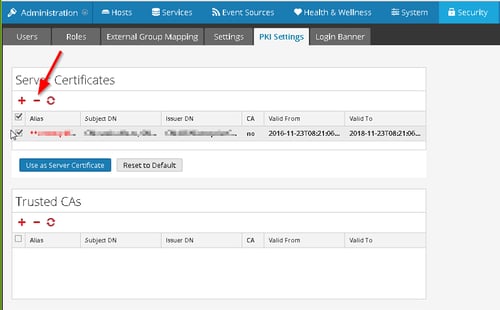
Delete the custom certificate from Server Certificates.
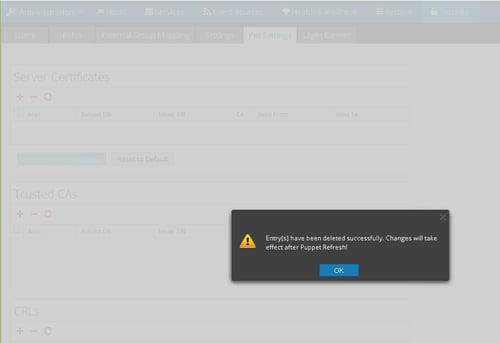
Make the jetty-ssl.xml files writable again and then run puppet agent:
chattr -i /opt/rsa/jetty9/etc/jetty-ssl.xml
chattr -i /etc/puppet/modules/saserver/files/jetty-ssl.xml
puppet agent -t
This should restart jetty and fix all the issues with the custom certificate.
We should be back to a stable condition where jettysrv does not crash and uses the self-signed certificate, and no custom certificate is configured in the UI.
Bonus point, if the customer is still willing to import their certificate explain that they need to perform step 6 as per https://community.rsa.com/docs/DOC-56684 (https://sadocs.emc.com/0\_en-us/088\_SA106/200\_SecUsrMgt/25\_SetPublicKey/10\_CfgPKI/20\_ImprtCert):
*(Optional) If the user certificate and Security Analytics server certificate are issued by the same CA, select the Import CAs checkox.*
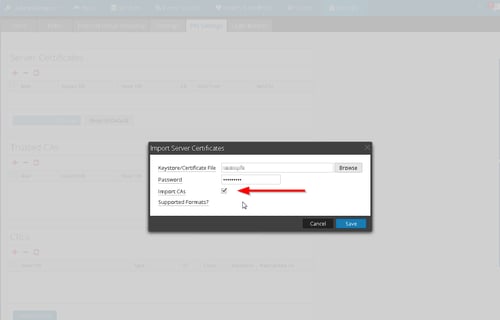
Further to this import you should see custom cert in Server Certificate **and** the Trusted CAs populated.
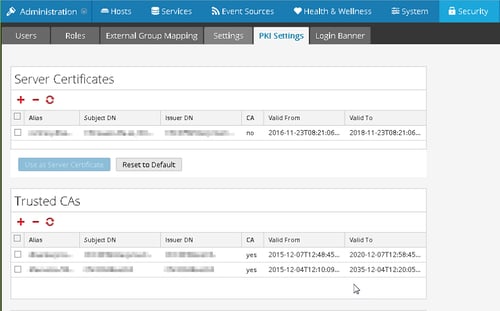
Select the custom certificate, click on "User as Server Certificate".
Run manually puppet agent -t.
This should restart jettysrv and after that the new (custom) certificate will be used.
**NOTE:**
You may need to clear the browser cache and restart the browser or open the UI in an incognito session in the browser to see the new (custom) certificate.
#### Product Details
**RSA Product Set:** Security Analytics
**RSA Product/Service Type:** SA Security Analytics Server
**RSA Version/Condition:** 10.6.1.0
#### Approval Reviewer Queue
ASOC Approval Group
[](https://mydev.netwitness.com/?hsLang=en)
Copyright © 2026, NetWitness LLC. All rights reserved.
[NetWitness Platform](https://www.netwitness.com/)
[Acceptable Use Policy](https://www.netwitness.com/wp-content/uploads/Acceptable-Use-Policy-092022.pdf) [Privacy Statement](https://www.netwitness.com/wp-content/uploads/NetWitness-Privacy-Statement-07292024.pdf)

[](https://www.linkedin.com/company/netwitness-platform/) [](https://www.youtube.com/@netwitness)
© 2026 NetWitness LLC. All rights reserved.