---
title: Import Server Certificate and Trusted CA Certificate
description: "Import Server Certificate and Trusted CA CertificateImport Server Certificate and Trusted CA Certificate\nTo enable PKI authentication, you must impor"
---
[Skip to content](https://mydev.netwitness.com/knowledge-base/importservercertificateandtrustedcacertificate#main-content)

- [Home](https://mydev.netwitness.com/home)
- Integrations
Show submenu for Integrations
- [Netwitness Platform Integrations](https://mydev.netwitness.com/netwitnessplatformintegrations)
- [Third Party Integrations](https://mydev.netwitness.com/thirdpartyintegrations)
- [Knowledge Center](https://mydev.netwitness.com/knowledge-base)
- Community
Show submenu for Community
- [Blogs](https://mydev.netwitness.com/netwitness-security-llc-blog)
- Discussions
- Customers
Show submenu for Customers
- [Manage Products and Licenses](https://mydev.netwitness.com/nwportal)
- Downloads
- Partners
Show submenu for Partners
- [Partner Program](https://mydev.netwitness.com/partner)
- [Partner Resources](https://mydev.netwitness.com/partnerresources)
- [Submit a New Deal Registration](https://mydev.netwitness.com/dealregistration)
- [Become a Partner](https://mydev.netwitness.com/becomeapartner)
- [Update Your Partner Locator Profile](https://www.netwitness.com/partner-locator/?utm_source=pardotnewsletter&utm_medium=email&utm_campaign=partner_march)
- [NetWitness LinkedIn Partner Hub](https://linkedin.com/showcase/netwitnesspartners/)
- Education
Show submenu for Education
- [Instructor Led Training Schedule](https://mydev.netwitness.com/instructorledtrainingschedule)
- [NetWitness Training Catalog](https://mydev.netwitness.com/netwitnesstrainingcatalog)
- [Security Awareness Training](https://mydev.netwitness.com/securityawarenesstraining)
- [New Product Readiness](https://mydev.netwitness.com/newproductreadiness)
- [On-Demand Virtual Labs](https://mydev.netwitness.com/ondemandvirtuallabs)
- [Additional Training Information](https://mydev.netwitness.com/additionaltraininginformation)
- [Frequently Asked Questions](https://mydev.netwitness.com/educationfaq)
- [Contact NetWitness Education Team](https://mydev.netwitness.com/contact-netwitness-education-team)
- Support
Show submenu for Support
- [Contact Support](https://mydev.netwitness.com/contact-support)
- [Create a New Case](https://mydev.netwitness.com/create-support-case)
- [View My Cases](https://mydev.netwitness.com/viewmycase)
- [Product Version Life Cycle](https://mydev.netwitness.com/product-version-life-cycle)
- [Warranty & Replacement Parts](https://mydev.netwitness.com/warranty-and-replacement-parts)
- [Community Support Forum](https://mydev.netwitness.com/community-support-forum)
- [Technical Support Guide](https://mydev.netwitness.com/technical-support-guide)
Open main navigation
Close main navigation
- [Home](https://mydev.netwitness.com/home)
- Integrations
Show submenu for Integrations
- [Netwitness Platform Integrations](https://mydev.netwitness.com/netwitnessplatformintegrations)
- [Third Party Integrations](https://mydev.netwitness.com/thirdpartyintegrations)
- [Knowledge Center](https://mydev.netwitness.com/knowledge-base)
- Community
Show submenu for Community
- [Blogs](https://mydev.netwitness.com/netwitness-security-llc-blog)
- Discussions
- Customers
Show submenu for Customers
- [Manage Products and Licenses](https://mydev.netwitness.com/nwportal)
- Downloads
- Partners
Show submenu for Partners
- [Partner Program](https://mydev.netwitness.com/partner)
- [Partner Resources](https://mydev.netwitness.com/partnerresources)
- [Submit a New Deal Registration](https://mydev.netwitness.com/dealregistration)
- [Become a Partner](https://mydev.netwitness.com/becomeapartner)
- [Update Your Partner Locator Profile](https://www.netwitness.com/partner-locator/?utm_source=pardotnewsletter&utm_medium=email&utm_campaign=partner_march)
- [NetWitness LinkedIn Partner Hub](https://linkedin.com/showcase/netwitnesspartners/)
- Education
Show submenu for Education
- [Instructor Led Training Schedule](https://mydev.netwitness.com/instructorledtrainingschedule)
- [NetWitness Training Catalog](https://mydev.netwitness.com/netwitnesstrainingcatalog)
- [Security Awareness Training](https://mydev.netwitness.com/securityawarenesstraining)
- [New Product Readiness](https://mydev.netwitness.com/newproductreadiness)
- [On-Demand Virtual Labs](https://mydev.netwitness.com/ondemandvirtuallabs)
- [Additional Training Information](https://mydev.netwitness.com/additionaltraininginformation)
- [Frequently Asked Questions](https://mydev.netwitness.com/educationfaq)
- [Contact NetWitness Education Team](https://mydev.netwitness.com/contact-netwitness-education-team)
- Support
Show submenu for Support
- [Contact Support](https://mydev.netwitness.com/contact-support)
- [Create a New Case](https://mydev.netwitness.com/create-support-case)
- [View My Cases](https://mydev.netwitness.com/viewmycase)
- [Product Version Life Cycle](https://mydev.netwitness.com/product-version-life-cycle)
- [Warranty & Replacement Parts](https://mydev.netwitness.com/warranty-and-replacement-parts)
- [Community Support Forum](https://mydev.netwitness.com/community-support-forum)
- [Technical Support Guide](https://mydev.netwitness.com/technical-support-guide)
How can we help you?
- There are no suggestions because the search field is empty.
1. [NetWitness Knowledge Base](https://mydev.netwitness.com/knowledge-base?hsLang=en)
2. [Documentation](https://mydev.netwitness.com/knowledge-base/documentation?hsLang=en)
April 28, 2026
# Import Server Certificate and Trusted CA Certificate
## Import Server Certificate and Trusted CA CertificateImport Server Certificate and Trusted CA Certificate
To enable PKI authentication, you must import the Trusted CA certificate into the NetWitness. You can import the server certificate and the trusted CA certificate in the  (Admin) \> Security view \> PKI Settings tab.
## Certificate Revocation ListCertificate Revocation List
A Certificate Revocation List (CRL) is a file that contains a list of revoked certificates with details such as the serial number and revocation date of each certificate. When a certificate validity is expired, it must be revoked to avoid any compromise of the certificate by unauthorized users. For example, if a NetWitness user resigns from an organization, then the user's certificate must be revoked by the issuing CA.
You can import the CRL or specify the HTTP URL issued by your trusted CA, so that NetWitness can validate with the CRL to block unauthorized users from accessing NetWitness.
To import the CRL or specify a HTTP URL into NetWitness, choose one of the following methods:
- **HTTP server** - This is the most common CRL location where the CA publishes the CRL to external applications using an HTTP server. The NetWitness reads the CRL using the HTTP URL.
- **Local CRL** - This allows the users to manually download the CRL from the CA and upload it to the NetWitness.
- **OCSP (Online Certificate Status Protocol) Responder** - This allows NetWitness to verify the revocation status of a particular certificate instead of validating the complete CRL. To specify a OCSP Responder, you need to provide the HTTP URL and optionally the OCSP Responder's Signing certificate. Make sure the OCSP Responder is online while adding the entry. When the OCSP Responder Signing Certificate is updated, you need to manually update the certificate in NetWitness.
**Note:** You can configure the CRL when you import the CA certificate or after importing the CA certificate.
## User Principal SettingsUser Principal Settings
User Principal Settings allow NetWitness to uniquely identify the user from the user certificate for PKI authentication. To identify the user, you must specify an attribute in the user certificate to extract the user name or user id. NetWitness must be configured to read the value of this attribute. NetWitness uses the extracted value of this attribute as username or user id for authorization and retrieves the user groups from an Active Directory (AD) server. By default, NetWitness extracts the entire value of the selected attribute, without filtering any characters. You can apply regular expression (RegEx) to refine the value extracted.
**Note:** The conversion of Distinguished Names (attribute in Subject Name or Subject Alternative Name) to a human readable format is done based on RFC2253 (LDAPv3). Therefore, any Relative Distinguished Name apart from the one defined in RFC2253 (LDAPv3) may display in hex format. For example, email attribute value may display #1160bcghryy637bchs774. You can apply RegEX to extract the value. NetWitness tries its best to extract values for such attributes.
User Principal settings can be configured when you import the Trusted CA certificate.
## Lookup QueryLookup Query
A Lookup Query sends a specific query to Active Directory to retrieve the user object. Here is an example of a sample query for retrieving a user object from the Active Directory.
**Sample Query:**(&(objectCategory=Person)(objectClass=User)(CN=${nw-pki-user}))
nw-pki-user is replaced with the value extracted from the user certificate.
**Caution:** Make sure that the AD user account is active. AD does not return the user account expiry (accountExpires) information to NetWitness along with user details. Therefore, the NetWitness cannot validate the AD user account is expired or not.
**Note:** NetWitness does not validate the syntax of the lookup query. You must ensure proper query syntax is used to retrieve the user object from Active Directory.
## Import NW Server Certificate with its Private KeyImport NW Server Certificate with its Private Key
For instructions on how to import the NetWitness Server Certificate with its private key, see [(Optional) Use a Custom Server Certificate](https://50269063.hs-sites.com/knowledge-base/Optional-UseaCustomServerCertificate?hsLang=en).
## Import Trusted CAs, Configuring CRL and User Principal SettingsImport Trusted CAs, Configuring CRL and User Principal Settings
To import a trusted CA:
1. Go to ** (Admin) \> Security.**
The Security view is displayed with the **Users** tab open.
2. Click the **PKI Settings** tab.
3. In the **Trusted CAs** section, click .
The Import Certificate Authority dialog is displayed.
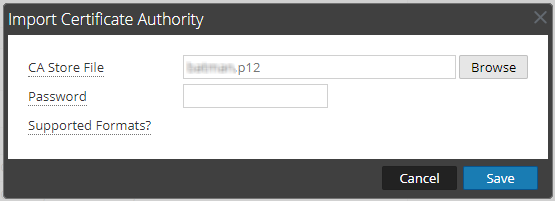
**Note:** The supported formats are .p12, .jks, .pfx, .pem, .crt, .der, and .cer
1. In the **CA Store File** field, click **Browse** and select a certificate.
2. In the **Password** field, enter the password of the certificate.
**Note:** The password is applicable only for .p12, .pfx and .jks certificate formats.
1. Click **Save**.
A Configure Trusted CA dialog is displayed with Certificate Details.
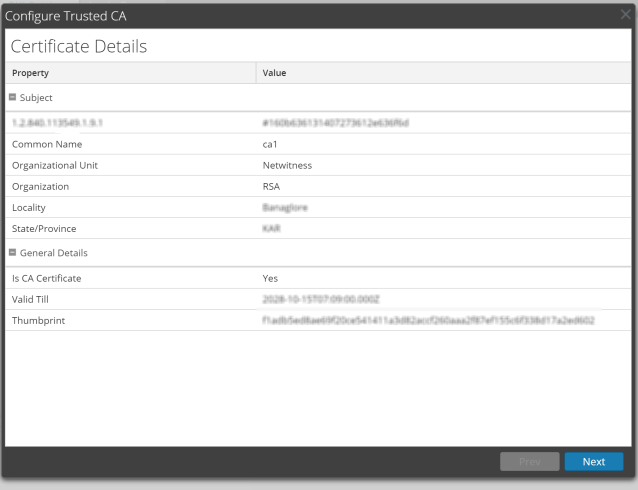
2. Click **Next**.
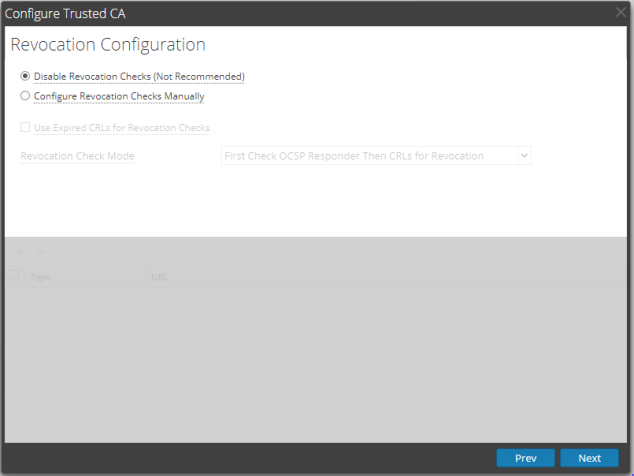
3. In the Revocation Configuration section, do one of the following to configure the CRL revocation check.
- Select **Disable Revocation Checks** to disable the CRL revocation check.
**Warning:** Disabling the revocation check may increase the risk of unauthorized users logging in to NetWitness.
- Select **Configure Revocation Checks Manually** to manually configure the CRL revocation check.
For more information, see [(Optional) Configure the CRL Manually](https://50269063.hs-sites.com/knowledge-base/Optional-ConfiguretheCRLManually?hsLang=en).
4. Click **Next**.
5. To configure user principal settings, in the User Principal Settings section, click **Configure Path and RegEx**.
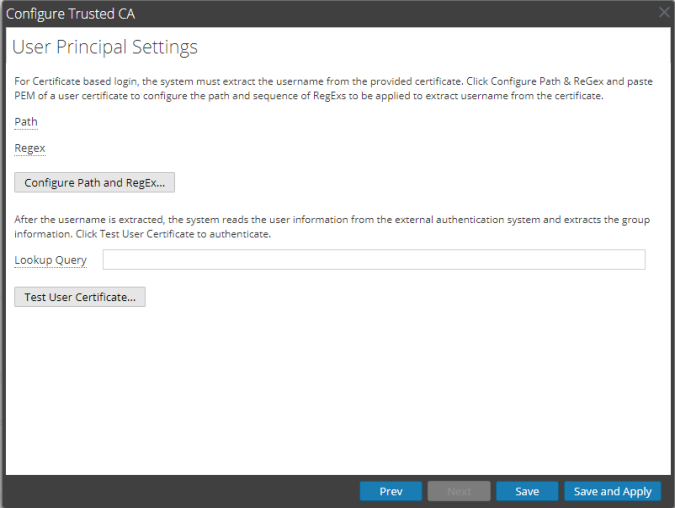
6. In the **Certificate** field, paste the PEM (Base64) encoded user certificate.
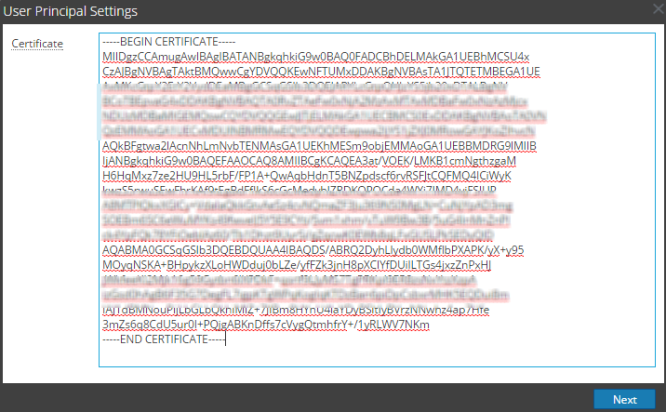
7. Click **Next**.
The **subjectDN**, **subjectAltnames**, and **extenstions** attributes are displayed.
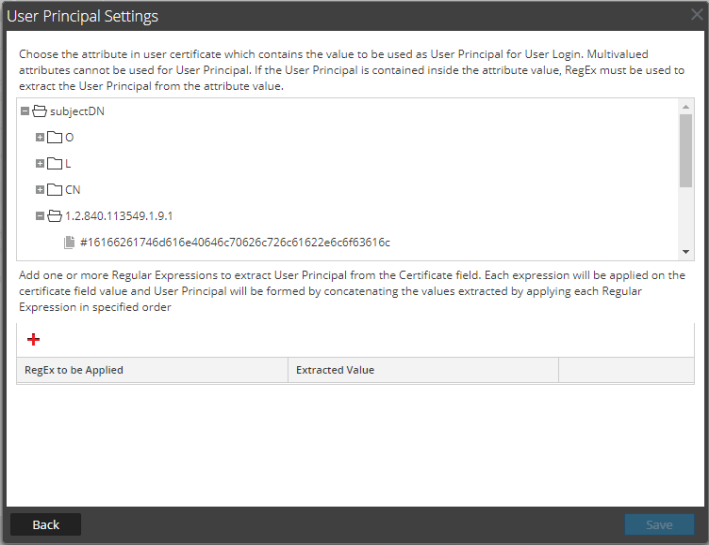
8. Select a unique attribute value to extract the username or user id.
9. To apply RegEx, click .
**Note:** You can apply multiple RegEx to extract a username or user id. All of the extracted values are concatenated to generate the final username or user id.
1. Click **Test**.
The final user name or user id after applying RegEx is extracted and displayed.
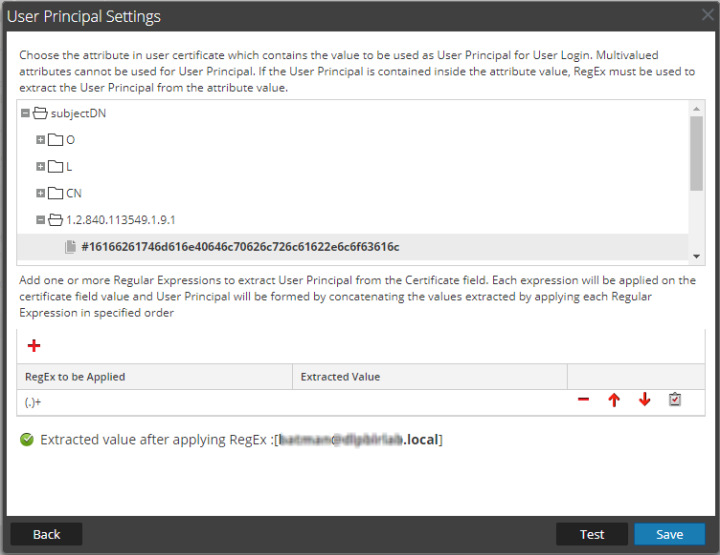
1. Click **Save**.
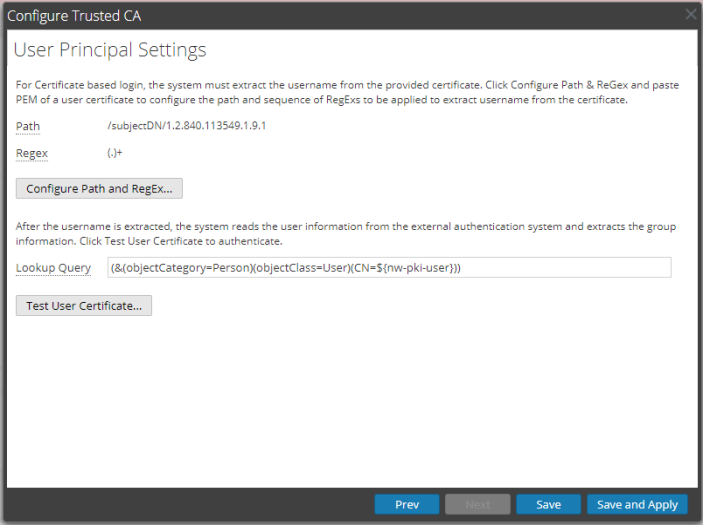
2. Enter the query in the **Lookup Query** field to query the external authentication system for retrieving the user objects.
3. Click **Test User Certificate**.
The Test User Certificate dialog is displayed.
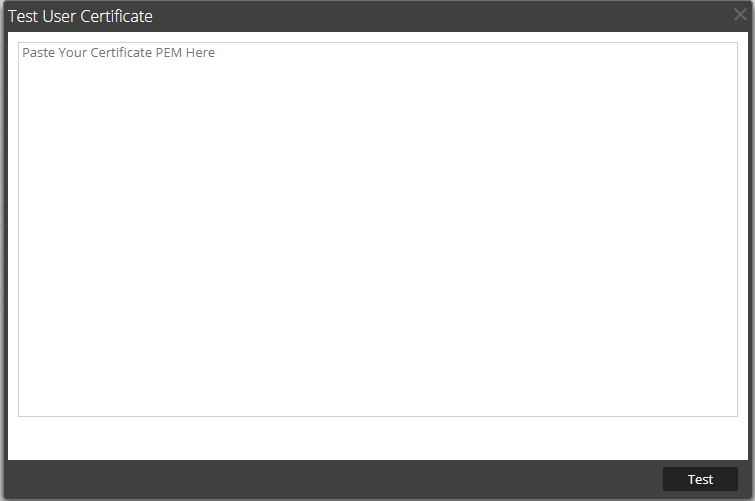
4. Paste the PEM of the user certificate and click **Test**.
**Note:** The user Certificate is used by NetWitness for a dry-run of the trusted CA configuration. If the user certificate validation and the user id extraction from the certificate is successful, a confirmation message is displayed.
1. After the certificate is validated, click **Save**.
The following message is displayed.
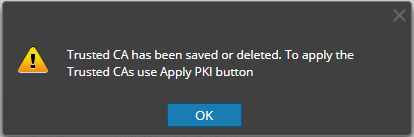
2. Click **OK**.
The Trusted CA certificate is added to the NetWitness.
**Note:** You can add multiple Trusted CA certificates.
[](https://mydev.netwitness.com/?hsLang=en)
Copyright © 2026, NetWitness LLC. All rights reserved.
[NetWitness Platform](https://www.netwitness.com/)
[Acceptable Use Policy](https://www.netwitness.com/wp-content/uploads/Acceptable-Use-Policy-092022.pdf) [Privacy Statement](https://www.netwitness.com/wp-content/uploads/NetWitness-Privacy-Statement-07292024.pdf)

[](https://www.linkedin.com/company/netwitness-platform/) [](https://www.youtube.com/@netwitness)
© 2026 NetWitness LLC. All rights reserved.