---
title: Identify High-Risk Entities
description: "Identify High-Risk Entities\nYou can identify high-risk user in your environment in the following ways:\nView top five high-risk entitiesView all the h"
---
[Skip to content](https://mydev.netwitness.com/knowledge-base/identifyhigh-riskentities#main-content)

- [Home](https://mydev.netwitness.com/home)
- Integrations
Show submenu for Integrations
- [Netwitness Platform Integrations](https://mydev.netwitness.com/netwitnessplatformintegrations)
- [Third Party Integrations](https://mydev.netwitness.com/thirdpartyintegrations)
- [Knowledge Center](https://mydev.netwitness.com/knowledge-base)
- Community
Show submenu for Community
- [Blogs](https://mydev.netwitness.com/netwitness-security-llc-blog)
- Discussions
- Customers
Show submenu for Customers
- [Manage Products and Licenses](https://mydev.netwitness.com/nwportal)
- Downloads
- Partners
Show submenu for Partners
- [Partner Program](https://mydev.netwitness.com/partner)
- [Partner Resources](https://mydev.netwitness.com/partnerresources)
- [Submit a New Deal Registration](https://mydev.netwitness.com/dealregistration)
- [Become a Partner](https://mydev.netwitness.com/becomeapartner)
- [Update Your Partner Locator Profile](https://www.netwitness.com/partner-locator/?utm_source=pardotnewsletter&utm_medium=email&utm_campaign=partner_march)
- [NetWitness LinkedIn Partner Hub](https://linkedin.com/showcase/netwitnesspartners/)
- Education
Show submenu for Education
- [Instructor Led Training Schedule](https://mydev.netwitness.com/instructorledtrainingschedule)
- [NetWitness Training Catalog](https://mydev.netwitness.com/netwitnesstrainingcatalog)
- [Security Awareness Training](https://mydev.netwitness.com/securityawarenesstraining)
- [New Product Readiness](https://mydev.netwitness.com/newproductreadiness)
- [On-Demand Virtual Labs](https://mydev.netwitness.com/ondemandvirtuallabs)
- [Additional Training Information](https://mydev.netwitness.com/additionaltraininginformation)
- [Frequently Asked Questions](https://mydev.netwitness.com/educationfaq)
- [Contact NetWitness Education Team](https://mydev.netwitness.com/contact-netwitness-education-team)
- Support
Show submenu for Support
- [Contact Support](https://mydev.netwitness.com/contact-support)
- [Create a New Case](https://mydev.netwitness.com/create-support-case)
- [View My Cases](https://mydev.netwitness.com/viewmycase)
- [Product Version Life Cycle](https://mydev.netwitness.com/product-version-life-cycle)
- [Warranty & Replacement Parts](https://mydev.netwitness.com/warranty-and-replacement-parts)
- [Community Support Forum](https://mydev.netwitness.com/community-support-forum)
- [Technical Support Guide](https://mydev.netwitness.com/technical-support-guide)
Open main navigation
Close main navigation
- [Home](https://mydev.netwitness.com/home)
- Integrations
Show submenu for Integrations
- [Netwitness Platform Integrations](https://mydev.netwitness.com/netwitnessplatformintegrations)
- [Third Party Integrations](https://mydev.netwitness.com/thirdpartyintegrations)
- [Knowledge Center](https://mydev.netwitness.com/knowledge-base)
- Community
Show submenu for Community
- [Blogs](https://mydev.netwitness.com/netwitness-security-llc-blog)
- Discussions
- Customers
Show submenu for Customers
- [Manage Products and Licenses](https://mydev.netwitness.com/nwportal)
- Downloads
- Partners
Show submenu for Partners
- [Partner Program](https://mydev.netwitness.com/partner)
- [Partner Resources](https://mydev.netwitness.com/partnerresources)
- [Submit a New Deal Registration](https://mydev.netwitness.com/dealregistration)
- [Become a Partner](https://mydev.netwitness.com/becomeapartner)
- [Update Your Partner Locator Profile](https://www.netwitness.com/partner-locator/?utm_source=pardotnewsletter&utm_medium=email&utm_campaign=partner_march)
- [NetWitness LinkedIn Partner Hub](https://linkedin.com/showcase/netwitnesspartners/)
- Education
Show submenu for Education
- [Instructor Led Training Schedule](https://mydev.netwitness.com/instructorledtrainingschedule)
- [NetWitness Training Catalog](https://mydev.netwitness.com/netwitnesstrainingcatalog)
- [Security Awareness Training](https://mydev.netwitness.com/securityawarenesstraining)
- [New Product Readiness](https://mydev.netwitness.com/newproductreadiness)
- [On-Demand Virtual Labs](https://mydev.netwitness.com/ondemandvirtuallabs)
- [Additional Training Information](https://mydev.netwitness.com/additionaltraininginformation)
- [Frequently Asked Questions](https://mydev.netwitness.com/educationfaq)
- [Contact NetWitness Education Team](https://mydev.netwitness.com/contact-netwitness-education-team)
- Support
Show submenu for Support
- [Contact Support](https://mydev.netwitness.com/contact-support)
- [Create a New Case](https://mydev.netwitness.com/create-support-case)
- [View My Cases](https://mydev.netwitness.com/viewmycase)
- [Product Version Life Cycle](https://mydev.netwitness.com/product-version-life-cycle)
- [Warranty & Replacement Parts](https://mydev.netwitness.com/warranty-and-replacement-parts)
- [Community Support Forum](https://mydev.netwitness.com/community-support-forum)
- [Technical Support Guide](https://mydev.netwitness.com/technical-support-guide)
How can we help you?
- There are no suggestions because the search field is empty.
1. [NetWitness Knowledge Base](https://mydev.netwitness.com/knowledge-base?hsLang=en)
2. [Documentation](https://mydev.netwitness.com/knowledge-base/documentation?hsLang=en)
April 28, 2026
# Identify High-Risk Entities
## Identify High-Risk Entities
You can identify high-risk user in your environment in the following ways:
- View top five high-risk entities
- View all the high-risk entities
- View users of a specific group
- View users and other entities based on forensic investigation
## View Top Ten Risky Entities
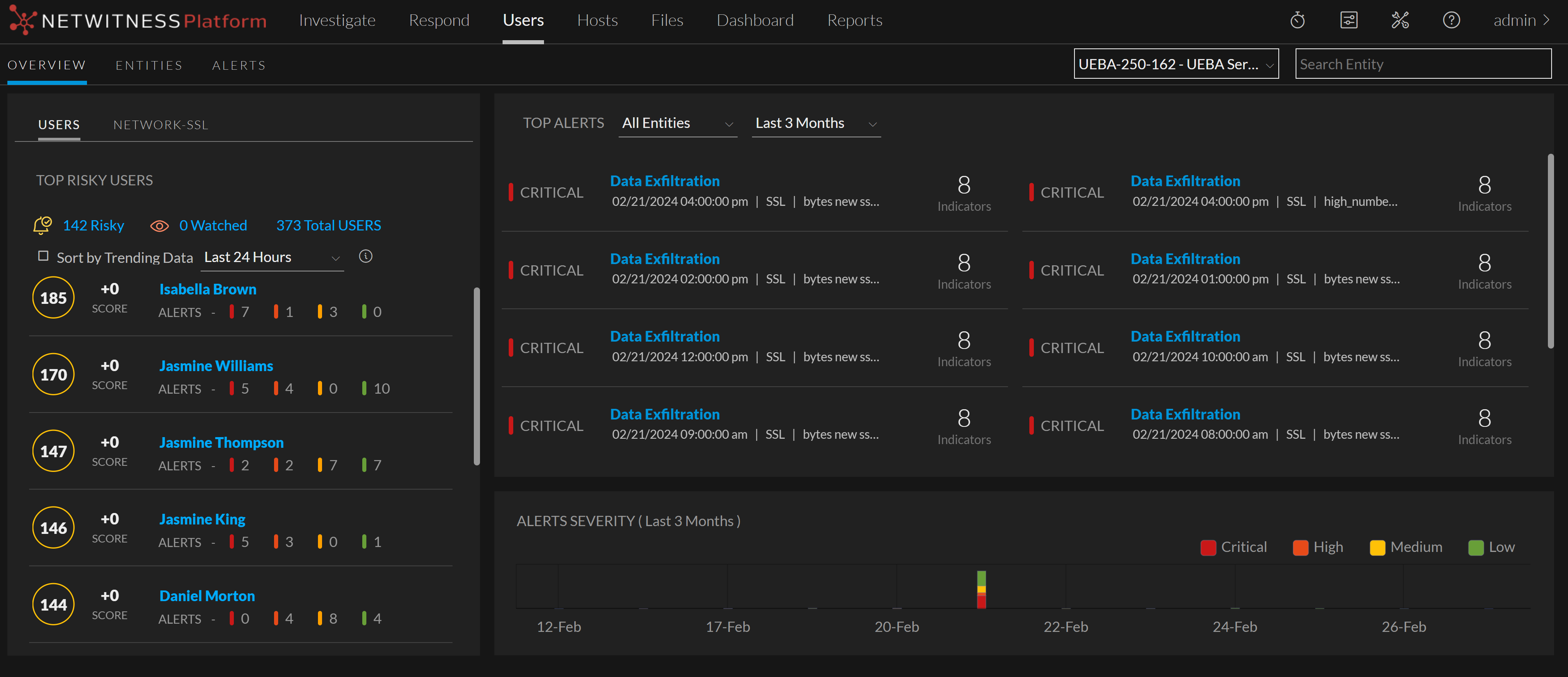
In the **OVERVIEW** tab, you can view the list of top five high-risk entities in your environment along with the risky score.
To view the top risky entities:
Log into NetWitness and go to **Investigate** \> **ENTITIES**.
The Overview tab is displayed with the high-risk users displayed in the Users tab and high-risk SSL are displayed under the Network-SSL tab.
## View All High-Risk Entities
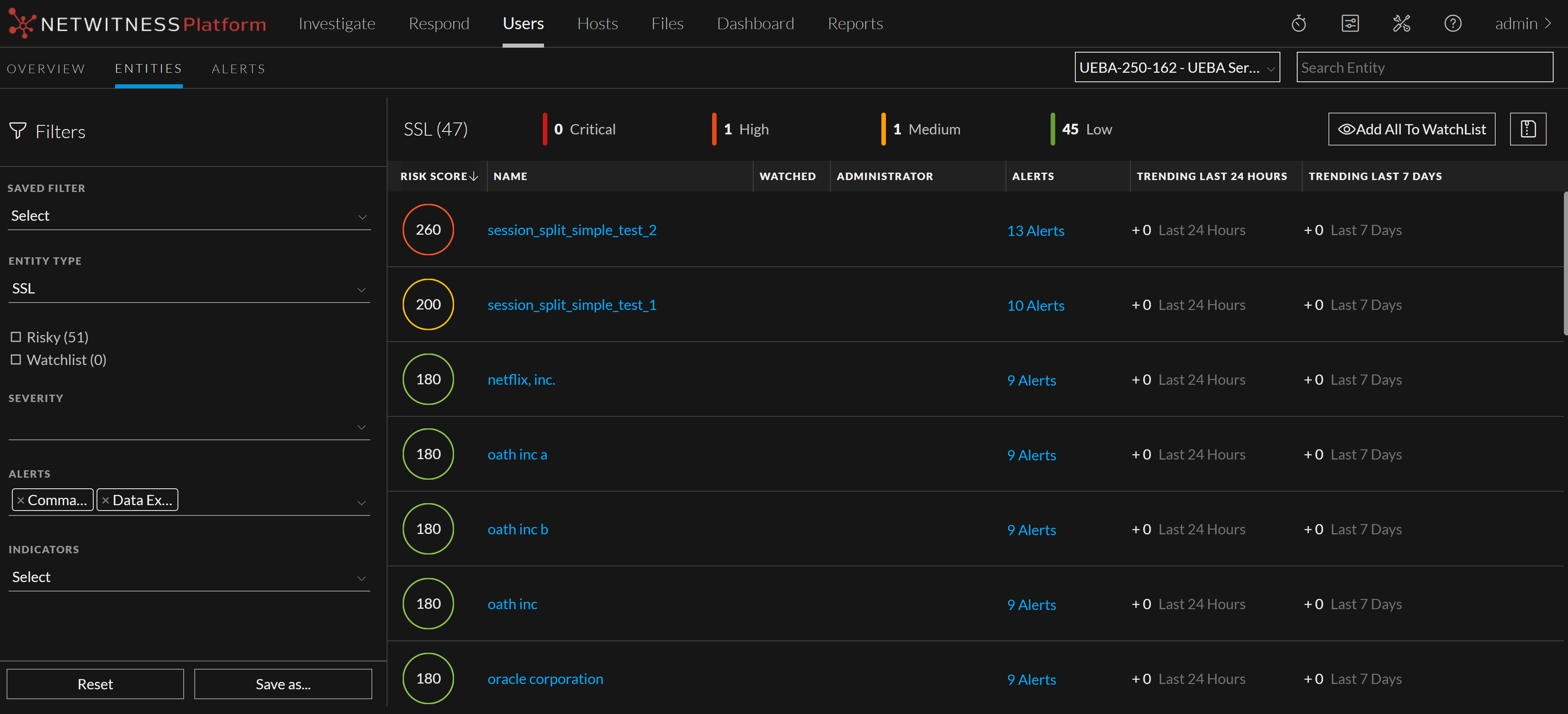
In the **Network** tab, you can view the list of all the high risk users in your environment along with the user score and total number of alerts associated with the users.
To view all high-risk users:
1. Log into NetWitness and go to **Investigate** \> **ENTITIES**.
The Overview tab is displayed.
2. Click **ENTITIES** tab.
The list of all high-risk entities are displayed.
## View Entities of Specific Group
In the **Network** tab, you can use different types of filters to identify targeted group of high-risk entity.
To view users of specific group:
1. Log into NetWitness and go to **Investigate** \> **ENTITIES**.
The Overview tab is displayed.
2. Click the **ENTITIES** tab.
3. In the **Filters** panel, do any of the following:
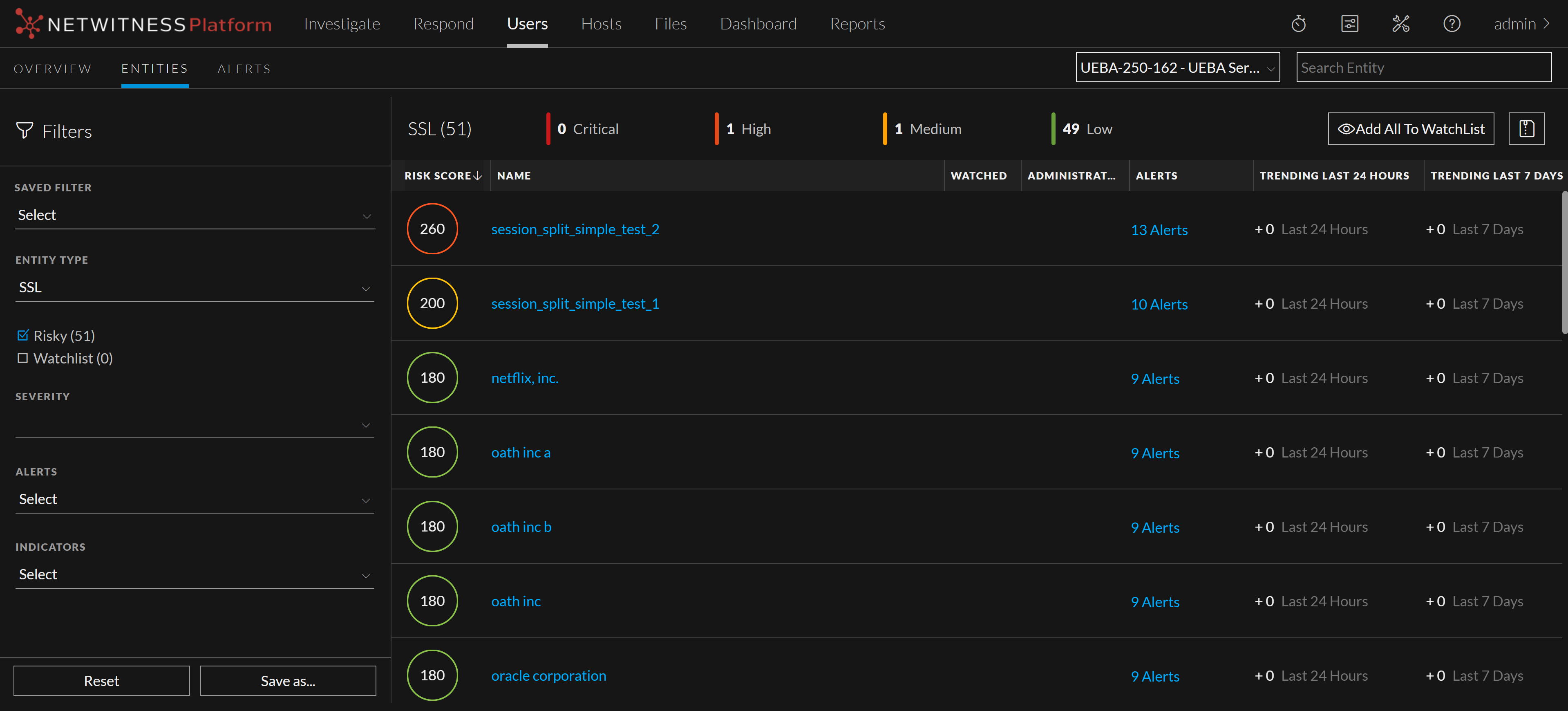
- **Risky Entities**: To view all the risky entities in your environment, select **Risky** . By default, risky entities along with their risky score are displayed.
- **Watchlist** : To view the list of entities that you added to the watchlist to monitor for specific changes, select **Watchlist**.
**Note:** You can view users of one or more group by selecting one or more filters. For example, if you want to view the list of admin users who are risky users, select the **Admin Users** and **Risky Users** filters.
## View Entity Based on Forensic Investigation
In the **ENTITIES** tab, you can use Alert Types and Indicators which are behavioral filters to view high-risk users based on forensic investigation. For more information on forensic investigation, see *Forensic Workflow* in the [Introduction](https://50269063.hs-sites.com/knowledge-base/669952?hsLang=en) topic.
To view users based on specific forensic investigation:
1. Log into NetWitness and go to **Investigate** \> **ENTITIES**.
The Overview tab is displayed.
2. Click **ENTITIES** tab.
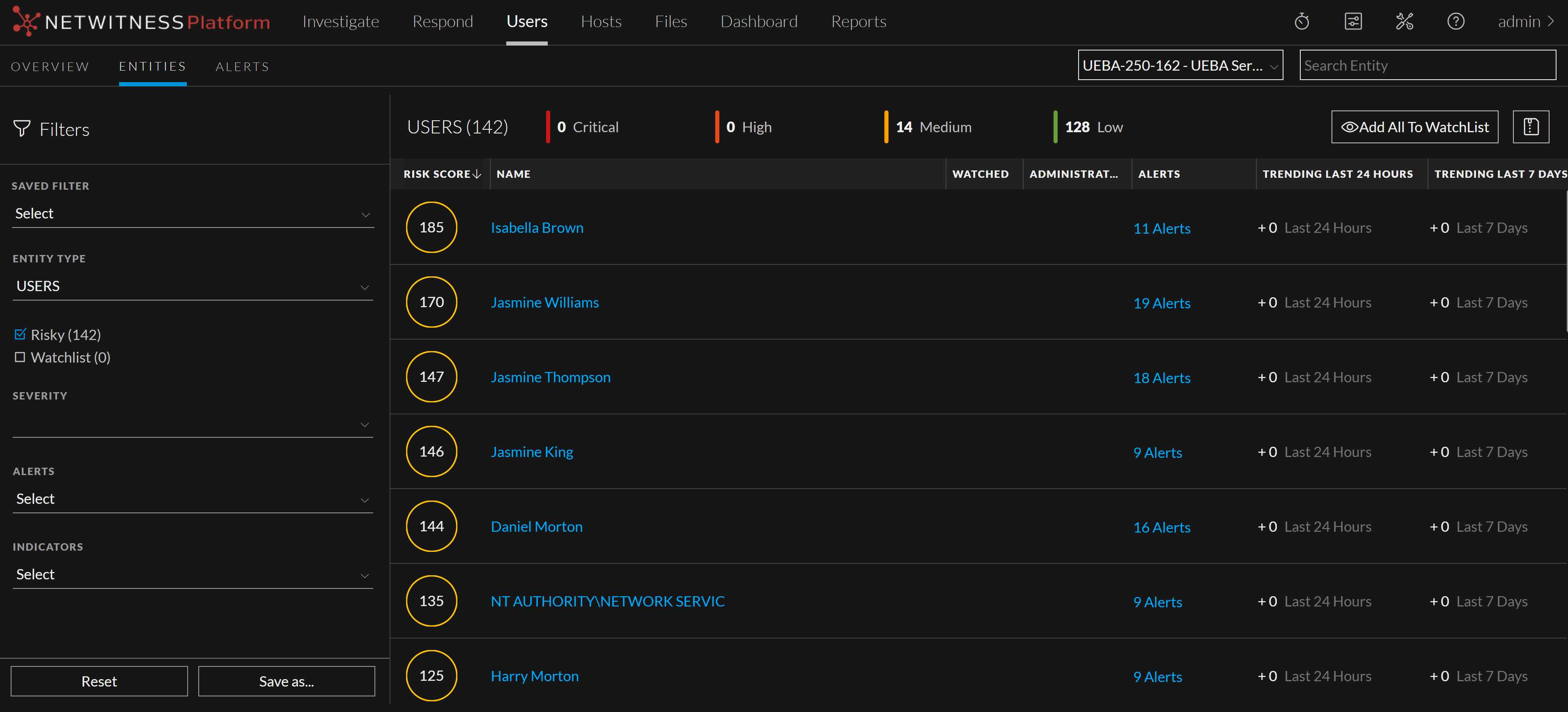
3. To create a behavioral filter using alert types, select one or more alerts in the **ALERTS** drop-down list.
4. To create a behavioral filter using indicators, select one or more indicators in the **INDICATORS** drop-down list.
5. To filter the result for SSL entity, select SSL from the **ENTITY TYPE** drop-down list.
**Note:** You can select combination of one or more alert types and indicators to create a behavioral filter based on your requirement. For example, to monitor abnormal access to confidential files and theft of sensitive data, you can create a behavioral filter with Alert Types = **Data Exfiltration** and Indicators = **Abnormal Traffic Volume Sent to Domain**.
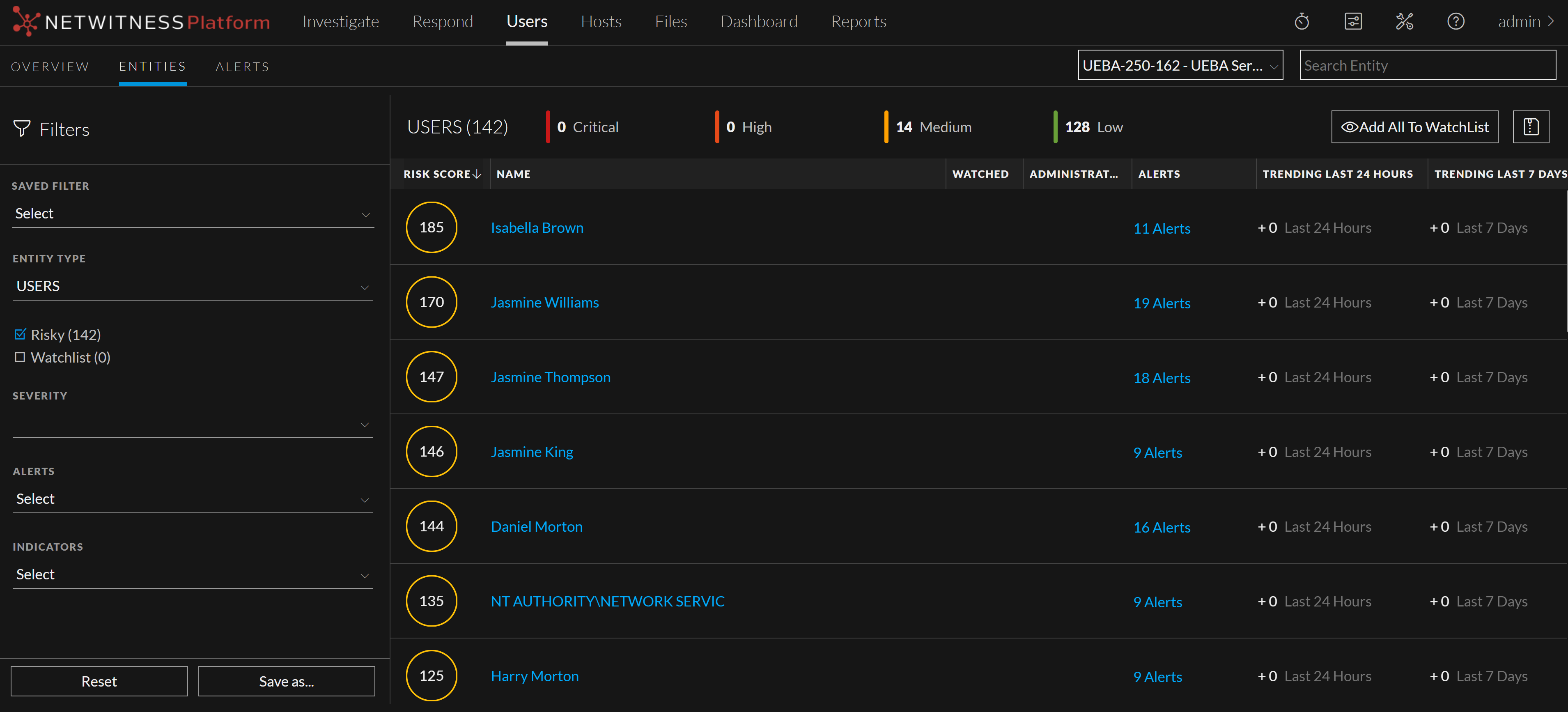
To save these behavioral filters as favorites for future investigation, click **Save as...**.
To delete the filters click **Reset Filters**.
Similarly, you can view the results for the SSL entity based on forensic investigation.
[](https://mydev.netwitness.com/?hsLang=en)
Copyright © 2026, NetWitness LLC. All rights reserved.
[NetWitness Platform](https://www.netwitness.com/)
[Acceptable Use Policy](https://www.netwitness.com/wp-content/uploads/Acceptable-Use-Policy-092022.pdf) [Privacy Statement](https://www.netwitness.com/wp-content/uploads/NetWitness-Privacy-Statement-07292024.pdf)

[](https://www.linkedin.com/company/netwitness-platform/) [](https://www.youtube.com/@netwitness)
© 2026 NetWitness LLC. All rights reserved.