---
title: How to Reset (or reboot) the iDRAC 7 Card in a Security Analytics Appliance
description: "Issue\nThese steps may be used when it is perceived that rendered information in iDRAC is not accurate (such as the case of a false positive alert), or"
---
[Skip to content](https://mydev.netwitness.com/knowledge-base/how-to-reset-or-reboot-the-idrac-7-card-in-a-security-analytics-appliance#main-content)

- [Home](https://mydev.netwitness.com/home)
- Integrations
Show submenu for Integrations
- [Netwitness Platform Integrations](https://mydev.netwitness.com/netwitnessplatformintegrations)
- [Third Party Integrations](https://mydev.netwitness.com/thirdpartyintegrations)
- [Knowledge Center](https://mydev.netwitness.com/knowledge-base)
- Community
Show submenu for Community
- [Blogs](https://mydev.netwitness.com/netwitness-security-llc-blog)
- Discussions
- Customers
Show submenu for Customers
- [Manage Products and Licenses](https://mydev.netwitness.com/nwportal)
- Downloads
- Partners
Show submenu for Partners
- [Partner Program](https://mydev.netwitness.com/partner)
- [Partner Resources](https://mydev.netwitness.com/partnerresources)
- [Submit a New Deal Registration](https://mydev.netwitness.com/dealregistration)
- [Become a Partner](https://mydev.netwitness.com/becomeapartner)
- [Update Your Partner Locator Profile](https://www.netwitness.com/partner-locator/?utm_source=pardotnewsletter&utm_medium=email&utm_campaign=partner_march)
- [NetWitness LinkedIn Partner Hub](https://linkedin.com/showcase/netwitnesspartners/)
- Education
Show submenu for Education
- [Instructor Led Training Schedule](https://mydev.netwitness.com/instructorledtrainingschedule)
- [NetWitness Training Catalog](https://mydev.netwitness.com/netwitnesstrainingcatalog)
- [Security Awareness Training](https://mydev.netwitness.com/securityawarenesstraining)
- [New Product Readiness](https://mydev.netwitness.com/newproductreadiness)
- [On-Demand Virtual Labs](https://mydev.netwitness.com/ondemandvirtuallabs)
- [Additional Training Information](https://mydev.netwitness.com/additionaltraininginformation)
- [Frequently Asked Questions](https://mydev.netwitness.com/educationfaq)
- [Contact NetWitness Education Team](https://mydev.netwitness.com/contact-netwitness-education-team)
- Support
Show submenu for Support
- [Contact Support](https://mydev.netwitness.com/contact-support)
- [Create a New Case](https://mydev.netwitness.com/create-support-case)
- [View My Cases](https://mydev.netwitness.com/viewmycase)
- [Product Version Life Cycle](https://mydev.netwitness.com/product-version-life-cycle)
- [Warranty & Replacement Parts](https://mydev.netwitness.com/warranty-and-replacement-parts)
- [Community Support Forum](https://mydev.netwitness.com/community-support-forum)
- [Technical Support Guide](https://mydev.netwitness.com/technical-support-guide)
Open main navigation
Close main navigation
- [Home](https://mydev.netwitness.com/home)
- Integrations
Show submenu for Integrations
- [Netwitness Platform Integrations](https://mydev.netwitness.com/netwitnessplatformintegrations)
- [Third Party Integrations](https://mydev.netwitness.com/thirdpartyintegrations)
- [Knowledge Center](https://mydev.netwitness.com/knowledge-base)
- Community
Show submenu for Community
- [Blogs](https://mydev.netwitness.com/netwitness-security-llc-blog)
- Discussions
- Customers
Show submenu for Customers
- [Manage Products and Licenses](https://mydev.netwitness.com/nwportal)
- Downloads
- Partners
Show submenu for Partners
- [Partner Program](https://mydev.netwitness.com/partner)
- [Partner Resources](https://mydev.netwitness.com/partnerresources)
- [Submit a New Deal Registration](https://mydev.netwitness.com/dealregistration)
- [Become a Partner](https://mydev.netwitness.com/becomeapartner)
- [Update Your Partner Locator Profile](https://www.netwitness.com/partner-locator/?utm_source=pardotnewsletter&utm_medium=email&utm_campaign=partner_march)
- [NetWitness LinkedIn Partner Hub](https://linkedin.com/showcase/netwitnesspartners/)
- Education
Show submenu for Education
- [Instructor Led Training Schedule](https://mydev.netwitness.com/instructorledtrainingschedule)
- [NetWitness Training Catalog](https://mydev.netwitness.com/netwitnesstrainingcatalog)
- [Security Awareness Training](https://mydev.netwitness.com/securityawarenesstraining)
- [New Product Readiness](https://mydev.netwitness.com/newproductreadiness)
- [On-Demand Virtual Labs](https://mydev.netwitness.com/ondemandvirtuallabs)
- [Additional Training Information](https://mydev.netwitness.com/additionaltraininginformation)
- [Frequently Asked Questions](https://mydev.netwitness.com/educationfaq)
- [Contact NetWitness Education Team](https://mydev.netwitness.com/contact-netwitness-education-team)
- Support
Show submenu for Support
- [Contact Support](https://mydev.netwitness.com/contact-support)
- [Create a New Case](https://mydev.netwitness.com/create-support-case)
- [View My Cases](https://mydev.netwitness.com/viewmycase)
- [Product Version Life Cycle](https://mydev.netwitness.com/product-version-life-cycle)
- [Warranty & Replacement Parts](https://mydev.netwitness.com/warranty-and-replacement-parts)
- [Community Support Forum](https://mydev.netwitness.com/community-support-forum)
- [Technical Support Guide](https://mydev.netwitness.com/technical-support-guide)
How can we help you?
- There are no suggestions because the search field is empty.
1. [NetWitness Knowledge Base](https://mydev.netwitness.com/knowledge-base?hsLang=en)
2. [Break Fix](https://mydev.netwitness.com/knowledge-base/break-fix?hsLang=en)
April 30, 2026
# How to Reset (or reboot) the iDRAC 7 Card in a Security Analytics Appliance
#### Issue
These steps may be used when it is perceived that rendered information in iDRAC is not accurate (such as the case of a false positive alert), or when the iDRAC is sluggish or not performing as expected.
Note resetting (or rebooting) the iDRAC through the WebUI does not impact SA appliance operation. It has no bearing or impact on the appliances' underlying OS, or SA software operation, and is not production impacting.
#### Tasks
1. Open the WebUI of the iDRAC using a supported web browser.
2. Logon using the iDRAC credentials. Note the RSA default credentials are different from the Dell default credentials.
3. Locate the "Reset iDRAC" link in the bottom, right-hand frame of the screen under the Quick Launch Tasks.
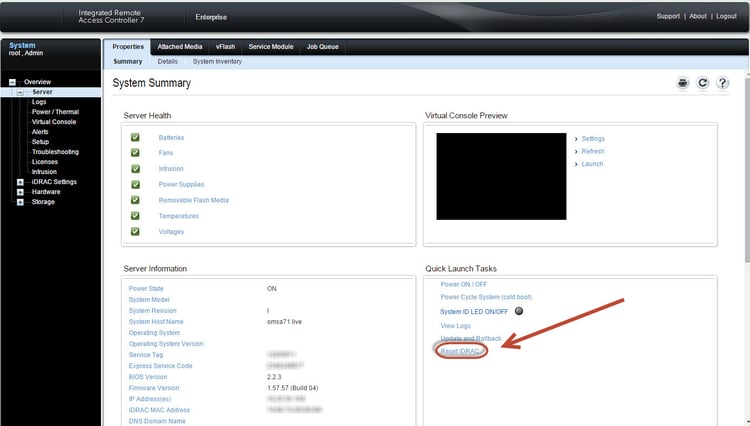
1. Click "Reset iDRAC".
2. Click "OK" in the confirmation dialog box.
1. 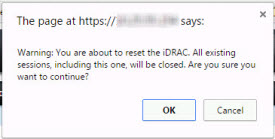
2. Verify the reset notice has appeared and wait for the iDRAC to reset.

8. Wait approximately 5 minutes, then reconnect to the iDRAC WebUI to confirm the iDRAC is now available.
#### Notes
**Note:** It is possible to reset the iDRAC from the command line providing the RACADM toolset is installed.
See the article [How to install and Use the Dell RACADM tool on Windows Workstations in conjunction with RSA Security Analytics appliances](https://mydev.netwitness.com/articles/How_To/a64764-How-to-install-and-Use-the-Dell-RACADM-tool-on-Windows-Workstations-in-conjunction-with-RSA-Security-Analytics-appliances?popup=false&sfdcIFrameOrigin=https%3A%2F%2Fna5.salesforce.com&isWsVw=true&nonce=4be371dfa435e4a570cb59143c62a7d6169bf25a8e8758af388aae476153224e&caseId=5007000001VQejx&navBack=H4sIAAAAAAAAAIuuVipWslLyzssvz0lNSU_1yM9NVdJRygaKFSSmp4ZkluSA-KVAvn58aaZ-NkyhPpCDqqs2FgCHRwp0TQAAAA&hsLang=en) for additional details.
See the Dell site for additional details on iDRAC 7
http://www.dell.com/support/manuals/us/en/19/Topic/integrated-dell-remote-access-cntrllr-7-v1.50.50/iDRAC7UG1.50.50-v1/en-us/GUID-5B8DE7B7-879F-45A4-88E0-732155904029
#### Product Details
**RSA Product Set:** Netwitness, Security Analytics,
**RSA Product/Service Type:** NextGen, Security Analytics,
**RSA Version/Condition:** 9.8.5.x, 10.3.x, 10.4.x, 10.5.x
**Platform:** CentOS
**O/S Version:** 5, 6
**Product Name:** iDRAC 7
#### Summary
This article provides information on how to reset (or reboot) the iDRAC 7 card found in a Security Analytics appliance from the iDRAC webUI.
#### Approval Reviewer Queue
ASOC Approval Group
[](https://mydev.netwitness.com/?hsLang=en)
Copyright © 2026, NetWitness LLC. All rights reserved.
[NetWitness Platform](https://www.netwitness.com/)
[Acceptable Use Policy](https://www.netwitness.com/wp-content/uploads/Acceptable-Use-Policy-092022.pdf) [Privacy Statement](https://www.netwitness.com/wp-content/uploads/NetWitness-Privacy-Statement-07292024.pdf)

[](https://www.linkedin.com/company/netwitness-platform/) [](https://www.youtube.com/@netwitness)
© 2026 NetWitness LLC. All rights reserved.