---
title: How to download the full install packages and OVA files for RSA NetWitness Logs & Network
description: "Issue\nI need to download a full install package or OVA file for my RSA NetWitness Logs & Network environment.When viewing my list of products on t"
---
[Skip to content](https://mydev.netwitness.com/knowledge-base/how-to-download-the-full-install-packages-and-ova-files-for-rsa-netwitness-logs-network#main-content)

- [Home](https://mydev.netwitness.com/home)
- Integrations
Show submenu for Integrations
- [Netwitness Platform Integrations](https://mydev.netwitness.com/netwitnessplatformintegrations)
- [Third Party Integrations](https://mydev.netwitness.com/thirdpartyintegrations)
- [Knowledge Center](https://mydev.netwitness.com/knowledge-base)
- Community
Show submenu for Community
- [Blogs](https://mydev.netwitness.com/netwitness-security-llc-blog)
- Discussions
- Customers
Show submenu for Customers
- [Manage Products and Licenses](https://mydev.netwitness.com/nwportal)
- Downloads
- Partners
Show submenu for Partners
- [Partner Program](https://mydev.netwitness.com/partner)
- [Partner Resources](https://mydev.netwitness.com/partnerresources)
- [Submit a New Deal Registration](https://mydev.netwitness.com/dealregistration)
- [Become a Partner](https://mydev.netwitness.com/becomeapartner)
- [Update Your Partner Locator Profile](https://www.netwitness.com/partner-locator/?utm_source=pardotnewsletter&utm_medium=email&utm_campaign=partner_march)
- [NetWitness LinkedIn Partner Hub](https://linkedin.com/showcase/netwitnesspartners/)
- Education
Show submenu for Education
- [Instructor Led Training Schedule](https://mydev.netwitness.com/instructorledtrainingschedule)
- [NetWitness Training Catalog](https://mydev.netwitness.com/netwitnesstrainingcatalog)
- [Security Awareness Training](https://mydev.netwitness.com/securityawarenesstraining)
- [New Product Readiness](https://mydev.netwitness.com/newproductreadiness)
- [On-Demand Virtual Labs](https://mydev.netwitness.com/ondemandvirtuallabs)
- [Additional Training Information](https://mydev.netwitness.com/additionaltraininginformation)
- [Frequently Asked Questions](https://mydev.netwitness.com/educationfaq)
- [Contact NetWitness Education Team](https://mydev.netwitness.com/contact-netwitness-education-team)
- Support
Show submenu for Support
- [Contact Support](https://mydev.netwitness.com/contact-support)
- [Create a New Case](https://mydev.netwitness.com/create-support-case)
- [View My Cases](https://mydev.netwitness.com/viewmycase)
- [Product Version Life Cycle](https://mydev.netwitness.com/product-version-life-cycle)
- [Warranty & Replacement Parts](https://mydev.netwitness.com/warranty-and-replacement-parts)
- [Community Support Forum](https://mydev.netwitness.com/community-support-forum)
- [Technical Support Guide](https://mydev.netwitness.com/technical-support-guide)
Open main navigation
Close main navigation
- [Home](https://mydev.netwitness.com/home)
- Integrations
Show submenu for Integrations
- [Netwitness Platform Integrations](https://mydev.netwitness.com/netwitnessplatformintegrations)
- [Third Party Integrations](https://mydev.netwitness.com/thirdpartyintegrations)
- [Knowledge Center](https://mydev.netwitness.com/knowledge-base)
- Community
Show submenu for Community
- [Blogs](https://mydev.netwitness.com/netwitness-security-llc-blog)
- Discussions
- Customers
Show submenu for Customers
- [Manage Products and Licenses](https://mydev.netwitness.com/nwportal)
- Downloads
- Partners
Show submenu for Partners
- [Partner Program](https://mydev.netwitness.com/partner)
- [Partner Resources](https://mydev.netwitness.com/partnerresources)
- [Submit a New Deal Registration](https://mydev.netwitness.com/dealregistration)
- [Become a Partner](https://mydev.netwitness.com/becomeapartner)
- [Update Your Partner Locator Profile](https://www.netwitness.com/partner-locator/?utm_source=pardotnewsletter&utm_medium=email&utm_campaign=partner_march)
- [NetWitness LinkedIn Partner Hub](https://linkedin.com/showcase/netwitnesspartners/)
- Education
Show submenu for Education
- [Instructor Led Training Schedule](https://mydev.netwitness.com/instructorledtrainingschedule)
- [NetWitness Training Catalog](https://mydev.netwitness.com/netwitnesstrainingcatalog)
- [Security Awareness Training](https://mydev.netwitness.com/securityawarenesstraining)
- [New Product Readiness](https://mydev.netwitness.com/newproductreadiness)
- [On-Demand Virtual Labs](https://mydev.netwitness.com/ondemandvirtuallabs)
- [Additional Training Information](https://mydev.netwitness.com/additionaltraininginformation)
- [Frequently Asked Questions](https://mydev.netwitness.com/educationfaq)
- [Contact NetWitness Education Team](https://mydev.netwitness.com/contact-netwitness-education-team)
- Support
Show submenu for Support
- [Contact Support](https://mydev.netwitness.com/contact-support)
- [Create a New Case](https://mydev.netwitness.com/create-support-case)
- [View My Cases](https://mydev.netwitness.com/viewmycase)
- [Product Version Life Cycle](https://mydev.netwitness.com/product-version-life-cycle)
- [Warranty & Replacement Parts](https://mydev.netwitness.com/warranty-and-replacement-parts)
- [Community Support Forum](https://mydev.netwitness.com/community-support-forum)
- [Technical Support Guide](https://mydev.netwitness.com/technical-support-guide)
How can we help you?
- There are no suggestions because the search field is empty.
1. [NetWitness Knowledge Base](https://mydev.netwitness.com/knowledge-base?hsLang=en)
2. [Break Fix](https://mydev.netwitness.com/knowledge-base/break-fix?hsLang=en)
April 30, 2026
# How to download the full install packages and OVA files for RSA NetWitness Logs & Network
#### Issue
I need to download a full install package or OVA file for my RSA NetWitness Logs & Network environment.
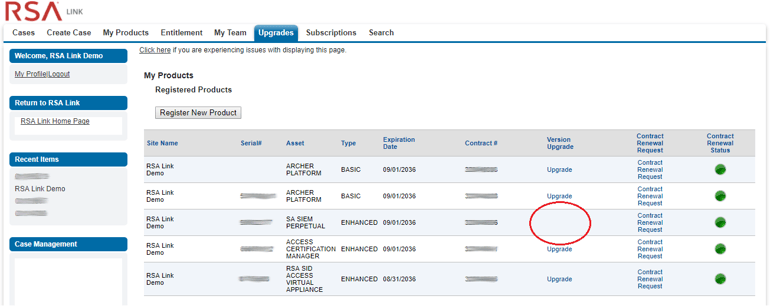
When viewing my list of products on the **Upgrades** tab in the [Case Management](https://community.rsa.com/cases) portal or on the [Version Upgrades](https://community.rsa.com/version-upgrades) portal, there is no *Upgrade* hyperlink for my RSA NetWitness product.
#### Resolution
Follow the instructions below to access and download the full install packages and OVA files for the RSA NetWitness Logs & Network (formerly RSA Security Analytics) product.
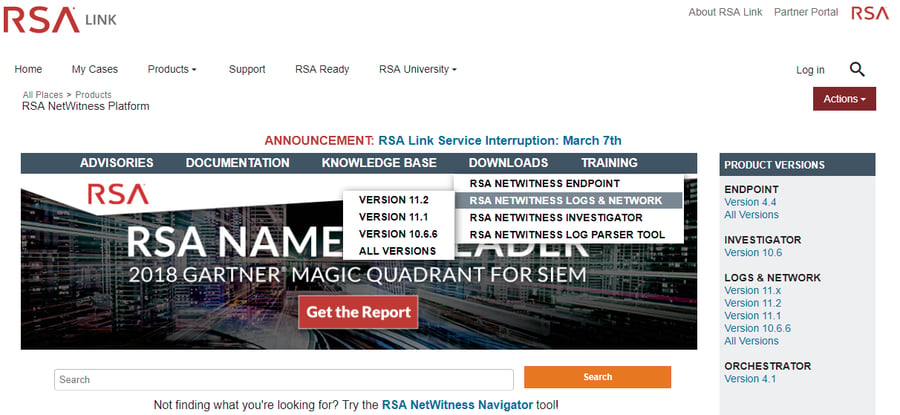
1. Log in to RSA Link and then navigate to one of the version [downloads pages](https://community.rsa.com/docs/DOC-58573#jive_content_id_Product_Downloads), such as the [RSA Security Analytics 10.6.6 Downloads](https://community.rsa.com/community/products/netwitness/1066/downloads) page.
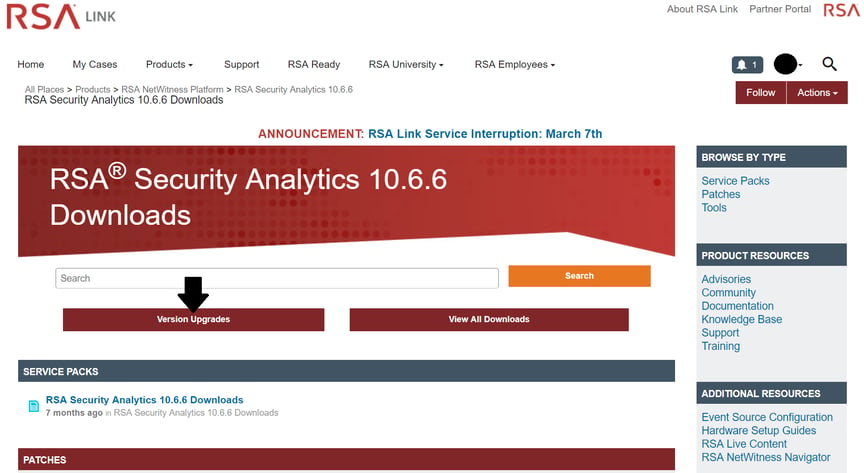
2. Click on the maroon **Version Upgrades** button just below the search bar.
3. On the myRSA home page that loads after logging on, locate and click on the appropriate product in the table that is displayed. If you have multiple sites, you will first need to select the appropriate site in the *order location* drop-down menu.

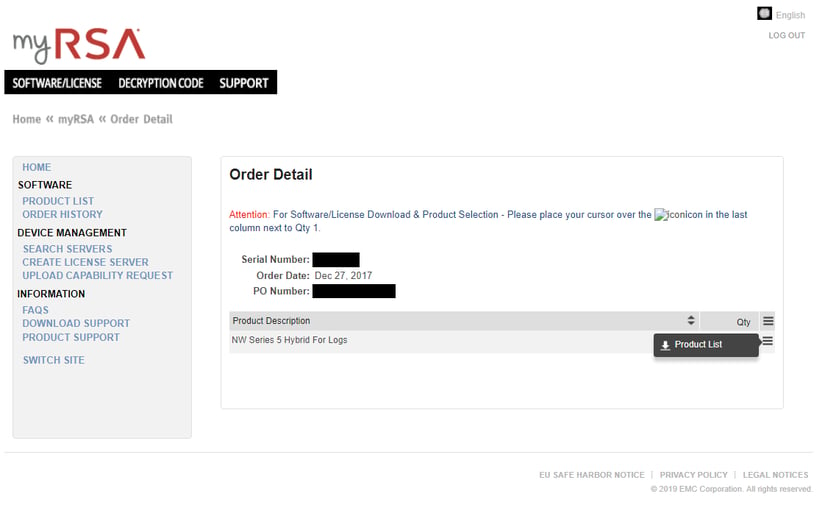
4. On the Order Detail page for the product, hover over the hamburger icon for the listed product (which may have a name such as *NW Series 5 Hybrid for Logs*) and then click on the **Product List** option that appears.
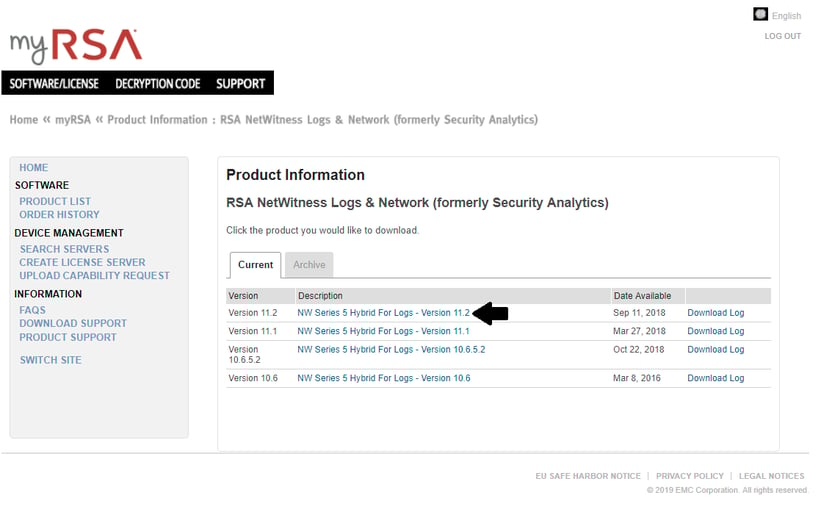
5. If presented with a list of available versions, click on the hyperlinked description for the version that you wish to download.
6. Agree to the EULA that is presented.

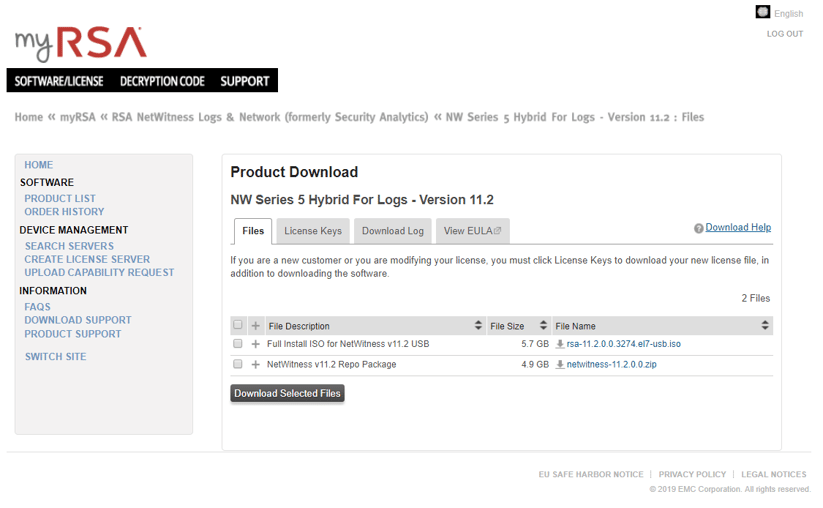
7. Download the required files individually by clicking on the file names or utilize the Download Manager by selecting multiple downloads with the checkboxes and then clicking on the **Download Selected Files** option.
Clicking on the plus (+) symbol for an item will display the checksum signature and allow you to view the compressed file contents for ZIP and TAR files.
If you are unsure of any of the steps above or experience any issues, [contact RSA Customer Support](https://community.rsa.com/docs/DOC-1294) and reference this article for further assistance.
#### Notes
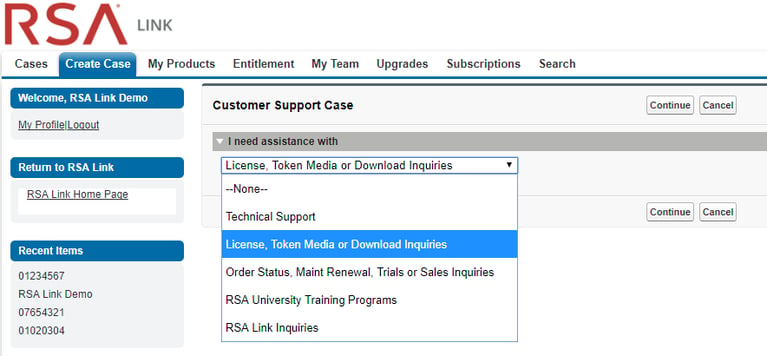
Not all users on a customer account will have access to [myRSA](https://download.rsasecurity.com). If you get an error message when attempting to access the myRSA portal in Step 2 above, then you will need to open a support case with the licensing team in order to gain access. This can be done by accessing the [Case Management](https://community.rsa.com/cases) portal, selecting the **Create Case** tab and then selecting the **License, Token Media or Download Inquiries** in the *I need assistance with* the drop-down menu.
#### Product Details
**RSA Product Set:** NetWitness Logs & Network, Security Analytics
**RSA Product/Service Type:** NetWitness Appliance (Physical or Virtual)
**RSA Version/Condition:** 10.x, 11.x
**Platform:** RSA Link (community.rsa.com), RSA Download Central (download.rsasecurity.com)
#### Approval Reviewer Queue
RSA NetWitness Suite Approval Queue
[](https://mydev.netwitness.com/?hsLang=en)
Copyright © 2026, NetWitness LLC. All rights reserved.
[NetWitness Platform](https://www.netwitness.com/)
[Acceptable Use Policy](https://www.netwitness.com/wp-content/uploads/Acceptable-Use-Policy-092022.pdf) [Privacy Statement](https://www.netwitness.com/wp-content/uploads/NetWitness-Privacy-Statement-07292024.pdf)

[](https://www.linkedin.com/company/netwitness-platform/) [](https://www.youtube.com/@netwitness)
© 2026 NetWitness LLC. All rights reserved.