---
title: How to configure external users with different roles using trusted connections in RSA Security Analytics 10.x
description: "Tasks\nThis article provides an example of how to configure external users with different roles in Security Analytics 10.x using trusted connections."
---
[Skip to content](https://mydev.netwitness.com/knowledge-base/how-to-configure-external-users-with-different-roles-using-trusted-connections-in-rsa-security-analytics-10-x#main-content)

- [Home](https://mydev.netwitness.com/home)
- Integrations
Show submenu for Integrations
- [Netwitness Platform Integrations](https://mydev.netwitness.com/netwitnessplatformintegrations)
- [Third Party Integrations](https://mydev.netwitness.com/thirdpartyintegrations)
- [Knowledge Center](https://mydev.netwitness.com/knowledge-base)
- Community
Show submenu for Community
- [Blogs](https://mydev.netwitness.com/netwitness-security-llc-blog)
- Discussions
- Customers
Show submenu for Customers
- [Manage Products and Licenses](https://mydev.netwitness.com/nwportal)
- Downloads
- Partners
Show submenu for Partners
- [Partner Program](https://mydev.netwitness.com/partner)
- [Partner Resources](https://mydev.netwitness.com/partnerresources)
- [Submit a New Deal Registration](https://mydev.netwitness.com/dealregistration)
- [Become a Partner](https://mydev.netwitness.com/becomeapartner)
- [Update Your Partner Locator Profile](https://www.netwitness.com/partner-locator/?utm_source=pardotnewsletter&utm_medium=email&utm_campaign=partner_march)
- [NetWitness LinkedIn Partner Hub](https://linkedin.com/showcase/netwitnesspartners/)
- Education
Show submenu for Education
- [Instructor Led Training Schedule](https://mydev.netwitness.com/instructorledtrainingschedule)
- [NetWitness Training Catalog](https://mydev.netwitness.com/netwitnesstrainingcatalog)
- [Security Awareness Training](https://mydev.netwitness.com/securityawarenesstraining)
- [New Product Readiness](https://mydev.netwitness.com/newproductreadiness)
- [On-Demand Virtual Labs](https://mydev.netwitness.com/ondemandvirtuallabs)
- [Additional Training Information](https://mydev.netwitness.com/additionaltraininginformation)
- [Frequently Asked Questions](https://mydev.netwitness.com/educationfaq)
- [Contact NetWitness Education Team](https://mydev.netwitness.com/contact-netwitness-education-team)
- Support
Show submenu for Support
- [Contact Support](https://mydev.netwitness.com/contact-support)
- [Create a New Case](https://mydev.netwitness.com/create-support-case)
- [View My Cases](https://mydev.netwitness.com/viewmycase)
- [Product Version Life Cycle](https://mydev.netwitness.com/product-version-life-cycle)
- [Warranty & Replacement Parts](https://mydev.netwitness.com/warranty-and-replacement-parts)
- [Community Support Forum](https://mydev.netwitness.com/community-support-forum)
- [Technical Support Guide](https://mydev.netwitness.com/technical-support-guide)
Open main navigation
Close main navigation
- [Home](https://mydev.netwitness.com/home)
- Integrations
Show submenu for Integrations
- [Netwitness Platform Integrations](https://mydev.netwitness.com/netwitnessplatformintegrations)
- [Third Party Integrations](https://mydev.netwitness.com/thirdpartyintegrations)
- [Knowledge Center](https://mydev.netwitness.com/knowledge-base)
- Community
Show submenu for Community
- [Blogs](https://mydev.netwitness.com/netwitness-security-llc-blog)
- Discussions
- Customers
Show submenu for Customers
- [Manage Products and Licenses](https://mydev.netwitness.com/nwportal)
- Downloads
- Partners
Show submenu for Partners
- [Partner Program](https://mydev.netwitness.com/partner)
- [Partner Resources](https://mydev.netwitness.com/partnerresources)
- [Submit a New Deal Registration](https://mydev.netwitness.com/dealregistration)
- [Become a Partner](https://mydev.netwitness.com/becomeapartner)
- [Update Your Partner Locator Profile](https://www.netwitness.com/partner-locator/?utm_source=pardotnewsletter&utm_medium=email&utm_campaign=partner_march)
- [NetWitness LinkedIn Partner Hub](https://linkedin.com/showcase/netwitnesspartners/)
- Education
Show submenu for Education
- [Instructor Led Training Schedule](https://mydev.netwitness.com/instructorledtrainingschedule)
- [NetWitness Training Catalog](https://mydev.netwitness.com/netwitnesstrainingcatalog)
- [Security Awareness Training](https://mydev.netwitness.com/securityawarenesstraining)
- [New Product Readiness](https://mydev.netwitness.com/newproductreadiness)
- [On-Demand Virtual Labs](https://mydev.netwitness.com/ondemandvirtuallabs)
- [Additional Training Information](https://mydev.netwitness.com/additionaltraininginformation)
- [Frequently Asked Questions](https://mydev.netwitness.com/educationfaq)
- [Contact NetWitness Education Team](https://mydev.netwitness.com/contact-netwitness-education-team)
- Support
Show submenu for Support
- [Contact Support](https://mydev.netwitness.com/contact-support)
- [Create a New Case](https://mydev.netwitness.com/create-support-case)
- [View My Cases](https://mydev.netwitness.com/viewmycase)
- [Product Version Life Cycle](https://mydev.netwitness.com/product-version-life-cycle)
- [Warranty & Replacement Parts](https://mydev.netwitness.com/warranty-and-replacement-parts)
- [Community Support Forum](https://mydev.netwitness.com/community-support-forum)
- [Technical Support Guide](https://mydev.netwitness.com/technical-support-guide)
How can we help you?
- There are no suggestions because the search field is empty.
1. [NetWitness Knowledge Base](https://mydev.netwitness.com/knowledge-base?hsLang=en)
2. [Break Fix](https://mydev.netwitness.com/knowledge-base/break-fix?hsLang=en)
April 30, 2026
# How to configure external users with different roles using trusted connections in RSA Security Analytics 10.x
#### Tasks
This article provides an example of how to configure external users with different roles in Security Analytics 10.x using trusted connections.
In this example, there are three classes of users:
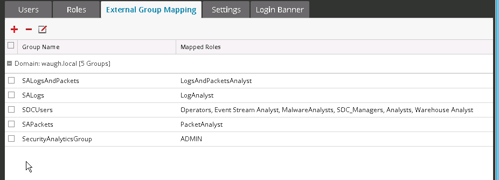
- SALogs - Users in this AD Group can only view Logs (example user is called logs)
- SAPackets - Users in this AD Group can only view Packet related Meta (example user is called packets)
- SAPackets - Users in this AD Group can view both Logs and Packet related Meta (example user is called logsnpackets)
There is one SA Server that is leveraging Active Directory for users and groups in this scenario.
Further configuration details:
- One SA Server
- One Broker which aggregates from a Packet Concentrator and a Log Concentrator
- One Packet Concentrator
- One Log Decoder and Collector hybrid
#### Resolution
Follow the steps below to configure the users.
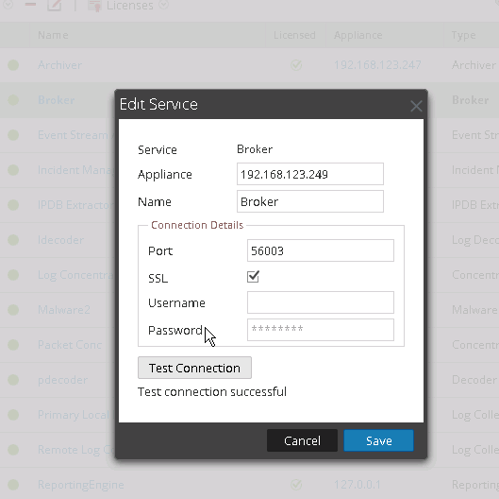
1. Ensure that each of your devices is set up to use Trusted Connections. This is done in the Security Analytics UI under Administration-\> Services and clicking on the relevant devices. By not defining a password we are using trusted connections.
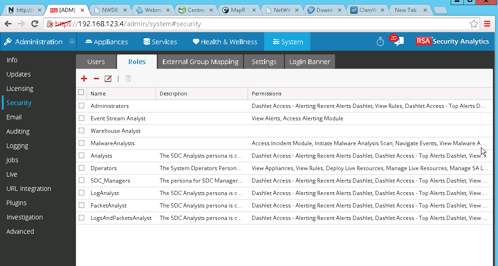
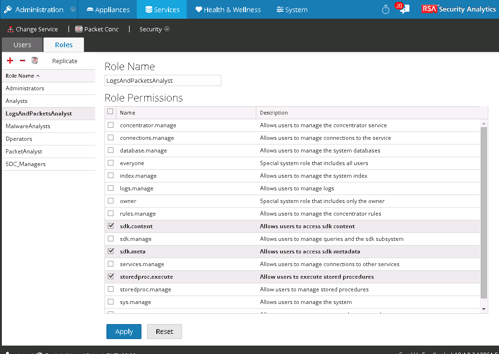
2. Define Custom Roles based on the Analyst Roles. Here I copied the analyst roles and created three new roles - LogAnalyst, PacketAnalyst and LogsAndPacketsAnalyst.
3. Add external groups Mapping to map External Active Directory Users to these groups
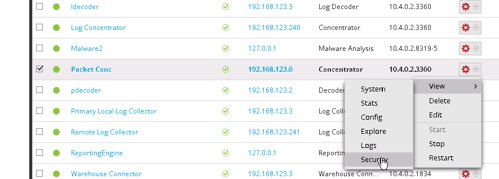
4. Now create the Roles on the Relevant Devices. For example, click on View -\> Security for the Packet Concentrator.
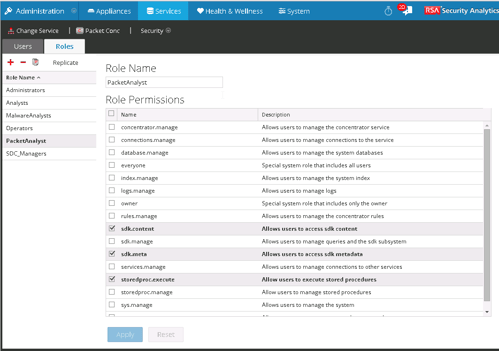
5. Create the relevant Role with the same Role name as above and give the role permissions of sdk.content, sdk.meta and storedproc.execute.
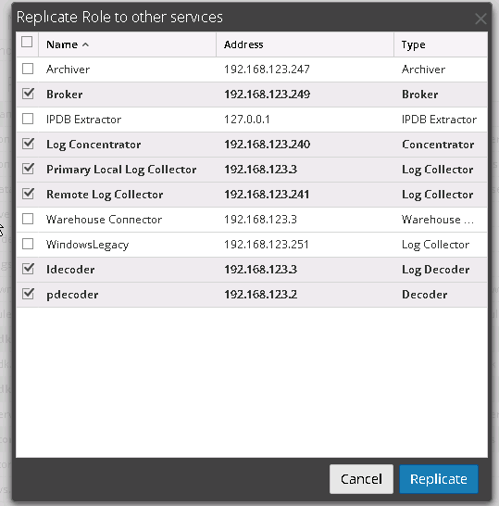
6. Replicate this Role to other devices in the same family. Eg Log Devices should have LogAnalyst Role replicate to them, Packet Devices should have PacketAnalystRole Replicated to them. LogsAndPacketsAnalyst role should be replicated to both Logs and Packet Devices.
7. Log in and test the relevant user. Each user can only gain access the devices on which they have permission. Eg Packet user can access Packet Concentrator
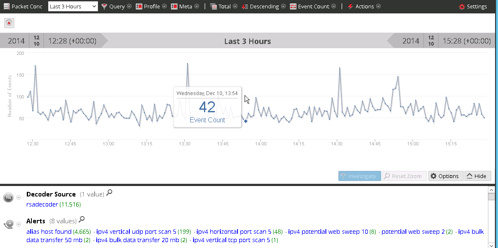
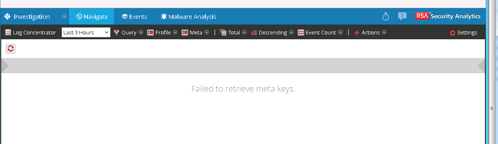
However, when the packet users try to query the Log Concentrator or any other device that does not have the Packet Analyst Role assigned they will get the error message "Failed to Retrieve Meta Keys"
#### Product Details
**RSA Product Set:** Security Analytics
**RSA Product/Service Type:** Security Analytics UI
**RSA Version/Condition:** 10.4, 10.5, 10.6
**Platform:** CentOS
**O/S Version:** EL6
#### Summary
This article provides an example of how to configure external users with different roles in Security Analytics 10.x using trusted connections.
#### Approval Reviewer Queue
RSA NetWitness Suite Approval Queue
[](https://mydev.netwitness.com/?hsLang=en)
Copyright © 2026, NetWitness LLC. All rights reserved.
[NetWitness Platform](https://www.netwitness.com/)
[Acceptable Use Policy](https://www.netwitness.com/wp-content/uploads/Acceptable-Use-Policy-092022.pdf) [Privacy Statement](https://www.netwitness.com/wp-content/uploads/NetWitness-Privacy-Statement-07292024.pdf)

[](https://www.linkedin.com/company/netwitness-platform/) [](https://www.youtube.com/@netwitness)
© 2026 NetWitness LLC. All rights reserved.