---
title: How to change forgotten RSA NetWitness iDRAC password?
description: "Issue\nUnable to login to iDRAC.The iDRAC root password was changed and is no longer known.How to change a forgotten NetWitness iDRAC password?\n\nResolu"
---
[Skip to content](https://mydev.netwitness.com/knowledge-base/how-to-change-forgotten-rsa-netwitness-idrac-password#main-content)

- [Home](https://mydev.netwitness.com/home)
- Integrations
Show submenu for Integrations
- [Netwitness Platform Integrations](https://mydev.netwitness.com/netwitnessplatformintegrations)
- [Third Party Integrations](https://mydev.netwitness.com/thirdpartyintegrations)
- [Knowledge Center](https://mydev.netwitness.com/knowledge-base)
- Community
Show submenu for Community
- [Blogs](https://mydev.netwitness.com/netwitness-security-llc-blog)
- Discussions
- Customers
Show submenu for Customers
- [Manage Products and Licenses](https://mydev.netwitness.com/nwportal)
- Downloads
- Partners
Show submenu for Partners
- [Partner Program](https://mydev.netwitness.com/partner)
- [Partner Resources](https://mydev.netwitness.com/partnerresources)
- [Submit a New Deal Registration](https://mydev.netwitness.com/dealregistration)
- [Become a Partner](https://mydev.netwitness.com/becomeapartner)
- [Update Your Partner Locator Profile](https://www.netwitness.com/partner-locator/?utm_source=pardotnewsletter&utm_medium=email&utm_campaign=partner_march)
- [NetWitness LinkedIn Partner Hub](https://linkedin.com/showcase/netwitnesspartners/)
- Education
Show submenu for Education
- [Instructor Led Training Schedule](https://mydev.netwitness.com/instructorledtrainingschedule)
- [NetWitness Training Catalog](https://mydev.netwitness.com/netwitnesstrainingcatalog)
- [Security Awareness Training](https://mydev.netwitness.com/securityawarenesstraining)
- [New Product Readiness](https://mydev.netwitness.com/newproductreadiness)
- [On-Demand Virtual Labs](https://mydev.netwitness.com/ondemandvirtuallabs)
- [Additional Training Information](https://mydev.netwitness.com/additionaltraininginformation)
- [Frequently Asked Questions](https://mydev.netwitness.com/educationfaq)
- [Contact NetWitness Education Team](https://mydev.netwitness.com/contact-netwitness-education-team)
- Support
Show submenu for Support
- [Contact Support](https://mydev.netwitness.com/contact-support)
- [Create a New Case](https://mydev.netwitness.com/create-support-case)
- [View My Cases](https://mydev.netwitness.com/viewmycase)
- [Product Version Life Cycle](https://mydev.netwitness.com/product-version-life-cycle)
- [Warranty & Replacement Parts](https://mydev.netwitness.com/warranty-and-replacement-parts)
- [Community Support Forum](https://mydev.netwitness.com/community-support-forum)
- [Technical Support Guide](https://mydev.netwitness.com/technical-support-guide)
Open main navigation
Close main navigation
- [Home](https://mydev.netwitness.com/home)
- Integrations
Show submenu for Integrations
- [Netwitness Platform Integrations](https://mydev.netwitness.com/netwitnessplatformintegrations)
- [Third Party Integrations](https://mydev.netwitness.com/thirdpartyintegrations)
- [Knowledge Center](https://mydev.netwitness.com/knowledge-base)
- Community
Show submenu for Community
- [Blogs](https://mydev.netwitness.com/netwitness-security-llc-blog)
- Discussions
- Customers
Show submenu for Customers
- [Manage Products and Licenses](https://mydev.netwitness.com/nwportal)
- Downloads
- Partners
Show submenu for Partners
- [Partner Program](https://mydev.netwitness.com/partner)
- [Partner Resources](https://mydev.netwitness.com/partnerresources)
- [Submit a New Deal Registration](https://mydev.netwitness.com/dealregistration)
- [Become a Partner](https://mydev.netwitness.com/becomeapartner)
- [Update Your Partner Locator Profile](https://www.netwitness.com/partner-locator/?utm_source=pardotnewsletter&utm_medium=email&utm_campaign=partner_march)
- [NetWitness LinkedIn Partner Hub](https://linkedin.com/showcase/netwitnesspartners/)
- Education
Show submenu for Education
- [Instructor Led Training Schedule](https://mydev.netwitness.com/instructorledtrainingschedule)
- [NetWitness Training Catalog](https://mydev.netwitness.com/netwitnesstrainingcatalog)
- [Security Awareness Training](https://mydev.netwitness.com/securityawarenesstraining)
- [New Product Readiness](https://mydev.netwitness.com/newproductreadiness)
- [On-Demand Virtual Labs](https://mydev.netwitness.com/ondemandvirtuallabs)
- [Additional Training Information](https://mydev.netwitness.com/additionaltraininginformation)
- [Frequently Asked Questions](https://mydev.netwitness.com/educationfaq)
- [Contact NetWitness Education Team](https://mydev.netwitness.com/contact-netwitness-education-team)
- Support
Show submenu for Support
- [Contact Support](https://mydev.netwitness.com/contact-support)
- [Create a New Case](https://mydev.netwitness.com/create-support-case)
- [View My Cases](https://mydev.netwitness.com/viewmycase)
- [Product Version Life Cycle](https://mydev.netwitness.com/product-version-life-cycle)
- [Warranty & Replacement Parts](https://mydev.netwitness.com/warranty-and-replacement-parts)
- [Community Support Forum](https://mydev.netwitness.com/community-support-forum)
- [Technical Support Guide](https://mydev.netwitness.com/technical-support-guide)
How can we help you?
- There are no suggestions because the search field is empty.
1. [NetWitness Knowledge Base](https://mydev.netwitness.com/knowledge-base?hsLang=en)
2. [Break Fix](https://mydev.netwitness.com/knowledge-base/break-fix?hsLang=en)
April 30, 2026
# How to change forgotten RSA NetWitness iDRAC password?
#### Issue
Unable to login to iDRAC.
The iDRAC root password was changed and is no longer known.
How to change a forgotten NetWitness iDRAC password?
#### Resolution
Below are a few options that can be used to change the iDRAC root password.
## 1. Changing the iDRAC root password from the commandline using ipmitool.
ssh login to the appliance with the iDRAC login issue.
Show a list of all iDRAC user accounts.
ipmitool user list 1
For example:
**ipmitool user list 1**
ID Name Callin Link Auth IPMI Msg Channel Priv Limit
1 true false false NO ACCESS
2 root true true true ADMINISTRATOR
3 true false false NO ACCESS
:
etc.
In the above example output ID 2 is the root login, so use the following command to change the password of ID 2,
ipmitool user set password 2
You will be prompted to enter the new password.
For example:
**ipmitool user set password 2**
Password for user 2:
## 2. Changing the iDRAC root password from the commandline using racadm.
The Dell racadm program, is not installed by default on NetWitness appliances, however the racadm program is installed by following the below RSA Knowledgebase article.
Reference: [How to Determine Add On Components for RSA NetWitness Platform Servers Using TSR Reports](https://mydev.netwitness.com/articles/en_US/How_To/How-to-Determine-Add-On-Components-for-RSA-NetWitness-Platform-Servers-Using-TSR-Reports?srKp=ka0&srPos=2&sfdcIFrameOrigin=https%3A%2F%2Frsasecurity.my.salesforce.com&isWsVw=true&nonce=d39629a8b10b87b25e497cf47ef6c54935a6107eab2a183df39c15b4b9a82d78&hsLang=en)
Follow KB instructions to install the commandline packages in the rsa\_hw\_report\_v4.tar file.
Once the radadm program is installed then change the iDRAC root password with the following syntax.
racadm set idrac.users.2.password *{New Password}*
**Or**
racadm config -g cfguseradmin -i 2 -o cfgUserAdminPassword *{New Password}*
## 3. Change the iDRAC root password on-site from the appliance console.
While on-site at the appliance console.
Boot the appliance and enter the iDRAC configuration utility using Ctrl+E during Power-on Self-test (POST).
Go to User Authentication, to change the iDRAC root password.
**Or**
Boot the appliance into System Setup using \[F2\] key.
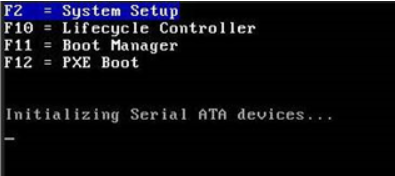
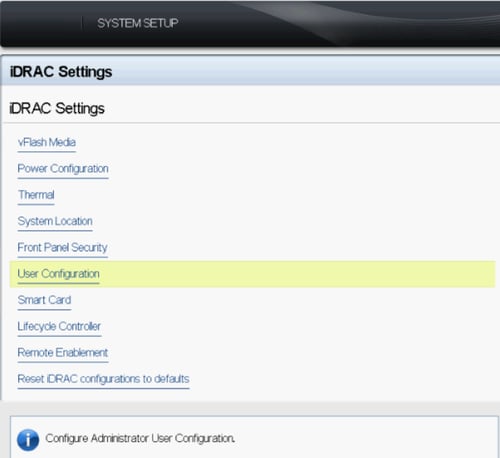
In System Setup click on iDRAC Settings \> User Configuration, to change the login password.

#### Notes
If setting the iDRAC root password using the above actions all fail then try reset the iDRAC card with one of the options below.
Then try setting the password with the above steps again.
## 1. iDRAC reset using racadm
racadm racreset for a soft reset (no saved settings are changed)
**Or**
racadm racresetcfg for a hard reset (IP and Account settings are reset back to factory default, so full config needs to be re-entered).
Resetting the iDRAC does not affect the server, it only reboots the iDRAC card. Allow about 5 minutes for the iDRAC card reset to complete.
## 2. iDRAC reset on-site using the "i" button
On the front of the NetWitness appliance under the front cover panel, there is a small "i" labeled button.
Press and hold the "i" button for at least 30 seconds. Stop pressing the button when the cooling fans start spinning at full speed, which indicates the iDRAC card reset has started.
Reference: [How to reset the internal Dell Remote Access Controller (iDRAC) on a PowerEdge server?](https://www.dell.com/support/article/en-au/sln305793/how-to-reset-the-internal-dell-remote-access-controller-idrac-on-a-poweredge-server)
#### Product Details
**RSA Product Set:** RSA NetWitness Platform
**RSA Version/Condition:** 10.6.x, 11.x
**Platform:** CentOS
**Platform (Other):** Dell PowerEdge appliance
#### Summary
The iDRAC root password was changed and is no longer known.
#### Approval Reviewer Queue
RSA NetWitness Suite Approval Queue
[](https://mydev.netwitness.com/?hsLang=en)
Copyright © 2026, NetWitness LLC. All rights reserved.
[NetWitness Platform](https://www.netwitness.com/)
[Acceptable Use Policy](https://www.netwitness.com/wp-content/uploads/Acceptable-Use-Policy-092022.pdf) [Privacy Statement](https://www.netwitness.com/wp-content/uploads/NetWitness-Privacy-Statement-07292024.pdf)

[](https://www.linkedin.com/company/netwitness-platform/) [](https://www.youtube.com/@netwitness)
© 2026 NetWitness LLC. All rights reserved.