---
title: How to add custom meta keys in RSA NetWitness Platform
description: "Issue\nHow to add custom meta keys in RSA NetWitness?What is the process of adding custom language keys in RSA NetWitness?After adding custom meta keys"
---
[Skip to content](https://mydev.netwitness.com/knowledge-base/how-to-add-custom-meta-keys-in-rsa-netwitness-platform#main-content)

- [Home](https://mydev.netwitness.com/home)
- Integrations
Show submenu for Integrations
- [Netwitness Platform Integrations](https://mydev.netwitness.com/netwitnessplatformintegrations)
- [Third Party Integrations](https://mydev.netwitness.com/thirdpartyintegrations)
- [Knowledge Center](https://mydev.netwitness.com/knowledge-base)
- Community
Show submenu for Community
- [Blogs](https://mydev.netwitness.com/netwitness-security-llc-blog)
- Discussions
- Customers
Show submenu for Customers
- [Manage Products and Licenses](https://mydev.netwitness.com/nwportal)
- Downloads
- Partners
Show submenu for Partners
- [Partner Program](https://mydev.netwitness.com/partner)
- [Partner Resources](https://mydev.netwitness.com/partnerresources)
- [Submit a New Deal Registration](https://mydev.netwitness.com/dealregistration)
- [Become a Partner](https://mydev.netwitness.com/becomeapartner)
- [Update Your Partner Locator Profile](https://www.netwitness.com/partner-locator/?utm_source=pardotnewsletter&utm_medium=email&utm_campaign=partner_march)
- [NetWitness LinkedIn Partner Hub](https://linkedin.com/showcase/netwitnesspartners/)
- Education
Show submenu for Education
- [Instructor Led Training Schedule](https://mydev.netwitness.com/instructorledtrainingschedule)
- [NetWitness Training Catalog](https://mydev.netwitness.com/netwitnesstrainingcatalog)
- [Security Awareness Training](https://mydev.netwitness.com/securityawarenesstraining)
- [New Product Readiness](https://mydev.netwitness.com/newproductreadiness)
- [On-Demand Virtual Labs](https://mydev.netwitness.com/ondemandvirtuallabs)
- [Additional Training Information](https://mydev.netwitness.com/additionaltraininginformation)
- [Frequently Asked Questions](https://mydev.netwitness.com/educationfaq)
- [Contact NetWitness Education Team](https://mydev.netwitness.com/contact-netwitness-education-team)
- Support
Show submenu for Support
- [Contact Support](https://mydev.netwitness.com/contact-support)
- [Create a New Case](https://mydev.netwitness.com/create-support-case)
- [View My Cases](https://mydev.netwitness.com/viewmycase)
- [Product Version Life Cycle](https://mydev.netwitness.com/product-version-life-cycle)
- [Warranty & Replacement Parts](https://mydev.netwitness.com/warranty-and-replacement-parts)
- [Community Support Forum](https://mydev.netwitness.com/community-support-forum)
- [Technical Support Guide](https://mydev.netwitness.com/technical-support-guide)
Open main navigation
Close main navigation
- [Home](https://mydev.netwitness.com/home)
- Integrations
Show submenu for Integrations
- [Netwitness Platform Integrations](https://mydev.netwitness.com/netwitnessplatformintegrations)
- [Third Party Integrations](https://mydev.netwitness.com/thirdpartyintegrations)
- [Knowledge Center](https://mydev.netwitness.com/knowledge-base)
- Community
Show submenu for Community
- [Blogs](https://mydev.netwitness.com/netwitness-security-llc-blog)
- Discussions
- Customers
Show submenu for Customers
- [Manage Products and Licenses](https://mydev.netwitness.com/nwportal)
- Downloads
- Partners
Show submenu for Partners
- [Partner Program](https://mydev.netwitness.com/partner)
- [Partner Resources](https://mydev.netwitness.com/partnerresources)
- [Submit a New Deal Registration](https://mydev.netwitness.com/dealregistration)
- [Become a Partner](https://mydev.netwitness.com/becomeapartner)
- [Update Your Partner Locator Profile](https://www.netwitness.com/partner-locator/?utm_source=pardotnewsletter&utm_medium=email&utm_campaign=partner_march)
- [NetWitness LinkedIn Partner Hub](https://linkedin.com/showcase/netwitnesspartners/)
- Education
Show submenu for Education
- [Instructor Led Training Schedule](https://mydev.netwitness.com/instructorledtrainingschedule)
- [NetWitness Training Catalog](https://mydev.netwitness.com/netwitnesstrainingcatalog)
- [Security Awareness Training](https://mydev.netwitness.com/securityawarenesstraining)
- [New Product Readiness](https://mydev.netwitness.com/newproductreadiness)
- [On-Demand Virtual Labs](https://mydev.netwitness.com/ondemandvirtuallabs)
- [Additional Training Information](https://mydev.netwitness.com/additionaltraininginformation)
- [Frequently Asked Questions](https://mydev.netwitness.com/educationfaq)
- [Contact NetWitness Education Team](https://mydev.netwitness.com/contact-netwitness-education-team)
- Support
Show submenu for Support
- [Contact Support](https://mydev.netwitness.com/contact-support)
- [Create a New Case](https://mydev.netwitness.com/create-support-case)
- [View My Cases](https://mydev.netwitness.com/viewmycase)
- [Product Version Life Cycle](https://mydev.netwitness.com/product-version-life-cycle)
- [Warranty & Replacement Parts](https://mydev.netwitness.com/warranty-and-replacement-parts)
- [Community Support Forum](https://mydev.netwitness.com/community-support-forum)
- [Technical Support Guide](https://mydev.netwitness.com/technical-support-guide)
How can we help you?
- There are no suggestions because the search field is empty.
1. [NetWitness Knowledge Base](https://mydev.netwitness.com/knowledge-base?hsLang=en)
2. [Break Fix](https://mydev.netwitness.com/knowledge-base/break-fix?hsLang=en)
April 30, 2026
# How to add custom meta keys in RSA NetWitness Platform
#### Issue
How to add custom meta keys in RSA NetWitness?
What is the process of adding custom language keys in RSA NetWitness?
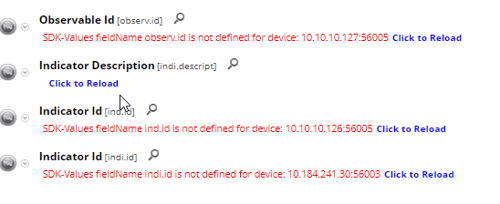
After adding custom meta keys in my concentrators, I can see the custom meta keys show up when Investigating directly using the concentrators, but why is the broker rendering errors in Investigations such as below:
#### Tasks
In RSA NetWitness, the default configuration of meta keys is stored in the index- .xml files (for example, index-concentrator.xml) on the NetWitness appliances.
The contents of these default files should not be manually changed as a new version of these files may be deployed during version upgrades.
Beginning from RSA NetWitness 10.0 a custom XML file, index- -custom.xml (for example, index-concentrator-custom.xml) can be created in the same directory as the default file.
The custom XML file will not be modified or overwritten during a version upgrades.
Customization changes of the default settings, or adding new custom meta keys should be added to the custom XML file.
Add the custom meta key lines or meta key modifications only to the index-concentrator-custom.xml file. No need to edit or add on the index- -custom.xml files.
The broker does not have their own index nor database, it only gets its unified index keys from the concentrators and/or brokers below it.
To ensure that the broker gets a unified index (language keys), edit (using the UI) and push the modified index-concentrator-custom.xml file to all the rest of the concentrators. Restart the concentrator services or initiate an index save on each (using concentrator\>view\>explore\>index right-click-properties, select save in the drop-down and send) for the service to pick up the modified index language keys.
It is important for all concentrators to have a single uniform index-concentrator-custom.xml file so it will have a unified language definition that will in turn be picked up the broker.
There are times that you may also need to do an index reset on the broker to have it pick up immediately the new index language keys from its concentrators.
To initiate an index reset on the broker, go to Services\>broker\>view\>explore\>broker right-click-properties, select reset in the drop-down, enter index=1 in the Parameters and send.
#### Resolution
How to add custom meta keys in RSA NetWitness Platform
Changes to default meta keys' configuration and the addition of new custom meta keys is made to the custom XML file, index- -custom.xml which will be in the /var/netwitness/ng directory.
For example,
Decoder service has index-decoder-custom.xml
Log Decoder service has index-logdecoder-custom.xml
Concentrator service has index-concentrator-custom.xml
The index--custom.xml file requires the basic xml definition statements at the top and bottom of the file to work correctly, so ensure that these lines exist when adding new keys. By default, these xml definition statements and some comments (instructions) are already written for you in the file, do not delete them, just add your custom keys lines as directed on the file.
If these lines are not present in the XML file, the service will **not** start and errors will be generated in the /var/log/messages file.
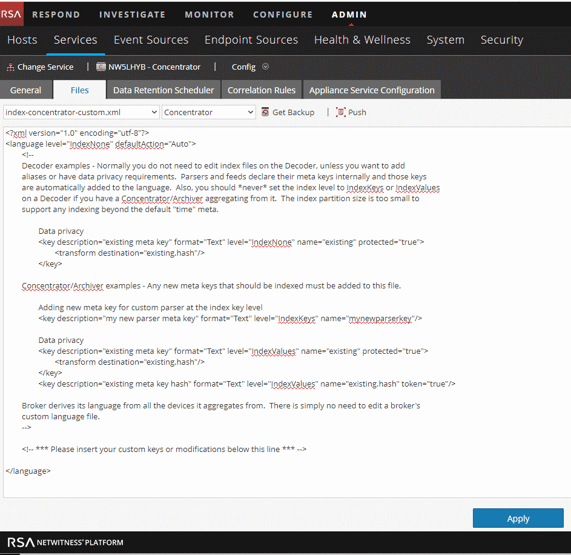
This example shows an XML file with no custom meta keys and includes just the default xml file format with some comment lines.
This example shows an XML file with a single custom meta key for "Destination E-Mail Address", settings are set to "IndexValues" with a format of "Text" and a valueMax of 2500000.
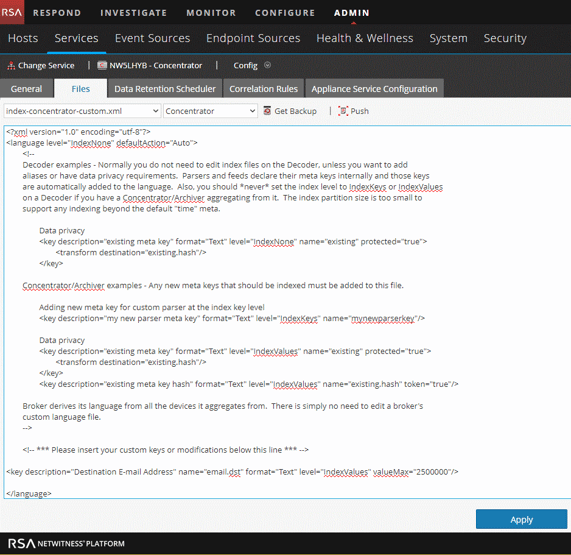
To save and deploy the new setting on the NetWitness appliance, select the Apply button.
The XML file can also be deployed to other NetWitness appliances by clicking on the Push button and selecting the destination NetWitness appliance. Only deploy the XML file to a NetWitness appliance that runs that service.
**Note:** Any entries in the index--custom.xml file will replace any similar entry in the default index-.xml files.
So, if want to change any default meta key in the standard index-.xml file (for example change a IndexKeys setting to IndexValues) simply copy the line for that meta key entry into the custom XML file and change the settings for that meta key there.
If you have any questions about the information above or experience any issues, contact RSA Support and quote this article ID for further assistance.
#### Product Details
**RSA Product Set:** NetWitness Platform
**RSA Product/Service Type:** NetWitness Core services
**RSA Version/Condition:** 10.6.x, 11.x
#### Summary
Where can custom meta keys be added in RSA NetWitness Platform?
#### Approval Reviewer Queue
RSA NetWitness Suite Approval Queue
[](https://mydev.netwitness.com/?hsLang=en)
Copyright © 2026, NetWitness LLC. All rights reserved.
[NetWitness Platform](https://www.netwitness.com/)
[Acceptable Use Policy](https://www.netwitness.com/wp-content/uploads/Acceptable-Use-Policy-092022.pdf) [Privacy Statement](https://www.netwitness.com/wp-content/uploads/NetWitness-Privacy-Statement-07292024.pdf)

[](https://www.linkedin.com/company/netwitness-platform/) [](https://www.youtube.com/@netwitness)
© 2026 NetWitness LLC. All rights reserved.