---
title: How can I contact Customer Support for issues or questions relating to RSA Link?
description: "Issue\nI am having an issue on RSA Link such as being unable to login or getting an error message when attempting to access content or downloads and I"
---
[Skip to content](https://mydev.netwitness.com/knowledge-base/how-can-i-contact-customer-support-for-issues-or-questions-relating-to-rsa-link#main-content)

- [Home](https://mydev.netwitness.com/home)
- Integrations
Show submenu for Integrations
- [Netwitness Platform Integrations](https://mydev.netwitness.com/netwitnessplatformintegrations)
- [Third Party Integrations](https://mydev.netwitness.com/thirdpartyintegrations)
- [Knowledge Center](https://mydev.netwitness.com/knowledge-base)
- Community
Show submenu for Community
- [Blogs](https://mydev.netwitness.com/netwitness-security-llc-blog)
- Discussions
- Customers
Show submenu for Customers
- [Manage Products and Licenses](https://mydev.netwitness.com/nwportal)
- Downloads
- Partners
Show submenu for Partners
- [Partner Program](https://mydev.netwitness.com/partner)
- [Partner Resources](https://mydev.netwitness.com/partnerresources)
- [Submit a New Deal Registration](https://mydev.netwitness.com/dealregistration)
- [Become a Partner](https://mydev.netwitness.com/becomeapartner)
- [Update Your Partner Locator Profile](https://www.netwitness.com/partner-locator/?utm_source=pardotnewsletter&utm_medium=email&utm_campaign=partner_march)
- [NetWitness LinkedIn Partner Hub](https://linkedin.com/showcase/netwitnesspartners/)
- Education
Show submenu for Education
- [Instructor Led Training Schedule](https://mydev.netwitness.com/instructorledtrainingschedule)
- [NetWitness Training Catalog](https://mydev.netwitness.com/netwitnesstrainingcatalog)
- [Security Awareness Training](https://mydev.netwitness.com/securityawarenesstraining)
- [New Product Readiness](https://mydev.netwitness.com/newproductreadiness)
- [On-Demand Virtual Labs](https://mydev.netwitness.com/ondemandvirtuallabs)
- [Additional Training Information](https://mydev.netwitness.com/additionaltraininginformation)
- [Frequently Asked Questions](https://mydev.netwitness.com/educationfaq)
- [Contact NetWitness Education Team](https://mydev.netwitness.com/contact-netwitness-education-team)
- Support
Show submenu for Support
- [Contact Support](https://mydev.netwitness.com/contact-support)
- [Create a New Case](https://mydev.netwitness.com/create-support-case)
- [View My Cases](https://mydev.netwitness.com/viewmycase)
- [Product Version Life Cycle](https://mydev.netwitness.com/product-version-life-cycle)
- [Warranty & Replacement Parts](https://mydev.netwitness.com/warranty-and-replacement-parts)
- [Community Support Forum](https://mydev.netwitness.com/community-support-forum)
- [Technical Support Guide](https://mydev.netwitness.com/technical-support-guide)
Open main navigation
Close main navigation
- [Home](https://mydev.netwitness.com/home)
- Integrations
Show submenu for Integrations
- [Netwitness Platform Integrations](https://mydev.netwitness.com/netwitnessplatformintegrations)
- [Third Party Integrations](https://mydev.netwitness.com/thirdpartyintegrations)
- [Knowledge Center](https://mydev.netwitness.com/knowledge-base)
- Community
Show submenu for Community
- [Blogs](https://mydev.netwitness.com/netwitness-security-llc-blog)
- Discussions
- Customers
Show submenu for Customers
- [Manage Products and Licenses](https://mydev.netwitness.com/nwportal)
- Downloads
- Partners
Show submenu for Partners
- [Partner Program](https://mydev.netwitness.com/partner)
- [Partner Resources](https://mydev.netwitness.com/partnerresources)
- [Submit a New Deal Registration](https://mydev.netwitness.com/dealregistration)
- [Become a Partner](https://mydev.netwitness.com/becomeapartner)
- [Update Your Partner Locator Profile](https://www.netwitness.com/partner-locator/?utm_source=pardotnewsletter&utm_medium=email&utm_campaign=partner_march)
- [NetWitness LinkedIn Partner Hub](https://linkedin.com/showcase/netwitnesspartners/)
- Education
Show submenu for Education
- [Instructor Led Training Schedule](https://mydev.netwitness.com/instructorledtrainingschedule)
- [NetWitness Training Catalog](https://mydev.netwitness.com/netwitnesstrainingcatalog)
- [Security Awareness Training](https://mydev.netwitness.com/securityawarenesstraining)
- [New Product Readiness](https://mydev.netwitness.com/newproductreadiness)
- [On-Demand Virtual Labs](https://mydev.netwitness.com/ondemandvirtuallabs)
- [Additional Training Information](https://mydev.netwitness.com/additionaltraininginformation)
- [Frequently Asked Questions](https://mydev.netwitness.com/educationfaq)
- [Contact NetWitness Education Team](https://mydev.netwitness.com/contact-netwitness-education-team)
- Support
Show submenu for Support
- [Contact Support](https://mydev.netwitness.com/contact-support)
- [Create a New Case](https://mydev.netwitness.com/create-support-case)
- [View My Cases](https://mydev.netwitness.com/viewmycase)
- [Product Version Life Cycle](https://mydev.netwitness.com/product-version-life-cycle)
- [Warranty & Replacement Parts](https://mydev.netwitness.com/warranty-and-replacement-parts)
- [Community Support Forum](https://mydev.netwitness.com/community-support-forum)
- [Technical Support Guide](https://mydev.netwitness.com/technical-support-guide)
How can we help you?
- There are no suggestions because the search field is empty.
1. [NetWitness Knowledge Base](https://mydev.netwitness.com/knowledge-base?hsLang=en)
2. [Break Fix](https://mydev.netwitness.com/knowledge-base/break-fix?hsLang=en)
April 30, 2026
# How can I contact Customer Support for issues or questions relating to RSA Link?
#### Issue
I am having an issue on RSA Link such as being unable to login or getting an error message when attempting to access content or downloads and I need to know how to contact RSA Customer Support for assistance.
#### Resolution
There are three different ways to get assistance with issues and questions relating to RSA Link, which are explained in the sections below.
- [Case Management Portal](https://mydev.netwitness.com/knowledge-base/how-can-i-contact-customer-support-for-issues-or-questions-relating-to-rsa-link#caseManagement)
- [RSA Link Contact Form](https://mydev.netwitness.com/knowledge-base/how-can-i-contact-customer-support-for-issues-or-questions-relating-to-rsa-link#contactForm)
- [RSA Customer Support Community](https://mydev.netwitness.com/knowledge-base/how-can-i-contact-customer-support-for-issues-or-questions-relating-to-rsa-link#community)
## Case Management Portal
If you are able to successfully log in and have registered as a customer or partner then you can access the [Case Management portal](https://community.rsa.com/cases) by clicking on the **My Cases** option in the website's main menu or by navigating directly to [https://community.rsa.com/cases](https://community.rsa.com/cases).

On the [Case Management portal](https://community.rsa.com/cases) you will then need to click on the **Create Case** tab or the **Create New Case** button to access the case creation form.

You can then select the **RSA Link Inquiries** option in the **I need assistance with** drop down list and click **Continue** to proceed with opening a support case for your issue.
For additional instructions on opening support cases via the [Case Management portal](https://community.rsa.com/cases) you can refer to the article entitled [How to open a technical support case via the Case Management portal on RSA Link](https://mydev.netwitness.com/articles/en_US/How_To/How-to-open-a-technical-support-case-via-the-Case-portal-on-RSA-Link?popup=false&navBack=H4sIAAAAAAAAAIuuVipWslLyzssvz0lNSU_1yM9NVdJRygaKFSSmp4ZkluSA-KVAvn58aaZ-NkyhPpCDosu-ODWxKDnD1gAIjM2MjMyVamMBIA-uQ14AAAA&sfdcIFrameOrigin=https%3A%2F%2Frsasecurity.my.salesforce.com&nonce=7cd517c90680882cc45c44fb32cbca9897307290e8bfd8688d7dfa60e3d94c20&hsLang=en) beginning with Step 4.
## RSA Link Contact Form
For those that cannot log in to RSA Link or who do not have access to the [Case Management portal](https://community.rsa.com/cases), you can use the [RSA Link Contact Form](https://community.rsa.com/contact) by hovering over the **CREATE A CASE** option in the menu on the RSA Customer Support community and clicking on the **OPEN AN RSA LINK SUPPORT CASE** option. Alternatively you can also navigate directly to [https://community.rsa.com/contact](https://community.rsa.com/contact).

Within the form, fill out your contact information underneath the **Case Information** section, including whether you would prefer to receive a response via email or phone.
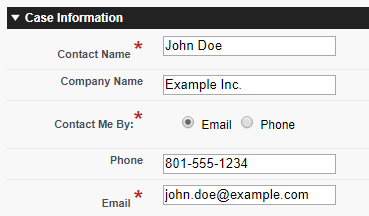
Use the **Request For** list to indicate which kind of issue you are experiencing on RSA Link.

You can then provide any additional information that may assist in resolving the issue such as your RSA product, your login username (which is generally your email address) and/or the serial number of your product, and then you can proceed with filling out the case subject and description.

If you have any attachments related to the issue such as screenshots or network trace files, you can attach them to the case under the the **Upload Attachments** section. To submit the case, check the box labeled **I'm not a robot** to complete the *reCAPTCHA* challenge and then click the **Submit Case** button.

## RSA Customer Support Community
An alternative to submitting a support case is to ask a question on the [RSA Customer Support community](https://community.rsa.com/support) on RSA Link, which you can access by clicking on the **Support** option in the website's main menu or by navigating directly to [https://community.rsa.com/support](https://community.rsa.com/support). You can search the community to see if you question has already been answered, or you can post a new question by hovering over the **ASK A QUESTION** option in the community main menu and selecting the **ASK A QUESTION ABOUT RSA LINK** option, or you can click on the green button labeled **Ask an RSA Link Question**.

#### Notes
RSA and Dell employees that experience issues with RSA Link should [engage the RSA Link team directly](https://community.rsa.com/docs/DOC-72976) rather than following the methods outlined above.
#### Product Details
RSA Link Users
#### Approval Reviewer Queue
Non-Product Approval Queue
[](https://mydev.netwitness.com/?hsLang=en)
Copyright © 2026, NetWitness LLC. All rights reserved.
[NetWitness Platform](https://www.netwitness.com/)
[Acceptable Use Policy](https://www.netwitness.com/wp-content/uploads/Acceptable-Use-Policy-092022.pdf) [Privacy Statement](https://www.netwitness.com/wp-content/uploads/NetWitness-Privacy-Statement-07292024.pdf)

[](https://www.linkedin.com/company/netwitness-platform/) [](https://www.youtube.com/@netwitness)
© 2026 NetWitness LLC. All rights reserved.