---
title: How can I change the On-Demand Authentication (ODA) PIN for my NetWitness Community account?
description: "Issue\nI want to change my On-Demand Authentication (ODA) PIN to be something that is easier for me to remember.\n\nResolution\nYou can easily update your"
---
[Skip to content](https://mydev.netwitness.com/knowledge-base/how-can-i-change-the-on-demand-authentication-oda-pin-for-my-netwitness-community-account#main-content)

- [Home](https://mydev.netwitness.com/home)
- Integrations
Show submenu for Integrations
- [Netwitness Platform Integrations](https://mydev.netwitness.com/netwitnessplatformintegrations)
- [Third Party Integrations](https://mydev.netwitness.com/thirdpartyintegrations)
- [Knowledge Center](https://mydev.netwitness.com/knowledge-base)
- Community
Show submenu for Community
- [Blogs](https://mydev.netwitness.com/netwitness-security-llc-blog)
- Discussions
- Customers
Show submenu for Customers
- [Manage Products and Licenses](https://mydev.netwitness.com/nwportal)
- Downloads
- Partners
Show submenu for Partners
- [Partner Program](https://mydev.netwitness.com/partner)
- [Partner Resources](https://mydev.netwitness.com/partnerresources)
- [Submit a New Deal Registration](https://mydev.netwitness.com/dealregistration)
- [Become a Partner](https://mydev.netwitness.com/becomeapartner)
- [Update Your Partner Locator Profile](https://www.netwitness.com/partner-locator/?utm_source=pardotnewsletter&utm_medium=email&utm_campaign=partner_march)
- [NetWitness LinkedIn Partner Hub](https://linkedin.com/showcase/netwitnesspartners/)
- Education
Show submenu for Education
- [Instructor Led Training Schedule](https://mydev.netwitness.com/instructorledtrainingschedule)
- [NetWitness Training Catalog](https://mydev.netwitness.com/netwitnesstrainingcatalog)
- [Security Awareness Training](https://mydev.netwitness.com/securityawarenesstraining)
- [New Product Readiness](https://mydev.netwitness.com/newproductreadiness)
- [On-Demand Virtual Labs](https://mydev.netwitness.com/ondemandvirtuallabs)
- [Additional Training Information](https://mydev.netwitness.com/additionaltraininginformation)
- [Frequently Asked Questions](https://mydev.netwitness.com/educationfaq)
- [Contact NetWitness Education Team](https://mydev.netwitness.com/contact-netwitness-education-team)
- Support
Show submenu for Support
- [Contact Support](https://mydev.netwitness.com/contact-support)
- [Create a New Case](https://mydev.netwitness.com/create-support-case)
- [View My Cases](https://mydev.netwitness.com/viewmycase)
- [Product Version Life Cycle](https://mydev.netwitness.com/product-version-life-cycle)
- [Warranty & Replacement Parts](https://mydev.netwitness.com/warranty-and-replacement-parts)
- [Community Support Forum](https://mydev.netwitness.com/community-support-forum)
- [Technical Support Guide](https://mydev.netwitness.com/technical-support-guide)
Open main navigation
Close main navigation
- [Home](https://mydev.netwitness.com/home)
- Integrations
Show submenu for Integrations
- [Netwitness Platform Integrations](https://mydev.netwitness.com/netwitnessplatformintegrations)
- [Third Party Integrations](https://mydev.netwitness.com/thirdpartyintegrations)
- [Knowledge Center](https://mydev.netwitness.com/knowledge-base)
- Community
Show submenu for Community
- [Blogs](https://mydev.netwitness.com/netwitness-security-llc-blog)
- Discussions
- Customers
Show submenu for Customers
- [Manage Products and Licenses](https://mydev.netwitness.com/nwportal)
- Downloads
- Partners
Show submenu for Partners
- [Partner Program](https://mydev.netwitness.com/partner)
- [Partner Resources](https://mydev.netwitness.com/partnerresources)
- [Submit a New Deal Registration](https://mydev.netwitness.com/dealregistration)
- [Become a Partner](https://mydev.netwitness.com/becomeapartner)
- [Update Your Partner Locator Profile](https://www.netwitness.com/partner-locator/?utm_source=pardotnewsletter&utm_medium=email&utm_campaign=partner_march)
- [NetWitness LinkedIn Partner Hub](https://linkedin.com/showcase/netwitnesspartners/)
- Education
Show submenu for Education
- [Instructor Led Training Schedule](https://mydev.netwitness.com/instructorledtrainingschedule)
- [NetWitness Training Catalog](https://mydev.netwitness.com/netwitnesstrainingcatalog)
- [Security Awareness Training](https://mydev.netwitness.com/securityawarenesstraining)
- [New Product Readiness](https://mydev.netwitness.com/newproductreadiness)
- [On-Demand Virtual Labs](https://mydev.netwitness.com/ondemandvirtuallabs)
- [Additional Training Information](https://mydev.netwitness.com/additionaltraininginformation)
- [Frequently Asked Questions](https://mydev.netwitness.com/educationfaq)
- [Contact NetWitness Education Team](https://mydev.netwitness.com/contact-netwitness-education-team)
- Support
Show submenu for Support
- [Contact Support](https://mydev.netwitness.com/contact-support)
- [Create a New Case](https://mydev.netwitness.com/create-support-case)
- [View My Cases](https://mydev.netwitness.com/viewmycase)
- [Product Version Life Cycle](https://mydev.netwitness.com/product-version-life-cycle)
- [Warranty & Replacement Parts](https://mydev.netwitness.com/warranty-and-replacement-parts)
- [Community Support Forum](https://mydev.netwitness.com/community-support-forum)
- [Technical Support Guide](https://mydev.netwitness.com/technical-support-guide)
How can we help you?
- There are no suggestions because the search field is empty.
1. [NetWitness Knowledge Base](https://mydev.netwitness.com/knowledge-base?hsLang=en)
2. [Break Fix](https://mydev.netwitness.com/knowledge-base/break-fix?hsLang=en)
April 30, 2026
# How can I change the On-Demand Authentication (ODA) PIN for my NetWitness Community account?
#### Issue
I want to change my On-Demand Authentication (ODA) PIN to be something that is easier for me to remember.
#### Resolution
You can easily update your On-Demand Authentication (ODA) PIN within the RSA Self-Service Console by performing the steps below.
1. Navigate to the RSA Self-Service Console here: [https://auth.rsasecurity.com](https://auth.rsasecurity.com)
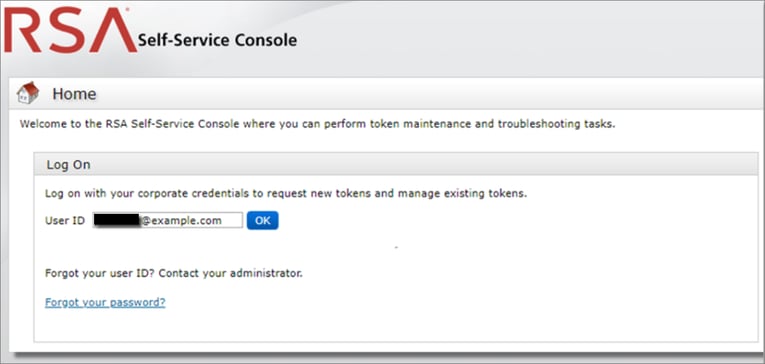
2. Enter the email address associated with your account in the **User ID** field and press Enter or click **OK**.
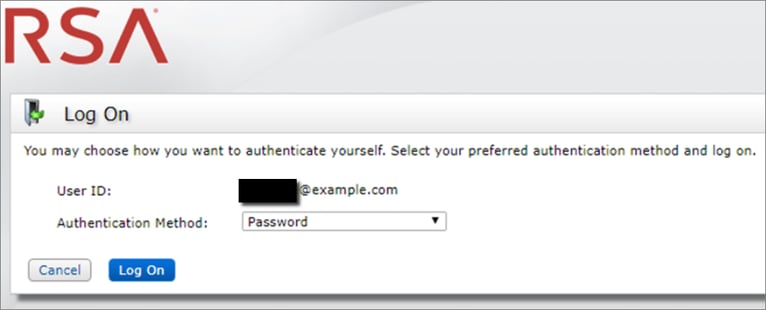
3. Select **Password** as the **Authentication Method** and then click the **Log On** button.
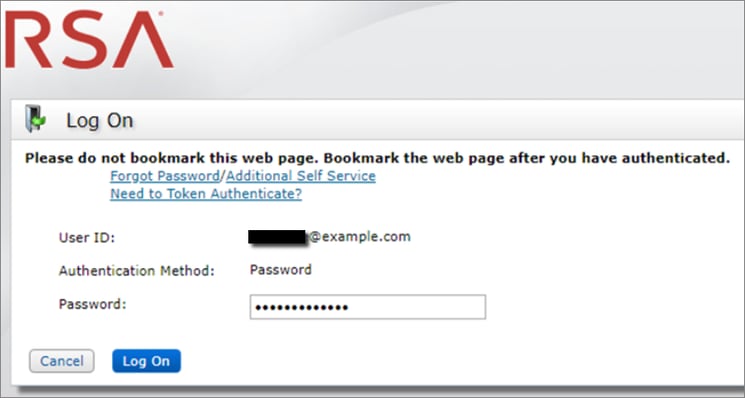
4. Enter your password and press Enter or click the **Log On** button.
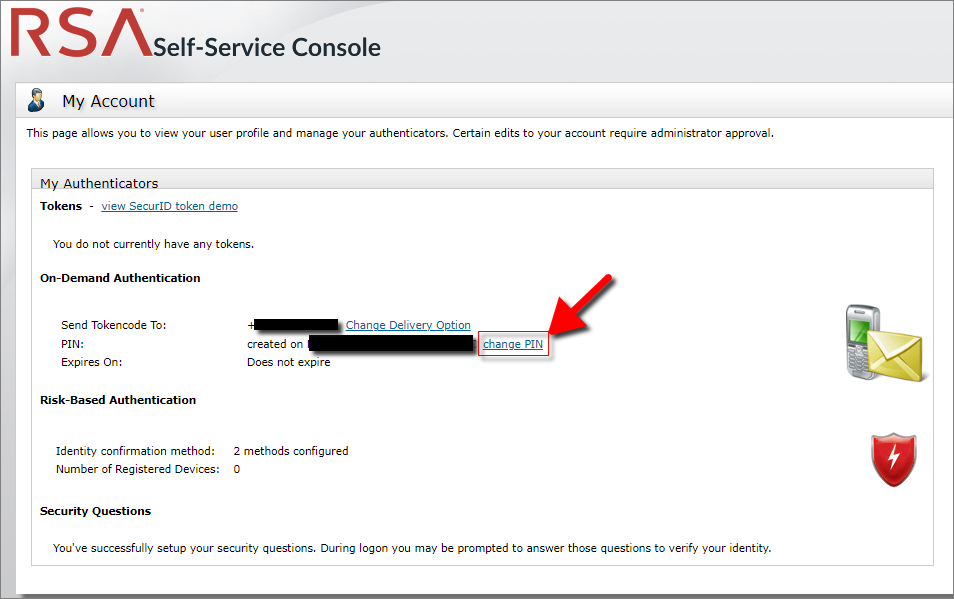
5. Once logged in to the RSA Self-Service Console, click on the **change PIN** hyperlink under the **On-Demand Authentication** section.
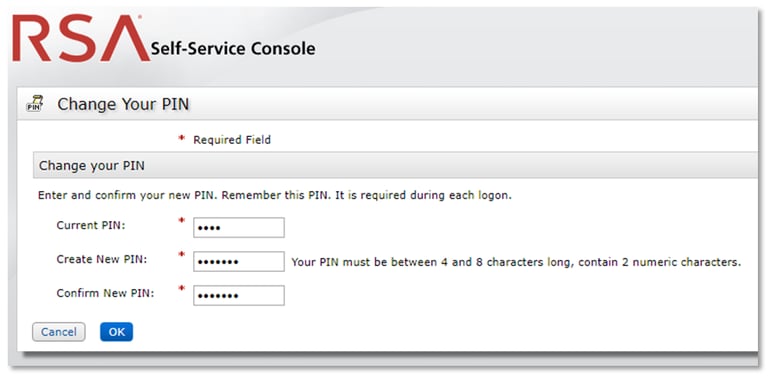
6. Enter your current PIN and then enter the new PIN you wish to use in the following two fields, then click the **OK** button.
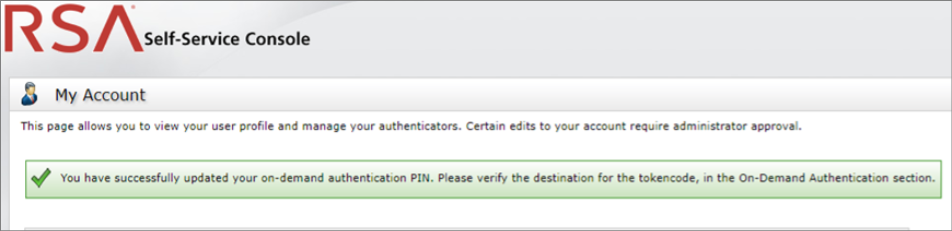
7. If the operation was successful you will see a green banner displayed when returned to the RSA Self-Service Console landing page.
If you experience any issues with the steps above, please [contact NetWitness Customer Support](https://community.netwitness.com/t5/support-information/how-to-contact-netwitness-support/ta-p/563897) by submitting the form at [https://netwitness.my.salesforce-sites.com/contactrsa/](https://netwitness.my.salesforce-sites.com/contactrsa).
#### Notes
Additional information can be found in the resources below.
- [NetWitness Community Frequently Asked Questions](https://community.netwitness.com/t5/getting-started/frequently-asked-questions-about-the-netwitness-community/ta-p/564365)
- [Why am I being asked to provide an On-Demand Authentication (ODA) PIN when logging in to NetWitness Community?](https://community.netwitness.com/t5/community-support-knowledge-base/why-am-i-being-asked-to-provide-an-on-demand-authentication-oda/ta-p/7443)
- [How can I set up On-Demand Authentication (ODA) for my NetWitness Community account?](https://community.netwitness.com/t5/netwitness-knowledge-base/how-do-i-reset-the-on-demand-authentication-oda-pin-for-my/ta-p/692048)
- [How do I reset the On-Demand Authentication (ODA) PIN for my NetWitness Community account?](https://community.netwitness.com/t5/netwitness-knowledge-base/how-do-i-reset-the-on-demand-authentication-oda-pin-for-my/ta-p/692048)
#### Internal Comments
**Customer Relations Desk**
Follow the steps below to reset a user's On-Demand Authentication (ODA) PIN.
1. Log in to the AM Console and look up the user by their User ID. (This will be the email address for non-employees and for employees.)
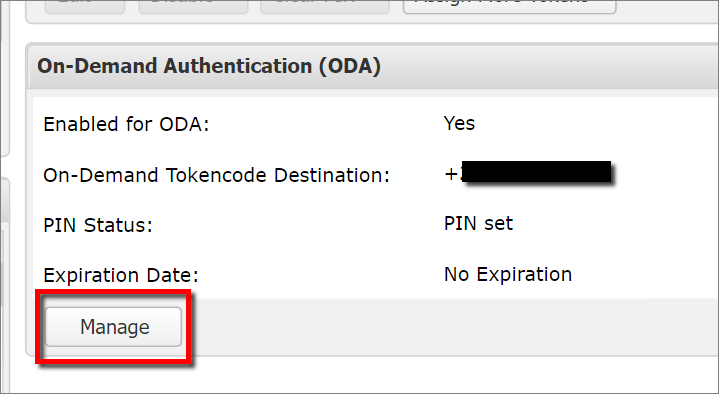
2. Underneath the *On-Demand Authentication (ODA)* section, click on the **Manage** button.
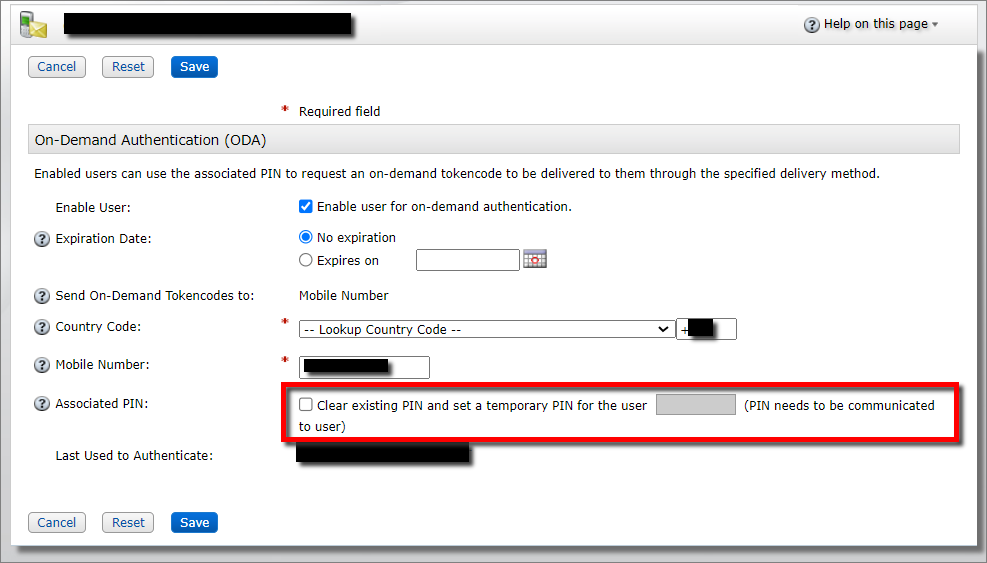
3. From the *Associated PIN* check the box labeled **Clear existing PIN**, set a temporary PIN (between 4 to 6 digits) and then click on the blue **Save** button at the bottom of the window.
#### Product Details
All NetWitness Community users
#### Approval Reviewer Queue
Non-Product Approval Queue
[](https://mydev.netwitness.com/?hsLang=en)
Copyright © 2026, NetWitness LLC. All rights reserved.
[NetWitness Platform](https://www.netwitness.com/)
[Acceptable Use Policy](https://www.netwitness.com/wp-content/uploads/Acceptable-Use-Policy-092022.pdf) [Privacy Statement](https://www.netwitness.com/wp-content/uploads/NetWitness-Privacy-Statement-07292024.pdf)

[](https://www.linkedin.com/company/netwitness-platform/) [](https://www.youtube.com/@netwitness)
© 2026 NetWitness LLC. All rights reserved.