---
title: Hosts and Services Set Up Procedures
description: "Hosts and Services Set Up ProceduresHosts and Services Set Up Procedures\nEvery service requires a host. After you set up a host, you can assign servi"
---
[Skip to content](https://mydev.netwitness.com/knowledge-base/hostsandservicessetupprocedures#main-content)

- [Home](https://mydev.netwitness.com/home)
- Integrations
Show submenu for Integrations
- [Netwitness Platform Integrations](https://mydev.netwitness.com/netwitnessplatformintegrations)
- [Third Party Integrations](https://mydev.netwitness.com/thirdpartyintegrations)
- [Knowledge Center](https://mydev.netwitness.com/knowledge-base)
- Community
Show submenu for Community
- [Blogs](https://mydev.netwitness.com/netwitness-security-llc-blog)
- Discussions
- Customers
Show submenu for Customers
- [Manage Products and Licenses](https://mydev.netwitness.com/nwportal)
- Downloads
- Partners
Show submenu for Partners
- [Partner Program](https://mydev.netwitness.com/partner)
- [Partner Resources](https://mydev.netwitness.com/partnerresources)
- [Submit a New Deal Registration](https://mydev.netwitness.com/dealregistration)
- [Become a Partner](https://mydev.netwitness.com/becomeapartner)
- [Update Your Partner Locator Profile](https://www.netwitness.com/partner-locator/?utm_source=pardotnewsletter&utm_medium=email&utm_campaign=partner_march)
- [NetWitness LinkedIn Partner Hub](https://linkedin.com/showcase/netwitnesspartners/)
- Education
Show submenu for Education
- [Instructor Led Training Schedule](https://mydev.netwitness.com/instructorledtrainingschedule)
- [NetWitness Training Catalog](https://mydev.netwitness.com/netwitnesstrainingcatalog)
- [Security Awareness Training](https://mydev.netwitness.com/securityawarenesstraining)
- [New Product Readiness](https://mydev.netwitness.com/newproductreadiness)
- [On-Demand Virtual Labs](https://mydev.netwitness.com/ondemandvirtuallabs)
- [Additional Training Information](https://mydev.netwitness.com/additionaltraininginformation)
- [Frequently Asked Questions](https://mydev.netwitness.com/educationfaq)
- [Contact NetWitness Education Team](https://mydev.netwitness.com/contact-netwitness-education-team)
- Support
Show submenu for Support
- [Contact Support](https://mydev.netwitness.com/contact-support)
- [Create a New Case](https://mydev.netwitness.com/create-support-case)
- [View My Cases](https://mydev.netwitness.com/viewmycase)
- [Product Version Life Cycle](https://mydev.netwitness.com/product-version-life-cycle)
- [Warranty & Replacement Parts](https://mydev.netwitness.com/warranty-and-replacement-parts)
- [Community Support Forum](https://mydev.netwitness.com/community-support-forum)
- [Technical Support Guide](https://mydev.netwitness.com/technical-support-guide)
Open main navigation
Close main navigation
- [Home](https://mydev.netwitness.com/home)
- Integrations
Show submenu for Integrations
- [Netwitness Platform Integrations](https://mydev.netwitness.com/netwitnessplatformintegrations)
- [Third Party Integrations](https://mydev.netwitness.com/thirdpartyintegrations)
- [Knowledge Center](https://mydev.netwitness.com/knowledge-base)
- Community
Show submenu for Community
- [Blogs](https://mydev.netwitness.com/netwitness-security-llc-blog)
- Discussions
- Customers
Show submenu for Customers
- [Manage Products and Licenses](https://mydev.netwitness.com/nwportal)
- Downloads
- Partners
Show submenu for Partners
- [Partner Program](https://mydev.netwitness.com/partner)
- [Partner Resources](https://mydev.netwitness.com/partnerresources)
- [Submit a New Deal Registration](https://mydev.netwitness.com/dealregistration)
- [Become a Partner](https://mydev.netwitness.com/becomeapartner)
- [Update Your Partner Locator Profile](https://www.netwitness.com/partner-locator/?utm_source=pardotnewsletter&utm_medium=email&utm_campaign=partner_march)
- [NetWitness LinkedIn Partner Hub](https://linkedin.com/showcase/netwitnesspartners/)
- Education
Show submenu for Education
- [Instructor Led Training Schedule](https://mydev.netwitness.com/instructorledtrainingschedule)
- [NetWitness Training Catalog](https://mydev.netwitness.com/netwitnesstrainingcatalog)
- [Security Awareness Training](https://mydev.netwitness.com/securityawarenesstraining)
- [New Product Readiness](https://mydev.netwitness.com/newproductreadiness)
- [On-Demand Virtual Labs](https://mydev.netwitness.com/ondemandvirtuallabs)
- [Additional Training Information](https://mydev.netwitness.com/additionaltraininginformation)
- [Frequently Asked Questions](https://mydev.netwitness.com/educationfaq)
- [Contact NetWitness Education Team](https://mydev.netwitness.com/contact-netwitness-education-team)
- Support
Show submenu for Support
- [Contact Support](https://mydev.netwitness.com/contact-support)
- [Create a New Case](https://mydev.netwitness.com/create-support-case)
- [View My Cases](https://mydev.netwitness.com/viewmycase)
- [Product Version Life Cycle](https://mydev.netwitness.com/product-version-life-cycle)
- [Warranty & Replacement Parts](https://mydev.netwitness.com/warranty-and-replacement-parts)
- [Community Support Forum](https://mydev.netwitness.com/community-support-forum)
- [Technical Support Guide](https://mydev.netwitness.com/technical-support-guide)
How can we help you?
- There are no suggestions because the search field is empty.
1. [NetWitness Knowledge Base](https://mydev.netwitness.com/knowledge-base?hsLang=en)
2. [Documentation](https://mydev.netwitness.com/knowledge-base/documentation?hsLang=en)
April 26, 2026
# Hosts and Services Set Up Procedures
## Hosts and Services Set Up ProceduresHosts and Services Set Up Procedures
Every service requires a host. After you set up a host, you can assign services to and from this host to other hosts in your NetWitness deployment. This topic contains information about basic procedures. For additional procedures, see [Hosts and Services Maintenance Procedures](https://community.netwitness.com/t5/netwitness-platform-online/hosts-and-services-maintenance-procedures/ta-p/668920).
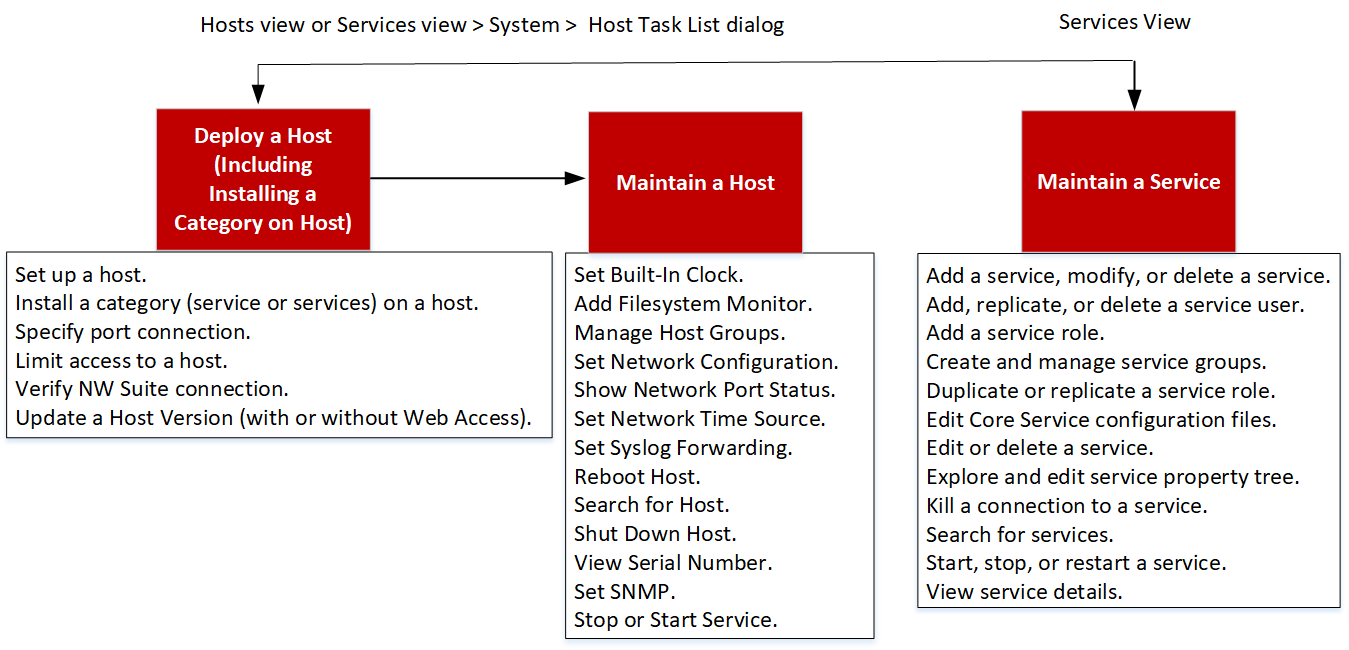
## Step 1. Deploy a HostStep 1. Deploy a Host
**Caution:** If you include "." in a host name, the host name must also include a valid domain name.
1. Deploy a host.
You can deploy a physical host (NetWitness Appliance), virtual host on-prem, a virtual in AWS, a virtual host in Azure, or a virtual host on Google Cloud Platform. See the following guides for instructions on how to deploy hosts.
- Physical Host Installation Guide
- Virtual Host Installation Guide
- AWS Installation Guide
- Azure Installation Guide
- GCP Installation Guide
2. Go to ** (Admin) \> Hosts**.
The New Hosts dialog is displayed with the hosts that you deployed.
3. Select the hosts that you want to enable.
The Enable menu option becomes active.
4. Click **Enable**.
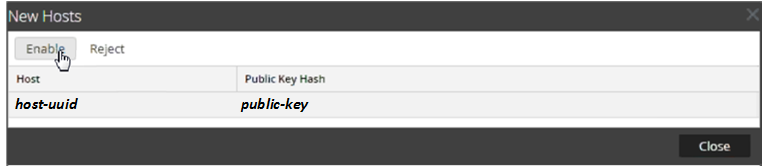
5. Select the host you enabled.
The host is displayed in the Hosts view. At this point, you can install a service on the host.
## Step 2. Install a Service on a HostStep 2. Install a Service on a Host
Perform the following steps to install a service on a host.
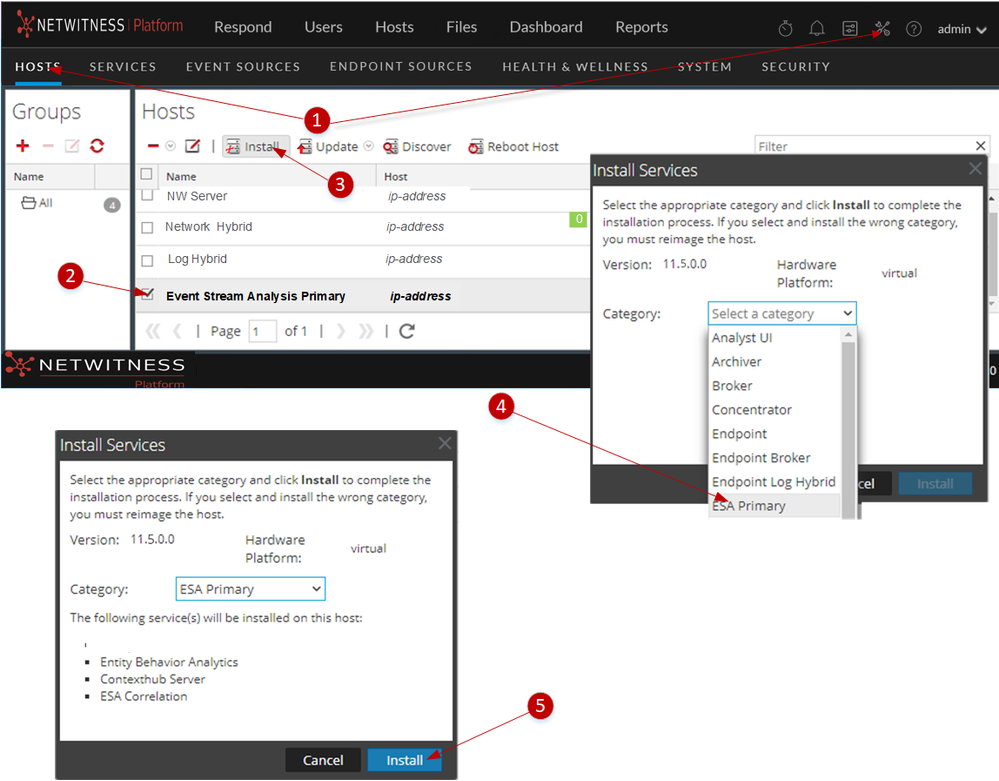
1. In NetWitness, go to ** (Admin) \> Hosts**.
The Hosts view is displayed.
2. Select the host on which you want to install the service (for example, **Event Stream Analysis**).
3. Click  in the toolbar.
The Install Services dialog is displayed.
4. Select a service from the **Category** drop-down list (for example, **ESA Primary**).
5. Click  in the Install Services dialog.
6. A pop-up listing all the services already installed on this host is displayed. If there are no services installed, this pop-up will not be displayed.
7. Click **Yes** to install the new service.
## Step 3. Review SSL Ports for Trusted ConnectionsStep 3. Review SSL Ports for Trusted Connections
To support trusted connections each core service has two ports, an unencrypted non-SSL port and an encrypted SSL port. Trusted connections require the encrypted SSL port.
### Encrypted SSL PortsEncrypted SSL Ports
By default, trusted connections are established with two settings:
- SSL is enabled.
- Core service is connected to an encrypted SSL port.
Each NetWitness Core service has two ports:
- Unencrypted non-SSL port
Example: Archiver 50008
- Encrypted SSL port
Example: Archiver 56008
The SSL port is the non-SSL port + 6000.
For information about ports and a comprehensive list of ports for all services, see "Network Architecture and Ports" in the *Deployment Guide for NetWitness Platform*. Go to the [NetWitness All Versions Documents](https://community.netwitness.com/t5/netwitness-platform-online/netwitness-platform-all-documents/ta-p/676246) page and find NetWitness Platform guides to troubleshoot issues.
## Step 4. Manage Access to a ServiceStep 4. Manage Access to a Service
In a trusted connection, a service explicitly trusts the NW Server to manage and authenticate users. With this trust, services in ** (Admin) \> Services** no longer require credentials to be defined for every NetWitness Core service. Instead, users who have been authenticated by the server can access the service without entering another password.
### Test a Trusted ConnectionTest a Trusted Connection
**Prerequisites**
1. The administrator must assign a role to the user.
For more information, see "Add a User and Assign a Role" in the *System Security and User Management Guide*.
2. The user must:
- Log in to NetWitness for the server to authenticate the user.
- Have access to the service.
**Procedure**
1. In NetWitness, go to ** (Admin) \> Services**.
The Services view is displayed.
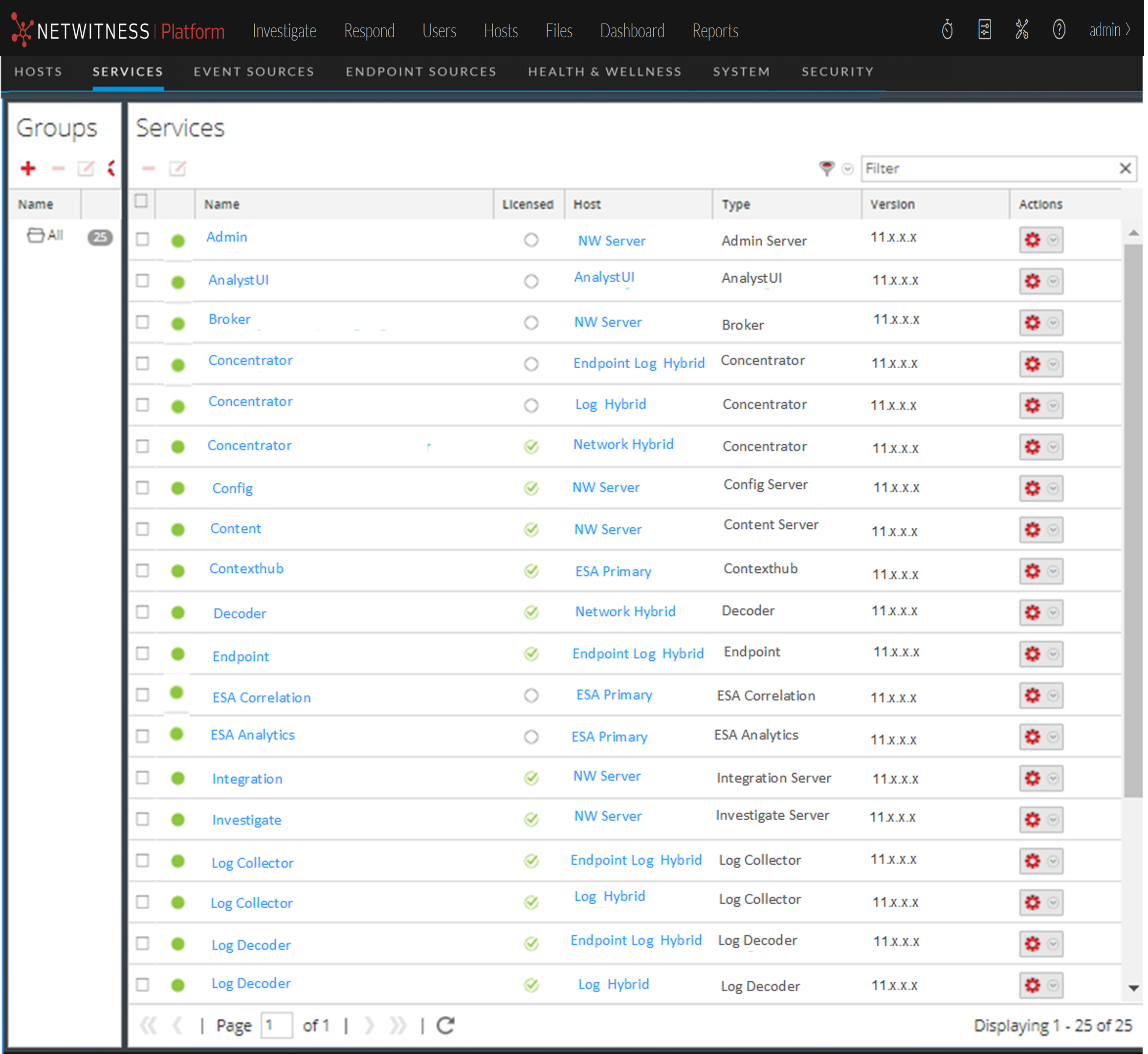
2. Select the checkbox of the service (for example, a Concentrator) to test and click .
The **Edit Service** dialog is displayed.
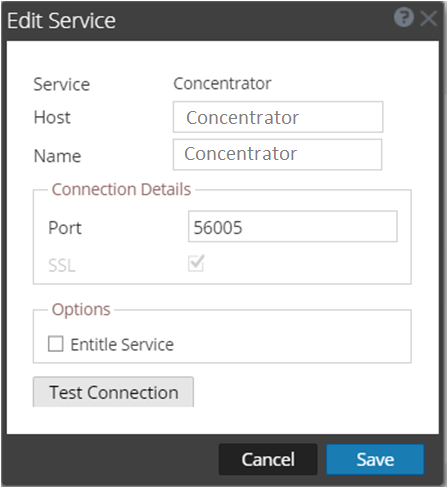
**Note:** The Options box will only display if the selected service is not licensed. A licensed service is denoted by a  in the Services view.
1. Remove the username to test the connection without credentials.
2. Click **Test Connection**.
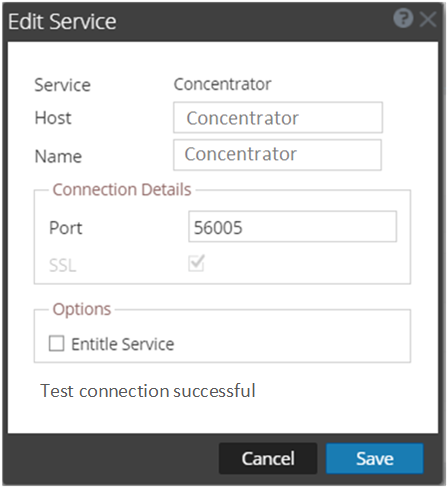
The message Test connection successful confirms the trusted connection is established.
The previously authenticated user can access the service without typing a username and password on the service.
3. Click **Save**.
[](https://mydev.netwitness.com/?hsLang=en)
Copyright © 2026, NetWitness LLC. All rights reserved.
[NetWitness Platform](https://www.netwitness.com/)
[Acceptable Use Policy](https://www.netwitness.com/wp-content/uploads/Acceptable-Use-Policy-092022.pdf) [Privacy Statement](https://www.netwitness.com/wp-content/uploads/NetWitness-Privacy-Statement-07292024.pdf)

[](https://www.linkedin.com/company/netwitness-platform/) [](https://www.youtube.com/@netwitness)
© 2026 NetWitness LLC. All rights reserved.