---
title: Firmware Updates for Dell BIOS SAS iDRAC LC for R620 NetWitness Appliances
description: "Issue\nIn order to capture the 10G on the Security Analytics 10.4 The Decoder 10G package has been tested with Dell R620 BIOS 2.2.3. BIOS revisions ear"
---
[Skip to content](https://mydev.netwitness.com/knowledge-base/firmware-updates-for-dell-bios-sas-idrac-lc-for-r620-rsa-security-analytics-appliances#main-content)

- [Home](https://mydev.netwitness.com/home)
- Integrations
Show submenu for Integrations
- [Netwitness Platform Integrations](https://mydev.netwitness.com/netwitnessplatformintegrations)
- [Third Party Integrations](https://mydev.netwitness.com/thirdpartyintegrations)
- [Knowledge Center](https://mydev.netwitness.com/knowledge-base)
- Community
Show submenu for Community
- [Blogs](https://mydev.netwitness.com/netwitness-security-llc-blog)
- Discussions
- Customers
Show submenu for Customers
- [Manage Products and Licenses](https://mydev.netwitness.com/nwportal)
- Downloads
- Partners
Show submenu for Partners
- [Partner Program](https://mydev.netwitness.com/partner)
- [Partner Resources](https://mydev.netwitness.com/partnerresources)
- [Submit a New Deal Registration](https://mydev.netwitness.com/dealregistration)
- [Become a Partner](https://mydev.netwitness.com/becomeapartner)
- [Update Your Partner Locator Profile](https://www.netwitness.com/partner-locator/?utm_source=pardotnewsletter&utm_medium=email&utm_campaign=partner_march)
- [NetWitness LinkedIn Partner Hub](https://linkedin.com/showcase/netwitnesspartners/)
- Education
Show submenu for Education
- [Instructor Led Training Schedule](https://mydev.netwitness.com/instructorledtrainingschedule)
- [NetWitness Training Catalog](https://mydev.netwitness.com/netwitnesstrainingcatalog)
- [Security Awareness Training](https://mydev.netwitness.com/securityawarenesstraining)
- [New Product Readiness](https://mydev.netwitness.com/newproductreadiness)
- [On-Demand Virtual Labs](https://mydev.netwitness.com/ondemandvirtuallabs)
- [Additional Training Information](https://mydev.netwitness.com/additionaltraininginformation)
- [Frequently Asked Questions](https://mydev.netwitness.com/educationfaq)
- [Contact NetWitness Education Team](https://mydev.netwitness.com/contact-netwitness-education-team)
- Support
Show submenu for Support
- [Contact Support](https://mydev.netwitness.com/contact-support)
- [Create a New Case](https://mydev.netwitness.com/create-support-case)
- [View My Cases](https://mydev.netwitness.com/viewmycase)
- [Product Version Life Cycle](https://mydev.netwitness.com/product-version-life-cycle)
- [Warranty & Replacement Parts](https://mydev.netwitness.com/warranty-and-replacement-parts)
- [Community Support Forum](https://mydev.netwitness.com/community-support-forum)
- [Technical Support Guide](https://mydev.netwitness.com/technical-support-guide)
Open main navigation
Close main navigation
- [Home](https://mydev.netwitness.com/home)
- Integrations
Show submenu for Integrations
- [Netwitness Platform Integrations](https://mydev.netwitness.com/netwitnessplatformintegrations)
- [Third Party Integrations](https://mydev.netwitness.com/thirdpartyintegrations)
- [Knowledge Center](https://mydev.netwitness.com/knowledge-base)
- Community
Show submenu for Community
- [Blogs](https://mydev.netwitness.com/netwitness-security-llc-blog)
- Discussions
- Customers
Show submenu for Customers
- [Manage Products and Licenses](https://mydev.netwitness.com/nwportal)
- Downloads
- Partners
Show submenu for Partners
- [Partner Program](https://mydev.netwitness.com/partner)
- [Partner Resources](https://mydev.netwitness.com/partnerresources)
- [Submit a New Deal Registration](https://mydev.netwitness.com/dealregistration)
- [Become a Partner](https://mydev.netwitness.com/becomeapartner)
- [Update Your Partner Locator Profile](https://www.netwitness.com/partner-locator/?utm_source=pardotnewsletter&utm_medium=email&utm_campaign=partner_march)
- [NetWitness LinkedIn Partner Hub](https://linkedin.com/showcase/netwitnesspartners/)
- Education
Show submenu for Education
- [Instructor Led Training Schedule](https://mydev.netwitness.com/instructorledtrainingschedule)
- [NetWitness Training Catalog](https://mydev.netwitness.com/netwitnesstrainingcatalog)
- [Security Awareness Training](https://mydev.netwitness.com/securityawarenesstraining)
- [New Product Readiness](https://mydev.netwitness.com/newproductreadiness)
- [On-Demand Virtual Labs](https://mydev.netwitness.com/ondemandvirtuallabs)
- [Additional Training Information](https://mydev.netwitness.com/additionaltraininginformation)
- [Frequently Asked Questions](https://mydev.netwitness.com/educationfaq)
- [Contact NetWitness Education Team](https://mydev.netwitness.com/contact-netwitness-education-team)
- Support
Show submenu for Support
- [Contact Support](https://mydev.netwitness.com/contact-support)
- [Create a New Case](https://mydev.netwitness.com/create-support-case)
- [View My Cases](https://mydev.netwitness.com/viewmycase)
- [Product Version Life Cycle](https://mydev.netwitness.com/product-version-life-cycle)
- [Warranty & Replacement Parts](https://mydev.netwitness.com/warranty-and-replacement-parts)
- [Community Support Forum](https://mydev.netwitness.com/community-support-forum)
- [Technical Support Guide](https://mydev.netwitness.com/technical-support-guide)
How can we help you?
- There are no suggestions because the search field is empty.
1. [NetWitness Knowledge Base](https://mydev.netwitness.com/knowledge-base?hsLang=en)
2. [Break Fix](https://mydev.netwitness.com/knowledge-base/break-fix?hsLang=en)
April 30, 2026
# Firmware Updates for Dell BIOS SAS iDRAC LC for R620 NetWitness Appliances
#### Issue
In order to capture the 10G on the Security Analytics 10.4 The Decoder 10G package has been tested with Dell R620 BIOS 2.2.3. BIOS revisions earlier than this have issues properly identifying the location of the 10G capture card within the system.
Customers may wish to upgrade firmware on all Series 4s appliances.
The following firmware releases are approved as of 31 January 2015.
Note: Some firmware versions are now deprecated by [https://community.rsa.com/docs/DOC-79266](https://community.rsa.com/docs/DOC-79266)
#### Tasks
Download the firmware update files from links provided below. Use only these files and not other firmware update versions even if newer versions are available from Dell. Only these specific versions have been tested and approved.
**These firmware updates are ONLY for the Dell R620 appliances.**
[Dell R620 Firmware Updates](http://edelivery.rsasecurity.com/patches/attach/nw/KB28971/DELL_R620_ALL_firmware_updates.zip)
[Dell R620 Firmware Updates MD5 Checksum](http://edelivery.rsasecurity.com/patches/attach/nw/kb28971/MD5_for_DELL_R620_ALL_firmware_updates.txt)
1. Copy the files to /root using scp of other tool.
2. Logon to the appliance as root
3. Change to the /root folder
4. Uncompress the file named "DELL\_R620\_ALL\_firmware\_updates.zip".
5. Mark the file named ***apply\_components.sh*** as executable with: ***chmod +x* *apply\_components.sh***
6. Run the command ./***apply\_components.sh***
7. Wait for the script to finish (see the screenshot below).
8. Stop any RSA services running on the appliance and reboot the appliance with "init 6" or "reboot".
*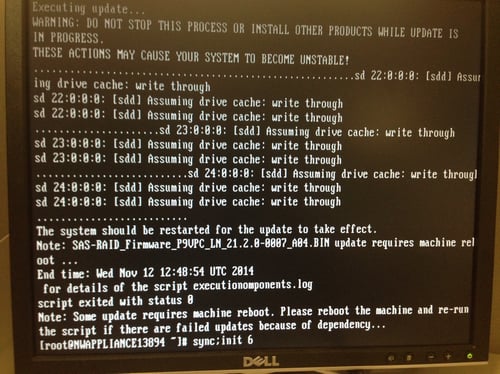*
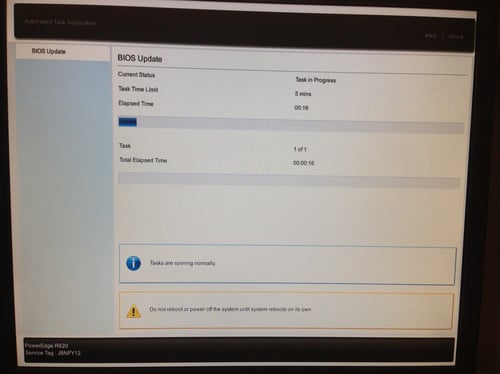
The BIOS update will require a reboot.
Do not interrupt this process or reboot the appliance while the BIOS update is in process. Doing so may render the appliance inoperable.
#### Resolution
An update package for all approved firmware packages for the Dell R620 has been released by the RSA Hardware Engineering team. This package should be available for download using the links provided below.
#### Notes
**Important note:**
If you are updating these firmware/BIOS files on an appliance with DAC attached to it please make sure you can run the MegaCli command and/or the nwraiutil.pl (which also uses the MegaCli commands).
After running this command for example:
*/opt/MegaRAID/MegaCli/MegaCli64 -pdlist –aall*
**And you receive a message as per below:**
*OSSpecificInitialize: Failed to load libsysfs.so.2.0.2 Please ensure that libsfs is present in the system.
The dependent library libsysfs.so.2.0.1 not available. Please contact LSI for distribution of the package*
Please refer to the following KB to resolve - [RSA Security Analytics - When running MegaCli command receiving the error: "OSSpecificInitialize: Failed to load libsysfs.so.2.0.2 Please ensure that libsfs is present in the system."](https://mydev.netwitness.com/articles/en_US/Break_Fix/Error-message-OSSpecificInitialize-Failed-to-load-libsysfs-so-2-0-2-Please-ensure-that-libsfs-is-present-in-the-system-when-running-MegaCli-command-on-an-RSA-Security-Analytics-appliance?popup=false&navBack=H4sIAAAAAAAAAIuuVipWslLyzssvz0lNSU_1yM9NVdJRygaKFSSmp4ZkluSA-KVAvn58aaZ-NkyhPpCDqqs2FgCHRwp0TQAAAA&sfdcIFrameOrigin=https%3A%2F%2Frsasecurity.my.salesforce.com&isWsVw=true&nonce=4673983fcb1f66f43cdcc68b443fcae1a56dea799ef80cb88f9f2c2357b08d8a&caseId=5007000001cmO8D&srKp=ka1&srPos=0&hsLang=en)
**May need to add these additional steps in the customer facing document:**
-before upgrade, need to stop services, comment out mount point of DACs in /etc/fstab, umount mount points, so no disks activity exists during the update. PERC firmware upgrade fails if it is in use or with activity to the DAC disks.
-after reboot of appliance, uncomment the mount points that was commented out before the upgrade (in /etc/fstab), then do a mount -a, restart services
-also update iDrac & LC anew with the latest version provided by CE based on ASOC-17020
[http://downloads.dell.com/FOLDER03408320M/1/iDRAC-with-Lifecycle-Controller\_Firmware\_VV01T\_LN\_2.21.21.21\_A00.BIN](http://downloads.dell.com/FOLDER03408320M/1/iDRAC-with-Lifecycle-Controller_Firmware_VV01T_LN_2.21.21.21_A00.BIN)
#### Internal Comments
As of 3 April, the files had not been uploaded to SCOL. I put the files on the Akamai share and provided links to those files.
iDRAC instructions are in KB articles 26991 and 26992.
Shipping versions of BIOS/FW for Dell appliances - [https://wiki.na.rsa.net/pages/viewpage.action?pageId=93266724](https://wiki.na.rsa.net/pages/viewpage.action?pageId=93266724)
#### Product Details
**RSA Product Set:** Security Analytics, NetWitness
**RSA Product/Service Type:** SA Series 4s Appliance
**RSA Version/Condition:** Dell R620
**Platform:** Hardware
**O/S Version:** 5, 6
**Platform (Other):** Dell PowerEdge R620
**Platform (Other):** BIOS
**Platform (Other):** PERC H710P
**Platform (Other):** PERC H810P
**Platform (Other):** Lifecycle Controller
#### Summary
The following firmware updates for Series 4s R620 appliances only. This new BIOS update is required for the 10G capture card supported in SA 10.4. All updates are recommended for better performance.
#### Approval Reviewer Queue
Technical approval queue
[](https://mydev.netwitness.com/?hsLang=en)
Copyright © 2026, NetWitness LLC. All rights reserved.
[NetWitness Platform](https://www.netwitness.com/)
[Acceptable Use Policy](https://www.netwitness.com/wp-content/uploads/Acceptable-Use-Policy-092022.pdf) [Privacy Statement](https://www.netwitness.com/wp-content/uploads/NetWitness-Privacy-Statement-07292024.pdf)

[](https://www.linkedin.com/company/netwitness-platform/) [](https://www.youtube.com/@netwitness)
© 2026 NetWitness LLC. All rights reserved.