---
title: Events View
description: "Events View\nIn the Events view analysts can view a sequential list of network, log and endpoint events, select an event for reconstruction and analys"
---
[Skip to content](https://mydev.netwitness.com/knowledge-base/eventsview#main-content)

- [Home](https://mydev.netwitness.com/home)
- Integrations
Show submenu for Integrations
- [Netwitness Platform Integrations](https://mydev.netwitness.com/netwitnessplatformintegrations)
- [Third Party Integrations](https://mydev.netwitness.com/thirdpartyintegrations)
- [Knowledge Center](https://mydev.netwitness.com/knowledge-base)
- Community
Show submenu for Community
- [Blogs](https://mydev.netwitness.com/netwitness-security-llc-blog)
- Discussions
- Customers
Show submenu for Customers
- [Manage Products and Licenses](https://mydev.netwitness.com/nwportal)
- Downloads
- Partners
Show submenu for Partners
- [Partner Program](https://mydev.netwitness.com/partner)
- [Partner Resources](https://mydev.netwitness.com/partnerresources)
- [Submit a New Deal Registration](https://mydev.netwitness.com/dealregistration)
- [Become a Partner](https://mydev.netwitness.com/becomeapartner)
- [Update Your Partner Locator Profile](https://www.netwitness.com/partner-locator/?utm_source=pardotnewsletter&utm_medium=email&utm_campaign=partner_march)
- [NetWitness LinkedIn Partner Hub](https://linkedin.com/showcase/netwitnesspartners/)
- Education
Show submenu for Education
- [Instructor Led Training Schedule](https://mydev.netwitness.com/instructorledtrainingschedule)
- [NetWitness Training Catalog](https://mydev.netwitness.com/netwitnesstrainingcatalog)
- [Security Awareness Training](https://mydev.netwitness.com/securityawarenesstraining)
- [New Product Readiness](https://mydev.netwitness.com/newproductreadiness)
- [On-Demand Virtual Labs](https://mydev.netwitness.com/ondemandvirtuallabs)
- [Additional Training Information](https://mydev.netwitness.com/additionaltraininginformation)
- [Frequently Asked Questions](https://mydev.netwitness.com/educationfaq)
- [Contact NetWitness Education Team](https://mydev.netwitness.com/contact-netwitness-education-team)
- Support
Show submenu for Support
- [Contact Support](https://mydev.netwitness.com/contact-support)
- [Create a New Case](https://mydev.netwitness.com/create-support-case)
- [View My Cases](https://mydev.netwitness.com/viewmycase)
- [Product Version Life Cycle](https://mydev.netwitness.com/product-version-life-cycle)
- [Warranty & Replacement Parts](https://mydev.netwitness.com/warranty-and-replacement-parts)
- [Community Support Forum](https://mydev.netwitness.com/community-support-forum)
- [Technical Support Guide](https://mydev.netwitness.com/technical-support-guide)
Open main navigation
Close main navigation
- [Home](https://mydev.netwitness.com/home)
- Integrations
Show submenu for Integrations
- [Netwitness Platform Integrations](https://mydev.netwitness.com/netwitnessplatformintegrations)
- [Third Party Integrations](https://mydev.netwitness.com/thirdpartyintegrations)
- [Knowledge Center](https://mydev.netwitness.com/knowledge-base)
- Community
Show submenu for Community
- [Blogs](https://mydev.netwitness.com/netwitness-security-llc-blog)
- Discussions
- Customers
Show submenu for Customers
- [Manage Products and Licenses](https://mydev.netwitness.com/nwportal)
- Downloads
- Partners
Show submenu for Partners
- [Partner Program](https://mydev.netwitness.com/partner)
- [Partner Resources](https://mydev.netwitness.com/partnerresources)
- [Submit a New Deal Registration](https://mydev.netwitness.com/dealregistration)
- [Become a Partner](https://mydev.netwitness.com/becomeapartner)
- [Update Your Partner Locator Profile](https://www.netwitness.com/partner-locator/?utm_source=pardotnewsletter&utm_medium=email&utm_campaign=partner_march)
- [NetWitness LinkedIn Partner Hub](https://linkedin.com/showcase/netwitnesspartners/)
- Education
Show submenu for Education
- [Instructor Led Training Schedule](https://mydev.netwitness.com/instructorledtrainingschedule)
- [NetWitness Training Catalog](https://mydev.netwitness.com/netwitnesstrainingcatalog)
- [Security Awareness Training](https://mydev.netwitness.com/securityawarenesstraining)
- [New Product Readiness](https://mydev.netwitness.com/newproductreadiness)
- [On-Demand Virtual Labs](https://mydev.netwitness.com/ondemandvirtuallabs)
- [Additional Training Information](https://mydev.netwitness.com/additionaltraininginformation)
- [Frequently Asked Questions](https://mydev.netwitness.com/educationfaq)
- [Contact NetWitness Education Team](https://mydev.netwitness.com/contact-netwitness-education-team)
- Support
Show submenu for Support
- [Contact Support](https://mydev.netwitness.com/contact-support)
- [Create a New Case](https://mydev.netwitness.com/create-support-case)
- [View My Cases](https://mydev.netwitness.com/viewmycase)
- [Product Version Life Cycle](https://mydev.netwitness.com/product-version-life-cycle)
- [Warranty & Replacement Parts](https://mydev.netwitness.com/warranty-and-replacement-parts)
- [Community Support Forum](https://mydev.netwitness.com/community-support-forum)
- [Technical Support Guide](https://mydev.netwitness.com/technical-support-guide)
How can we help you?
- There are no suggestions because the search field is empty.
1. [NetWitness Knowledge Base](https://mydev.netwitness.com/knowledge-base?hsLang=en)
2. [Documentation](https://mydev.netwitness.com/knowledge-base/documentation?hsLang=en)
April 26, 2026
# Events View
## Events View
In the Events view analysts can view a sequential list of network, log and endpoint events, select an event for reconstruction and analysis, and view the raw event and metadata with interactive features that enhance the ability to see meaningful patterns in the data. In Version 11.5 and later, you can drill into metadata for the listed events. The Events view offers packet, file, host, text, log, and email reconstruction. When you open a web reconstruction of an event, the same web reconstruction used in the Legacy Events view is displayed.
## Workflow
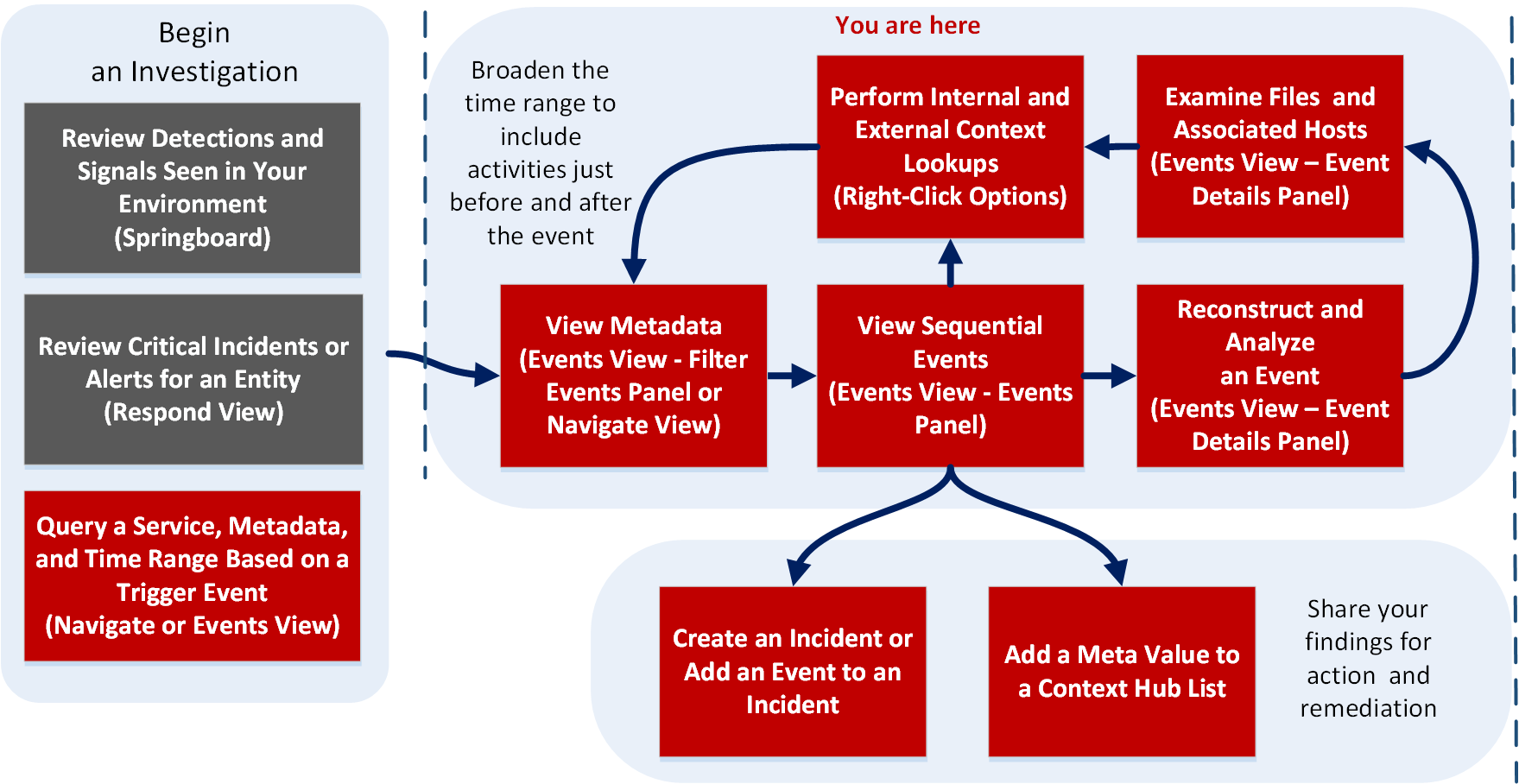
The following figure is a high-level workflow illustrating the tasks you can do in NetWitness Investigate, with the Events view tasks highlighted in red.
## What do you want to do?
\*You can perform this task in the current view.
## Related Topics
- [How NetWitness Investigate Works](https://50269063.hs-sites.com/knowledge-base/HowNetWitnessInvestigateWorks?hsLang=en)
- [Events View - Packet Tab](https://50269063.hs-sites.com/knowledge-base/EventsView-PacketTab?hsLang=en)
- [Events View - Text Tab](https://50269063.hs-sites.com/knowledge-base/EventsView-TextTab?hsLang=en)
- [Events View - File Tab](https://50269063.hs-sites.com/knowledge-base/EventsView-FileTab?hsLang=en)
- [Events View - Email Tab](https://50269063.hs-sites.com/knowledge-base/EventsView-EmailTab?hsLang=en)
- [Events View - Host Tab](https://50269063.hs-sites.com/knowledge-base/EventsView-HostTab?hsLang=en)
## Quick Look
There are multiple access points to this view, which are described in [Begin an Investigation in the Events View](https://50269063.hs-sites.com/knowledge-base/BeginanInvestigationintheEventsView?hsLang=en). If you access the Events view from the Respond view, you can see the analysis for a selected event in an incident. The options are a subset of the options available when you open an event from within the Investigate view. To get complete functionality and examine other events, you can go to the Event view directly (INVESTIGATE \> Event ).
The Events view lists events in ascending order by time in the Events panel. The events displayed can be results for the drill point in the Navigate view or Legacy Events view, or results for a query entered in the Events view query bar.
Input fields for a query are displayed so that you can select a service and time range, and type an optional query. When you submit a query, the service being investigated counts the results up to a limit of 10,000 events, and 10,000 network, log, and endpoint events are loaded in the Events panel. Different columns are displayed, depending on the selected column group. You can rearrange and resize the columns, choose a built-in or custom column group, and choose individual columns that you want to see. When you find an event of interest, clicking the event opens the reconstruction in a new panel (Packet, Text , or File).
**Note:** For versions earlier than 11.3, the first 100 events are loaded. You can scroll through the list and click **Show Next 100 Events** at the bottom of the list. If the next page contains fewer than 100 events, the button changes to reflect the number of remaining events.
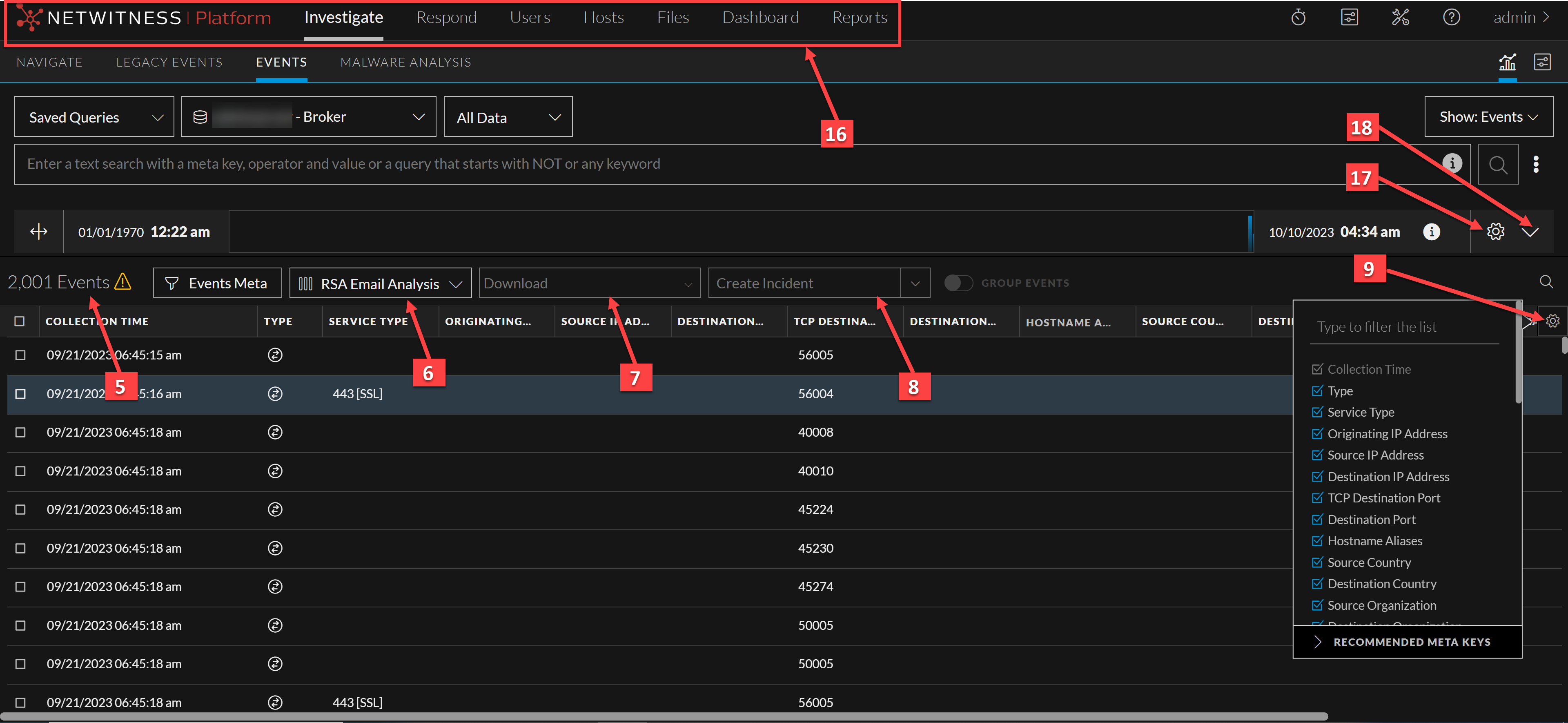
The following figure highlights the major features of the Events view.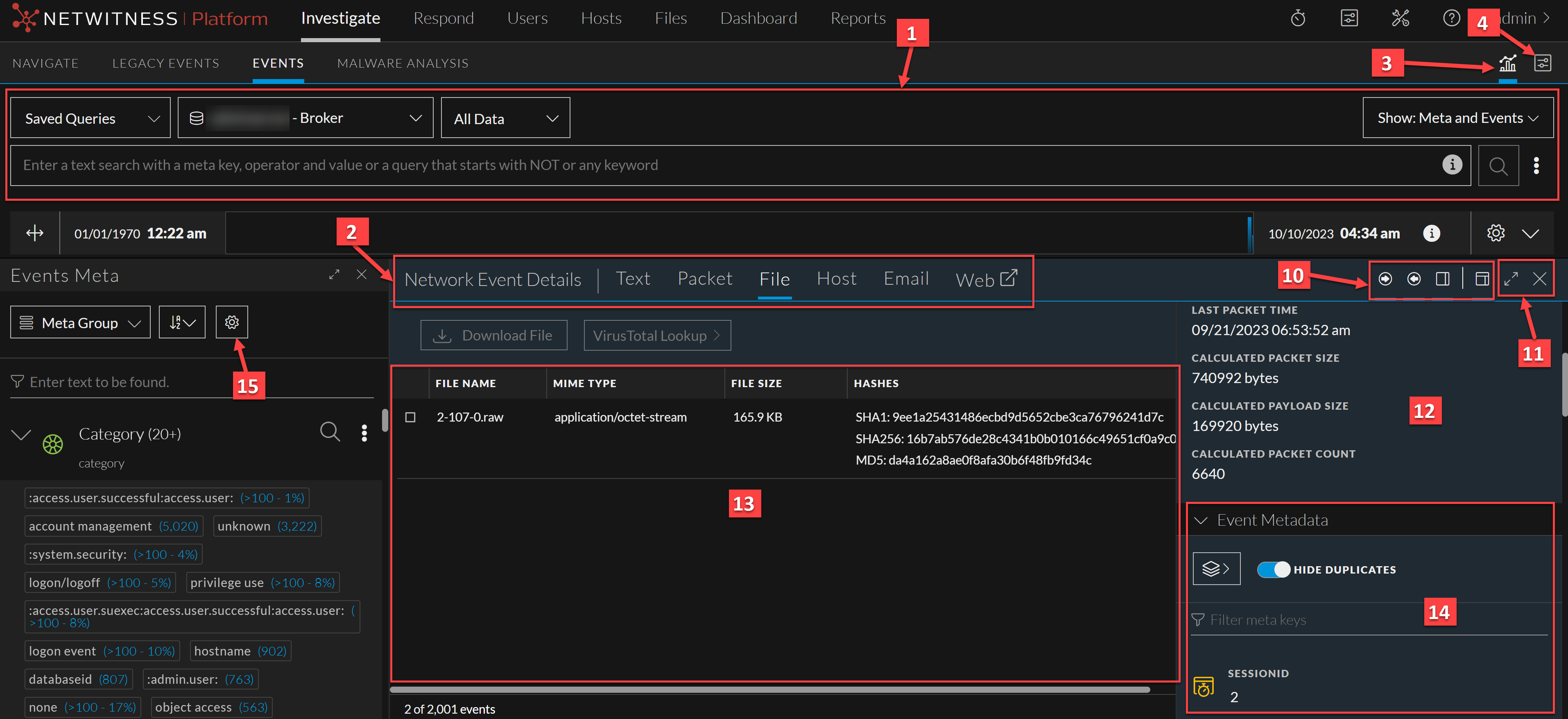
## Events Meta Panel
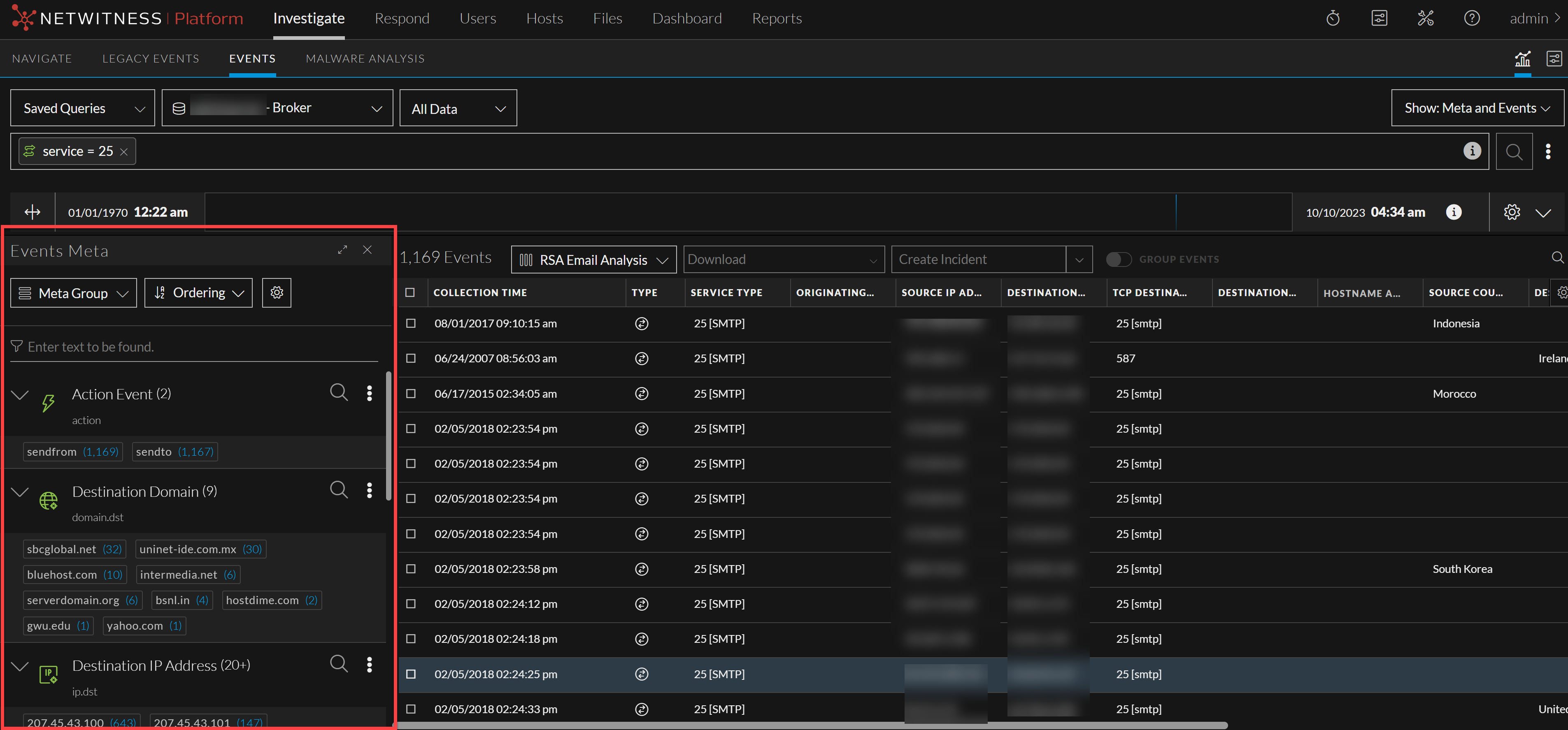
The Events Meta panel is a beta feature added from Version 11.5. Clicking the Filter button () in the Events panel, opens the panel to provide a view of meta keys and meta values found in the data set. (Version 11.6) By default, the Events Meta panel is open in the Events view. The user preference (open, closed, or fully expanded) is saved across sessions and logins. See [Drill into Metadata in the Events View](https://50269063.hs-sites.com/knowledge-base/DrillintoMetadataintheEventsView?hsLang=en) for more information about drilling into metadata.
**Note:** (Version 11.6) By default, the Events Meta panel is open in the Events view. The last used state of the panel (narrow or fully expanded) is saved throughout the session and across logins. Also, the Filter Events panel provides additional contrast between meta keys, meta values, and meta counts to improve readability.
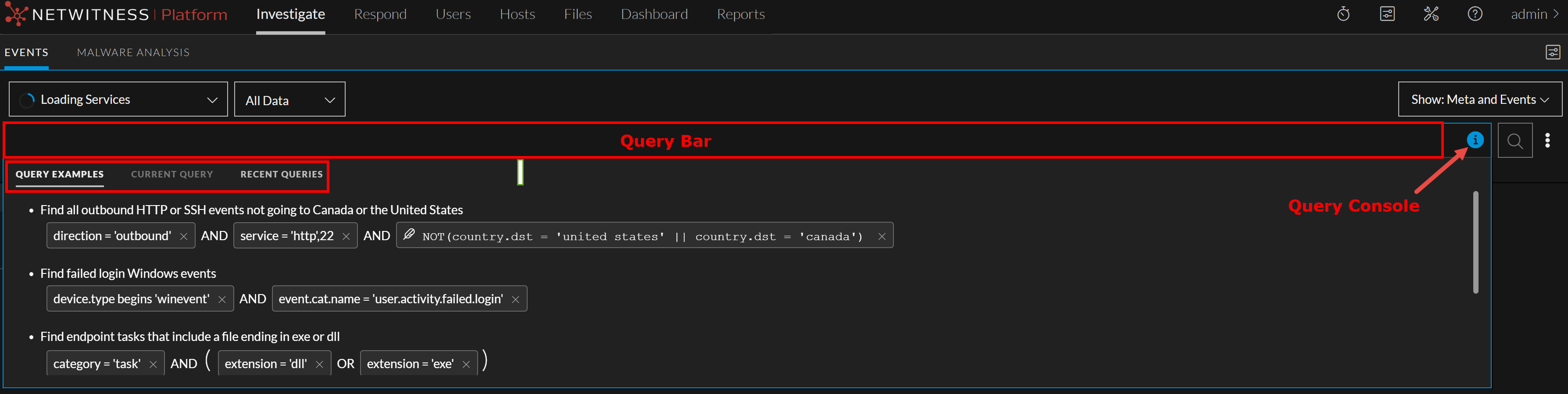
## Query Console
Clicking  (the console icon) opens the query console, where Query Examples, Current query, and Recent Query details are provided.
### Query Examples
In the **Query Console** \> **Query Examples** tab, you can see the example query list to help you understand the query construction.
### Current Query
In the **Query Console** \> **Current Query** tab, you can see which service, time range, and metadata was queried as well as real-time information about the status of the que
[](https://mydev.netwitness.com/?hsLang=en)
Copyright © 2026, NetWitness LLC. All rights reserved.
[NetWitness Platform](https://www.netwitness.com/)
[Acceptable Use Policy](https://www.netwitness.com/wp-content/uploads/Acceptable-Use-Policy-092022.pdf) [Privacy Statement](https://www.netwitness.com/wp-content/uploads/NetWitness-Privacy-Statement-07292024.pdf)

[](https://www.linkedin.com/company/netwitness-platform/) [](https://www.youtube.com/@netwitness)
© 2026 NetWitness LLC. All rights reserved.