---
title: Enable Parser Mappings
description: "Enable Parser MappingsEnable Parser Mappings\nThis topic tells administrators how to enable event source mapping on a Log Decoder.\nThe Log Collector d"
---
[Skip to content](https://mydev.netwitness.com/knowledge-base/enableparsermappings#main-content)

- [Home](https://mydev.netwitness.com/home)
- Integrations
Show submenu for Integrations
- [Netwitness Platform Integrations](https://mydev.netwitness.com/netwitnessplatformintegrations)
- [Third Party Integrations](https://mydev.netwitness.com/thirdpartyintegrations)
- [Knowledge Center](https://mydev.netwitness.com/knowledge-base)
- Community
Show submenu for Community
- [Blogs](https://mydev.netwitness.com/netwitness-security-llc-blog)
- Discussions
- Customers
Show submenu for Customers
- [Manage Products and Licenses](https://mydev.netwitness.com/nwportal)
- Downloads
- Partners
Show submenu for Partners
- [Partner Program](https://mydev.netwitness.com/partner)
- [Partner Resources](https://mydev.netwitness.com/partnerresources)
- [Submit a New Deal Registration](https://mydev.netwitness.com/dealregistration)
- [Become a Partner](https://mydev.netwitness.com/becomeapartner)
- [Update Your Partner Locator Profile](https://www.netwitness.com/partner-locator/?utm_source=pardotnewsletter&utm_medium=email&utm_campaign=partner_march)
- [NetWitness LinkedIn Partner Hub](https://linkedin.com/showcase/netwitnesspartners/)
- Education
Show submenu for Education
- [Instructor Led Training Schedule](https://mydev.netwitness.com/instructorledtrainingschedule)
- [NetWitness Training Catalog](https://mydev.netwitness.com/netwitnesstrainingcatalog)
- [Security Awareness Training](https://mydev.netwitness.com/securityawarenesstraining)
- [New Product Readiness](https://mydev.netwitness.com/newproductreadiness)
- [On-Demand Virtual Labs](https://mydev.netwitness.com/ondemandvirtuallabs)
- [Additional Training Information](https://mydev.netwitness.com/additionaltraininginformation)
- [Frequently Asked Questions](https://mydev.netwitness.com/educationfaq)
- [Contact NetWitness Education Team](https://mydev.netwitness.com/contact-netwitness-education-team)
- Support
Show submenu for Support
- [Contact Support](https://mydev.netwitness.com/contact-support)
- [Create a New Case](https://mydev.netwitness.com/create-support-case)
- [View My Cases](https://mydev.netwitness.com/viewmycase)
- [Product Version Life Cycle](https://mydev.netwitness.com/product-version-life-cycle)
- [Warranty & Replacement Parts](https://mydev.netwitness.com/warranty-and-replacement-parts)
- [Community Support Forum](https://mydev.netwitness.com/community-support-forum)
- [Technical Support Guide](https://mydev.netwitness.com/technical-support-guide)
Open main navigation
Close main navigation
- [Home](https://mydev.netwitness.com/home)
- Integrations
Show submenu for Integrations
- [Netwitness Platform Integrations](https://mydev.netwitness.com/netwitnessplatformintegrations)
- [Third Party Integrations](https://mydev.netwitness.com/thirdpartyintegrations)
- [Knowledge Center](https://mydev.netwitness.com/knowledge-base)
- Community
Show submenu for Community
- [Blogs](https://mydev.netwitness.com/netwitness-security-llc-blog)
- Discussions
- Customers
Show submenu for Customers
- [Manage Products and Licenses](https://mydev.netwitness.com/nwportal)
- Downloads
- Partners
Show submenu for Partners
- [Partner Program](https://mydev.netwitness.com/partner)
- [Partner Resources](https://mydev.netwitness.com/partnerresources)
- [Submit a New Deal Registration](https://mydev.netwitness.com/dealregistration)
- [Become a Partner](https://mydev.netwitness.com/becomeapartner)
- [Update Your Partner Locator Profile](https://www.netwitness.com/partner-locator/?utm_source=pardotnewsletter&utm_medium=email&utm_campaign=partner_march)
- [NetWitness LinkedIn Partner Hub](https://linkedin.com/showcase/netwitnesspartners/)
- Education
Show submenu for Education
- [Instructor Led Training Schedule](https://mydev.netwitness.com/instructorledtrainingschedule)
- [NetWitness Training Catalog](https://mydev.netwitness.com/netwitnesstrainingcatalog)
- [Security Awareness Training](https://mydev.netwitness.com/securityawarenesstraining)
- [New Product Readiness](https://mydev.netwitness.com/newproductreadiness)
- [On-Demand Virtual Labs](https://mydev.netwitness.com/ondemandvirtuallabs)
- [Additional Training Information](https://mydev.netwitness.com/additionaltraininginformation)
- [Frequently Asked Questions](https://mydev.netwitness.com/educationfaq)
- [Contact NetWitness Education Team](https://mydev.netwitness.com/contact-netwitness-education-team)
- Support
Show submenu for Support
- [Contact Support](https://mydev.netwitness.com/contact-support)
- [Create a New Case](https://mydev.netwitness.com/create-support-case)
- [View My Cases](https://mydev.netwitness.com/viewmycase)
- [Product Version Life Cycle](https://mydev.netwitness.com/product-version-life-cycle)
- [Warranty & Replacement Parts](https://mydev.netwitness.com/warranty-and-replacement-parts)
- [Community Support Forum](https://mydev.netwitness.com/community-support-forum)
- [Technical Support Guide](https://mydev.netwitness.com/technical-support-guide)
How can we help you?
- There are no suggestions because the search field is empty.
1. [NetWitness Knowledge Base](https://mydev.netwitness.com/knowledge-base?hsLang=en)
2. [Documentation](https://mydev.netwitness.com/knowledge-base/documentation?hsLang=en)
April 28, 2026
# Enable Parser Mappings
## Enable Parser MappingsEnable Parser Mappings
This topic tells administrators how to enable event source mapping on a Log Decoder.
The Log Collector discovers the event source type on a per-message basis. If the correct parser is not identified for the event source, a small percentage of logs may be misidentified. The misclassified messages do not populate event source rules and alerts, and the reports do not have the correct data. If there are multiple event source types associated with an IP address, it makes it difficult for the parsers to identify the exact event source from which the logs are generated.
If you map an IP address to its event source type, the Log Decoder can identify the event source from which the log is generated. When messages are delivered to the Log Decoder from a mapped event source, only the assigned parsers are queried to find event matches.
You can assign event source types to IPV4, IPV6, or the hostname value of the event source. You can also assign multiple event source types to a single IP address. You can also use the Log Collector ID when different event source types with the same IP address are sent to different Log Collectors.
**Note:** You can also enable parser mapping functions by navigating to  (Admin) **\> Event Sources \> Discovery.**
## Enable IP Address to Event Source MappingEnable IP Address to Event Source Mapping
To enable an IP address to event source mapping:
1. Go to ** (Admin) \> Services** and select a Log Decoder.
2. Select  **\> View \> Config**.
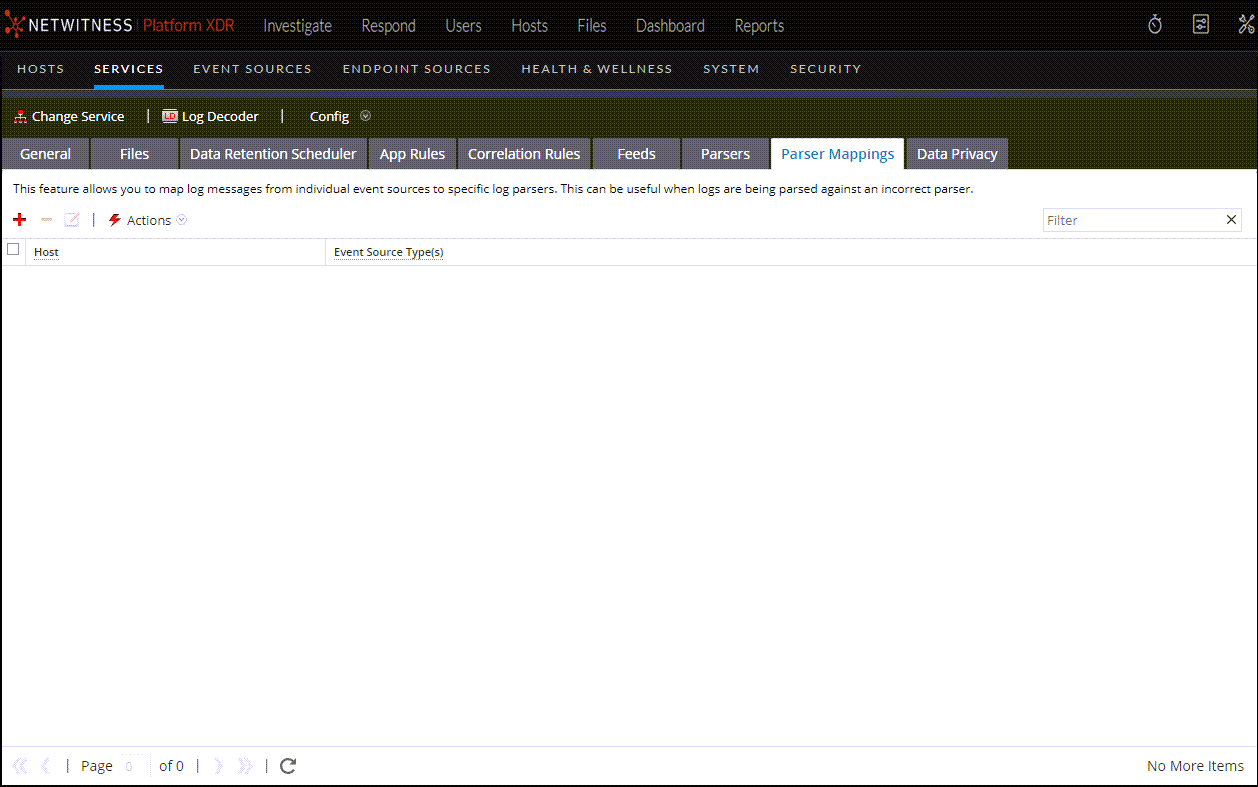
3. In the Configuration page, select the **Parser Mappings** tab.
The Parser Mappings tab is displayed in the Services Config view.
## Update IP to Event Source MappingUpdate IP to Event Source Mapping
To update an IP to event source mapping:
1. Go to  (Admin) **\> Services**.
2. Select a **Log Decoder**, and in the **Actions** column, select  **\> View \> Config**.
The Services Config view is displayed.
3. Select the **Parsers Mapping** tab.
4. Click.
The Mapping Editor is displayed.
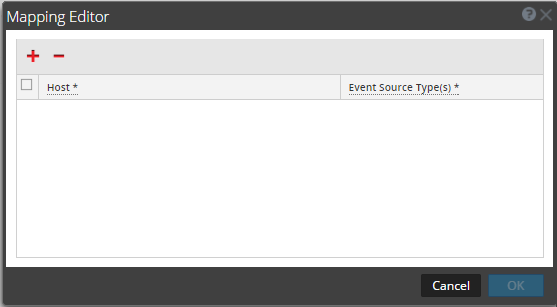
5. Any of the following mappings can be defined:
- One Host and One Event Source Type
In the **Host** field, enter the hostname.
For example: 10.0.0.1
- In the **Event Sources(**s) field, enter the event source type.
For example: apache
- One Host and One or More Event Source Types
In the **Host** field, enter the hostname.
For example: 10.0.0.1
- In the **Event Source(s)** field, enter the event source type.
For example: apache,sap,aix
- One Host, One Log Collector, and One Event Source Type
In the **Host** field, enter the hostname and Log Collector ID.
For example: 10.0.0.1,LC-1
- In the **Event Source(s)** field, enter the event source type.
For example: apache
- One Host, One Log Collector ID, and One or More Event Source Types
In the **Host** field, enter the hostname and Log Collector ID.
For example: 10.0.0.1,LC-1
- In the **Event Source(s)** field, enter the event source type.
For example: apache,sap,aix
**Note:** The event source types are processed in the order you enter the parsers and if one or more parsers matches a log, the first parser in the list is queried. The Host/IP can be IPv4, IPv6, or Hostname.
6. Click **OK**.
The Parser Mapping is added.
7. To cancel the parser mappings selection, click **Cancel**.
## Read IP to Event Source Type MappingsRead IP to Event Source Type Mappings
To read an IP to event source type mappings:
1. Go to ** (Admin) \> Services**, and select a Log Decoder service.
2. In the Actions column, select  **\> View \> Config**.
The Services Config view is displayed.
3. Select the **Parsers Mapping** tab.
The mappings are displayed.

## Edit IP to Event Source Type MappingsEdit IP to Event Source Type Mappings
To edit IP to event source type mappings:
1. Go to ** (Admin) \> Services**, and select a Log Decoder service.
2. In the Actions column, select  **\> View \> Config**.
The Service Config view is displayed.
3. Select the **Parser Mappings** tab.
4. Select the mapping you want to edit.
**Note:** You can only edit one mapping at a time.
5. Click .
6. In the **Event Source(s)** field, modify the event source(s).
**Note:** The host is not editable and the field is disabled.
7. Click **OK** to accept the edited Event Source.
8. To cancel the changes, click **Cancel**.
## Delete IP to Event Source Type MappingsDelete IP to Event Source Type Mappings
To delete IP to event source type mappings:
1. Go to ** (Admin) \> Services**, and select a Log Decoder service.
2. In the Actions column, select  **\> View \> Config**.
The Service Config view is displayed.
3. Select the **Parser Mappings** tab.
4. Select the mapping you want to delete.
5. Click .
The mapping is deleted and the grid is refreshed.
6. To cancel the changes, click **Cancel**.
## Sort the Hostname or Event Source TypeSort the Hostname or Event Source Type
To sort the hostname or event source type:
1. Go to ** (Admin) \> Services**, and select a Log Decoder service.
2. In the Actions column, select  **\> View \> Config**.
The Service Config view is displayed.
3. Select the **Parser Mappings** tab.
4. To sort a column, click in the column header.
Event Source Types are applied for your selected IP address. Logs are parsed against the parsers in the order they are listed.
## Import IP to Event Source Mapping EntriesImport IP to Event Source Mapping Entries
To import IP to event source mapping entries:
1. Go to ** (Admin) \> Services**, and select a Log Decoder service.
2. In the Actions column, select  **\> View \> Config**.
The Service Config view is displayed.
3. Select the **Parser Mappings** tab.
4. Select **Actions \> Import**.
The Import dialog is displayed.
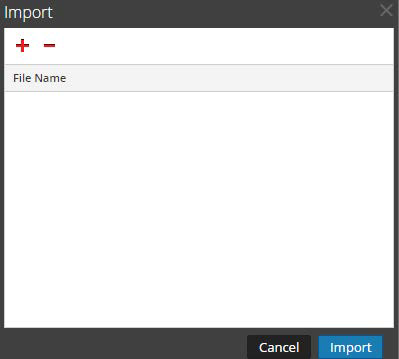
5. Click .
6. Select the file you want to import and click **OK**.
7. To load the parser, click **Import**.
**Note:** You can only import one .csv file at a time.
## Export IP to Event Source Mapping EntriesExport IP to Event Source Mapping Entries
To export IP to event source mapping entries:
1. Go to ** (Admin) \> Services**, and select a Log Decoder service.
2. In the Actions column, select  **\> View \> Config**.
The Service Config view is displayed.
3. Select the **Parser Mappings** tab.
4. Select the mappings you want to export.
5. Select **Actions \> Export \> Selection**.
The Export Selection dialog is displayed.
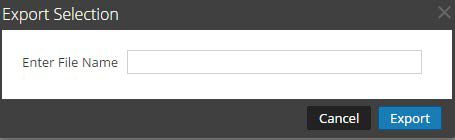
6. Enter the file name and click **Export**.
## Search IP to Event Source Mapping EntriesSearch IP to Event Source Mapping Entries
To search IP to event source mapping entries:
1. Go to ** (Admin) \> Services**, and select a Log Decoder service.
2. In the Actions column, select  **\> View \> Config**.
The Service Config view is displayed.
3. Select the **Parser Mappings** tab.
4. In the Parsers Mappings toolbar, enter the Host or Event Source in the **Filter** field.
5. Click **Enter**.
The Hosts or Event Sources that match the names entered in the **Filter** field are displayed.
[](https://mydev.netwitness.com/?hsLang=en)
Copyright © 2026, NetWitness LLC. All rights reserved.
[NetWitness Platform](https://www.netwitness.com/)
[Acceptable Use Policy](https://www.netwitness.com/wp-content/uploads/Acceptable-Use-Policy-092022.pdf) [Privacy Statement](https://www.netwitness.com/wp-content/uploads/NetWitness-Privacy-Statement-07292024.pdf)

[](https://www.linkedin.com/company/netwitness-platform/) [](https://www.youtube.com/@netwitness)
© 2026 NetWitness LLC. All rights reserved.