---
title: Enable or Disable CCM for All or Individual Decoder Services
description: "Enable or Disable CCM for All or Individual Decoder Services\nYou can choose to use CCM to manage content for selected services or for all services.\nWh"
---
[Skip to content](https://mydev.netwitness.com/knowledge-base/enableordisableccmforallorindividualdecoderservices#main-content)

- [Home](https://mydev.netwitness.com/home)
- Integrations
Show submenu for Integrations
- [Netwitness Platform Integrations](https://mydev.netwitness.com/netwitnessplatformintegrations)
- [Third Party Integrations](https://mydev.netwitness.com/thirdpartyintegrations)
- [Knowledge Center](https://mydev.netwitness.com/knowledge-base)
- Community
Show submenu for Community
- [Blogs](https://mydev.netwitness.com/netwitness-security-llc-blog)
- Discussions
- Customers
Show submenu for Customers
- [Manage Products and Licenses](https://mydev.netwitness.com/nwportal)
- Downloads
- Partners
Show submenu for Partners
- [Partner Program](https://mydev.netwitness.com/partner)
- [Partner Resources](https://mydev.netwitness.com/partnerresources)
- [Submit a New Deal Registration](https://mydev.netwitness.com/dealregistration)
- [Become a Partner](https://mydev.netwitness.com/becomeapartner)
- [Update Your Partner Locator Profile](https://www.netwitness.com/partner-locator/?utm_source=pardotnewsletter&utm_medium=email&utm_campaign=partner_march)
- [NetWitness LinkedIn Partner Hub](https://linkedin.com/showcase/netwitnesspartners/)
- Education
Show submenu for Education
- [Instructor Led Training Schedule](https://mydev.netwitness.com/instructorledtrainingschedule)
- [NetWitness Training Catalog](https://mydev.netwitness.com/netwitnesstrainingcatalog)
- [Security Awareness Training](https://mydev.netwitness.com/securityawarenesstraining)
- [New Product Readiness](https://mydev.netwitness.com/newproductreadiness)
- [On-Demand Virtual Labs](https://mydev.netwitness.com/ondemandvirtuallabs)
- [Additional Training Information](https://mydev.netwitness.com/additionaltraininginformation)
- [Frequently Asked Questions](https://mydev.netwitness.com/educationfaq)
- [Contact NetWitness Education Team](https://mydev.netwitness.com/contact-netwitness-education-team)
- Support
Show submenu for Support
- [Contact Support](https://mydev.netwitness.com/contact-support)
- [Create a New Case](https://mydev.netwitness.com/create-support-case)
- [View My Cases](https://mydev.netwitness.com/viewmycase)
- [Product Version Life Cycle](https://mydev.netwitness.com/product-version-life-cycle)
- [Warranty & Replacement Parts](https://mydev.netwitness.com/warranty-and-replacement-parts)
- [Community Support Forum](https://mydev.netwitness.com/community-support-forum)
- [Technical Support Guide](https://mydev.netwitness.com/technical-support-guide)
Open main navigation
Close main navigation
- [Home](https://mydev.netwitness.com/home)
- Integrations
Show submenu for Integrations
- [Netwitness Platform Integrations](https://mydev.netwitness.com/netwitnessplatformintegrations)
- [Third Party Integrations](https://mydev.netwitness.com/thirdpartyintegrations)
- [Knowledge Center](https://mydev.netwitness.com/knowledge-base)
- Community
Show submenu for Community
- [Blogs](https://mydev.netwitness.com/netwitness-security-llc-blog)
- Discussions
- Customers
Show submenu for Customers
- [Manage Products and Licenses](https://mydev.netwitness.com/nwportal)
- Downloads
- Partners
Show submenu for Partners
- [Partner Program](https://mydev.netwitness.com/partner)
- [Partner Resources](https://mydev.netwitness.com/partnerresources)
- [Submit a New Deal Registration](https://mydev.netwitness.com/dealregistration)
- [Become a Partner](https://mydev.netwitness.com/becomeapartner)
- [Update Your Partner Locator Profile](https://www.netwitness.com/partner-locator/?utm_source=pardotnewsletter&utm_medium=email&utm_campaign=partner_march)
- [NetWitness LinkedIn Partner Hub](https://linkedin.com/showcase/netwitnesspartners/)
- Education
Show submenu for Education
- [Instructor Led Training Schedule](https://mydev.netwitness.com/instructorledtrainingschedule)
- [NetWitness Training Catalog](https://mydev.netwitness.com/netwitnesstrainingcatalog)
- [Security Awareness Training](https://mydev.netwitness.com/securityawarenesstraining)
- [New Product Readiness](https://mydev.netwitness.com/newproductreadiness)
- [On-Demand Virtual Labs](https://mydev.netwitness.com/ondemandvirtuallabs)
- [Additional Training Information](https://mydev.netwitness.com/additionaltraininginformation)
- [Frequently Asked Questions](https://mydev.netwitness.com/educationfaq)
- [Contact NetWitness Education Team](https://mydev.netwitness.com/contact-netwitness-education-team)
- Support
Show submenu for Support
- [Contact Support](https://mydev.netwitness.com/contact-support)
- [Create a New Case](https://mydev.netwitness.com/create-support-case)
- [View My Cases](https://mydev.netwitness.com/viewmycase)
- [Product Version Life Cycle](https://mydev.netwitness.com/product-version-life-cycle)
- [Warranty & Replacement Parts](https://mydev.netwitness.com/warranty-and-replacement-parts)
- [Community Support Forum](https://mydev.netwitness.com/community-support-forum)
- [Technical Support Guide](https://mydev.netwitness.com/technical-support-guide)
How can we help you?
- There are no suggestions because the search field is empty.
1. [NetWitness Knowledge Base](https://mydev.netwitness.com/knowledge-base?hsLang=en)
2. [Documentation](https://mydev.netwitness.com/knowledge-base/documentation?hsLang=en)
April 26, 2026
# Enable or Disable CCM for All or Individual Decoder Services
## Enable or Disable CCM for All or Individual Decoder Services
You can choose to use CCM to manage content for selected services or for all services.
When CCM is Enabled:
- The service config page is read-only. Only **Export** button is enabled in service config page to export content.
- Content cannot be deployed to CCM enabled services through the Live Content UI.
- Content for all CCM enabled services can be managed through the Content Policies and the Content Library.
- Content subscription from CCM overrides content subscription from  **(CONFIGURE) \> Subscriptions** page.
When CCM is Disabled:
- Content can be deployed from Live Content UI.
- The content of the service can be managed from service config page. Any changes made through the Service Config page does not reflect in the content policy.
- The service is disabled in the Policy or Group page of CCM and the policy status changes to **Partial**. The policy can be published with a disabled service. However, the policy state always remains **Partial**. Publishing a policy will affect only the services that are enabled for CCM.
**Note:** When a service, which is part of a group, is added back to CCM, the policy status changes to “Unpublished”.
## Enable or Disable CCM for All Decoder Services
From 12.2 version onwards, a CCM toggle is introduced to enable or disable CCM for all 12.0+ Decoder Services. The toggle is available on the UI.
To enable or disable CCM for all Decoder Services on the UI
**Scenario 1: Some Decoder Services are Managed by CCM**
1. Go to  **(CONFIGURE) \> Policies**.
2. In the policies panel, click **Content**.
3. Click either **Content Library**, **Policies**, **Groups** or **Services**.
The respective screens are displayed. On these screens, on the left bottom corner, the message on managing the content is displayed.
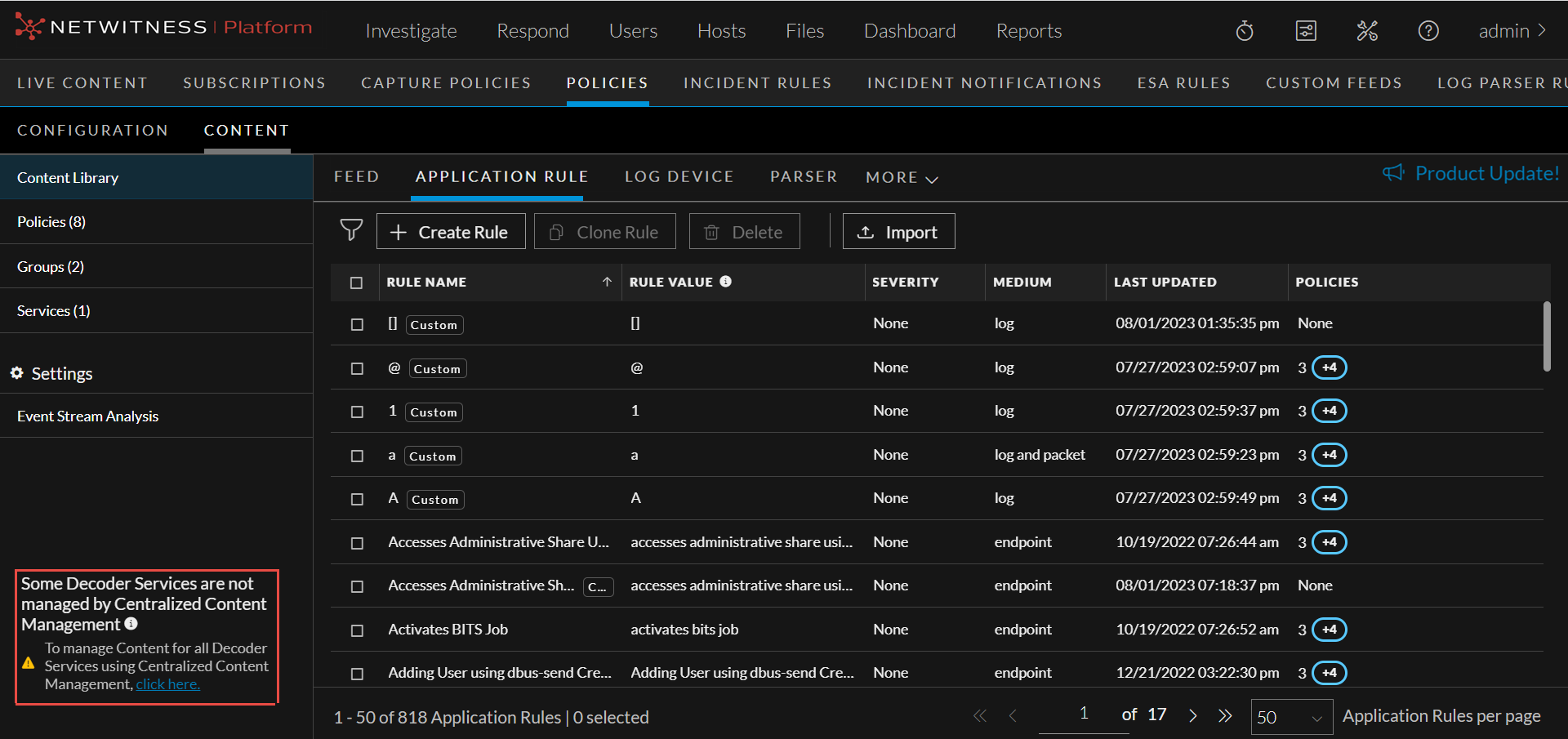
1. If the NetWitness platform consists of only few Decoders managed by CCM, then the message "Some Decoder Services are managed by Centralized Content Management" is diplayed. In such a case, you can choose to either manage all the Decoder Services by CCM or not to manage any Decoder Services by CCM by clicking **click here**.
The **Manage Content for Decoder Services** pop-up window is displayed.
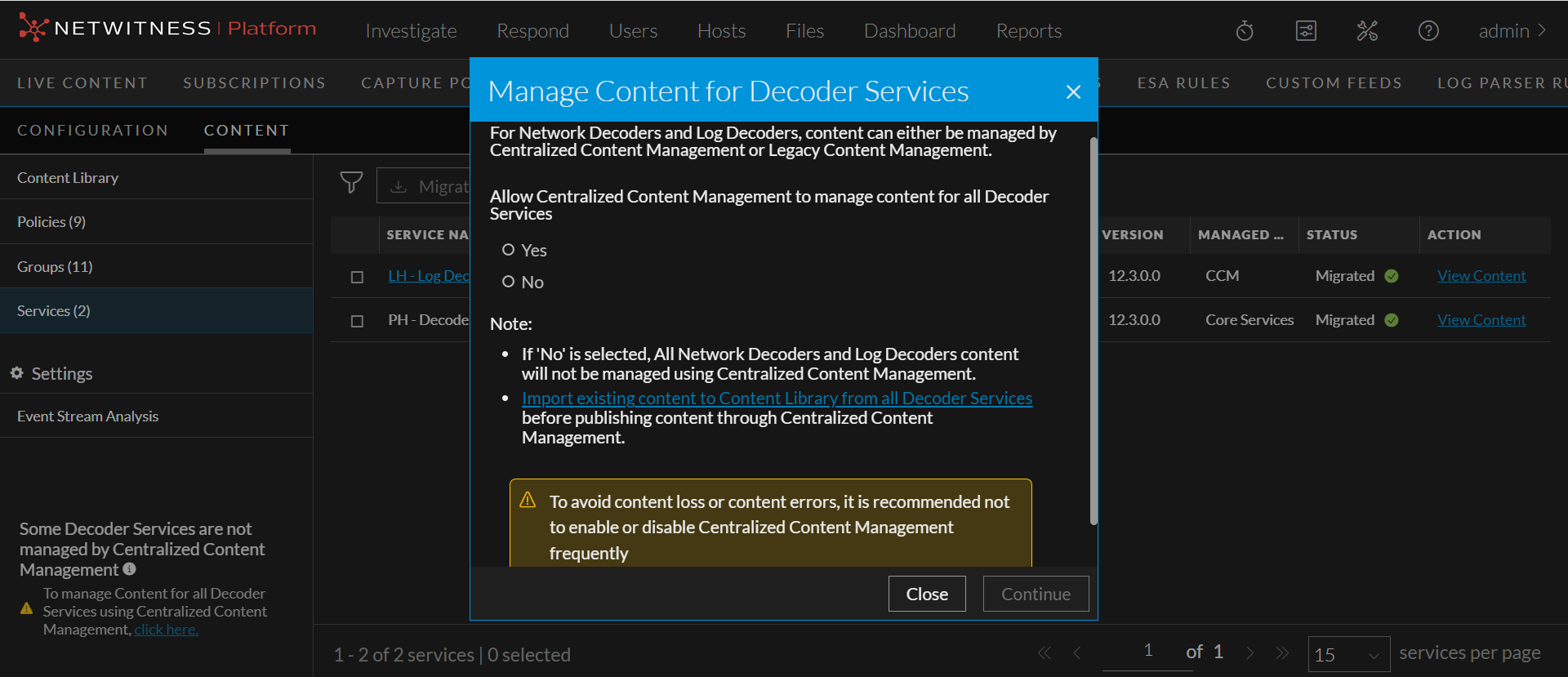
1. On the **Manage Content for Decoder Services** pop-up window, click **Yes** for **Allow Centralized Content Management to manage content for all Decoder Services** to enable CCM for all Decoder Services. Click **No** to disable CCM for all Decoder Services.
**Note:** Read the notes on the pop-up window before clicking on **Continue**.
1. Click **Continue**. The **Manage Content for Decoder Services - Review and Confirm** screen is displayed.
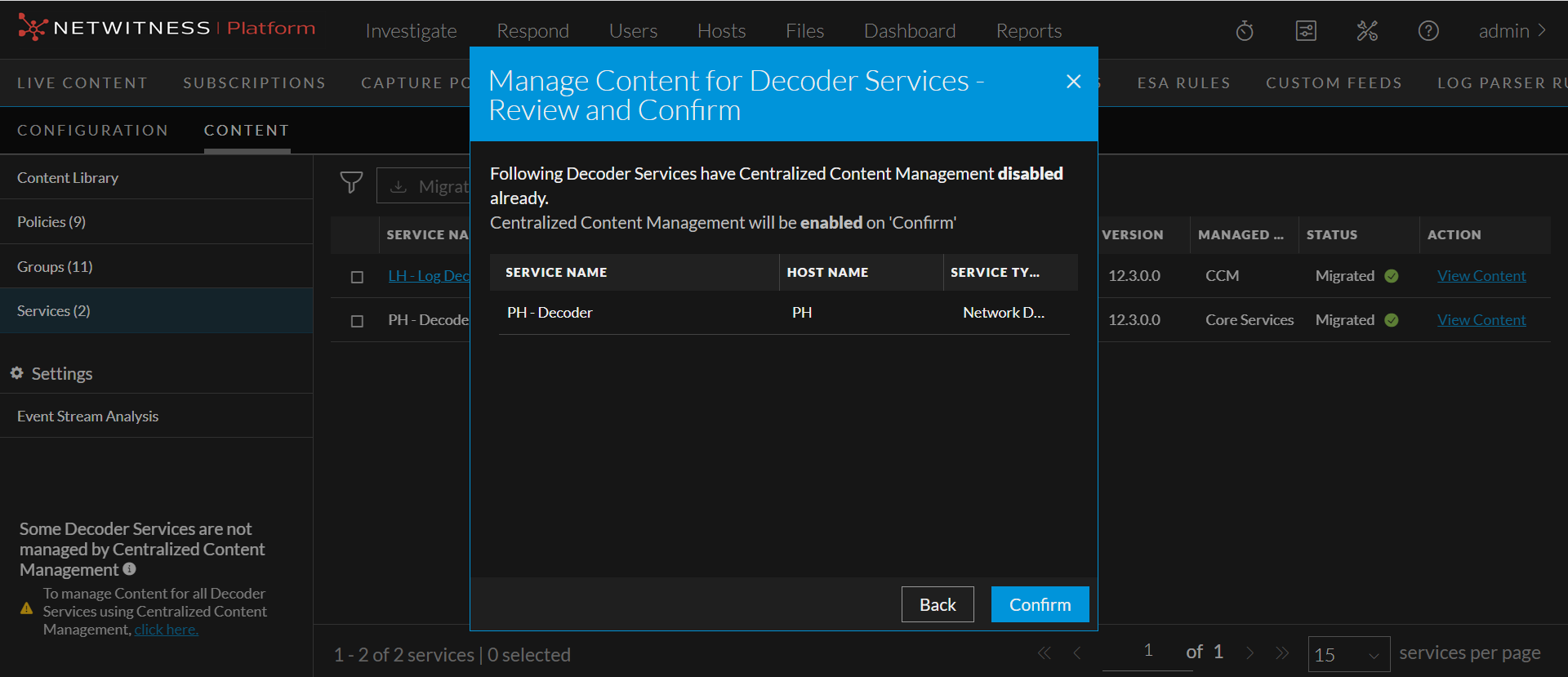
1. Click **Confirm** to review and confirm the services which will be enabled or disabled based on the selected option. Else, click **Back** to go back to the previous screen.
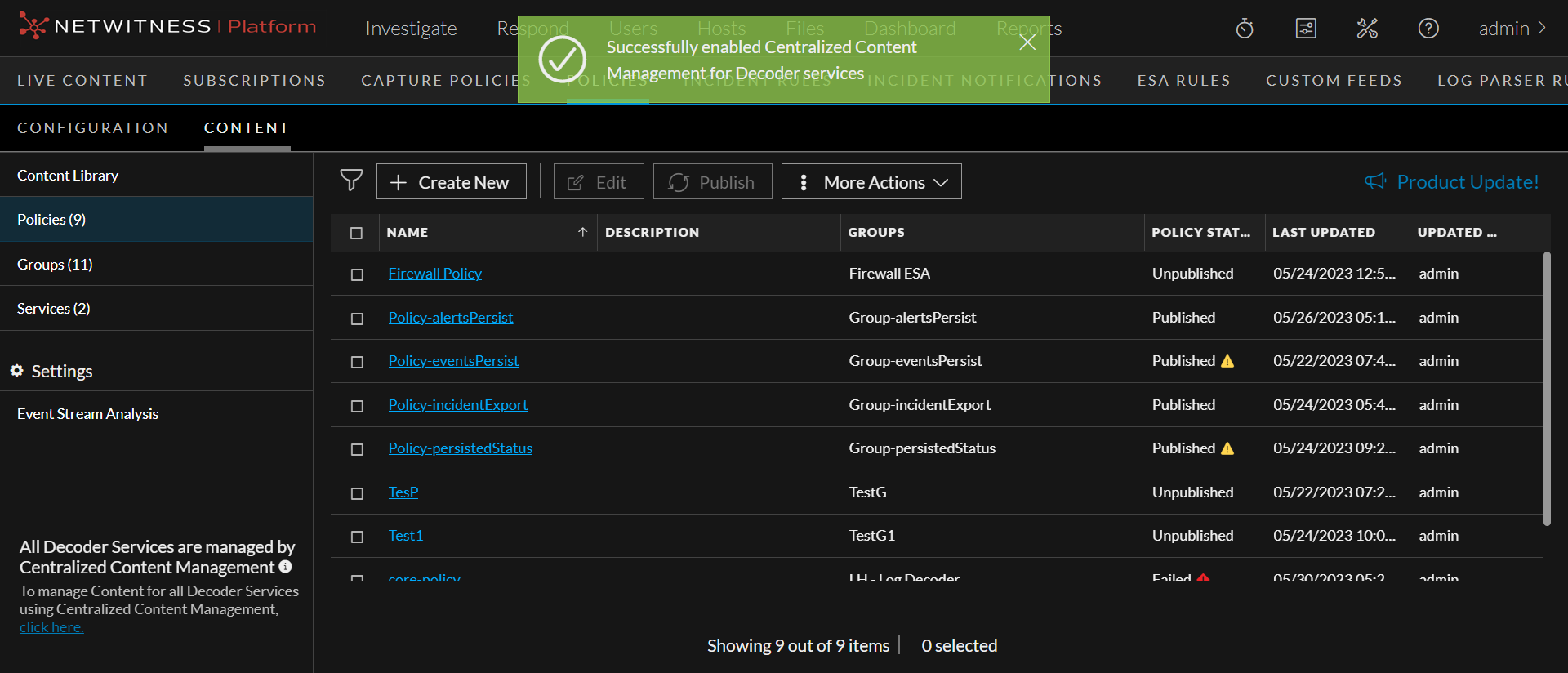
2. The success message is displayed on the screen.
**Scenario 2: All Decoder Services are Managed by CCM**
1. Go to  **(CONFIGURE) \> Policies**.
2. In the policies panel, click **Content**.
3. Click either **Content Library**, **Policies**, **Groups** or **Services**.
4. The respective screens are displayed. On these screens, on the left bottom corner, the message on managing the content is displayed.
5. 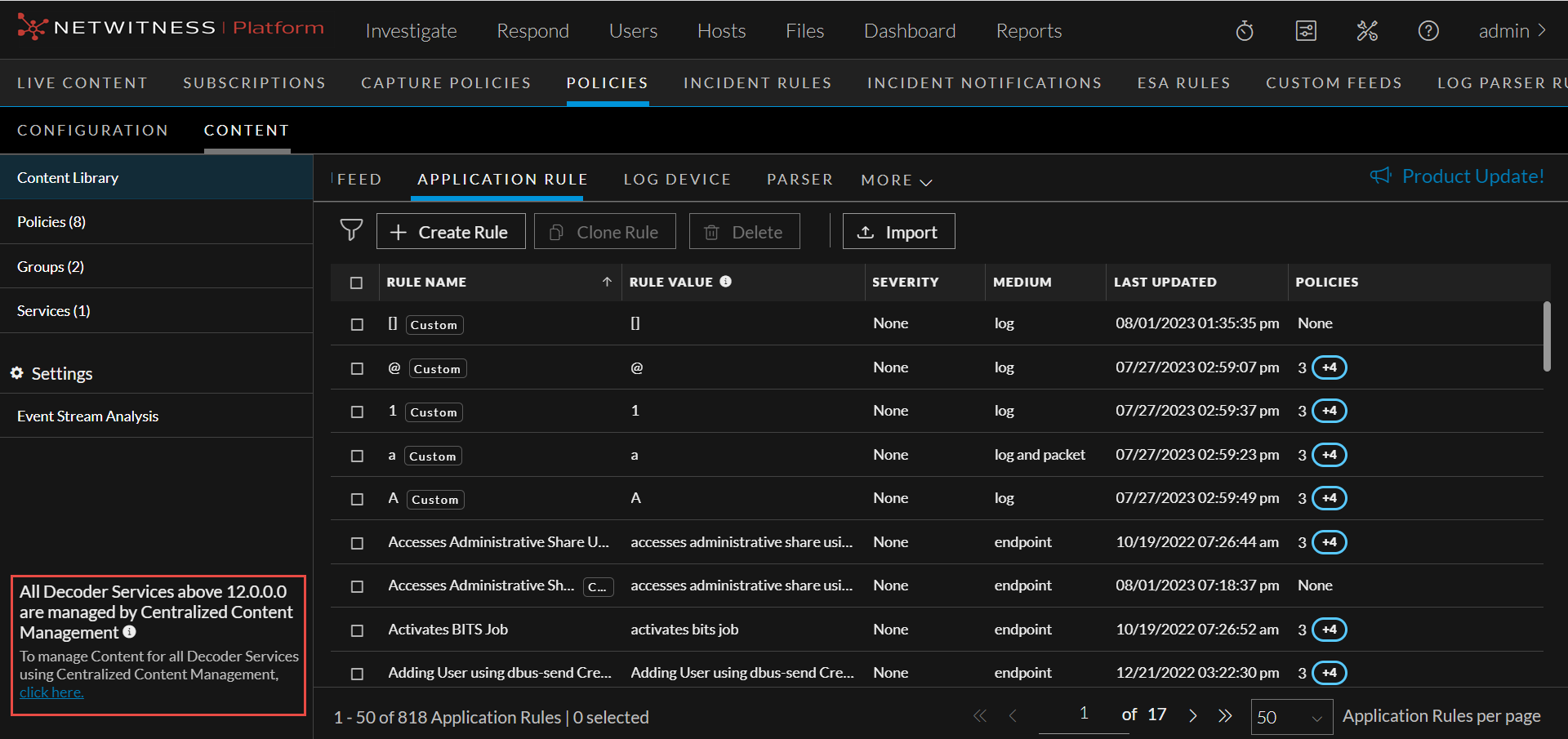If the NetWitness platform consists of all Decoders managed by CCM, then the message "All Decoder Services above 12.0.0.0 are managed by Centralized Content Management" is displayed. In such a case, you can choose to not manage any Decoder Services by CCM by clicking **click here**.
6. The **Manage Content for Decoder Services** pop-up window is displayed.
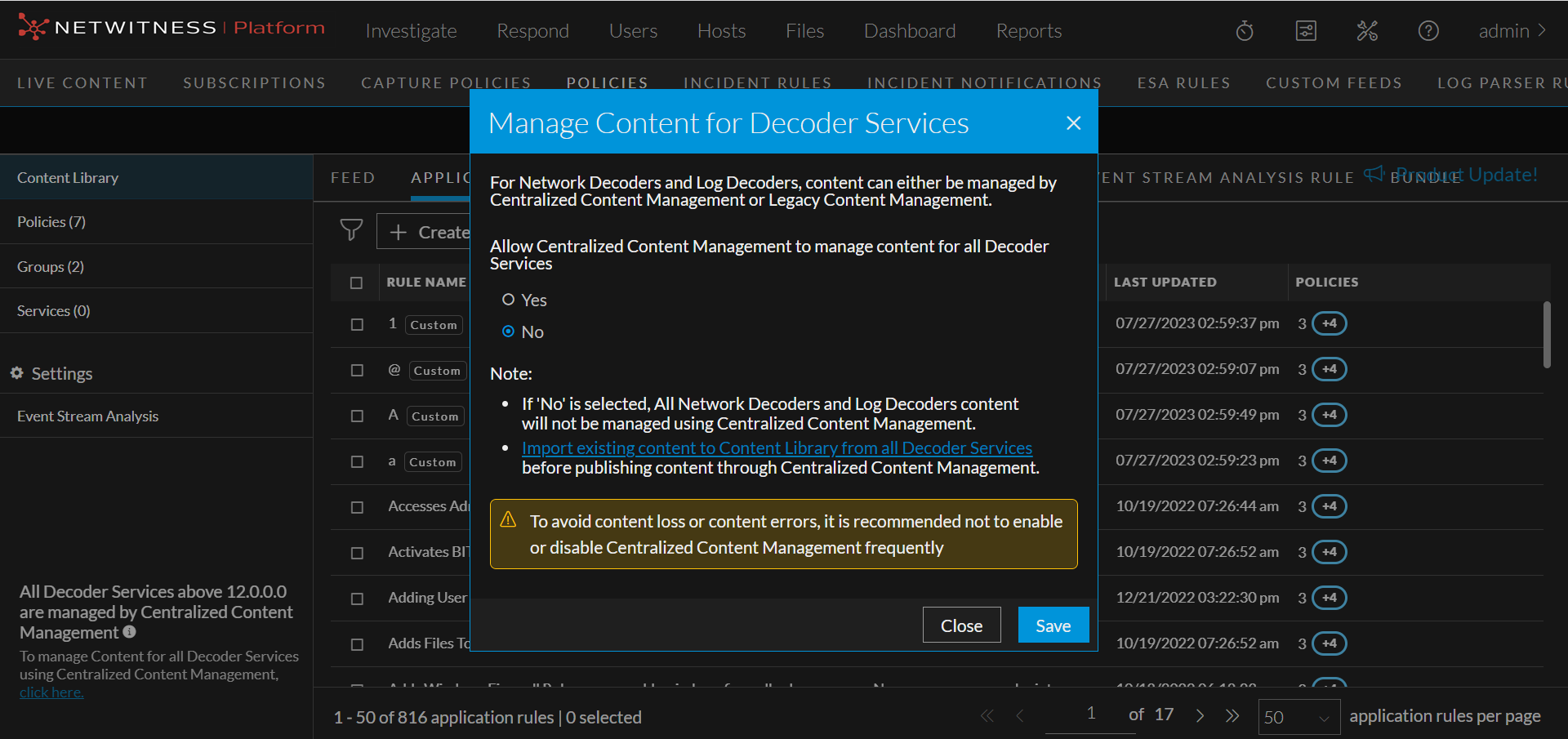
7. On the **Manage Content for Decoder Services** pop-up window, click **No** for **Allow Centralized Content Management to manage content for all Decoder Services** to disable CCM for all Decoder Services.
**Note:**
\- The **Yes** option is selected by default.
\- Read the notes on the pop-up window before clicking on **Save**.
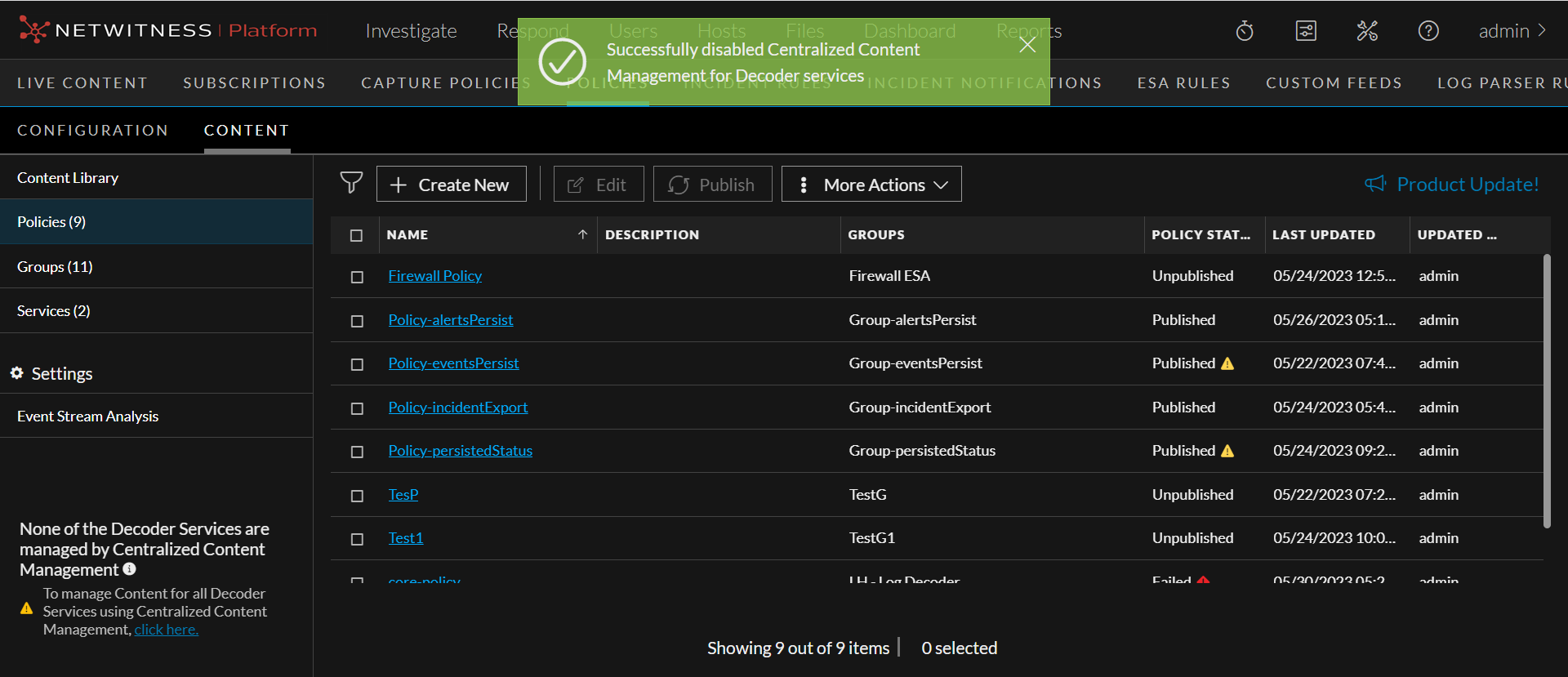
1. Click **Save**. The success message is displayed on the screen.
**Note:** The **Save** option is enabled only when you select **No**.
**Scenario 3: None of the Decoder Services are Managed by CCM**
1. Go to  **(CONFIGURE) \> Policies**.
2. In the policies panel, click **Content**.
3. Click either **Content Library**, **Policies**, **Groups** or **Services**.
4. The respective screens are displayed. On these screens, on the left bottom corner, the message on managing the content is displayed.
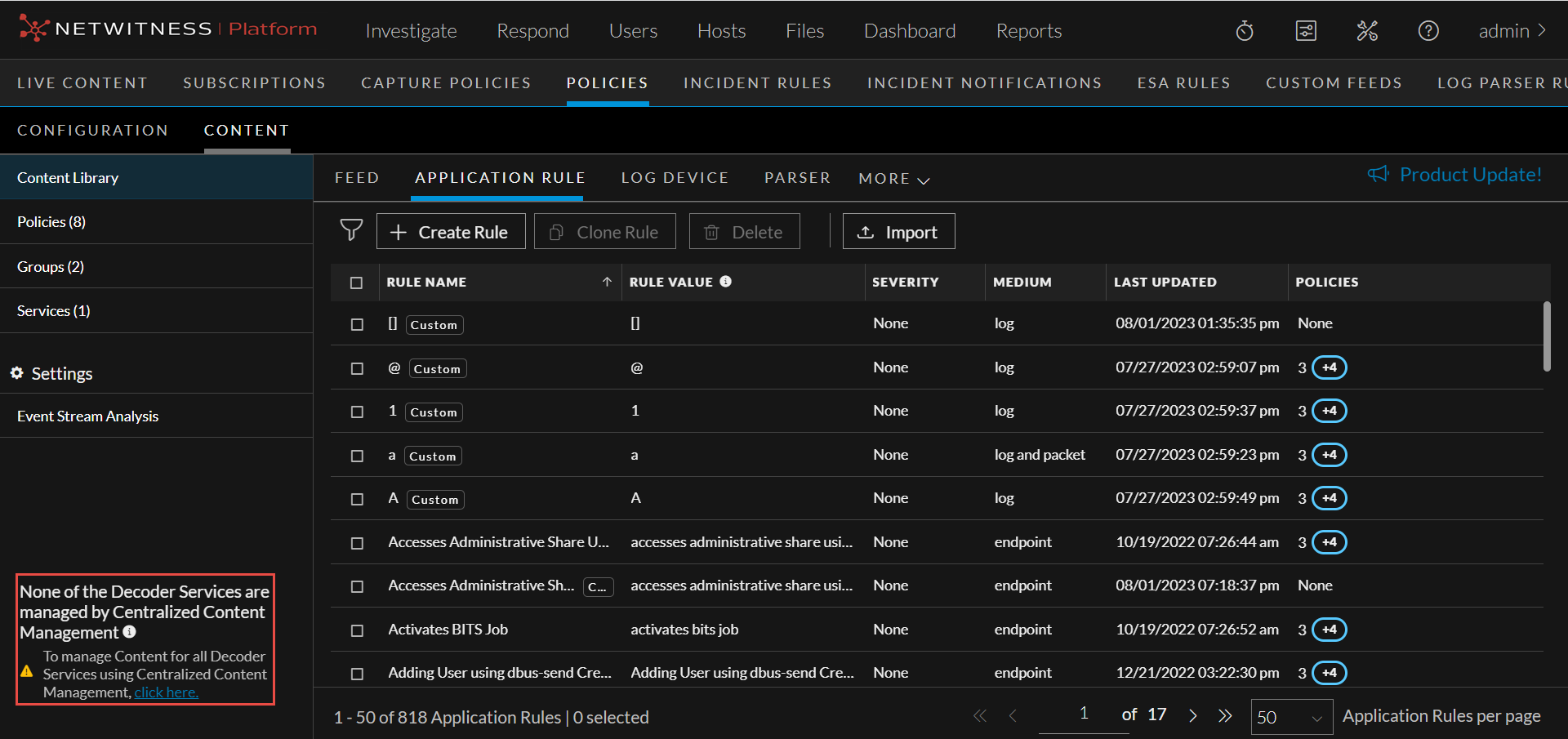
5. If the NetWitness platform does not consist of any Decoders managed by CCM, then the message "None of the Decoder Services are managed by Centralized Content Management" is displayed. In such a case, you can choose to manage all Decoder Services by CCM by clicking **click here**.
6. The **Manage Content for Decoder Services** pop-up window is displayed.
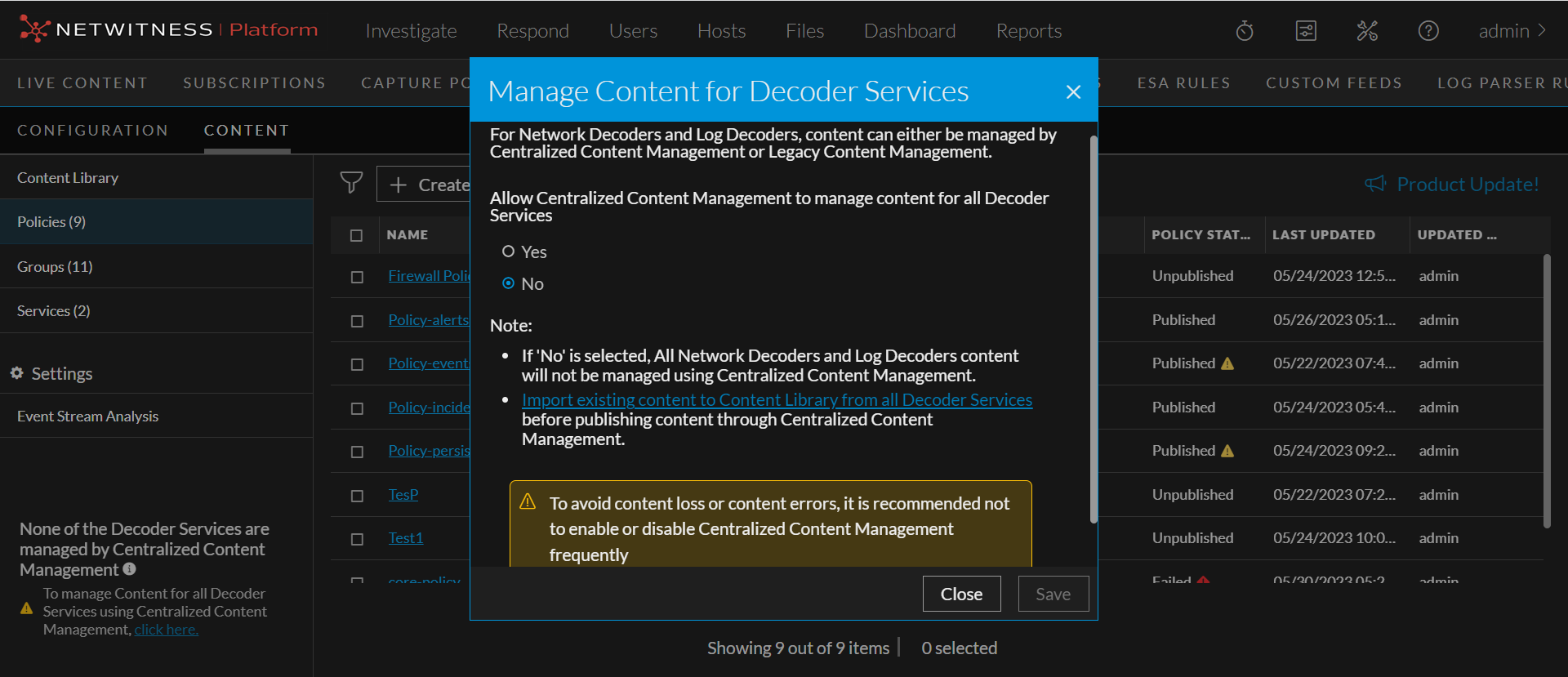
7. On the **Manage Content for Decoder Services** pop-up window, click **Yes** for **Allow Centralized Content Management to manage content for all Decoder Services** to enable CCM for all Decoder Services.
**Note:**
\- The **No** option is selected by default.
\- Read the notes on the pop-up window before clicking on **Save**.
1. Click **Save**. The success message is displayed on the screen.
2. **Note:** The **Save** option is enabled only when you select **Yes**.
## Enable or Disable CCM for Individual Decoder Services
To enable or disable CCM for individual Decoder services, see [Enable or Disable CCM for Individual Decoder Services](https://50269063.hs-sites.com/knowledge-base/EnableorDisableCCMforIndividualDecoderServices?hsLang=en) topic under [Manage Services](https://50269063.hs-sites.com/knowledge-base/ManageServices?hsLang=en).
[Previous Page](https://community.netwitness.com/t5/tkb/articleeditorpage/tkb-id/netwitness-online-documentation/message-uid/685709) [Next Page](https://50269063.hs-sites.com/knowledge-base/MigrateContentfromCoreServicestoContentLibrary?hsLang=en)
[](https://mydev.netwitness.com/?hsLang=en)
Copyright © 2026, NetWitness LLC. All rights reserved.
[NetWitness Platform](https://www.netwitness.com/)
[Acceptable Use Policy](https://www.netwitness.com/wp-content/uploads/Acceptable-Use-Policy-092022.pdf) [Privacy Statement](https://www.netwitness.com/wp-content/uploads/NetWitness-Privacy-Statement-07292024.pdf)

[](https://www.linkedin.com/company/netwitness-platform/) [](https://www.youtube.com/@netwitness)
© 2026 NetWitness LLC. All rights reserved.