---
title: Edit Application Rule
description: "Tags: Configuration, Documentation, Version 12.2Edit Application Rule\nWhen you edit the application rule, follow these guidelines:\n\nYou can only edit"
---
[Skip to content](https://mydev.netwitness.com/knowledge-base/editapplicationrule#main-content)

- [Home](https://mydev.netwitness.com/home)
- Integrations
Show submenu for Integrations
- [Netwitness Platform Integrations](https://mydev.netwitness.com/netwitnessplatformintegrations)
- [Third Party Integrations](https://mydev.netwitness.com/thirdpartyintegrations)
- [Knowledge Center](https://mydev.netwitness.com/knowledge-base)
- Community
Show submenu for Community
- [Blogs](https://mydev.netwitness.com/netwitness-security-llc-blog)
- Discussions
- Customers
Show submenu for Customers
- [Manage Products and Licenses](https://mydev.netwitness.com/nwportal)
- Downloads
- Partners
Show submenu for Partners
- [Partner Program](https://mydev.netwitness.com/partner)
- [Partner Resources](https://mydev.netwitness.com/partnerresources)
- [Submit a New Deal Registration](https://mydev.netwitness.com/dealregistration)
- [Become a Partner](https://mydev.netwitness.com/becomeapartner)
- [Update Your Partner Locator Profile](https://www.netwitness.com/partner-locator/?utm_source=pardotnewsletter&utm_medium=email&utm_campaign=partner_march)
- [NetWitness LinkedIn Partner Hub](https://linkedin.com/showcase/netwitnesspartners/)
- Education
Show submenu for Education
- [Instructor Led Training Schedule](https://mydev.netwitness.com/instructorledtrainingschedule)
- [NetWitness Training Catalog](https://mydev.netwitness.com/netwitnesstrainingcatalog)
- [Security Awareness Training](https://mydev.netwitness.com/securityawarenesstraining)
- [New Product Readiness](https://mydev.netwitness.com/newproductreadiness)
- [On-Demand Virtual Labs](https://mydev.netwitness.com/ondemandvirtuallabs)
- [Additional Training Information](https://mydev.netwitness.com/additionaltraininginformation)
- [Frequently Asked Questions](https://mydev.netwitness.com/educationfaq)
- [Contact NetWitness Education Team](https://mydev.netwitness.com/contact-netwitness-education-team)
- Support
Show submenu for Support
- [Contact Support](https://mydev.netwitness.com/contact-support)
- [Create a New Case](https://mydev.netwitness.com/create-support-case)
- [View My Cases](https://mydev.netwitness.com/viewmycase)
- [Product Version Life Cycle](https://mydev.netwitness.com/product-version-life-cycle)
- [Warranty & Replacement Parts](https://mydev.netwitness.com/warranty-and-replacement-parts)
- [Community Support Forum](https://mydev.netwitness.com/community-support-forum)
- [Technical Support Guide](https://mydev.netwitness.com/technical-support-guide)
Open main navigation
Close main navigation
- [Home](https://mydev.netwitness.com/home)
- Integrations
Show submenu for Integrations
- [Netwitness Platform Integrations](https://mydev.netwitness.com/netwitnessplatformintegrations)
- [Third Party Integrations](https://mydev.netwitness.com/thirdpartyintegrations)
- [Knowledge Center](https://mydev.netwitness.com/knowledge-base)
- Community
Show submenu for Community
- [Blogs](https://mydev.netwitness.com/netwitness-security-llc-blog)
- Discussions
- Customers
Show submenu for Customers
- [Manage Products and Licenses](https://mydev.netwitness.com/nwportal)
- Downloads
- Partners
Show submenu for Partners
- [Partner Program](https://mydev.netwitness.com/partner)
- [Partner Resources](https://mydev.netwitness.com/partnerresources)
- [Submit a New Deal Registration](https://mydev.netwitness.com/dealregistration)
- [Become a Partner](https://mydev.netwitness.com/becomeapartner)
- [Update Your Partner Locator Profile](https://www.netwitness.com/partner-locator/?utm_source=pardotnewsletter&utm_medium=email&utm_campaign=partner_march)
- [NetWitness LinkedIn Partner Hub](https://linkedin.com/showcase/netwitnesspartners/)
- Education
Show submenu for Education
- [Instructor Led Training Schedule](https://mydev.netwitness.com/instructorledtrainingschedule)
- [NetWitness Training Catalog](https://mydev.netwitness.com/netwitnesstrainingcatalog)
- [Security Awareness Training](https://mydev.netwitness.com/securityawarenesstraining)
- [New Product Readiness](https://mydev.netwitness.com/newproductreadiness)
- [On-Demand Virtual Labs](https://mydev.netwitness.com/ondemandvirtuallabs)
- [Additional Training Information](https://mydev.netwitness.com/additionaltraininginformation)
- [Frequently Asked Questions](https://mydev.netwitness.com/educationfaq)
- [Contact NetWitness Education Team](https://mydev.netwitness.com/contact-netwitness-education-team)
- Support
Show submenu for Support
- [Contact Support](https://mydev.netwitness.com/contact-support)
- [Create a New Case](https://mydev.netwitness.com/create-support-case)
- [View My Cases](https://mydev.netwitness.com/viewmycase)
- [Product Version Life Cycle](https://mydev.netwitness.com/product-version-life-cycle)
- [Warranty & Replacement Parts](https://mydev.netwitness.com/warranty-and-replacement-parts)
- [Community Support Forum](https://mydev.netwitness.com/community-support-forum)
- [Technical Support Guide](https://mydev.netwitness.com/technical-support-guide)
How can we help you?
- There are no suggestions because the search field is empty.
1. [NetWitness Knowledge Base](https://mydev.netwitness.com/knowledge-base?hsLang=en)
2. [Documentation](https://mydev.netwitness.com/knowledge-base/documentation?hsLang=en)
April 28, 2026
# Edit Application Rule
**Tags:** Configuration, Documentation, Version 12.2
## Edit Application Rule
When you edit the application rule, follow these guidelines:
- You can only edit the custom rules.
- The rule name and rule value cannot be edited if the custom rule is assigned to a policy.
- If the custom rule assigned to a policy is edited, then the customer must republish the policy for the changes to take effect in the service.
- The rule value cannot be edited. The rule value can be same for different rule names.
- While editing the rule name, if the name of that application rule is same as an existing rule, an error message is displayed.
- Let’s you to tag MITRE ATT&CK Tactics for each rule.
- Let’s you select the MITRE ATT&CK Techniques for the rule.
To edit an Application Rule
1. Go to  **(CONFIGURE) \> Policies**.
2. In the policies panel, click **Content**.
3. In the left panel, click **Content Library**.
4. Select an application rule to edit.
5. Click **Edit Rule** to edit the application rule.
6. In the **Edit Rule** panel, do the following:
- Enter a unique rule name. If the name of that application rule is the same as an existing rule, an error message is displayed.
- Enter the rule value. This is the value written to the alert meta.
- Enter the condition for the rule. You can apply two types of conditions for the rule.
- Normal mode:
- It gives suggestions for supported metas (ip, host and so on) and operators (“=”, “Not Equal To”, “Contains”, “Exists” and so on).
- The entered condition will be enclosed in a ‘Pill’. When you enter multiple conditions, the conditions are automatically joined by an ‘AND’ operator. On clicking the ‘AND’ operator, you can toggle between ‘AND’ and ‘OR’ operators.
- Advanced: You can customize the conditions as a free form text.
- Select the medium to be applied for the rule.
- Select the MITRE ATT&CK TACTICS for the rule. The MITRE ATT&CK Tactics are listed. You can select an appropriate MITRE ATT&CK Tactic.
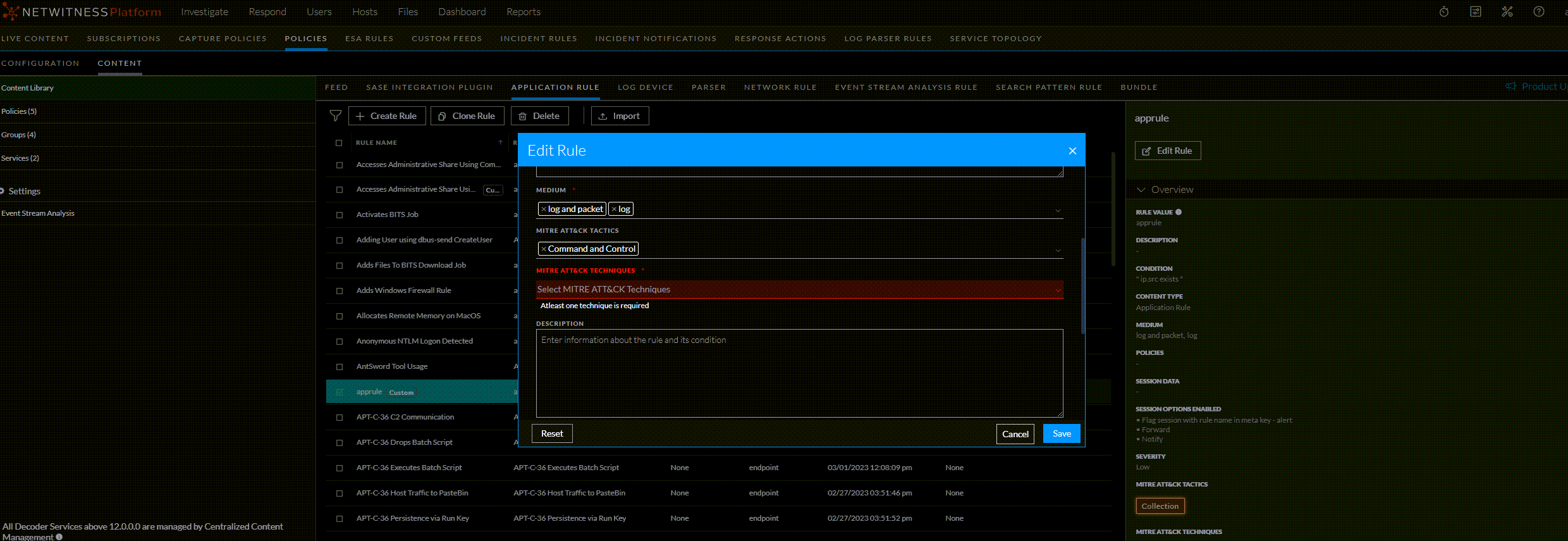
- Select the MITRE ATT&CK TECHNIQUES for the rule. The MITRE ATT&CK Techniques are listed. You can select an appropriate MITRE ATT&CK Technique.
- Enter the description for the rule.
- Select the session data to be applied for the rule.
- Select the session options to be applied for the rule.The options are listed below:
- **Flag Session with rule name in meta key**: Select the meta value for the alert from the drop-down menu. This is mandatory.
- **Forward**: This option enables the performance of syslog forwarding when the log matches the rule.
- **Transient**: This option prevents the created alert metadata from being written to the disk.
- **Notify**: This option enables you to choose the **Severity** levels for the application rule and utilize the option to trigger alert generation.
- Low
- Medium
- High
- Critical
**Note:** Severity is selected by default as Low.
- Click **Save** to save the application rule details.
- Click **Reset** to reset the fields.
- Click **Cancel** to cancel the operation.
[Previous Page](https://50269063.hs-sites.com/knowledge-base/CloneApplicationRule?hsLang=en) [Next Page](https://50269063.hs-sites.com/knowledge-base/DeleteApplicationRule?hsLang=en)
[](https://mydev.netwitness.com/?hsLang=en)
Copyright © 2026, NetWitness LLC. All rights reserved.
[NetWitness Platform](https://www.netwitness.com/)
[Acceptable Use Policy](https://www.netwitness.com/wp-content/uploads/Acceptable-Use-Policy-092022.pdf) [Privacy Statement](https://www.netwitness.com/wp-content/uploads/NetWitness-Privacy-Statement-07292024.pdf)

[](https://www.linkedin.com/company/netwitness-platform/) [](https://www.youtube.com/@netwitness)
© 2026 NetWitness LLC. All rights reserved.