---
title: Edit a Deployment
description: "Edit a Deployment\n\n\n\n\nYou can edit a deployment to change the data source, create a data source filter, and view ESA rules that are associated wit"
---
[Skip to content](https://mydev.netwitness.com/knowledge-base/editadeployment#main-content)

- [Home](https://mydev.netwitness.com/home)
- Integrations
Show submenu for Integrations
- [Netwitness Platform Integrations](https://mydev.netwitness.com/netwitnessplatformintegrations)
- [Third Party Integrations](https://mydev.netwitness.com/thirdpartyintegrations)
- [Knowledge Center](https://mydev.netwitness.com/knowledge-base)
- Community
Show submenu for Community
- [Blogs](https://mydev.netwitness.com/netwitness-security-llc-blog)
- Discussions
- Customers
Show submenu for Customers
- [Manage Products and Licenses](https://mydev.netwitness.com/nwportal)
- Downloads
- Partners
Show submenu for Partners
- [Partner Program](https://mydev.netwitness.com/partner)
- [Partner Resources](https://mydev.netwitness.com/partnerresources)
- [Submit a New Deal Registration](https://mydev.netwitness.com/dealregistration)
- [Become a Partner](https://mydev.netwitness.com/becomeapartner)
- [Update Your Partner Locator Profile](https://www.netwitness.com/partner-locator/?utm_source=pardotnewsletter&utm_medium=email&utm_campaign=partner_march)
- [NetWitness LinkedIn Partner Hub](https://linkedin.com/showcase/netwitnesspartners/)
- Education
Show submenu for Education
- [Instructor Led Training Schedule](https://mydev.netwitness.com/instructorledtrainingschedule)
- [NetWitness Training Catalog](https://mydev.netwitness.com/netwitnesstrainingcatalog)
- [Security Awareness Training](https://mydev.netwitness.com/securityawarenesstraining)
- [New Product Readiness](https://mydev.netwitness.com/newproductreadiness)
- [On-Demand Virtual Labs](https://mydev.netwitness.com/ondemandvirtuallabs)
- [Additional Training Information](https://mydev.netwitness.com/additionaltraininginformation)
- [Frequently Asked Questions](https://mydev.netwitness.com/educationfaq)
- [Contact NetWitness Education Team](https://mydev.netwitness.com/contact-netwitness-education-team)
- Support
Show submenu for Support
- [Contact Support](https://mydev.netwitness.com/contact-support)
- [Create a New Case](https://mydev.netwitness.com/create-support-case)
- [View My Cases](https://mydev.netwitness.com/viewmycase)
- [Product Version Life Cycle](https://mydev.netwitness.com/product-version-life-cycle)
- [Warranty & Replacement Parts](https://mydev.netwitness.com/warranty-and-replacement-parts)
- [Community Support Forum](https://mydev.netwitness.com/community-support-forum)
- [Technical Support Guide](https://mydev.netwitness.com/technical-support-guide)
Open main navigation
Close main navigation
- [Home](https://mydev.netwitness.com/home)
- Integrations
Show submenu for Integrations
- [Netwitness Platform Integrations](https://mydev.netwitness.com/netwitnessplatformintegrations)
- [Third Party Integrations](https://mydev.netwitness.com/thirdpartyintegrations)
- [Knowledge Center](https://mydev.netwitness.com/knowledge-base)
- Community
Show submenu for Community
- [Blogs](https://mydev.netwitness.com/netwitness-security-llc-blog)
- Discussions
- Customers
Show submenu for Customers
- [Manage Products and Licenses](https://mydev.netwitness.com/nwportal)
- Downloads
- Partners
Show submenu for Partners
- [Partner Program](https://mydev.netwitness.com/partner)
- [Partner Resources](https://mydev.netwitness.com/partnerresources)
- [Submit a New Deal Registration](https://mydev.netwitness.com/dealregistration)
- [Become a Partner](https://mydev.netwitness.com/becomeapartner)
- [Update Your Partner Locator Profile](https://www.netwitness.com/partner-locator/?utm_source=pardotnewsletter&utm_medium=email&utm_campaign=partner_march)
- [NetWitness LinkedIn Partner Hub](https://linkedin.com/showcase/netwitnesspartners/)
- Education
Show submenu for Education
- [Instructor Led Training Schedule](https://mydev.netwitness.com/instructorledtrainingschedule)
- [NetWitness Training Catalog](https://mydev.netwitness.com/netwitnesstrainingcatalog)
- [Security Awareness Training](https://mydev.netwitness.com/securityawarenesstraining)
- [New Product Readiness](https://mydev.netwitness.com/newproductreadiness)
- [On-Demand Virtual Labs](https://mydev.netwitness.com/ondemandvirtuallabs)
- [Additional Training Information](https://mydev.netwitness.com/additionaltraininginformation)
- [Frequently Asked Questions](https://mydev.netwitness.com/educationfaq)
- [Contact NetWitness Education Team](https://mydev.netwitness.com/contact-netwitness-education-team)
- Support
Show submenu for Support
- [Contact Support](https://mydev.netwitness.com/contact-support)
- [Create a New Case](https://mydev.netwitness.com/create-support-case)
- [View My Cases](https://mydev.netwitness.com/viewmycase)
- [Product Version Life Cycle](https://mydev.netwitness.com/product-version-life-cycle)
- [Warranty & Replacement Parts](https://mydev.netwitness.com/warranty-and-replacement-parts)
- [Community Support Forum](https://mydev.netwitness.com/community-support-forum)
- [Technical Support Guide](https://mydev.netwitness.com/technical-support-guide)
How can we help you?
- There are no suggestions because the search field is empty.
1. [NetWitness Knowledge Base](https://mydev.netwitness.com/knowledge-base?hsLang=en)
2. [Documentation](https://mydev.netwitness.com/knowledge-base/documentation?hsLang=en)
April 28, 2026
# Edit a Deployment
## Edit a Deployment
You can edit a deployment to change the data source, create a data source filter, and view ESA rules that are associated with this deployment. A data source filter can improve performance by only aggregating relevant data to an ESA rule deployment. For the filter to work, application rules must be enabled on the mapped decoders to apply the meta keys required for this filter. After saving the filter, it must be deployed to take effect.
However, you cannot change the deployment name, or ESA service that are associated with the deployment.
NetWitness Platform XDR provides two methods to manage deployments.
You can edit deployments in the following ways:
- Using the ESA Deployments tab. The **ESA Deployments** tab provides a consolidated view of all the available deployments within CCM. You can edit deployments.
- Using a specific policy. In this method, you cannot view other deployments. You need to go to each policy and edit a deployment.
To edit a deployment from the ESA Deployments tab
1. Go to  **(CONFIGURE)** \> **Policies** \> **Content**.
1. Under **Settings**, click **Event Stream Analysis** \> **ESA Deployments**.
The available deployments are displayed.
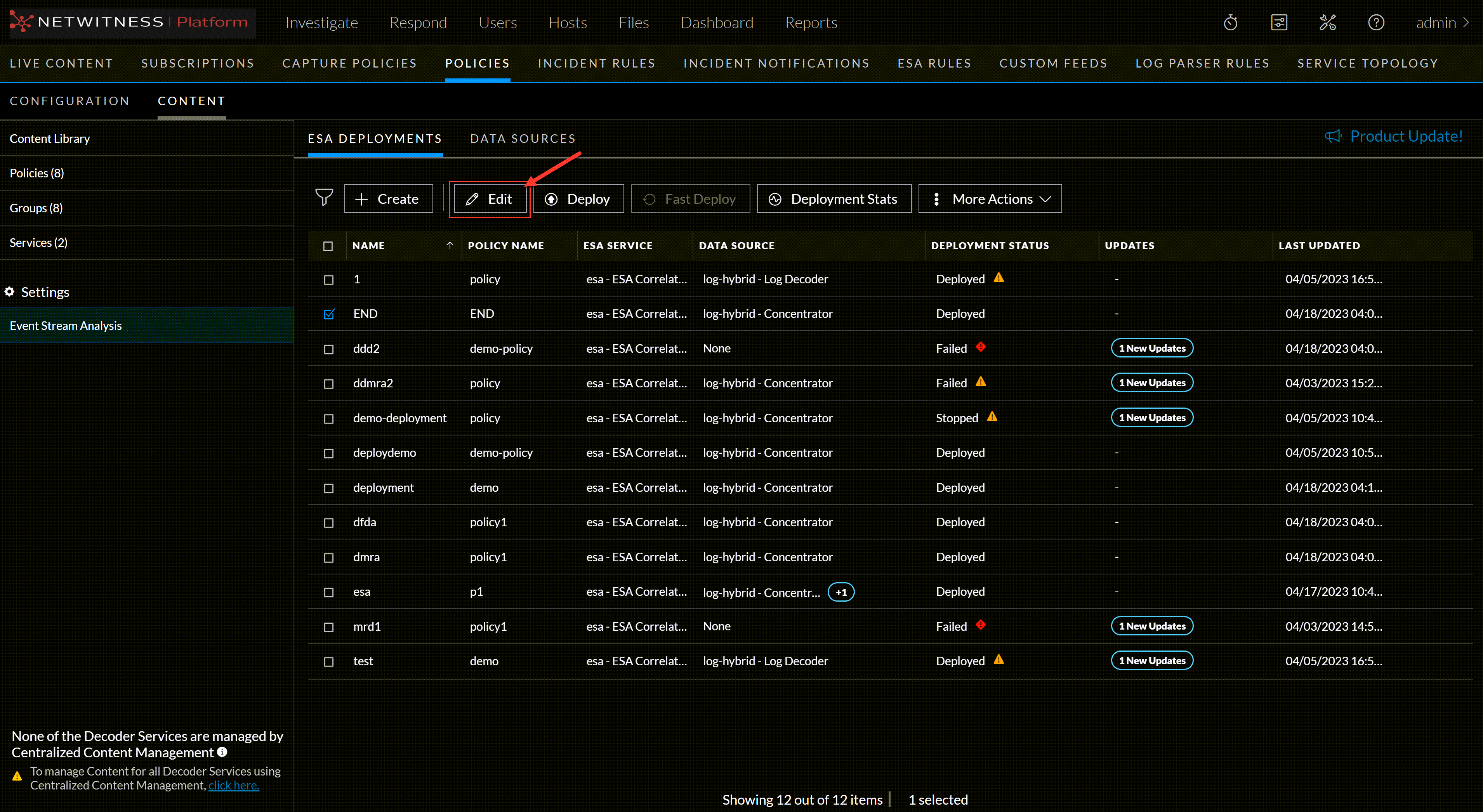
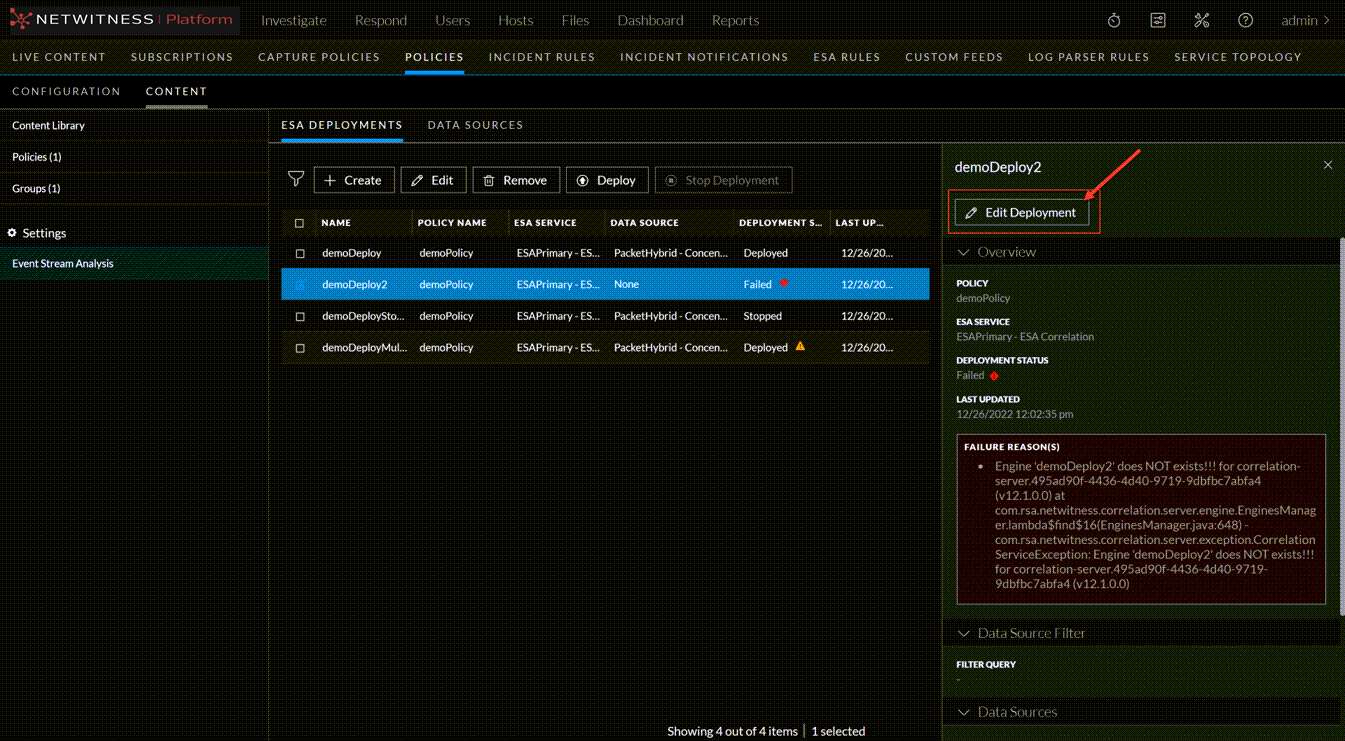
1. Select a deployment and click **Edit** or **Edit Deployment**.
1. When you select the checkbox and click **Edit**.
2. When you select or click a row of the deployment, a right panel is displayed to click **Edit Deployment**.
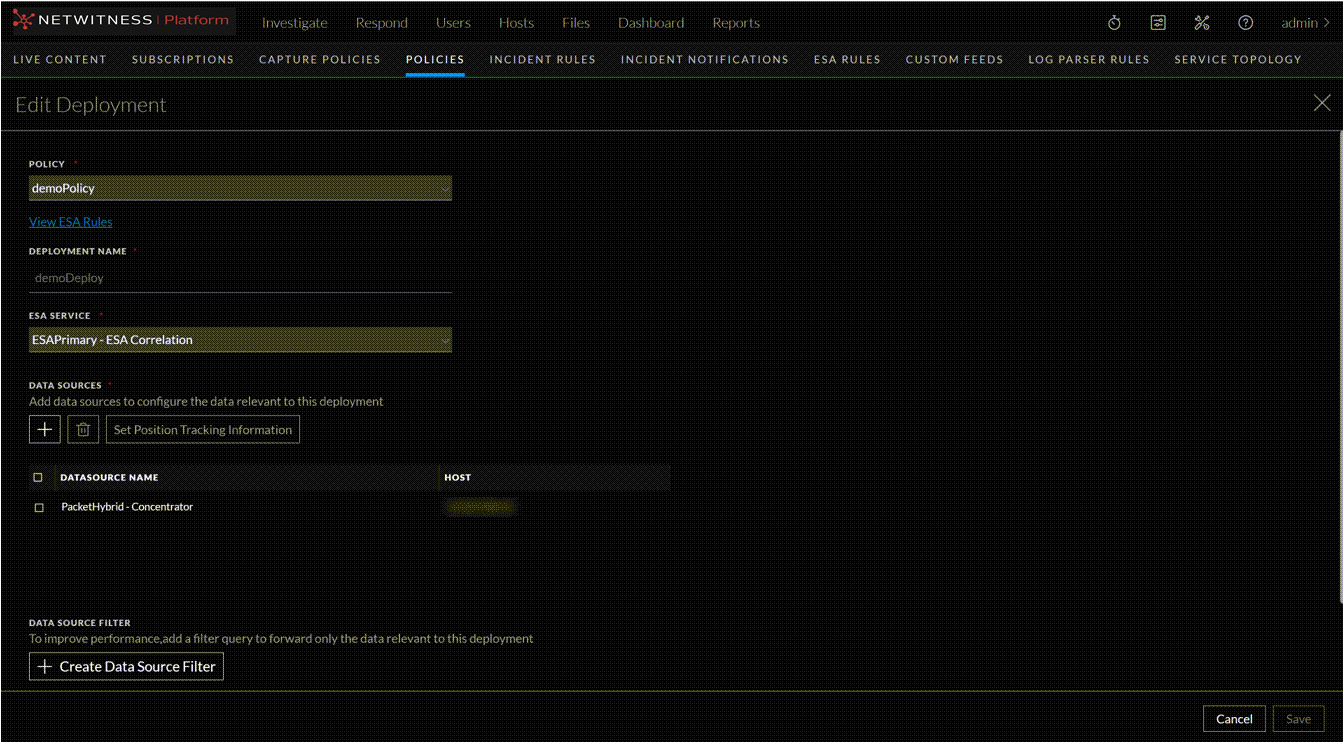
The **Edit Deployment** dialog is displayed.
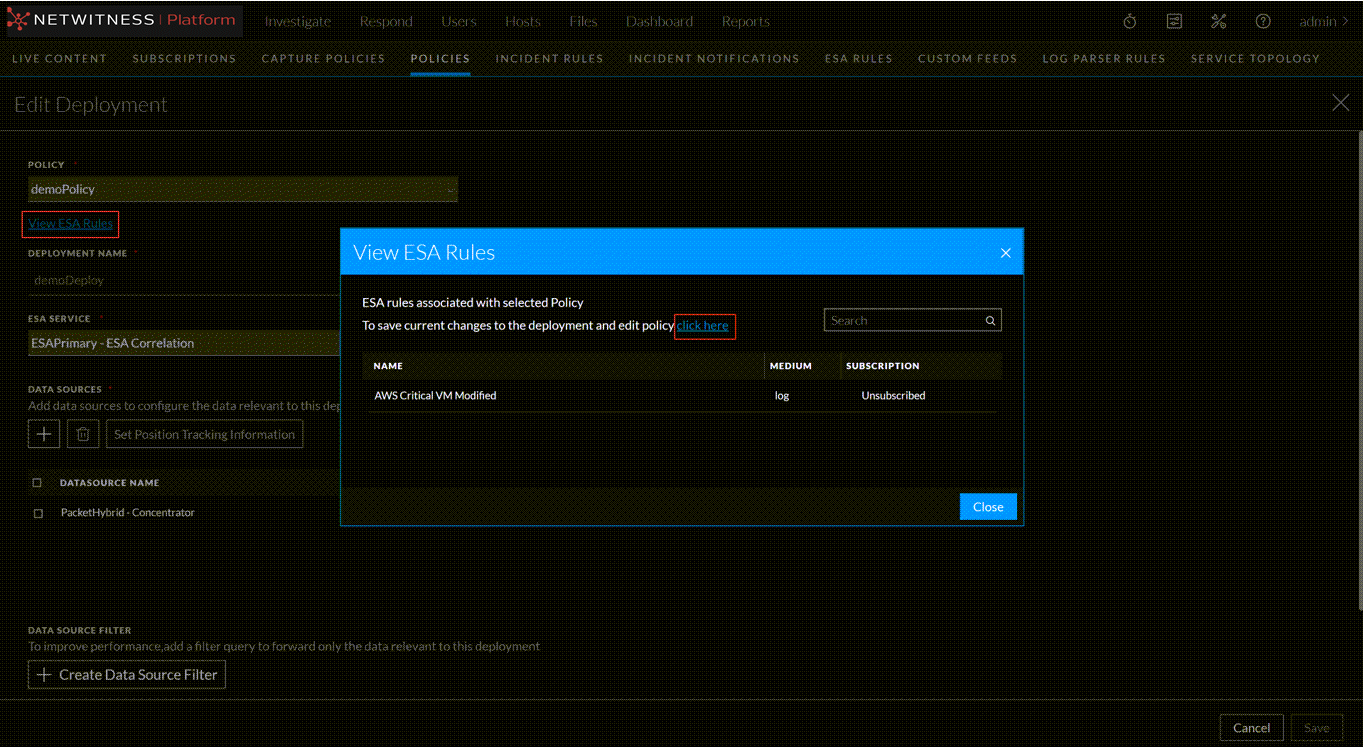
1. (Optional) you can click on **View ESA Rules** to search for rules associated with selected policy. To save current changes to the deployment and modify the policy, select **click here** and navigate to the **Edit Content Policy** page.
2. Make the required changes in the deployment. Policy, deployment name, and ESA service are pre-populated and cannot be modified.
3. Under **Data Sources**, click + to add a data source. The **Add Data Source** dialog is displayed.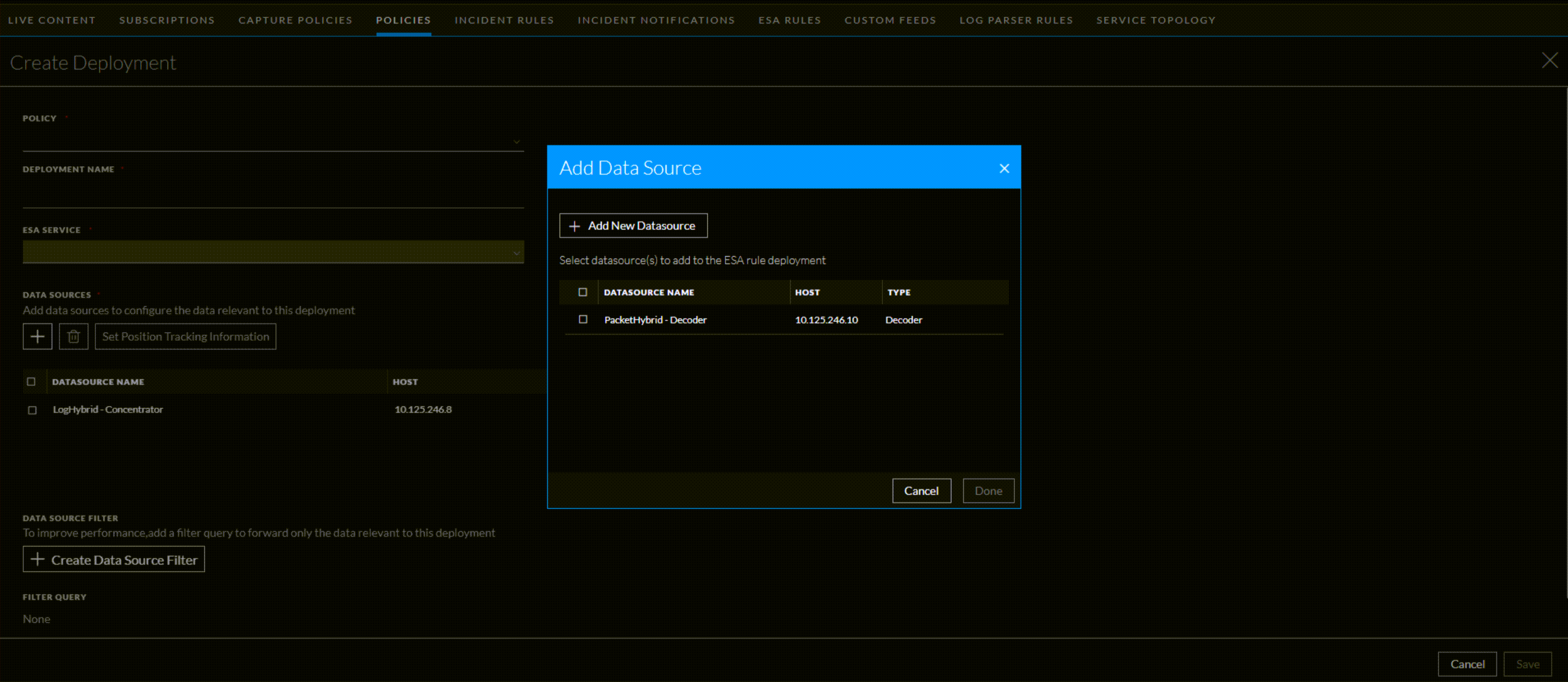
4. If required, you can add a new data source by selecting **+ Add New Datasource** tab in the dialog-box.
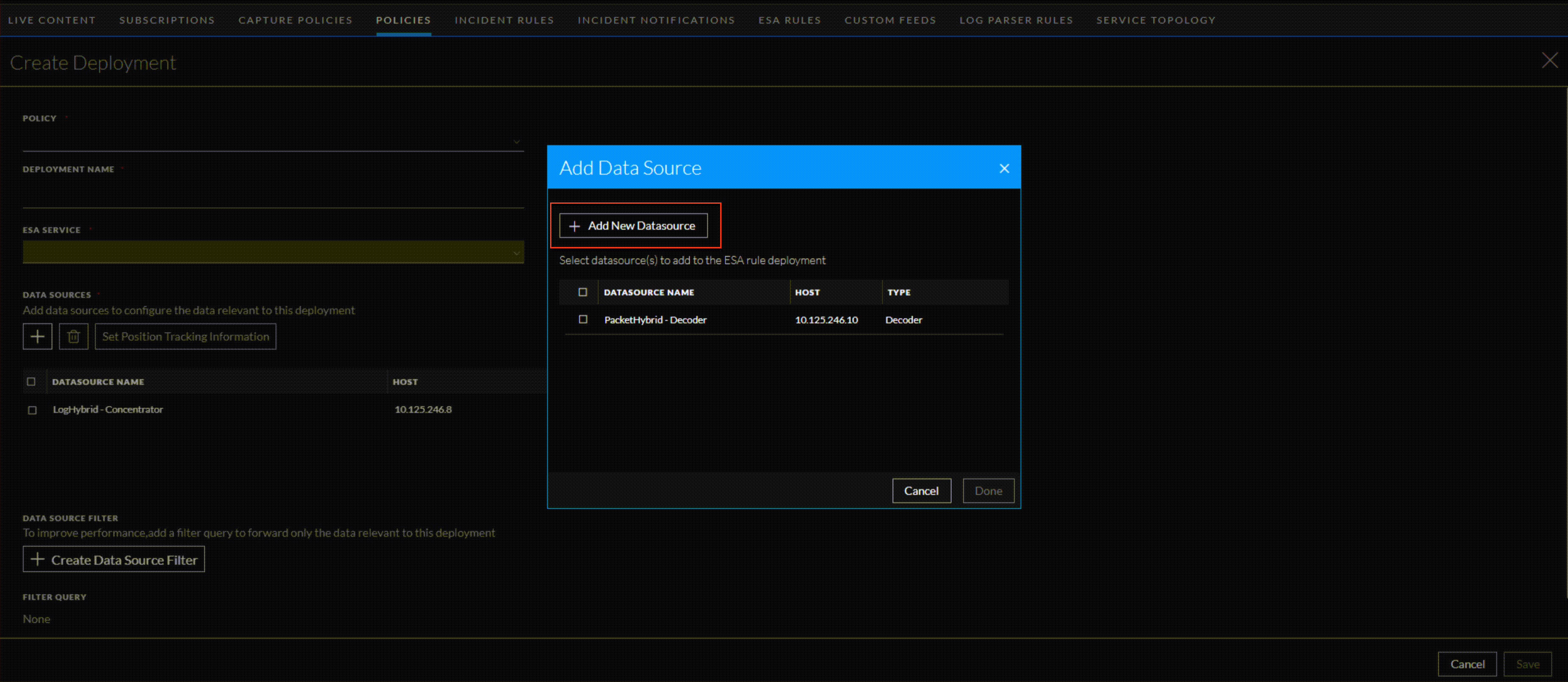
**IMPORTANT:** If the data sources are not listed, you can add the required datasource. For more information, see the topic [Add an ESA Datasource](https://50269063.hs-sites.com/knowledge-base/AddanESADatasource?hsLang=en).
1. Click **Save**.
2. Select the deployment and click **Deploy**.
To edit a deployment from a selected policy
1. Go to  **(CONFIGURE) \> Policies**.
2. In the policies panel, click **Content**.
The available policies are displayed.
3. Click a Policy.
The selected policy view is displayed and by default **Application Rule** is selected.
4. Click **Event Stream Analysis Rule** \> **Deployments**.
The available deployments for the selected policy are displayed.
5. Select a deployment to edit and click **Edit Deployment**.
The **Edit Deployment** dialog is displayed.
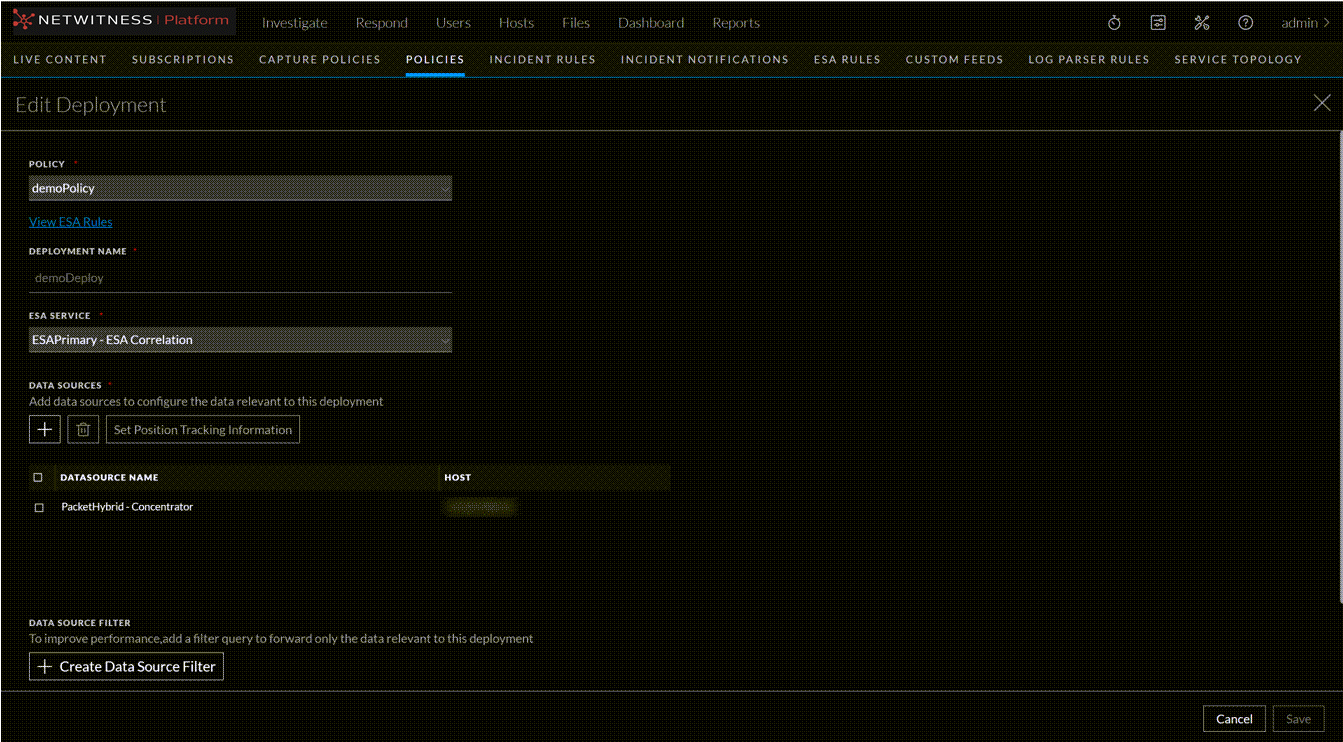
6. Make the required changes in the deployment.
7. Click **Save**.
8. Select the deployment and click **Deploy**.
**Note:** You can deploy the changes either by performing a **Deploy** action on selected deployment or by publishing the policy. Publishing a policy with deployment in stopped state, will not deploy the deployment.
*[Previous Page](https://50269063.hs-sites.com/knowledge-base/CreateaDeployment?hsLang=en) [Next Page](https://50269063.hs-sites.com/knowledge-base/DeployaDeployment?hsLang=en)*
[](https://mydev.netwitness.com/?hsLang=en)
Copyright © 2026, NetWitness LLC. All rights reserved.
[NetWitness Platform](https://www.netwitness.com/)
[Acceptable Use Policy](https://www.netwitness.com/wp-content/uploads/Acceptable-Use-Policy-092022.pdf) [Privacy Statement](https://www.netwitness.com/wp-content/uploads/NetWitness-Privacy-Statement-07292024.pdf)

[](https://www.linkedin.com/company/netwitness-platform/) [](https://www.youtube.com/@netwitness)
© 2026 NetWitness LLC. All rights reserved.