---
title: Define a Global Audit Logging Configuration
description: "Define a Global Audit Logging Configuration\nThis topic tells administrators how to define a global audit logging configuration. This procedure is req"
---
[Skip to content](https://mydev.netwitness.com/knowledge-base/defineaglobalauditloggingconfiguration#main-content)

- [Home](https://mydev.netwitness.com/home)
- Integrations
Show submenu for Integrations
- [Netwitness Platform Integrations](https://mydev.netwitness.com/netwitnessplatformintegrations)
- [Third Party Integrations](https://mydev.netwitness.com/thirdpartyintegrations)
- [Knowledge Center](https://mydev.netwitness.com/knowledge-base)
- Community
Show submenu for Community
- [Blogs](https://mydev.netwitness.com/netwitness-security-llc-blog)
- Discussions
- Customers
Show submenu for Customers
- [Manage Products and Licenses](https://mydev.netwitness.com/nwportal)
- Downloads
- Partners
Show submenu for Partners
- [Partner Program](https://mydev.netwitness.com/partner)
- [Partner Resources](https://mydev.netwitness.com/partnerresources)
- [Submit a New Deal Registration](https://mydev.netwitness.com/dealregistration)
- [Become a Partner](https://mydev.netwitness.com/becomeapartner)
- [Update Your Partner Locator Profile](https://www.netwitness.com/partner-locator/?utm_source=pardotnewsletter&utm_medium=email&utm_campaign=partner_march)
- [NetWitness LinkedIn Partner Hub](https://linkedin.com/showcase/netwitnesspartners/)
- Education
Show submenu for Education
- [Instructor Led Training Schedule](https://mydev.netwitness.com/instructorledtrainingschedule)
- [NetWitness Training Catalog](https://mydev.netwitness.com/netwitnesstrainingcatalog)
- [Security Awareness Training](https://mydev.netwitness.com/securityawarenesstraining)
- [New Product Readiness](https://mydev.netwitness.com/newproductreadiness)
- [On-Demand Virtual Labs](https://mydev.netwitness.com/ondemandvirtuallabs)
- [Additional Training Information](https://mydev.netwitness.com/additionaltraininginformation)
- [Frequently Asked Questions](https://mydev.netwitness.com/educationfaq)
- [Contact NetWitness Education Team](https://mydev.netwitness.com/contact-netwitness-education-team)
- Support
Show submenu for Support
- [Contact Support](https://mydev.netwitness.com/contact-support)
- [Create a New Case](https://mydev.netwitness.com/create-support-case)
- [View My Cases](https://mydev.netwitness.com/viewmycase)
- [Product Version Life Cycle](https://mydev.netwitness.com/product-version-life-cycle)
- [Warranty & Replacement Parts](https://mydev.netwitness.com/warranty-and-replacement-parts)
- [Community Support Forum](https://mydev.netwitness.com/community-support-forum)
- [Technical Support Guide](https://mydev.netwitness.com/technical-support-guide)
Open main navigation
Close main navigation
- [Home](https://mydev.netwitness.com/home)
- Integrations
Show submenu for Integrations
- [Netwitness Platform Integrations](https://mydev.netwitness.com/netwitnessplatformintegrations)
- [Third Party Integrations](https://mydev.netwitness.com/thirdpartyintegrations)
- [Knowledge Center](https://mydev.netwitness.com/knowledge-base)
- Community
Show submenu for Community
- [Blogs](https://mydev.netwitness.com/netwitness-security-llc-blog)
- Discussions
- Customers
Show submenu for Customers
- [Manage Products and Licenses](https://mydev.netwitness.com/nwportal)
- Downloads
- Partners
Show submenu for Partners
- [Partner Program](https://mydev.netwitness.com/partner)
- [Partner Resources](https://mydev.netwitness.com/partnerresources)
- [Submit a New Deal Registration](https://mydev.netwitness.com/dealregistration)
- [Become a Partner](https://mydev.netwitness.com/becomeapartner)
- [Update Your Partner Locator Profile](https://www.netwitness.com/partner-locator/?utm_source=pardotnewsletter&utm_medium=email&utm_campaign=partner_march)
- [NetWitness LinkedIn Partner Hub](https://linkedin.com/showcase/netwitnesspartners/)
- Education
Show submenu for Education
- [Instructor Led Training Schedule](https://mydev.netwitness.com/instructorledtrainingschedule)
- [NetWitness Training Catalog](https://mydev.netwitness.com/netwitnesstrainingcatalog)
- [Security Awareness Training](https://mydev.netwitness.com/securityawarenesstraining)
- [New Product Readiness](https://mydev.netwitness.com/newproductreadiness)
- [On-Demand Virtual Labs](https://mydev.netwitness.com/ondemandvirtuallabs)
- [Additional Training Information](https://mydev.netwitness.com/additionaltraininginformation)
- [Frequently Asked Questions](https://mydev.netwitness.com/educationfaq)
- [Contact NetWitness Education Team](https://mydev.netwitness.com/contact-netwitness-education-team)
- Support
Show submenu for Support
- [Contact Support](https://mydev.netwitness.com/contact-support)
- [Create a New Case](https://mydev.netwitness.com/create-support-case)
- [View My Cases](https://mydev.netwitness.com/viewmycase)
- [Product Version Life Cycle](https://mydev.netwitness.com/product-version-life-cycle)
- [Warranty & Replacement Parts](https://mydev.netwitness.com/warranty-and-replacement-parts)
- [Community Support Forum](https://mydev.netwitness.com/community-support-forum)
- [Technical Support Guide](https://mydev.netwitness.com/technical-support-guide)
How can we help you?
- There are no suggestions because the search field is empty.
1. [NetWitness Knowledge Base](https://mydev.netwitness.com/knowledge-base?hsLang=en)
2. [Documentation](https://mydev.netwitness.com/knowledge-base/documentation?hsLang=en)
April 26, 2026
# Define a Global Audit Logging Configuration
## Define a Global Audit Logging Configuration
This topic tells administrators how to define a global audit logging configuration. This procedure is required only if you choose to set up centralized audit logging in your environment. These global audit logging configurations define how the global audit logs are forwarded to external syslog systems or Log Decoders. Audit logs are forwarded to the selected Notification Servers.
## Prerequisites
Before starting this procedure, configure the following to use for global audit logging:
- Syslog Notification Server
- Audit Logging Template
You configure the notification server and template on the Global Notifications panel. You can access the Global Notifications panel by going to  (Admin) \> System and select Global Notifications. You can only define a Syslog type of Notification Server for global audit logging. For Log Decoders, use a Syslog type of Notification Server and a Common Event Format (CEF) audit logging template. You can use a default audit logging template or define your own template. You can create multiple audit logging templates and Syslog Notification Servers to use for your global audit logging configurations.
If you are forwarding global audit logs to a Log Decoder, deploy the Common Event Format parser to your Log Decoder from Live.
## Add a Global Audit Logging Configuration
1. Go to ** (Admin)** \> **System**.
2. In the options panel, select **Global Auditing**.
The **Global Audit Logging Configurations** panel is displayed.
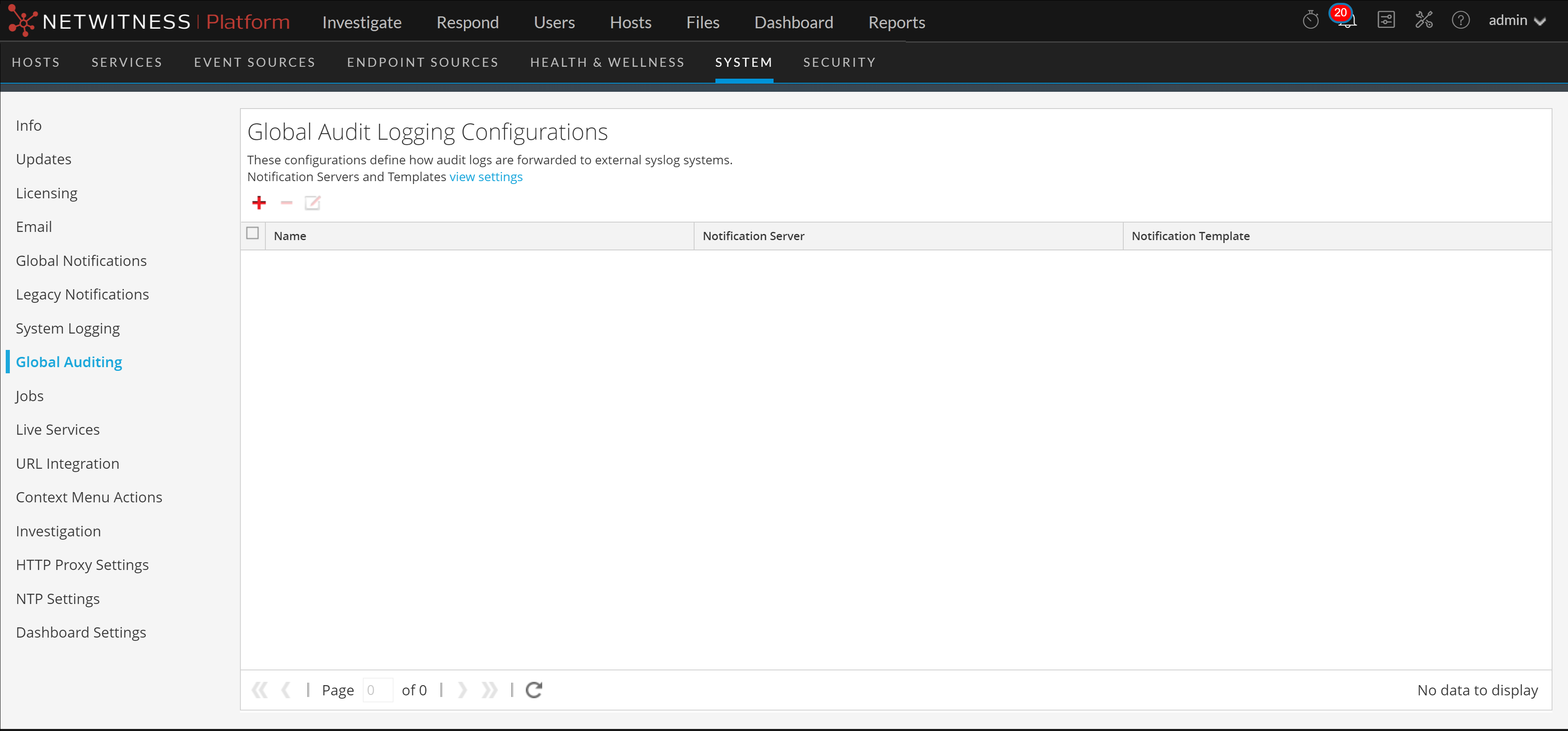
3. Click  to add a global audit logging configuration.
The **Add New Configuration** dialog is displayed.
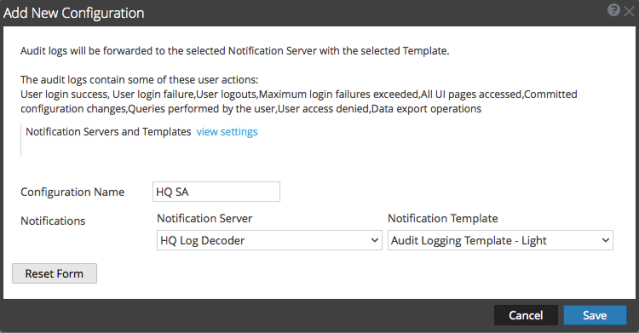
4. In the **Configuration Name** field, type a unique name for the global audit logging configuration. For example, you can create a configuration for a specific type of global audit logging configuration, such as HQ NW for a NetWitness headquarters configuration.
5. In the **Notifications** section, select the syslog **Notification Server** to use for this configuration. The notification server is the destination to send the global audit logs.
6. Select the audit logging **Notification Template** to use for this configuration. The Audit Logging template defines the format and audit log message fields to be sent.
7. Click **Save**.
Add New Configuration Dialog provides additional information and examples of the user actions logged. For a list of message types being logged by the various NetWitness components, see [Global Audit Logging Operation Reference](https://community.netwitness.com/t5/netwitness-platform-online/global-audit-logging-operation-reference/ta-p/669736).
## Edit a Global Audit Logging Configuration
This topic provides instructions on how to edit a global audit logging configuration. You can edit a global audit logging configuration to change the destination of the global audit logs for your user audits by selecting a different Notification Server. You can also change the format and message fields of the global audit log entries by selecting a different Notification Template. You make changes to the Notification Server or Template on the Global Notifications panel. You can access the Global Notifications panel by clicking the **view settings** link on the Global Audit Logging Configurations panel.
You cannot change which NetWitness user actions are logged and sent in the global audit logs.
1. Go to ** (Admin) \> System**.
2. In the options panel, select **Global Auditing**.
3. In the **Global Audit Logging Configurations** panel, select a configuration to edit and click .
4. In the **Add New Configuration** dialog, modify the global audit logging configuration as required. You can modify the **Configuration Name** and select a different **NotificationServer** or **Template**.
5. Click **Save.**
## Delete a Global Audit Logging Configuration
Deleting a global audit configuration does not delete the associated notification server and template. After you delete a global audit logging configuration, the forwarding of global audit logs specified in that configuration is discontinued.
1. Go to ** (Admin) \> System**.
2. In the options panel, select **Global Auditing**.
3. In the **Global Audit Logging Configurations** panel, select a configuration to delete and click .
A confirmation dialog is displayed.
4. Click **Yes**.
The selected configuration is deleted.
[](https://mydev.netwitness.com/?hsLang=en)
Copyright © 2026, NetWitness LLC. All rights reserved.
[NetWitness Platform](https://www.netwitness.com/)
[Acceptable Use Policy](https://www.netwitness.com/wp-content/uploads/Acceptable-Use-Policy-092022.pdf) [Privacy Statement](https://www.netwitness.com/wp-content/uploads/NetWitness-Privacy-Statement-07292024.pdf)

[](https://www.linkedin.com/company/netwitness-platform/) [](https://www.youtube.com/@netwitness)
© 2026 NetWitness LLC. All rights reserved.