---
title: Decoder and Log Decoder Quick Setup
description: "Decoder and Log Decoder Quick Setup\nA basic NetWitness network includes at minimum Brokers, Concentrators, and Decoders. Brokers aggregate data from"
---
[Skip to content](https://mydev.netwitness.com/knowledge-base/decoderandlogdecoderquicksetup#main-content)

- [Home](https://mydev.netwitness.com/home)
- Integrations
Show submenu for Integrations
- [Netwitness Platform Integrations](https://mydev.netwitness.com/netwitnessplatformintegrations)
- [Third Party Integrations](https://mydev.netwitness.com/thirdpartyintegrations)
- [Knowledge Center](https://mydev.netwitness.com/knowledge-base)
- Community
Show submenu for Community
- [Blogs](https://mydev.netwitness.com/netwitness-security-llc-blog)
- Discussions
- Customers
Show submenu for Customers
- [Manage Products and Licenses](https://mydev.netwitness.com/nwportal)
- Downloads
- Partners
Show submenu for Partners
- [Partner Program](https://mydev.netwitness.com/partner)
- [Partner Resources](https://mydev.netwitness.com/partnerresources)
- [Submit a New Deal Registration](https://mydev.netwitness.com/dealregistration)
- [Become a Partner](https://mydev.netwitness.com/becomeapartner)
- [Update Your Partner Locator Profile](https://www.netwitness.com/partner-locator/?utm_source=pardotnewsletter&utm_medium=email&utm_campaign=partner_march)
- [NetWitness LinkedIn Partner Hub](https://linkedin.com/showcase/netwitnesspartners/)
- Education
Show submenu for Education
- [Instructor Led Training Schedule](https://mydev.netwitness.com/instructorledtrainingschedule)
- [NetWitness Training Catalog](https://mydev.netwitness.com/netwitnesstrainingcatalog)
- [Security Awareness Training](https://mydev.netwitness.com/securityawarenesstraining)
- [New Product Readiness](https://mydev.netwitness.com/newproductreadiness)
- [On-Demand Virtual Labs](https://mydev.netwitness.com/ondemandvirtuallabs)
- [Additional Training Information](https://mydev.netwitness.com/additionaltraininginformation)
- [Frequently Asked Questions](https://mydev.netwitness.com/educationfaq)
- [Contact NetWitness Education Team](https://mydev.netwitness.com/contact-netwitness-education-team)
- Support
Show submenu for Support
- [Contact Support](https://mydev.netwitness.com/contact-support)
- [Create a New Case](https://mydev.netwitness.com/create-support-case)
- [View My Cases](https://mydev.netwitness.com/viewmycase)
- [Product Version Life Cycle](https://mydev.netwitness.com/product-version-life-cycle)
- [Warranty & Replacement Parts](https://mydev.netwitness.com/warranty-and-replacement-parts)
- [Community Support Forum](https://mydev.netwitness.com/community-support-forum)
- [Technical Support Guide](https://mydev.netwitness.com/technical-support-guide)
Open main navigation
Close main navigation
- [Home](https://mydev.netwitness.com/home)
- Integrations
Show submenu for Integrations
- [Netwitness Platform Integrations](https://mydev.netwitness.com/netwitnessplatformintegrations)
- [Third Party Integrations](https://mydev.netwitness.com/thirdpartyintegrations)
- [Knowledge Center](https://mydev.netwitness.com/knowledge-base)
- Community
Show submenu for Community
- [Blogs](https://mydev.netwitness.com/netwitness-security-llc-blog)
- Discussions
- Customers
Show submenu for Customers
- [Manage Products and Licenses](https://mydev.netwitness.com/nwportal)
- Downloads
- Partners
Show submenu for Partners
- [Partner Program](https://mydev.netwitness.com/partner)
- [Partner Resources](https://mydev.netwitness.com/partnerresources)
- [Submit a New Deal Registration](https://mydev.netwitness.com/dealregistration)
- [Become a Partner](https://mydev.netwitness.com/becomeapartner)
- [Update Your Partner Locator Profile](https://www.netwitness.com/partner-locator/?utm_source=pardotnewsletter&utm_medium=email&utm_campaign=partner_march)
- [NetWitness LinkedIn Partner Hub](https://linkedin.com/showcase/netwitnesspartners/)
- Education
Show submenu for Education
- [Instructor Led Training Schedule](https://mydev.netwitness.com/instructorledtrainingschedule)
- [NetWitness Training Catalog](https://mydev.netwitness.com/netwitnesstrainingcatalog)
- [Security Awareness Training](https://mydev.netwitness.com/securityawarenesstraining)
- [New Product Readiness](https://mydev.netwitness.com/newproductreadiness)
- [On-Demand Virtual Labs](https://mydev.netwitness.com/ondemandvirtuallabs)
- [Additional Training Information](https://mydev.netwitness.com/additionaltraininginformation)
- [Frequently Asked Questions](https://mydev.netwitness.com/educationfaq)
- [Contact NetWitness Education Team](https://mydev.netwitness.com/contact-netwitness-education-team)
- Support
Show submenu for Support
- [Contact Support](https://mydev.netwitness.com/contact-support)
- [Create a New Case](https://mydev.netwitness.com/create-support-case)
- [View My Cases](https://mydev.netwitness.com/viewmycase)
- [Product Version Life Cycle](https://mydev.netwitness.com/product-version-life-cycle)
- [Warranty & Replacement Parts](https://mydev.netwitness.com/warranty-and-replacement-parts)
- [Community Support Forum](https://mydev.netwitness.com/community-support-forum)
- [Technical Support Guide](https://mydev.netwitness.com/technical-support-guide)
How can we help you?
- There are no suggestions because the search field is empty.
1. [NetWitness Knowledge Base](https://mydev.netwitness.com/knowledge-base?hsLang=en)
2. [Documentation](https://mydev.netwitness.com/knowledge-base/documentation?hsLang=en)
April 28, 2026
# Decoder and Log Decoder Quick Setup
## Decoder and Log Decoder Quick Setup
A basic NetWitness network includes at minimum Brokers, Concentrators, and Decoders. Brokers aggregate data from Concentrators, and Concentrators consume data from at least one Network Decoder or Log Decoder. The basic network may include both types of Decoders. Network Decoders are usually referred to as Decoders, and they capture network data in packet form. Log Decoders capture log data as events.
Adding a Decoder makes it visible and available for use with NetWitness Administration, Live Services, and Investigate. To add a service in NetWitness, you select the service type, provide service connection information, and validate that the service can be reached. The *Hosts and Services Getting Started Guide* provides the information you need to understand and install all NetWitness services.
After the services are added, you need to configure each service. This is the preferred order for configuring your system:
1. Decoders
2. Log Decoders
3. Concentrators (refer to the *Broker and Concentrator Configuration Guide*)
4. Brokers (refer to the *Broker and Concentrator Configuration Guide*)
**Note:** A Log Decoder is a special type of Decoder, which is configured and managed in a similar way to a Decoder. Most of the information in this guide refers to both types of Decoders. "Decoder" refers to both types of Decoders. Information that applies exclusively to Network Decoders or Log Decoders is clearly identified.
Basic configuration of the Decoder involves selecting a network adapter interface and starting data capture.
In addition, you can configure each Decoder to control the type of traffic captured using rules, feeds, and parsers. Advanced configuration tasks enable additional features that are relevant to specific applications. For example, configure a 10G Decoder, create custom meta keys, or decrypt incoming packets.
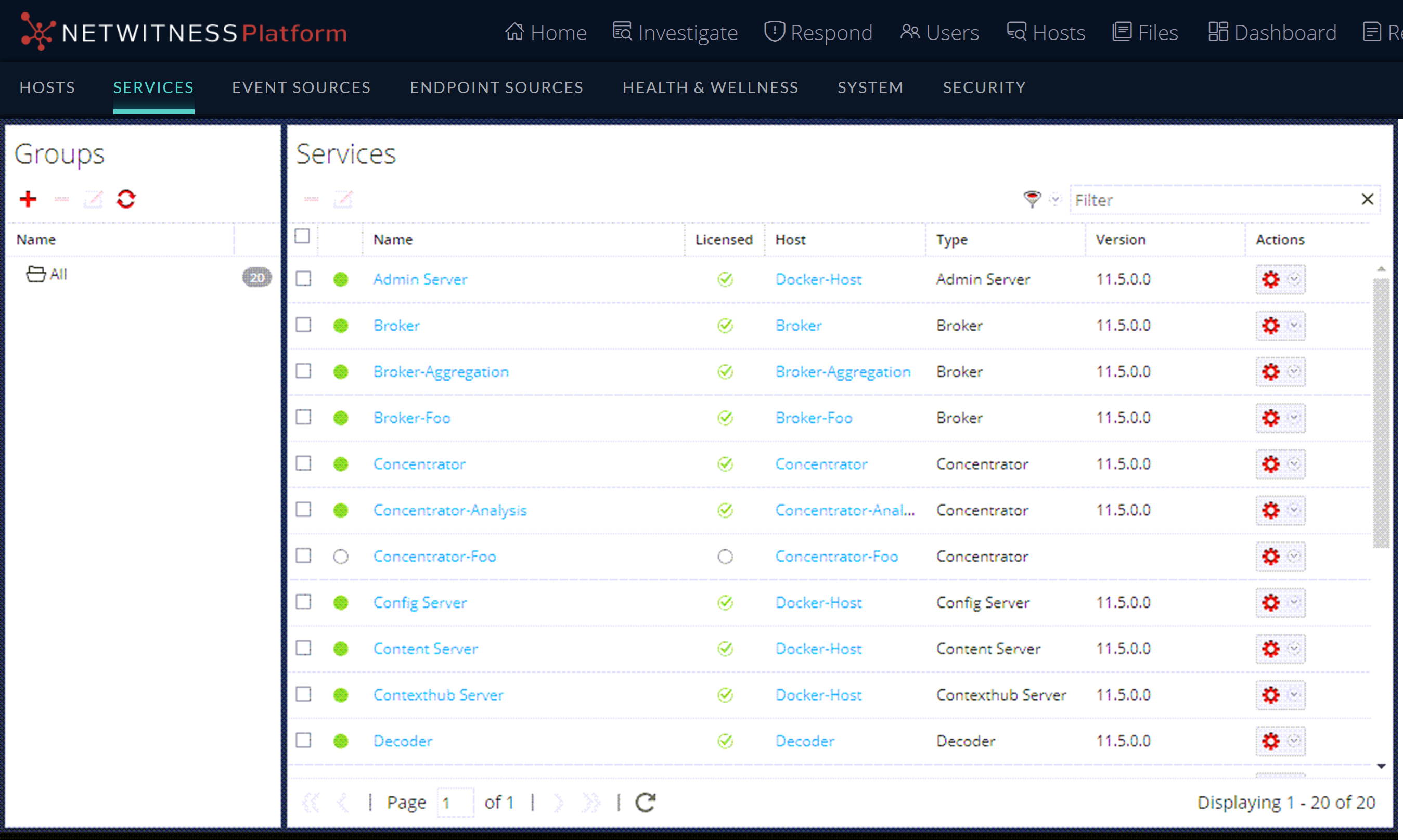
The easiest way to configure all of the required Decoder and Log Decoder settings is to use the options in the NetWitness user interface. For the most part, configuration is performed in the Administration Services view (  (Admin) \> Services).
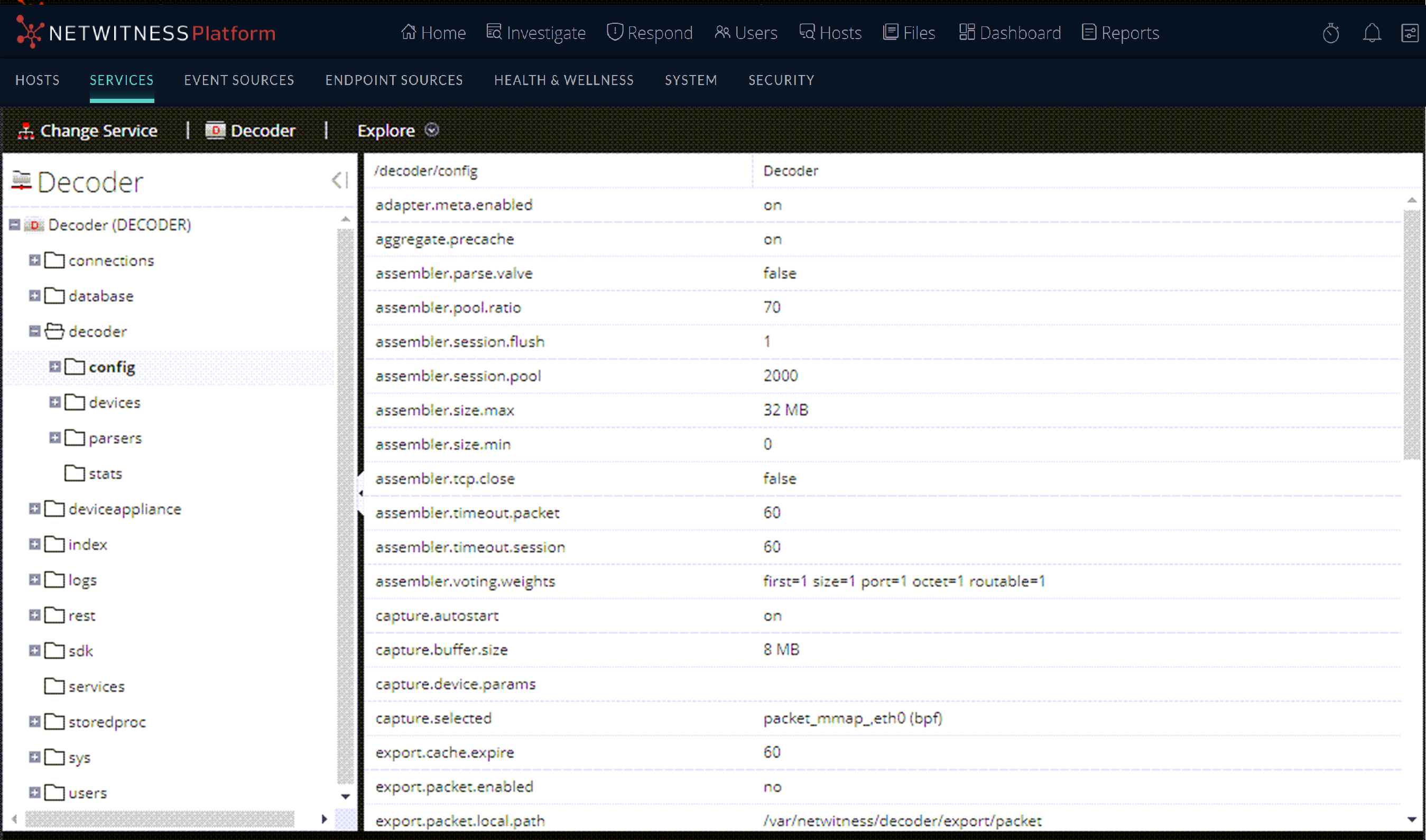
Administrators who feel comfortable working outside of the user interface can configure the basic parameters as well as advanced settings by editing database nodes in the Decoder node tree using the Services Explore view.
Perform Initial Quick Setup
This procedure accomplishes the initial, basic configuration of a Decoder, and starts data capture. When the basic setup is complete, the Decoder begins capturing data for the Concentrator to consume.
To configure a Decoder and start capturing data:
1. Assign a network interface for capturing data. For details, see "Select a Network Adapter" in [Configure Capture Settings](https://50269063.hs-sites.com/knowledge-base/ConfigureCaptureSettings?hsLang=en).
2. Do one of the following:
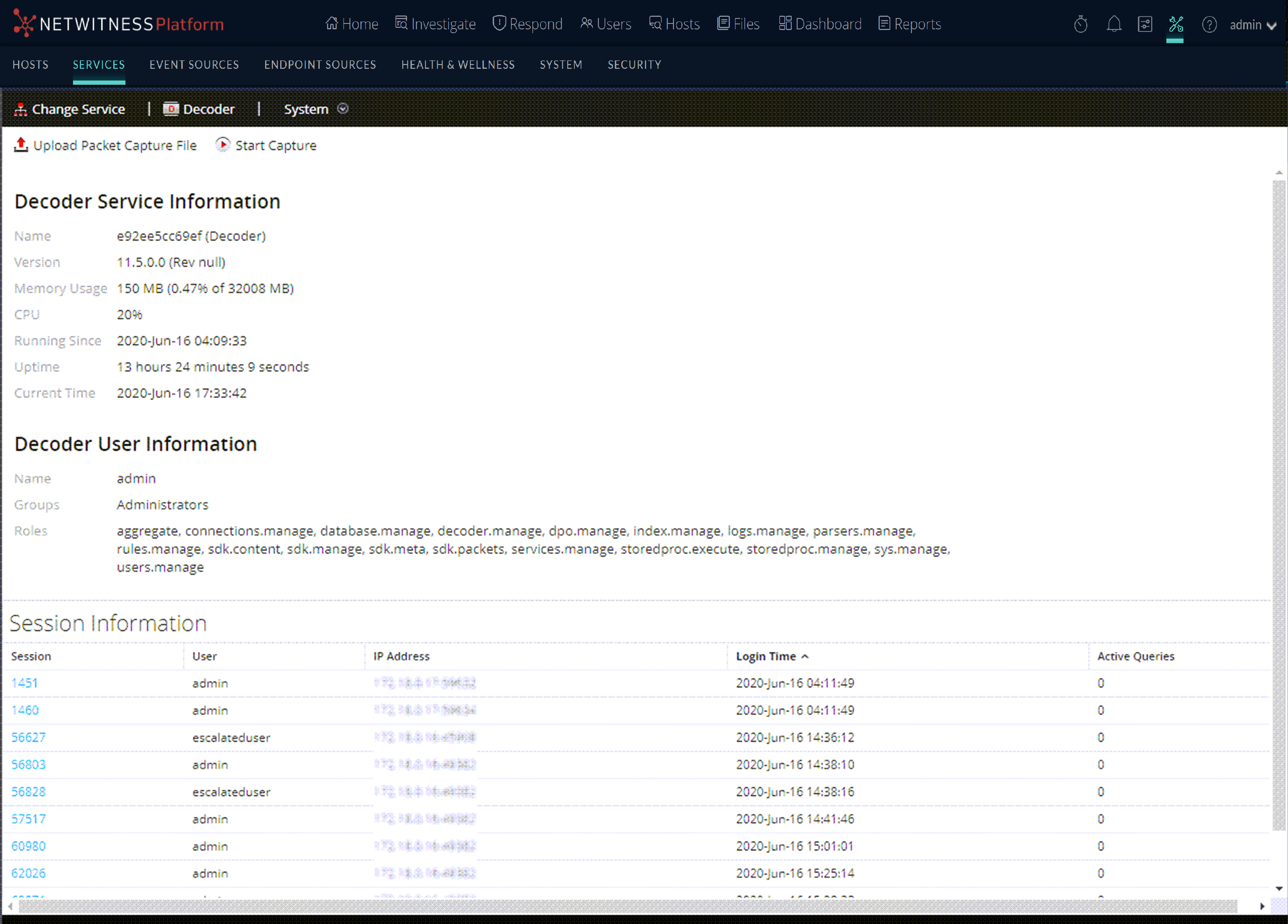
1. To start capture, select the Decoder and  **\>** **View \> System**. In the toolbar click.
2. To enable Capture Autostart, see "Configure a Decoder to Begin Capturing Data Automatically" in [Configure Capture Settings](https://50269063.hs-sites.com/knowledge-base/ConfigureCaptureSettings?hsLang=en).
The Decoder begins capturing data for consumption by a Concentrator. For additional configuration options, refer to [Configure Common Settings on a Decoder](https://50269063.hs-sites.com/knowledge-base/ConfigureCommonSettingsonaDecoder?hsLang=en) and [or Decoder and Log Decoder Additional Procedures](https://50269063.hs-sites.com/knowledge-base/DecoderandLogDecoderAdditionalProcedures?hsLang=en)
[](https://mydev.netwitness.com/?hsLang=en)
Copyright © 2026, NetWitness LLC. All rights reserved.
[NetWitness Platform](https://www.netwitness.com/)
[Acceptable Use Policy](https://www.netwitness.com/wp-content/uploads/Acceptable-Use-Policy-092022.pdf) [Privacy Statement](https://www.netwitness.com/wp-content/uploads/NetWitness-Privacy-Statement-07292024.pdf)

[](https://www.linkedin.com/company/netwitness-platform/) [](https://www.youtube.com/@netwitness)
© 2026 NetWitness LLC. All rights reserved.