---
title: Create Events Widget from Investigate View
description: "Tags: Documentation From NetWitness Platform 12.5 or later, users can now create an Events widget from the Investigate > Events view. Users can add an"
---
[Skip to content](https://mydev.netwitness.com/knowledge-base/createeventswidgetfrominvestigateview#main-content)

- [Home](https://mydev.netwitness.com/home)
- Integrations
Show submenu for Integrations
- [Netwitness Platform Integrations](https://mydev.netwitness.com/netwitnessplatformintegrations)
- [Third Party Integrations](https://mydev.netwitness.com/thirdpartyintegrations)
- [Knowledge Center](https://mydev.netwitness.com/knowledge-base)
- Community
Show submenu for Community
- [Blogs](https://mydev.netwitness.com/netwitness-security-llc-blog)
- Discussions
- Customers
Show submenu for Customers
- [Manage Products and Licenses](https://mydev.netwitness.com/nwportal)
- Downloads
- Partners
Show submenu for Partners
- [Partner Program](https://mydev.netwitness.com/partner)
- [Partner Resources](https://mydev.netwitness.com/partnerresources)
- [Submit a New Deal Registration](https://mydev.netwitness.com/dealregistration)
- [Become a Partner](https://mydev.netwitness.com/becomeapartner)
- [Update Your Partner Locator Profile](https://www.netwitness.com/partner-locator/?utm_source=pardotnewsletter&utm_medium=email&utm_campaign=partner_march)
- [NetWitness LinkedIn Partner Hub](https://linkedin.com/showcase/netwitnesspartners/)
- Education
Show submenu for Education
- [Instructor Led Training Schedule](https://mydev.netwitness.com/instructorledtrainingschedule)
- [NetWitness Training Catalog](https://mydev.netwitness.com/netwitnesstrainingcatalog)
- [Security Awareness Training](https://mydev.netwitness.com/securityawarenesstraining)
- [New Product Readiness](https://mydev.netwitness.com/newproductreadiness)
- [On-Demand Virtual Labs](https://mydev.netwitness.com/ondemandvirtuallabs)
- [Additional Training Information](https://mydev.netwitness.com/additionaltraininginformation)
- [Frequently Asked Questions](https://mydev.netwitness.com/educationfaq)
- [Contact NetWitness Education Team](https://mydev.netwitness.com/contact-netwitness-education-team)
- Support
Show submenu for Support
- [Contact Support](https://mydev.netwitness.com/contact-support)
- [Create a New Case](https://mydev.netwitness.com/create-support-case)
- [View My Cases](https://mydev.netwitness.com/viewmycase)
- [Product Version Life Cycle](https://mydev.netwitness.com/product-version-life-cycle)
- [Warranty & Replacement Parts](https://mydev.netwitness.com/warranty-and-replacement-parts)
- [Community Support Forum](https://mydev.netwitness.com/community-support-forum)
- [Technical Support Guide](https://mydev.netwitness.com/technical-support-guide)
Open main navigation
Close main navigation
- [Home](https://mydev.netwitness.com/home)
- Integrations
Show submenu for Integrations
- [Netwitness Platform Integrations](https://mydev.netwitness.com/netwitnessplatformintegrations)
- [Third Party Integrations](https://mydev.netwitness.com/thirdpartyintegrations)
- [Knowledge Center](https://mydev.netwitness.com/knowledge-base)
- Community
Show submenu for Community
- [Blogs](https://mydev.netwitness.com/netwitness-security-llc-blog)
- Discussions
- Customers
Show submenu for Customers
- [Manage Products and Licenses](https://mydev.netwitness.com/nwportal)
- Downloads
- Partners
Show submenu for Partners
- [Partner Program](https://mydev.netwitness.com/partner)
- [Partner Resources](https://mydev.netwitness.com/partnerresources)
- [Submit a New Deal Registration](https://mydev.netwitness.com/dealregistration)
- [Become a Partner](https://mydev.netwitness.com/becomeapartner)
- [Update Your Partner Locator Profile](https://www.netwitness.com/partner-locator/?utm_source=pardotnewsletter&utm_medium=email&utm_campaign=partner_march)
- [NetWitness LinkedIn Partner Hub](https://linkedin.com/showcase/netwitnesspartners/)
- Education
Show submenu for Education
- [Instructor Led Training Schedule](https://mydev.netwitness.com/instructorledtrainingschedule)
- [NetWitness Training Catalog](https://mydev.netwitness.com/netwitnesstrainingcatalog)
- [Security Awareness Training](https://mydev.netwitness.com/securityawarenesstraining)
- [New Product Readiness](https://mydev.netwitness.com/newproductreadiness)
- [On-Demand Virtual Labs](https://mydev.netwitness.com/ondemandvirtuallabs)
- [Additional Training Information](https://mydev.netwitness.com/additionaltraininginformation)
- [Frequently Asked Questions](https://mydev.netwitness.com/educationfaq)
- [Contact NetWitness Education Team](https://mydev.netwitness.com/contact-netwitness-education-team)
- Support
Show submenu for Support
- [Contact Support](https://mydev.netwitness.com/contact-support)
- [Create a New Case](https://mydev.netwitness.com/create-support-case)
- [View My Cases](https://mydev.netwitness.com/viewmycase)
- [Product Version Life Cycle](https://mydev.netwitness.com/product-version-life-cycle)
- [Warranty & Replacement Parts](https://mydev.netwitness.com/warranty-and-replacement-parts)
- [Community Support Forum](https://mydev.netwitness.com/community-support-forum)
- [Technical Support Guide](https://mydev.netwitness.com/technical-support-guide)
How can we help you?
- There are no suggestions because the search field is empty.
1. [NetWitness Knowledge Base](https://mydev.netwitness.com/knowledge-base?hsLang=en)
2. [Documentation](https://mydev.netwitness.com/knowledge-base/documentation?hsLang=en)
April 7, 2026
# Create Events Widget from Investigate View
**Tags:** Documentation
From NetWitness Platform 12.5 or later, users can now create an Events widget from the **Investigate** \> **Events** view. Users can add any number of query filters containing meta keys and operators on the query search bar and convert them into Events widgets with important system indicators for threat hunting and investigation.
First, using the **Investigate** \> **Events** view, you need to query for a specific meta and create the Events widget. The second step is to add the Events widget to the dashboard layout under the **Home** page. Then, users can customize and arrange the Events widget according to their preferences.
Step 1: Create an Events widget from the Investigate view
1. Log in to the NetWitness Platform.
2. Go to **Investigate** \> **Events**.
3. Create a query that consists of one or more filters containing a meta key, operator, and optional value. For example, **ip.src exists**.
4. Click the three-dot () icon \> **Create Event Widget**.
The Create Event Widget dialog is displayed.
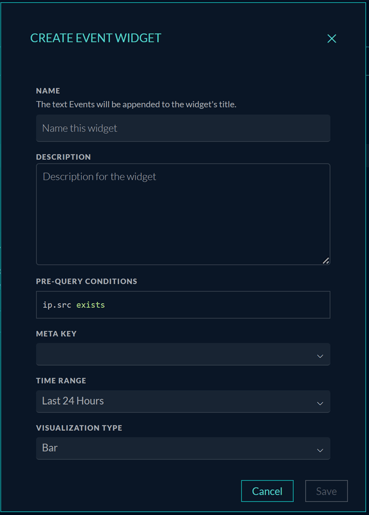
5. Enter the following details:
1. **Name**: Enter a unique name for the widget. The name can include alphabets, numbers, spaces, and special characters, such as \_ - ( ) \[ \].
**Note:** The text **Events** will be appended to the widget's title. For example, if you enter the name **ipv4**, the widget’s title will be displayed as **Events – IPV4**.
2. **Description**: Provide a brief description of the configuration.
**Note:** You can increase the text area size by placing the cursor in the bottom corner of the text box on the right-hand side and dragging the box.
3. **Pre-Query Conditions**: Displayed based on the input criteria entered in the search query panel.
4. **Meta Key**: Select the required Meta Key available for the service from the drop-down list. For example, **ip.all – All IPV4 Keys**.
5. **Time Range**: Select a specific timeframe from the drop-down menu to display data for that period. You can select any time range from **Last 5** **Minutes** to **Last 7 Days**. By default, the **Last 24 Hours** is selected.
6. **Visualization Type**: Select the required visualization type from the drop-down menu. You can select either a **Bar** or a **Donut** chart.
6. 1. Click **Save**.
2. Click **X** or **Cancel** to close the dialog.
Edits you make to widgets will be available only to the user who made the changes.
Step 2: Add the Events Widget to the Dashboard Layout
Users can add the Events widgets to their dashboard. There is no restriction on the number of widgets that can be added.
To add the Events widget to the dashboard
1. Navigate to the Home page.
2. From the drop-down menu in the upper right-hand corner of the **Home** page, select the view you want to add (**Admin**, **Analyst**, or **Manager**).
3. Click the **Edit Layout** button in the upper right corner. The **Add Widget** panel displays all the widgets that are available.
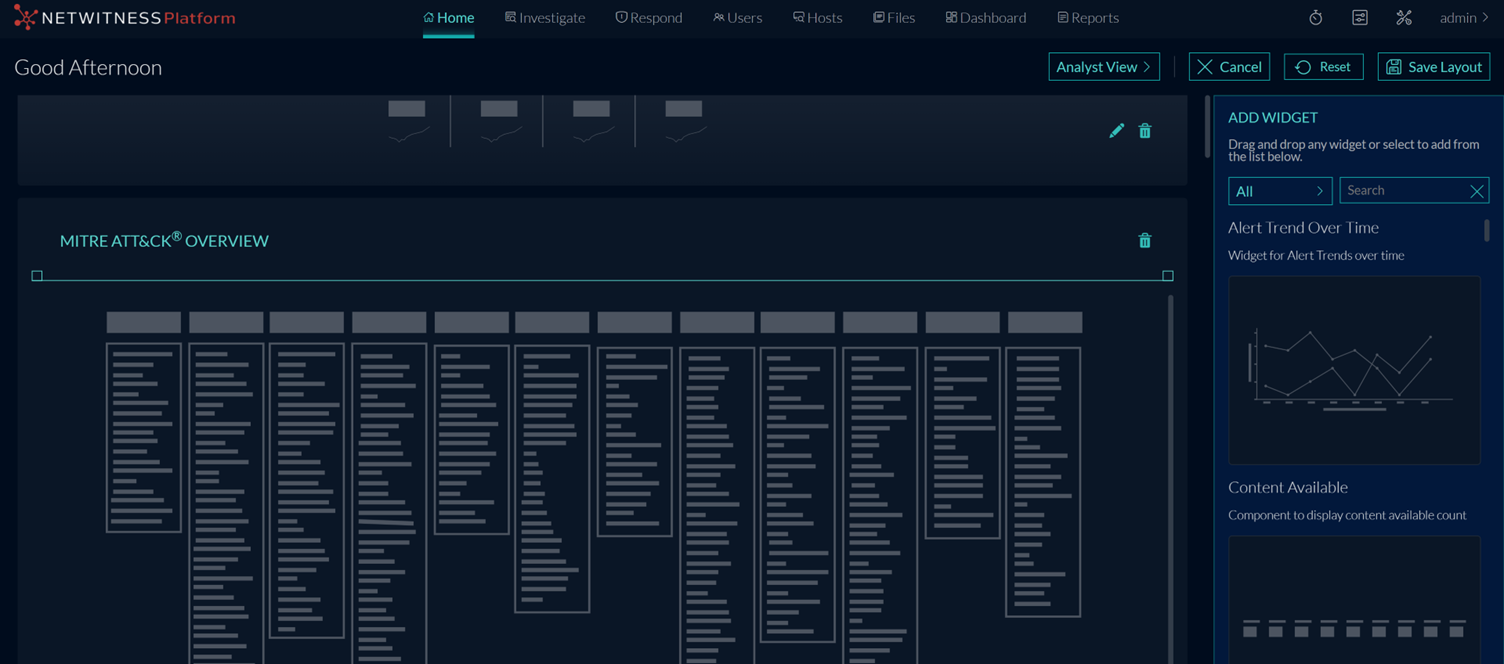
**Note:** To quickly locate an Events widget, do one of the following:
\- Use the Search field by entering its name. The widgets will be filtered as you type, displaying only matching results.
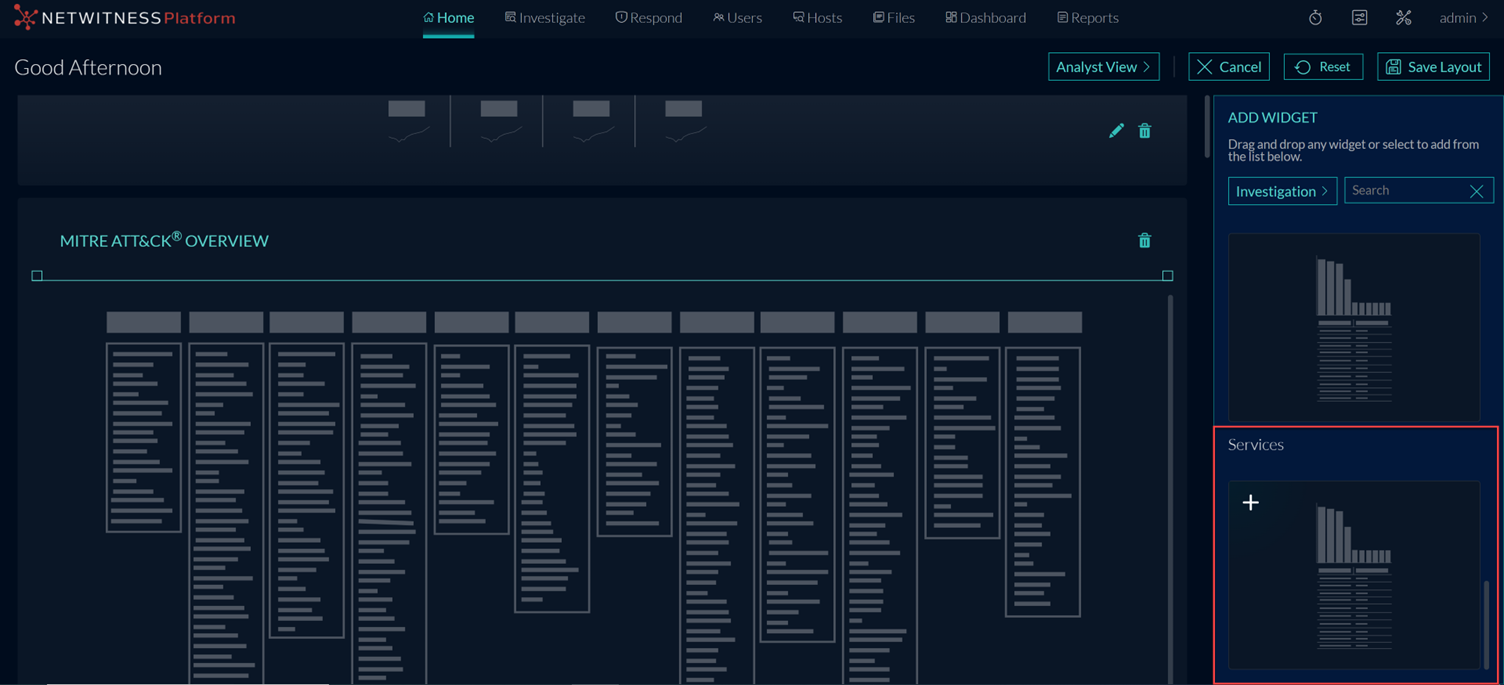
\- From the drop-down menu, select **Investigation**. The widgets related to Investigate Events will be displayed.
4. To add an Events widget, follow either of the steps below:
1. Hover the cursor over the Events widget, triggering a + (add) icon to appear in its upper-left corner. Click on the + icon to add the Events widget. This will add the Events widget to the bottom of the layout.
2. Alternatively, click and drag a widget to the desired location on the dashboard. As you drag the widget, the dashboard will indicate the target position.
5. Click **Save Layout** to add the Events widget to the dashboard layout.
The Events widget has been successfully added to the dashboard layout.
**Note:**
\- When you click the Cancel button, any unsaved changes made to your dashboard layout will be discarded, and the panel will be closed.
\- If the data for the Meta value is not available for the specified time range, no data will be displayed on the chart.
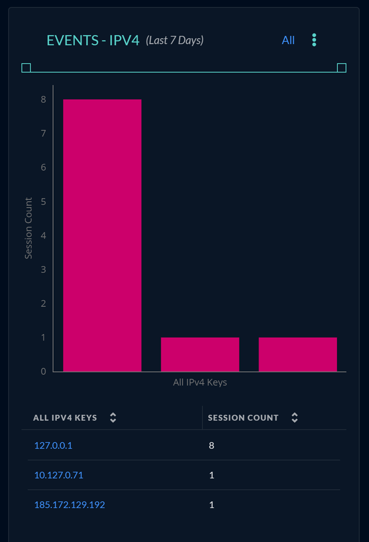
Click the three-dot (  ) icon in the widget's upper-right corner and then click **Configuration** to customize the Events widget according to your preference.
The following is an example of the **Events** widget configured for Filename meta. It displays each filename with different colors in a donut chart for easy identification.
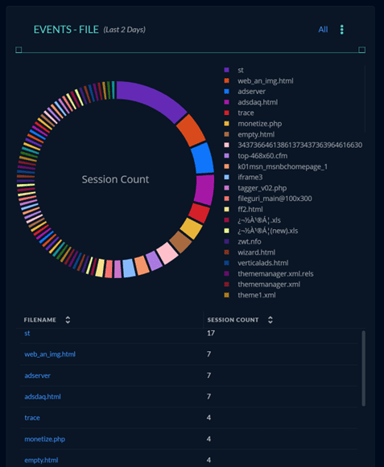
The in-built Events widget topic has details on configuration options, information displayed in the widget, and actions you can take with the events. For more information, see the Events Widget.
**Note:** Modifications to a layout are applicable only to the user who made them.
For more information on the customization of the layout, see the section **Customize your Dashboard Layout** in the [**Manage Home Widgets**](https://community.netwitness.com/t5/netwitness-platform-online/manage-home-widgets/ta-p/717030) topic in the *NetWitness Platform Getting Started Guide for 12.5*.
[](https://mydev.netwitness.com/?hsLang=en)
Copyright © 2026, NetWitness LLC. All rights reserved.
[NetWitness Platform](https://www.netwitness.com/)
[Acceptable Use Policy](https://www.netwitness.com/wp-content/uploads/Acceptable-Use-Policy-092022.pdf) [Privacy Statement](https://www.netwitness.com/wp-content/uploads/NetWitness-Privacy-Statement-07292024.pdf)

[](https://www.linkedin.com/company/netwitness-platform/) [](https://www.youtube.com/@netwitness)
© 2026 NetWitness LLC. All rights reserved.