---
title: Create a Query in the Navigate and Legacy Events Views
description: "Create a Query in the Navigate and Legacy Events ViewsCreate a Query in the Navigate and Legacy Events Views\nIn the Navigate view or the Legacy Event"
---
[Skip to content](https://mydev.netwitness.com/knowledge-base/createaqueryinthenavigateandlegacyeventsviews#main-content)

- [Home](https://mydev.netwitness.com/home)
- Integrations
Show submenu for Integrations
- [Netwitness Platform Integrations](https://mydev.netwitness.com/netwitnessplatformintegrations)
- [Third Party Integrations](https://mydev.netwitness.com/thirdpartyintegrations)
- [Knowledge Center](https://mydev.netwitness.com/knowledge-base)
- Community
Show submenu for Community
- [Blogs](https://mydev.netwitness.com/netwitness-security-llc-blog)
- Discussions
- Customers
Show submenu for Customers
- [Manage Products and Licenses](https://mydev.netwitness.com/nwportal)
- Downloads
- Partners
Show submenu for Partners
- [Partner Program](https://mydev.netwitness.com/partner)
- [Partner Resources](https://mydev.netwitness.com/partnerresources)
- [Submit a New Deal Registration](https://mydev.netwitness.com/dealregistration)
- [Become a Partner](https://mydev.netwitness.com/becomeapartner)
- [Update Your Partner Locator Profile](https://www.netwitness.com/partner-locator/?utm_source=pardotnewsletter&utm_medium=email&utm_campaign=partner_march)
- [NetWitness LinkedIn Partner Hub](https://linkedin.com/showcase/netwitnesspartners/)
- Education
Show submenu for Education
- [Instructor Led Training Schedule](https://mydev.netwitness.com/instructorledtrainingschedule)
- [NetWitness Training Catalog](https://mydev.netwitness.com/netwitnesstrainingcatalog)
- [Security Awareness Training](https://mydev.netwitness.com/securityawarenesstraining)
- [New Product Readiness](https://mydev.netwitness.com/newproductreadiness)
- [On-Demand Virtual Labs](https://mydev.netwitness.com/ondemandvirtuallabs)
- [Additional Training Information](https://mydev.netwitness.com/additionaltraininginformation)
- [Frequently Asked Questions](https://mydev.netwitness.com/educationfaq)
- [Contact NetWitness Education Team](https://mydev.netwitness.com/contact-netwitness-education-team)
- Support
Show submenu for Support
- [Contact Support](https://mydev.netwitness.com/contact-support)
- [Create a New Case](https://mydev.netwitness.com/create-support-case)
- [View My Cases](https://mydev.netwitness.com/viewmycase)
- [Product Version Life Cycle](https://mydev.netwitness.com/product-version-life-cycle)
- [Warranty & Replacement Parts](https://mydev.netwitness.com/warranty-and-replacement-parts)
- [Community Support Forum](https://mydev.netwitness.com/community-support-forum)
- [Technical Support Guide](https://mydev.netwitness.com/technical-support-guide)
Open main navigation
Close main navigation
- [Home](https://mydev.netwitness.com/home)
- Integrations
Show submenu for Integrations
- [Netwitness Platform Integrations](https://mydev.netwitness.com/netwitnessplatformintegrations)
- [Third Party Integrations](https://mydev.netwitness.com/thirdpartyintegrations)
- [Knowledge Center](https://mydev.netwitness.com/knowledge-base)
- Community
Show submenu for Community
- [Blogs](https://mydev.netwitness.com/netwitness-security-llc-blog)
- Discussions
- Customers
Show submenu for Customers
- [Manage Products and Licenses](https://mydev.netwitness.com/nwportal)
- Downloads
- Partners
Show submenu for Partners
- [Partner Program](https://mydev.netwitness.com/partner)
- [Partner Resources](https://mydev.netwitness.com/partnerresources)
- [Submit a New Deal Registration](https://mydev.netwitness.com/dealregistration)
- [Become a Partner](https://mydev.netwitness.com/becomeapartner)
- [Update Your Partner Locator Profile](https://www.netwitness.com/partner-locator/?utm_source=pardotnewsletter&utm_medium=email&utm_campaign=partner_march)
- [NetWitness LinkedIn Partner Hub](https://linkedin.com/showcase/netwitnesspartners/)
- Education
Show submenu for Education
- [Instructor Led Training Schedule](https://mydev.netwitness.com/instructorledtrainingschedule)
- [NetWitness Training Catalog](https://mydev.netwitness.com/netwitnesstrainingcatalog)
- [Security Awareness Training](https://mydev.netwitness.com/securityawarenesstraining)
- [New Product Readiness](https://mydev.netwitness.com/newproductreadiness)
- [On-Demand Virtual Labs](https://mydev.netwitness.com/ondemandvirtuallabs)
- [Additional Training Information](https://mydev.netwitness.com/additionaltraininginformation)
- [Frequently Asked Questions](https://mydev.netwitness.com/educationfaq)
- [Contact NetWitness Education Team](https://mydev.netwitness.com/contact-netwitness-education-team)
- Support
Show submenu for Support
- [Contact Support](https://mydev.netwitness.com/contact-support)
- [Create a New Case](https://mydev.netwitness.com/create-support-case)
- [View My Cases](https://mydev.netwitness.com/viewmycase)
- [Product Version Life Cycle](https://mydev.netwitness.com/product-version-life-cycle)
- [Warranty & Replacement Parts](https://mydev.netwitness.com/warranty-and-replacement-parts)
- [Community Support Forum](https://mydev.netwitness.com/community-support-forum)
- [Technical Support Guide](https://mydev.netwitness.com/technical-support-guide)
How can we help you?
- There are no suggestions because the search field is empty.
1. [NetWitness Knowledge Base](https://mydev.netwitness.com/knowledge-base?hsLang=en)
2. [Documentation](https://mydev.netwitness.com/knowledge-base/documentation?hsLang=en)
April 28, 2026
# Create a Query in the Navigate and Legacy Events Views
## Create a Query in the Navigate and Legacy Events ViewsCreate a Query in the Navigate and Legacy Events Views
In the Navigate view or the Legacy Events view, you can create a query using dialogs for that offer syntax help with drop-down lists of applicable meta keys or meta entities and operators.
When viewing the drop-down list, you can expand and collapse each meta group to view or hide the individual meta keys in that group. When you select a meta group, NetWitness generates the complex query equal to a query with all of the meta keys in that group ORed together. So if a meta group contains ip.src and ip.dst, the query generated is ip.src = OR ip.dst = . If the meta group contains meta keys that have different meta value types, the value input is disabled and the query uses exists statements. For example, a meta group that contains ip.src, ip.dst, and alias.host includes meta keys that have different value types; ip.src and ip.dst are ip addresses and alias.host is text. The generated query is ip.src exists OR ip.dst exists OR alias.host exists.
A basic query is in the following form:
\[ \]
These are a few examples:
action exists
action = 'get'
alias.host = '10.25.55.115'
extension = 'exe'
orig\_ip != "10.0.0.0" - "10.255.255.255"
## Create a Query Using the Basic MethodCreate a Query Using the Basic Method
When you create a query using the basic method, drop-down lists of meta keys and operators are displayed.
1. In the **Navigate** view or the Legacy Events view toolbar, select **Query.**
The Query dialog is displayed, with the Simple option selected.
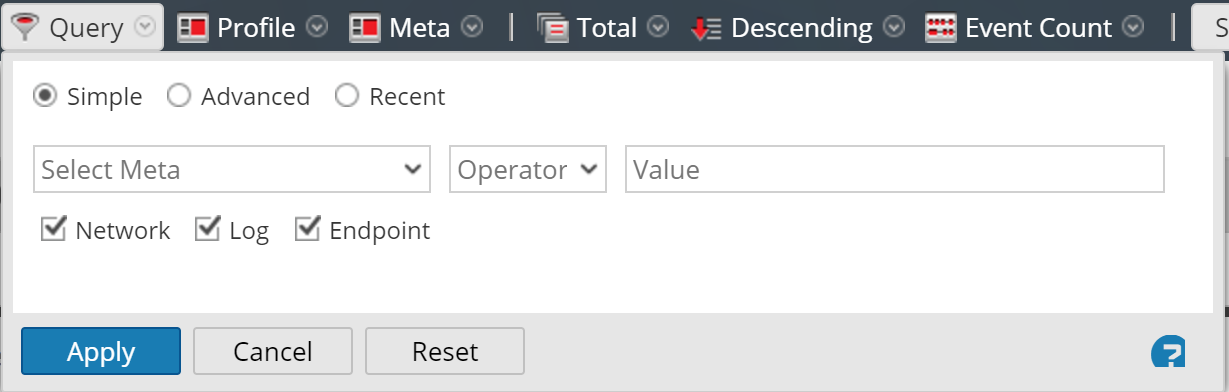
2. In the **Select Meta** field, click to display the drop-down list. The drop-down list has two sections: Meta Groups and All Meta.
3. Select a single meta key under **All Meta** or select a meta group under **Meta Groups**. You can also type in a meta key or meta group in the field.
4. In the **Operator** field, type an operator or click on the drop-down list to select a valid operator.
5. (Optional) If you selected an operator that requires a value, for example, =, in the third field type the value for the meta key.
6. In the Network, Log, and Endpoint checkboxes, choose the type of data to query. Do one of the following:
1. To limit the query to packets select **Network** and de-select **Log** and **Endpoint**.
2. To limit the query to logs, select **Log** and de-select **Network** and **Endpoint**.
3. To limit the query to endpoint events, select **Endpoint** and de-select **Network** and **Log**.
4. To apply the query to packets, logs, and endpoints, select **Network**, **Log**, and **Endpoint**.
7. Do one of the following:
1. Click **Apply**.
The window is closed and the view is updated with the results of the new query. The query is displayed in the breadcrumb.
2. Click **Cancel**.
The window is closed and no changes are made to the view or current query.
## Create a Query Using the Advanced MethodCreate a Query Using the Advanced Method
1. In the **Navigate** view or the Legacy Events view toolbar, select **Query.**
The Query dialog is displayed.

2. Select **Advanced**.
The advanced query field is displayed.
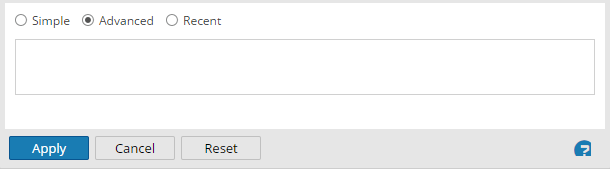
3. In the field, create a query, which can include the meta key, operator, and value. When you begin typing a meta key in the field a drop-down list of available meta keys for the selected service is displayed.
4. Select the meta key for your query.
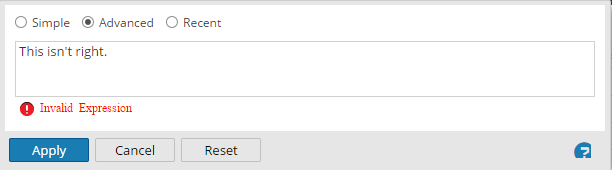
The display is updated. If the expression is not yet complete, the status indicates that the query is invalid.
5. Continue with an operator, from the drop-down list, then a value if necessary. The display is updated as you continue to enter the query. If you enter an operator, such as **exists** or **!exists**, which does not use the value field, the value field is disabled and the invalid status is cleared. If you enter an operator, such as **=**, which requires the value field, the invalid status remains until you enter a value. When the query is valid the invalid status is no longer displayed.
6. Do one of the following:
- Click **Apply**.
The window is closed and the view is updated with the results of the new query. The query is displayed in the breadcrumb.
- Click **Cancel**.
The window is closed and no changes are made to the view or current query.
## Apply a Recent QueryApply a Recent Query
You can view recent queries and select one to apply to the current service being investigated. To select a recent query:
1. In the **Navigate view** or the Events view toolbar, select **Query.**
The Query dialog is displayed, with the Simple option selected.

2. Select the **Recent** option.
The list of recent queries is displayed in the bottom portion of the dialog.
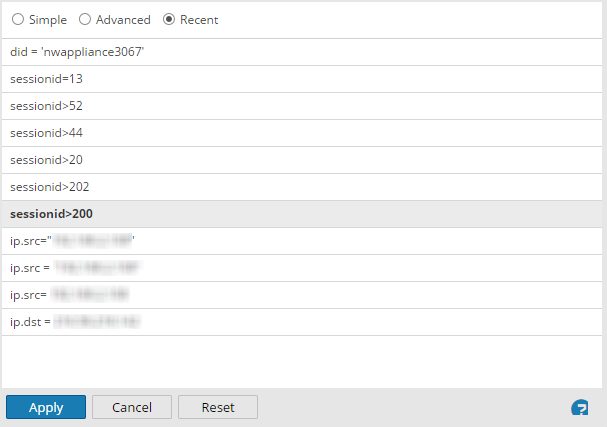
3. In the list of recent queries, click to select a query.
4. Do one of the following:
- Double-click a query.
- Select a query and click **Apply**.
The window is closed and the view is updated with the results of the new query. The query is displayed in the breadcrumb.
- Click **Cancel**.
The window is closed and no changes are made to the view or current query.
[](https://mydev.netwitness.com/?hsLang=en)
Copyright © 2026, NetWitness LLC. All rights reserved.
[NetWitness Platform](https://www.netwitness.com/)
[Acceptable Use Policy](https://www.netwitness.com/wp-content/uploads/Acceptable-Use-Policy-092022.pdf) [Privacy Statement](https://www.netwitness.com/wp-content/uploads/NetWitness-Privacy-Statement-07292024.pdf)

[](https://www.linkedin.com/company/netwitness-platform/) [](https://www.youtube.com/@netwitness)
© 2026 NetWitness LLC. All rights reserved.