---
title: Create and Publish Policies
description: "Tags: Configuration, Version 12.2Create and Publish Policies\nYou can create a policy and assign it to one or more groups.\nTo create a Policy\nGo to&nbs"
---
[Skip to content](https://mydev.netwitness.com/knowledge-base/createandpublishpolicies#main-content)

- [Home](https://mydev.netwitness.com/home)
- Integrations
Show submenu for Integrations
- [Netwitness Platform Integrations](https://mydev.netwitness.com/netwitnessplatformintegrations)
- [Third Party Integrations](https://mydev.netwitness.com/thirdpartyintegrations)
- [Knowledge Center](https://mydev.netwitness.com/knowledge-base)
- Community
Show submenu for Community
- [Blogs](https://mydev.netwitness.com/netwitness-security-llc-blog)
- Discussions
- Customers
Show submenu for Customers
- [Manage Products and Licenses](https://mydev.netwitness.com/nwportal)
- Downloads
- Partners
Show submenu for Partners
- [Partner Program](https://mydev.netwitness.com/partner)
- [Partner Resources](https://mydev.netwitness.com/partnerresources)
- [Submit a New Deal Registration](https://mydev.netwitness.com/dealregistration)
- [Become a Partner](https://mydev.netwitness.com/becomeapartner)
- [Update Your Partner Locator Profile](https://www.netwitness.com/partner-locator/?utm_source=pardotnewsletter&utm_medium=email&utm_campaign=partner_march)
- [NetWitness LinkedIn Partner Hub](https://linkedin.com/showcase/netwitnesspartners/)
- Education
Show submenu for Education
- [Instructor Led Training Schedule](https://mydev.netwitness.com/instructorledtrainingschedule)
- [NetWitness Training Catalog](https://mydev.netwitness.com/netwitnesstrainingcatalog)
- [Security Awareness Training](https://mydev.netwitness.com/securityawarenesstraining)
- [New Product Readiness](https://mydev.netwitness.com/newproductreadiness)
- [On-Demand Virtual Labs](https://mydev.netwitness.com/ondemandvirtuallabs)
- [Additional Training Information](https://mydev.netwitness.com/additionaltraininginformation)
- [Frequently Asked Questions](https://mydev.netwitness.com/educationfaq)
- [Contact NetWitness Education Team](https://mydev.netwitness.com/contact-netwitness-education-team)
- Support
Show submenu for Support
- [Contact Support](https://mydev.netwitness.com/contact-support)
- [Create a New Case](https://mydev.netwitness.com/create-support-case)
- [View My Cases](https://mydev.netwitness.com/viewmycase)
- [Product Version Life Cycle](https://mydev.netwitness.com/product-version-life-cycle)
- [Warranty & Replacement Parts](https://mydev.netwitness.com/warranty-and-replacement-parts)
- [Community Support Forum](https://mydev.netwitness.com/community-support-forum)
- [Technical Support Guide](https://mydev.netwitness.com/technical-support-guide)
Open main navigation
Close main navigation
- [Home](https://mydev.netwitness.com/home)
- Integrations
Show submenu for Integrations
- [Netwitness Platform Integrations](https://mydev.netwitness.com/netwitnessplatformintegrations)
- [Third Party Integrations](https://mydev.netwitness.com/thirdpartyintegrations)
- [Knowledge Center](https://mydev.netwitness.com/knowledge-base)
- Community
Show submenu for Community
- [Blogs](https://mydev.netwitness.com/netwitness-security-llc-blog)
- Discussions
- Customers
Show submenu for Customers
- [Manage Products and Licenses](https://mydev.netwitness.com/nwportal)
- Downloads
- Partners
Show submenu for Partners
- [Partner Program](https://mydev.netwitness.com/partner)
- [Partner Resources](https://mydev.netwitness.com/partnerresources)
- [Submit a New Deal Registration](https://mydev.netwitness.com/dealregistration)
- [Become a Partner](https://mydev.netwitness.com/becomeapartner)
- [Update Your Partner Locator Profile](https://www.netwitness.com/partner-locator/?utm_source=pardotnewsletter&utm_medium=email&utm_campaign=partner_march)
- [NetWitness LinkedIn Partner Hub](https://linkedin.com/showcase/netwitnesspartners/)
- Education
Show submenu for Education
- [Instructor Led Training Schedule](https://mydev.netwitness.com/instructorledtrainingschedule)
- [NetWitness Training Catalog](https://mydev.netwitness.com/netwitnesstrainingcatalog)
- [Security Awareness Training](https://mydev.netwitness.com/securityawarenesstraining)
- [New Product Readiness](https://mydev.netwitness.com/newproductreadiness)
- [On-Demand Virtual Labs](https://mydev.netwitness.com/ondemandvirtuallabs)
- [Additional Training Information](https://mydev.netwitness.com/additionaltraininginformation)
- [Frequently Asked Questions](https://mydev.netwitness.com/educationfaq)
- [Contact NetWitness Education Team](https://mydev.netwitness.com/contact-netwitness-education-team)
- Support
Show submenu for Support
- [Contact Support](https://mydev.netwitness.com/contact-support)
- [Create a New Case](https://mydev.netwitness.com/create-support-case)
- [View My Cases](https://mydev.netwitness.com/viewmycase)
- [Product Version Life Cycle](https://mydev.netwitness.com/product-version-life-cycle)
- [Warranty & Replacement Parts](https://mydev.netwitness.com/warranty-and-replacement-parts)
- [Community Support Forum](https://mydev.netwitness.com/community-support-forum)
- [Technical Support Guide](https://mydev.netwitness.com/technical-support-guide)
How can we help you?
- There are no suggestions because the search field is empty.
1. [NetWitness Knowledge Base](https://mydev.netwitness.com/knowledge-base?hsLang=en)
2. [Documentation](https://mydev.netwitness.com/knowledge-base/documentation?hsLang=en)
April 27, 2026
# Create and Publish Policies
**Tags:** Configuration, Version 12.2
## Create and Publish Policies
You can create a policy and assign it to one or more groups.
**To create a Policy**
1. Go to  **(CONFIGURE) \> Policies**.
2. In the policies panel, click **Content**.
3. Click **Policies**.
The available policies are displayed.
4. Click **+ Create New** to add a new policy.
5. In the **New Policy** panel, do the following:
- Enter a unique policy name.
- Enter a description for the policy.
6. Click **Next**.
7. In the **Available Content**, select the content type and click + to add the content to the policy. To add all content based on the resource type, click . After you add the content, you can enable subscription (if required) by clicking subscribed toggle. Once the content is subscribed the updates are pushed automatically. To conveniently search the available content, type the initial content text in the **Search** box available under the **Available Content** .To conveniently search the selected content, type the initial content text in the **Search** box available under the **Selected Content**.
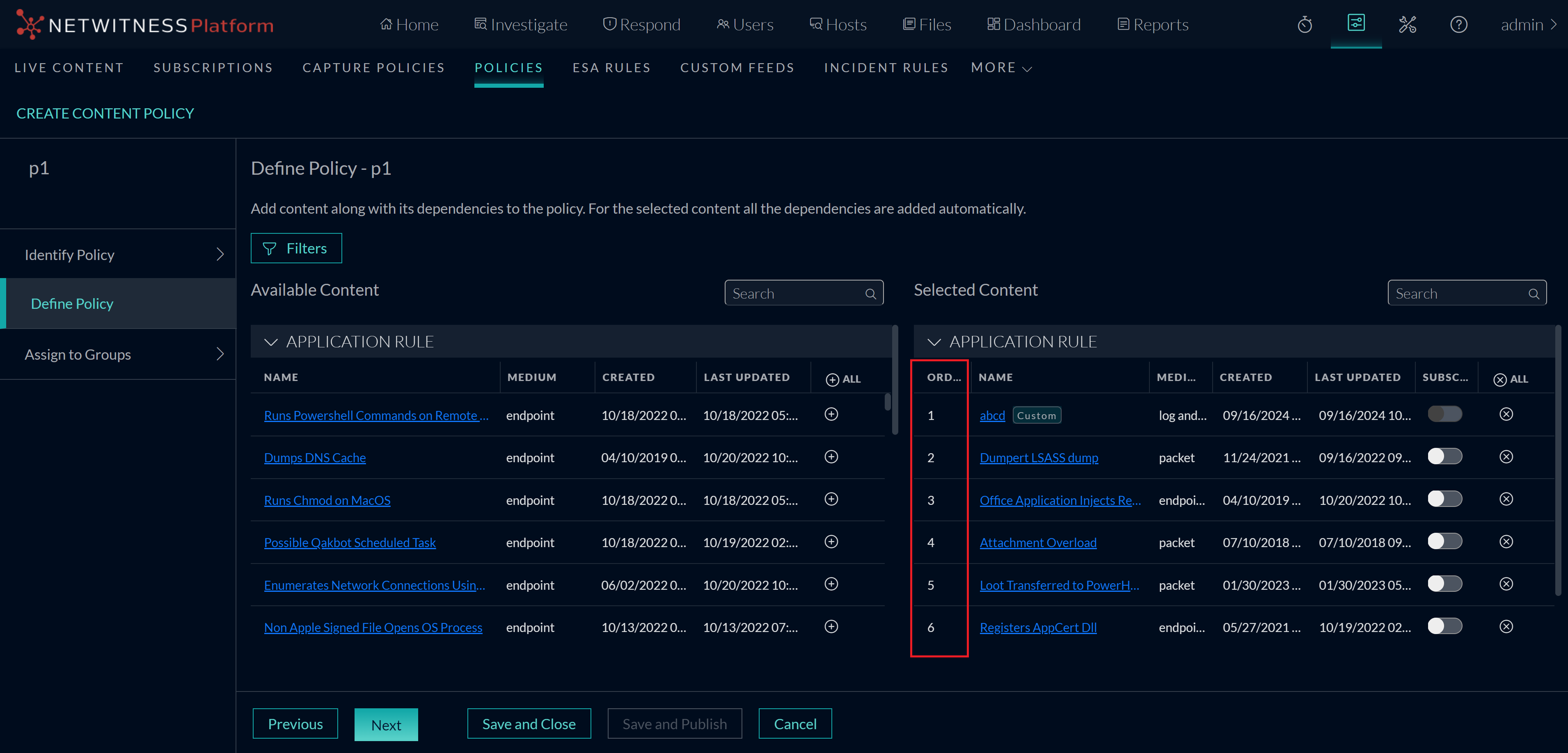
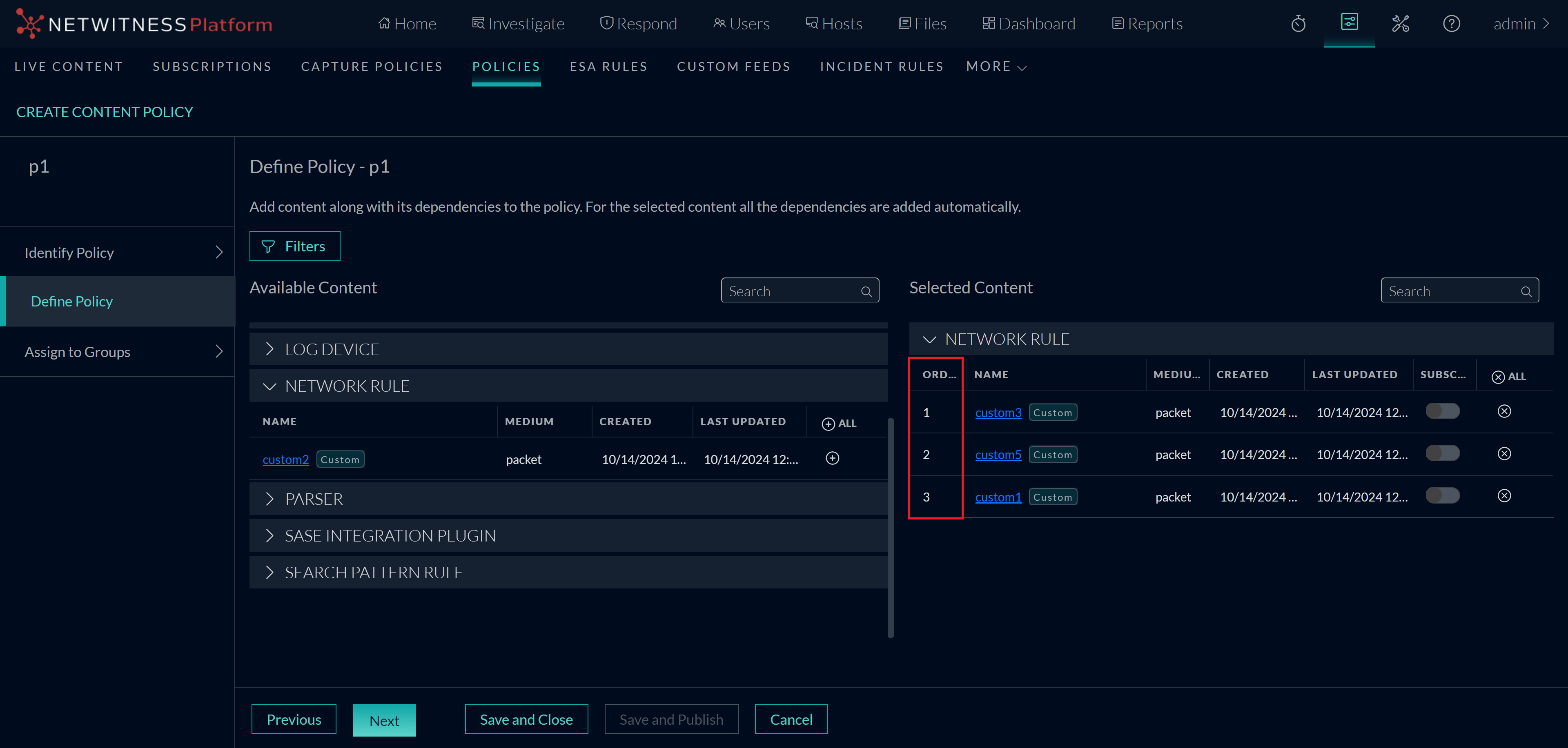
**Note:** In NetWitness 12.5.1, users can view the order of the selected Application or Network Rules when creating a new policy or editing an existing one. The selected rules are displayed sequentially under the Order column in the Selected Content view under the Define Policy option. Now, the Selected Content can be sorted based on the rule Order.
8. To filter both available and selected content, do the following:
- Click the  icon. The filter panel window is displayed.
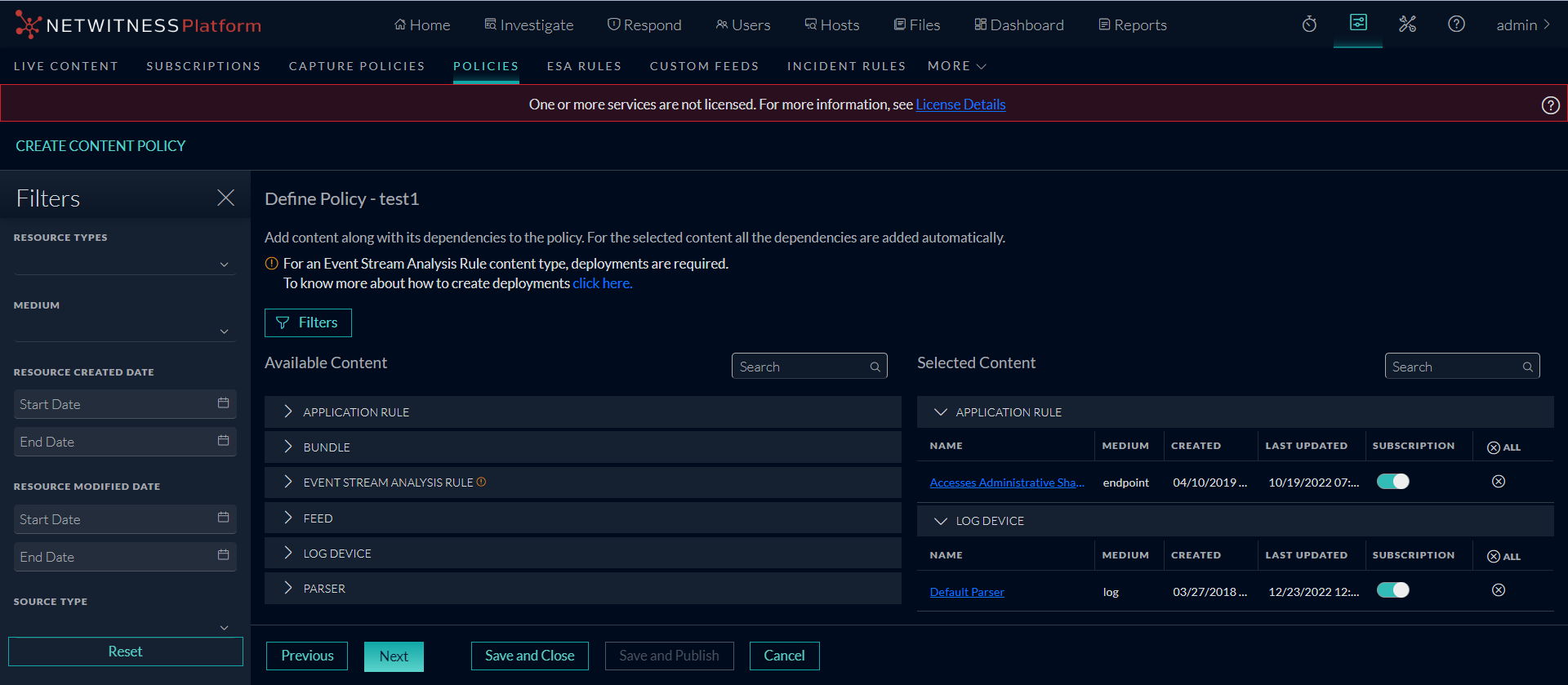
- Select the **Resource Types** from the available drop-down values.
- Select the **Medium** from the available drop-down values.
- Select the **Resource Created Date** and **Resource Modified Date**.
- Select the **Source Type** as either 'Custom', 'Live' or 'Native Parser'.
- To reset the fields, click **Reset**.
**Note:** Subscription is not allowed for custom content.
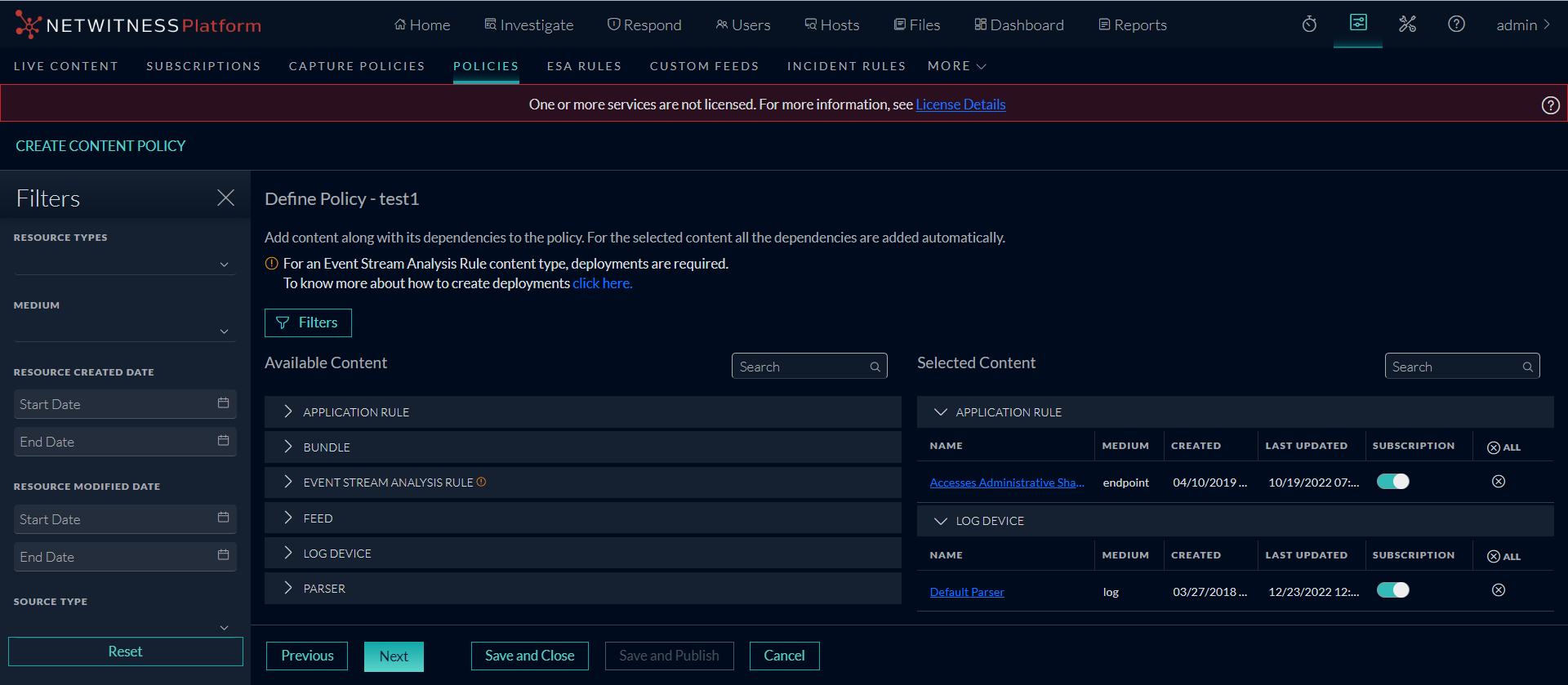
9. **Note:** All the dependencies are added automatically for the selected content. You can click on the content name highlighted in blue and look for details such as content description, content type, resources and dependencies and so on. You can also add and subscribe the resource from the details view.
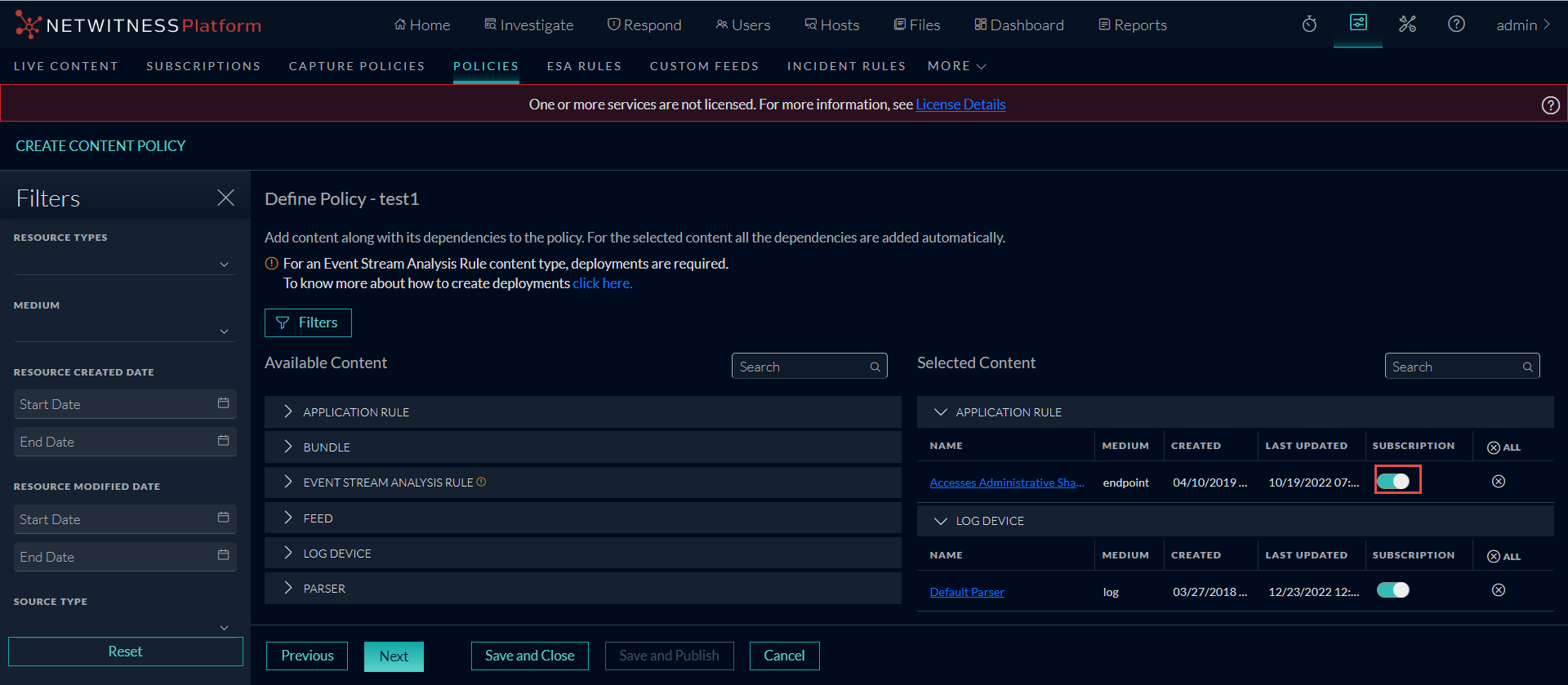
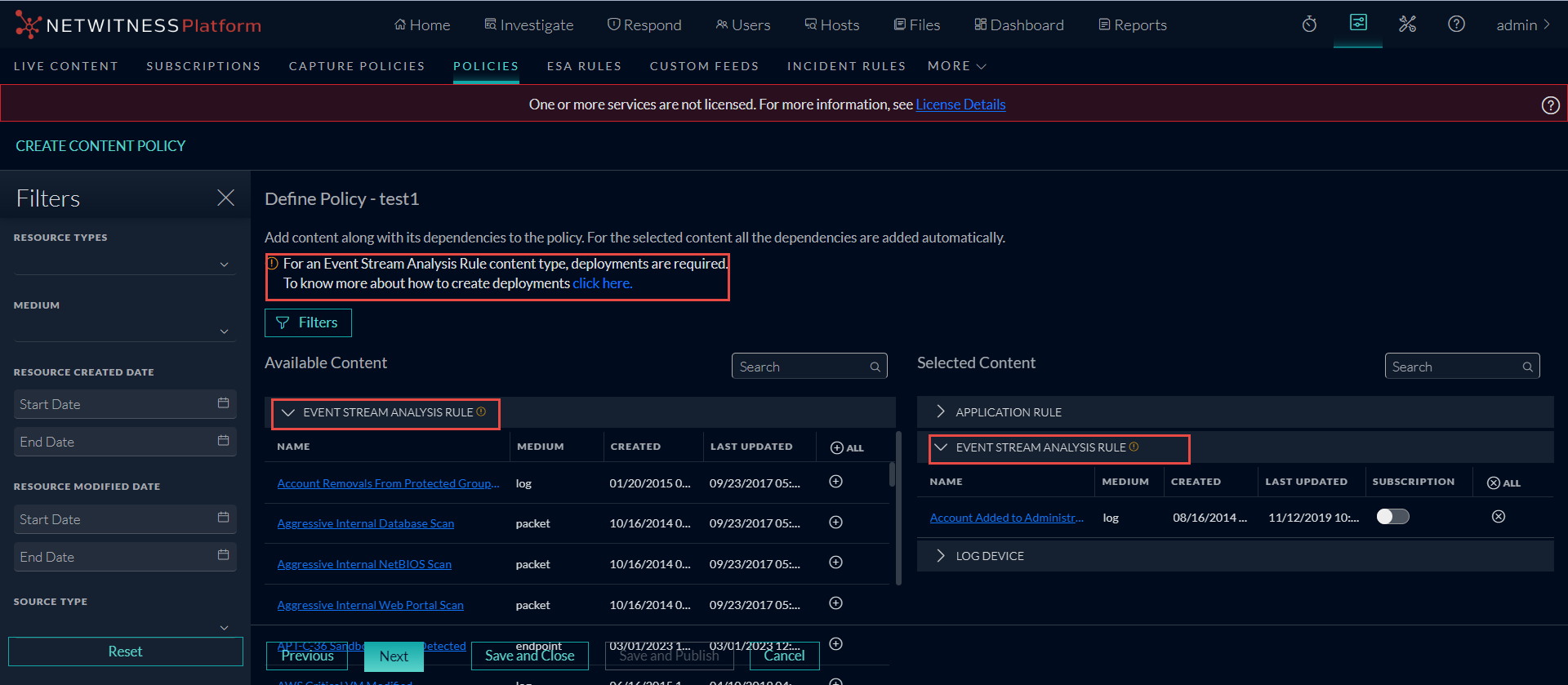
- To implement the **Event Stream Analysis Rule** content type, you must have a deployment.
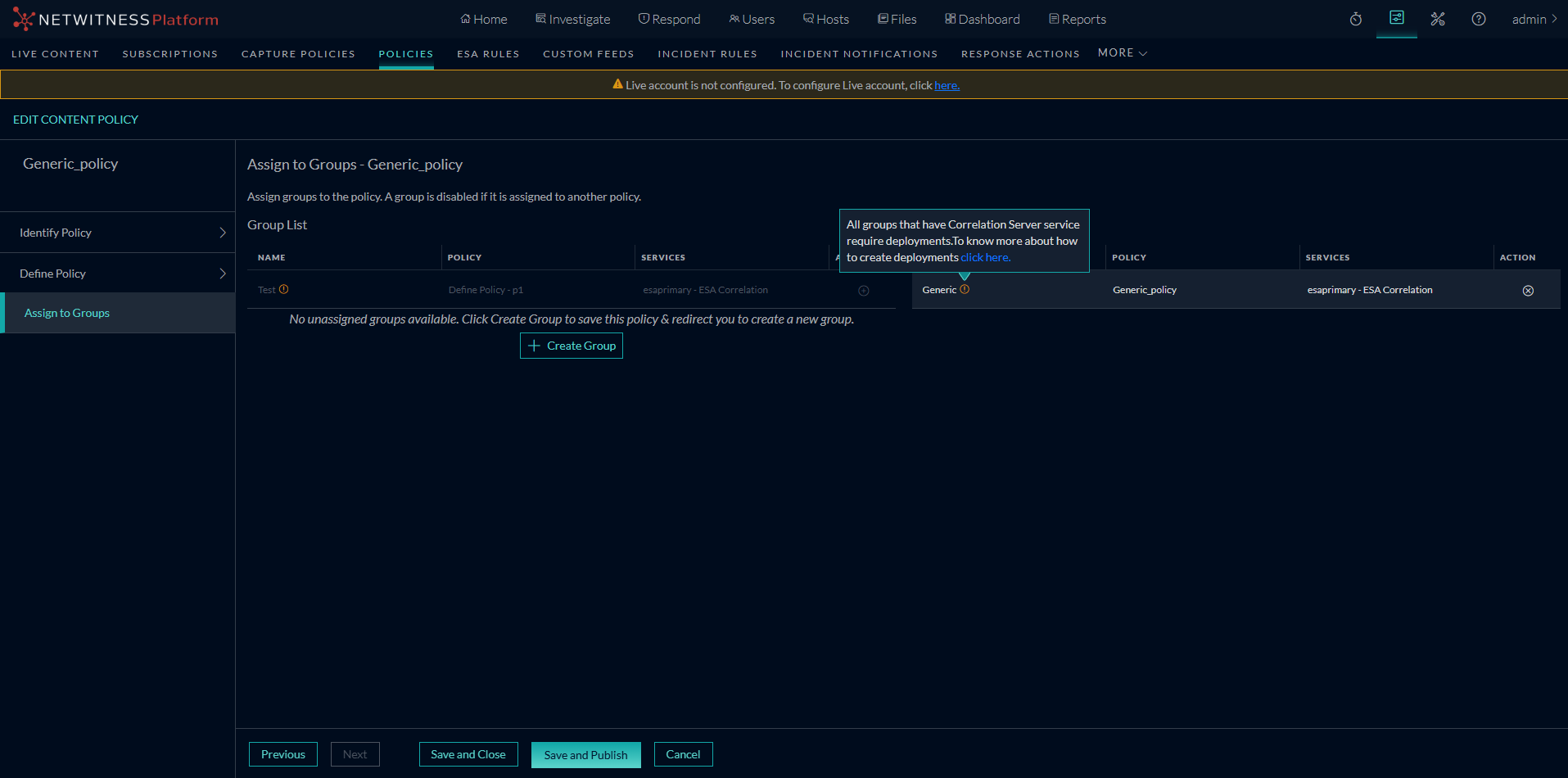
- All groups that have correlation server service must have a deployment.
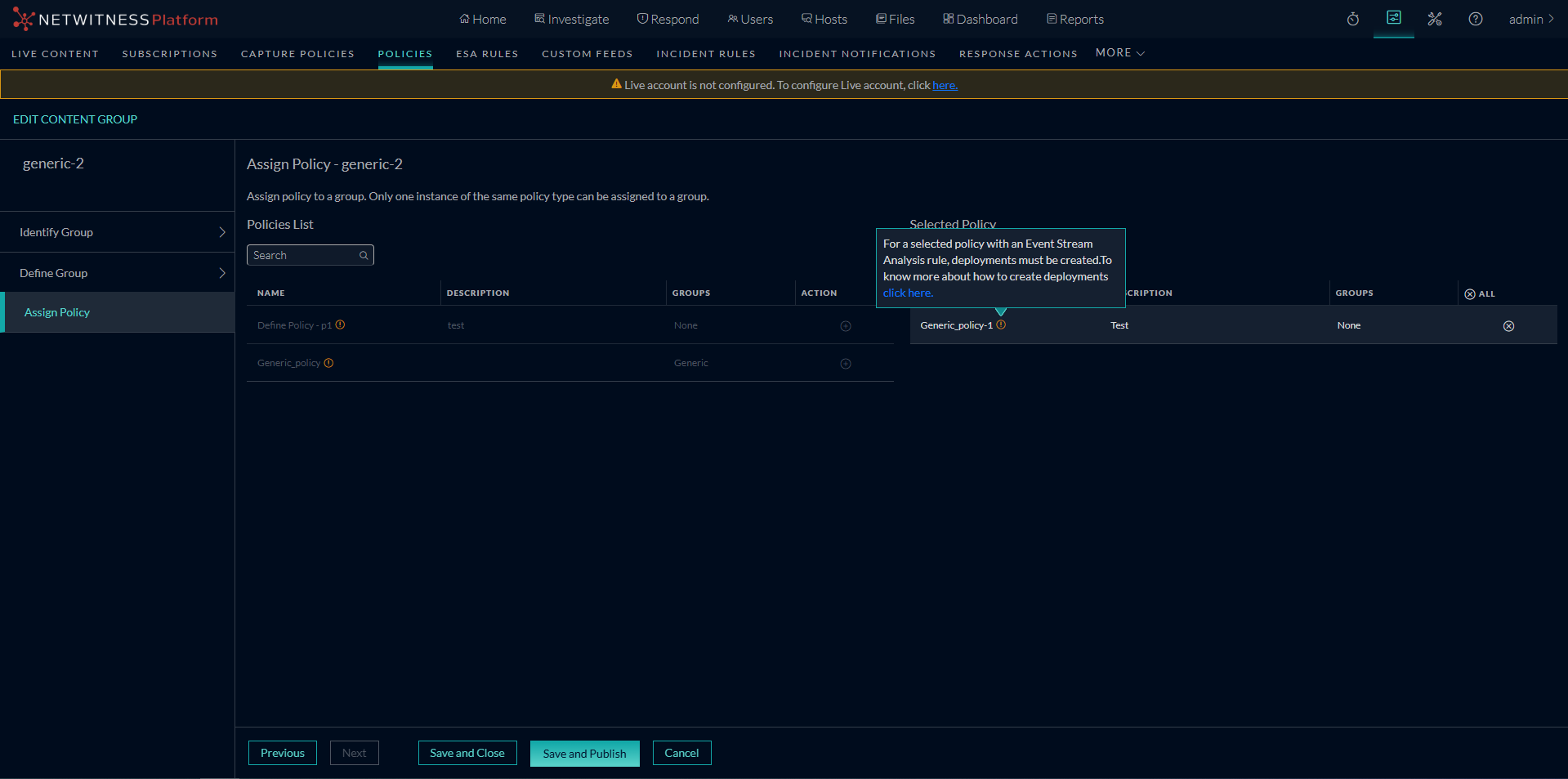
- For any selected policy with an ESA rule, deployment are must be created.
To create and manage deployments, refer to [Manage Deployments](https://community.netwitness.com/../12.1proj/Content/2-Configuration/Live/CCM/ManageDeployments.htm) feature.
10. In the Group List, click + to assign groups to the policy.
**Note:** A group is disabled if another policy of the same type is already assigned to this group.
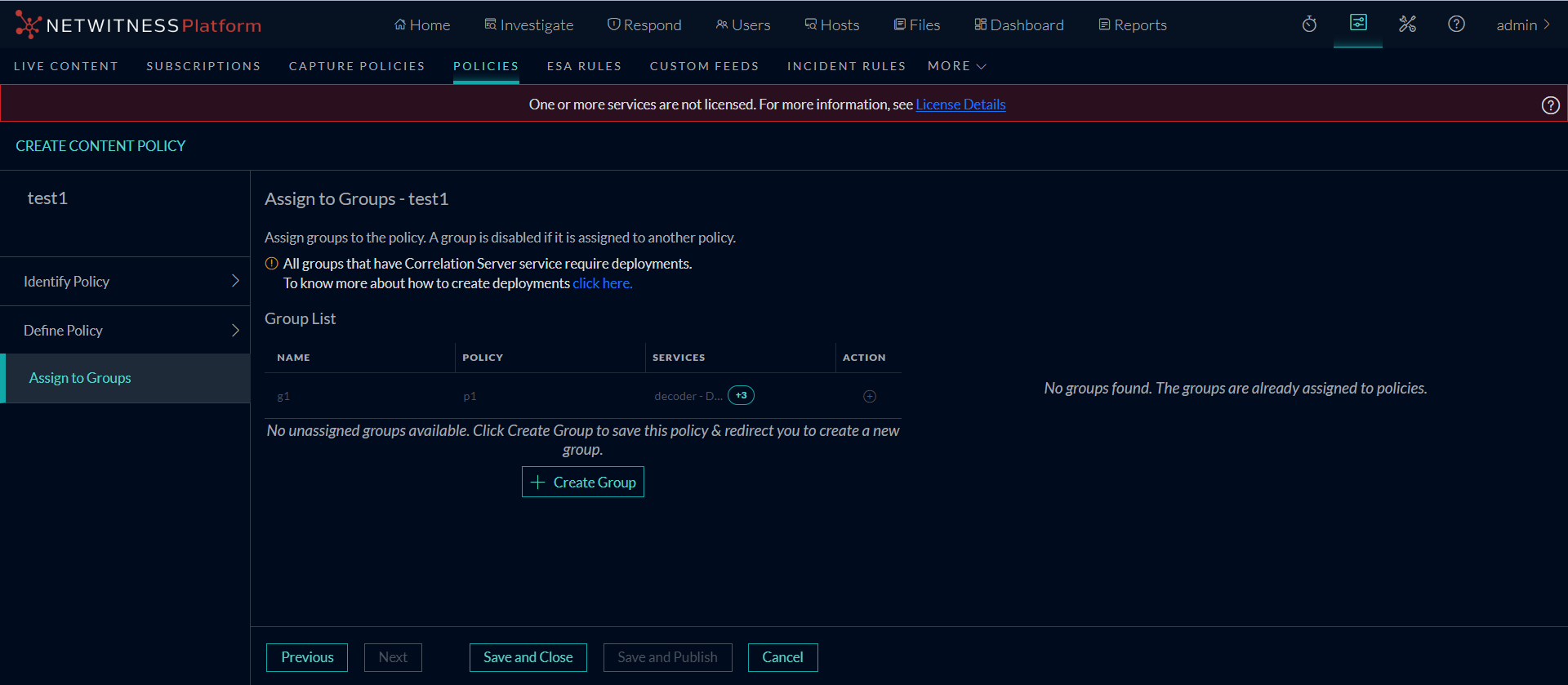
11. If there are no unassigned groups available, click  to save the policy and redirect you to **Create New Group** screen. For more information on creating a new group, see [Create a Group](https://community.netwitness.com/CreateaGroup.htm) feature.
12. Click **Save and Publish** to save and publish the settings.
**Note:** You can also publish a policy from **Policy Details** screen. For more information on publishing a policy from **Policy Details** screen, refer [View a Policy](https://community.netwitness.com/ViewaPolicy.htm) feature.
13. Click **Cancel** to cancel the publish content dialog.
14. Click **Save and Close** to save the settings.
**Important:** From 12.3 version onwards, contents of services are not wiped out while publishing the first policy.
\- The endpoint risk scoring requires certain application rules. Refer [Endpoint Risk Scoring Rules](https://community.netwitness.com/ApplicationRuleNames.htm) to view the list of these application rules.
[](https://mydev.netwitness.com/?hsLang=en)
Copyright © 2026, NetWitness LLC. All rights reserved.
[NetWitness Platform](https://www.netwitness.com/)
[Acceptable Use Policy](https://www.netwitness.com/wp-content/uploads/Acceptable-Use-Policy-092022.pdf) [Privacy Statement](https://www.netwitness.com/wp-content/uploads/NetWitness-Privacy-Statement-07292024.pdf)

[](https://www.linkedin.com/company/netwitness-platform/) [](https://www.youtube.com/@netwitness)
© 2026 NetWitness LLC. All rights reserved.