---
title: Connect with Threat Connect using HTTPS
description: "Tags: Documentation The SSL connection between ThreatConnect and NetWitness Platform ensures that the data forwarded to the ThreatConnect instance"
---
[Skip to content](https://mydev.netwitness.com/knowledge-base/connectwiththreatconnectusinghttps#main-content)

- [Home](https://mydev.netwitness.com/home)
- Integrations
Show submenu for Integrations
- [Netwitness Platform Integrations](https://mydev.netwitness.com/netwitnessplatformintegrations)
- [Third Party Integrations](https://mydev.netwitness.com/thirdpartyintegrations)
- [Knowledge Center](https://mydev.netwitness.com/knowledge-base)
- Community
Show submenu for Community
- [Blogs](https://mydev.netwitness.com/netwitness-security-llc-blog)
- Discussions
- Customers
Show submenu for Customers
- [Manage Products and Licenses](https://mydev.netwitness.com/nwportal)
- Downloads
- Partners
Show submenu for Partners
- [Partner Program](https://mydev.netwitness.com/partner)
- [Partner Resources](https://mydev.netwitness.com/partnerresources)
- [Submit a New Deal Registration](https://mydev.netwitness.com/dealregistration)
- [Become a Partner](https://mydev.netwitness.com/becomeapartner)
- [Update Your Partner Locator Profile](https://www.netwitness.com/partner-locator/?utm_source=pardotnewsletter&utm_medium=email&utm_campaign=partner_march)
- [NetWitness LinkedIn Partner Hub](https://linkedin.com/showcase/netwitnesspartners/)
- Education
Show submenu for Education
- [Instructor Led Training Schedule](https://mydev.netwitness.com/instructorledtrainingschedule)
- [NetWitness Training Catalog](https://mydev.netwitness.com/netwitnesstrainingcatalog)
- [Security Awareness Training](https://mydev.netwitness.com/securityawarenesstraining)
- [New Product Readiness](https://mydev.netwitness.com/newproductreadiness)
- [On-Demand Virtual Labs](https://mydev.netwitness.com/ondemandvirtuallabs)
- [Additional Training Information](https://mydev.netwitness.com/additionaltraininginformation)
- [Frequently Asked Questions](https://mydev.netwitness.com/educationfaq)
- [Contact NetWitness Education Team](https://mydev.netwitness.com/contact-netwitness-education-team)
- Support
Show submenu for Support
- [Contact Support](https://mydev.netwitness.com/contact-support)
- [Create a New Case](https://mydev.netwitness.com/create-support-case)
- [View My Cases](https://mydev.netwitness.com/viewmycase)
- [Product Version Life Cycle](https://mydev.netwitness.com/product-version-life-cycle)
- [Warranty & Replacement Parts](https://mydev.netwitness.com/warranty-and-replacement-parts)
- [Community Support Forum](https://mydev.netwitness.com/community-support-forum)
- [Technical Support Guide](https://mydev.netwitness.com/technical-support-guide)
Open main navigation
Close main navigation
- [Home](https://mydev.netwitness.com/home)
- Integrations
Show submenu for Integrations
- [Netwitness Platform Integrations](https://mydev.netwitness.com/netwitnessplatformintegrations)
- [Third Party Integrations](https://mydev.netwitness.com/thirdpartyintegrations)
- [Knowledge Center](https://mydev.netwitness.com/knowledge-base)
- Community
Show submenu for Community
- [Blogs](https://mydev.netwitness.com/netwitness-security-llc-blog)
- Discussions
- Customers
Show submenu for Customers
- [Manage Products and Licenses](https://mydev.netwitness.com/nwportal)
- Downloads
- Partners
Show submenu for Partners
- [Partner Program](https://mydev.netwitness.com/partner)
- [Partner Resources](https://mydev.netwitness.com/partnerresources)
- [Submit a New Deal Registration](https://mydev.netwitness.com/dealregistration)
- [Become a Partner](https://mydev.netwitness.com/becomeapartner)
- [Update Your Partner Locator Profile](https://www.netwitness.com/partner-locator/?utm_source=pardotnewsletter&utm_medium=email&utm_campaign=partner_march)
- [NetWitness LinkedIn Partner Hub](https://linkedin.com/showcase/netwitnesspartners/)
- Education
Show submenu for Education
- [Instructor Led Training Schedule](https://mydev.netwitness.com/instructorledtrainingschedule)
- [NetWitness Training Catalog](https://mydev.netwitness.com/netwitnesstrainingcatalog)
- [Security Awareness Training](https://mydev.netwitness.com/securityawarenesstraining)
- [New Product Readiness](https://mydev.netwitness.com/newproductreadiness)
- [On-Demand Virtual Labs](https://mydev.netwitness.com/ondemandvirtuallabs)
- [Additional Training Information](https://mydev.netwitness.com/additionaltraininginformation)
- [Frequently Asked Questions](https://mydev.netwitness.com/educationfaq)
- [Contact NetWitness Education Team](https://mydev.netwitness.com/contact-netwitness-education-team)
- Support
Show submenu for Support
- [Contact Support](https://mydev.netwitness.com/contact-support)
- [Create a New Case](https://mydev.netwitness.com/create-support-case)
- [View My Cases](https://mydev.netwitness.com/viewmycase)
- [Product Version Life Cycle](https://mydev.netwitness.com/product-version-life-cycle)
- [Warranty & Replacement Parts](https://mydev.netwitness.com/warranty-and-replacement-parts)
- [Community Support Forum](https://mydev.netwitness.com/community-support-forum)
- [Technical Support Guide](https://mydev.netwitness.com/technical-support-guide)
How can we help you?
- There are no suggestions because the search field is empty.
1. [NetWitness Knowledge Base](https://mydev.netwitness.com/knowledge-base?hsLang=en)
2. [Documentation](https://mydev.netwitness.com/knowledge-base/documentation?hsLang=en)
April 8, 2026
# Connect with Threat Connect using HTTPS
**Tags:** Documentation
The SSL connection between ThreatConnect and NetWitness Platform ensures that the data forwarded to the ThreatConnect instance through NetWitness Platform is completely secure.
You can establish the HTTPS connection between the ThreatConnect instance and NetWitness Platform with or without SSL certificate verification depending on whether the **verify-s-s-l** is marked as true or false.
### Establish HTTPS connection with SSL certificate verification
You must export the SSL certificate from ThreatConnect instance and add the certificate to the Response Actions service trust-store for SSL certificate verification.
To perform SSL certificate verification using ThreatConnect Instance
1. Obtain the SSL certificate from ThreatConnect instance.
**Note:** Depending upon the implementation of ThreatConnect Playbook, you can obtain the certificate through different modes.
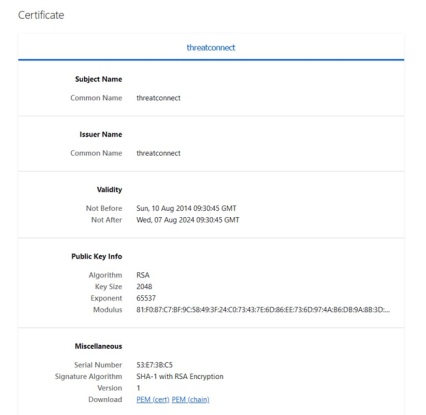
For example: If the ThreatConnect Playbook is implemented as Webhook Trigger, the certificate viewer associated with the browser can be used to export the certificate. The certificate exported is as shown in the following figure.
2. Ensure that the certificate obtained is in **.pem** format. If the certificate obtained is not in **.pem** format, you must convert the format to **.pem.**
**Note:** If multiple intermediate Certificate Authorities (CAs) are present in the connection between NetWitness Platform and ThreatConnect, all the certificates of the certificate chain must be uploaded to service trust-store in **.pem** format. If the certificates are transferred between the Operating Systems such as Windows and Linux, the format of the certificates must be adjusted.
3. Place the certificate on Admin-Server and run the following command.
security-cli-client --add-trusts -s response-actions-server -x /root/threatconnect-chain.pem -u deploy\_admin -k
4. Capture the CommonName (CN) from the certificate and add it as the host mapping under **/etc/hosts** file.
For example: If **threatconnect** is the CommonName captured from the certificate, you must append the following entry to the **/etc/hosts** file.
#threatconnect-instance-ip CommonName-present-in-certificate
1.1.1.x threatconnect .
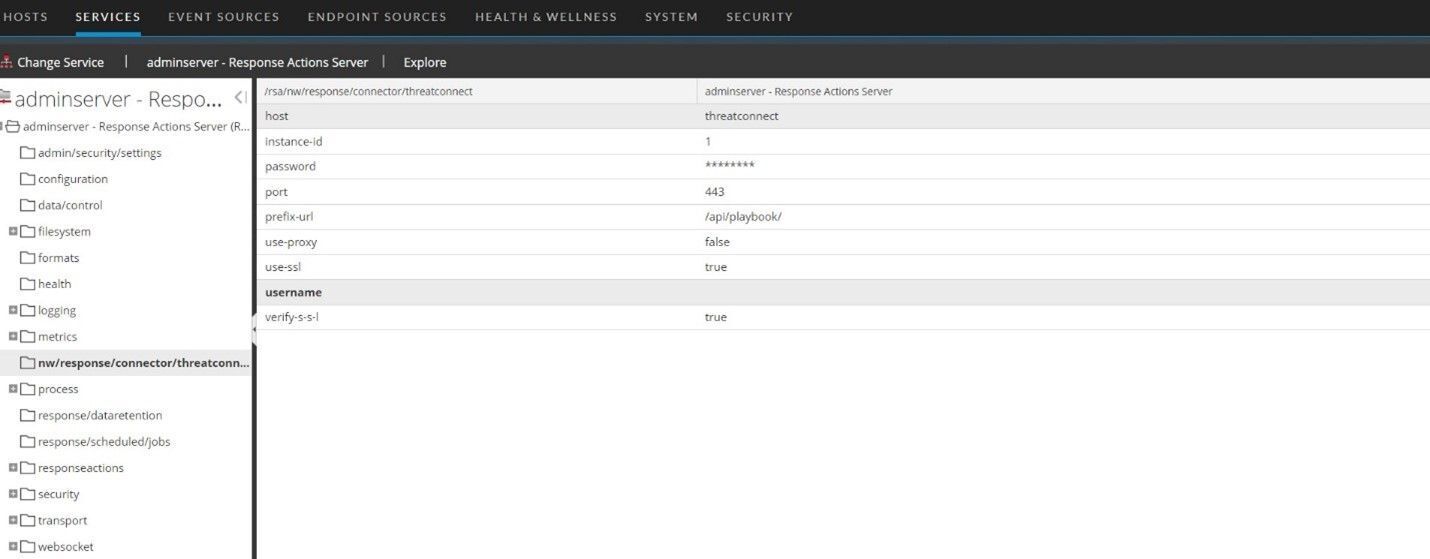
5. Go to (**Admin**) \> **Services** \> select the Response Actions Server service \>  \> **View** \> **Explore** \> **nw/response/connector/threatconnect**.
6. Enter the CommonName (CN) captured (in **Step-4**) in the **host** field.
7. Enter **true** in the **use-ssl** field.
8. Enter **true** in the **verify-s-s-l** field.
9. In the **port** field, enter the appropriate port on which the ThreatConnect instance is connected. By default, the SSL port is **443**.
### Establish HTTPS connection without SSL certificate verification
You can establish the SSL connection between ThreatConnect and NetWitness Platform without SSL certificate verification.
To skip SSL certificate verification
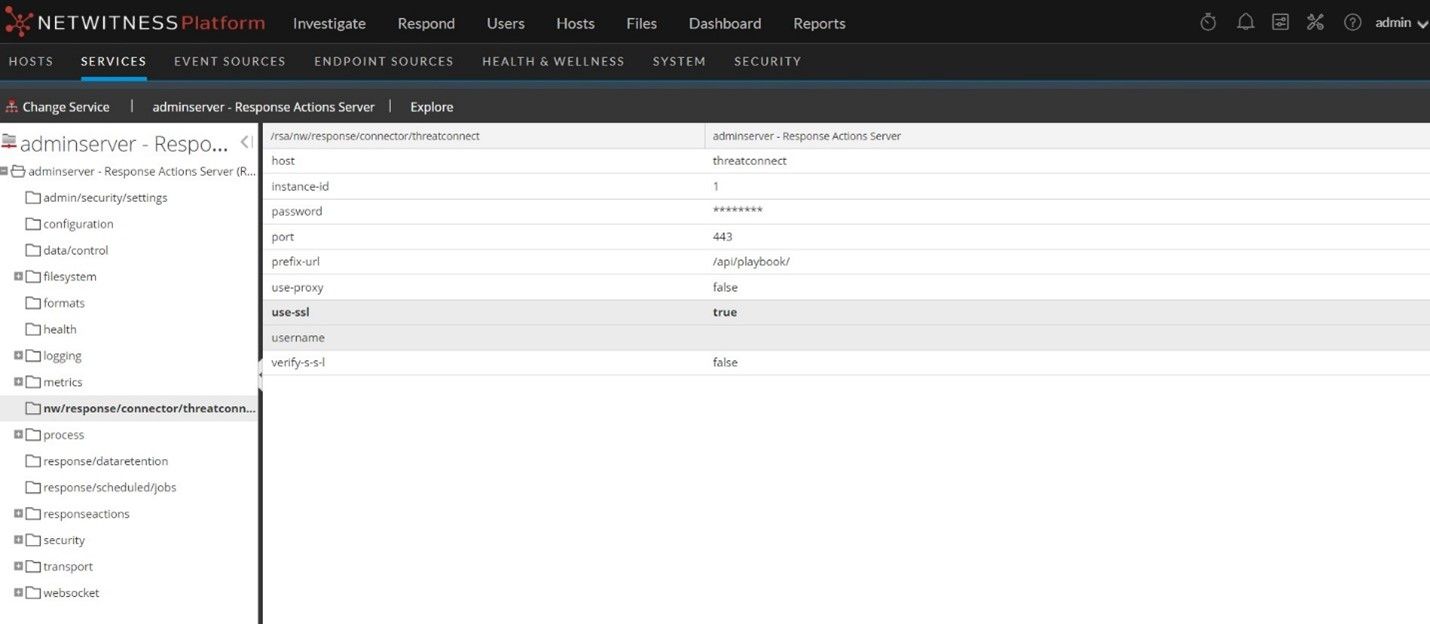
1. Go to (**Admin**) \> **Services** \> select the Response Actions Server service \>  \> **View** \> **Explore** \> **nw/response/connector/threatconnect**.
2. Enter **true** in the **use-ssl** field.
3. Enter **false** in the **verify-s-s-l** field.
**Note:** When **verify-s-s-l** field is set to **false**, you can enter the IP address or DNS mapping of ThreatConnect Instance in the **host** field in (**Admin**) \> **Services** \> select the Response Actions Server service \>  \> **View** \> **Explore** \> **nw/response/connector/threatconnect**.
4. In the **port** field, enter the appropriate port on which the ThreatConnect instance is connected. By default, the SSL port is **443**.
### Troubleshooting
This section lists the troubleshooting information for the various issues encountered while integrating and executing Response Actions.
- **Column 1:** **Error**
- **Column 2:** 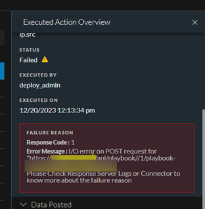
- **Column 1:** **Problem**
- **Column 2:** The Response Action execution fails if you do not upload the SSL certificate to the Response Actions Server service trust-store after setting the **verify-s-s-l** configuration to **true** in the Response Actions Server Explore view. Consequently, the above error is displayed in the Response Actions History Overview panel.
- **Column 1:** **Workaround**
- **Column 2:**
You must upload the SSL certificate to the Response Actions Server service trust-store after setting the **verify-s-s-l** configuration to **true** in the Response Actions Server Explore view.
- **Column 1:** **Error**
- **Column 2:** 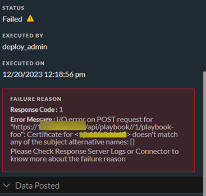
- **Column 1:** **Problem**
- **Column 2:**
The Response Action execution fails if you do not perform the following actions after adding the SSL certificate to the Response Actions Server service trust-store.
\- Adding the CommonName (CN) of the certificate as the host mapping in **/etc/hosts** file.
\- Entering the CommonName (CN) of the certificate in the **host** field in (**Admin**) \> **Services** \> select the Response Actions Server service \>  \> **View** \> **Explore** \> **nw/response/connector/threatconnect**.
- **Column 1:** **Workaround**
- **Column 2:**
You must perform the following actions after adding the SSL certificate to the Response Actions Server service trust-store.
\- Adding the CommonName (CN) of the certificate as the host mapping in **/etc/hosts** file.
\- Entering the CommonName (CN) of the certificate in the **host** field in (**Admin**) \> **Services** \> select the Response Actions Server service \>  \> **View** \> **Explore** \>**nw/response/connector/threatconnect**.
[](https://mydev.netwitness.com/?hsLang=en)
Copyright © 2026, NetWitness LLC. All rights reserved.
[NetWitness Platform](https://www.netwitness.com/)
[Acceptable Use Policy](https://www.netwitness.com/wp-content/uploads/Acceptable-Use-Policy-092022.pdf) [Privacy Statement](https://www.netwitness.com/wp-content/uploads/NetWitness-Privacy-Statement-07292024.pdf)

[](https://www.linkedin.com/company/netwitness-platform/) [](https://www.youtube.com/@netwitness)
© 2026 NetWitness LLC. All rights reserved.